
2026-02-27 Envision, design and code Business Central agents with the AI development toolkit (public preview)
Announces public preview features for Business Central agents, MCP Server, and release wave content with links to documentation and videos.
What this file does
Announces public preview features for Business Central agents, MCP Server, and release wave content with links to documentation and videos.
When to use it
- You want to prototype Business Central agents without writing AL code
- You need to set up MCP Server for external agent development
- You are looking for release wave 2 or wave 1 launch event videos for developers
- You want to try GitHub Copilot agent tools in the AL extension
Assumes this stack
2026-02-27 Envision, design and code Business Central agents with the AI development toolkit (public preview)
With the minor version 27.4 update you can now envision, design, and code Business Central agents using the AI development toolkit.
Whether you're a consultant, product owner, domain expert, or developer, you can start the journey prototyping AI-powered agents directly in Business Central sandbox environments using an in-client agent design experience; no AL code required. Design prompts, test agent behavior against live UI and data, and validate scenarios, including with prospect customers, before you commit to a full AL implementation.
When you're ready to productize your Business Central agents, you can use the AI development toolkit to implement the agents in AL. You can define the agent setup, the agent itself, as well as any integrations such as to email, triggers or job queue schedule, and any other app functionality that the agent might require, and deploy the resulting extension. In the public preview you can deploy to sandbox environments, including those with customer data, to try out the implementation.
We've also made it easier for you to get started with samples and templates. In the in-client agent design experience, you can create a test agent based on a sales validation sample. And when you move to developing the agent in AL code, you can start with the agent template when you create a new AL project in Visual Studio Code, to get the basic scaffolding and example of defining an agent in code.
Read more about the agent design experience and coding Business Central agents in AL with the AI development toolkit here Designing and coding agents in Business Central (preview).
Ramp up quickly with our new walkthrough videos that show you how to use the toolkit to design, test, and iterate on agents in Business Central. Check them out at aka.ms/BCDesignAgents.
We'd love your feedback! Learn more about how you provide feedback here.
2025-11-17 MCP Server for Business Central is now in public preview
At Directions EMEA 2025, we announced that the public preview of MCP Server for Business Central is available in 27.1. Are you curious to learn more? Take a look at the following resources for developing external agents for Business Central using the Model Context Protocol (MCP):
To learn what MCP is, take a look at the specification here What is the Model Context Protocol (MCP)?.
To set up MCP Server configurations in Business Central, go to Configure Business Central MCP Server.
To use MCP in Copilot Studio, go to Create agents that connect to Business Central MCP Server.
The first version of the MCP Server for Business Central only supports Copilot Studio as the MCP client. If you want to play with other MCP clients such as Visual Studio Code or Claude Desktop, go to Business Central MCP Proxy.
We hope that you'll start experimenting with this exciting new tool. And we promise that we'll iterate fast during the public preview and release updates as soon as they're ready for you to test.
2025-10-10 Business Central 2025 release wave 2 launch edition (BCLE) content for developers
The Business Central 2025 release wave 2 went live on October 1st and with it the launch edition on YouTube was kicked off with videos on the latest innovations for Business Central. These videos contain high-quality content presented by product leaders to enable you to learn how to take Business Central to the next level as a developer. Visit the Business Central YouTube channel to see what's available. We've produced a lot of content, and we guarantee you that it'll be worth the time you invest in it.
If you're a developer, we'd suggest the following titles to get you started on the latest additions and improvements:
What's new: AL Language
What's new: Capturing SQL calls in performance profiles
What's New: Page scripting enhancements
What's new: Smarter Pipelines
What's new in AL-Go for GitHub: Introducing Custom Templates
What's new in AL-Go for GitHub: Telemetry and Dashboards
What's new in AL-Go for GitHub: Productivity Enhancements
What's new: Server and database (in 2025 release wave 2)
What's new: Document reporting (in 2025 release wave 2)
Introducing: Extending Copilot Chat with your app's documentation
What's new: Demo data for analytics (in 2025 release wave 2)
What's new: Drill-back and dynamic dimension name support in Power BI apps for Business Central (in 2025 release wave 2)
What's new: Open sourcing Power BI apps for Business Central (in 2025 release wave 2)
If you want to learn more about the new PDF post processing features in the platform, check out the:
What's new: E-Documents ZUGFeRD format
Learn about the latest usability and productivity improvements in the Business Central web client:
What's new: User experience improvements
If you're interested in AI and Agents, consider diving more into the topic with these sessions:
What's new: Payables Agent update
What's new: Sales Order Agent enhancements
For content about environment management and migrations, we suggest you watch the following videos:
What's new: Migrate record links and notes
Watch content about new integration functionality in these videos:
What's new: IRS1099 integration with IRIS
What's new: APIs in E-Documents
What's new in Shopify Connector: Prices for markets
What's new in Shopify Connector: Point of sale
What's new in Shopify Connector: Shopify B2B companies and company locations
What's new in Shopify Connector: Troubleshoot synchronization
With Copilot in Business Central, we've worked hard to provide productivity tools that help users be more effective in their work. The following videos dive into how Copilot can help get work done in Business Central:
What's new: Sustainability Copilot
Introducing: Extending Copilot Chat with your app's documentation
What's new: Enhancements to Copilot summaries
What's new: Enhancements to Chat with Copilot
What's new: Autofill contact details with Copilot
In this release wave, we added a lot of new reporting and analytics capabilities. If that is your thing, check out these videos:
What's new: Enhanced Power BI for purchasing (in 2025 release wave 2)
What's new: Manufacturing analytics (in 2025 release wave 2)
What's new: Sales analytics (in 2025 release wave 2)
What's new: Financial analytics (in 2025 release wave 2)
What's new: Power BI for projects and inventory (in 2025 release wave 2)
What's new: Drill-back and dynamic dimension name support in Power BI apps for Business Central (in 2025 release wave 2)
What's new: Open sourcing Power BI apps for Business Central (in 2025 release wave 2)
What's new: Data analysis (in 2025 release wave 2)
What's new: Demo data for analytics (in 2025 release wave 2)
What's new: Drill-back and dynamic dimension name support in Power BI apps for Business Central (in 2025 release wave 2)
What's new: Open sourcing Power BI apps for Business Central (in 2025 release wave 2)
Want to learn more about E-Documents and electronic invoices? Then consider these videos:
What's new: E-Documents ZUGFeRD format
What's new: Draft page for electronic invoices
What's new: E-Documents and Clearance model
What's new: APIs in E-Documents
What's new: E-Documents and E-Shipments
Want to learn more about the sustainability module? Then consider these videos:
What's new: Sustainability Copilot
What's new in Sustainability: Reporting CSRD
What's new in Sustainability: Measure all gasses as Carbon Equivalents
What's new in Sustainability: Value Chain with Item Charges
What's new in Sustainability: Track your energy consumption
What's new in Sustainability: Value Chain in Projects
What's new in Sustainability: Sustainability Journals Approval
What's new in Sustainability: Reporting for CBAM and EPR
And for more videos on other new functionality in the application, consider these videos:
What's new: Account Payable role center
What's new: Create multiple Fixed Assets
What's new: IRS1099 integration with IRIS
What's new: Excise Taxes Framework
We hope you'll find this useful. If you have any feedback, please let us know.
2025-09-30 🚀 GitHub Copilot Agent Tools now available in the AL Extension (Pre-release version)
We've just added a set of GitHub Copilot agent tools to the AL VSIX! These tools enable the GitHub Copilot agent mode to automate and orchestrate AL workflows, making development faster, smarter, and more flexible.
🔧 What you can do
- Build your project with
al_build - Publish apps using
al_publishoral_fulldependencypublish - Download source code with
al_downloadsource - Start debugging sessions using
al_debug - Navigate symbols with
al_navigate - …and more tools are available!
💡 Why it matters
These tools allow GitHub Copilot agent mode to act more intelligently - automating repetitive tasks, chaining commands, and adapting to your workflow. Whether you're building, deploying, or debugging, GitHub Copilot agent mode can now handle it for you.
🧪 Try it out and help shape what comes next
- What workflows should we support?
- What tools are missing?
- What ideas do you have?
Drop your feedback here or reach out directly. Let's build the future of agentic development together!
2025-05-02 Business Central 2025 release wave 1 launch event content for developers
The Business Central 2025 release wave 1 went live on April 1st and with it the launch event was kicked off with videos on the latest innovations for Business Central. These videos contain high-quality content presented by product leaders to enable you to learn how to take Business Central to the next level as a developer. Visit the Business Central Youtube channel to see what is available. We've produced a lot of content, and we guarantee you that it will be worth the time you invest in it.
If you're a developer, we'd suggest the following titles to get you started on the latest additions and improvements
What's new: AL language
What's new: Moving tables and fields between AppSource extensions
What's new: Opening Visual Studio code from the web client
Introducing: How to mock outbound http calls for easier testing
What's new : AL-Go for GitHub on quality and testability
What's new: AL-Go for GitHub on delivery and deployment
What's new : AL-Go for GitHub on build and performance
What's next: AL-Go for GitHub
What's new: Contoso demo tool
What's new: Server and database
What's new: Reporting (for developers)
What's new: Power BI embedding (for developers)
What's new: Extending E-Documents with new interface
What's new: Prepare your Copilot extension - practical considerations
Learn about the latest usability and productivity improvements in the Business Central web client
What's new: Business Central user experience and productivity
What's new: Data analysis
Introducing: Discover and explore reports
If you're interested in AI and Agents, consider diving more into the topic with these sessions
Introducing: Payables agent
Introducing: Sales order agent
For content about environment management, we suggest you watch the following videos
What's new: Telemetry
What's new: Flexible update management
What's new: Customer-managed encryption key
Introducing: PTEs in admin center
Watch content about new integration functionality in these videos
What's new: Integration with Dynamics 365 Field Service
Introducing: Tenant discovery endpoint
With Copilot in Business Central, we've worked hard to provide productivity tools that help users be more effective in their work. The following videos dive into how Copilot can help get work done in Business Central
What's new: Autofill fields with Copilot
What's new: Copilot for sustainability
What's new: Summarize with Copilot
What's new: Enhanced purchase order matching with Copilot
What's new: Chat with Copilot in 2025
In this release wave, we added a lot of new reporting and analytics capabilities. If that is your thing, check out these videos
What's new: Data analysis
Introducing: Discover and explore reports
What’s new: Financial reporting (for report users)
What’s new: Financial reporting (for report authors)
What’s new: Financial reporting (for administrators)
What's new: Manufacturing analytics (new and updated reports)
What's new: Manufacturing analytics (updated Power BI app)
What's new: Power BI (for sales)
What's new: Power BI (for subscription billing)
What's new: Power BI reports for sustainability
What's new: Excel reporting (for finance, sales, purchasing, fixed assets, and sustainability)
And for more videos on all of the new functionality in the application, consider these videos
What's new: Concurrent inventory posting
What's new: Cost adjustment
What's new: E-Documents localizations
What's new: Enhancements in E-Documents
What's new: E-Documents connectors
What's new: Document preview in E-Documents
What's new: Enhancements in intrastat
What's new in manufacturing: Integration to warehouse
What's new in manufacturing: Reverse production order transactions
What's new in manufacturing: Streamline product design
What's new in manufacturing: Order processing
What's new in manufacturing: Costing
What's new in project management: Receive project items with receipts or put-aways
What's new in Shopify connector: Activate sales channels
What's new in Shopify connector: Metafields
What's new in Shopify connector: Troubleshoot export issues on Shopify skipped records page
What's new in sustainability: Post emissions with the general journal
What's new in sustainability: Water and waste management
What's new in sustainability: Default sustainability information
What's new: Value chain automation with transfer orders
What's new: Value chain automation with assembly orders
What's new: Value chain automation with production orders
We hope you'll find this useful. If you have any feedback, please let us know.
2025-03-14 Upcoming changes to the process of how we set up app key vaults for AppSource apps
We're updating the process for registering the owning Microsoft Entra tenant ID for the key vault specified in AppSource apps and moving it to a fully automated process in the coming month. For this change to be effective we encourage partners who have specified the keyVaultUrls property in their app.json files to verify the value. The following consequences should be considered starting 1st of April 2025:
- Every AppSource submission with data in the
keyVaultUrlsproperty in theapp.jsonfiles, will automatically be picked up for registration. If you don't want to register your key vaults, remove it from yourapp.jsonfiles before submitting. Any value that cannot be validated will result in a submission failure. For more details follow the guidelines provided in the failure message in Partner Center. - When the
keyVaultUrlsproperty has been validated, the owning Microsoft Entra tenant ID will be registered as part of the submission. - Every AppSource submission that contains apps that already have an Microsoft Entra tenant ID registered will not fail even if they don't have a
AllowedBusinessCentralAppIdsspecial secret in their key vaults. However, we highly recommend adding the secret by following the description in the guide to avoid submissions failing in the future.
Note that automatic removal of the Microsoft Entra ID registration is not supported without reaching out to support.
Keep an eye on our "What's cooking" series for an upcoming episode, where we'll go through the process.
2024-10-23 Business Central 2024 release wave 2 launch event content for developers
The Business Central 2024 release wave 2 went live on October 1st and with it the launch event was kicked off with videos on the latest innovations for Business Central. These videos contain high-quality content presented by product leaders to enable you to learn how to take Business Central to the next level as a developer. Visit the Business Central Youtube channel to see what is available. We've produced a lot of content, and we guarantee you that it will be worth the time you invest in it.
If you're a developer, we'd suggest the following titles to get you started on the latest additions and improvements:
What's new in AL - Language
What's new in AL - Interfaces
What's new in AL - Dependency Publishing
What's new in AL: Easy access to source code with Open In VS Code and GitHub projects
What's new: Analyze performance issues with scheduled profiles
What’s new: Data search improvements (for developers)
Embedding resources in applications
What’s new: Reporting features (for developers and consultants)
What’s new: Enhanced document reporting features (for developers)
What's new: Business Central integration with Power Platform including Power BI (for developers)
What's new in AL-Go for GitHub
What's new: Run page scripts in CICD pipelines
What's new in the Co-Development initiative
Learn about the latest usability and productivity improvements in the Business Central web client:
What's new: Business Central user experience
If you're interested in AI and Copilot, consider diving more into the topic with these sessions:
What's new: Extending Copilot in Business Central
What's new: Setting up Copilot in Business Central - tips for admins
What's new: Testing Copilot in Business Central
For content about environment management, we suggest you watch the following videos:
What's new: Auditing In Purview
What's new: Customer-managed encryption key & Lockbox
What's new: Environment-level access controls for delegated administrators
What's new: Flexible update management
Watch content about new integration functionality in these videos:
What's new: Business Central integration with Power Platform including Power BI
What's new: Auto-applying templates in integration with Dataverse
What's new: Power BI reporting for Business central - new apps
With Copilot in Business Central, we've worked hard to provide productivity tools that help users be more effective in their work. The following videos dive into how Copilot can help get work done in Business Central:
Introducing: Copilot for Finance: Why is this a game changer
What's new: Suggest Number Series with Copilot
What's new: Analysis assist with Copilot in 2024 release wave 2
What's new: Item Substitution with Copilot
What's new in Sales Lines suggestions with Copilot
And for more videos on all of the new functionality in the application, consider these videos:
What's new: Subscription Billing
What's new: Concurrency in Warehousing
What's new: Enhancements to Job Queue
What's new: Get notified of issues with Job Queues
What's new: Field Service Integration to Service Management
What's new: Financial analytics
What's new: Project and Service management
What's new: Shopify Connector
What's new: Financial Management
Introduction in Multiple VAT Numbers for Customers
What's new in E-Documents
What's new in Sustainability
We hope you'll find this useful. If you have any feedback, please let us know.
2024-09-05 Get your AppSource and per-tenant apps ready for the next major release (2024 release wave 2)
We're approaching yet another major release, and as developers and solution architects, you play a pivotal role in ensuring a seamless upgrade experience for our shared customers. Here we want to repeat some of the key best practices for getting ready for the new major release, and call out some changes for AppSource apps from this release going forward.
AppSource apps
As for previous releases, one month before the next major release (i.e., from today), we no longer accept AppSource app submissions that are incompatible with the upcoming version. Thus, please start identifying and addressing compatibility issues already now, to handle them proactively, avoiding last-minute firefighting and disruption. If your AppSource submission fails, we push detailed results to the AppInsights for the AppSource app, if that has been provided in the app.json file. You can read more about how to do that and available submit signals here: Analyzing AppSource submission validation telemetry.
We also start checking the existing, installed AppSource apps for compatibility with the next major release. In previous releases we published validation results to a public URL where you could check results for you app by providing an appId, but we're no longer supporting this. Instead, we also publish these results to a provided AppInsights for the AppSource app. The relevant signals here are LC0230 to LC0237.
As a best practice, however, don't just rely on checking the results of our validation, but perform your own, in your pipelines. For more information, see documentation on technical validation.
In our recent release, we introduced the ability to hotfix older versions of AppSource apps. This means you can continue patching your apps for previous Business Central versions while simultaneously working on the new version targeting the next major release. Your customers running on the previous versions of your apps will therefore not be left behind and get the support they need. Find more information about hotfixing AppSource apps here.
Per-tenant extensions
Again, as for previous releases, one month prior to the major release (i.e., now), our system starts notifying customers when their per-tenant extensions are incompatible with the next major release. The notifications are sent via email, to the recipients registered in Business Central Admin Center and via messages in the Microsoft 365 Message Center. Use this information to prioritize fixing your per-tenant extensions, to avoid the risk of disruptions, escalations and dealing with requests to postpone updates. Find more information about our per-tenant validation here.
Business Central makes a preview version available that allows you to create a sandbox environment available for all customers, one month prior to the major release date. Use this option to upload and test your extensions proactively. Read more about preview environments here.
Get ahead of the game with DevOps solutions
Business Central provides both AppSource and per-tenant extension builders with an easy to use, rich and secure DevOps solution: AL-Go for GitHub. Find more information here.
Among many other capabilities, AL-Go for GitHub allows developers to easily check compatibility of their apps with any upcoming version, whether minor or major, in real-time with these changes being introduced by Business Central team. Start using this solution or other DevOps solutions available in the Business Central ecosystem to handle compatibility proactively.
By adhering to these technical best practices, you contribute to a thriving ecosystem. Prepare early, prioritize quality, and deliver exceptional solutions to our mutual customers. Thank you for helping us shape the future of Business Central!
More information:
- Maintain AppSource apps and per-tenant extensions
- Lifecycle of apps and extensions
- Update Lifecycle for Tenant Customizations
- Technical validation FAQ
2024-06-04 Help the Dynamics 365 Business Central team assess the usage of DevOps solutions
DevOps is a vital part of every development project and helps ensure consistency and quality of your solutions. In Business Central we're currently running a survey to assess, which DevOps solutions partners are using, and what challenges they're facing.
Please join our survey and provide your feedback here, before June 18, 2024: Survey
2024-05-01 Business Central 2024 release wave 1 launch event content for developers
In April 2024, the Business Central 2024 release wave 1 launch event went live with videos on the latest innovations for Business Central to you through an all-access digital experience. They contain high-quality content presented by product leaders to enable you to learn how to take Business Central to the next level as a developer. All 100% free. All you need to do is to visit the Business Central Youtube channel and then set aside time to learn and digest. There's a lot of content, so maybe set aside 20 minutes every morning before you open your email. We guarantee you that it will be worth the time.
These are the sessions that we think are most relevant for you as a developer and where you should start your learning journey:
- What's new: Developer tools
- What's new: Extending Copilot using AL code
- What's new: Designing generative AI experiences
- What's new: Key updates in our learning content (documentation) for developers
- What's new: Excel layouts for developers
- What's new: Introducing the Business Foundation and the No. Series module
- What's new: Going Open Source with the new GitHub repository for Business Central
- In preview: User acceptance testing with the Page Scripting tool
If AI and Copilot rock your boat, consider diving more into the topic with these sessions:
- Introducing: Chat with Copilot
- Introducing: AI-powered analysis with Copilot
- Introducing: Sales lines suggestions with Copilot
- What's new: Extending Copilot using AL code
- What's new: Designing generative AI experiences
You might also want to dive deeper into the Business Central platform, and learn about the server, database, resource governance (in the online version of Business Central), and troubleshooting with telemetry:
After you've seen/browsed those sessions, consider spending some time in the Application track. We think that these sessions are particularly useful for developers (or you can just be a hero and send some links to your functional consultant friends):
- What's new: Excel reports for finance and sales
- Introducing: Sustainability in Business Central
- What's new: E-Documents
- What's new: Cost Adjustment
- What's new: Service Management
- What's new: Project Management
- What's new: Financial management - Overview
- What's new: Financial management - Reminder Automation
- What's new: Financial management - G/L Account Revaluations
- What's new: Entering and approving time sheets
- What's new: Business Central Mobile App and Barcode Scanning
- What's new: Automated IRS1099 reporting
- What's new: The Danish Bookkeeping Act
If you want to dive more into ways to integrate Business central with other services, such as Microsoft Power Platform, Power BI, Microsoft 365, or Shopify, then check out these sessions:
- What's new: Key updates in learning content (docs) for systems architects and integration developers
- What's new: Business Central Integration with Power Platform
- What's new: Using Power Pages with Business Central
- What's new: Business Central Integration with Dataverse
- What's new: Shopify Connector B2B Functionality
- Introducing: Dynamics 365 Field Service Integration with Business Central
- Introducing: Create Power Automate flows with Copilot
If you also spend time administering environments, check this out session:
That's all folks! Go learn. Get smart. Be awesome. Help customers.
2024-03-12 Want to know how things work? Learn how Business Central integrates to other Microsoft services and products
As developers and solution architects, developing in AL is likely only part of your job. In a world where customers operate in the cloud, integration to other Microsoft services and products is an increasingly important part of Business Central implementations. As children, many of you probably asked a lot of “how does that work?” questions and might have read the book “The way things work” by David Macaulay to satisfy your curiosity. In the Business Central product group we're no different and we asked ourselves: “Why not write the: The way Business Central integrations work" article to give an overview on, which integrations are currently possible and how they work.
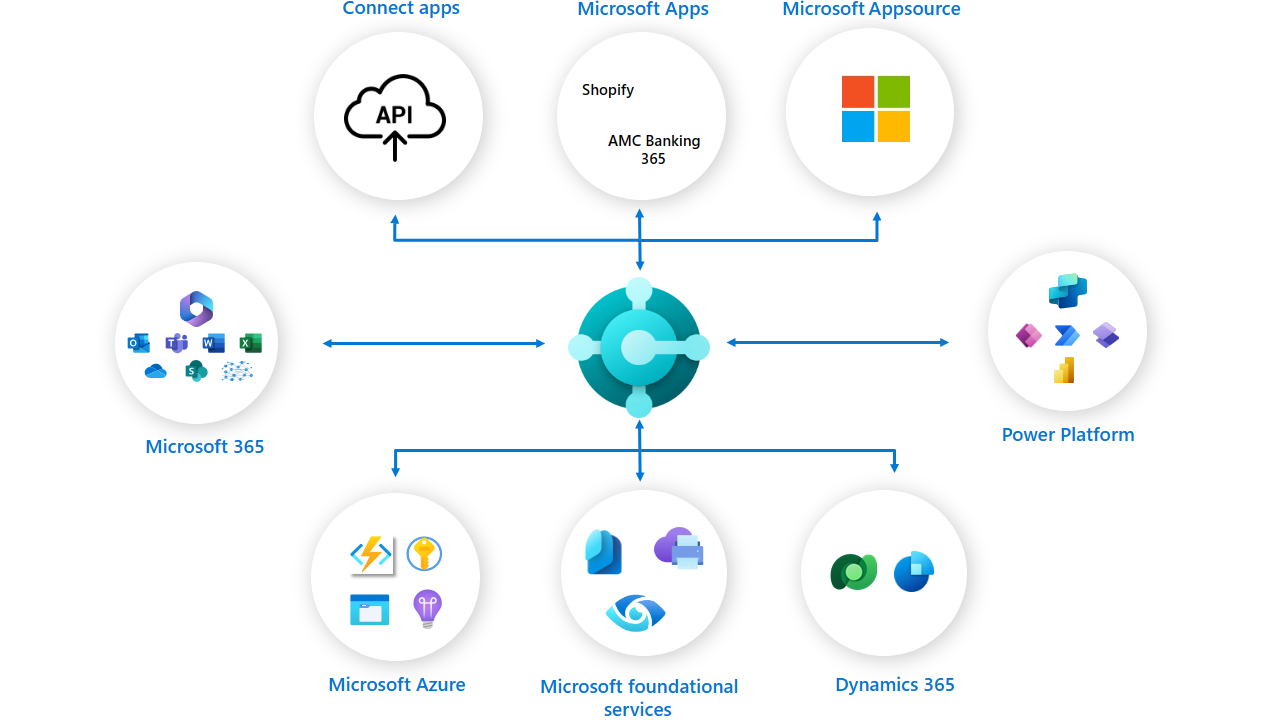
We added new content on the following topics:
- Overall integration overview
- Integrations to Office/M365
- Integrations to Power Platform
- Integrations to Dataverse
- Integrations to Azure
- Integrations to infrastructure services
Want to check it out? Then start by visiting the new overview article aka.ms/bcintegration.
That's all for now, folks!
Most of these suggestions we added because you gave us feedback on things you'd like to see in this part of docs. Keep the feedback coming, together we can make docs a really useful tool for AL developers.
2024-02-28 Working on AppSource apps and per-tenant extensions? Get ready for the next major release
As developers and solution architects, you play a pivotal role in shaping the Business Central ecosystem. We count on you to facilitate a seamless experience for our shared customers as they move to the upcoming major release. Here we want to list some of the key best practices for getting ready for the new major release.
AppSource apps
One month before the next major release, we cease accepting AppSource apps that are incompatible with the upcoming version. Please start identifying and addressing compatibility issues already now, to handle them proactively, avoiding last-minute firefighting and disruption.
We also start checking the existing AppSource apps for compatibility with the next major release, and publish validation results weekly to a public URL (aka.ms/readyForNextMajor?appId=<appId>), making it easier for you to assess your app’s readiness for the next release. However, as best practice, don't just rely on checking the results of our validation, but perform your own, in your pipelines. For more information, see documentation on technical validation.
In our recent release, we introduced the ability to hotfix older versions of AppSource apps. This means you can continue patching your apps for previous Business Central versions while simultaneously working on the new version targeting the next major release. Your customers running on the previous versions of your apps will therefore not be left behind and get the support they need. Find more information about hotfixing AppSource apps here.
Per-tenant extensions
Also, one month prior to the major release, our system starts notifying customers when their per-tenant extensions are incompatible with the next major release. The notifications are sent via email, to the recipients registered in Business Central Admin Center and via messages in the Microsoft 365 Message Center. Use this information to prioritize fixing your per-tenant extensions, to avoid the risk of disruptions, escalations and dealing with requests to postpone updates. Find more information about our per-tenant validation here.
Business Central makes a preview version available that allows you to create a sandbox environment available for all customers, one month prior to the major release date. Use this option to upload and test your extensions proactively. Read more about preview environments here.
Get ahead of the game with DevOps solutions
Business Central provides both AppSource and per-tenant extension builders with an easy to use, rich and secure DevOps solution: AL-Go for GitHub. Find more information here.
Among many other capabilities, AL-Go for GitHub allows developers to easily check compatibility of their apps with any upcoming version, whether minor or major, in real-time with these changes being introduced by Business Central team. Start using this solution or other DevOps solutions available in the Business Central ecosystem to handle compatibility proactively.
By adhering to these technical best practices, you contribute to a thriving ecosystem. Prepare early, prioritize quality, and deliver exceptional solutions to our mutual customers. Thank you for helping us shape the future of Business Central!
More information
- Maintain AppSource apps and per-tenant extensions
- Lifecycle of apps and extensions
- Update Lifecycle for Tenant Customizations
- Technical validation FAQ
2024-01-25 Document reporting with Word layouts documentation just got better!
Over the last weeks, we've worked on improving the developer documentation for Word layouts in Dynamics 365 Business Central.
You find the all the Word layout content in the developer docs in the table of contents under Development, choose Programming in the AL language, then Developing reports, Report layouts, Excel, Word, and RDL report layouts and then Creating an Excel layout report.
So what did we do? Well, quite a lot...
We added new content on the following topics:
- How to iterate a Word layout over a dataitem (also expanded the article on how WordMergeDataItem works)
- How to create a new Word layout from Visual Studio Code
- How to do totals
- How to use headers/footers, sections, and watermarks
- How to use fonts
- How to use hyperlinks
- How to use tables to control alignment of text and images
- How to work with pictures in Word layouts
- Changing layout properties such as margins or orientation
- Designing layouts for precision printing
- How to use the same table style for all tables in the layout
- Design guidelines for a report dataset designed for Word layouts
- Difference between RDL and Word layouts
- More content on how to use Office document themes
- How to use tables to display data from the report dataset (simple repeaters)
- How to use lists to display data from the report dataset (simple repeaters)
- How to use nested repeaters to display data from nested dataitems in the report dataset
- How to do sub totals/running totals
- How to do conditional formatting
- Operational limits for reports with Word layouts
- How to convert an RDL layout to a Word layout
Want to check it out? Then start by visiting the Creating an Word layout report article.
That's all for now, folks!
Most of these suggestions we added because you gave us feedback on things you'd like to see in this part of docs. Keep the feedback coming, together we can make docs a really useful tool for AL developers.
2024-01-11 Error handling documentation just got better!
Over the last months, we've worked on improving the developer documentation for error handling in Dynamics 365 Business Central.
You find the all the error handling content in the developer docs in the table of contents under Development, choose Programming in the AL language, and then Error handling.
So what did we do? Well, quite a lot...
- All articles related to error handling (that we're aware of) are now present under Error handling in the table of contents.
- All articles about error handling (that we're aware of) have been updated to reflect latest language features and to include AL example code.
- New article Failure modeling and robust coding practices with two techniques that you can use to make your code more robust towards errors: failure modeling and robust coding practices.
- Article Understanding the error dialog is updated with a section on how to understand the information in Copy details section. Also a new section explaining how to understand a AL stack trace.
- New article User experience guidelines for errors that offers guidance on how to formulate good error messages, both for older versions of Business Central and for versions supporting the actionable errors framework.
- New article Actionable errors that offers guidance on how to handle error dialogs in AL code, specifically how to use the actionable errors framework to provide recommended actions to users to resolve errors more effectively.
- All four articles for telemetry related to errors are available in the Error telemetry part of the table of contents.
- All articles from the AL Language reference documentation (related to error handling) are present in the table of contents and all reference articles have been updated to reflect latest language features and to include examples of robust coding practices.
- All articles from the Base App reference documentation (related to error handling) are also present in the table of contents.
Want to check it out? Then start by visiting the new Error handling overview.
That's all for now, folks!
Most of these suggestions we added because you gave us feedback on things you'd like to see in this part of docs. Keep the feedback coming, together we can make docs a really useful tool for AL developers.
2023-12-13 Curious about integrating AI using developer tools for copilot?
With the latest refresh of the documentation, we've added content on how to build a copilot user experience for Business Central. Read about the developer tools, how to get set up with Azure OpenAI service, and how to build the copilot capability and experience in Business Central.
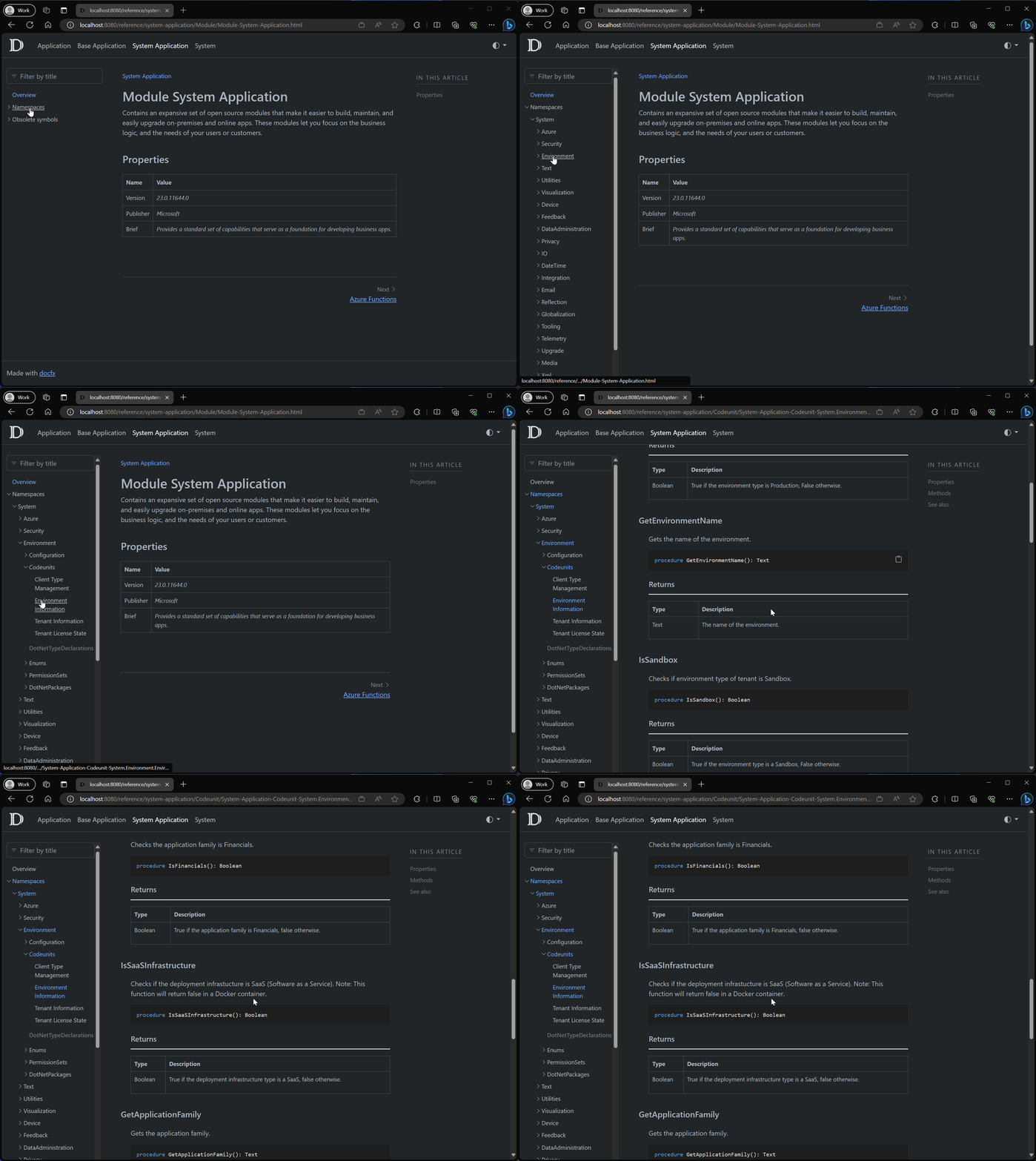
Get started with the Integrating AI using Developer Tools for Copilot landing page. And check out the refreshed System application documentation.
We hope you'll find this useful. If you have any feedback, please let us know.
2023-12-08 Reporting documentation just got better!
Over the last months, we've worked on improving the developer documentation for reporting in Dynamics 365 Business Central.
You find the all the reporting content in the developer docs in the table of contents (TOC) under Development, choose AL Language, and then Developing reports.
So what did we do? Well, quite a lot...
- All articles related to reporting (that we're aware of) are now present under Developing reports in the TOC.
- All articles about reports (that we're aware of) have been updated to reflect latest language features and to include AL example code.
- New content on how to format report data (both TOC entry and a new article).
- The Report layouts section in the TOC now also includes all layout articles from the user part of the Business Central documentation.
- New content on report discoverability added (both a new TOC entry and a new article).
- New article on report troubleshooting added.
- All articles from the AL Language reference (related to reports) are present in the TOC and all reference articles have been updated to reflect latest language features and to include examples of robust coding practices.
Want to check it out? Then visit the Reports overview. And don't miss the latest blog post on LinkedIn about The world is changing (in Business Central reporting).
That's all for now, folks!
Most of these suggestions we added because you gave us feedback on things you'd like to see in this part of docs. Keep the feedback coming, together we can make docs a really useful tool for AL developers.
2023-11-16 Are you looking into creating generative AI solutions for Business Central?
Then read on here. As you move forward with exploring generative AI, we’ve published a couple of articles to get you started. There's a new article for the PromptDialog page type and we've also updated the reference documentation for the following properties:
This serves as a starting point for other documentation that we’ll be shipping on how to get started developing a generative AI solution with Business Central.
Remember that you can go to the aka.ms/BCTech repo to discover more and maybe get inspired.
At Directions EMEA 2023, the keynote presentations demonstrated how Business Central has integrated AI to enhance productivity. Check these recordings out here.
Stay tuned!
2023-11-09 Refresh of the system and base application reference
We've just refreshed the system and base application reference documentation for Business Central version 23, (base application version 23.0.12034.12416, system application version 23.0.12034.12416).
This refresh includes namespaces and the system level as well. To browse the reference library, go to System and Base Application Reference for Dynamics 365 Business Central.
Business Central 2023 release wave 2 launch event content for developers
In October 2023, Business Central 2023 release wave 2 launch event went live with videos on the latest innovations for Business Central to you via an all-access digital experience. They contain high-quality content presented by product leaders to enable you to learn how to take Business Central to the next level as a developer. All 100% free. All you need to do is to sign up and log in at the event site aka.ms/bcle and then set aside time to learn and digest. There's a lot of content, so maybe set aside 20 minutes every morning before you open your email. We guarantee you that it will be worth the time.
These are the sessions that we think are most relevant for you as a developer and where you should start your learning journey
- What's new in Developer Tools
- What's new in AL-Go for GitHub
- What's new: Performance testing before go-live with Performance Toolkit
- What's new: Power BI and reporting (for developers)
You might also want to dive deeper into the Business Central platform, and learn about the server, database, resource governance (in the online version of Business Central), and troubleshooting with telemetry
- What's new in Server and Database - a faster runtime
- What's new in Server and Database - a faster data stack
- What's new in Server and Database - more stable web services
- What's new in Server and Database - new reporting capabilities
- What's new in resource governance for Dynamics 365 Business Central online
- What's new in telemetry
After you've seen/browsed those sessions, consider spending some time in the Application and Onboarding and user experience tracks. We think that these sessions are particularly useful for developers
- Creating customer centric onboarding experiences
- What's new: Add existing field in pages
- What's new: Productivity features in the web client
- Introducing Analyze data on lists on queries
If you want to dive more into ways to integrate Business central with Microsoft Power Platform, Power BI, and Microsoft 365, then check out these sessions
- What's new: Business central integration with Power Platform
- What's new in Dataverse and Dynamics 365 app integration - Part 1
- What's new in Dataverse and Dynamics 365 app integration - Part 2
- What's new: Power BI and reporting (for developers)
That's all folks! Go learn. Get smart. Be awesome. Help customers.
2023-10-04 Business Central 2023 release wave 2 launch event content for developers
Join the product team on October 10-12th, 2023 to see what’s new in Dynamics 365 Business Central 2023 release wave 2 at the Business Central Launch Event; a free virtual event for everyone from reselling partners to consultants, and ISV partners.
We're hosting live Q&As on these topics that might interest you as a developer:
- What's new in developer tools
- What's new in AL-Go for GitHub
- What's new: Performance testing before go-live with Performance Toolkit
- What's new: Power BI and reporting (for developers)
- Creating customer-centric onboarding experiences
- Add an existing field
- What's new in server and database
- What's new in resource governance for Dynamics 365 Business Central online
- What's new in telemetry
- What's new in Dataverse and Dynamics 365 app integration - Part 1
- What's new in Dataverse and Dynamics 365 app integration - Part 2
Join us! Register today at aka.ms/BCLE.
2023-09-07 Business Central 2023 release wave 2 release notes for developers
We just updated the release notes for Business Central 2023 release wave 2, and with the preview coming out soon, this is a perfect time to get updated on the development additions, try them out and provide feedback.
First, you can now very easily get the latest build of the AL Language for Microsoft Dynamics 365 Business Central, directly from the Visual Studio Code Marketplace, by simply just switching between public and pre-release versions.
Get the AL Language extension in pre-release versions on Visual Studio Code Marketplace
Namespaces have finally arrived, and will make it easier to structure apps, create better object names, and avoid identifier clashes, and eventually in a later release allow moving away from affixes. First party apps have uptaken namespaces, and the AL Explorer allows filtering to view objects by namespace.
Segment AL code and reduce naming conflicts with namespaces
We know it can be challenging and tedious to set up Visual Studio Code for an environment to investigate or troubleshoot. With this release, developers and consultants can now easily provision a matching Visual Studio Code for a production or sandbox environment directly from within the web client.
Open Visual Studio Code from web client to investigate or troubleshoot extensions
Our built-in rich text editor supports all media fields in Business Central, and developers can also customize rich text capabilities for their extensions and applications.
Use the built-in rich text editor to enter data
Field group extensibility is one of our larger and highly voted gaps, and in this release we have added the ability to define field groups in table extensions for tables not originally having a field group.
Add a new FieldGroup to an existing table
To help you protect specific variable data so that other parties can't access it during debugging, we have introduced a SecureText type. Use SecretText type to protect credentials and sensitive textual values from being revealed in debug sessions
We have also added a number of IntelliSense additions and project features to help your everyday productivity.
- Get inlay hints in source editor for AL method parameters and return types
- Hover over label variable to see text string value
- Get IntelliSense for adding variables in Visual Studio Code AL debugger console
- Get smarter method signature recommendations in IntelliSense
- Show list of keys while working on AL code
- Set new output folder setting for storing app files at AL project build
When it comes to data analysis and reporting, we give you have more control, you can now turn off Analysis Mode on pages and specify how to embed content from Power BI.
Turn off data analysis mode on pages and queries
For AppSource, the first wave of transact support with per-user licensing and credit card purchase in the AppSource Marketplace will release to public. Later this fall we are enabling ISVs to organize a preview for their AppSource apps for a controlled audience of their customers.
- Sell Business Central apps through AppSource
- AppSource ISV publishers can preview their AppSource apps with select customers
That is already a comprehensive list, but wait, there is even more! Next round of release notes will include entries for the following:
- AL Extension for Linux in preview - in fact this is already out, just install the extension from Visual Studio Code Marketplace in your Visual Studio Code installation on Linux.
- ALDoc preview for partners, read more about that here Generating help with the ALDoc tool.
- AL syntax highlighting for DevOps.
- Teaching tooltips on report request pages.
- Set the default folder location for new AL projects.
- Track source and build metadata from DevOps pipelines in extension app.json.
- Choose between more sampling intervals for snapshot and in-client profiling.
- Use Find all references for triggers, system methods, and trigger events on page fields, table fields, page actions, and table methods/triggers/events.
2023-08-29 Enhancements to the HttpClient data type documentation
Over the last months, we've worked on improving the developer documentation for how to use the HttpClient data type to do outgoing web calls from AL in Dynamics 365 Business Central.
First of all, we made the topic a first class citizen in the developer docs, by adding a new section in the table of contents (TOC) under AL Platform plus a new overview article, where we did the following:
- Explain high-level details on how to set up an external call (including how to use request and content headers), run it, and parse the result from the service. All three sections come with sample AL code that also tries to showcase how to write AL code, which is resilient towards failures.
- Document the supported HTTP methods (and this information is reused in relevant other pages).
- Explain HTTP status codes and include a troubleshooting guide on common HTTP status codes for client errors (4xx).
- Show how you can use certificates in your requests.
- Explain how to troubleshoot outgoing web calls with telemetry.
- Give guidance on performance impact for UI sessions of outgoing calls.
For more information, read more in Call external services with the HttpClient data type.
Second, we updated the existing overview article for the HttpClient data type with a new section on how HttpClient calls can fail and why it's important to react to return values of the methods HttpClient.Delete, HttpClient.Get, HttpClient.Post, HttpClient.Put, or HttpClient.Send. We also highlight how AllowHttpClientRequests works in online sandboxes. Read more here.
Third, the existing article on the HttpContent data type got a new section on content headers, including the information that we always have a default content header for Content-Type, namely text/plain; charset=utf-8. Read more on the HttpContent data type.
Fourth, each of the existing articles on the methods HttpClient.Delete, HttpClient.Get, HttpClient.Post, HttpClient.Put, and HttpClient.Send methods got two new sections:
- Ways that HttpClient.XXX calls can fail
- Example sample AL code
The only two exceptions are the articles for HttpClient.Send and for HttpClient.Post:
- For HttpClient.Send, the generic examples shows how to do HTTP
PATCHrequests as this HTTP method currently doesn't yet have its own wrapper method. For more information on Httpclient.Send, see here. - For HttpClient.Post, we threw in examples on how to use multipart/form-data in two examples on how to upload/stream files (either text or binary files). For more information on Httpclient.Post, see here.
That's all for now, folks!
Most of these suggestions we added because you gave us feedback on things you would like to see in this part of docs. Keep the feedback coming, together we can make docs a really useful tool for AL developers.
2023-08-22 Business Central 2023 release wave 1 launch event content for developers
In April 2023, Business Central 2023 release wave 1 launch event went live with videos on the latest innovations for Business Central to you via an all-access digital experience. High-quality content presented by product leaders to enable you to learn how to take Business Central to the next level as a developer. And it's all for free. All you need to do is to sign up and login at the event site aka.ms/bcle and then set aside time to learn and digest. There's a lot of content, so maybe set aside 20 minutes every morning before you open your email. We guarantee you that it will be worth the time.
These are the sessions that we think are most relevant for you as a developer and where you should start your learning journey:
- What's new in VS Code and AL
- What's new in Server and Database
- What's new in telemetry
- What's new in AL-Go for GitHub
- Introducing AppSource transactability for Business Central apps
After you have seen/browsed those sessions, consider spending some time in the Application and user experience track. We think that these sessions are particularly useful for developers:
- What's new: Work more productively with actions
- Introducing data analysis
- What's new in the web client
If you want to dive more into ways to integrate Business central with Microsoft Power Platform and Microsoft 365, then check out these sessions:
- Introducing: Best practices for building Power Apps based solutions for Business Central
- What's new in Power Platform integrations
- What's new in Virtual Table for Microsoft Dataverse
- What's new in Power Automate and approval workflows
- What's new in Teams integration
And if you also work with tenant administration, go check out these videos related to Governance and administration:
That's all folks! Go learn. Get smart. Be awesome. Help customers.
2023-08-18 Introducing ALDoc: a new command line tool for generating reference documentation for AL extensions
It’s our pleasure to announce that with the latest Pre-Release update of the AL Language extension for Microsoft Dynamics 365 Business Central, we have included the ALDoc tool for partners. The ALDoc tool generates documentation from symbolic and syntactical information, code comments, and overall application structure based on input .app file(s). Use it to generate internally or externally facing reference documentation for your solution. The tool also generates a help site with the reference articles, sorted by the application structure, based on the provided template.
Read more about the tool in our docs Generating help with the ALDoc tool
We’d love to hear what you think, use https://github.com/microsoft/AL/issues for tool feedback.
2023-08-16 Get the AL Language extension in pre-release versions on Visual Studio Code Marketplace
The AL Language extension Pre-Release versions are now available through the existing Visual Studio Code mechanism for getting notified about and installing Pre-Release versions. To learn more about this mechanism, visit Prerelease Extensions in the Visual Studio Code documentation.
To install the Pre-Release Version, use the drop-down to select Install Pre-Release Version, or if already installed, use the Switch to Pre-Release Version option in the Visual Studio Code extension management page for the AL Language extension.

When you have switched to the Pre-Release version, the Visual Studio Code extension management page for the AL Language extension will display that the Pre-Release is used, and offer the option to switch back to the Release Version.

2023-06-21 Get started with developing generative AI features for Business Central
Let's bootstrap your AI journey with Azure OpenAI! We've shared some sample code as an extension that enables you to explore the possibilities of large-scale language models (LLM). This code is designed to simplify the process of setting up and running LLM experiments, starting with easily configuring and testing your connection to the Azure OpenAI service. After that, you can extend your AL logic to do more exciting things with this code. The sample code uses Azure OpenAI to suggest an item category based on the item description field.
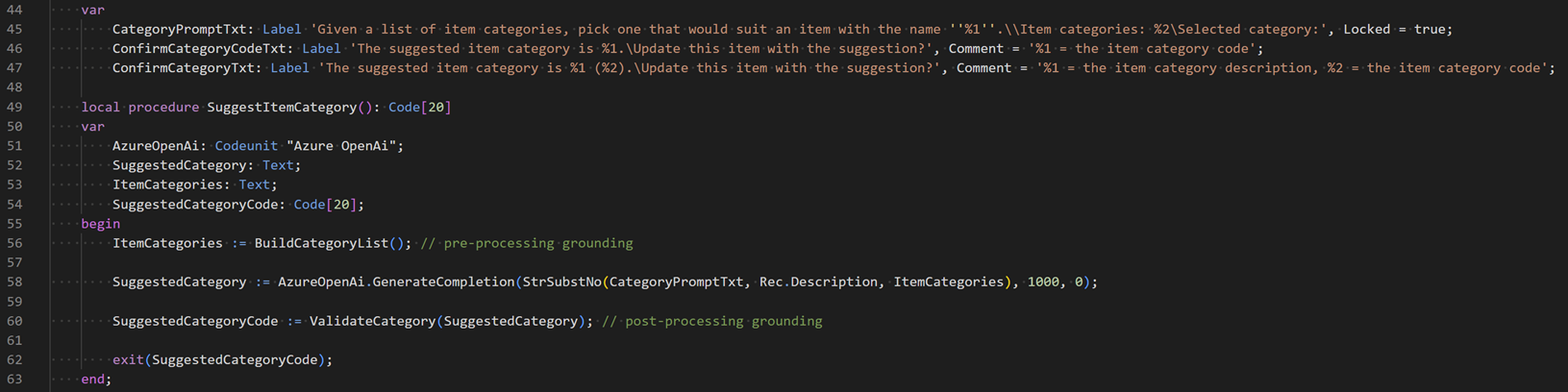
The extension's source code is available at the Business Central BCTech repository on GitHub. You can get to it directly at https://aka.ms/BCStartCodingWithAI. You can either download or install the sample extension to your sandbox environment or clone the source code for your own projects.
The product team is eager to hear your feedback on how we can support your use cases and help you design, build, and deliver AI solutions quickly and responsibly in the AI era: community partners are invited to join us at the Copilot and AI Innovation group on our Yammer development network.
Happy experimentation!
The Business Central product team
2023-05-31 Performance pattern - Use built-in data structures
AL comes with built-in data structures that have been optimized for performance and server resource consumption. Make sure that you're familiar with them to make your AL code as efficient as possible.
When working with strings, make sure to use the TextBuilder data type and not repeated use of the += operator on a Text variable. General guidance is to use a Text data type if you concatenate fewer than five strings (here the internal allocation of a TextBuilder and the final ToText invocation is more expensive). If you need to concatenate five strings or more or concatenate strings in a loop, then TextBuilder is faster. Also, use a TextBuilder data type instead of BigText when possible. For more information, see TextBuilder Data Type.
If you need a key-value data structure that is optimized for fast lookups, use a Dictionary data type. For more information, see Dictionary Data Type.
Use a List data type if you need an unbound "array" (where you would previously create a temporary table object). For more information, see List Data Type.
Use the Media or MediaSet data types instead of the Blob data type. The Media and MediaSet data types have a couple advantages over the Blob data type when working with images. First of all, a thumbnail version of the image is generated when you save the data. You can use the thumbnail when loading a page and then load the larger image asynchronously using a page background task. Second, data for Media and MediaSet data types is cached on the client. Data for the Blob data type is never cached on the server. It's always fetched from the database.
For more information about performance tips and tricks for developers, see Performance Articles For Developers.
2023-05-25 Enable telemetry for your apps/extensions
To send telemetry data to Azure Application Insights, you must have an Application Insights resource in Azure. Once you have the Azure Application Insights resource, you can start to configure your apps/extensions to send telemetry data to it by setting the telemetry connection string in your app.json configuration file. See Sending App/Extension Telemetry to Azure Application Insights for details.
On the overview page Telemetry by area, you can see what type of data you can expect to get for your app/extension. Note that you get this data for all customers across the install base of the app/extension.
What does it cost to have telemetry enabled? It depends on how much data you ingest. Please review the article Controlling Telemetry Cost to learn about cost of your telemetry and strategies for controlling it.
2023-05-09 AL debugger and snapshot capture doesn't work in Visual Studio Code v1.78
Update: Fix will be available in v1.78.2.
The Visual Studio Code v1.78 update contained a change that has impacted debugging for multiple different Visual Studio Code extensions, including AL.
The impact of this is that the debugger stops at the first breakpoint and then hangs.
On the AL side, the issue is tracked by microsoft/AL/issues/7388.
Visual Studio Code is currently in the process of reverting the cause, tracked by microsoft/vscode/issues/181485. They expect that the change will be in the Insider build on Wednesday May 10th, and that there will be a fixed v1.78.2 by the end of the week.
In the meantime, the Visual Studio Code team recommends that you downgrade to Visual Studio Code v1.77.3 and turn off automatic upgrades for Visual Studio Code, by adding "update.mode": "manual" (or none) to your settings.
2023-04-03 Welcome to the AL Home and AL Explorer 😃😃👏👏
You're reading this in one of the two new views added to the AL Language extension for Microsoft Dynamics 365 Business Central, namely AL Home and AL Explorer.
AL Home
The AL Home shows news related to developing in AL for Business Central. It'll be used to share news, best practices, upcoming events, urgent information and status, and learn content.
AL Explorer
The AL Explorer lets you easily browse your objects and the ones coming from apps in your dependencies. It's structured into four sections with the focus on extensibility points. These sections are: Objects, Events, Apis, Extensible Enums.
- Objects: Contains a collection of all the codeunits, tables, pages, pageextensions, reports, etc.
- Events: Contains the integration and business events made available to be subscribed to.
- Apis: Provides all the API pages.
- Extensible Enums: These are all the enums, which are extensible and that implement an interface.
Filtering and grouping
In order to easier find what you are looking for, the AL Explorer provides search functionality to filter down the list based on the ID or Name. It also has Grouping options, which is fitted to match each section. The last option is to filter based on your bookmarked objects, the project in your workspace you want to target, or the app from your dependencies you want to explore.
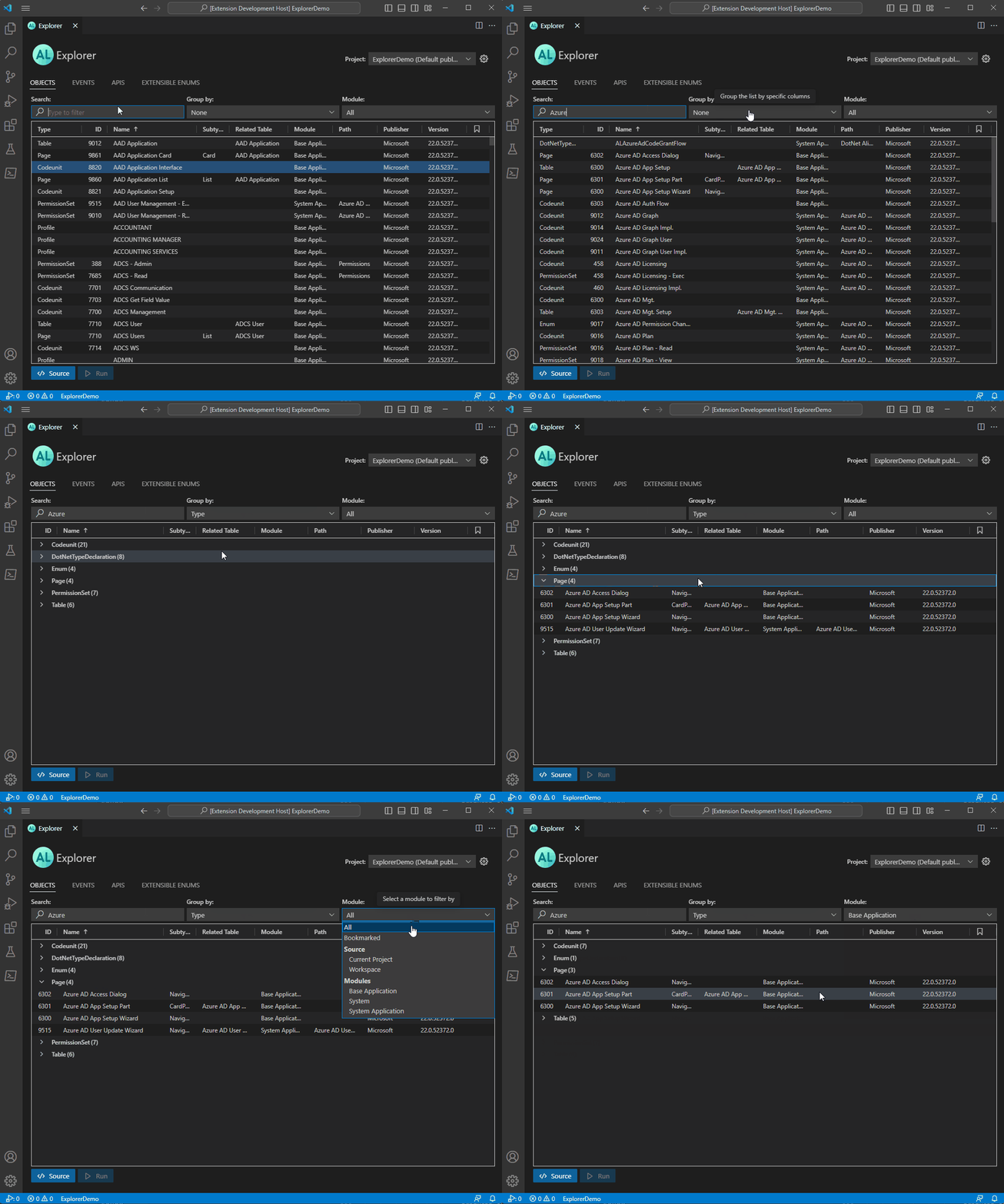
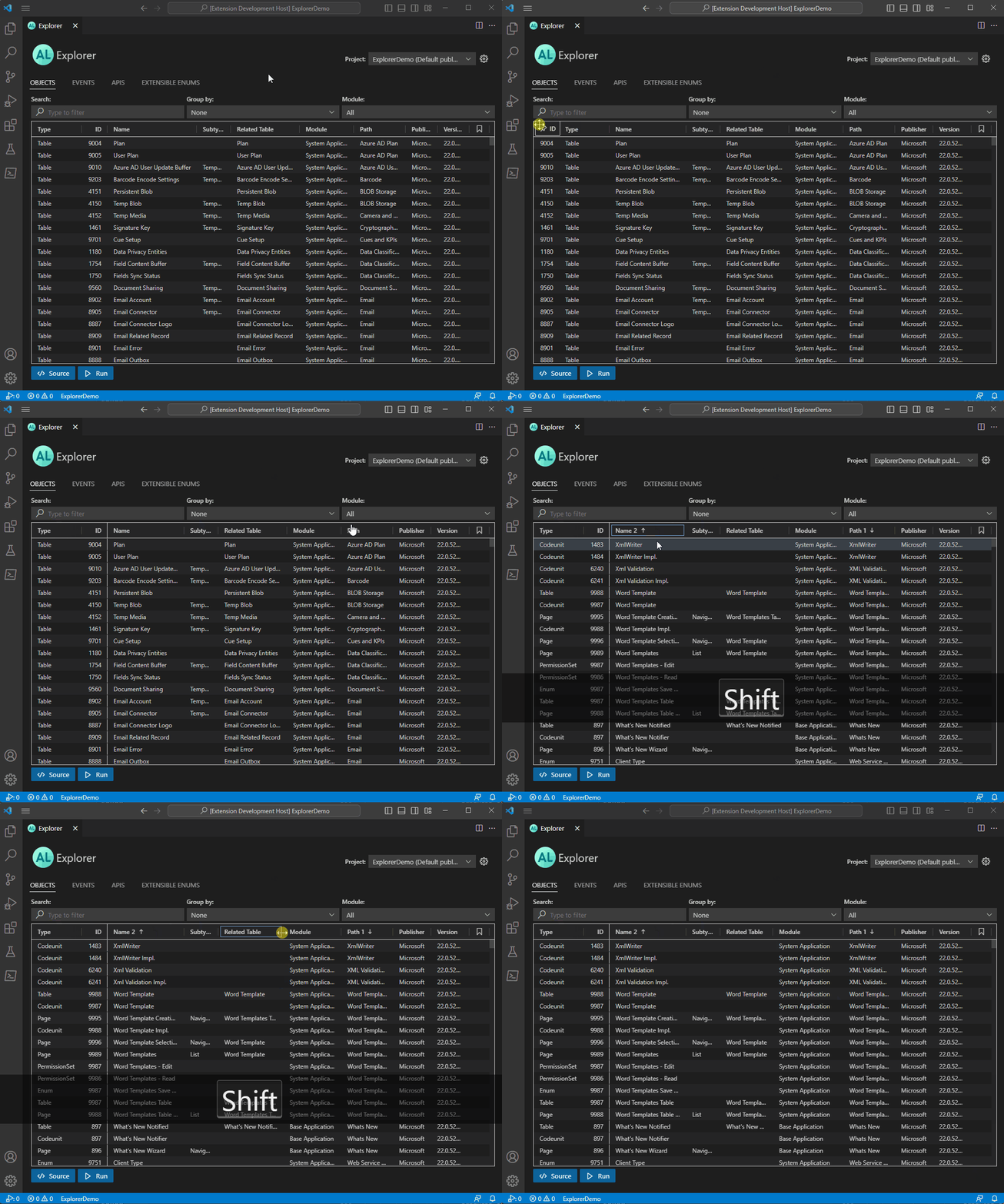
Advanced features
Some of you might recognize the look and feel of the AL Explorer's grid. It is built using the same component as analysis mode in the web client, which provides some capabilities that can be good to know.
- Sort using multiple columns by holding down shift you can click one column after the next one to set up the order of sorting done.
- In the webclient it is possible to define a freeze pane, and the same functionality is possible here, by dragging a column to the top right or left, and holding it there for a moment.
- Resizing columns can either be to the column on the left by default or to the one on the right, by holding down shift.
- You can also reorder the columns to your liking by drag and dropping them.
What's inside
5 dated announcements, each with links to docs and YouTube playlists
Change this for your project
- Replace
https://aka.ms/BCDesignAgentswith your own walkthrough URL if you host alternative videos - Replace
https://github.com/microsoft/BCTech/tree/master/samples/BcMCPProxywith your own MCP proxy repository if forked
Where it goes
Save as AGENTS.md in your repository root. Read by Codex, Cursor and other agents that follow the AGENTS.md convention.
Related Documents
Browser-only development
Guides AI assistants on an Electron + React + TypeScript desktop app for browsing and organizing AI-generated images locally.
Claude Agents — Reference & Recommendations
Catalogues 40+ Claude agents and marketing skills for building a cat adoption charity landing page, with a ready-to-paste prompt and backend API reference.
Golden DKG Prototype -- Master Plan
Defines an 8-phase implementation plan for a Rust prototype of the Golden non-interactive DKG protocol using BLS12-381 and tokio.
Swarms Examples Index
Lists 60+ example scripts for building single and multi-agent systems with the Swarms framework, organized by category and use case.