
System Design - 1 | 06.06.2024
Introduces system design fundamentals, SDLC phases via a house-building analogy, networking primer, HTTP overview, and scaling concepts with weekly tasks.
What this file does
Introduces system design fundamentals, SDLC phases via a house-building analogy, networking primer, HTTP overview, and scaling concepts with weekly tasks.
When to use it
- Learning system design basics for the first time
- Preparing for system design interviews
- Understanding SDLC phases through analogy
- Getting started with HTTP server performance testing
Assumes this stack
System Design - 1 | 06.06.2024
- Why SysDesign? | SDLC
- What is SysDesign?
- Basics of Sys Design
- TASKS - EVERY WEEK
Why System Design | Software Development LifeCycle (SDLC)
Overview
System design is essential because it provides a structured framework for translating user requirements into a cohesive, efficient, and scalable solution. It ensures that all components of the system work together seamlessly, addressing potential issues in functionality, performance, and security before they become critical problems. By focusing on architecture, subsystem integration, and user experience, system design helps in creating reliable and maintainable software that meets user needs and business objectives. This systematic approach reduces risks, saves costs in the long run, and ensures that the final product is robust and adaptable to future changes.
Imagine you are building a house. Steps Required:
- Blueprints and Planning [Requirements Gathering]
- Foundation and Structure [Architecture Design]
- Plumbing and Wiring [Subsystems]
- Interior Design [UI/UX]
- Testing the House [System Testing]
- Maintenance and Upgrades [System Maintenance]
In-Depth Discussion / Analogy of building a house with SDLC
1. Blueprints and Planning [Requirements Gathering]
House Building:
-
Before construction begins, you need a detailed plan. This involves discussing with the homeowners (stakeholders) to understand their needs and wants for the house.
-
You need to consider the number of rooms, type of rooms, special features, and the overall layout.
-
This phase includes creating blueprints and detailed plans which will guide the entire construction process. SDLC:
-
Similarly, in software development, the first step is to gather and analyze requirements from stakeholders.
-
This involves understanding the purpose of the software, who will use it, and what functionalities are needed.
-
The output is a requirements specification document that guides the subsequent phases of development.
2. Foundation and Structure [Architecture Design]
House Building:
-
Once you have the blueprints, the next step is to lay the foundation and build the basic structure of the house.
-
This includes creating the framework that will support everything else, ensuring it's strong and stable. SDLC:
-
In software development, architecture design involves creating the high-level structure of the system.
-
This includes designing the overall system architecture, defining the main components, their interactions, and the technologies to be used.
-
This stage ensures that the software will be scalable, reliable, and maintainable.
3. Plumbing and Wiring [Subsystems]
House Building:
-
After the structure is in place, you need to install the essential systems that make the house functional, such as plumbing, electrical wiring, heating, and cooling systems.
-
These systems need to be carefully integrated into the house’s framework. SDLC:
-
Similarly, in software development, subsystems and components are developed during this phase.
-
This includes coding the core functionalities, integrating databases, and setting up server-side logic.
-
Each subsystem needs to work seamlessly with the others, forming a cohesive system.
4. Interior Design [UI/UX]
House Building:
-
With the structural and functional elements in place, attention turns to interior design.
-
This involves selecting paint colors, flooring, cabinetry, and other aesthetic details that make the house pleasant and livable. SDLC:
-
In software development, this phase is akin to designing the user interface (UI) and user experience (UX).
-
This includes designing how the software looks and feels, ensuring it’s intuitive and user-friendly.
-
A good UI/UX design is crucial for user satisfaction and adoption.
5. Testing the House [System Testing]
House Building:
-
Before the homeowners move in, the house needs a thorough inspection.
-
This includes checking the structural integrity, ensuring all systems (plumbing, electrical, etc.) work correctly, and verifying that everything meets the required standards. SDLC:
-
In software development, system testing involves verifying that the entire system works as intended.
-
This includes functional testing, performance testing, security testing, and user acceptance testing.
-
The goal is to identify and fix any issues before the software is released to users.
6. Maintenance and Upgrades [System Maintenance]
House Building:
-
Even after the homeowners move in, the house requires regular maintenance.
-
This includes fixing any issues that arise, updating systems as needed, and possibly renovating or expanding parts of the house over time. SDLC:
-
Similarly, software requires ongoing maintenance after it’s deployed.
-
This includes fixing bugs, updating software to improve performance or security, and adding new features as user needs evolve.
-
Regular maintenance ensures the software remains functional and relevant. By drawing this analogy between house building and system design in SDLC, we can better appreciate the careful planning, structured processes, and iterative improvements that both activities require. Each phase is crucial and builds upon the previous ones, ensuring a strong, functional, and user-friendly final product.
System Design Fundamentals
Overview
- Vertical Scaling: optimise precision and increase throughput with the same resources
- Preprocessing (e.g. cron job): prepare beforehand during non-pick hours
- Backup: keep backups and avoid a single point of failure
- Horizontal scaling: get more resources
- Microservice Architecture
- Distributed system (partitioning)
- Load distribution/ Load Balancing
- Decoupling
- Logging
- Extensible System
In-Depth Discussion
1. Vertical Scaling: Optimize Precision and Increase Throughput with the Same Resources
Vertical scaling involves enhancing the capabilities of the existing hardware or software resources to improve performance. This can mean upgrading the CPU, increasing RAM, or optimizing software processes to handle more tasks efficiently. By fine-tuning the existing setup, systems can process more data faster, improving precision and throughput without the need for additional resources.
2. Preprocessing: Prepare Beforehand During Non-Peak Hours
Preprocessing involves executing tasks in advance during periods of low activity (non-peak hours) to reduce the load during peak times. For example, cron jobs can be scheduled to run overnight to process large batches of data or update databases, ensuring that the system is ready for high demand periods with minimal latency.
3. Backup: Keep Backups and Avoid a Single Point of Failure
Implementing a robust backup strategy ensures data integrity and availability in case of hardware failures, data corruption, or cyberattacks. Regular backups, stored in multiple locations, help maintain system resilience by allowing quick recovery and minimizing downtime, thus avoiding a single point of failure.
4. Horizontal Scaling: Get More Resources
Horizontal scaling involves adding more machines or instances to the system to handle increased load. This approach distributes the workload across multiple servers, enhancing capacity and fault tolerance. It is especially useful for applications experiencing growth in user traffic or data volume, as it allows for scalability without overburdening individual resources.
5. Microservice Architecture
Microservice architecture breaks down a large, monolithic application into smaller, loosely coupled services, each responsible for a specific functionality. This design promotes flexibility, as services can be developed, deployed, and scaled independently. It also improves fault isolation, making the system more robust and easier to maintain.
6. Distributed System (Partitioning)
In a distributed system, data and computation are spread across multiple servers or locations. Partitioning involves dividing the database into smaller, manageable segments that can be processed concurrently. This increases efficiency and reduces the risk of bottlenecks, ensuring the system remains responsive and scalable.
7. Load Distribution/ Load Balancing
Load balancing evenly distributes incoming network traffic across multiple servers to ensure no single server becomes overwhelmed. This improves system reliability and performance by maximizing resource utilization and preventing downtime. Load balancers can also provide failover, redirecting traffic from a failed server to healthy ones.
8. Decoupling
Decoupling refers to designing system components to operate independently, reducing dependencies between them. This enhances modularity, making it easier to update or replace individual components without affecting the entire system. Decoupled systems are more flexible, maintainable, and can adapt quickly to changes.
9. Logging
Logging involves systematically recording events, errors, and transactions within the system. It is crucial for monitoring system health, diagnosing issues, and ensuring compliance with regulatory requirements. Effective logging provides valuable insights into system behavior, helping to identify and resolve problems promptly.
10. Extensible System
An extensible system is designed to accommodate future growth and changes with minimal disruption. This involves using modular architectures, well-defined interfaces, and scalable infrastructure. Extensibility ensures that new features, technologies, or components can be integrated seamlessly, prolonging the system's lifespan and adaptability.
By understanding and implementing these system design fundamentals, developers can create robust, scalable, and maintainable systems that meet the demands of today's dynamic technological landscape.
Networking Primer
- The OSI model or the Open Systems Interconnection model has 7 layers which are: These layers must be completed for a connection to establish between two machines. These layers together are called “Network Stack”. This is a network protocol that defines how communication takes place. At the sending computer, the data flows downwards i.e. 7→1 each layer adds some headers, footers, and data properties., this is called “Encapsulation”. In the receiving computer, the data flows upwards i.e. 1→7 where each layer takes some information until the final information which was sent is received, this is called “De-Encapsulation”.
- Physical Layer
- Data Link Layer
- Network Layer
- Transport Layer
- Session Layer
- Presentation Layer
- Application Layer
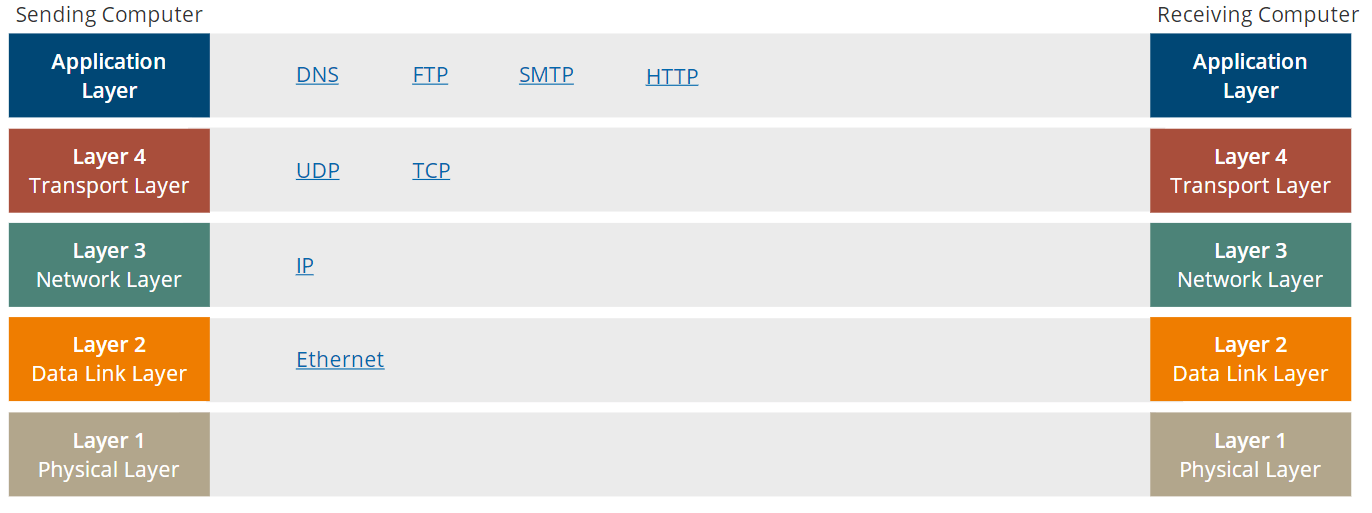
- Application Layer- The data is first processed here using one of the many protocols in this layer like SMTP, HTTP, DNS, and FTP. This layer specifies the details on how the data should be encrypted, compressed, encoded, and how the sessions should be managed.
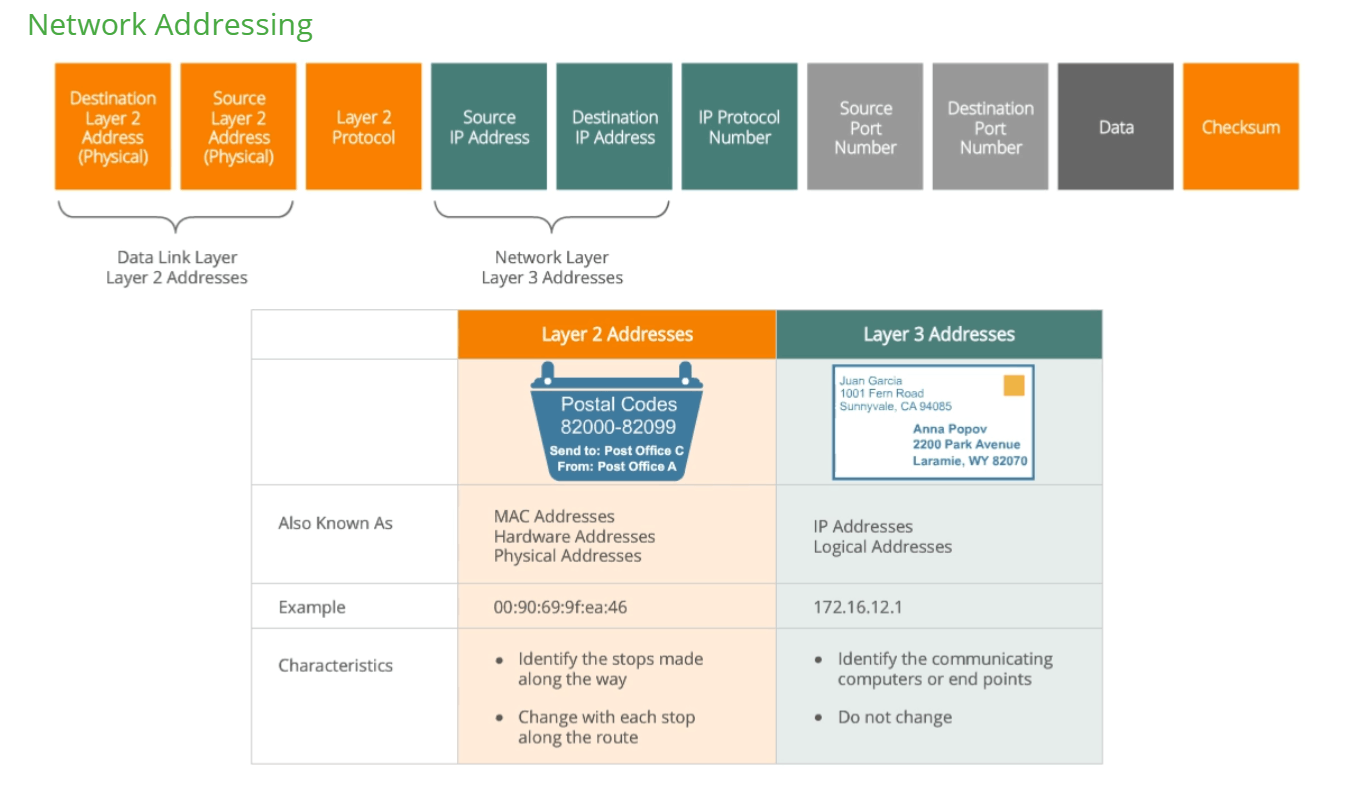
- Transport Layer: This is the fourth layer. It adds the source port (which is a unique identifier) and destination port of any data packet. Some important ports are:The transport layer has two protocols also called the layer-4 protocols:
- HTTP - 80
- HTTPS - 443
- DNS - 53
- TFTP - 69
- SSH - 22
- SMTP - 25
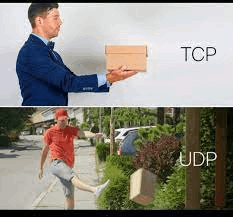
- TCP - Transmission Control Protocol
- It is a more robust protocol, providing delivery notification, error checking, and recovery procedures.
- The receiving computer tells the sending computer that the data is received.
- It cuts the data into small pieces called “segments” which are labelled in an order.
- Examples: HTTP, FTP, SMTP
- UDP - User Datagram Protocol
- A simple, fast, and “best effort service”
- It is very fast but does not receive any confirmation that data is received. There is no error checking or feedback, it just sends data packets.
- It is commonly used for short-messaging, VoIP, DNS, online gaming, video streaming
- Example: DNS
- Network layer - This layer adds the source and destination IP address headers to the data forming a “Packet”. The IP address is also referred to as layer-3 address or logical address. It also adds the IP Protocol number to the header identifying which layer-4 protocol is being used. For eg- TCP has an IP protocol number of 6 and UDP is 17.
- Data Link Layer - It adds its own set of headers which are layer-2 address and MAC (media access control) address of both the source and destination. This layer also adds a checksum (mostly SHA hash of data) or a Cyclic redundancy check (CRC) in front of the data packet. The receiver matches the checksum by rehashing the received data to check its integrity. Finally, it converts the data into binary form to transport over electrical signals.
- Physical Layer- It contains all the physical cables, switches, and routers for transferring the electrical signals.
Data unit names:
- Transport Layer (4) - Segment
- Network Layer (3) - Packet
- Data Link Layer (2) - Frame
HTTP

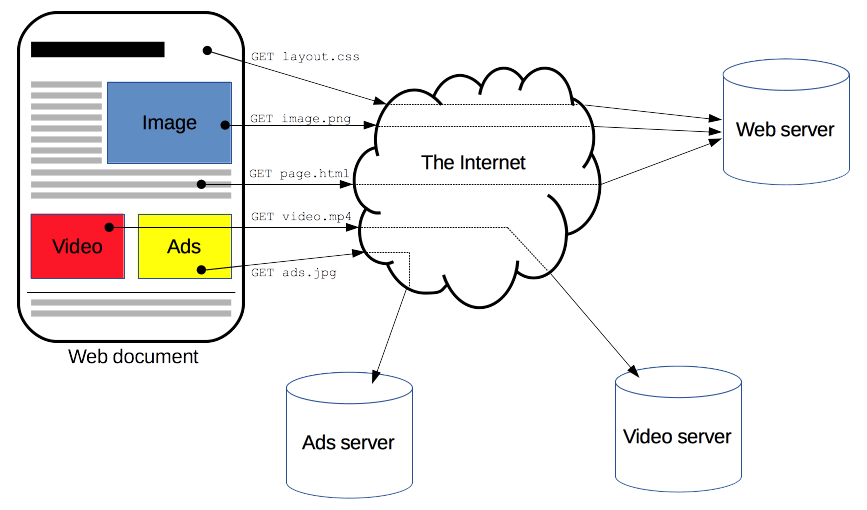
developer.mozilla.org/en-US/docs/Web/HTTP/Overview
Scaling
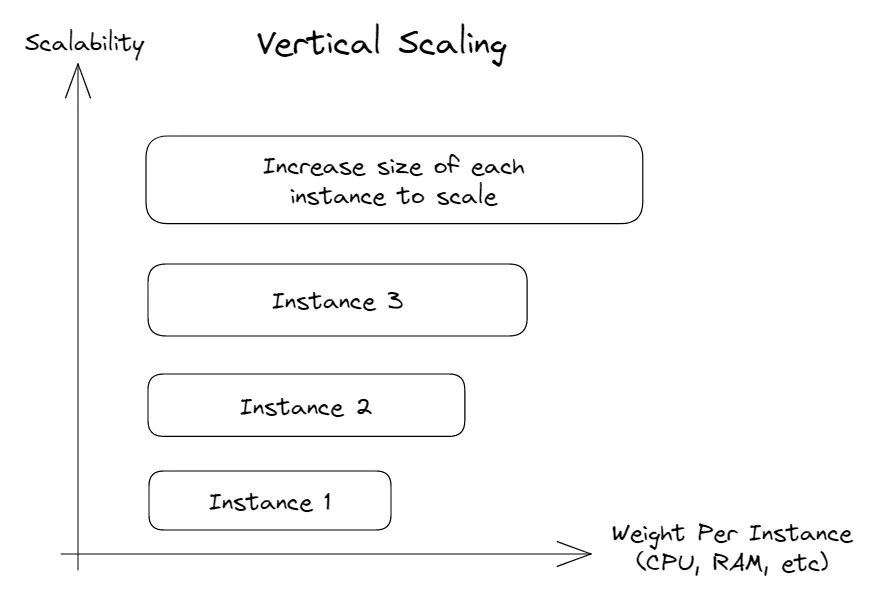
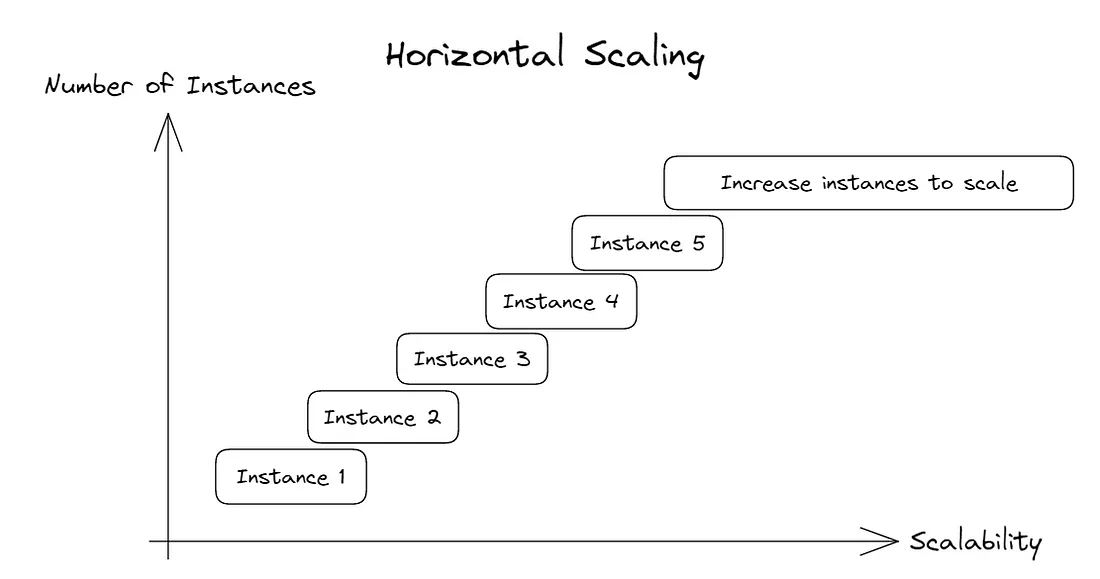
kubernetes.io/docs/concepts/workloads/autoscaling/
TASKS
- Make a simple HTTP server with 4 routes, they should get some data from the user and format it in any manner you want, then return the response.
Now think of some use cases to abuse (not literally) this server and how you can break it or achieve maximum performance. Bring forth your solutions in the next round to discuss.
Use the Apache benchmark tool ab to test your server performance. (Maybe even have a competition amongst yourselves to achieve the lowest response time possible).
ab -n 1000 -c 10 http://yourserver.com/yourpath (your path would be localhost:<some port> mp)
- Generate 4-5 log files, concatenate them in ascending order of their timestamp, and search the logs.
Make 3 different scripts for these 3 tasks
a single line of log would look like: <iso timestamp> <warning level - WARN, DEBUG, CRITICAL, INFO> <some function name where log originated> <log message>
Search params - give all logs of type CRITICAL, give all logs between time a and b, give all logs of some function x
Use some scripting lang
Definitely take help from Google but not from AI please, we will know, we do this all the time 😉.
Try using the unofficial channel for discussions, it would promote learning.
Also, please create a X account and post your achievements and knowledge regularly. Will help you to create a good habit.
What's inside
6 major sections: SDLC analogy, 10 design fundamentals, OSI model, HTTP overview, scaling comparison, and 2 weekly tasks.
Change this for your project
- Replace
http://yourserver.com/yourpathwith your server's actual URL - Replace
localhost:<some port>with your server's port number - Replace
<iso timestamp>,<warning level>,<function name>,<log message>with your log format
Where it goes
Save in docs/ or the repository root. Gives agents and new contributors a map of the codebase.
Worth borrowing
- House-building analogy to explain SDLC phases
- Weekly tasks combining HTTP server creation with Apache Benchmark testing
- Log file concatenation and search scripting exercise
Related Documents
PCB Design Sources for Industry-Scale Testing
Lists GitHub repos and communities where you can download real PCB designs for testing optimization at scale.
Design Document: BharatSeva AI
Describes a 10-agent AWS system that helps India's informal workers access government schemes via voice-first, serverless architecture.
OpenClaw Enterprise Transformation Plan
Transforms a single-user AI agent into a dual-mode platform supporting both viral open-source and Fortune 500 enterprise deployments through phased security, IAM, audit, multi-tenancy, and Kubernetes features.
Qwen Image and Edit: Open-sourcing and Local GGUF Generations with Lightning
Documents the Qwen-Image and Qwen-Image-Edit models, covering architecture, training, benchmarks, ComfyUI setup, and prompting techniques for local GGUF deployment.