
python-client-benchmarks
Benchmarks Python HTTP clients (requests, pycurl, urllib3, urllib) against a Docker-based test API and reports performance differences.
View sourceWhat this file does
Benchmarks Python HTTP clients (requests, pycurl, urllib3, urllib) against a Docker-based test API and reports performance differences.
When to use it
- Choosing an HTTP client library for a latency-sensitive Python service
- Evaluating connection reuse vs new connections for your workload
- Comparing HTTP vs HTTPS overhead in a controlled environment
- Reproducing or extending the original StackOverflow benchmark
Assumes this stack
python-client-benchmarks
Benchmarking different python HTTP clients, using a small, high-performance sample API.
Why?
To answer a StackOverflow question: how much does performance differ, for python HTTP clients?
This provides a Python client library benchmarking tool and a simple but high-performance API (HTTP and HTTPS) to use in benchmarking.
Oh, and of course, results in a controlled environment!
How do I run the test server?
In one terminal:
- docker run --rm -i -t -w /tmp -p 4443:443 -p 8080:80 svanoort/client-flask-demo:2.0
- OR: (sudo) ./build-docker.sh && ./run-docker.sh
The test server will expose several API endpoints, with HTTP responses on port 8080 & HTTPS (self-signed cert) on port 4443:
- /ping - returns "pong"
- /bigger - returns a fixed ~585B JSON response
- /length/<integer> - returns a fixed-length random binary response of $integer bytes. The first time this is generated and cached, then it is served from cache.
How do I run the benchmark client?
It's a command line utility, and has help via "python benchmark.py -h" python benchmark.py http://host:port/
How
-
On one server or system
-
In one terminal, build & run the docker image to start a test server:
sh build-docker.sh && sh run-docker.sh -
In another terminal, run: python benchmark.py --cycles 10000
-
Tests take a few minutes minute to finish, then you can close process in terminal 1.
Short Summary of Results
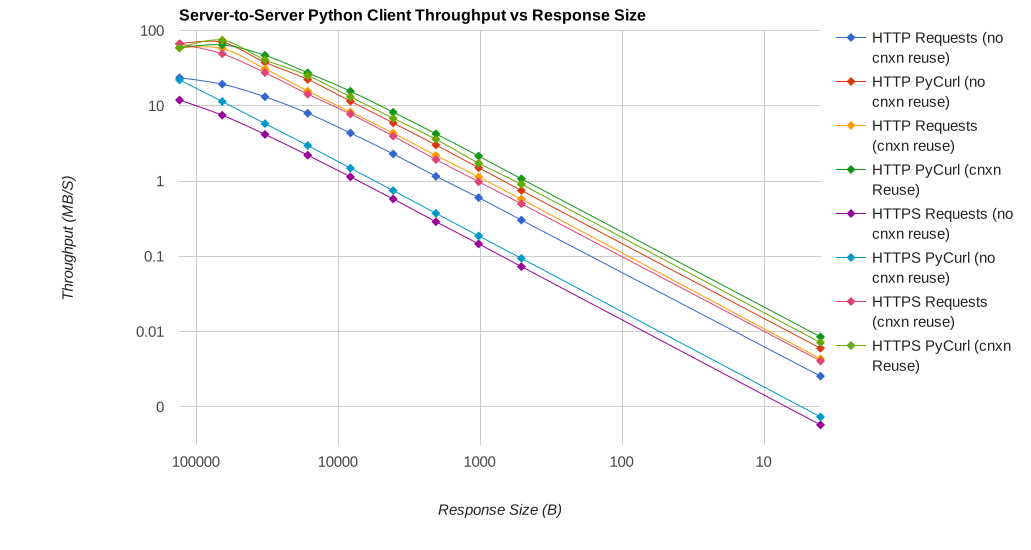
PyCurl is much faster than Requests (or other HTTP client libraries), generally completing smaller requests 2-3x as fast, and requires 3-10x less CPU time. This is most visible with connection creation for small requests; given large enough requests (above 100 kB/s), Requests can still saturate a fast connection quite easily even without concurrent HTTP requests (assuming that all post-request processing is done separately) on a fast CPU.
On this system:
- pycurl takes about 73 CPU-microseconds to issue a request when reusing a connection
- requests takes about 526 CPU-microseconds to issue a request when reusing a connection
- pycurl takes about 165 CPU-microseconds to open a new connection and issue a request (no connection reuse), or ~92 microseconds to open
- requests takes about 1078 CPU-microseconds to open a new connection and issue a request (no connection reuse), or ~552 microseconds to open
- CPU-limited peak throughput with PyCurl is roughly 50%-100% better than requests with very large request sizes, assuming an extremely fast network connection relative to CPU (in this case several GBit)
Benchmark Setup
- Testing with two c4.large instances in AWS, one running a client, and the other running the server.
- All tests issued 10000 sequential requests to minimize the impact of noise
- Timing was done using timeit, to separate initial setup & library loading from actual request time.
- For loopback tests, both are run on the same (client) system, to measure performance without bandwidth limits.
- Logs were collected from each benchmark run, along with vmstat dumps to verify that the CPU was never fully loaded (and never a bottleneck).
Specs:
- Amazon Linux (Fedora-based), latest update and all updates installed as of 26-Feb-2016.
- Enhanced networking, one source suggests the c4.large has ~517 Mbps of bandwidth per host.
- Apache Benchmark confirms that ~65 MB is roughly the limit (there are rare cases where 100 MB/s connections may be observed though)
- 2 vCPUs, Intel Xeon E5-2666 v3 or equivalent (8 ECU)
- 3.75 GB of RAM
- 8 GB GP2 EBS volume
Graphs
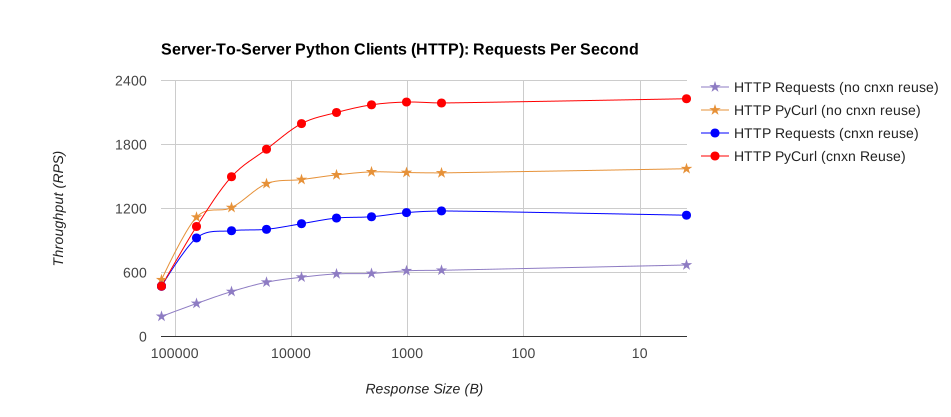

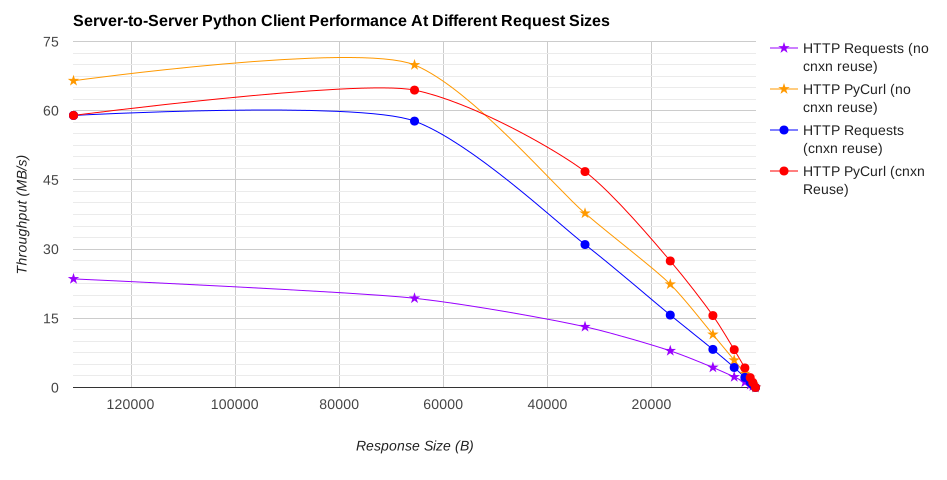
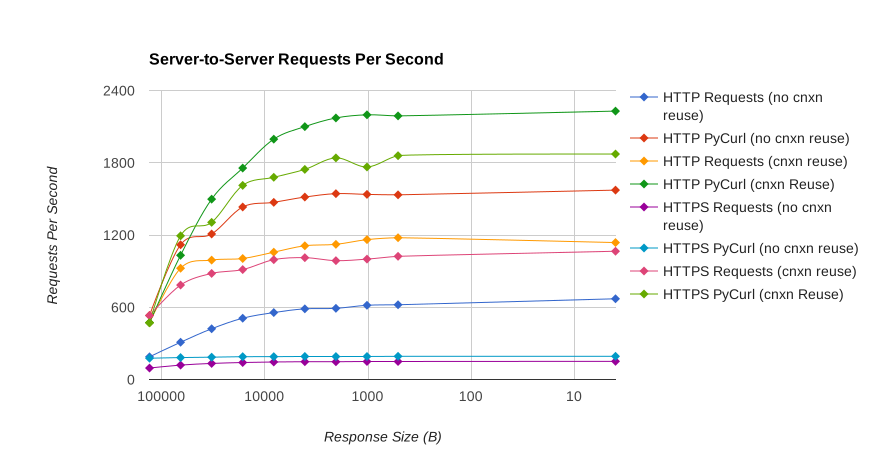
Detailed Results
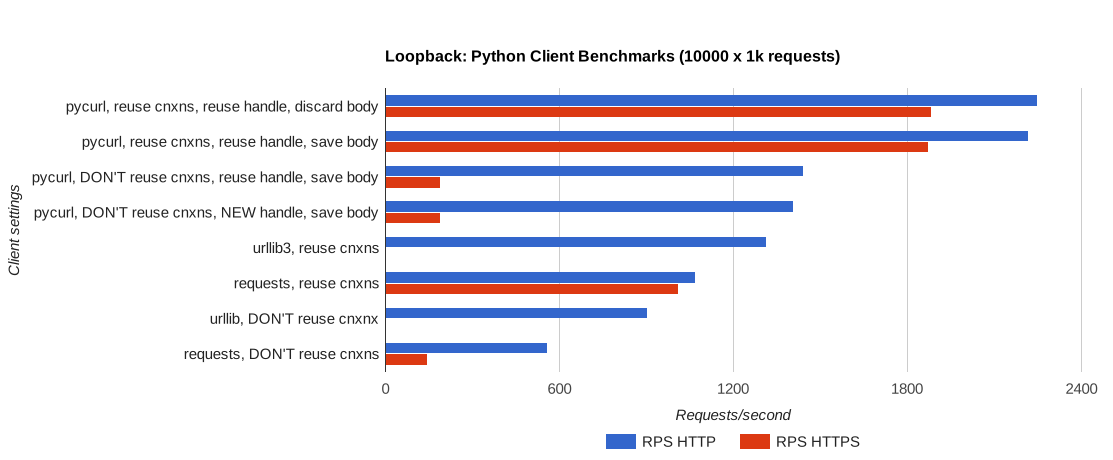
Loopback Test, running on 1 c4.large and making 1 kB requests against a local server
| Request Type, Loopback Tests | RPS HTTP | RPS HTTPS |
|---|---|---|
| requests, reuse cnxns: False, options: Default | 557.3155949917 | 146.2831102504 |
| requests, reuse cnxns: True, options: Default | 1070.6839916342 | 1008.8823802972 |
| pycurl, reuse cnxns: True, options: Reuse handle, don't save body | 2247.4874466776 | 1882.3429728577 |
| pycurl, reuse cnxns: True, options: Reuse handle, save response to new buffer | 2216.451621972 | 1872.04671333 |
| pycurl, reuse cnxns: False, options: Reuse handle, save response to new buffer | 1442.8205461881 | 189.3355681677 |
| pycurl, reuse cnxns: False, options: New handle, save response to new buffer | 1406.1161485093 | 188.6946363771 |
| urllib3, reuse cnxns: True, options: Default | 1314.916432521 | |
| urllib, reuse cnxns: False, options: Default | 902.8386556557 |
Detailed CPU TIME Loopback Test, running on 1 c4.large with different request sizes
| Response_size | Requests Time (no cnxn reuse) | pyCurl Time (no cnxn reuse) | Requests Time (cnxn reuse) | pyCurl Time (cnxn reuse) |
|---|---|---|---|---|
| 4 | 10.780000000000001 | 1.6500000000000004 | 5.259999999999998 | 0.7300000000000004 |
| 512 | 11.330000000000002 | 1.6499999999999986 | 5.300000000000004 | 0.7399999999999949 |
| 1024 | 11.420000000000002 | 1.6500000000000057 | 5.329999999999998 | 0.7399999999999949 |
| 2048 | 11.400000000000006 | 1.6800000000000068 | 5.310000000000002 | 0.769999999999996 |
| 4096 | 11.400000000000006 | 1.6700000000000017 | 5.329999999999998 | 0.7700000000000102 |
| 8192 | 11.61999999999999 | 1.6899999999999977 | 5.480000000000004 | 0.769999999999996 |
| 16384 | 11.799999999999997 | 1.7800000000000011 | 5.609999999999985 | 0.9099999999999966 |
| 32768 | 13.080000000000013 | 1.8700000000000045 | 6.0 | 1.0600000000000023 |
| 65536 | 15.370000000000005 | 2.640000000000015 | 6.429999999999978 | 1.6900000000000261 |
| 131072 | 19.789999999999992 | 3.3700000000000045 | 9.0 | 3.1399999999999864 |
Full data for server-to-server tests: available in the Google Sheet under the AWS-to-AWS benchmark tab.
Also available in the new-aws-results folder.
Miscellanea
build-docker.sh was used to generate the docker image ./run-docker.sh will launch the container
Caveats
- This is only one system type and one operating system tested
- I am only trying GET requests to a sample API
- I've taken pains to generate data in as scientific and clean a manner as I can reasonably manage (reporting stats over 10k requests), but do not collect per-execution data so there are no error bars
- HTTPS performance should be taken with an extra grain of salt and only used for rough comparison:
- Many different options and configurable settings exist for HTTPS, all with varying performance
- There are also multiple TLS/SSL implementations available for libcurl, for sanity's sake I am only testing the default one.
- For similar reasons I'm not testing pyopenssl use in requests (in addition to base requests settings)
What's inside
Setup instructions, benchmark runner usage, results tables, 6 SVG graphs, and caveats across 12 sections.
Change this for your project
- Replace
svanoort/client-flask-demo:2.0with your own Docker image or API - Replace
http://host:port/in benchmark command with your test server URL - Replace
c4.largeinstance references with your own hardware specs
Where it goes
Keep it in your repository where the agent or team that needs it will read it.
Worth borrowing
- Using timeit to separate library loading from actual request timing
- Reporting results over 10,000 sequential requests to reduce noise
- Including both loopback and cross-instance tests to isolate network effects
Related Documents
OABench: Benchmarking Large Language Models on the Brazilian Bar Examination
Evaluates 11 LLMs on the Brazilian Bar Exam's first phase, reporting accuracy, cost, and latency across three exam editions.
Trust: A Multi-Level Exploration and Framework
Explores trust definitions from simple to scholarly, includes mathematical models, code, and resources for AI trustworthiness.
Ruby 2.7
Documents every language, core class, and standard library change in Ruby 2.7 with code examples and rationale.
agentmark — Benchmark AI Coding Agents on Your Codebase
Defines an open-source Python CLI that benchmarks AI coding agents on a user's own codebase and tasks, producing a terminal comparison report of pass/fail, time, cost, tokens, and LLM calls.