
Create a list that will hold your chunks
Walks through document chunking strategies for RAG pipelines, from basic character splitting to recursive and token-based methods, with code examples in LangChain.
What this file does
Walks through document chunking strategies for RAG pipelines, from basic character splitting to recursive and token-based methods, with code examples in LangChain.
When to use it
- You are building a RAG pipeline and need to split documents into chunks
- You want to understand different chunking strategies and their trade-offs
- You need to choose between character, recursive, or token-based splitters
- You are new to LangChain and want to see how text splitters work
Assumes this stack
Document Splitting
Once the data is loaded, the next step in the indexing pipeline is splitting the documents into manageable chunks. The question arises around the need of this step. Why is splitting of documents necessary? There are two reasons for that:
- Ease of Search Large chunks of data are harder to search over. Splitting data into smaller chunks therefore helps in better indexation.
- Context Window Size LLMs allow only a finite number of tokens in prompts and completions. The context therefore cannot be larger than what the context window permits.
Chunking Strategies
While splitting documents into chunks might sound a simple concept, there are certain best practices that researchers have discovered. There are a few considerations that may influence the overall chunking strategy.
- Nature of Content Consider whether you are working with lengthy documents, such as articles or books, or shorter content like tweets or instant messages. The chosen model for your goal and, consequently, the appropriate chunking strategy depend on your response.
- Embedding Model being Used We will discuss embeddings in detail in the next section but the choice of embedding model also dictates the chunking strategy. Some models perform better with chunks of specific length
- Expected Length and Complexity of User Queries Determine whether the content will be short and specific or long and complex. This factor will influence the approach to chunking the content, ensuring a closer correlation between the embedded query and the embedded chunks
- Application Specific Requirements The application use case, such as semantic search, question answering, summarization, or other purposes will also determine how text should be chunked. If the results need to be input into another language model with a token limit, it is crucial to factor this into your decision-making process.
Chunking Methods
Depending on the aforementioned considerations, a number of text splitters are available. At a broad level, text splitters operate in the following manner:
- Divide the text into compact,
semantically meaningful units, often sentences. - Merge these smaller units into larger chunks until a specific size is achieved, measured by a
length function. - Upon reaching the predetermined size, treat that chunk as an independent segment of text. Thereafter, start creating a new text chunk with
some degree of overlapto maintain contextual continuity between chunks.
Two areas to focus on, therefore are:
- How the text is split?
- How the chunk size is measured?
Levels Of Text Splitting
- Character Splitting - Simple static character chunks of data
- Recursive Character Text Splitting - Recursive chunking based on a list of separators
- Document Specific Splitting - Various chunking methods for different document types (PDF, Python, Markdown)
- Semantic Splitting - Embedding walk based chunking
- Agentic Splitting - Experimental method of splitting text with an agent-like system. Good for if you believe that token cost will trend to $0.00
- Alternative Representation Chunking + Indexing - Derivative representations of your raw text that will aid in retrieval and indexing
A very common approach is where we pre-determine the size of the text chunks.
Additionally, we can specify the overlap between chunks (Remember, overlap is
preferred to maintain contextual continuity between chunks).
This approach is simple and cheap and is, therefore, widely used. Let’s look at
some examples:
Split by Character
In this approach, the text is split based on a character and the chunk size is measured by the number of characters.
Example text : alice_in_wonderland.txt (the book in .txt format) using LangChain’s CharacterTextSplitter
Character Splitting
Character splitting is the most basic form of splitting up your text. It is the process of simply dividing your text into N-character sized chunks regardless of their content or form.
This method isn't recommended for any applications - but it's a great starting point for us to understand the basics.
- Pros: Easy & Simple
- Cons: Very rigid and doesn't take into account the structure of your text
Concepts to know:
- Chunk Size - The number of characters you would like in your chunks. 50, 100, 100,000, etc.
- Chunk Overlap - The amount you would like your sequential chunks to overlap. This is to try to avoid cutting a single piece of context into multiple pieces. This will create duplicate data across chunks.
First let's get some sample text
In [1]:
text = "This is the text I would like to chunk up. It is the example text for this exercise"
Then let's split this text manually
In [2]:
# Create a list that will hold your chunks
chunks = []

chunk_size = 35 # Characters

# Run through the a range with the length of your text and iterate every chunk_size you want
for i in range(0, len(text), chunk_size):
    chunk = text[i:i + chunk_size]
    chunks.append(chunk)
chunks
Out[2]:
['This is the text I would like to ch',
 'unk up. It is the example text for ',
 'this exercise']
Congratulations! You just split your first text. We have long way to go but you're already making progress. Feel like a language model practitioner yet?
When working with text in the language model world, we don't deal with raw strings. It is more common to work with documents. Documents are objects that hold the text you're concerned with, but also additional metadata which makes filtering and manipulation easier later.
We could convert our list of strings into documents, but I'd rather start from scratch and create the docs.
Let's load up LangChains CharacterSplitter to do this for us
In [3]:
from langchain.text_splitter import CharacterTextSplitter
Then let's load up this text splitter. I need to specify chunk overlap and separator or else we'll get funk results. We'll get into those next
In [4]:
text_splitter = CharacterTextSplitter(chunk_size = 35, chunk_overlap=0, separator='', strip_whitespace=False)
Then we can actually split our text via create_documents. Note: create_documents expects a list of texts, so if you just have a string (like we do) you'll need to wrap it in []
In [5]:
text_splitter.create_documents([text])
Out[5]:
[Document(page_content='This is the text I would like to ch'),
 Document(page_content='unk up. It is the example text for '),
 Document(page_content='this exercise')]
Notice how this time we have the same chunks, but they are in documents. These will play nicely with the rest of the LangChain world. Also notice how the trailing whitespace on the end of the 2nd chunk is missing. This is because LangChain removes it, see this line for where they do it. You can avoid this with strip_whitespace=False
Chunk Overlap & Separators
Chunk overlap will blend together our chunks so that the tail of Chunk #1 will be the same thing and the head of Chunk #2 and so on and so forth.
This time I'll load up my overlap with a value of 4, this means 4 characters of overlap
In [6]:
text_splitter = CharacterTextSplitter(chunk_size = 35, chunk_overlap=4, separator='')
In [7]:
text_splitter.create_documents([text])
Out[7]:
[Document(page_content='This is the text I would like to ch'),
 Document(page_content='o chunk up. It is the example text'),
 Document(page_content='ext for this exercise')]
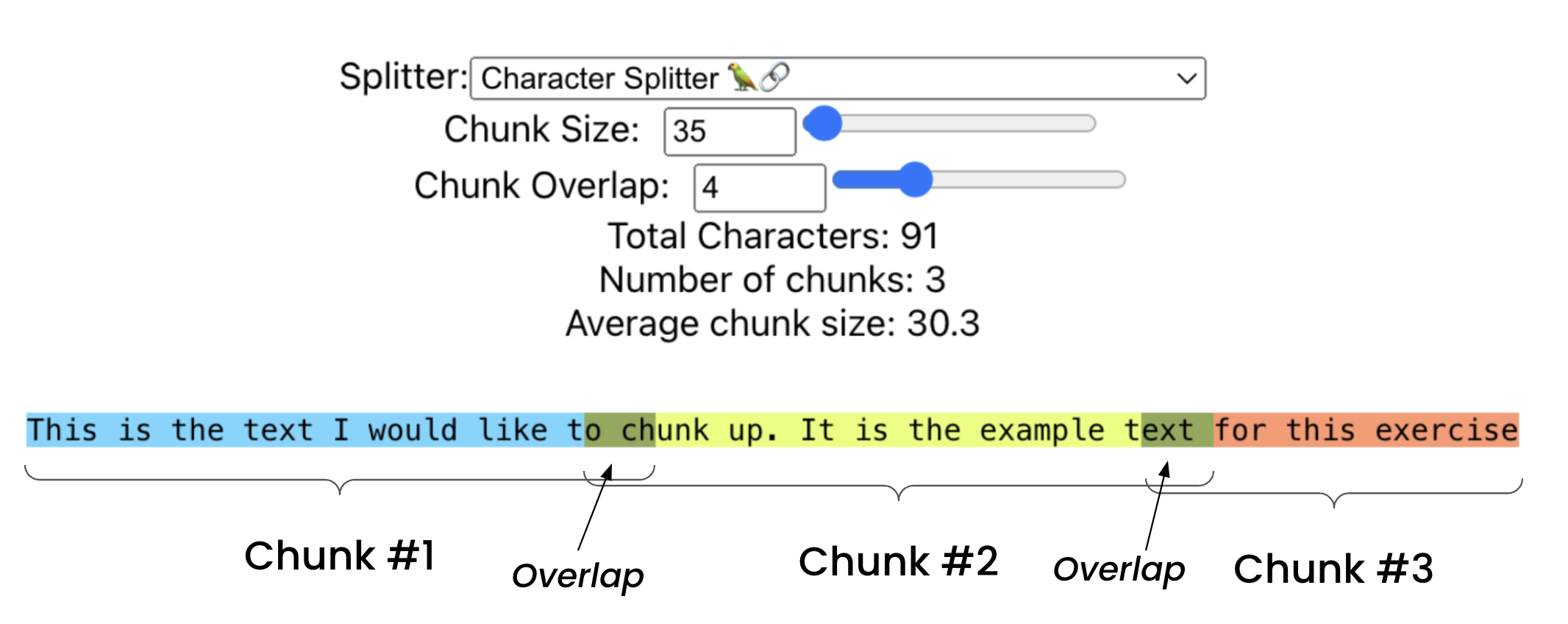
Notice how we have the same chunks, but now there is overlap between 1 & 2 and 2 & 3. The 'o ch' on the tail of Chunk #1 matches the 'o ch' of the head of Chunk #2.
Check ChunkViz.com to help show it. Here's what the same text looks like.
static/ChunkVizCharacterRecursive.png
Check out how we have three colors, with two overlaping sections.
Separators are character(s) sequences you would like to split on. Say you wanted to chunk your data at ch, you can specify it.
In [8]:
text_splitter = CharacterTextSplitter(chunk_size = 35, chunk_overlap=0, separator='ch')
In [9]:
text_splitter.create_documents([text])
Out[9]:
[Document(page_content='This is the text I would like to'),
 Document(page_content='unk up. It is the example text for this exercise')]
Recursive Character Text Splitting
Let's jump a level of complexity.
The problem with Level #1 is that we don't take into account the structure of our document at all. We simply split by a fix number of characters.
The Recursive Character Text Splitter helps with this. With it, we'll specify a series of separatators which will be used to split our docs.
You can see the default separators for LangChain here. Let's take a look at them one by one.
- "\n\n" - Double new line, or most commonly paragraph breaks
- "\n" - New lines
- " " - Spaces
- "" - Characters
I'm not sure why a period (".") isn't included on the list, perhaps it is not universal enough? If you know, let me know.
This is the swiss army knife of splitters and my first choice when mocking up a quick application. If you don't know which splitter to start with, this is a good first bet.
Let's try it out
In [16]:
from langchain.text_splitter import RecursiveCharacterTextSplitter
Then let's load up a larger piece of text
In [17]:
text = """
One of the most important things I didn't understand about the world when I was a child is the degree to which the returns for performance are superlinear.

Teachers and coaches implicitly told us the returns were linear. "You get out," I heard a thousand times, "what you put in." They meant well, but this is rarely true. If your product is only half as good as your competitor's, you don't get half as many customers. You get no customers, and you go out of business.

It's obviously true that the returns for performance are superlinear in business. Some think this is a flaw of capitalism, and that if we changed the rules it would stop being true. But superlinear returns for performance are a feature of the world, not an artifact of rules we've invented. We see the same pattern in fame, power, military victories, knowledge, and even benefit to humanity. In all of these, the rich get richer. [1]
Now let's make our text splitter
In [18]:
text_splitter = RecursiveCharacterTextSplitter(chunk_size = 65, chunk_overlap=0)
In [19]:
text_splitter.create_documents([text])
Out[19]:
[Document(page_content="One of the most important things I didn't understand about the"),
 Document(page_content='world when I was a child is the degree to which the returns for'),
 Document(page_content='performance are superlinear.'),
 Document(page_content='Teachers and coaches implicitly told us the returns were linear.'),
 Document(page_content='"You get out," I heard a thousand times, "what you put in." They'),
 Document(page_content='meant well, but this is rarely true. If your product is only'),
 Document(page_content="half as good as your competitor's, you don't get half as many"),
 Document(page_content='customers. You get no customers, and you go out of business.'),
 Document(page_content="It's obviously true that the returns for performance are"),
 Document(page_content='superlinear in business. Some think this is a flaw of'),
 Document(page_content='capitalism, and that if we changed the rules it would stop being'),
 Document(page_content='true. But superlinear returns for performance are a feature of'),
 Document(page_content="the world, not an artifact of rules we've invented. We see the"),
 Document(page_content='same pattern in fame, power, military victories, knowledge, and'),
 Document(page_content='even benefit to humanity. In all of these, the rich get richer.'),
 Document(page_content='[1]')]
Notice how now there are more chunks that end with a period ".". This is because those likely are the end of a paragraph and the splitter first looks for double new lines (paragraph break).
Once paragraphs are split, then it looks at the chunk size, if a chunk is too big, then it'll split by the next separator. If the chunk is still too big, then it'll move onto the next one and so forth.
For text of this size, let's split on something bigger.
In [20]:
text_splitter = RecursiveCharacterTextSplitter(chunk_size = 450, chunk_overlap=0)
text_splitter.create_documents([text])
Out[20]:
[Document(page_content="One of the most important things I didn't understand about the world when I was a child is the degree to which the returns for performance are superlinear."),
 Document(page_content='Teachers and coaches implicitly told us the returns were linear. "You get out," I heard a thousand times, "what you put in." They meant well, but this is rarely true. If your product is only half as good as your competitor\'s, you don\'t get half as many customers. You get no customers, and you go out of business.'),
 Document(page_content="It's obviously true that the returns for performance are superlinear in business. Some think this is a flaw of capitalism, and that if we changed the rules it would stop being true. But superlinear returns for performance are a feature of the world, not an artifact of rules we've invented. We see the same pattern in fame, power, military victories, knowledge, and even benefit to humanity. In all of these, the rich get richer. [1]")]
For this text, 450 splits the paragraphs perfectly. You can even switch the chunk size to 469 and get the same splits. This is because this splitter builds in a bit of cushion and wiggle room to allow your chunks to 'snap' to the nearest separator.
Let's view this visually

Split by Tokens
For those well versed with Large Language Models, tokens is not a new concept. All LLMs have a token limit in their respective context windows which we cannot exceed. It is therefore a good idea to count the tokens while creating chunks. All LLMs also have their tokenizers.
Tiktoken Tokenizer
Tiktoken tokenizer has been created by OpenAI for their family of models. Using
this strategy, the split still happens based on the character. However, the length
of the chunk is determined by the number of tokens.
example: LangChain’s TokenTextSplitter
Tokenizers are helpful in creating chunks that sit well in the context window of an LLM
Hugging Face Tokenizer
Hugging Face has become the go-to platform for anyone building apps using LLMs or even other models. All models available via Hugging Face are also accompanied by their tokenizers.
example: GPT2TokenizerFast
https://huggingface.co/docs/transformers/tokenizer_summary
Other Tokenizer
Other libraries like Spacy, NLTK and SentenceTransformers also provide splitters
Things to Keep in Mind
-
Ensure data quality by preprocessing it before determining the optimal chunk size. Examples include removing HTML tags or eliminating specific elements that contribute noise, particularly when data is sourced from the web.
-
Consider factors such as content nature (e.g., short messages or lengthy documents), embedding model characteristics, and capabilities like token limits in choosing chunk sizes. Aim for a balance between preserving context and maintaining accuracy.
-
Test different chunk sizes. Create embeddings for the chosen chunk sizes and store them in your index or indices. Run a series of queries to evaluate quality and compare the performance of different chunk sizes.
ref: https://github.com/FullStackRetrieval-com/RetrievalTutorials/blob/main/tutorials/LevelsOfTextSplitting/5_Levels_Of_Text_Splitting.ipynb https://www.linkedin.com/in/abhinav-kimothi/
What's inside
5 chunking methods explained, 9 code cells with LangChain examples, 2 visual diagrams, and a list of considerations
Change this for your project
- Replace
alice_in_wonderland.txtwith your own text file path - Replace the example text in
text = """..."""with your own content - Replace
chunk_size = 35andchunk_overlap=0with values suited to your use case - Replace the repository URLs like
https://github.com/FullStackRetrieval-com/RetrievalTutorials/...with your own references
Where it goes
Keep it in your repository where the agent or team that needs it will read it.
Worth borrowing
- Use recursive character splitting as a default starting point when unsure which splitter to choose
- Test multiple chunk sizes and evaluate retrieval quality before settling on one
Related Documents
基于命题分块以增强RAG
Implements proposition chunking for RAG: decomposes documents into atomic facts, evaluates quality, and compares retrieval against standard chunking.
TileMap Chunk Manager
Divides a large tilemap into fixed-size chunks, loading and rendering only those visible to reduce memory and draw calls by over 99%.
Message Chunking for MCP stdio Transport
Explains macOS 64KB pipe write limit and provides a chunking layer for MCP stdio transport that splits and reassembles large messages transparently.
🤖 n8n AI Agent Mastery Course 2025
Serves as the main README for an n8n course repository, listing 10+ AI agent workflow projects with links to YouTube tutorials and Docker setup instructions.