
Retrieval Augmented Generation
Implements a local Retrieval-Augmented Generation system using LangChain, Ollama, and Hugging Face models to augment LLM responses with context from a vector store.
What this file does
Implements a local Retrieval-Augmented Generation system using LangChain, Ollama, and Hugging Face models to augment LLM responses with context from a vector store.
When to use it
- You want to build a RAG pipeline that runs entirely offline
- You need to augment LLM responses with domain-specific documents
- You prefer open-source models over paid APIs for retrieval augmentation
- You are following the LangChain RAG tutorial but want a local setup
Assumes this stack
Retrieval Augmented Generation
Our implementation of a RAG is inspired from this Lang Chain tutorial, but we ensured that everything is running locally using ollama or Hugging Face-based LLMs.
Python dependencies that are required for this module are mostly based on langchain: langchain, langchain-chroma, langchain-huggingface, langchain-ollama, and langgraph.
To install them, run the following command:
pip3 install langchain langchain-chroma langchain-huggingface langchain-ollama langgraph
How does RAG work?
Retrieval-Augmented Generation (RAG) is a framework that enhances generative models by providing additional and contextually relevant information to the LLMs context, in order to provide better responses to queries.
As highlighed in the following diagram, whenever we pose a question to a RAG agent, we perform a retrieval step that search in a database documents which likely contains information of the prompted question. Such content is fed, alongside with the question, to the LLM agent to provide a context-based response.
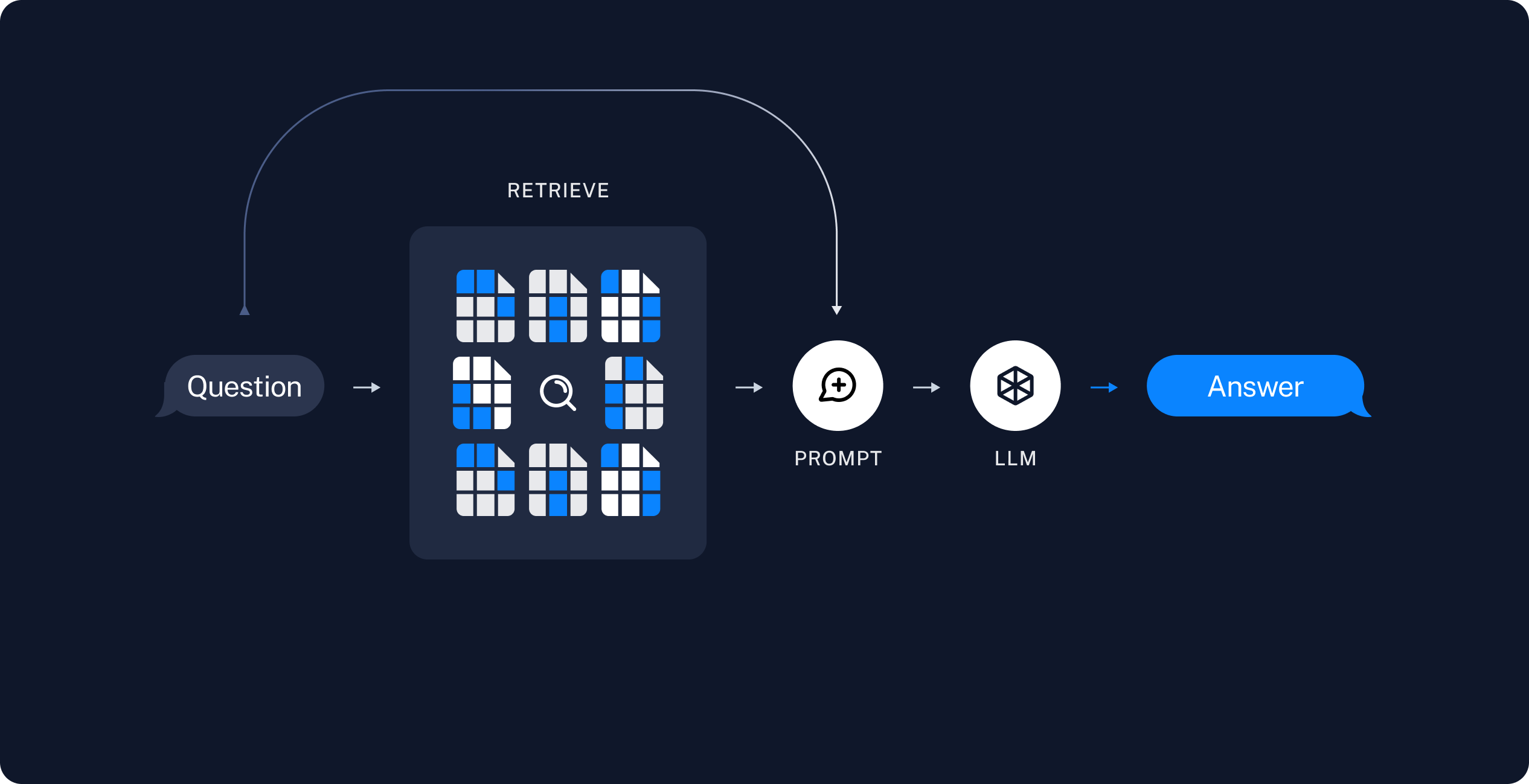
In practise, a RAG application encompasses the following steps:
- a document database (that can be generated offline) that contains relevant information that we may want to use to augment the LLMs response quality. Such databases are usually referred as vector stores;
- at runtime, when a question is prompted to the user, we firstly query the vector store for relevant documents. With this additional information, we can finally query the LLM with both the original question as well as the improved context.
Running the RAG application
To run the RAG application, simply call
python3 -m rag.rag
What's inside
1 diagram, 1 code block for dependencies, 1 code block for execution, 3 conceptual sections
Change this for your project
- Replace
rag.ragwith your own module path if different - Replace
ollamaorHugging Facemodel references with your chosen local models
Where it goes
Reference documentation for a retrieval pipeline. Keep with the ingestion or retrieval code it describes.
Related Documents
SUMMARY
Proposes three on-prem AI architectures, modular, hybrid, and fully local RAG, with hardware specs and vendor lists.
Retrieval & Prompts
Explains how CharMemory's extraction prompt and Vector Storage settings determine memory retrieval quality in SillyTavern.
Advanced RAG Techniques
Surveys advanced RAG architectures, Agentic, Corrective, Self-RAG, Graph RAG, RAPTOR, Multimodal, Temporal, with design trade-offs and decision guidance.
RFC-BLite: High-Performance Embedded Document Database for .NET
Specifies an embedded document database for.NET with zero-allocation I/O, C-BSON format, and ACID transactions.