
Back to Blog googleappsscript
 kubernetes
 ai
ai typescript
 showdev
 ai
ai agents
Monitoring Sheet Changes with SHEET and SHEETS Functions on Google Sheets
Tanaike April 8, 2026
0 views
Abstract Google Sheets recently introduced the SHEET and SHEETS functions. Because they...
## Abstract
Google Sheets recently introduced the `SHEET` and `SHEETS` functions. Because they automatically recalculate upon structural changes, developers can utilize them as custom triggers. This article demonstrates how to leverage these functions to detect sheet insertions, deletions, renames, and movements without requiring cumbersome installable triggers in Google Apps Script.
## Introduction
On February 23, 2026, Google introduced two pivotal built-in functions to Google Sheets: `SHEET` and `SHEETS` [Ref](https://workspaceupdates.googleblog.com/2026/02/two-new-functions-in-google-sheets.html). The `SHEET` function returns the index (sheet number) of a specified sheet or reference [Ref](https://support.google.com/docs/answer/16865249?dark=1&hl=en). Meanwhile, the `SHEETS` function provides the total count of sheets within a spreadsheet [Ref](https://support.google.com/docs/answer/16865347?dark=1&hl=en).
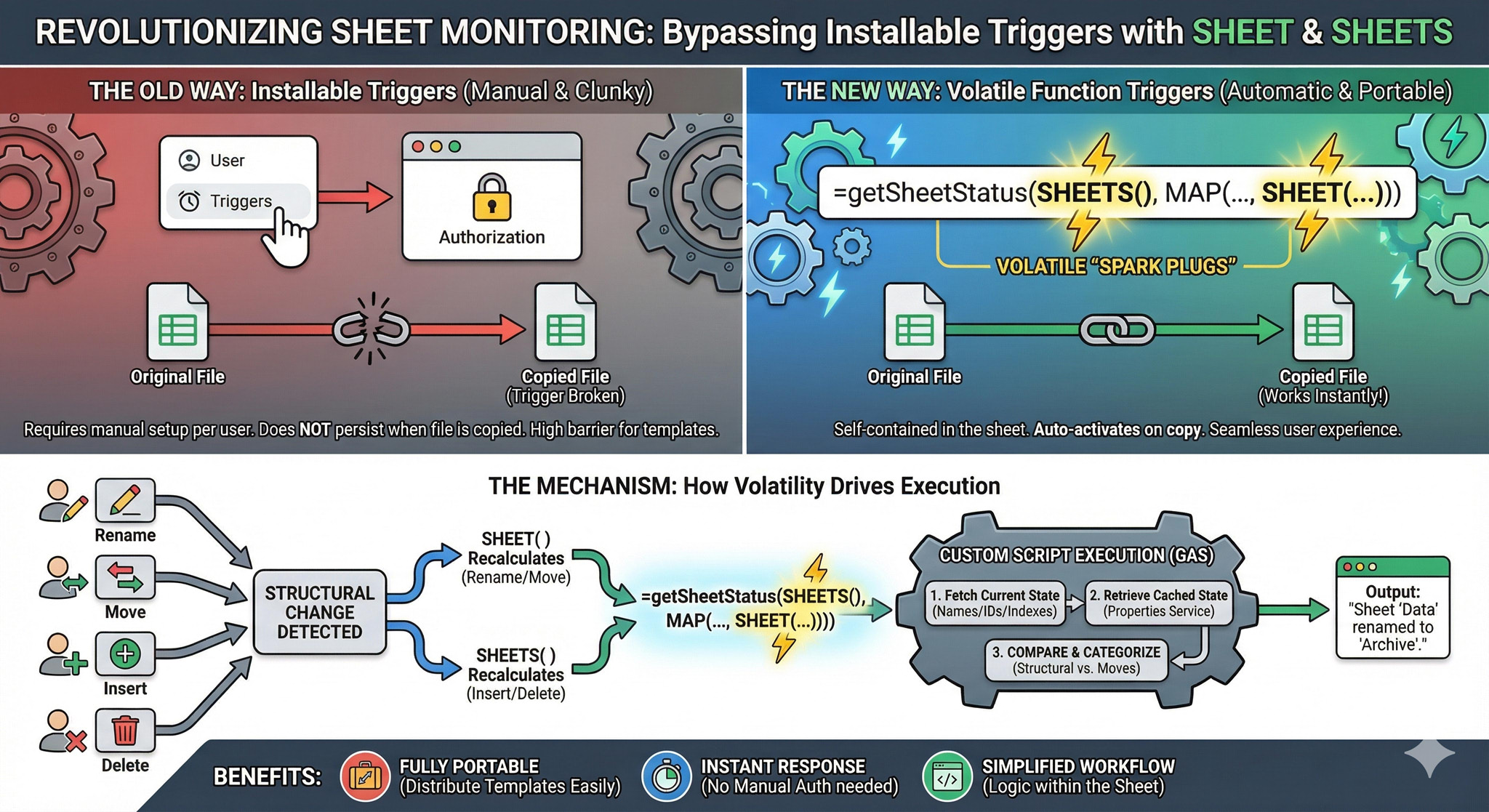
A critical technical characteristic of these functions is their volatility and automatic recalculation based on the spreadsheet's structural metadata. Specifically:
- `SHEET` triggers a recalculation when a sheet is renamed or its position is changed via drag-and-drop.
- `SHEETS` triggers a recalculation whenever a sheet is inserted, duplicated, or removed.
Historically, detecting such structural changes necessitated the use of an **installable OnChange trigger** in Google Apps Script (GAS). This posed a significant barrier for template distribution, as installable triggers require manual authorization by each user and do not persist through simple file copies.
By leveraging these new functions as "custom triggers," we can effectively bypass the need for installable triggers. When a custom function or formula containing `SHEET` or `SHEETS` recalculates, it serves as a catalyst for GAS execution. This enables the creation of self-contained spreadsheets where advanced sheet monitoring logic is activated immediately upon copying the file, significantly improving the user experience and portability of GAS-based solutions.
## Implementation Guide
### 1. Spreadsheet Initialization
Create a new Google Sheets file to serve as your testing environment.
### 2. Google Apps Script Configuration
Open the Google Apps Script editor bound to your new spreadsheet. Copy and paste the following script, replacing any default code, and save your project.
```javascript
/**
* Global constant defining the Script Properties storage key.
*/
const STORAGE_KEY = "SHEET_STATUS_CACHE";
/**
* Simple trigger to initialize the cached sheet metadata upon opening the spreadsheet.
*/
function onOpen() {
updateStoredSheetData_();
}
/**
* Custom function wrapper to retrieve an array of all current sheet names.
*/
function getAllSheetNames() {
return SpreadsheetApp.getActiveSpreadsheet()
.getSheets()
.map((s) => s.getName());
}
/**
* Core custom function for detecting structural alterations.
* Priority: If any structural change (Add/Remove/Rename) occurs,
* subsequent "move" reports are suppressed to avoid noise from index shifting.
*/
function getSheetStatus(_trigger1, _trigger2, returnRawObject = false) {
const propService = PropertiesService.getScriptProperties();
const oldDataJson = propService.getProperty(STORAGE_KEY);
const ss = SpreadsheetApp.getActiveSpreadsheet();
const currentSheets = ss.getSheets();
const newData = currentSheets.map((s, i) => ({
name: s.getName(),
id: s.getSheetId(),
index: i + 1,
}));
if (!oldDataJson) {
updateStoredSheetData_();
return "Initial state recorded.";
}
const oldData = JSON.parse(oldDataJson).map((s, i) => ({
...s,
index: i + 1,
}));
// Categorize detected modifications into structural changes or simple index moves.
const { structural, moves } = detectCategorizedChanges_(oldData, newData);
// Persist the newly fetched metadata to Script Properties.
propService.setProperty(
STORAGE_KEY,
JSON.stringify(newData.map(({ name, id }) => ({ name, id }))),
);
// Evaluate which results to return based on change priority.
// Ignore index movement noise if a primary structural change (addition, removal, rename) occurred.
const finalDiffs = structural.length > 0 ? structural : moves;
if (finalDiffs.length === 0) return "No change";
if (returnRawObject) return JSON.stringify(finalDiffs);
return finalDiffs.map((d) => d.message).join("\n");
}
/**
* Retrieves current spreadsheet metadata and persists it to the properties cache.
*/
function updateStoredSheetData_() {
const ss = SpreadsheetApp.getActiveSpreadsheet();
const sheetData = ss.getSheets().map((s) => ({
name: s.getName(),
id: s.getSheetId(),
}));
PropertiesService.getScriptProperties().setProperty(
STORAGE_KEY,
JSON.stringify(sheetData),
);
return sheetData;
}
/**
* Differentiates between core structural changes and simple index shifts.
*/
function detectCategorizedChanges_(oldData, newData) {
const structural = [];
const moves = [];
const oldMap = new Map(oldData.map((s) => [s.id, s]));
const newMap = new Map(newData.map((s) => [s.id, s]));
// 1. Identify removed sheets (Structural change).
oldData.forEach((oldSheet) => {
if (!newMap.has(oldSheet.id)) {
structural.push({
type: "removed",
message: `"${oldSheet.name}" was removed.`,
});
}
});
// 2. Identify added, renamed, or repositioned sheets.
newData.forEach((newSheet) => {
const oldSheet = oldMap.get(newSheet.id);
if (!oldSheet) {
// Handle added sheets (Structural change).
structural.push({
type: "added",
message: `"${newSheet.name}" was inserted at tab ${newSheet.index}.`,
});
} else {
const isRenamed = oldSheet.name !== newSheet.name;
const isMoved = oldSheet.index !== newSheet.index;
if (isRenamed) {
// Handle renamed sheets (Structural change).
structural.push({
type: "renamed",
message: `"${oldSheet.name}" was renamed to "${newSheet.name}".`,
});
} else if (isMoved) {
// Handle pure index movements (Non-structural change).
moves.push({
type: "moved",
message: `"${newSheet.name}" was moved from tab ${oldSheet.index} to ${newSheet.index}.`,
});
}
}
});
return { structural, moves };
}
/**
* Optional callback for installable OnChange triggers.
* If utilized, do not use the custom formula in the sheet.
*/
function onChange(e = {}) {
const { changeType } = e;
if (["OTHER", "INSERT_GRID", "REMOVE_GRID"].includes(changeType)) {
const res = getSheetStatus();
Browser.msgBox(res);
}
}
```
### 3. Applying the Custom Formula
Return to your Google Sheets interface. In the first sheet, copy and paste the following formula into cell `A1`:
```text
=getSheetStatus(SHEETS(),MAP(getAllSheetNames(),lambda(sheetname,SHEET(sheetname))))
```
### 4. Testing the Workflow
Once the formula is in place, the cell will actively monitor the document's structure. The demonstration below illustrates the expected behavior:
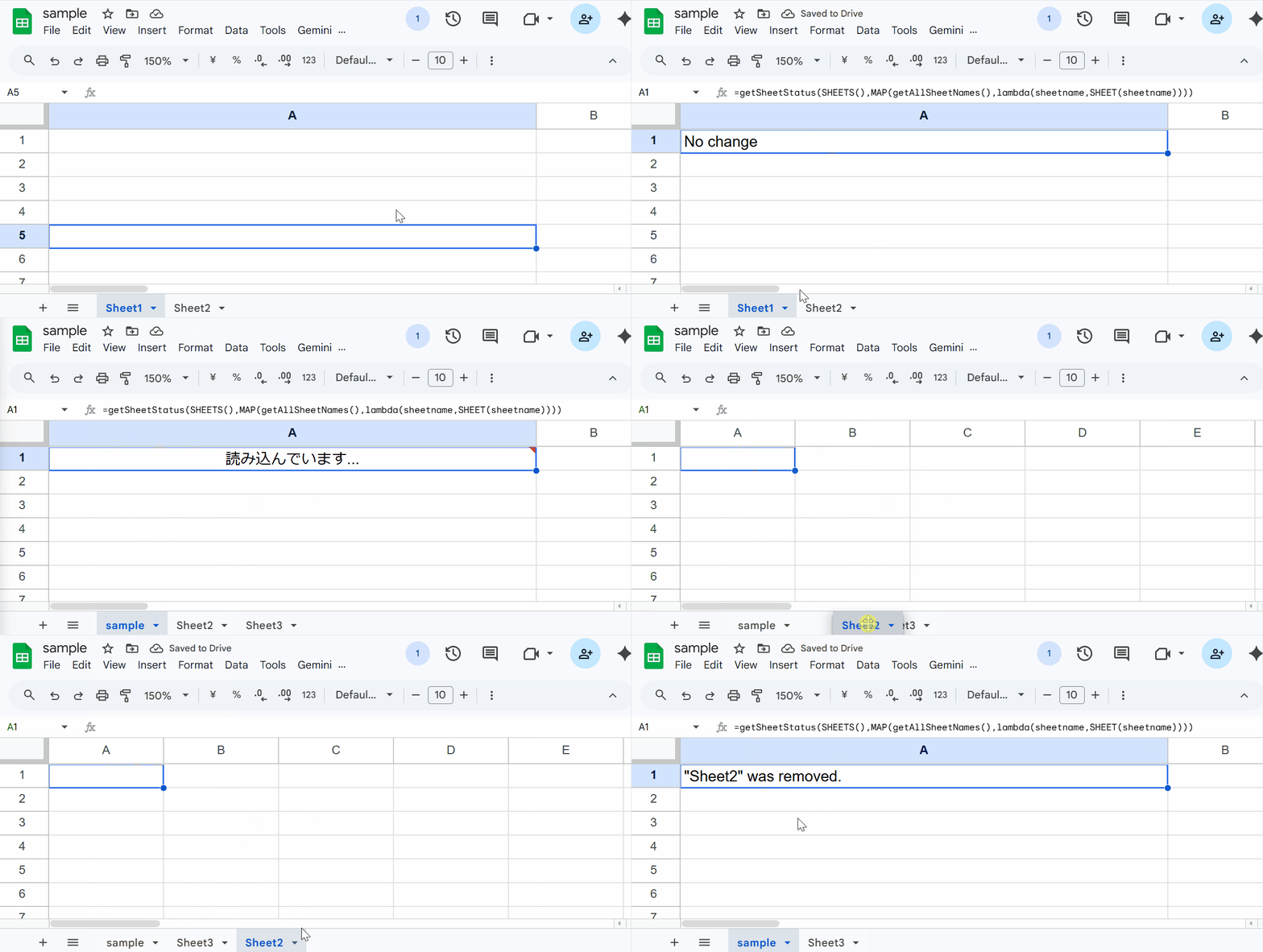
During the demonstration, the following actions trigger a status update in the cell:
1. Renaming an existing sheet.
2. Adding a new sheet to the workbook.
3. Changing the order (moving) of a sheet.
4. Deleting a sheet.
## Appendix: Using Traditional Triggers
If you prefer to use the traditional installable `onChange` trigger method, you can utilize the `onChange` function provided at the bottom of the script. In this scenario, you must manually bind the trigger to the `onChange` function via the Apps Script dashboard and **remove** the custom formula (`=getSheetStatus(...)`) from cell `A1`. The underlying logic handles the detection identically, routing the output to a browser message box instead of a cell.
## Summary
- The introduction of `SHEET` and `SHEETS` functions enables automatic formula recalculation based on structural metadata changes.
- These built-in functions can be passed into custom Google Apps Script functions to act as volatile execution triggers.
- This methodology eliminates the traditional dependency on installable `onChange` triggers for monitoring tab modifications.
- Removing installable triggers drastically improves script portability and the user experience when distributing spreadsheet templates.
- The provided script successfully categorizes and logs structural alterations versus simple index shifts for comprehensive monitoring.
Comments
More Blog
View allkubernetesMinimalist EKS: The Easy Way
Amazon EKS manages the Kubernetes control plane, but you remain responsible for provisioning the...
J
Joaquin MenchacaaiNever forget to enter the Stern Grove lottery again!
Browser automation with Playwright, Python, GitHub Actions, and Entire to auto-enter San Francisco Stern Grove concert lotteries each week!
L
Lizzie SiegletypescriptA Free Screenshot Editor That Never Uploads Your Image
A free screenshot and image editor that runs entirely in your browser. Keeping every edit reversible and handling big phone photos, in plain TypeScript and Canvas2D.
M
Martin StarkshowdevI built a CLI to break my highlights out of Apple Books
A macOS CLI + MCP server that exports Apple Books highlights to Markdown and gives AI assistants direct access to your reading notes.
A
Andrey KorchakaiA Developer's Guide to Agent Hooks in Antigravity CLI
Motivation To be quite honest, "Hooks"—the shell commands we trigger at specific points...
T
TanaikeagentsTactical vs. Strategic Agentic AI Development — A Playbook for Developers
The Strategic Engineer: Why Writing Code Is No Longer Your Most Valuable Skill ...
A
Adewumi Saheed Adewale