
Back to Blog rag
rag kubernetes
 ai
ai typescript
 showdev
 ai
ai agents
Migrating vector embeddings in production without downtime
Remigiusz Samborski April 13, 2026
0 views
In the fast-moving world of AI, models evolve rapidly. What was state-of-the-art six months ago is...
In the fast-moving world of AI, models evolve rapidly. What was state-of-the-art six months ago is now being surpassed by newer models. For a RAG system, this presents a significant challenge: vector embeddings are tied to the specific model that generated them.
If you want to upgrade your model, you can’t just start using the new one. Existing vectors in your database are incompatible with queries from the new model. A "naive" migration-shutting down the site, re-embedding everything, and restarting-means hours of potential downtime.
In this post, I'll show you how to execute a zero-downtime migration strategy using dual-column schemas and background processing.
If you haven't read [the previous post](https://dev.to/googleai/building-a-scalable-rag-backend-with-cloud-run-jobs-and-alloydb-59pk), I recommend starting there to understand the basics of building a RAG pipeline with [BigQuery](https://docs.cloud.google.com/bigquery/docs/introduction?utm_campaign=CDR_0x87fa8d40_default_b499342268&utm_medium=external&utm_source=blog), [Cloud Run Jobs](https://docs.cloud.google.com/run/docs/create-jobs?utm_campaign=CDR_0x87fa8d40_default_b499342268&utm_medium=external&utm_source=blog), [Vertex AI](https://docs.cloud.google.com/vertex-ai/generative-ai/docs/embeddings?utm_campaign=CDR_0x87fa8d40_default_b499342268&utm_medium=external&utm_source=blog), and [AlloyDB for PostgreSQL](https://docs.cloud.google.com/alloydb/docs/overview?utm_campaign=CDR_0x87fa8d40_default_b499342268&utm_medium=external&utm_source=blog).
In this post we will start off with a running system built in [the previous post](https://medium.com/@rsamborski/6ead93ca4aec), and I will show you how to:
* Implement the [Shadow Deployment pattern](https://devops.com/what-is-a-shadow-deployment/) with dual-column schemas
* Execute background backfilling using [Cloud Run Jobs](https://docs.cloud.google.com/run/docs/create-jobs?utm_campaign=CDR_0x87fa8d40_default_b499342268&utm_medium=external&utm_source=blog)
* Safely switch application logic without impacting search functionality
* Ensure data consistency and handle migration failures
Before we dive into the code, let's briefly discuss the concept of shadow deployment and how it supports the RAG application migration process.
## Shadow deployment with dual columns
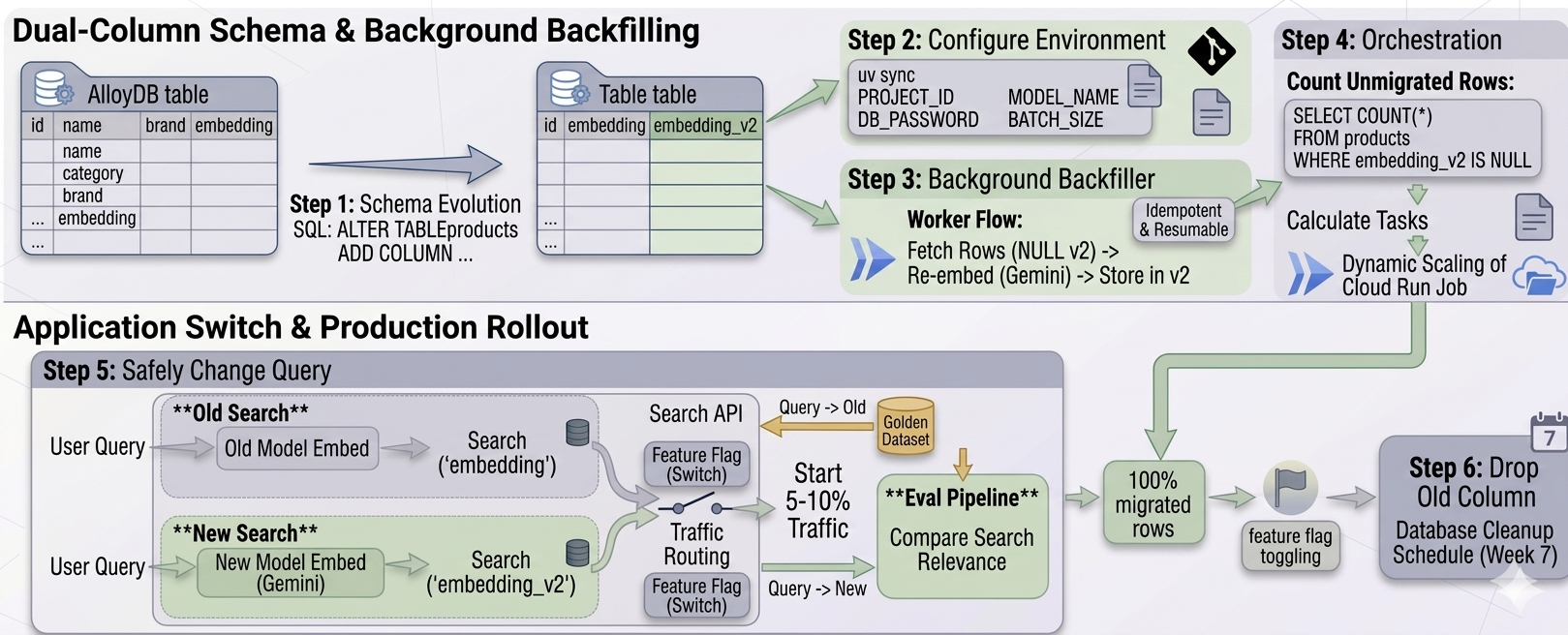
A robust way to migrate embeddings is to use a [Shadow Deployment pattern](https://devops.com/what-is-a-shadow-deployment/). Instead of replacing the existing vectors, you store the new vectors alongside them in a separate column. The migration process boils down to following major steps:
* Add a new column: We update our AlloyDB table to include `embedding_v2`.
* Backfill in the background: We run a migration job to populate `embedding_v2` for all existing rows.
* Switch: Once every row has a new vector, we update the application code to use the new model and the new column.
This strategy ensures that your live search functionality, which still uses the original `embedding` column, remains fully operational during the entire migration process.
## **Implementation**
Let's walk through the migration process step-by-step. All the code for this migration is available in the `03-migration` folder of the [RAG Migration Repository](https://github.com/rsamborski/rag-migration).
### Step 1: Schema evolution
First, we prepare the database. Using a simple SQL query, we add the new vector column. Because we are targeting an existing database, we connect via the [AlloyDB Auth Proxy](https://cloud.google.com/alloydb/docs/auth-proxy/overview?utm_campaign=CDR_0x87fa8d40_default_b499342268&utm_medium=external&utm_source=blog) and use `psql` to execute the query.
```shell
# Ensure your AlloyDB Auth proxy is running in another terminal window by running
# ./alloydb-auth-proxy projects/<PROJECT_ID>/locations/<LOCATION>/clusters/<CLUSTER>/instances/<INSTANCE> --port <PORT> --auto-iam-authn --public-ip
# Navigate to the migration directory
cd 03-migration
# Apply the schema change
psql -h 127.0.0.1 -p <PORT> -U postgres -d <DATABASE_NAME> -f 001_add_embedding_v2.sql
```
The content of `001_add_embedding_v2.sql` is straightforward:
```sql
ALTER TABLE products ADD COLUMN IF NOT EXISTS embedding_v2 VECTOR(768);
```
Since AlloyDB handles schema changes gracefully, this operation is near-instantaneous and doesn’t lock the table for reads. Your live API is completely unaffected.
*Note: In production you may want to run this query via your CI/CD pipeline.*
### Step 2: Configure the migration environment
We reuse the parallelization framework we built in [the previous post](https://medium.com/@rsamborski/6ead93ca4aec), but this time we configure the environment for the new model. The project uses `uv` for dependency management:
```shell
# Sync local dependencies (run it in 03-migration folder)
uv sync
# Set required environment variables
export GOOGLE_CLOUD_PROJECT="YOUR_PROJECT_ID"
export DB_PASSWORD="YOUR_ALLOYDB_PASSWORD"
export GEMINI_EMBEDDING_MODEL="gemini-embedding-001"
export GEMINI_EMBEDDING_DIMENSION=768
export BATCH_SIZE=1000
```
### Step 3: Background backfilling worker
The migration worker (`03-migration/main.py`) specifically targets rows where the new column is still empty. This makes the migration process **idempotent and resumable** \- if a task fails, you can just run it again.
```py
# snippet from 03-migration/main.py
# Fetch products where embedding_v2 is null, respecting offset
fetch_stmt = text("""
SELECT id, name, category, brand FROM products
WHERE embedding_v2 IS NULL
ORDER BY id
LIMIT :batch_size OFFSET :offset
""")
```
We deploy this worker as a Cloud Run Job. A convenient deploy script is provided in the repository which builds the Docker image and configures the job on GCP.
```shell
./infra/scripts/deploy_migration.sh
```
### Step 4: Orchestrating the migration
Instead of manually calculating the number of tasks to run, we use a Python orchestrator (`03-migration/orchestrator.py`) to query the database, calculate the remaining work, and dynamically scale the Cloud Run Job.
The orchestrator counts the number of unmigrated rows:
```py
# snippet from orchestrator.py logic
count_stmt = text("SELECT COUNT(*) FROM products WHERE embedding_v2 IS NULL")
unmigrated_count = session.execute(count_stmt).scalar()
total_tasks = math.ceil(unmigrated_count / batch_size)
```
Then, it triggers the Cloud Run Job via the Google Cloud SDK, passing the exact number of tasks required:
```shell
# Run the orchestrator to kick off the migration
uv run orchestrator.py
```
The job runs in the background, consuming rows and generating new embeddings without competing for critical resources with our live search API.
### Step 5: Safely changing the query
Once the orchestrator reports that 100% of rows have `embedding_v2` populated, we are ready for the switch. This happens entirely at the application layer (`02-ui`).
The search API code is updated to:
1. Use the `gemini-embedding-001` model to embed the user's search query.
2. Query the `embedding_v2` column in AlloyDB instead of `embedding`.
Congratulations 🎉 You have successfully migrated your entire vector database with zero downtime\!
### **Production best practices: evals and feature flags**
While a direct code swap works for a simple demonstration, in a real-world production environment, you should avoid an abrupt 100% cutover. Instead, you should leverage the fact that both vector representations exist simultaneously in your database to roll out safely:
1. **Evaluation pipeline:** Before exposing the new model to customers, build an eval pipeline. Take a golden dataset of your most common or critical search queries and run them against both the old (`embedding`) and new (`embedding_v2`) columns. Compare the relevance of the retrieved results to ensure the new model actually improves the search experience.
2. **Feature flags for traffic routing:** Wrap the application-layer switch in a feature flag. Start by routing a small percentage of your traffic (e.g., 5% or 10%) to the new `embedding_v2` logic. Monitor your application metrics, click-through rates, and error logs.
Because the migration happened in the background, this dual-state makes it trivial to run A/B tests or instantly rollback by toggling the feature flag if the new model introduces unexpected regressions. Once you're fully ramped up to 100% and verified the new performance, the old `embedding` column can be safely dropped in a future database cleanup.
### See it in action
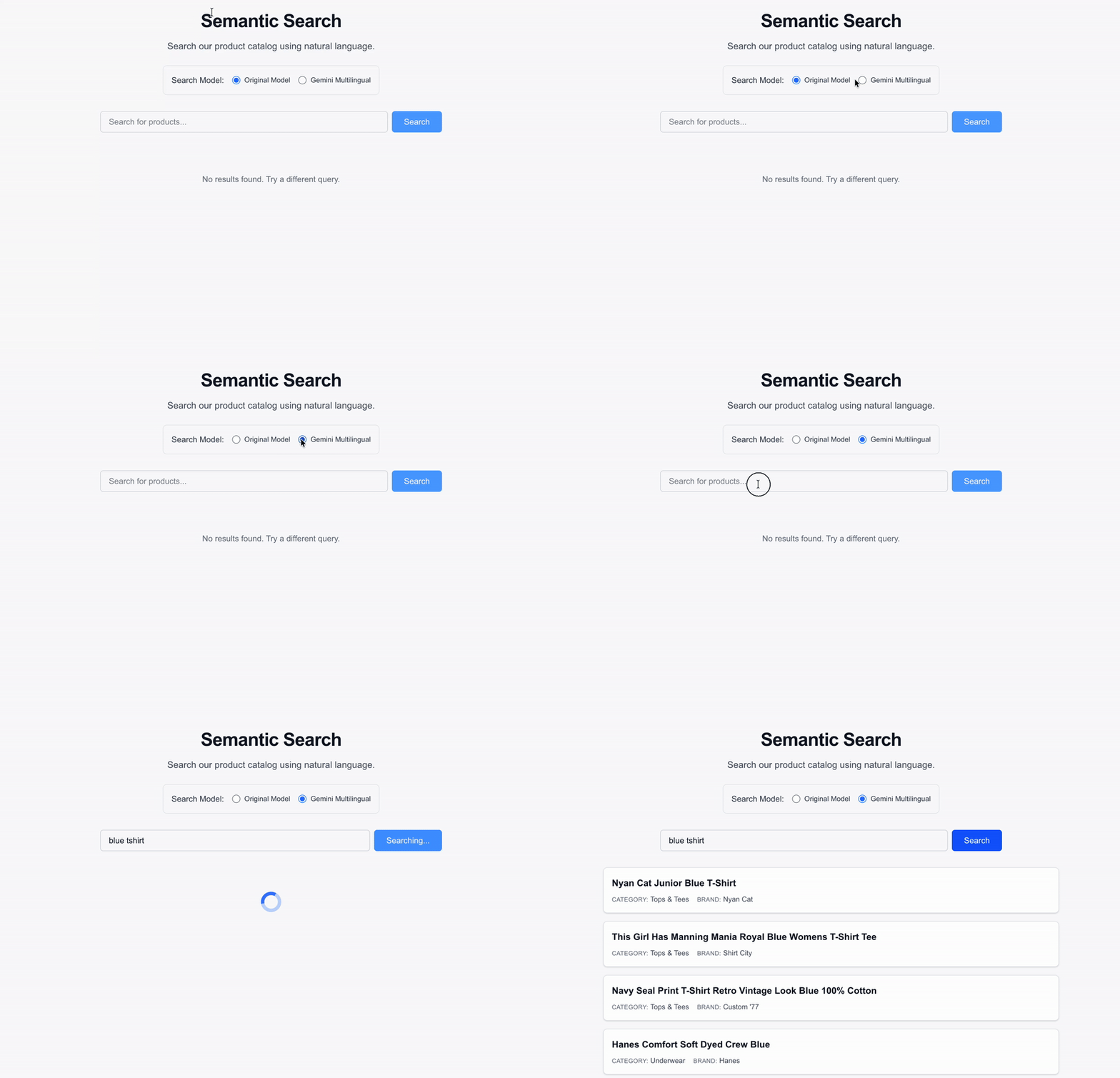
*The semantic search UI seamlessly returns results using the new gemini-embedding-001 model without any disruption to the user experience.*
## **Summary**
AI infrastructure is about more than just the initial build; it’s about designing for evolution. By using shadow deployments, you ensure your RAG system can always stay at the cutting edge of model performance without sacrificing availability.
Ready to take it further?
* Check out the [full source code on GitHub](https://github.com/rsamborski/rag-migration).
* [Learn more about Cloud Run Jobs](https://docs.cloud.google.com/run/docs/create-jobs?utm_campaign=CDR_0x87fa8d40_default_b499342268&utm_medium=external&utm_source=blog).
* [Learn more about AlloyDB and pgvector](https://docs.cloud.google.com/alloydb/docs/pgvector?utm_campaign=CDR_0x87fa8d40_default_b499342268&utm_medium=external&utm_source=blog).
* [Learn more about Embeddings APIs on VertexAI](https://docs.cloud.google.com/vertex-ai/generative-ai/docs/embeddings?utm_campaign=CDR_0x87fa8d40_default_b499342268&utm_medium=external&utm_source=blog).
In my next post, we’ll look at the Developer Experience \- how I used [Gemini CLI](https://geminicli.com/) and the [Conductor extension](https://github.com/gemini-cli-extensions/conductor) to build and manage this entire multi-phase project.
## **Thanks for reading**
If you found this article helpful, please consider adding 50 claps to this post by pressing and holding the clap button 👏 This will help others find it. You can also share it with your friends on socials.
I'm always eager to share my learnings or chat with fellow developers and AI enthusiasts, so feel free to follow me on [LinkedIn](https://www.linkedin.com/in/remigiusz-samborski/), [X](https://x.com/RemikSamborski) or [Bluesky](https://bsky.app/profile/rsamborski.bsky.social).
Comments
More Blog
View allkubernetesMinimalist EKS: The Easy Way
Amazon EKS manages the Kubernetes control plane, but you remain responsible for provisioning the...
J
Joaquin MenchacaaiNever forget to enter the Stern Grove lottery again!
Browser automation with Playwright, Python, GitHub Actions, and Entire to auto-enter San Francisco Stern Grove concert lotteries each week!
L
Lizzie SiegletypescriptA Free Screenshot Editor That Never Uploads Your Image
A free screenshot and image editor that runs entirely in your browser. Keeping every edit reversible and handling big phone photos, in plain TypeScript and Canvas2D.
M
Martin StarkshowdevI built a CLI to break my highlights out of Apple Books
A macOS CLI + MCP server that exports Apple Books highlights to Markdown and gives AI assistants direct access to your reading notes.
A
Andrey KorchakaiA Developer's Guide to Agent Hooks in Antigravity CLI
Motivation To be quite honest, "Hooks"—the shell commands we trigger at specific points...
T
TanaikeagentsTactical vs. Strategic Agentic AI Development — A Playbook for Developers
The Strategic Engineer: Why Writing Code Is No Longer Your Most Valuable Skill ...
A
Adewumi Saheed Adewale