
Back to Blog claude
 kubernetes
 ai
ai typescript
 showdev
 ai
ai agents
Claude skills vs Commands
Neha Sharma April 14, 2026
0 views
If you are using Claude for “vibe coding”, you may have come across Skills and Commands. Both are...
If you are using Claude for “vibe coding”, you may have come across Skills and Commands. Both are mechanisms to automate workflows, but they differ significantly in how they are invoked and used.
> AI usage for this blog: This blog was human written. I used AI for clarity, image creation, and Grammar check
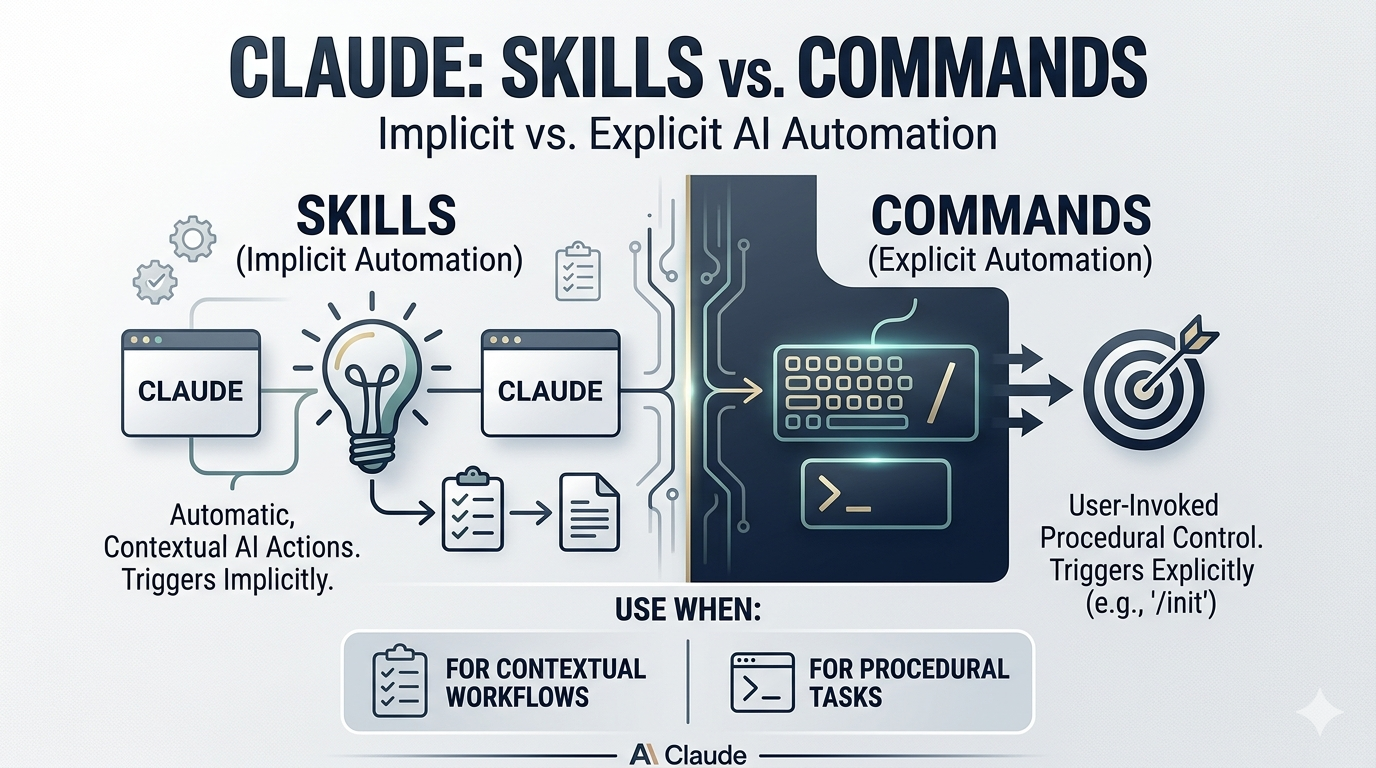
This blog provides a concise overview and a practical comparison.
## Skills.md
Skills are reusable instruction sets that Claude can apply implicitly. They are typically defined as .md files containing structured instructions for specific tasks.
### Skills characteristics:
1. Implicitly available: Claude loads and considers skills without explicit invocation
2. Context-driven execution: Triggered based on natural language prompts
3. Reusable patterns: Ideal for consistent workflows (e.g., accessibility reviews, code audits)
_eg: If you define an accessibility skill, a prompt like: “Review this for accessibility” ._ will automatically trigger the skill without needing any special syntax.
> Accessibility skill — https://github.com/Neha/check-fix-accessibility/blob/main/review-fix-a11y/SKILL.md
Skills are effectively preloaded context. They reduce the need for repeated prompt engineering. They can be scoped to avoid always being active (depending on configuration)
### Starter template:
[https://github.com/Neha/skill-starter-template
](https://github.com/Neha/skill-starter-template
)
## Commands
Commands are explicitly invoked automation scripts. They are also defined as .md files, but unlike skills, they are only executed when explicitly called. In Claude, there are inbuilt commands eg: /init, /compact, /clearetc. One can build own custom commands too.
### Commands Characteristics
1. Explicit invocation: Triggered using /
2. Deterministic execution: Runs only when called
3. Scoped usage: Can be local, global, or system-level
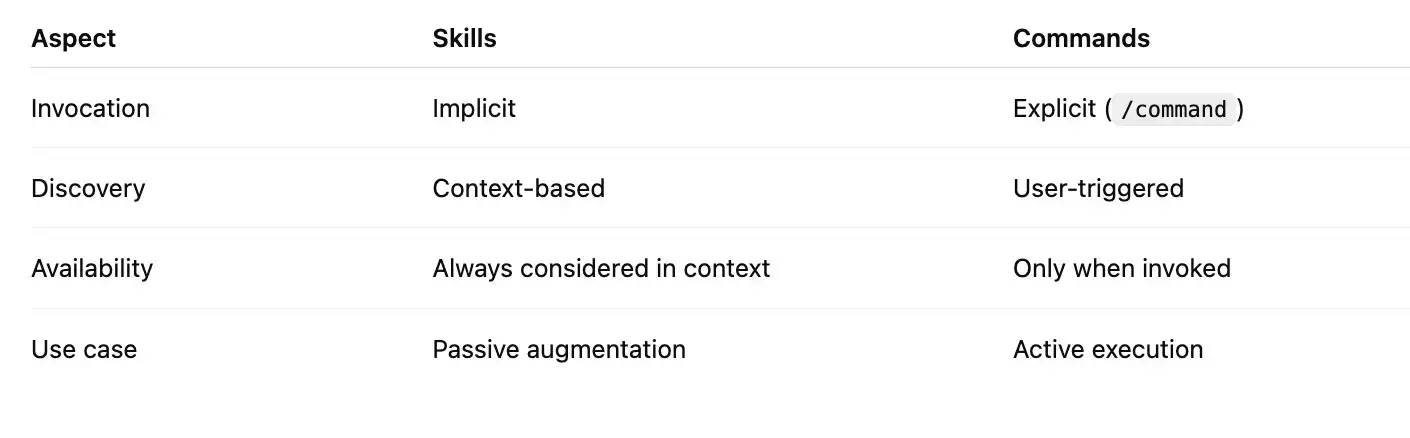
### Skills vs Commands
Now the question is which to use when? Both are MD files then what’s the difference between the both? The core distinction lies in how they are invoked and discovered by Claude.
## When to Use What?
**Use Skills when:**
You want automatic behavior
2. The task should be context-aware
3. You want to reduce prompt verbosity
4. eg: code review standards, accessibility checks
**Use Commands when:**
You need explicit control
2. The task is procedural or multi-step
3. You don’t want it triggered unintentionally
4. eg: generating reports, running transformations
Happy learning!!
You can connect me with at [Linkedln](https://www.linkedin.com/in/nehha/), [Twitter](https://x.com/hellonehha), [Medium](https://medium.com/@hellonehha), my [website](https://nehasharma.dev/)
Comments
More Blog
View allkubernetesMinimalist EKS: The Easy Way
Amazon EKS manages the Kubernetes control plane, but you remain responsible for provisioning the...
J
Joaquin MenchacaaiNever forget to enter the Stern Grove lottery again!
Browser automation with Playwright, Python, GitHub Actions, and Entire to auto-enter San Francisco Stern Grove concert lotteries each week!
L
Lizzie SiegletypescriptA Free Screenshot Editor That Never Uploads Your Image
A free screenshot and image editor that runs entirely in your browser. Keeping every edit reversible and handling big phone photos, in plain TypeScript and Canvas2D.
M
Martin StarkshowdevI built a CLI to break my highlights out of Apple Books
A macOS CLI + MCP server that exports Apple Books highlights to Markdown and gives AI assistants direct access to your reading notes.
A
Andrey KorchakaiA Developer's Guide to Agent Hooks in Antigravity CLI
Motivation To be quite honest, "Hooks"—the shell commands we trigger at specific points...
T
TanaikeagentsTactical vs. Strategic Agentic AI Development — A Playbook for Developers
The Strategic Engineer: Why Writing Code Is No Longer Your Most Valuable Skill ...
A
Adewumi Saheed Adewale