
Back to Blog playwright
 kubernetes
 ai
ai typescript
 showdev
 ai
ai agents
Playwright in Pictures: Fully Parallel Mode
Vitaliy Potapov April 15, 2026
0 views
Playwright in Pictures is a series of articles where I use playwright-timeline-reporter to visualize...
<small>_**Playwright in Pictures** is a series of articles where I use [playwright-timeline-reporter](https://github.com/vitalets/playwright-timeline-reporter) to visualize different Playwright concepts with simple timeline charts. Here's the first article in the series._</small>
---
Playwright’s [`fullyParallel`](https://playwright.dev/docs/api/class-testproject#test-project-fully-parallel) mode is often treated as a simple performance switch. In practice, it changes how the runner schedules work, which leads to different execution shapes for the same test suite.
In this post I’ll show a visual comparison of different modes and highlight when fully parallel is slower.
## Example Setup
I use a minimal suite:
* `spec1.test.ts` → 1 test
* `spec2.test.ts` → 5 tests
* `workers = 2`
This setup is enough to expose how scheduling works.
## Non-Fully Parallel
By default, Playwright assigns entire files to workers. Once a worker picks a file, it runs all tests in that file in order.
Running the example suite:
```shell
npx playwright test --workers 2
```
produces the following timeline:
[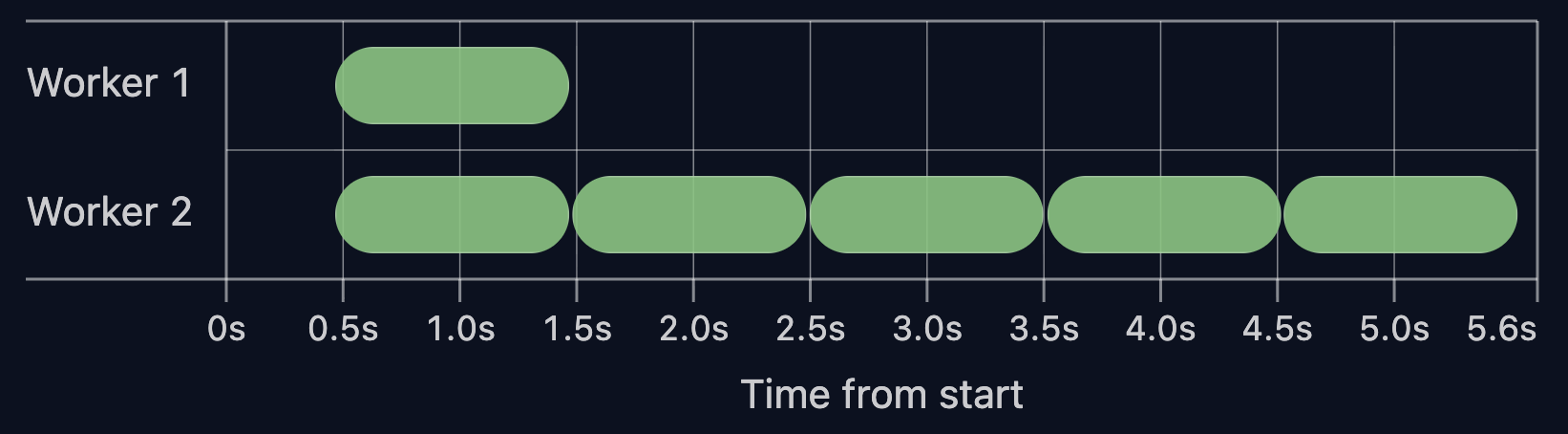](https://vitalets.github.io/playwright-demos/fully-parallel/timeline-report/non-fully-parallel.html)
<center><small>Non-fully parallel mode ([live report ↗](https://vitalets.github.io/playwright-demos/fully-parallel/timeline-report/non-fully-parallel.html))</small></center><br>
In this setup, `Worker 1` runs the single test from `spec1`, while `Worker 2` executes all 5 tests from `spec2`.
Tests inside a file cannot move to another worker. Even if one worker is idle, it cannot pick up remaining tests from other running files.
In practice, the total run time is defined by the longest file, not by the total amount of work.
## Fully Parallel
With `--fully-parallel` enabled, Playwright schedules individual tests instead of files. File boundaries stop mattering. Workers take the next available test.
Running the example suite with `--fully-parallel`:
```shell
npx playwright test --workers 2 --fully-parallel
```
The timeline:
[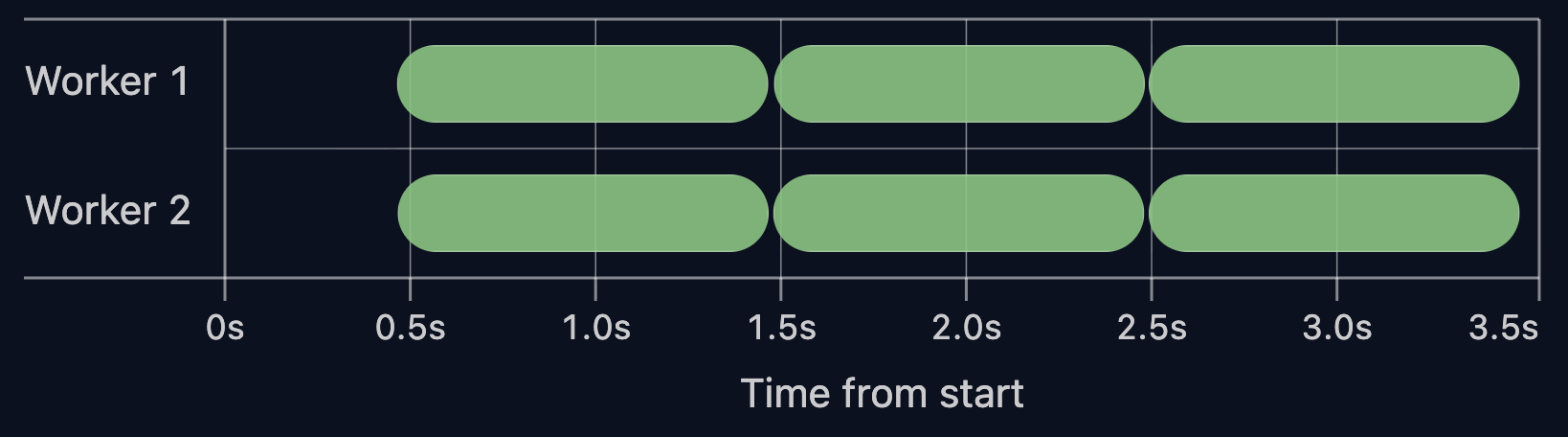](https://vitalets.github.io/playwright-demos/fully-parallel/timeline-report/fully-parallel.html)
<center><small>Fully parallel mode ([live report ↗](https://vitalets.github.io/playwright-demos/fully-parallel/timeline-report/fully-parallel.html))</small></center><br>
With the same setup, the 5 tests from `spec2` are split across both workers, keeping the timeline balanced.
The total run time drops from **5.6s** to **3.5s**.
This shifts the execution model. It now follows individual tests instead of the longest file.
## Is Fully Parallel Always Faster? No.
Fully parallel mode may be slower if tests rely on heavy worker hooks or worker fixtures.
To illustrate this, I added a heavy `beforeAll` hook to `spec2`:
```ts
test.beforeAll(async () => {
await expensiveSetup()
});
```
Running the tests without fully parallel:
[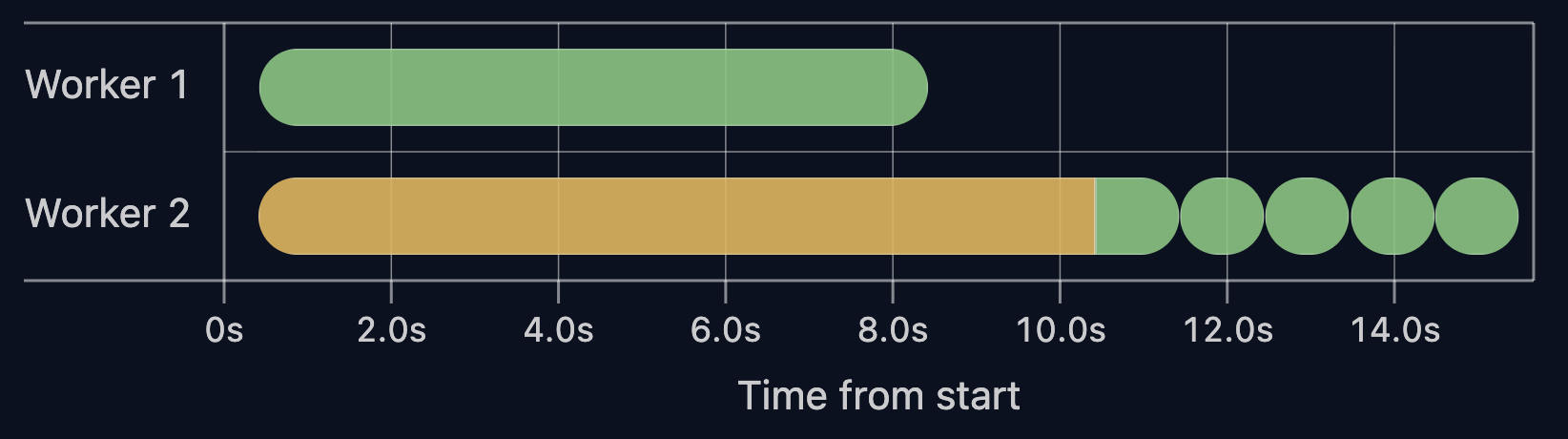](https://vitalets.github.io/playwright-demos/fully-parallel/timeline-report/non-fully-parallel-with-hook.html)
<center><small>Non-fully parallel mode with heavy BeforeAll ([live report ↗](https://vitalets.github.io/playwright-demos/fully-parallel/timeline-report/non-fully-parallel-with-hook.html))</small></center><br>
The `beforeAll` setup cost (yellow bar) is paid once in `Worker 2` and reused across all tests in that file.
Now run the same suite with `--fully-parallel`:
[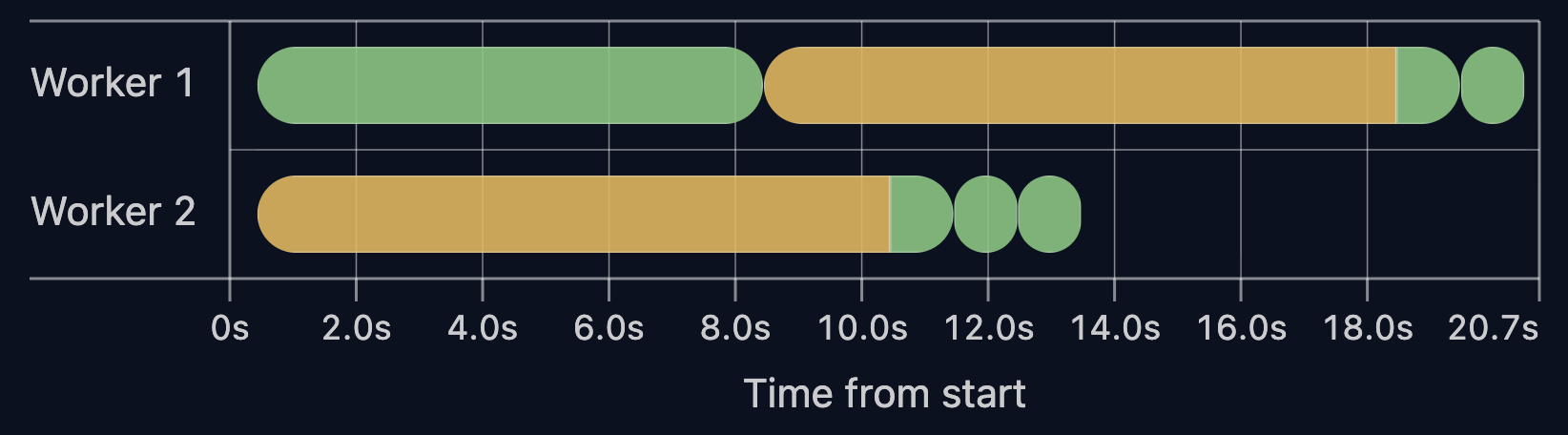](https://vitalets.github.io/playwright-demos/fully-parallel/timeline-report/fully-parallel-with-hook.html)
<center><small>Fully parallel mode with heavy BeforeAll ([live report ↗](https://vitalets.github.io/playwright-demos/fully-parallel/timeline-report/fully-parallel-with-hook.html))</small></center><br>
Here, `beforeAll` runs twice, once per worker. As the number of workers grows, the setup is repeated more times.
Total run time increases from **15s** to **20s** after enabling fully parallel mode.
When setup dominates test time, `--fully-parallel` makes the run slower.
## Key Takeaways
* By default, Playwright runs tests per file: files are split across workers, tests inside a file run sequentially.
* With fully parallel mode, tests are split across workers and run independently.
* Fully parallel mode can slow tests down. Check your test distribution and setup before enabling it.
Thanks for reading ❤️
👉 _Next in the series:_ **[Playwright in Pictures: Why Workers Restart?](https://dev.to/vitalets/playwright-in-pictures-why-workers-restart-34bp)**
Comments
More Blog
View allkubernetesMinimalist EKS: The Easy Way
Amazon EKS manages the Kubernetes control plane, but you remain responsible for provisioning the...
J
Joaquin MenchacaaiNever forget to enter the Stern Grove lottery again!
Browser automation with Playwright, Python, GitHub Actions, and Entire to auto-enter San Francisco Stern Grove concert lotteries each week!
L
Lizzie SiegletypescriptA Free Screenshot Editor That Never Uploads Your Image
A free screenshot and image editor that runs entirely in your browser. Keeping every edit reversible and handling big phone photos, in plain TypeScript and Canvas2D.
M
Martin StarkshowdevI built a CLI to break my highlights out of Apple Books
A macOS CLI + MCP server that exports Apple Books highlights to Markdown and gives AI assistants direct access to your reading notes.
A
Andrey KorchakaiA Developer's Guide to Agent Hooks in Antigravity CLI
Motivation To be quite honest, "Hooks"—the shell commands we trigger at specific points...
T
TanaikeagentsTactical vs. Strategic Agentic AI Development — A Playbook for Developers
The Strategic Engineer: Why Writing Code Is No Longer Your Most Valuable Skill ...
A
Adewumi Saheed Adewale