
Back to Blog aws
aws kubernetes
 ai
ai typescript
 showdev
 ai
ai agents
Processing long running events on AWS API Gateway
Evertson Croes April 17, 2026
0 views
Processing long running events on AWS API Gateway AWS API Gateway is a managed HTTP/REST...
# Processing long running events on AWS API Gateway
[AWS API Gateway](https://aws.amazon.com/api-gateway/) is a managed HTTP/REST service provided by AWS. It provides a relatively simple way to host an API and offers rich functionality when it comes to customizability, security and integration. AWS API Gateway enforces a maximum integration timeout of 29 seconds. For most APIs this is perfectly reasonable.
However, problems arise when an API must trigger operations that take minutes to complete, such as generating large exports or running complex background jobs. In our case, we needed to generate large database exports that could take several minutes. A synchronous API request was therefore not an option. One example is the generation of large exports from a database. This became a challenge with the default setup we had with API Gateway.
AWS provides some [guidance](https://docs.aws.amazon.com/prescriptive-guidance/latest/patterns/process-events-asynchronously-with-amazon-api-gateway-and-aws-lambda.html) on this in their documentation. However, in this blog article I want to share how we solved this problem in our project in more detail and also provide a working CDK project as an example.
## The problem
As mentioned in the intro, we have a time **limit of 29 seconds** on requests on API Gateway. But the problem is also that we want to run functionality that could potentially run for many minutes. In this case, we do not want to run a **synchronous** call, but an **asynchronous** call. Meaning that even if API Gateway would allow us to keep a request open for 30 minutes, it would not be beneficial for a frontend application to keep one blocking request open for that long since it takes up resources.
So we also need a mechanism to handle asynchronous requests while still using API Gateway.
## The TaskManager
We ended up calling the solution to this problem the “TaskManager”. It can be seen as one Microservice with the sole responsibility of keeping track of tasks. It does not actually process the tasks. The following diagram provides a high-level overview:
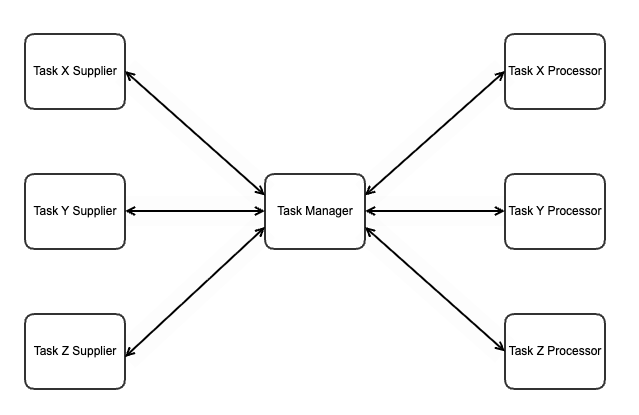
In this overview, there are Task Suppliers, Task Processors and the TaskManager itself. It is important to note that in our use cases, we have not yet found a scenario where there are multiple suppliers of the same task and multiple processors for the same type of task. However, the pattern introduced in this blog could be expanded to include this if necessary.
If we zoom in to the TaskManager, we have the following components:
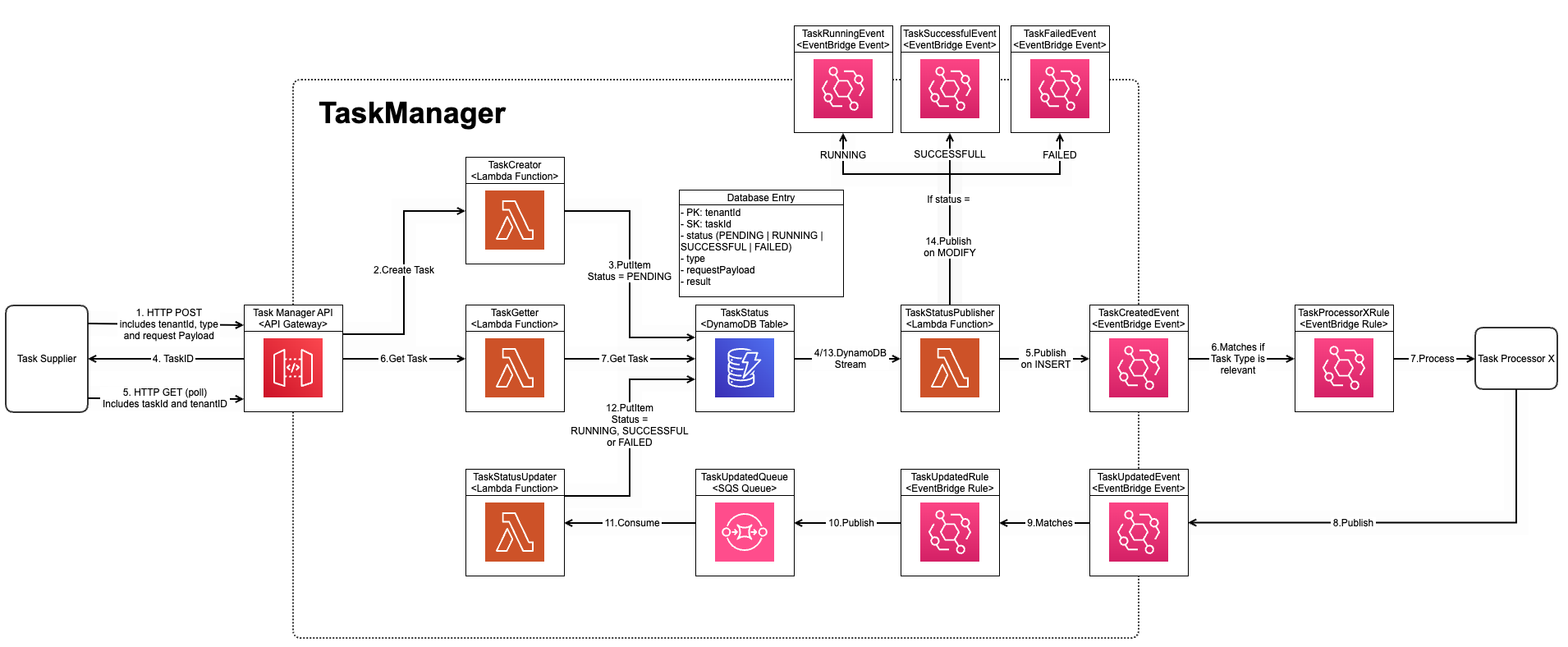
(Click [here](https://evertson-public.s3.eu-central-1.amazonaws.com/task_manager_diagram.png) to see diagram better)
This diagram depicts the deployment and the flow at the same time. On the left side, we can see a Task Supplier. For this example, it does not matter what this is. It could be any component that can do a HTTP request. In our example, it was a Backend-for-Frontend API Gateway.
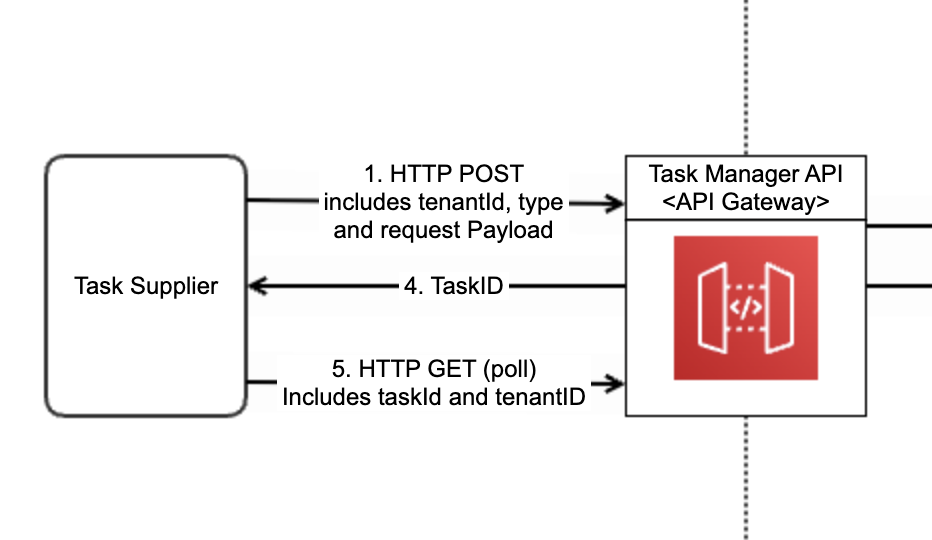
This Task Supplier calls one of the two endpoints available in the TaskManager API, which itself is an API Gateway, that allows the creation of a Task via a HTTP POST request. This triggers a Lambda function that will create the task in the TaskStatus DynamoDB Table.
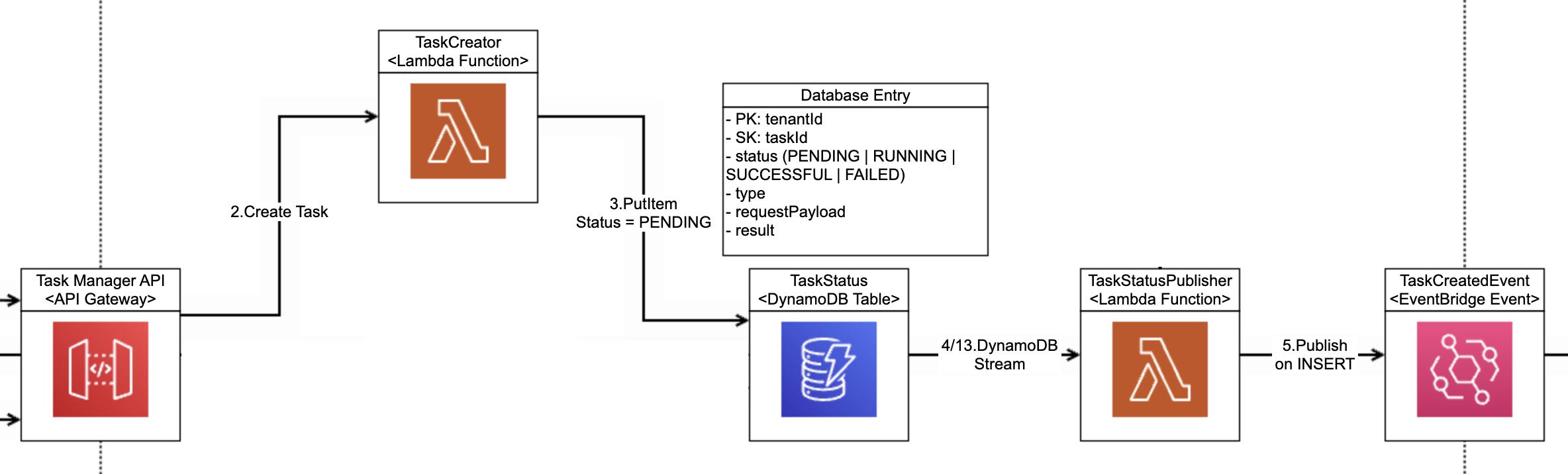
When an entry is created in this Table, a DynamoDB Stream will trigger the TaskStatusPublisher Lambda. This Lambda will check if this is a new entry (indicated by the INSERT) and in this case will publish a “TaskCreatedEvent”. It is important to note that this event also contains the Task Type. This is important as the type determines which processor needs to process it.
This is essentially where the first flow of the TaskManager ends. It is the responsibility of the Task Processor to create an EventBridge rule to consume this event and process the event.
The TaskManager expects to be regularly updated by the TaskProcessor via the TaskUpdatedEvent. The status of the event can be updated to RUNNING, SUCCESSFUL and FAILED. In the case of SUCCESSFUL, a payload can also be added. This could be the result of the task or in our case for the large exports, a signed S3 bucket URL to download it.
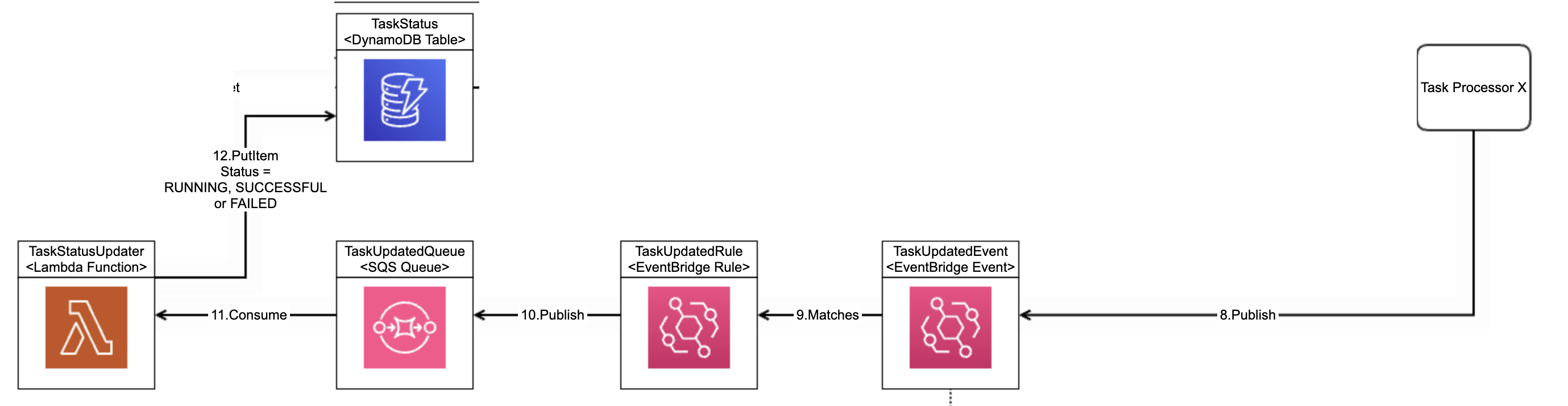
The Task Supplier can poll for the task regularly and get the status. Based on this status it can decide how to react.

Notice that the TaskStatusPublisher also publishes TaskRunningEvent, TaskSuccessfulEvent and TaskFailedEvent. This could be used in combination with a WebSocket mechanism to receive live updates instead of polling. However, this is out-of-scope for this blog.
This setup benefits from being completely serverless, meaning we can scale up on higher loads but also scale down to zero if there are no tasks. For this reason, in our case, we have only created one instance of this TaskManager that is shared by all tasks in our system. However, you could create multiple TaskManagers for different bounded contexts or even for each type of task.
## CDK Project
The example CDK project of this setup can be found in this GitHub [repository](https://github.com/evertson90/aws-task-manager). There is a README file which explains how to build and deploy the project to your own AWS environment.
## Final Thoughts
This pattern is a simple but powerful way to:
- Work around API Gateway limitations
- Build scalable async workflows
- Keep your frontend responsive
If you're dealing with long-running operations in AWS, this approach is definitely worth considering.
Comments
More Blog
View allkubernetesMinimalist EKS: The Easy Way
Amazon EKS manages the Kubernetes control plane, but you remain responsible for provisioning the...
J
Joaquin MenchacaaiNever forget to enter the Stern Grove lottery again!
Browser automation with Playwright, Python, GitHub Actions, and Entire to auto-enter San Francisco Stern Grove concert lotteries each week!
L
Lizzie SiegletypescriptA Free Screenshot Editor That Never Uploads Your Image
A free screenshot and image editor that runs entirely in your browser. Keeping every edit reversible and handling big phone photos, in plain TypeScript and Canvas2D.
M
Martin StarkshowdevI built a CLI to break my highlights out of Apple Books
A macOS CLI + MCP server that exports Apple Books highlights to Markdown and gives AI assistants direct access to your reading notes.
A
Andrey KorchakaiA Developer's Guide to Agent Hooks in Antigravity CLI
Motivation To be quite honest, "Hooks"—the shell commands we trigger at specific points...
T
TanaikeagentsTactical vs. Strategic Agentic AI Development — A Playbook for Developers
The Strategic Engineer: Why Writing Code Is No Longer Your Most Valuable Skill ...
A
Adewumi Saheed Adewale