
Back to Blog![Extending a Video with Angular, Veo 3.1 Lite, Firebase Cloud Functions, and Firebase Cloud Storage [GDE]](https://media2.dev.to/dynamic/image/width=1000,height=420,fit=cover,gravity=auto,format=auto/https%3A%2F%2Fdev-to-uploads.s3.amazonaws.com%2Fuploads%2Farticles%2Fua0oviy5ng0ohla9lglj.jpg) gemini
gemini kubernetes
 ai
ai typescript
 showdev
 ai
ai agents
Extending a Video with Angular, Veo 3.1 Lite, Firebase Cloud Functions, and Firebase Cloud Storage [GDE]
Connie Leung April 18, 2026
0 views
Google released the Veo 3.1 Lite model for AI video generation in the Gemini API, Gemini in Vertex...
Google released the Veo 3.1 Lite model for AI video generation in the Gemini API, Gemini in Vertex AI, and Gemini AI Studio. This model solves a common developer pain point: generating high-quality videos quickly and at a lower cost.
In this blog post, I migrate my application to use the Veo 3.1 Lite model and implement a new Firebase Cloud Function to extend a video using the GenAI TypeScript SDK.
The application supports image-to-video generation, video interpolation using the first and last frames, and extending Veo videos.
## Prerequisites
The technical stack of the project:
- **Angular 21**, the latest version as of April 2026.
- **Node LTS**, the LTS version as of April 2026.
- **Firebase Remote Config:** To manage dynamic parameters.
- **Firebase Cloud Functions:** To be called by the frontend to generate a video, interpolate a video between two images, or extend a Veo video.
- **Firebase Cloud Storage:** To host the generated video files in the default Firebase Storage bucket.
- **Firebase Local Emulator Suite:** To test the functions locally at `http://localhost:5001`.
- **Gemini in Vertex AI:** Use Gemini in Vertex AI to generate videos and store them in Firebase Cloud Storage.
The public Google AI Studio API is restricted in my region (Hong Kong). However, Vertex AI (Google Cloud) offers enterprise access that works reliably here, so I chose Vertex AI for this demo.
```bash
npm i -g firebase-tools
```
Install `firebase-tools` globally using `npm`.
```bash
firebase logout
```
```bash
firebase login
```
Log out of Firebase and log in again to perform proper Firebase authentication.
```bash
firebase init
```
Execute `firebase init` and follow the prompts to set up Firebase Cloud Functions, the Firebase Local Emulator Suite, Firebase Cloud Storage, and Firebase Remote Config.
If you have an existing project or multiple projects, you can specify the project ID on the command line.
```bash
firebase init --project <PROJECT_ID>
```
In both cases, the Firebase CLI automatically installs the `firebase-admin` and `firebase-functions` dependencies.
After completing the setup steps, the Firebase tools generate the functions emulator, functions, a storage rules file, remote config templates, and configuration files such as `.firebaserc` and `firebase.json`.
- Angular dependency
```bash
npm i firebase
```
The Angular application requires the `firebase` dependency to initialize a Firebase app, load remote config, and invoke the Firebase Cloud Functions to generate videos.
- Firebase dependencies
```bash
npm i @cfworker/json-schema @google/genai @modelcontextprotocol/sdk
```
Install the above dependencies to access Gemini in Vertex AI. `@google/genai` depends on `@cfworker/json-schema` and `@modelcontextprotocol/sdk`. Without these, the Cloud Functions cannot start.
With our project configured, let's look at how the frontend and backend communicate.
---
## Architecture
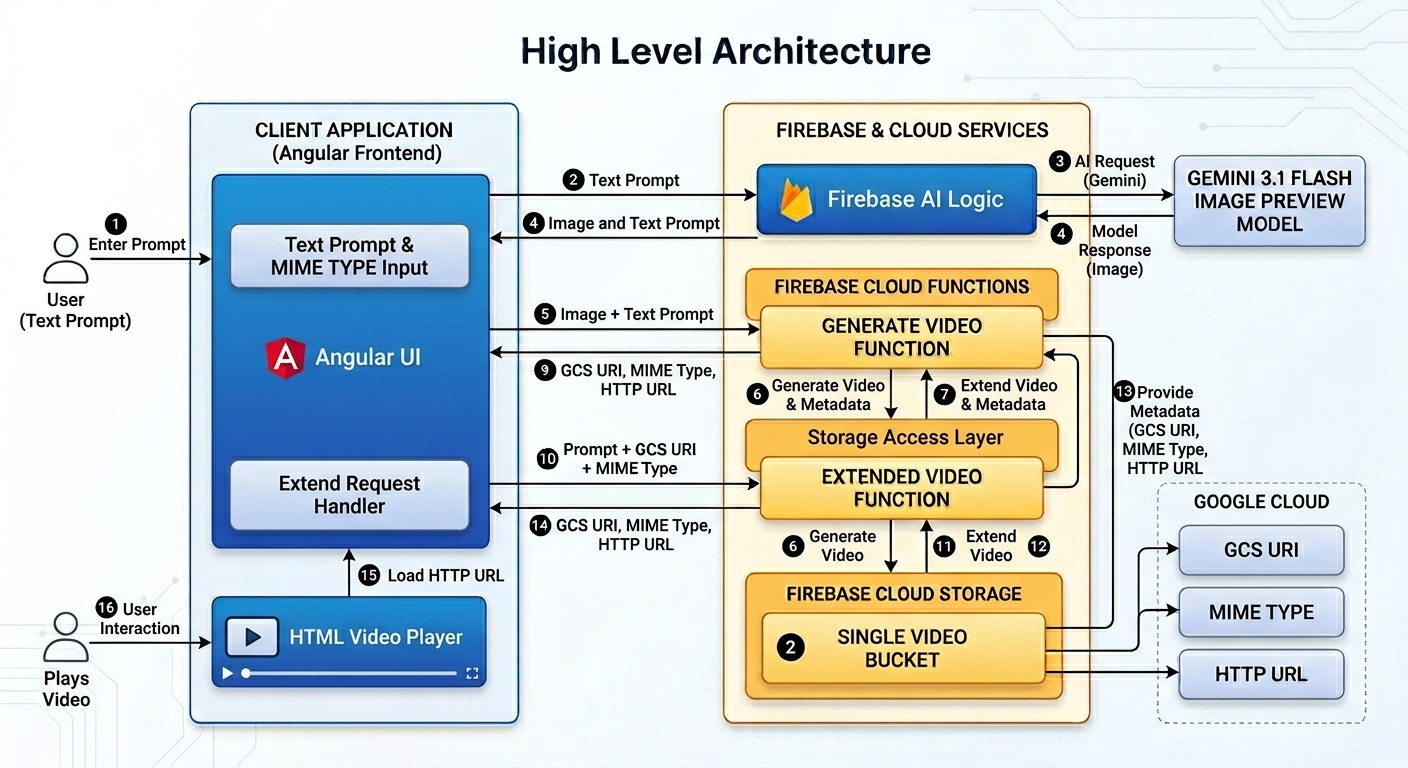
The frontend application is built with Angular. It relies on Firebase AI Logic to generate images using the Gemini 3.1 Flash Image Preview model. Then, the text prompt and the image are submitted to a Firebase Cloud Function to generate a video, store it in a Firebase Cloud Storage bucket, and return the GCS URI, MIME type, and HTTP URL to the client.
When the client extends the Veo video, it provides the prompt, the GCS URI, and the MIME type to another Firebase Cloud Function to generate an extended video, store it in the Firebase Cloud Storage bucket, and return the GCS URI, MIME type, and HTTP URL to the client.
Similarly, the HTML video player element plays the HTTP URL in the client application.
---
## Difference between Veo 3.1 Lite in Gemini AI Studio and Gemini in Vertex AI
| Difference | Gemini AI Studio | Gemini in Vertex AI |
| --- | --- | --- |
| Model Name | veo-3.1-lite-generate-preview | veo-3.1-lite-generate-001 |
| Number of extensions | Extend by 7 seconds and up to 20 times | Extend by 7 seconds and up to 4 times |
| Video length | Extend 141 seconds and the total length is 148 seconds | Extend 28 seconds and the total length is 36 seconds |
---
## What Veo 3.1 Does Not Support in Gemini Vertex AI
1. Unlike Veo 3.1 and Veo 3.1 Fast (which only lack support for Reference style images), Veo 3.1 Lite does not support either Reference asset images or Reference style images.
2. Supported input resolution does not support 4K.
3. Supported output resolution does not support 4K.
This limitation does not impact our application, as the demo focuses exclusively on video extension and the resolution of generated videos is hardcoded to 720p.
---
## Firebase Integration
### 1. Configure Environment Variables
I define the environment variables in the Firebase project. This ensures the functions know the regions for storage, function hosting, and the Veo model to use for video generation.
**`.env.example`**
```env
GOOGLE_CLOUD_LOCATION="us-central1"
GEMINI_VIDEO_MODEL_NAME="veo-3.1-lite-generate-001"
IS_VEO31_USED="true"
POLLING_PERIOD_MS="10000"
GOOGLE_FUNCTION_LOCATION="us-central1"
WHITELIST="http://localhost:4200"
REFERER="http://localhost:4200/"
```
| Variable | Description |
| --- | --- |
| GOOGLE_CLOUD_LOCATION | The location of the bucket. I chose `us-central1` because the bucket is always free in this region. |
| GEMINI_VIDEO_MODEL_NAME | The name of the Gemini video model. |
| IS_VEO31_USED | Whether Veo 3.1 is used. If false, it falls back to generating a video instead of interpolation. |
| POLLING_PERIOD_MS | The polling period of the video operation in milliseconds. |
| GOOGLE_FUNCTION_LOCATION | The region of the Cloud Functions. I chose `us-central1` so the functions and the bucket are in the same region. |
| WHITELIST | Requests must come from <http://localhost:4200>. |
| REFERER | Requests originate from <http://localhost:4200/>. |
### 2. Validating Environment Variables
Before the Cloud Function proceeds with any AI calls, it is critical to ensure that all necessary environment variables are present. I implemented a `VIDEO_CONFIG` IIFE (Immediately Invoked Function Expression) to run once to validate environment variables such as the polling period, whether Veo 3.1 is used, the Veo model name, the project ID, and the location.
```typescript
import logger from "firebase-functions/logger";
export function validate(value: string | undefined, fieldName: string, missingKeys: string[]) {
const err = `${fieldName} is missing.`;
if (!value) {
logger.error(err);
missingKeys.push(fieldName);
return "";
}
return value;
}
```
```typescript
export const VIDEO_CONFIG = (() => {
process.loadEnvFile();
const env = process.env;
const isVeo31Used = (env.IS_VEO31_USED || "false") === "true";
const pollingPeriod = Number(env.POLLING_PERIOD_MS || "10000");
const missingKeys: string[] = [];
const model = validate(env.GEMINI_VIDEO_MODEL_NAME, "Gemini Video Model Name", missingKeys);
const project = validate(env.GCLOUD_PROJECT, "Project ID", missingKeys);
const location = validate(env.GOOGLE_CLOUD_LOCATION, "Google Cloud Location", missingKeys);
if (missingKeys.length > 0) {
throw new Error(`Missing environment variables: ${missingKeys.join(", ")}`);
}
return {
genAIOptions: {
project,
location,
vertexai: true,
},
aiVideoOptions: {
model,
storageBucket: `${project}.firebasestorage.app`,
isVeo31Used,
pollingPeriod,
},
};
})();
```
I am using Node 24 as of April 2026. Since Node 20, we can use the built-in `process.loadEnvFile` function that loads environment variables from the `.env` file.
In `env.ts`, the try-catch block attempts to load the environment variables from the `.env` file.
```typescript
try {
process.loadEnvFile();
} catch {
// Ignore error if .env file is not found (e.g., in production where env vars are set by the platform)
}
```
In `src/index.ts`, the first statement imports the `env.ts` before importing other files and libraries.
```typescript
import "./env";
... other import statements ...
```
If you are using a Node version that does not support `process.loadEnvfile`, the alternative is to install `dotenv` to load the environment variables.
```bash
npm i dotenv
```
```typescript
import dotenv from "dotenv";
dotenv.config();
```
Firebase provides the `GCLOUD_PROJECT` variable, so it is not defined in the `.env` file.
When the `missingKeys` array is not empty, `VIDEO_CONFIG` throws an error that lists all the missing variable names. If the validation is successful, the `genAIOptions` and `aiVideoOptions` are returned. The `genAIOptions` is used to initialize the `GoogleGenAI` and `aiVideoOptions` contains parameters for extending a Veo video.
### 3. Extending a Video and Storing in Firebase Storage
The `extendVideo` Cloud Function passes the payload to the `extendVideoFunction` function.
All Cloud Functions enforce App Check, CORS, and a timeout period of 600 seconds. If `WHITELIST` is unspecified, CORS defaults to true. It is acceptable in a demo, but it is safer to default to `false` or a specific domain in production.
```typescript
const cors = process.env.WHITELIST ? process.env.WHITELIST.split(",").map((origin) => origin.trim()): true;
const options = {
cors,
enforceAppCheck: true,
timeoutSeconds: 600,
};
export const extendVideo = onCall( options,
({ data }) => extendVideoFunction(data)
);
```
`extendVideoFunction` delegates to the `extendVideoByPolling` function to construct the video arguments and poll the video operation until it finishes. When the function completes successfully, it returns the GCS URI and the MIME type. In the error case, the function throws an error.
```typescript
import { GoogleGenAI } from "@google/genai";
import { ExtendVideoRequest } from "./types/video.type";
import { extendVideoByPolling, VIDEO_CONFIG } from "./video.util";
export async function extendVideoFunction(data: ExtendVideoRequest) {
const { genAIOptions, aiVideoOptions } = VIDEO_CONFIG;
try {
if (!aiVideoOptions.isVeo31Used) {
throw new Error("Video extension is only supported for Veo 3.1 model");
}
const ai = new GoogleGenAI(genAIOptions);
return await extendVideoByPolling({ ai, ...aiVideoOptions }, {
prompt: data.prompt,
video: data.video,
config: data.config,
});
} catch (error) {
console.error("Error generating video:", error);
throw new Error("Error generating video");
}
}
```
```typescript
import { GenerateVideosConfig, GoogleGenAI, Video } from "@google/genai";
export type AIVideoBucket = {
ai: GoogleGenAI;
model: string;
storageBucket: string;
isVeo31Used: boolean;
pollingPeriod: number;
}
export type ExtendVideoRequest = {
prompt: string;
video: Video;
config?: GenerateVideosConfig;
}
export async function extendVideoByPolling(
aiVideo: AIVideoBucket,
request: ExtendVideoRequest,
) {
return processVideoPolling(aiVideo, {
prompt: request.prompt,
config: request.config,
video: request.video,
});
}
async function processVideoPolling(
{ ai, model, storageBucket, pollingPeriod }: AIVideoBucket,
mediaParams: VideoMediaParams
) {
const genVideosParams: GenerateVideosParameters = {
model,
...mediaParams,
config: {
...mediaParams.config,
numberOfVideos: 1,
outputGcsUri: `gs://${storageBucket}`,
},
};
return getVideoUri(ai, genVideosParams, pollingPeriod);
}
```
The `extendVideoByPolling` function invokes the `processVideoPolling` function to poll the video operation until it completes.
The `processVideoPolling` function constructs the video parameters and invokes the `getVideoUri` function to return the GCS URI and the MIME type. Most importantly, the `config` property specifies that the number of generated videos is one, and the `outputGcsUri` keeps the generated video in the storage bucket.
### 4. Asynchronous Polling
Video extension is a long-running task. Because Vertex AI processes them asynchronously, the functions must poll the operation status in a `while` loop until the `done` flag is true.
The Gemini API cannot see the Cloud Storage for Firebase Local Emulator, so it requires a real output GCS URI, which is `gs://${storageBucket}`.
When the `done` flag is true, the operation ends and one of three outcomes occurs:
- Outcome 1: The `error` is true, and the video failed to generate. Therefore, the function throws an error.
- Outcome 2: The video is successfully stored in the GCS bucket. The function returns the GCS URI and the MIME type to the client application.
- Outcome 3: Neither happens. There is no error and no GCS URI, so the function returns an unknown error.
```typescript
import { GenerateVideosParameters, GoogleGenAI } from "@google/genai";
async function getVideoUri(
ai: GoogleGenAI,
genVideosParams: GenerateVideosParameters,
pollingPeriod: number,
): Promise<{ uri: string, mimeType: string }> {
let operation = await ai.models.generateVideos(genVideosParams);
while (!operation.done) {
await new Promise((resolve) => setTimeout(resolve, pollingPeriod));
operation = await ai.operations.getVideosOperation({ operation });
}
if (operation.error) {
const strError = `Video generation failed: ${operation.error.message}`;
console.error(strError);
throw new Error(strError);
}
const video = operation.response?.generatedVideos?.[0]?.video || {};
const { uri, mimeType } = video;
if (uri && mimeType) {
console.log("video uri", uri, mimeType);
return { uri, mimeType };
}
const strError = "Video generation finished but no uri was provided.";
console.error(strError);
throw new Error(strError);
}
```
The environment variable, `POLLING_PERIOD_MS`, sets the polling period to 10 seconds. If the wait time is too long, the polling period can be decreased. If the polling cost is expensive or too frequent, the polling period can be increased.
Note: For demo purposes, polling is a decent solution to handle asynchronous video generation. However, it is expensive and creates unnecessary load and latency. For production usage, you may consider push notifications such as WebSockets and Server-Sent Events.
### 5. Firebase App Configuration and reCAPTCHA Site Key
`getFirebaseConfig` is a Firebase Cloud Function that returns both the Firebase app configuration and the reCAPTCHA site key.
```typescript
import logger from "firebase-functions/logger";
import { validate } from "./validate";
function validateFirebaseConfigFields(env: NodeJS.ProcessEnv) {
const missingKeys: string[] = [];
const apiKey = validate(env.APP_API_KEY, "API Key", missingKeys);
const appId = validate(env.APP_ID, "App Id", missingKeys);
const messagingSenderId = validate(env.APP_MESSAGING_SENDER_ID, "Messaging Sender ID", missingKeys);
const recaptchaSiteKey = validate(env.RECAPTCHA_ENTERPRISE_SITE_KEY, "Recaptcha site key", missingKeys);
const projectId = validate(env.GCLOUD_PROJECT, "Project ID", missingKeys);
if (missingKeys.length > 0) {
throw new Error(`Missing environment variables: ${missingKeys.join(", ")}`);
}
return {
app: {
apiKey,
appId,
projectId,
messagingSenderId,
authDomain: `${projectId}.firebaseapp.com`,
storageBucket: `${projectId}.firebasestorage.app`,
},
recaptchaSiteKey,
};
}
export const getFirebaseConfigFunction = () => {
logger.info("getFirebaseConfig called");
process.loadEnvFile();
const variables = validateFirebaseConfigFields(process.env);
if (!variables) {
return undefined;
}
return variables;
};
```
The Angular application receives the Firebase app configuration and reCAPTCHA site key from the Cloud Function to initialize Firebase AI Logic and protect resources from unauthorized access and abuse.
### 6. Local Development with Emulators
For local development, I used the Firebase Local Emulator Suite. In the `bootstrapFirebase` process, the app calls `connectFunctionsEmulator` to link to the Cloud Functions running at `http://localhost:5001`.
The port number defaulted to 5001 when `firebase init` was executed.
**Note:** While the Cloud Function runs locally (at zero cost), the Storage emulator is not used. This is because the Gemini API requires an actual accessible GCS bucket to store the generated videos.
```typescript
export function connectEmulators({ remoteConfig, functions }: FirebaseObjects) {
const useEmulators = getValue(remoteConfig, 'useEmulators').asBoolean();
if (useEmulators) {
console.log('Connecting to emulators...');
const host = getValue(remoteConfig, 'functionEmulatorHost').asString();
const port = getValue(remoteConfig, 'functionEmulatorPort').asNumber();
console.log('functionEmulator', `${host}:${port}`);
connectFunctionsEmulator(functions, host, port);
}
}
```
`loadFirebaseConfig` is a helper function that makes request to the Cloud function to obtain the Firebase App configuration and the reCAPTCHA site key.
```json
{
"getFirebaseConfigUrl": "http://127.0.0.1:5001/vertexai-firebase-6a64f/us-central1/getFirebaseConfig"
}
```
```typescript
import { HttpClient } from '@angular/common/http';
import { inject } from '@angular/core';
import { initializeAppCheck, ReCaptchaEnterpriseProvider } from 'firebase/app-check';
import { catchError, lastValueFrom, throwError } from 'rxjs';
import config from '../../public/config.json';
import { ConfigService } from './ai/services/config.service';
import { FirebaseConfigResponse } from './ai/types/firebase-config.type';
import { connectEmulators, initFirebaseApp } from './firebase.util';
async function loadFirebaseConfig() {
const httpService = inject(HttpClient);
const firebaseConfig$ =
httpService.get<FirebaseConfigResponse>(`${config.getFirebaseConfigUrl}`)
.pipe(catchError((e) => throwError(() => e)));
return lastValueFrom(firebaseConfig$);
}
export async function bootstrapFirebase() {
try {
const configService = inject(ConfigService);
const firebaseConfig = await loadFirebaseConfig();
const { app, recaptchaSiteKey } = firebaseConfig;
const firebaseObjects = await initFirebaseApp(app);
const { firebaseApp } = firebaseObjects;
initializeAppCheck(firebaseApp, {
provider: new ReCaptchaEnterpriseProvider(recaptchaSiteKey),
isTokenAutoRefreshEnabled: true,
});
connectEmulators(firebaseObjects);
configService.loadConfig(firebaseObjects);
} catch (err) {
console.error(err);
}
}
```
The AppConfig remains unchanged.
```typescript
import { ApplicationConfig, provideAppInitializer } from '@angular/core';
import { bootstrapFirebase } from './app.bootstrap';
export const appConfig: ApplicationConfig = {
providers: [
provideAppInitializer(async () => bootstrapFirebase()),
]
};
```
### 7. Firebase Remote Configuration
New variables are introduced for extending a Veo video in Firebase Remote Config. For the Gemini API, a video can be extended as many as 20 times. For Gemini in Vertex AI, a video can be extended as many as 4 times because the video length exceeds 30 seconds. Therefore, this is externalized into the `maxVideoExtendAllowed` variable.
| Variable | Description | Value |
| --- | --- | --- |
| maxVideoExtendAllowed | Maximum number of extensions allowed | 4 |
### 8. Video Player Component in Angular
The Angular frontend triggers the process using `httpsCallable`. Once the function returns the Cloud Storage path and the MIME type, the app fetches the download URL for playback.
The `ConfigService` stores the Firebase app, Remote Config, and functions to be used throughout the application.
```typescript
import { FirebaseApp } from 'firebase/app';
import { Functions } from 'firebase/functions';
import { RemoteConfig } from 'firebase/remote-config';
export type FirebaseObjects = {
firebaseApp: FirebaseApp;
remoteConfig: RemoteConfig;
functions: Functions;
}
```
```typescript
import { Injectable } from '@angular/core';
import { FirebaseObjects } from '../types/firebase-objects';
@Injectable({
providedIn: 'root'
})
export class ConfigService {
firebaseObjects: FirebaseObjects | undefined = undefined;
loadConfig(firebaseObjects: FirebaseObjects) {
this.firebaseObjects = firebaseObjects;
}
}
```
The `retrieveVideoUri` method calls the Cloud Function directly to retrieve the GCS URI and the MIME type.
The `downloadVideoUriAndUrl` method resolves the URI to an HTTP URL so that an HTML video player can play it immediately.
```typescript
export type VideoGenerationResponse = {
uri: string;
url: string;
mimeType: string;
}
export type DownloadVideoResponse = {
uri: string;
mimeType: string;
}
```
```typescript
import { inject, Injectable } from '@angular/core';
import { httpsCallable } from 'firebase/functions';
import { getDownloadURL, getStorage, ref } from 'firebase/storage';
import { GenerateVideoRequest } from '../types/video.type';
import { ConfigService } from './config.service';
@Injectable({
providedIn: 'root'
})
export class VeoService {
private readonly storage = getStorage();
private readonly configService = inject(ConfigService);
private async retrieveVideoUri<T = GenerateVideoRequest>(request: T, methodName: string): Promise<DownloadVideoResponse> {
try {
const { functions } = this.configService.firebaseObjects || {};
if (!functions) {
throw new Error('Functions does not exist.');
}
const downloadGcsUri = httpsCallable<T, DownloadVideoResponse>(
functions, methodName, { timeout: 600000 }
);
const { data } = await downloadGcsUri(request);
return data;
} catch (err) {
console.error(err);
throw err;
}
}
async downloadVideoUriAndUrl<T = GenerateVideoRequest>(request: T, methodName: CallableNames = 'videos-generateVideo'): Promise<VideoGenerationResponse> {
const { uri, mimeType } = await this.retrieveVideoUri(request, methodName);
if (!uri) {
throw new Error('Video operation completed but no URI was returned.');
}
return getDownloadURL(ref(this.storage, uri))
.then((url) => {
console.log("download url", url);
return { uri, url, mimeType };
})
.catch((error) => {
switch (error.code) {
case 'storage/object-not-found':
throw new Error("File doesn't exist");
case 'storage/unauthorized':
throw new Error("User doesn't have permission to access the object");
case 'storage/canceled':
throw new Error("User canceled the upload");
case 'storage/unknown':
throw new Error("Unknown storage error occurred, inspect the server response");
}
throw new Error("Unknown error occurred");
});
}
}
```
The `VideoPlayerComponent` has a required `videoUrl` signal input that is assigned to the source of the video player. It has an "Extend Video" button that emits an `extendVideo` custom event when clicked. This event notifies the parent component to extend the video in the `videoUrl` signal input.
```typescript
import { LoaderComponent } from '@/shared/loader/loader.component';
import { ChangeDetectionStrategy, Component, input, output } from '@angular/core';
import { ExtendVideoIconComponent } from '../../icons/extend-video-icon.component';
@Component({
selector: 'app-video-player',
imports: [LoaderComponent, ExtendVideoIconComponent],
template: `
@if (isGeneratingVideo()) {
<div class="mt-6">
<app-loader [loadingText]="loadingText()">
<p class="text-sm">This can take several minutes. Please be patient.</p>
</app-loader>
</div>
} @else if (videoUrl()) {
<div class="mt-6 flex flex-col gap-4">
<div class="video-container">
<video [src]="videoUrl()" controls autoplay loop class="w-full rounded-md"></video>
</div>
<div class="flex justify-center">
<button
(click)="extendVideo.emit()"
aria-label="Extend video"
title="Extend video"
class="extend-btn"
>
<app-extend-video-icon />
<span>Extend Video</span>
</button>
</div>
</div>
}
`,
styleUrl: './video-player.component.css',
changeDetection: ChangeDetectionStrategy.OnPush,
})
export class VideoPlayerComponent {
isGeneratingVideo = input(false);
videoUrl = input.required<string>();
extendVideo = output<void>();
loadingText = input('Generating your video...');
}
```
### 9. Angular Integration with Gemini to Extend Video
```typescript
import { VideoPlayerComponent } from './video-player/video-player.component';
@Component({
selector: 'app-gen-media',
imports: [
VideoPlayerComponent,
],
template: `
<app-video-player
[isGeneratingVideo]="isGeneratingVideo()"
[videoUrl]="videoUrl()"
(extendVideo)="extendVideo()"
[loadingText]="loadingVideoText()"
/>`,
changeDetection: ChangeDetectionStrategy.OnPush,
})
export class GenMediaComponent {
private readonly genMediaService = inject(GenMediaService);
private readonly genVideoService = inject(GenVideoService);
genMediaInput = input<GenMediaInput>();
videoUrl = this.genVideoService.videoUrl;
isGeneratingVideo = this.genVideoService.isGeneratingVideo.asReadonly();
loadingVideoText = signal('Generating your video...');
trimmedUserPrompt = computed(() => this.genMediaInput()?.userPrompt.trim() || '');
async extendVideo() {
if (this.trimmedUserPrompt()) {
try {
this.loadingVideoText.set('Extending your video...');
await this.genVideoService.extendVideo(this.trimmedUserPrompt());
} finally {
this.loadingVideoText.set('Generating your video...');
}
}
}
}
```
The `GenMediaComponent` calls `extendVideo` with the prompt and the Veo video URL to create an extended video.
```typescript
import { ConfigService } from '@/ai/services/config.service';
import { VeoService } from '@/ai/services/veo.service';
import { ExtendVideoRequest, GenerateVideoFromFramesRequest, GenerateVideoRequest, VideoGenerationResponse } from '@/ai/types/video.type';
import { computed, inject, Injectable, signal, WritableSignal } from '@angular/core';
import { getValue } from 'firebase/remote-config';
@Injectable({
providedIn: 'root'
})
export class GenVideoService {
private readonly veoService = inject(VeoService);
private readonly configService = inject(ConfigService);
videoError = signal('');
videoResponse = signal<VideoGenerationResponse>({ uri: '', url: '', mimeType: '' });
#extendVideoCounter = signal(0);
isGeneratingVideo = signal(false);
videoUrl = computed(() => this.videoResponse().url);
isVideoExtensionAllowed(counter: number) {
const remoteConfig = this.configService.firebaseObjects?.remoteConfig;
if (!remoteConfig) {
console.warn('Remote config does not exist.');
return false;
}
const max_extend_allowed = getValue(remoteConfig,'maxVideoExtendAllowed').asNumber();
if (counter >= max_extend_allowed) {
console.warn('Maximum extension limit reached.');
return false;
}
return true;
}
async extendVideo(prompt: string): Promise<void> {
try {
const result = await this.extendInterpolatedVideo(
prompt,
this.#extendVideoCounter(),
this.videoResponse()
);
if (!result) {
return;
}
this.videoResponse.set(result);
this.#extendVideoCounter.update(count => count + 1);
console.log(`Video extended successfully. Current extension count: ${this.#extendVideoCounter()}`);
} catch (e) {
console.error(e);
const errMsg = e instanceof Error ?
e.message :
'An unexpected error occurred in video generation.'
this.videoError.set(errMsg);
} finally {
this.isGeneratingVideo.set(false);
}
}
async extendInterpolatedVideo(
prompt: string,
counter: number,
customVideo: Pick<VideoGenerationResponse, 'uri' | 'mimeType'>,
generatingSignal?: WritableSignal<boolean>,
error?: WritableSignal<string>
) {
const { uri, mimeType } = customVideo;
if (!mimeType || !uri) {
console.warn('No video to extend. Please generate a video first.');
return null;
}
if (!prompt) {
console.warn('Prompt is required to extend the video.');
return null;
}
if (!this.isVideoExtensionAllowed(counter)) {
return null;
}
const actualErrorSignal = error || this.videoError;
const actualGeneratingSignal = generatingSignal || this.isGeneratingVideo;
try {
actualErrorSignal.set('');
actualGeneratingSignal.set(true);
const extendVideoParams: ExtendVideoRequest = {
prompt,
video: { uri, mimeType },
}
return await this.veoService.downloadVideoUriAndUrl(extendVideoParams, 'videos-extendVideo');
} catch (e) {
console.error(e);
throw e;
} finally {
actualGeneratingSignal.set(false);
}
}
}
```
The `extendVideo` and `extendInterpolatedVideo` methods validate that an extension is allowed by comparing the `#extendVideoCounter` signal value against the `maxVideoExtendAllowed` Remote Config value. If the check fails, nothing happens. If the check succeeds, the `videos-extendVideo` Cloud Function is called to extend the video. Then, the `#extendVideoCounter` is incremented by 1 until the extension limit is reached. When extending a Veo video that is too long, Gemini throws an error, and I want to block this from happening on the client side.
---
This is the end of the walkthrough for the demo. You should now be able to extend generated videos in a Cloud Function, store them securely in a bucket, and play them in a video player within a user interface.
---
## Conclusion
Combining Veo 3.1 with the serverless scalability of Firebase is a powerful workflow.
First, the Angular application neither installs the `genai` dependency nor maintains the Vertex AI environment variables in a `.env` file. The client application calls the Cloud Functions to perform intensive tasks and waits for the results.
The Cloud Functions receive arguments from the client, execute complex AI operations like generation, interpolation, and video extension, and write the videos to the dedicated bucket securely. During local development, the Firebase Emulator calls the functions at `http://localhost:5001` instead of the ones deployed on the Cloud Run platform.
Try cloning the GitHub repository, generating images, and using those images to generate and interpolate videos. Then, you can extend these Veo videos to create extended videos that are more than 7 seconds long.
## Resources
- [GitHub Repo](https://github.com/railsstudent/ng-firebase-ai-nano-banana/blob/main/firebase-project/functions/src/video/extend-video.ts)
- [Firebase Cloud Functions](https://firebase.google.com/docs/functions?utm_campaign=deveco_gdemembers&utm_source=deveco)
- [Firebase Cloud Storage for Web](https://firebase.google.com/docs/storage/web/start?utm_campaign=deveco_gdemembers&utm_source=deveco)
- [Firebase Security Rules](https://firebase.google.com/docs/rules/basics?utm_campaign=deveco_gdemembers&utm_source=deveco)
- [Connect to the Cloud Functions Emulator](https://firebase.google.com/docs/emulator-suite/connect_functions?utm_campaign=deveco_gdemembers&utm_source=deveco)
- [Image to Video Generation](https://ai.google.dev/gemini-api/docs/video?example=dialogue#generate-from-images&utm_campaign=deveco_gdemembers&utm_source=deveco)
- [Build with Veo 3.1 Lite, our most cost-effective video generation model](https://blog.google/innovation-and-ai/technology/ai/veo-3-1-lite?utm_campaign=deveco_gdemembers&utm_source=deveco)
Comments
More Blog
View allkubernetesMinimalist EKS: The Easy Way
Amazon EKS manages the Kubernetes control plane, but you remain responsible for provisioning the...
J
Joaquin MenchacaaiNever forget to enter the Stern Grove lottery again!
Browser automation with Playwright, Python, GitHub Actions, and Entire to auto-enter San Francisco Stern Grove concert lotteries each week!
L
Lizzie SiegletypescriptA Free Screenshot Editor That Never Uploads Your Image
A free screenshot and image editor that runs entirely in your browser. Keeping every edit reversible and handling big phone photos, in plain TypeScript and Canvas2D.
M
Martin StarkshowdevI built a CLI to break my highlights out of Apple Books
A macOS CLI + MCP server that exports Apple Books highlights to Markdown and gives AI assistants direct access to your reading notes.
A
Andrey KorchakaiA Developer's Guide to Agent Hooks in Antigravity CLI
Motivation To be quite honest, "Hooks"—the shell commands we trigger at specific points...
T
TanaikeagentsTactical vs. Strategic Agentic AI Development — A Playbook for Developers
The Strategic Engineer: Why Writing Code Is No Longer Your Most Valuable Skill ...
A
Adewumi Saheed Adewale