
Back to Blog database
 kubernetes
 ai
ai typescript
 showdev
 ai
ai agents
I built a self-hosted PostgreSQL Control Plane that runs on single Docker container
Mateusz Woźniak April 20, 2026
0 views
I built NeonD — an open-source, self-hosted control plane for PostgreSQL inspired by Neon. It gives you branching, point-in-time recovery, and S3-backed durability, all running from a single Docker container on dedicated server.
---
title: I built a self-hosted PostgreSQL Control Plane that runs on single Docker container
published: true
description: I built NeonD — an open-source, self-hosted control plane for PostgreSQL inspired by Neon. It gives you branching, point-in-time recovery, and S3-backed durability, all running from a single Docker container on dedicated server.
tags: database, postgres, postgresql, selfhosted
cover_image: https://dev-to-uploads.s3.amazonaws.com/uploads/articles/e9m34bvs9lod7p9wk6mn.png
# cover_image: https://direct_url_to_image.jpg
# Use a ratio of 100:42 for best results.
# published_at: 2026-04-20 08:10 +0000
---
## The itch I was scratching
Every time I spin up a new side project, I hit the same wall with Postgres:
- `postgres:latest` in Docker is fine until you want a throwaway copy of prod to reproduce a bug, or a preview environment per PR.
- Managed services (Neon, Supabase, RDS) solve this beautifully — branching in seconds, PITR by default — but they cost real money once you have more than a toy project, and you lose control. Also for me latency was always big problem. Most of my projects are hosted on big dedicated server in Warsaw (Poland), but cloud providers don't often offer this region.
> I wanted the developer experience of Neon — instant branches, a nice UI, one connection string per branch — on a $10 Hetzner box. That gap is what NeonD tries to fill.
## What it actually does
NeonD is a control plane that sits on top of the open-source neondatabase/neon storage engine. The Neon team open-sourced the hard parts (pageserver, safekeeper, compute); NeonD wraps them into something you can deploy in five minutes.
## Features
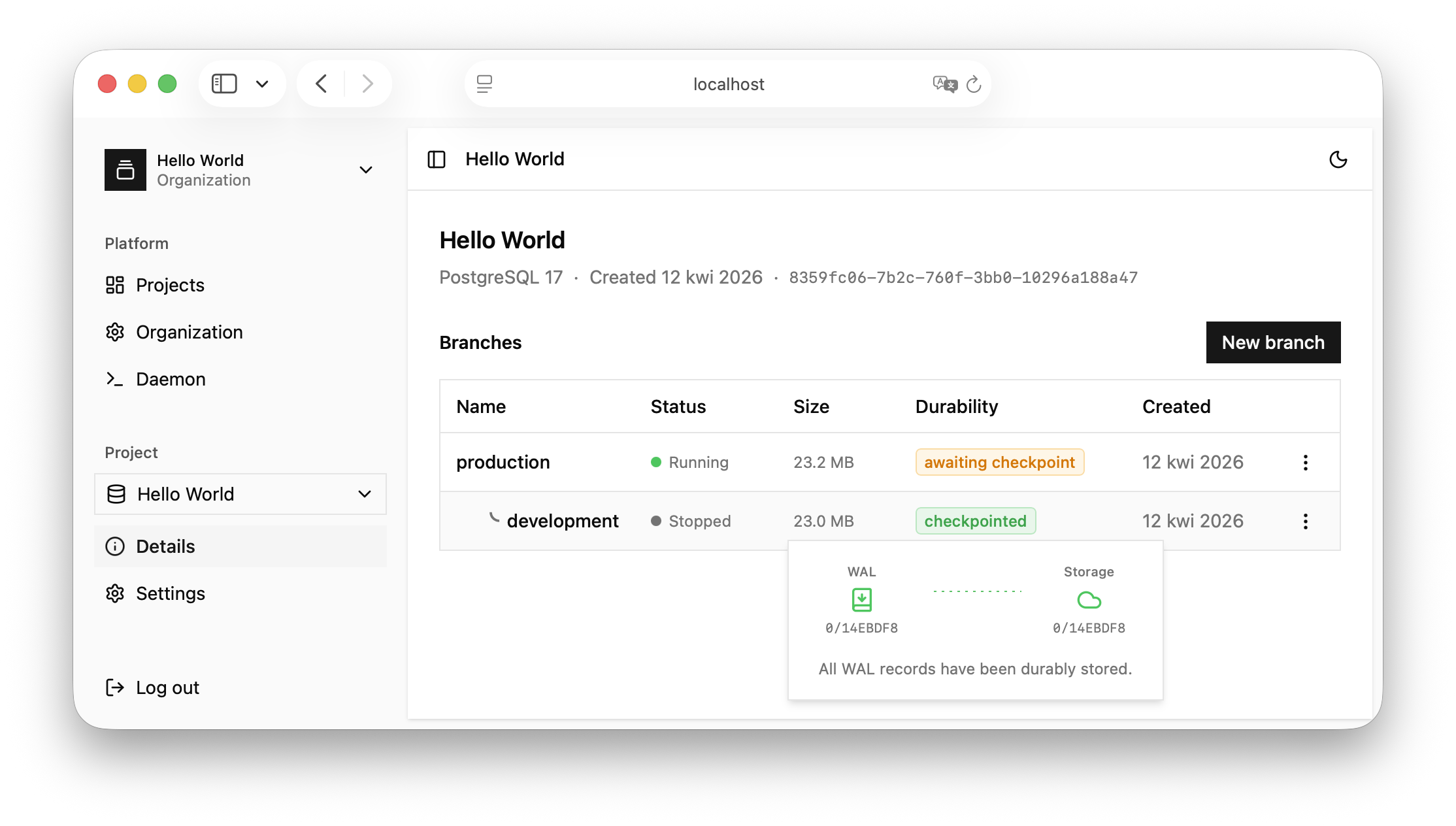
- Spin up Postgres instances on v14, v15, v16, or v17 from a web UI
- Branch any timeline — fork production into dev, pr-142, bug-repro in seconds, because branches are copy-on-write at the storage layer
- Point-in-time recovery down to the second
- S3 checkpoints — your data lives durably in an S3 bucket, the local disk is just a cache
- TLS SNI routing — publish compute endpoints under subdomains like `{instance-slug}.yourcompany.com`
- Multi-tenancy — organizations, projects, users, roles
Migration between servers is docker compose down, rsync one directory, docker compose up on the new box. That's it.
## What it's not
I want to be very upfront: NeonD is not for mission-critical production. The architecture is intentionally tightly coupled — one container, one server, one point of failure. There's no HA, no automated failover, no multi-region story.
If you're running a bank, use RDS. If you're running a side project, a staging cluster, a preview-environment farm, or an early-stage startup where velocity matters more than five nines — that's the sweet spot.
## A quick tour
Deployment is a docker-compose.yaml:
```yaml
services:
neond:
image: neond/neond:latest
environment:
PORT: 3000
SERVER_SECRET: "SuperSecret" # you should change this
PORT_RANGE: 50000-50010
ports:
- "3000:3000"
- "50000-50010:50000-50010"
restart: unless-stopped
volumes:
- ./neond_data:/neond
```
Then:
1. Open http://your-server:3000
2. Create an organization and a project
3. Hit "Start endpoint" on the production branch
4. Copy the connection string, psql in
5. Right-click the branch → "Create branch from here" → you now have an instant, isolated copy of your data on a new connection string
Total time from docker compose up to querying a branched database: under five minutes.
## Where I'd love feedback
This is an early project (17 stars as I write this, hi!) and there are plenty of rough edges. Things I'd especially appreciate eyes on:
- The branching UX — is it intuitive if you've never used Neon?
- The S3 setup — does the doc make sense for people who aren't AWS-native?
- Use cases I haven't thought of — tell me what you'd want to do with branching Postgres on your own box
Repo: [github.com/matisiekpl/neond](github.com/matisiekpl/neond)
## Credits
Huge credit to the Neon team for open-sourcing the storage engine. NeonD is a thin control plane on top of their work — none of this would exist without what they've built.
Comments
More Blog
View allkubernetesMinimalist EKS: The Easy Way
Amazon EKS manages the Kubernetes control plane, but you remain responsible for provisioning the...
J
Joaquin MenchacaaiNever forget to enter the Stern Grove lottery again!
Browser automation with Playwright, Python, GitHub Actions, and Entire to auto-enter San Francisco Stern Grove concert lotteries each week!
L
Lizzie SiegletypescriptA Free Screenshot Editor That Never Uploads Your Image
A free screenshot and image editor that runs entirely in your browser. Keeping every edit reversible and handling big phone photos, in plain TypeScript and Canvas2D.
M
Martin StarkshowdevI built a CLI to break my highlights out of Apple Books
A macOS CLI + MCP server that exports Apple Books highlights to Markdown and gives AI assistants direct access to your reading notes.
A
Andrey KorchakaiA Developer's Guide to Agent Hooks in Antigravity CLI
Motivation To be quite honest, "Hooks"—the shell commands we trigger at specific points...
T
TanaikeagentsTactical vs. Strategic Agentic AI Development — A Playbook for Developers
The Strategic Engineer: Why Writing Code Is No Longer Your Most Valuable Skill ...
A
Adewumi Saheed Adewale