
Back to Blog angular
 kubernetes
 ai
ai typescript
 showdev
 ai
ai agents
I got tired of copy-pasting the same table code, so I built a library
Zonaib Bokhari April 20, 2026
0 views
Every Angular project I've worked on has a table. Usually more than one. And every single time I end...
Every Angular project I've worked on has a table. Usually more than one. And every single time I end up writing the same setup — wire up `MatSort`, wire up `MatPaginator`, build a `SelectionModel` for checkboxes, manage filter state somewhere, figure out export again from scratch.
It's not hard, it's just tedious. And when you do it enough times across enough projects, slightly differently each time, you start to wonder why you haven't just extracted it.
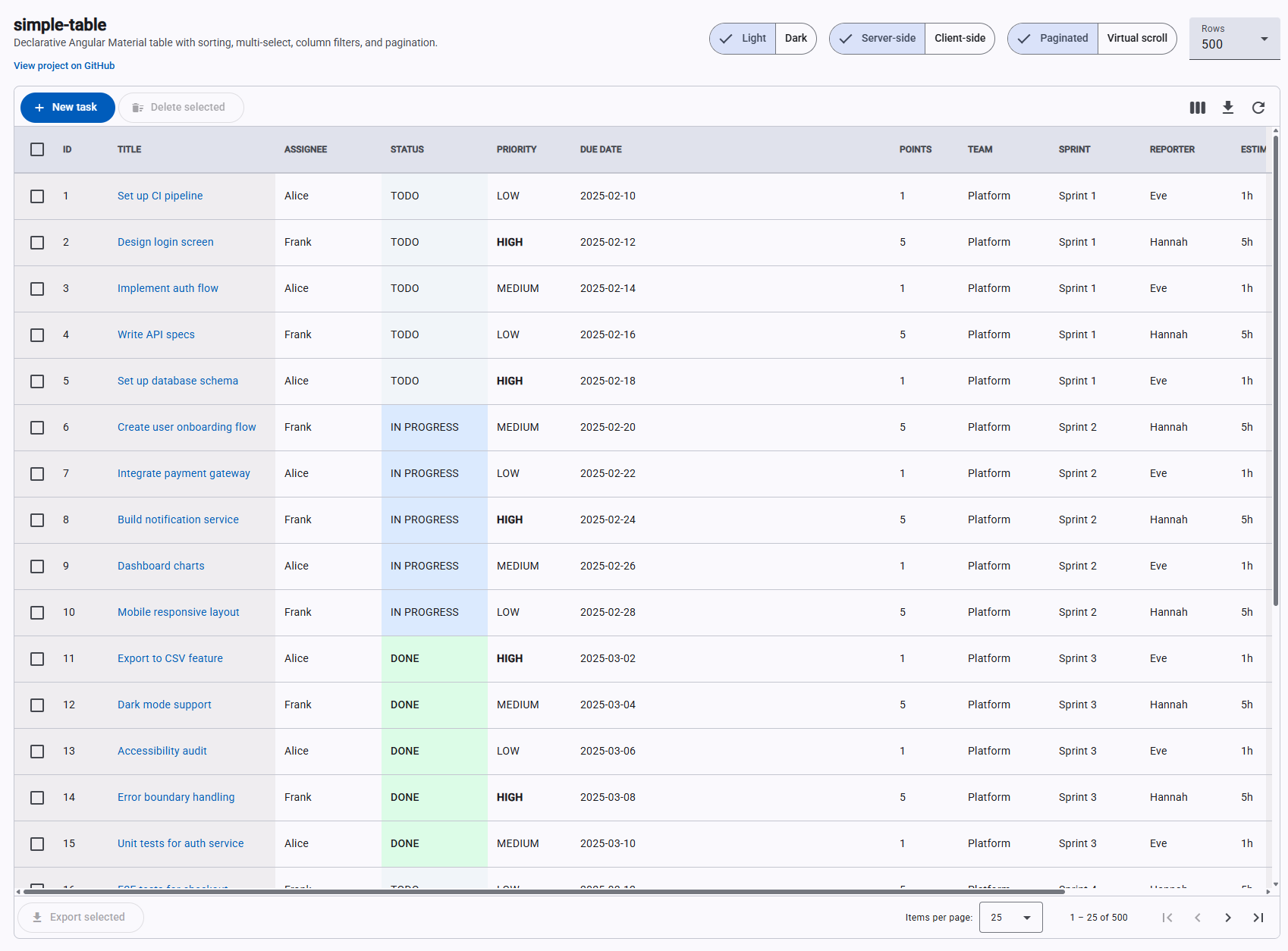
So I did. [`ngx-mat-simple-table`](https://www.npmjs.com/package/ngx-mat-simple-table) — an Angular Material table component that takes a column config and data, and handles the rest.
---
## The core idea
I wanted to go from this (the usual boilerplate situation) to this:
```html
<simple-table
[tableColumns]="columns"
[dataSource]="rows"
[tableConfig]="config"
(sortChange)="onSort($event)"
(filterChange)="onFilter($event)"
(selectionChange)="onSelect($event)"
>
<st-export filename="tasks" format="xlsx" [allDataProvider]="getAllForExport" />
</simple-table>
```
Column config is a plain array:
```typescript
readonly columns: ColumnDef[] = [
{ key: 'select' },
{ key: 'title', label: 'Title', hasColumnFilters: true },
{ key: 'assignee', label: 'Assignee', hasColumnFilters: true, filterType: FilterType.DropDown },
{ key: 'status', label: 'Status', hasColumnFilters: true, filterType: FilterType.DropDown,
displayValue: v => String(v).replace(/-/g, ' ').toUpperCase() },
{ key: 'dueDate', label: 'Due Date' },
];
```
Fully paginated, sortable, filterable, exportable table. That's the whole host component.
---
## Signals from the start
I built this after Angular 17 shipped, so I went all-in on the signals API. No `@Input()`, no `EventEmitter`, no `ChangeDetectorRef`. Everything is `input()`, `output()`, `computed()`, `effect()`.
I wasn't sure how it would feel at first but honestly it's made the component much easier to reason about. I've never once had to think about change detection. Would not go back.
---
## The Windows `file:` reference trap
This one annoyed me more than it should have.
When developing a library locally you need the demo app to consume the built output. I used `"ngx-mat-simple-table": "file:./dist/ngx-mat-simple-table"` in the root `package.json`. On macOS this works fine. On Windows, `npm install` with a `file:` reference copies the files at install time — so running `build:lib:watch` updates `dist/` but `node_modules/` stays completely stale. I kept seeing old code after rebuilds and couldn't figure out why for longer than I'd like to admit.
The fix is `tsconfig.json` paths instead:
```json
"paths": {
"ngx-mat-simple-table": ["./dist/ngx-mat-simple-table"]
}
```
Angular's build system watches files resolved through `paths`, so incremental rebuilds are picked up immediately. Should have just done this from the start.
---
## CDK drag-reorder was a puzzle
Column drag-reorder uses Angular CDK. My first attempt put `cdkDropList` and `cdkDrag` on the same `<th>` element. CDK silently reported `previousContainer === container` on every drop, so the column order never actually changed. Body cells stayed out of sync with headers. No error, just nothing happening.
The fix: `<th>` is the `CdkDropList`, a wrapper `<div>` inside it carries `CdkDrag`. Separate elements. Also — and this surprised me — Angular's `@for` block doesn't work here. CDK needs to traverse the view tree to find connected drop lists, and `@for` uses a different internal structure than `*ngFor`. Switching to `*ngFor` on the column blocks fixed it.
---
## Don't install SheetJS without checking if it actually does what you need
I needed styled Excel headers. I installed SheetJS (xlsx), the most popular option. Spent a while getting it set up, wrote the header styling code, tested it — headers were completely plain. No error, styling just silently had no effect.
Turns out cell styles in SheetJS community edition are a Pro-only feature. It's in the docs if you look for it, but it's not exactly front and centre.
Switched to [ExcelJS](https://github.com/exceljs/exceljs) (MIT, actually free) and it worked immediately. The API is clean and it supports full cell styling. To match the exported header to the rendered grid I just read styles from the DOM at export time:
```typescript
const el = hostEl.querySelector('th.mat-mdc-header-cell') as HTMLElement;
const cs = window.getComputedStyle(el);
const bg = this._cssColorToArgb(cs.backgroundColor); // → ARGB hex for ExcelJS
const bold = parseInt(cs.fontWeight) >= 600;
```
Whatever theme or custom CSS the host applies, the Excel header automatically matches it.
---
## Export should export everything, not just what's on screen
The first version of export grabbed whatever rows were rendered — so if you were on page 3 of 10, you'd export 10 rows. Obviously wrong in hindsight.
Client-side mode was easy to fix: export `MatTableDataSource.filteredData`, which has all filtered rows regardless of page.
Server-side mode needed a different approach. The `<st-export>` directive accepts an `allDataProvider` callback — the host provides a function that fetches everything from the API without pagination params:
```typescript
readonly getAllForExport = (): Promise<Task[]> => {
return firstValueFrom(
this._http.get<TasksResponse>('/api/tasks', { params: this.activeFilterParams() })
.pipe(map(r => r.data))
);
};
```
```html
<st-export filename="tasks" [allDataProvider]="getAllForExport" />
```
Active filters are forwarded so the export reflects exactly what the user sees — just without the page limit.
---
## Vercel 404 after deploy
After one release the demo started returning 404 on every route. Angular 17+'s esbuild builder outputs to `dist/<project>/browser/` — Vercel was pointed at `dist/<project>/` and finding no `index.html`.
Fixed with a `vercel.json`:
```json
{
"buildCommand": "npm run build:lib && npm install && npm run build",
"outputDirectory": "dist/Demo-table/browser",
"rewrites": [{ "source": "/(.*)", "destination": "/index.html" }]
}
```
The `rewrites` rule matters too. Without it, refreshing any route other than `/` returns 404 because Vercel looks for a file at that path instead of letting Angular's router handle it.
---
## Where it is now
- **npm:** [`ngx-mat-simple-table`](https://www.npmjs.com/package/ngx-mat-simple-table)
- **Demo:** [ng-simple-table.vercel.app](https://ng-simple-table.vercel.app)
- **GitHub:** [github.com/xonaib/ng-simple-table](https://github.com/xonaib/ng-simple-table)
It has pagination, sorting, multi-select, dropdown filters, column chooser, drag-reorder, column resize, sticky columns, Excel export with full header styling, user settings persistence, and virtual scroll. Client-side and server-side data modes.
If you're building data-heavy Angular apps, hopefully it saves you some of the boilerplate.
## What's new in v1.2
Since the original post the library has grown quite a bit. Here's what landed in v1.2:
- **Sticky columns** — `ColumnDef.sticky: 'left' | 'right'` pins columns to either edge during horizontal scroll. Drag-reorder is automatically disabled for sticky columns so users can't accidentally break the layout.
- **Dark mode** — all colour tokens alias Angular Material 3 system tokens, so flipping `body { color-scheme: dark }` adapts the entire table with zero extra CSS. Use the CSS `light-dark()` function for any custom cell colours and they adapt too.
- **`cellClass` callback** — return a CSS class from `(value, row)` for conditional cell styling — colour-coded status badges, priority indicators — without needing a full custom template.
- **`fillContainer` mode** — set `TableConfig.fillContainer: true` and the table stretches to fill its parent height. Toolbar and paginator stay pinned; only the rows scroll.
- **22 CSS custom properties** — every visual surface now has a `--st-*` token covering header, borders, row backgrounds, hover, sticky cells, cell text, scrollbar, filter popup, and column chooser. Override any of them on the element or any ancestor.
- **State persistence fix** — new columns added after a saved state are now correctly appended rather than silently dropped.
## What's new in v1.3
v1.3 ships virtual scroll.
Pagination works, but some UIs just want to scroll. Flip one flag and the paginator disappears and CDK virtual scroll takes over — only the rows in the viewport are in the DOM.
**Client-side** is a one-liner config change:
```html
<simple-table
[dataSource]="allRows"
[columns]="columns"
[config]="{ virtual: true, virtualRowHeight: 48 }"
/>
```
Pass your full array. The component handles everything internally.
**Server-side** is where it gets more interesting. Instead of fetching everything upfront, the table emits a `virtualRangeChange` event as the user scrolls, telling you which rows are in view. You fetch just that window:
```html
<simple-table
[dataSource]="currentWindow"
[columns]="columns"
[config]="{ virtual: true, virtualRowHeight: 48 }"
[virtualOffset]="windowStart"
[totalLength]="totalRecords"
(virtualRangeChange)="onRangeChange($event)"
/>
```
```typescript
onRangeChange({ start, end }: VirtualRange) {
this.windowStart = start;
this.http.get(`/api/items?offset=${start}&limit=${end - start}`)
.subscribe(data => this.currentWindow = data);
}
```
`virtualOffset` tells the table where in the full dataset your loaded window starts. `totalLength` sizes the scroll track correctly so the scrollbar reflects the real dataset. You never load more than what's on screen.
**One thing that took longer than expected:** CDK virtual scroll normally positions loaded content by applying `transform: translateY()` to the content wrapper. That creates a CSS stacking context, which breaks `position: sticky` on the table header — the header scrolls away with the content instead of staying fixed. The fix is to no-op that transform entirely and use `margin-top` instead. Same visual positioning, no stacking context, sticky headers stay sticky. Not obvious until you hit it.
Comments
More Blog
View allkubernetesMinimalist EKS: The Easy Way
Amazon EKS manages the Kubernetes control plane, but you remain responsible for provisioning the...
J
Joaquin MenchacaaiNever forget to enter the Stern Grove lottery again!
Browser automation with Playwright, Python, GitHub Actions, and Entire to auto-enter San Francisco Stern Grove concert lotteries each week!
L
Lizzie SiegletypescriptA Free Screenshot Editor That Never Uploads Your Image
A free screenshot and image editor that runs entirely in your browser. Keeping every edit reversible and handling big phone photos, in plain TypeScript and Canvas2D.
M
Martin StarkshowdevI built a CLI to break my highlights out of Apple Books
A macOS CLI + MCP server that exports Apple Books highlights to Markdown and gives AI assistants direct access to your reading notes.
A
Andrey KorchakaiA Developer's Guide to Agent Hooks in Antigravity CLI
Motivation To be quite honest, "Hooks"—the shell commands we trigger at specific points...
T
TanaikeagentsTactical vs. Strategic Agentic AI Development — A Playbook for Developers
The Strategic Engineer: Why Writing Code Is No Longer Your Most Valuable Skill ...
A
Adewumi Saheed Adewale