
Back to Blog angular
 kubernetes
 ai
ai typescript
 showdev
 ai
ai agents
Building MCP Apps with Angular
Dale Nguyen April 25, 2026
0 views
If you've been building MCP servers, you know the drill: your tool returns JSON, the host renders it...
If you've been building MCP servers, you know the drill: your tool returns JSON, the host renders it as text, and the user squints at a timestamp string. [MCP Apps](https://github.com/modelcontextprotocol/ext-apps) change that — they let your server ship an interactive UI that the host renders in an iframe, right inside the conversation.
MCP Apps are built on the **Model Context Protocol** — an open standard. They're not tied to Claude or any specific AI provider. Any host that implements the MCP Apps specification (Claude Desktop, custom chat clients, or other AI assistants that adopt MCP) can render your UI. You build it once, and it works everywhere MCP is supported.
This post walks through building MCP Apps with Angular. We'll start with a single tool, add a second tool with its own UI, and then show how to share code between them without bloating either bundle.
## How MCP Apps Work (Quick Recap)
```plaintext
View (Angular App) <--PostMessageTransport--> Host (AppBridge) <--MCP Client--> MCP Server
```
- **Server** registers tools and resources. Each tool can point to a resource URI containing the UI.
- **Host** (the chat client) fetches that resource and renders it in a sandboxed iframe.
- **View** is your Angular app running inside that iframe. It uses the `App` class from `@modelcontextprotocol/ext-apps` to communicate with the host.
The key insight: your UI is bundled into a **single self-contained HTML file** using Vite and `vite-plugin-singlefile`. The host doesn't need to know it's Angular — it just loads HTML.
## Project Structure
```plaintext
basic-server-angular/
├── mcp-app.html # HTML entry point for UI #1
├── greeting-app.html # HTML entry point for UI #2
├── src/
│ ├── main.ts # Angular bootstrap for UI #1
│ ├── app.component.ts # Get Time component
│ ├── greeting-main.ts # Angular bootstrap for UI #2
│ ├── greeting.component.ts # Greeting component
│ ├── shared/
│ │ └── mcp-app-setup.ts # Shared App + theming setup
│ └── global.css # Host-aware CSS variables
├── server.ts # MCP server (registers tools + resources)
├── main.ts # Server entry point (HTTP + stdio)
└── vite.config.ts # Builds each HTML into a single file
```
## Step 1: The Server
Every MCP App starts on the server side. You register a **tool** (what the LLM calls) and a **resource** (the HTML that gets rendered). They're linked by a resource URI.
```ts
// server.ts
import { McpServer } from "@modelcontextprotocol/sdk/server/mcp.js";
import type { CallToolResult, ReadResourceResult } from "@modelcontextprotocol/sdk/types.js";
import fs from "node:fs/promises";
import path from "node:path";
import {
registerAppTool,
registerAppResource,
RESOURCE_MIME_TYPE,
} from "@modelcontextprotocol/ext-apps/server";
const DIST_DIR = import.meta.filename.endsWith(".ts")
? path.join(import.meta.dirname, "dist")
: import.meta.dirname;
export function createServer(): McpServer {
const server = new McpServer({
name: "Basic MCP App Server (Angular)",
version: "1.0.0",
});
const resourceUri = "ui://get-time/mcp-app.html";
// Register the tool — this is what the LLM calls
registerAppTool(server, "get-time", {
title: "Get Time",
description: "Returns the current server time as an ISO 8601 string.",
inputSchema: {},
_meta: { ui: { resourceUri } }, // Links this tool to its UI
}, async (): Promise<CallToolResult> => {
const time = new Date().toISOString();
return { content: [{ type: "text", text: time }] };
});
// Register the resource — the bundled HTML for this tool's UI
registerAppResource(server, resourceUri, resourceUri, {
mimeType: RESOURCE_MIME_TYPE,
}, async (): Promise<ReadResourceResult> => {
const html = await fs.readFile(
path.join(DIST_DIR, "mcp-app.html"),
"utf-8",
);
return {
contents: [{ uri: resourceUri, mimeType: RESOURCE_MIME_TYPE, text: html }],
};
});
return server;
}
```
The `_meta.ui.resourceUri` is the glue. When the host calls this tool, it reads that field to know which resource to fetch and render.
## Step 2: The HTML Entry Point
Each UI needs an HTML file at the project root. This is the Vite entry point that gets bundled into a single self-contained file.
```html
<!-- mcp-app.html -->
<!DOCTYPE html>
<html lang="en">
<head>
<meta charset="UTF-8">
<meta name="viewport" content="width=device-width, initial-scale=1.0">
<meta name="color-scheme" content="light dark">
<title>Get Time App</title>
<link rel="stylesheet" href="/src/global.css">
</head>
<body>
<app-root></app-root>
<script type="module" src="/src/main.ts"></script>
</body>
</html>
```
## Step 3: The Angular App
The bootstrap is minimal — Angular 19+ with zoneless change detection:
```ts
// src/main.ts
import "@angular/compiler";
import { bootstrapApplication } from "@angular/platform-browser";
import { provideZonelessChangeDetection } from "@angular/core";
import { AppComponent } from "./app.component";
import "./global.css";
bootstrapApplication(AppComponent, {
providers: [provideZonelessChangeDetection()],
}).catch((err) => console.error(err));
```
Now the component itself. The `App` class from `@modelcontextprotocol/ext-apps` is the bridge between your Angular code and the host:
```ts
// src/app.component.ts
import { Component, type OnInit, signal } from "@angular/core";
import {
App,
applyDocumentTheme,
applyHostStyleVariables,
applyHostFonts,
type McpUiHostContext,
} from "@modelcontextprotocol/ext-apps";
import type { CallToolResult } from "@modelcontextprotocol/sdk/types.js";
function extractText(result: CallToolResult): string {
return result.content?.find((c) => c.type === "text")!.text;
}
@Component({
selector: "app-root",
template: `
<main
[style.padding-top.px]="hostContext()?.safeAreaInsets?.top"
[style.padding-right.px]="hostContext()?.safeAreaInsets?.right"
[style.padding-bottom.px]="hostContext()?.safeAreaInsets?.bottom"
[style.padding-left.px]="hostContext()?.safeAreaInsets?.left"
>
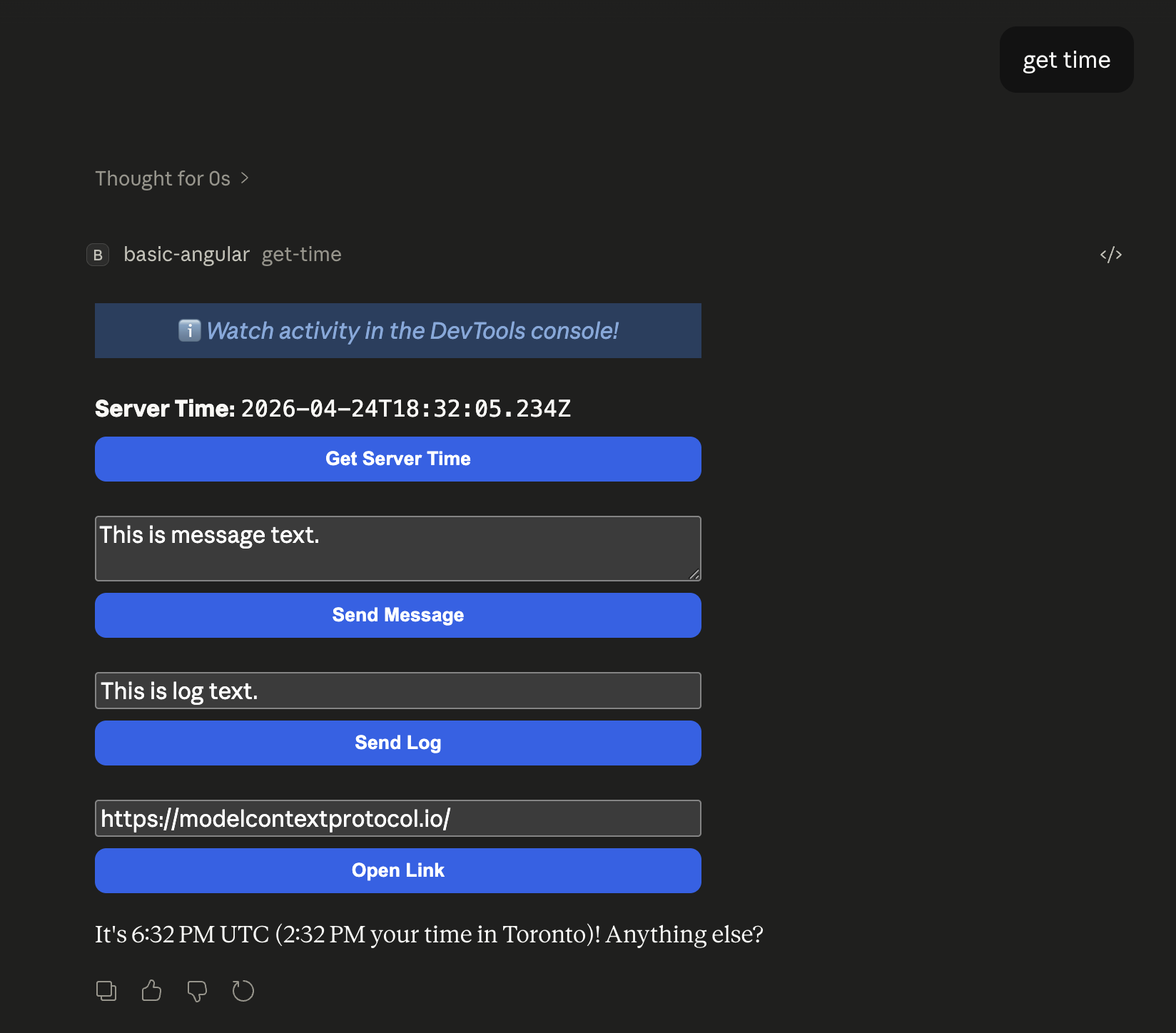
<p><strong>Server Time:</strong> <code>{{ serverTime() }}</code></p>
<button (click)="handleGetTime()">Get Server Time</button>
</main>
`,
})
export class AppComponent implements OnInit {
private app: App | null = null;
hostContext = signal<McpUiHostContext | undefined>(undefined);
serverTime = signal("Loading...");
async ngOnInit() {
const instance = new App({ name: "Get Time App", version: "1.0.0" });
instance.ontoolresult = (result) => {
this.serverTime.set(extractText(result));
};
instance.onhostcontextchanged = (params) => {
const ctx = { ...this.hostContext(), ...params };
this.hostContext.set(ctx);
if (ctx.theme) applyDocumentTheme(ctx.theme);
if (ctx.styles?.variables) applyHostStyleVariables(ctx.styles.variables);
if (ctx.styles?.css?.fonts) applyHostFonts(ctx.styles.css.fonts);
};
await instance.connect();
this.app = instance;
const ctx = instance.getHostContext();
this.hostContext.set(ctx);
if (ctx?.theme) applyDocumentTheme(ctx.theme);
if (ctx?.styles?.variables) applyHostStyleVariables(ctx.styles.variables);
if (ctx?.styles?.css?.fonts) applyHostFonts(ctx.styles.css.fonts);
}
async handleGetTime() {
if (!this.app) return;
try {
const result = await this.app.callServerTool({
name: "get-time",
arguments: {},
});
this.serverTime.set(extractText(result));
} catch {
this.serverTime.set("[ERROR]");
}
}
}
```
A few things to note:
- **`App` class** — this is the SDK's main entry point. You create one, wire up callbacks, and call `connect()`. That's it.
- **`ontoolresult`** — fires when the host sends a tool result. This is how data flows from the server to your UI.
- **`callServerTool()`** — lets the UI call tools on the server. The host proxies this through the MCP client.
- **`onhostcontextchanged`** — the host pushes theme and style updates. The helper functions (`applyDocumentTheme`, etc.) apply them as CSS variables on `document`, so your component styles just work.
- **`safeAreaInsets`** — the host tells you how much padding to leave for its chrome. Use it on your root container.
## Step 4: Adding a Second UI
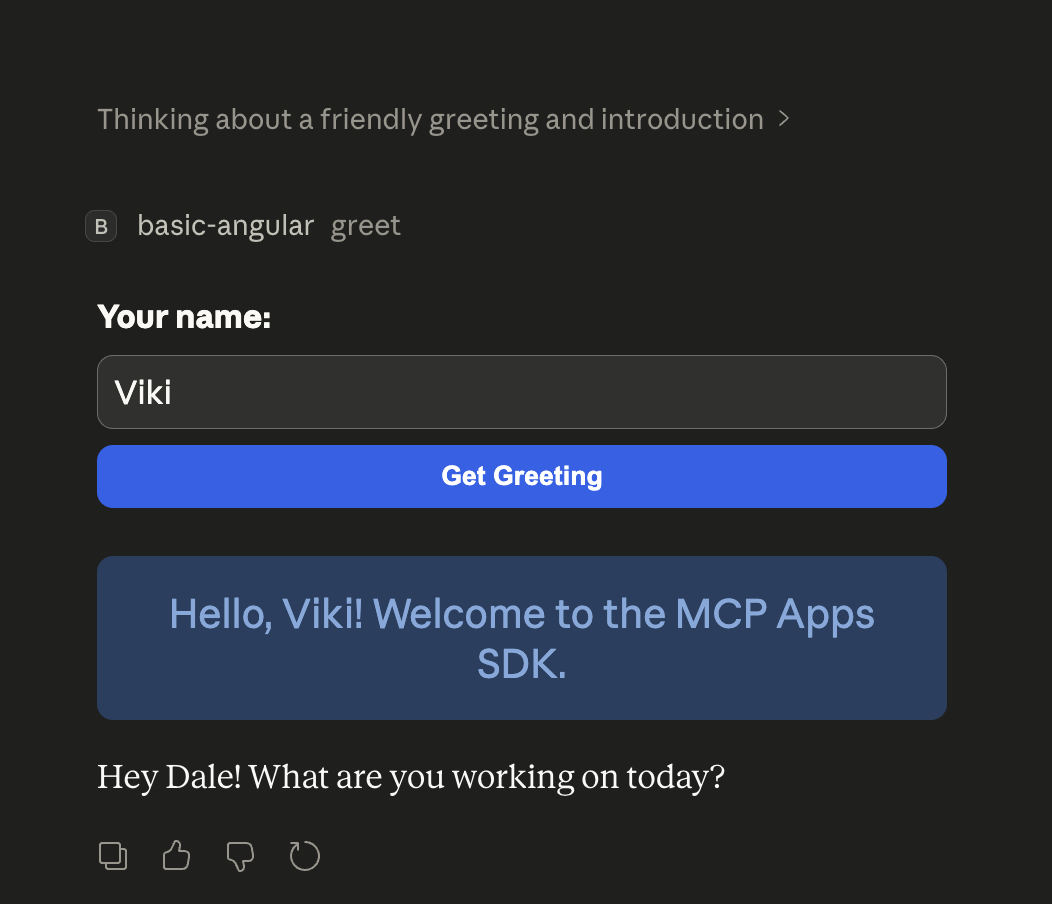
Here's where it gets interesting. Say you want a "Greet" tool with its own UI. Each tool gets its own HTML entry point, its own Angular app, and its own resource registration.
### Server: Register Both Tools
```ts
// server.ts — inside createServer()
// Tool #1: Get Time
const timeResourceUri = "ui://get-time/mcp-app.html";
registerAppTool(server, "get-time", {
title: "Get Time",
description: "Returns the current server time.",
inputSchema: {},
_meta: { ui: { resourceUri: timeResourceUri } },
}, async (): Promise<CallToolResult> => {
return { content: [{ type: "text", text: new Date().toISOString() }] };
});
registerAppResource(server, timeResourceUri, timeResourceUri, {
mimeType: RESOURCE_MIME_TYPE,
}, async (): Promise<ReadResourceResult> => {
const html = await fs.readFile(path.join(DIST_DIR, "mcp-app.html"), "utf-8");
return { contents: [{ uri: timeResourceUri, mimeType: RESOURCE_MIME_TYPE, text: html }] };
});
// Tool #2: Greet
const greetResourceUri = "ui://greet/greeting-app.html";
registerAppTool(server, "greet", {
title: "Greet",
description: "Returns a personalised greeting.",
inputSchema: {
name: z.string().optional().default("World").describe("Name to greet"),
},
_meta: { ui: { resourceUri: greetResourceUri } },
}, async ({ name }: { name?: string }): Promise<CallToolResult> => {
const greeting = `Hello, ${name || "World"}! Welcome to the MCP Apps SDK.`;
return { content: [{ type: "text", text: greeting }] };
});
registerAppResource(server, greetResourceUri, greetResourceUri, {
mimeType: RESOURCE_MIME_TYPE,
}, async (): Promise<ReadResourceResult> => {
const html = await fs.readFile(path.join(DIST_DIR, "greeting-app.html"), "utf-8");
return { contents: [{ uri: greetResourceUri, mimeType: RESOURCE_MIME_TYPE, text: html }] };
});
```
### Greeting Component
```ts
// src/greeting.component.ts
import { Component, type OnInit, signal } from "@angular/core";
import { FormsModule } from "@angular/forms";
import {
App,
applyDocumentTheme,
applyHostStyleVariables,
applyHostFonts,
type McpUiHostContext,
} from "@modelcontextprotocol/ext-apps";
import type { CallToolResult } from "@modelcontextprotocol/sdk/types.js";
@Component({
selector: "greeting-root",
imports: [FormsModule],
template: `
<main
[style.padding-top.px]="hostContext()?.safeAreaInsets?.top"
[style.padding-right.px]="hostContext()?.safeAreaInsets?.right"
[style.padding-bottom.px]="hostContext()?.safeAreaInsets?.bottom"
[style.padding-left.px]="hostContext()?.safeAreaInsets?.left"
>
<div>
<label><strong>Your name:</strong></label>
<input type="text" [(ngModel)]="nameText" placeholder="Enter your name">
<button (click)="handleGreet()">Get Greeting</button>
</div>
@if (greeting()) {
<div class="greeting-display">{{ greeting() }}</div>
}
</main>
`,
})
export class GreetingComponent implements OnInit {
private app: App | null = null;
hostContext = signal<McpUiHostContext | undefined>(undefined);
greeting = signal("");
nameText = "";
async ngOnInit() {
const instance = new App({ name: "Greeting App", version: "1.0.0" });
instance.ontoolresult = (result) => {
this.greeting.set(result.content?.find((c) => c.type === "text")!.text);
};
instance.onhostcontextchanged = (params) => {
const ctx = { ...this.hostContext(), ...params };
this.hostContext.set(ctx);
if (ctx.theme) applyDocumentTheme(ctx.theme);
if (ctx.styles?.variables) applyHostStyleVariables(ctx.styles.variables);
if (ctx.styles?.css?.fonts) applyHostFonts(ctx.styles.css.fonts);
};
await instance.connect();
this.app = instance;
const ctx = instance.getHostContext();
this.hostContext.set(ctx);
if (ctx?.theme) applyDocumentTheme(ctx.theme);
if (ctx?.styles?.variables) applyHostStyleVariables(ctx.styles.variables);
if (ctx?.styles?.css?.fonts) applyHostFonts(ctx.styles.css.fonts);
}
async handleGreet() {
if (!this.app) return;
try {
const name = this.nameText.trim() || "World";
const result = await this.app.callServerTool({ name: "greet", arguments: { name } });
this.greeting.set(result.content?.find((c) => c.type === "text")!.text);
} catch {
this.greeting.set("[ERROR]");
}
}
}
```
## Step 5: Sharing Code Between UIs
You probably noticed that both components have identical `App` setup and theming boilerplate. That's a great candidate for extraction — and since each HTML is a separate Vite entry point, **Vite's tree-shaking ensures each bundle only includes what it actually imports**.
```ts
// src/shared/mcp-app-setup.ts
import {
App,
applyDocumentTheme,
applyHostStyleVariables,
applyHostFonts,
type McpUiHostContext,
} from "@modelcontextprotocol/ext-apps";
import type { WritableSignal } from "@angular/core";
import type { CallToolResult } from "@modelcontextprotocol/sdk/types.js";
export function extractText(result: CallToolResult): string {
return result.content?.find((c) => c.type === "text")!.text;
}
function applyContext(ctx: McpUiHostContext): void {
if (ctx.theme) applyDocumentTheme(ctx.theme);
if (ctx.styles?.variables) applyHostStyleVariables(ctx.styles.variables);
if (ctx.styles?.css?.fonts) applyHostFonts(ctx.styles.css.fonts);
}
export async function createMcpApp(
name: string,
hostContext: WritableSignal<McpUiHostContext | undefined>,
onToolResult?: (result: CallToolResult) => void,
): Promise<App> {
const app = new App({ name, version: "1.0.0" });
if (onToolResult) app.ontoolresult = onToolResult;
app.onhostcontextchanged = (params) => {
const ctx = { ...hostContext(), ...params } as McpUiHostContext;
hostContext.set(ctx);
applyContext(ctx);
};
await app.connect();
const ctx = app.getHostContext();
hostContext.set(ctx);
if (ctx) applyContext(ctx);
return app;
}
```
Both components import `createMcpApp` and `extractText` from the shared module. Since they're in separate Vite builds, tree-shaking still applies — each bundle only pulls in what it calls.
## Step 6: The Build
```ts
// vite.config.ts
import { defineConfig } from "vite";
import { viteSingleFile } from "vite-plugin-singlefile";
const INPUT = process.env.INPUT;
if (!INPUT) throw new Error("INPUT environment variable is not set");
export default defineConfig({
plugins: [viteSingleFile()],
build: {
rollupOptions: { input: INPUT },
outDir: "dist",
emptyOutDir: false, // Key: don't wipe previous builds
},
});
```
```json
{
"scripts": {
"build": "tsc --noEmit && cross-env INPUT=mcp-app.html vite build && cross-env INPUT=greeting-app.html vite build && tsc -p tsconfig.server.json && bun build server.ts --outdir dist --target node"
}
}
```
Each HTML file produces a fully self-contained output (all JS, CSS, and Angular runtime inlined). The two bundles are completely independent.
## Theming: Looking Native in Any Host
```css
:root {
color-scheme: light dark;
--color-text-primary: light-dark(#1f2937, #f3f4f6);
--color-background-primary: light-dark(#ffffff, #1a1a1a);
--color-accent: #2563eb;
--border-radius-md: 6px;
--spacing-unit: var(--font-text-md-size);
}
```
When the host sends style updates via `onhostcontextchanged`, the helper functions overwrite these variables on the document root. Your Angular component styles reference the variables (`var(--color-accent)`, `var(--spacing-md)`), so they adapt automatically — no theme prop drilling needed.
## Recap
1. **Server**: register a tool + resource pair per UI, linked by a resource URI
2. **HTML**: one entry point per UI, each bootstrapping its own Angular app
3. **Component**: create an `App` instance, wire up callbacks, call `connect()`
4. **Shared code**: extract common setup into a shared module — Vite tree-shakes per entry point
5. **Build**: run Vite once per HTML file into the same `dist/` directory
6. **Theming**: use host CSS variables with fallbacks, apply updates via `onhostcontextchanged`
The full source is available in the [ext-apps examples](https://github.com/dalenguyen/ext-apps/tree/main/examples/basic-server-angular).
Comments
More Blog
View allkubernetesMinimalist EKS: The Easy Way
Amazon EKS manages the Kubernetes control plane, but you remain responsible for provisioning the...
J
Joaquin MenchacaaiNever forget to enter the Stern Grove lottery again!
Browser automation with Playwright, Python, GitHub Actions, and Entire to auto-enter San Francisco Stern Grove concert lotteries each week!
L
Lizzie SiegletypescriptA Free Screenshot Editor That Never Uploads Your Image
A free screenshot and image editor that runs entirely in your browser. Keeping every edit reversible and handling big phone photos, in plain TypeScript and Canvas2D.
M
Martin StarkshowdevI built a CLI to break my highlights out of Apple Books
A macOS CLI + MCP server that exports Apple Books highlights to Markdown and gives AI assistants direct access to your reading notes.
A
Andrey KorchakaiA Developer's Guide to Agent Hooks in Antigravity CLI
Motivation To be quite honest, "Hooks"—the shell commands we trigger at specific points...
T
TanaikeagentsTactical vs. Strategic Agentic AI Development — A Playbook for Developers
The Strategic Engineer: Why Writing Code Is No Longer Your Most Valuable Skill ...
A
Adewumi Saheed Adewale