
Back to Blog computerscience
 kubernetes
 ai
ai typescript
 showdev
 ai
ai agents
When Information Hits a Wall: Barriers in Cellular Automata
John Samuel April 26, 2026
0 views
TL;DR: Add one frozen cell to a cellular automaton and watch the entire pattern reshape itself. This...
> **TL;DR:** Add one frozen cell to a cellular automaton and watch the entire pattern reshape itself. This post explores what happens when you introduce a single barrier into elementary CAs — and why it matters for both theory and real-world modeling.
What happens when a single cell in a cellular automaton refuses to change?
In elementary cellular automata (ECAs), every cell updates each generation based on its neighbors and a deterministic rule. Patterns emerge, spread, and evolve across the grid in beautiful, often chaotic ways. But introduce one **frozen cell** — one immutable point that never updates — and the entire system transforms.
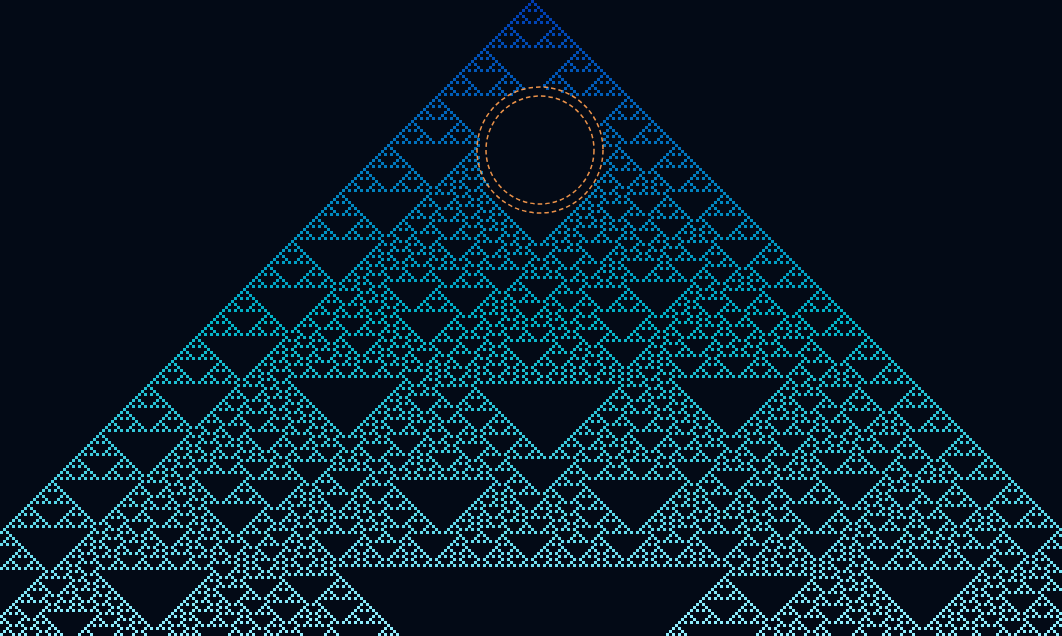
This simple constraint acts like matter in an otherwise purely computational space, **blocking information flow** and reshaping how patterns propagate.
---
## 🧱 The Barrier Concept
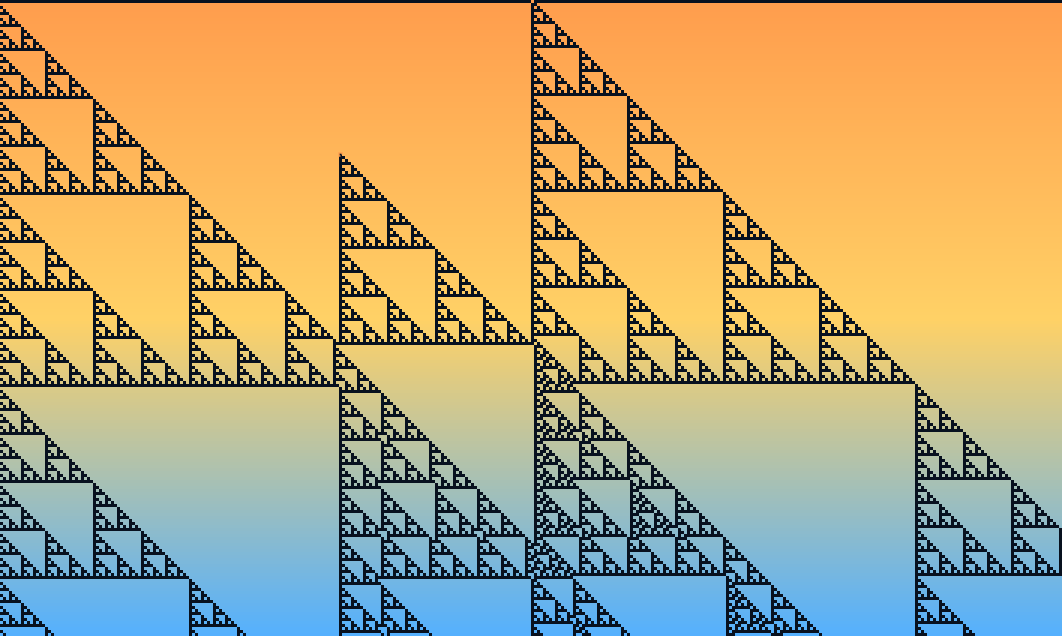
A barrier is remarkably simple to define: mark one cell as frozen.
While every other cell continues updating according to the automaton's rule, this single cell remains locked in its initial state. It doesn't compute. It doesn't respond to neighbors. It just sits there, unchanging.
The automaton must work around this obstacle. Information flowing through the grid can't pass through the barrier — it **reflects**, **splits**, or **terminates** at this boundary.
Think of it like dropping a rock into a stream: the water doesn't stop, but its flow pattern is permanently altered.
### Rule 195
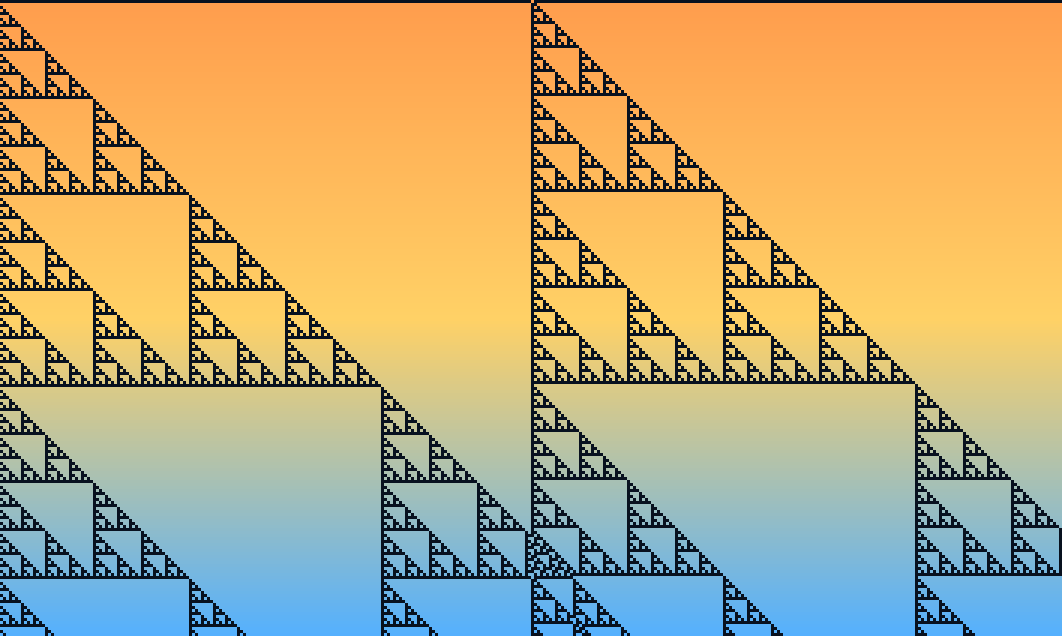
### Rule 195 with one cell barrier
---
## 🔬 Visualizing the Impact: Three Rules, One Barrier
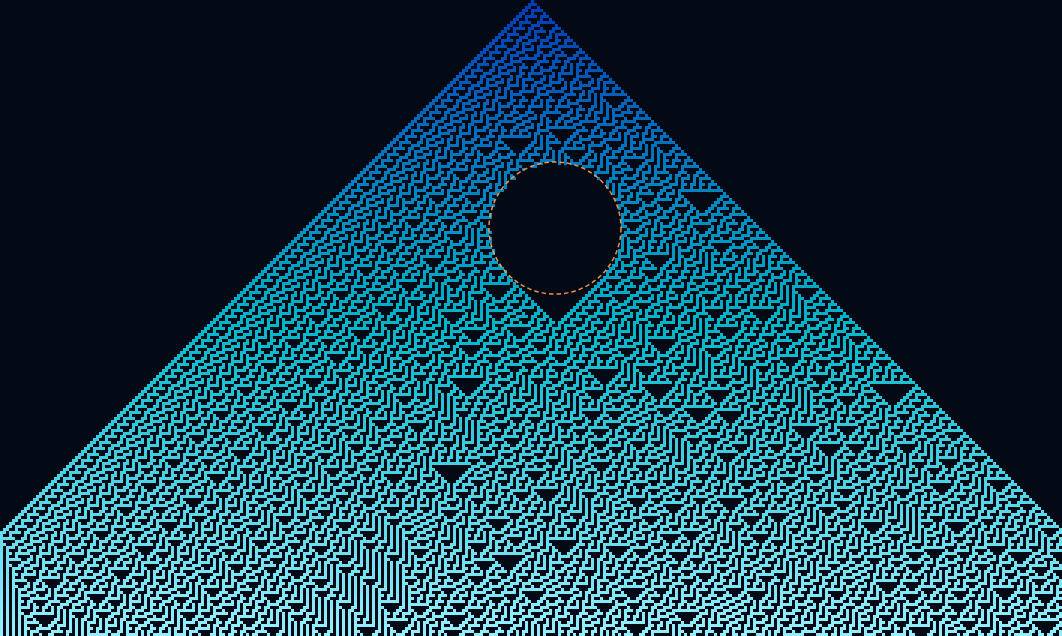
### Rule 30 — Chaos Interrupted
**Rule 30** is famous for its chaotic, random-looking output — so much so that Wolfram used it as a pseudorandom number generator. Place a barrier anywhere in a Rule 30 grid, and you see dramatic sensitivity: patterns on either side of the frozen cell diverge completely, as if two independent automata are running simultaneously.
### Rule 110 — Computation Blocked
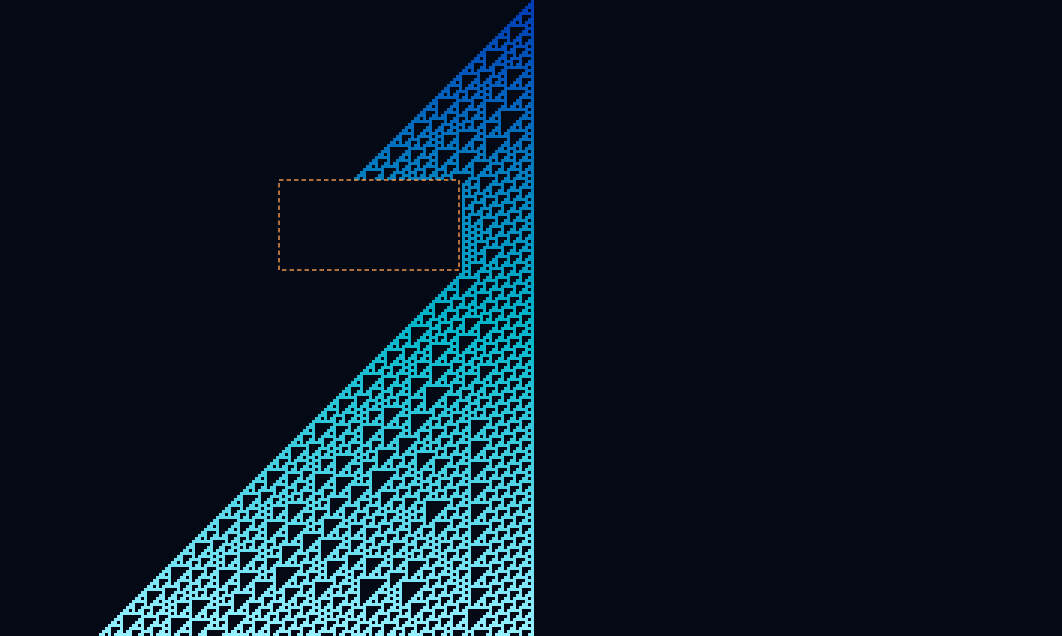
**Rule 110** is remarkable: it's been proven **Turing-complete**, capable of universal computation. A barrier doesn't just disrupt its pattern — it interrupts the computation itself. Signals that would have propagated and interacted across the grid are halted or reflected, cutting off potential glider collisions and information pathways.
### Rule 90 — Symmetry Preserved (Then Broken)
**Rule 90** produces beautiful, perfectly symmetric Sierpiński triangle-like patterns under normal conditions. Add a barrier on the central axis, and the symmetry is maintained. Shift it off-center, however, and you get asymmetric reflections — a clean demonstration of how positional context shapes global behavior.
---
## 🧪 A Minimal Experiment You Can Run
Here's the core idea in code:
```python
# Elementary CA with a single frozen barrier
RULE = 30
SIZE = 101
BARRIER_POS = SIZE // 3 # Offset from center
grid = [0] * SIZE
grid[SIZE // 2] = 1 # Single active cell at start
def step(row, rule, barrier):
new_row = []
for i in range(len(row)):
if i == barrier:
new_row.append(row[i]) # Frozen — never updates
else:
left = row[i - 1] if i > 0 else 0
center = row[i]
right = row[i + 1] if i < len(row) - 1 else 0
index = (left << 2) | (center << 1) | right
new_row.append((rule >> index) & 1)
return new_row
for _ in range(50):
grid = step(grid, RULE, BARRIER_POS)
```
The key insight: **one `if` statement is all it takes** to turn a computational cell into a physical obstacle.
Try changing `BARRIER_POS` or swapping `RULE` to 90 or 110 — the behavioral differences are striking.
---
## 💡 Why One Barrier Matters
The single-barrier setup is a case of **minimal experimental design**. By introducing exactly one constraint, you isolate its effects cleanly — no noise from multiple obstacles or extended walls. Every change in behavior traces directly back to that one frozen cell.
This reveals something profound: cellular automata, despite being abstract computational systems, **respond to spatial constraints in ways that feel physical**. The barrier doesn't change the rule or the initial conditions — it just occupies space. Yet this spatial occupation transforms global dynamics.
From a research perspective, barriers bridge pure computation and physical simulation:
- 🔷 **Crystal defects** in material science — impurities that scatter phonons and electrons
- 🌊 **Obstacles in fluid flow** — the same logic underpins lattice-Boltzmann simulations
- ⚛️ **Scattering particles** in quantum systems — potential wells and barriers that reflect wave functions
Cellular automata give us a clean, discrete sandbox to study the same phenomenon at minimal cost.
---
## 🚀 Try It Interactively
In a universe of pure information, a barrier becomes matter. And matter, it turns out, changes everything.
👉 **[Explore barriers interactively at CellCosmos](https://multilingualprogramming.github.io/cellcosmos/)**
Switch between Rule 30, 90, and 110. Drag the barrier to different positions. Watch how one frozen cell reshapes the entire computation around it.
---
*What rule or barrier position surprised you the most? Drop a comment — I'd love to compare notes!*
Comments
More Blog
View allkubernetesMinimalist EKS: The Easy Way
Amazon EKS manages the Kubernetes control plane, but you remain responsible for provisioning the...
J
Joaquin MenchacaaiNever forget to enter the Stern Grove lottery again!
Browser automation with Playwright, Python, GitHub Actions, and Entire to auto-enter San Francisco Stern Grove concert lotteries each week!
L
Lizzie SiegletypescriptA Free Screenshot Editor That Never Uploads Your Image
A free screenshot and image editor that runs entirely in your browser. Keeping every edit reversible and handling big phone photos, in plain TypeScript and Canvas2D.
M
Martin StarkshowdevI built a CLI to break my highlights out of Apple Books
A macOS CLI + MCP server that exports Apple Books highlights to Markdown and gives AI assistants direct access to your reading notes.
A
Andrey KorchakaiA Developer's Guide to Agent Hooks in Antigravity CLI
Motivation To be quite honest, "Hooks"—the shell commands we trigger at specific points...
T
TanaikeagentsTactical vs. Strategic Agentic AI Development — A Playbook for Developers
The Strategic Engineer: Why Writing Code Is No Longer Your Most Valuable Skill ...
A
Adewumi Saheed Adewale