
Back to Blog distributedsystems
 kubernetes
 ai
ai typescript
 showdev
 ai
ai agents
One-shotting a Diskless Kafka in Python with a Leaderless Log Protocol
Stanislav Kozlovski April 29, 2026
0 views
Talk is cheap, show me the code - Linus Torvalds In 2026, code is cheap too - design is what...
> Talk is cheap, show me the code - Linus Torvalds
In 2026, code is cheap too - design is what matters.
StreamNative recently open-sourced a [formally-verified protocol](https://github.com/lakestream-io/leaderless-log-protocol/) for implementing **a leaderless log**. Their announcement blog sent a message similar to the opening quote (h/t [@sijieg](https://x.com/@sijieg)) - that in the age of AI coding harnesses, what matters more is the design/protocol of a system rather than its particular implementation.
I wanted to put that to the test, so I took their protocol, took [a linearizable metadata store](https://stanislavkozlovski.medium.com/oxia-a-modern-cloud-native-zookeeper-replacement-d68198a8427c) (which the protocol requires) and got cracking:
```bash
git clone git@github.com:oxia-db/oxia-client-python.git
git clone https://github.com/oxia-db/oxia oxia-server
git clone https://github.com/lakestream-io/leaderless-log-protocol
/code/diskless-python-kafka (main) $ ls
leaderless-log-protocol oxia-client-python oxia-server
/code/diskless-python-kafka (main) $ codex # the magic begins
```
# The One Shot
My prompt was simple:
> Using the Oxia python client (in this folder), and a running Oxia server (again in this folder), please implement a leaderless log protocol python agent for writing data. (only writing. no compaction yet). Use the leaderless-log-protocol spec in the folder here. In particular, the 1-leaderless-log-protocol.md should tell you all you need to know. The 0-coordination-delegated-pattern.md can share info on Oxia/the coordination store. Implement everything in one single file.
This was enough to implement a working leaderless log distributed system (with just its write functionality). Two prompts later, I implemented the read path and the compaction path.
But it wasn't optimal - the published leaderless log specification only details how to ensure correctness for a single partition. It doesn't detail how to batch many topic partitions into a single mixed WAL S3 object for cost efficiency (what WarpStream and every other Diskless Kafka do).
Preserving correctness while batching and following the protocol wasn't hard though.
The core thing was more or less implemented in one **5 hour usage limit of Codex ($20 plan)** with gpt-5.4 xhigh.
I then started spending tokens on "productionizing" it. A load-testing harness, an observability stack and subsequent performance optimizations. This took me around 2-3 days of hacking, and a lot more tokens from parallel Codex sessions.
Here's how my terminal looked:
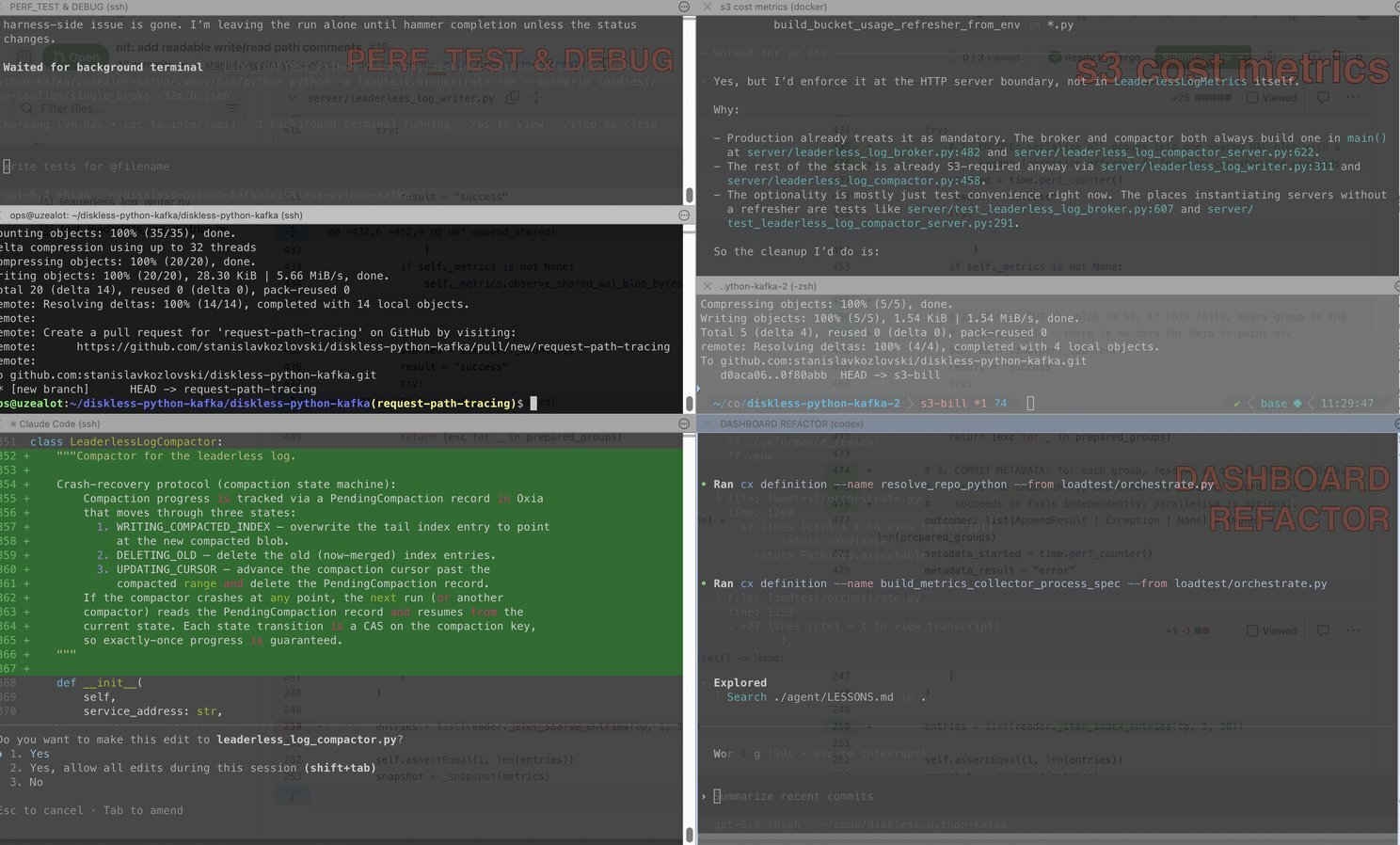
It's important to work on unrelated stuff in parallel so as to limit the eventual merge conflicts.
# How Diskless Works
The leaderless log protocol will be familiar to anybody who's read about Diskless Kafka before. The key differentiator from regular Kafka is that:
- **no leaders exist**: every broker accepts writes for **every** partition
- **mixed-partition segment files:** each broker buffers data and then unloads it all in one big fat blob on S3 that contains multi-partition data
- **compaction is critical:** eventually, a compaction process splits that big blob into **per-partition** blobs optimized for sequential reads
Key benefits of this architecture are:
1. **cost** - it can be [90% cheaper](https://topicpartition.io/blog/kip-1150-diskless-topics-in-apache-kafka#the-bottom-line) in high throughput situations because no inter-AZ network fees are incurred.
2. **operational simplicity** - because brokers are stateless (all data is in S3), they're easier to manage and scale.
Here's how my write path looked like:
```asciidoc
client
|
| POST /produce
v
+---------------------------+
| HTTP broker |
| topic_partitions[] |
+---------------------------+
|
| aggregate + batch
| flush at 8 MiB or 500 ms
v
+---------------------------+
| LeaderlessLogWriter |
| |
+---------------------------+
|
| 1) write one shared WAL blob
+-------------------------------> S3
| llog/wal-shared/{uuid}
|
| 2) for each partition:
| reserve offsets + persist sparse-index
v
+----------------------------------------------+
| Oxia |
| orders[0] offsets 1..2 -> shared WAL object |
| orders[1] offsets 1..1 -> same WAL object |
+----------------------------------------------+
|
| 3) respond with per-partition offsets/results
v
client
```
1. An **HTTP Python broker** accepts incoming POST /produce requests whose payload is a simple JSON map of partition name to a list of records for that partition.
2. The broker buffers requests until it either reaches **8 MiB** of pending data, or the wall clock time from the first request has surpassed **500ms**. When either triggers, it begins to commit the data.
3. First, it commits the mixed topic-partition data to S3 in one big 8 MiB blob. The data is durably persisted in S3 at this point - but it doesn't have offsets applied yet.
4. Then, for each partition, it goes to Oxia (the distributed key-value metadata store) and persists the offsets there. This now "seals" our S3 file as a legit record of Kafka record data. Our metadata points to it.
5. The broker responds to the client's produce request.
Step 4) is more complex than it looks, and is critical in ensuring safety of the distributed protocol. Let me expand on it:
## The Oxia Offset Commit
> 💡 **Oxia** is the distributed strongly-consistent key-value store we chose as our metadata store ([article here](https://stanislavkozlovski.medium.com/oxia-a-modern-cloud-native-zookeeper-replacement-d68198a8427c))
The offset assignment in Oxia consists of multiple steps. A single `meta/control` key (per partition) acts as the centralized sequencer -- it says what the latest offset is.
```json
meta/control = {
"log_state": "OPEN",
"sequence_counter": 48,
"pending": null
}
```
When a writer goes to commit a new bunch of offsets for a partition there (after the mixed multi-partition S3 blob has been persisted), it increments the offset counter AND populates the `pending` field to reference the latest mixed S3 blob that holds these offsets:
```json
{
"log_state": "OPEN",
"sequence_counter": 73, // + 25
"pending": {
"start_offset": 48,
"end_offset": 72,
"msg_count": 25,
"data_key": "s3://bucket/llog/wal-shared/abc123",
...
}
}
```
This is done with a [Compare-and-Swap (CAS)](https://en.wikipedia.org/wiki/Compare-and-swap) write to Oxia.
> 💡 Oxia [assigns versions for EVERY write operation](https://oxia-db.github.io/docs/features/versioning), which lets you achieve **strongly-consistent** conditional updates via compare and swap operations.
The next step for that writer is to move the pending data to the `index/` key hierarchy in Oxia (for that partition). That is where the definitive \[record-offset -> S3\] data location mapping is stored. An entry in that key space looks like this:
```json
// key: llog/orders/partitions/0/index/00000000000000000072
// hint: 00000000000000000072 is the end offset
{
"type": "WAL",
"msg_count": 25,
"data_key": "s3://bucket/llog/wal-shared/blob-c",
"encoding": "bytes-batch-v1",
"byte_offset": 2048,
"byte_length": 12000,
"created_at_ms": 1760000002000
}
```
where:
- `orders/partitions/0` - denotes partition-0 of the orders topic
- `00000000000000000072` - a part of the key name, is the END offset of the records in that index entry
- `data_key` - denotes the full S3 path for that blob file.
- `byte_offset/byte_length` - denotes the exact location **inside** the S3 blob file where the records are consecutively laid out. Since a read may only want a single record from that blob file, it would be inefficient to have it read the whole blob to get the record. Instead, this mapping allows for [byte-ranged GETs](https://docs.aws.amazon.com/AmazonS3/latest/userguide/range-get-olap.html) to S3 that download those particular records and not a byte more.
After it's written there, the `pending` field of `meta/control` gets deleted.
## Offset Summary
So again, the path is:
1. write the index entry into `meta/control.pending`
2. write the index entry into `index/{END_OFFSET}`
3. delete the `pending` field of `meta/control`.
These 3 steps are not atomic. The writer process can fail in the middle of any step.
The key safety property which guarantees data stays consistent is the following - a writer NEVER overrides `meta/control.pending`.
It only writes into it if it's empty (which we can guarantee via the CAS write).
If it is NOT empty, that implies that a previous writer process failed to complete the steps. The new writer takes up this responsibility and [performs steps \[2, 3\] itself before it writes its own index entry](https://github.com/lakestream-io/leaderless-log-protocol/blob/7567a40ff918d9a04321fd7421acef227d3a3f39/examples/s3-queue/impl/src/coordination/atomic_increment.rs#L44-L47).
# The Read Path
Now that we have our files stored in S3 and our metadata stored in Oxia, reads can be performed from literally any broker. Our brokers are completely stateless.
When a broker receives a request to fetch starting offset `40` from partition `0` of topic `orders`, it deterministically knows that the place to figure out which S3 file stores that data is somewhere in Oxia under the key space of `llog/orders/partitions/0/index/`.
But which exact key is it? If you've noticed, our indexing is sparse.
Assuming our batch size is 50 records per index (i.e the mixed S3 blob had each partition store 50 records in it), Oxia may hold two index keys (per partition) for a hundred records. In this example, they would denote two end offsets - 50 and 100:
```json
llog/orders/partitions/0/index/00000000000000000050
{ ... S3 file, S3 byte offset, etc ... }
llog/orders/partitions/0/index/00000000000000000100
{ ... S3 file, S3 byte offset, etc ... }
```
Assume a pathological scenario - a Fetch request comes in for offsets 40-60 (desiring data from both index entries).
The reader issues a so-called [Ceiling Get](https://oxia-db.github.io/oxia-client-java/apidocs/latest/io/oxia/client/api/options/GetOption.html#ComparisonCeiling) to Oxia. This gets the key-value entry whose key is the **lowest one** that is **above or equal** to the supplied parameter. In other words:
```python
ceiling_get(0) # => 50
ceiling_get(40) # => 50
ceiling_get(50) # => 50
ceiling_get(51) # => 100
ceiling_get(99) # => 100
```
> 💡(remember this behavior because it's critical to how compaction works)
Because all keys hold end offsets, our reader requesting a ceiling get of 40-60 issues `ceiling_get(40)` and knows that the entry it received - end offset 50 - holds at least **some** of the records it wants. When it realizes it ends at record 50, it'll issue a ceiling get of 51 and get the next index entry 100.
Knowing both S3 file locations, the reader performs [byte-ranged GETs](https://docs.aws.amazon.com/AmazonS3/latest/userguide/range-get-olap.html) to fetch that data.
Easy peasy!
# Compaction
Last but definitely not least - compaction. If you haven't yet noticed, this data model can result in pretty slow and expensive reads:
- Oxia will accumulate **a lot** of index keys
- S3 will accumulate **a lot** of small files
- Readers who want a lot of consecutive record data need to scan multiple Oxia keys and read from multiple S3 files
Just to crunch some numbers - assume our cluster has 10 brokers, assume we persist two WAL blobs a second per broker (the default 500ms per batch), and assume a mixed WAL blob has just ~20 partitions' worth of data -- that's:
1. **34,560,000 sparse index key entries a day**
2. **1,728,000 S3 files a day**
Each partition would have 1,728,000 index key entries per day alone. Assuming each partition in a mixed WAL blob has ~200 records in it, each index entry itself would also just point to 200 records.
If we could compact each S3 file to instead store, say, 100,000 records per partition and each index entry to denote 5000 records, we'd go down to a more manageable:
- 3456 S3 files per partition a day
- 69,120 index entries per partition a day
Or:
- **69,120** S3 files a day
- **1,382,400** sparse index key entries a day
So how can we do that?
## The Compaction Path
The Compactor is a separate service that reads and mutates Oxia/S3. There is no need for it to talk to the broker that serves reads/writes because its process is asynchronous, and locking is guaranteed through Oxia. The compactor is therefore free to scale separately and not interfere with the broker.
The Compactor works on one partition at a time. To ensure other compactors don't step on each other, it claims a so-called [Ephemeral Record](https://oxia-db.github.io/docs/features/ephemerals) in Oxia - this acts as a lightweight distributed lock.
```json
// llog/orders/partitions/0/meta/compactor-claim
{
"compactor_id": "compactor-1",
"claimed_at_ms": 1760000010000
}
```
> 💡 An ephemeral record is one whose lifecycle is tied to a particular client. It stays alive as long as the client heartbeats. If the client dies, the record is deleted by Oxia.
The Compactor keeps a compaction cursor per partition, denoting up to what offset it has compacted:
```json
// llog/orders/partitions/0/meta/compaction-cursor
{
"offset": 1
}
```
> 🤫 This single-offset implies we do a one-pass compaction only, which can be inefficient. A better implementation would support multiple passes of compaction, creating ever-larger files with each pass. (up to a limit)
Starting from the last compacted offset, it starts reading `/index` entries for that partition and its record data from S3. It groups up many such records into a newly-created single partition-exclusive blob file and uploads it to S3.
It then creates a single `/compaction` key entry in Oxia to persist its progress:
```json
// llog/orders/partitions/0/meta/compaction
{
"state": "WRITING_COMPACTED_INDEX",
"start_offset": 1,
"end_offset": 100,
"data_key": "s3://leaderless-log-wal/llog/orders/partitions/0/data/compacted/8b8e9c9df7d94d5f8f2b7b6d3e6a1234",
// ^ the newly-compacted S3 file
}
```
This `meta/compaction` key acts as the single source-of-truth of the current on-going compaction. The key either has data in it - which means a compaction is on-going, or it's empty - which means no compaction is happening right now.
At this point, we've compacted the data into a new read-optimized file in S3.
The next step is to override the metadata - our `/index` entries. Those still point to the old mixed S3 blobs when they should actually be pointing to the new compacted file.
Instead of naively overwriting every index key entry at this stage, the protocol **only overwrites the max end offset index entry**:
```json
// llog/orders/partitions/0/index/00000000000000000100
{
"type": "COMPACTED",
"data_key": "s3://leaderless-log-wal/llog/orders/partitions/0/data/compacted/8b8e9c9df7d94d5f8f2b7b6d3e6a1234",
// ^ the newly-compacted S3 file
...
}
```
The rest of the index entries will be deleted.
Remember - readers issue Ceiling GETs to find the end offset of an index entry -- and our many index entries just got merged into one big entry. So naturally, we will be left with one big (compacted) index entry whose end offset is the largest offset in it.
Before they get deleted, the state update has to be persisted:
```json
// llog/orders/partitions/0/meta/compaction
{
"state": "DELETING_OLD",
...
}
```
> 💭 It's important to durably persist progress. Were the compaction node to die, the fail-over to a new compactor would be faster.
The compactor then deletes all the old index entries for that partition from Oxia.
Once the old index entries are deleted, the compaction state is advanced again:
```json
// llog/orders/partitions/0/meta/compaction
{
"state": "UPDATING_CURSOR",
...
}
```
And the compaction cursor is updated:
```json
// llog/orders/partitions/0/meta/compaction-cursor
{
"offset": 101
}
```
And then the meta/compaction record is deleted:
```json
// llog/orders/partitions/0/meta/compaction
NULL
```
---------------------------
# The Golden Age of Programming 💛
The funny thing is that I did not come up with these paths, nor did I implement them.
I retroactively learned about how it works in detail.
By pointing my agent to the [battle-tested, formally-verified protocol](https://github.com/lakestream-io/leaderless-log-protocol/blob/main/1-leaderless-log-protocol.md) that got shared by [StreamNative](https://streamnative.io/) - my agent implemented everything without burdening me with complex distributed system problems.
It was the subsequent prompts that made it explain things to me which helped me learn.
It is extremely fun to toy around with AI coding when you know what you're doing. The key thing is to:
- **have a strong foundation** in the domain you're working on -- in this case, understand distributed systems at some decent level
- **have enough experience** so as to have proper intuition on where the AI may have screwed up or done something inefficient
👉 The most fun I had was during our iteration over the system's performance. I was aiming to hit a simple 32 MB/s write rate on a single broker. I couldn't.
1. First, I simply didn't have enough clients sending enough data to reach 32 MB/s per broker (duh...). So I added more (192). Throughput didn't budge but latency grew (285ms → 2074ms). Hm...
2. Second, I thought we were overloading Oxia with too many requests. Since the number of Oxia operations scales with the number of partitions (around 3-5 ops/s per partition), I figured 128 partitions (up to 910 ops/s) was a tad too much -> **lowered partitions to 32**. Got some improvement, esp. around latency. (2.6 MB/s -> 4.24 MB/s **(up 61%)**; 1997ms -> 786ms **(down 61%)**); Still low though. Can't be it.
3. Oxia exhibited decent latency (max ~5ms per op), so it didn't make sense it would take long. **The issue was dumber than I thought**. Given Python & the AI, the Oxia metadata requests were all SERIAL. The code would serially send hundreds of requests, always waiting for the previous one to finish. Parallelisation fixed that. ~7.41 MB/s and 523ms - good progress. The bottleneck moved to the client.
4. Increased the number of HTTP clients again. The way the test was structured, each client would send at most one request at a time. With the given latency per request, and the size of the request - 192 requests in flight weren't enough to reach the target throughput. Increased it to 512. Much higher throughput! (18MB/s, up 162%). But latency also went up - **890ms**.
5. Another dumb server bottleneck - lock contention. The path that checks if a partition exists was using **the same lock** as the write lock, meaning each request was blocked on the one writing. That made no sense. Removed the lock & added another one -- then we really got a perf boost - 28MB/s and 181ms (yes, latency went down **80%**). That particular stage (locking) was taking 532ms... we got it down to **0.09ms**.
> 📱 All these steps were done **through my phone** in a park. 🌲 When you've got the testing harness right (export results in agent-readable JSON) and you've got a decent intuition of where the system may be slow -- querying the agent is a piece of cake.
Having the AI automate all these tedious and ultra-boring processes was a godsend. I could get 100x more done in a day than I would have pre-AI.
Through this AI coding exercise, I also found [a small shard placement bug](https://github.com/oxia-db/oxia/pull/1021) in Oxia that I fixed, and [a feature gap](https://github.com/oxia-db/oxia-client-python/pull/6) in the Python client that also got fixed.
# The Results
Testing this on real S3 and EC2, I got:
- 100 MB/s writes
- 100 MB/s reads

_the cluster-wide data in and data out throughput rates_
inside a single EC2 instance running 5 brokers, Oxia & compactors.
All for less than **$0.60/hour** of S3 API costs.
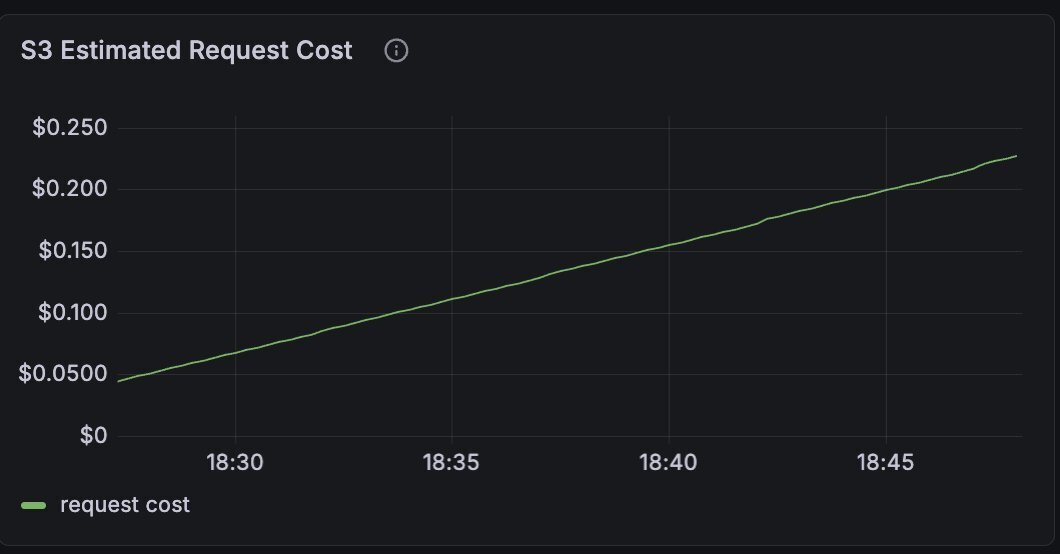
The cost deflation of this architecture is **real**. The equivalent would have cost at least **$16.4/hour** of cross-AZ network costs in AWS.
But it doesn't come entirely for free. Hitting the real S3 meant much higher latencies than what the local MinIO gave me:
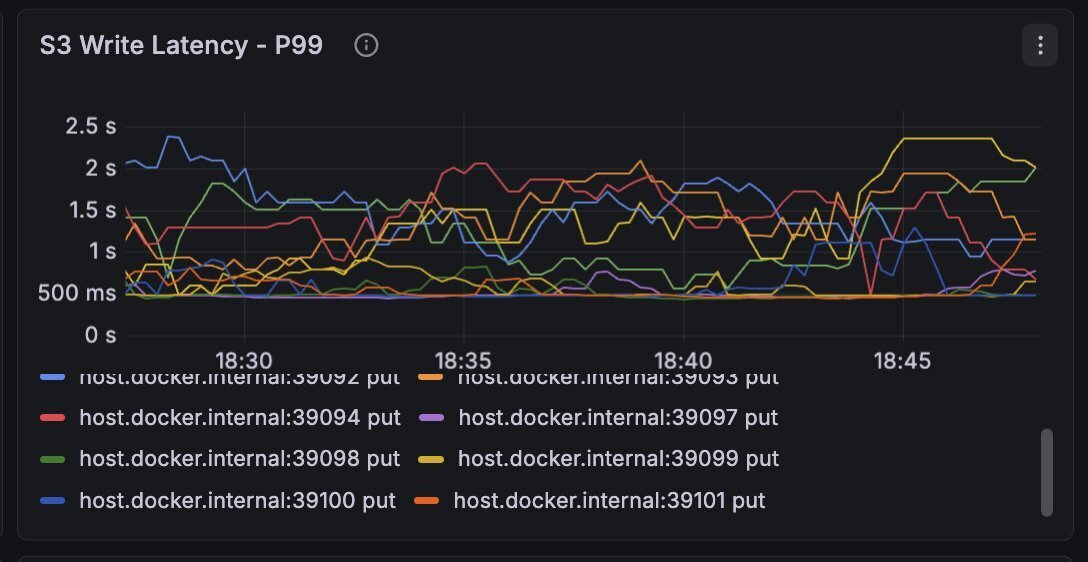
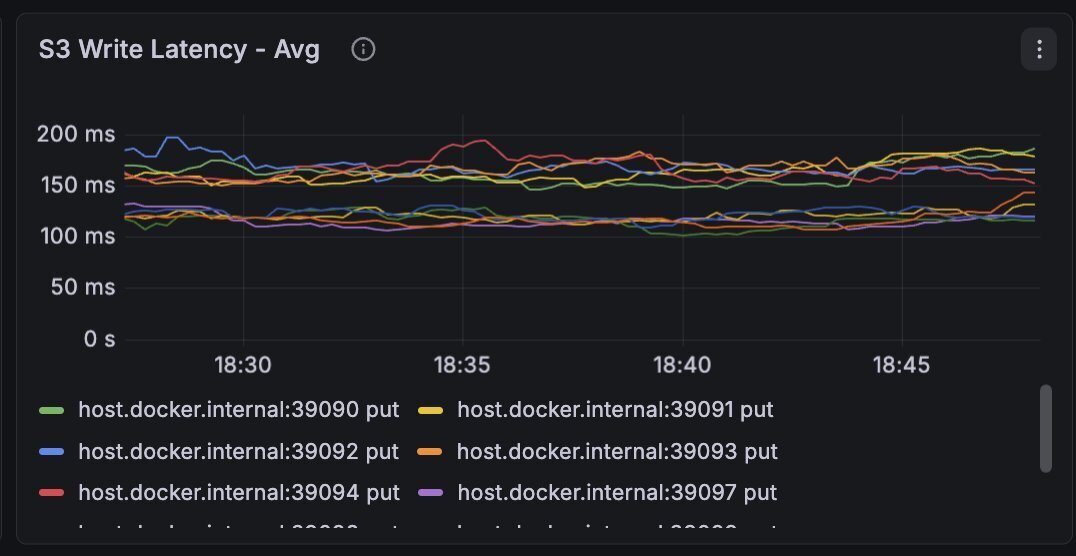
Average writes for 10MB objects were ~200ms, whereas p99 went up to the multi-second threshold.
And herein lies the big tradeoff that this leaderless log architecture brings - higher **end-to-end** latency.
> 💡 **end-to-end latency** - measures the time from which an event was published from a producer application to the time it was read by a consumer application. This is the latency metric Kafka users care about, the rest is marketing fluff.
With this type of diskless, leaderless architecture it's inevitable you incur significantly higher latency than what your regular Kafka would (20-30x). In order of significance, these steps take the most latency:
1. S3 PUTs - **200-2500ms**; S3 Standard simply isn't designed for consistent low latency. Using S3 Express is more complex and incurs a ton more costs
2. Batching - **100-500ms**; In order to save on S3 API costs and keep that **$0.60/hour** run rate, you have to send less PUT requests. The only way to do that is to batch the data. This helps reduce the number of small files too
3. Metadata Store - **10-150ms**; The metadata store can become a hot component as it's literally in every critical path of the system (write, read, compact)
It is frankly-said impossible to get consistently-low, <100ms e2e latency with this architecture.
This is why I believe the future is in the engines that support both types of topics - the classically-replicated-on-disk Kafka topics and the new diskless variant:
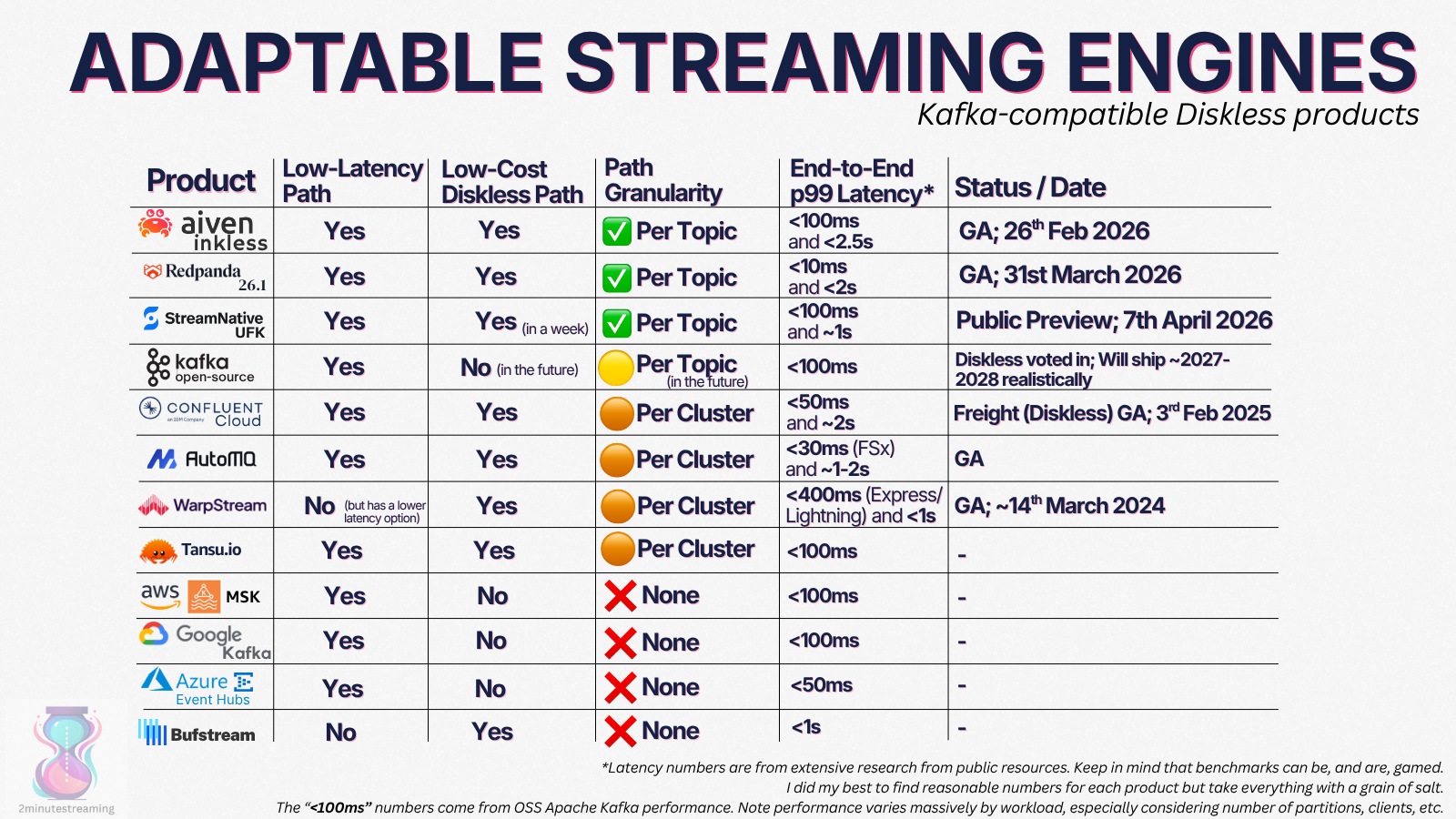
An overview (as of April 2026) of what engines support different topic profiles. Coming soon to the open source Apache Kafka too
## 👋 Parting Words
Thanks to StreamNative for publishing the leaderless log protocol. It does not give you the full diskless Kafka secret sauce, as key things need to be implemented on top of it:
- no batch writes/reads
- caching for reads
- garbage collection of the mixed S3 log segments

my manual GC results (deleted the whole bucket)
But those are implementation details that are solvable - not correctness constraints. The core distributed system protocol is there for any motivated engineer (or AI agent) to see and build on top of.
I'm sure I could iterate on it and do a lot more, but this is where I'm officially closing the token gate and concluding this experiment. If you want to continue, the repo is [diskless-kafka-in-python](https://github.com/stanislavkozlovski/diskless-kafka-in-python).
And if you found this article informative, share it with your network. 🌞
Thanks for reading. ~Stan
Comments
More Blog
View allkubernetesMinimalist EKS: The Easy Way
Amazon EKS manages the Kubernetes control plane, but you remain responsible for provisioning the...
J
Joaquin MenchacaaiNever forget to enter the Stern Grove lottery again!
Browser automation with Playwright, Python, GitHub Actions, and Entire to auto-enter San Francisco Stern Grove concert lotteries each week!
L
Lizzie SiegletypescriptA Free Screenshot Editor That Never Uploads Your Image
A free screenshot and image editor that runs entirely in your browser. Keeping every edit reversible and handling big phone photos, in plain TypeScript and Canvas2D.
M
Martin StarkshowdevI built a CLI to break my highlights out of Apple Books
A macOS CLI + MCP server that exports Apple Books highlights to Markdown and gives AI assistants direct access to your reading notes.
A
Andrey KorchakaiA Developer's Guide to Agent Hooks in Antigravity CLI
Motivation To be quite honest, "Hooks"—the shell commands we trigger at specific points...
T
TanaikeagentsTactical vs. Strategic Agentic AI Development — A Playbook for Developers
The Strategic Engineer: Why Writing Code Is No Longer Your Most Valuable Skill ...
A
Adewumi Saheed Adewale