
Back to Blog tpu
tpu kubernetes
 ai
ai typescript
 showdev
 ai
ai agents
vLLM on Google Cloud TPU: A Model Size vs Chip Cheat Sheet (With Interactive Tool)
Grace April 30, 2026
0 views
Picking a Cloud TPU slice for vLLM inference involves three decisions that most tutorials skip...

Picking a Cloud TPU slice for vLLM inference involves three decisions that most tutorials skip over: how much HBM your model actually needs at runtime, how many chips to shard across, and whether the cost is justified for your workload. Get it wrong in either direction and you're either OOMing on startup or paying for memory you're not using.
This post walks through how to make that decision, with a reference table for popular models and a live interactive tool where you can select your model, toggle precision, and see exactly which TPU configurations fit and what they cost.
## What is vLLM and why run it on a TPU?
vLLM is an open-source LLM inference engine built for high-throughput, memory-efficient serving. It uses a technique called PagedAttention to manage the KV cache more efficiently than naive implementations, which translates to higher throughput and the ability to serve larger batches from the same hardware.
It has historically been GPU-first, but vLLM now has first-class support for Google Cloud TPUs, covering v5e, v6e (Trillium), and Ironwood. You can run both offline batch inference and an OpenAI-compatible API server on a Cloud TPU VM with the same command-line interface you'd use on a GPU.
## Why TPU instead of GPU?
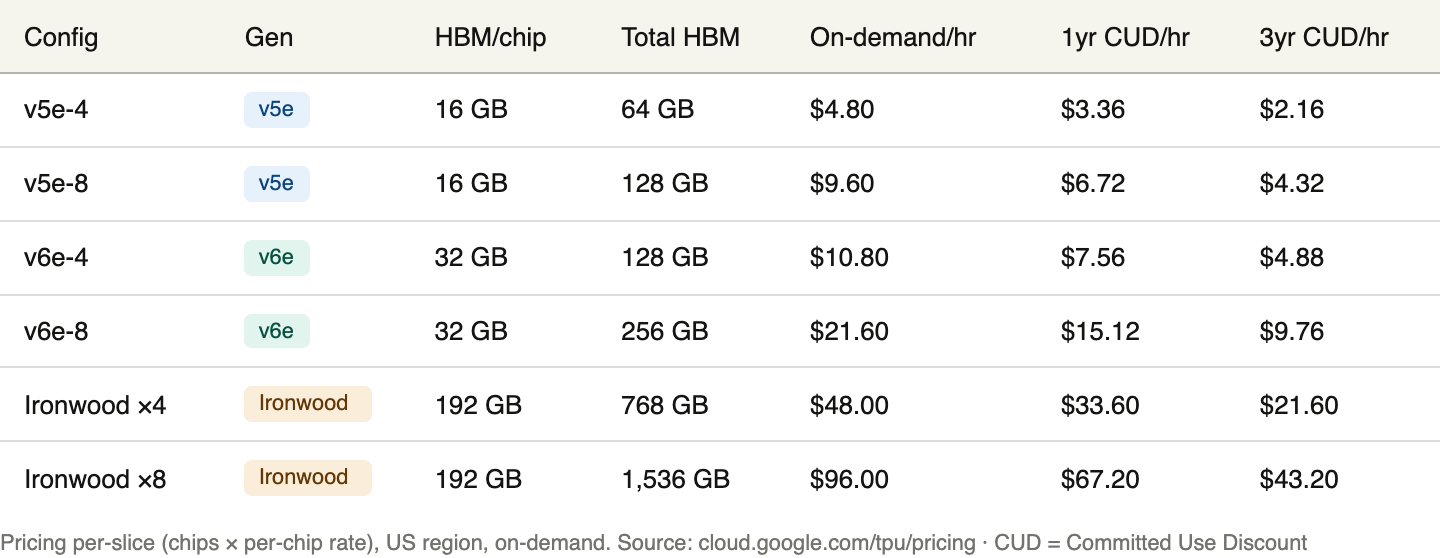
The short answer is cost at scale. For sustained, high-volume LLM inference, TPUs often deliver better performance per dollar than equivalent GPU setups, particularly with Google's newer generations. Trillium (v6e) delivers 4.7x more compute per chip than v5e while being 67% more energy efficient. Ironwood brings 192 GB of HBM per chip, which opens up model sizes and context lengths that simply aren't practical on a single GPU node. For teams already in the Google Cloud ecosystem, the operational simplicity of a managed TPU VM also reduces setup overhead.
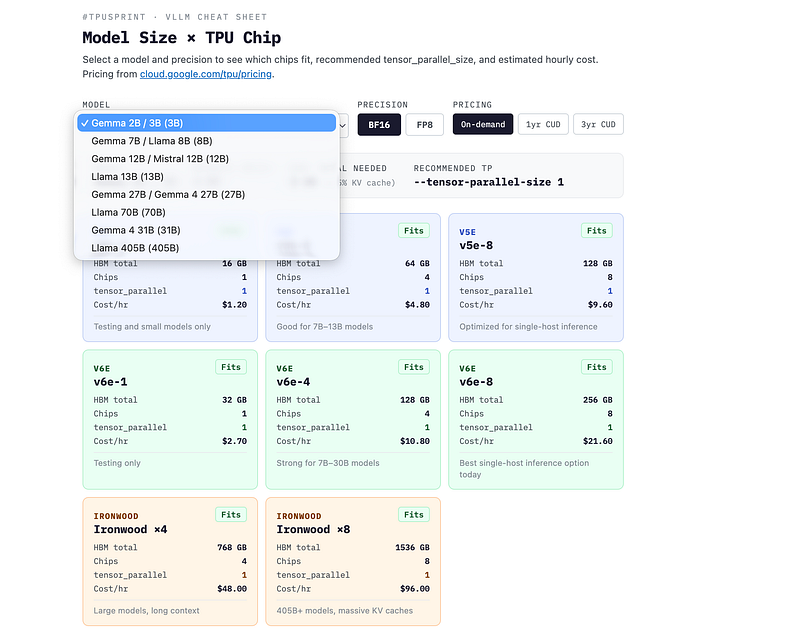
The site is a mini-project based on data pulled from 4/30/2026 and may change. Please refer to the official docs & site and double check.
## What the interactive tool does
The cheat sheet at ggongg.github.io/vllm-tpu-notes lets you:
- Select a model from Gemma 2B through Llama 405B
- Toggle between BF16 and FP8 precision
- Switch between on-demand, 1-year CUD, and 3-year CUD pricing
- See which TPU slices fit the model, the recommended --tensor-parallel-size for each, and the hourly cost
- Get a generated vllm serve command for the cheapest compatible chip
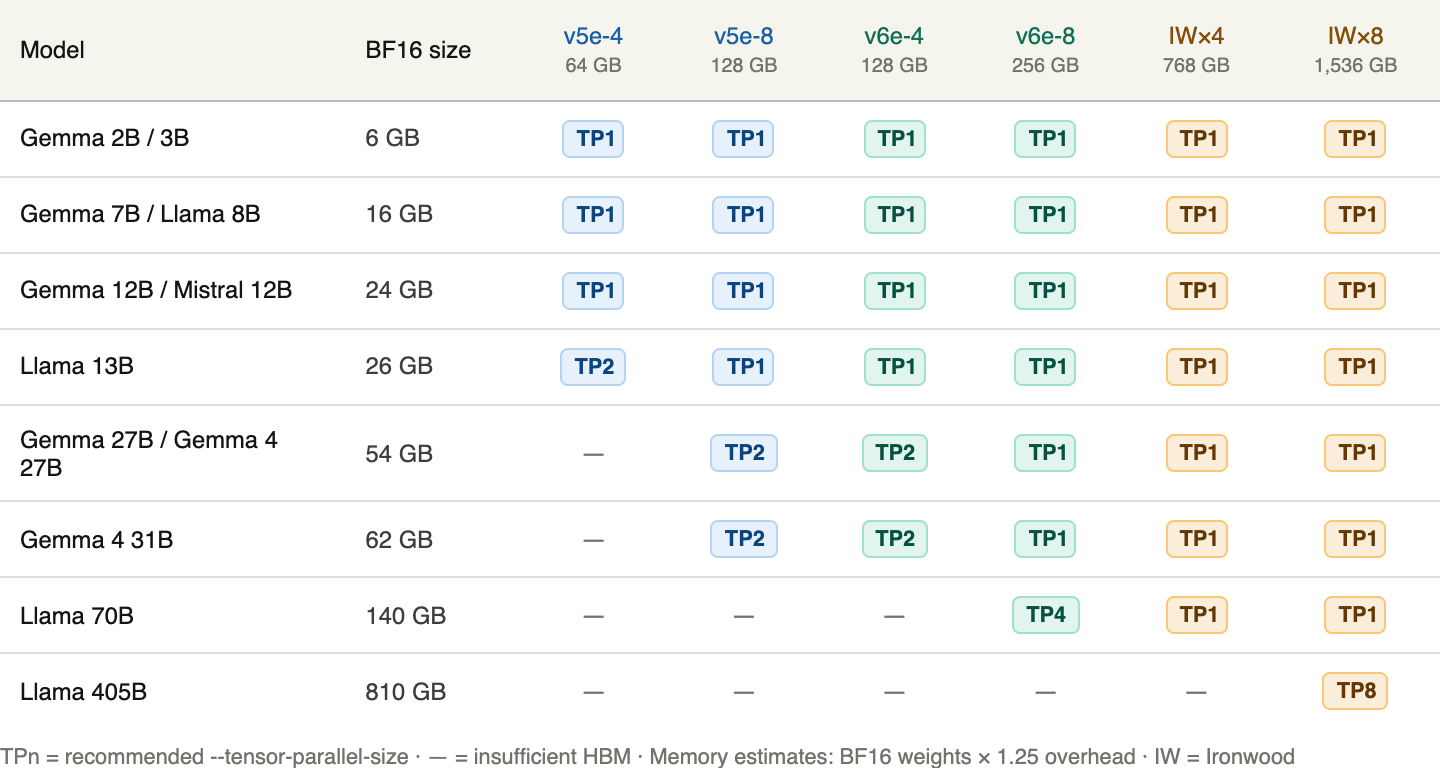
All pricing is pulled from the official Google Cloud TPU pricing page. Memory estimates use weights × 1.25 to account for KV cache and activation overhead.
## How much memory does a model actually need?
The naive calculation is parameters × bytes per parameter. A 7B model in BF16 is 7B × 2 bytes = 14 GB. But that only covers the weight footprint. At inference time, you also need headroom for:
KV cache, which grows with batch size and context length
Activations during the forward pass
vLLM's internal buffers
A practical floor is weights × 1.25. A 7B BF16 model needs roughly 17.5 GB, which means a single v5e chip (16 GB HBM) will OOM, but a v5e-4 slice (64 GB across 4 chips) fits comfortably.
FP8 halves the weight footprint, so the same 7B model drops to about 8 GB in FP8, leaving far more room for KV cache on a given slice. Trillium (v6e) and Ironwood both support native FP8. TPU v5e supports INT8 quantization via vLLM's tpu_int8 flag instead.
## TPU chip HBM and pricing reference
These are the currently available Cloud TPU slices for vLLM inference. Per-chip pricing is from cloud.google.com/tpu/pricing, US region, as of April 30, 2026. Slice prices are chips × per-chip rate.
## Model size vs chip: the cheat sheet
## The key vLLM flags for TPU
vllm serve MODEL_ID \
--tensor-parallel-size TP \
--max-model-len MAX_TOKENS \
--dtype bfloat16 \
--device tpu
--tensor-parallel-size sets how many chips the model is sharded across. It needs to be a power of 2 (1, 2, 4, or 8) and match your slice size or be a divisor of it.
--max-model-len caps the context window, which controls KV cache memory usage. If you're OOMing on a slice that should theoretically fit the model, reduce this first before scaling up to a larger slice.
--dtype bfloat16 is the right default for TPU. For native FP8 on v6e or Ironwood, use --dtype fp8 instead.
--device tpu tells vLLM to use the TPU backend.
## Example commands
Gemma 7B on v5e-4
vllm serve google/gemma-7b-it \
--tensor-parallel-size 1 \
--max-model-len 4096 \
--dtype bfloat16 \
--device tpu
16 GB weights fit on a single v5e chip. With 64 GB total on a v5e-4, there is plenty of room for KV cache at reasonable context lengths.
Llama 3.1 70B on v6e-8
vllm serve meta-llama/Llama-3.1-70B-Instruct \
--tensor-parallel-size 4 \
--max-model-len 8192 \
--dtype bfloat16 \
--device tpu
140 GB of weights need roughly 175 GB with overhead. The v6e-8 has 256 GB total across 8 chips, so TP4 puts 64 GB on each of 4 chips and leaves headroom for the KV cache.
Llama 3.1 8B on v6e with FP8
vllm serve meta-llama/Llama-3.1-8B-Instruct \
--tensor-parallel-size 1 \
--max-model-len 8192 \
--dtype fp8 \
--device tpu
FP8 brings the 8B model down to about 8 GB, fitting easily on a single v6e chip (32 GB) and leaving 24 GB for KV cache. This is a good setup for high-concurrency serving where you want to maximize batch size.
Gemma 4 31B on v6e-8
docker run -itd --name gemma4-tpu \
--privileged --network host --shm-size 16G \
-v /dev/shm:/dev/shm \
-e HF_TOKEN=$HF_TOKEN \
vllm/vllm-tpu:gemma4 \
--model google/gemma-4-31B-it \
--tensor-parallel-size 8 \
--max-model-len 16384 \
--device tpu
Gemma 4 has a dedicated Docker image (vllm/vllm-tpu:gemma4) that includes multimodal support. For the 31B variant on a v6e-8, TP8 across all 8 chips is the recommended configuration.
## Provisioning a TPU VM for vLLM
# Create a v6e-8 VM
gcloud compute tpus tpu-vm create my-vllm-tpu \
--zone=us-east1-d \
--accelerator-type=v6e-8 \
--version=tpu-ubuntu2204-base
# SSH in
gcloud compute tpus tpu-vm ssh my-vllm-tpu --zone=us-east1-d
# Install vLLM TPU
pip install vllm-tpu
The v6e-8 configuration is the one Google designed specifically for single-host inference. For Ironwood, you need to use GKE rather than the TPU VM API. Step-by-step instructions for both are in the vLLM TPU quickstart.
---
## Picking the right configuration
v5e-4 or v5e-8 makes sense if you're running models up to 27B and want the lowest cost per hour. At $1.20/chip/hr, it's the cheapest path to TPU inference. The 16 GB per chip limits what fits, but it covers the 7B to 13B range that handles most practical use cases.
v6e-4 or v6e-8 (Trillium) is the best general-purpose option today. The 32 GB per chip opens up models to 70B with enough chips, and the 4.7x compute improvement over v5e gives meaningfully better throughput for the same money. The v6e-8 in particular was designed by Google for single-host inference and is the easiest starting point for production workloads.
Ironwood is the right choice when you genuinely need the memory: 70B at long context, 405B models, or high-concurrency serving where maximizing KV cache capacity matters. At $12/chip/hr, it's worth confirming you actually need the 192 GB per chip before provisioning it.
---
## Try it yourself
The interactive tool is live at ggongg.github.io/vllm-tpu-notes. Select your model, toggle precision and pricing tier, and get the recommended chip configuration and vLLM command in one view. The source is on GitHub at github.com/ggongg/vllm-tpu-notes.
---
## Resources
- Interactive cheat sheet
- vLLM TPU quickstart
- vLLM TPU installation
- Cloud TPU pricing
- TPU v6e documentation
- TPU v7 (Ironwood) documentation
- Gemma 4 vLLM recipe
---
`#TPUSprint program`
Check cloud.google.com/tpu/pricing for most up to date info!
Comments
More Blog
View allkubernetesMinimalist EKS: The Easy Way
Amazon EKS manages the Kubernetes control plane, but you remain responsible for provisioning the...
J
Joaquin MenchacaaiNever forget to enter the Stern Grove lottery again!
Browser automation with Playwright, Python, GitHub Actions, and Entire to auto-enter San Francisco Stern Grove concert lotteries each week!
L
Lizzie SiegletypescriptA Free Screenshot Editor That Never Uploads Your Image
A free screenshot and image editor that runs entirely in your browser. Keeping every edit reversible and handling big phone photos, in plain TypeScript and Canvas2D.
M
Martin StarkshowdevI built a CLI to break my highlights out of Apple Books
A macOS CLI + MCP server that exports Apple Books highlights to Markdown and gives AI assistants direct access to your reading notes.
A
Andrey KorchakaiA Developer's Guide to Agent Hooks in Antigravity CLI
Motivation To be quite honest, "Hooks"—the shell commands we trigger at specific points...
T
TanaikeagentsTactical vs. Strategic Agentic AI Development — A Playbook for Developers
The Strategic Engineer: Why Writing Code Is No Longer Your Most Valuable Skill ...
A
Adewumi Saheed Adewale