
Back to Blog api
api kubernetes
 ai
ai typescript
 showdev
 ai
ai agents
Multimodal RAG with the Gemini API File Search Tool: A Developer Guide
Patrick Loeber May 5, 2026
0 views
The File Search tool in the Gemini API now supports multimodal retrieval by adding support for Gemini...
The File Search tool in the Gemini API now supports multimodal retrieval by adding support for [Gemini Embedding 2](https://developers.googleblog.com/en/building-with-gemini-embedding-2/). This update allows images, such as charts, product photos, and diagrams, to be natively indexed and searched in the same store as your text-based documents.
This post covers how to use the File Search tool end-to-end: creating a store, uploading documents and images, querying with grounded generation, and retrieving image citations.
## What is File Search?
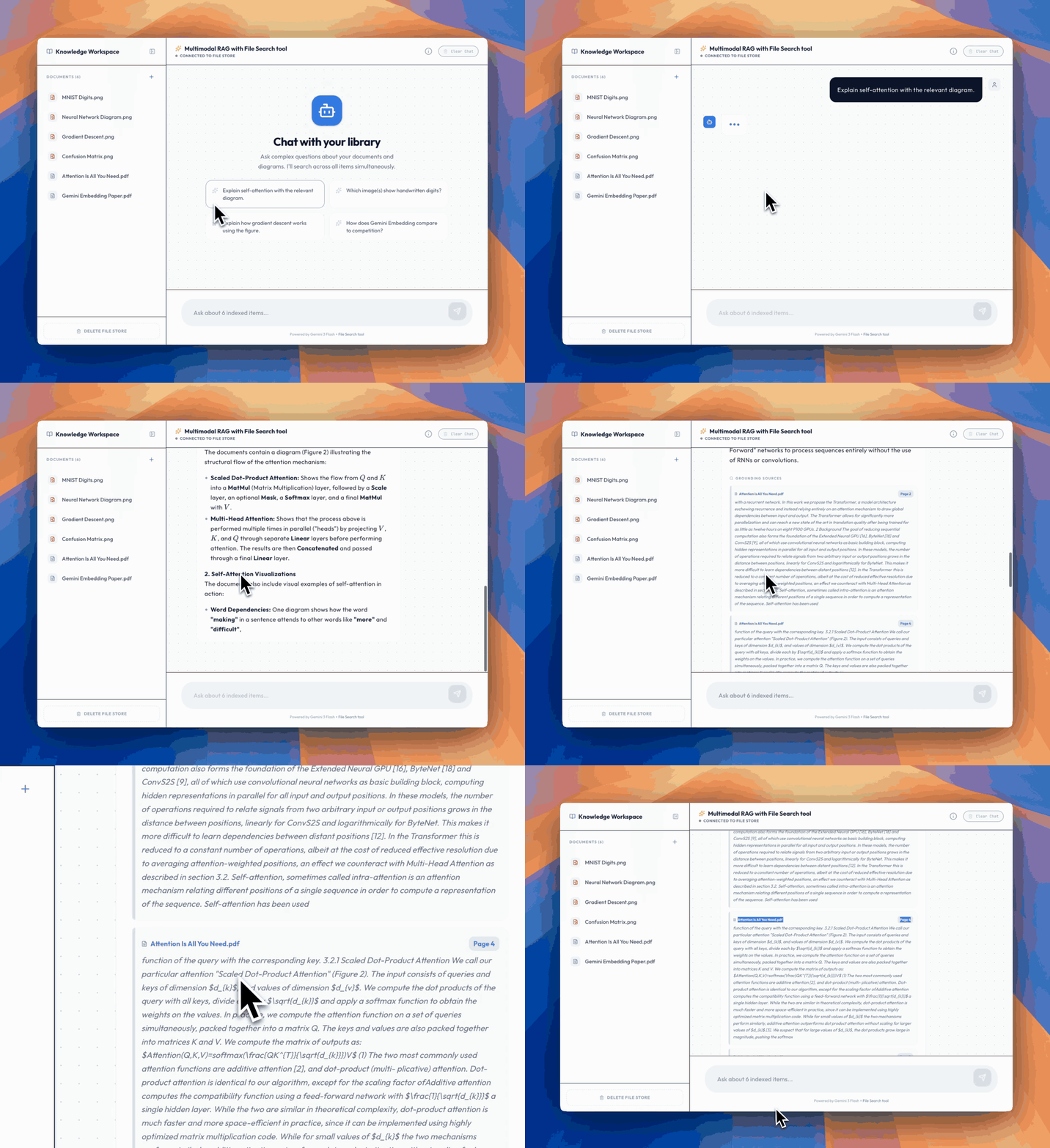
Here's an example app you can try in AI Studio that lets you chat with your documents and image library
[File Search](https://ai.google.dev/gemini-api/docs/file-search) is the Gemini API's built-in RAG tool. When you upload your documents, the API takes care of the heavy lifting: chunking, embedding, indexing, and retrieval. At query time, pass a `file_search` tool alongside your prompt, and the model automatically retrieves relevant chunks from your data to generate a grounded response.
Compared to rolling your own RAG pipeline, File Search offers:
- **Fully managed**: No vector databases to provision or embedding pipeline to maintain.
- **Cost-effective**: Storage and query-time embeddings are free. You only pay for the initial indexing embeddings and the standard Gemini input/output tokens.
- **Built-in citations**: Every response includes grounding metadata that links the answer to specific documents and pages. For multimodal stores, citations also include downloadable image references.
- **Native image search**: With the `gemini-embedding-2` model, images are embedded directly rather than relying on OCR, enabling true visual retrieval.
## Try It in AI Studio
Want to see multimodal File Search in action before writing any code? We built an [example app in AI Studio](https://ai.studio/apps/acb0ca81-7130-43ae-a31f-bedd96d28294) that lets you chat with your documents and image library. Upload PDFs and images, then ask questions. The app retrieves relevant text and visuals in real time, complete with citations and page numbers so you can trace every answer back to its source.
## Getting Started
### Step 1: Create a File Search Store
A File Search Store is a persistent container for your document embeddings. Think of it as a managed vector database scoped to a project.
To enable multimodal search over images, specify `gemini-embedding-2` as the embedding model. This parameter is optional; if omitted, the store defaults to `gemini-embedding-001`, which is cost-optimized for text-only workloads, and cannot be changed later.
To use the new features, make sure to install the latest Python SDK: `pip install -U google-genai`.
```py
from google import genai
from google.genai import types
client = genai.Client()
# Create a multimodal store with gemini-embedding-2
# Omit embedding_model to use the default text-only model (gemini-embedding-001)
file_search_store = client.file_search_stores.create(
config={
"display_name": "product-catalog",
"embedding_model": "models/gemini-embedding-2"
}
)
print(f"Created store: {file_search_store.name}")
```
| Embedding Model | Best For |
| :---- | :---- |
| `gemini-embedding-001` (default) | Text-heavy workloads, cost-optimized |
| `gemini-embedding-2` | Multimodal retrieval (documents *and* images) |
### Step 2: Upload Documents and Images
The simplest path is the `upload_to_file_search_store` method, which uploads and indexes a file in one step. With `gemini-embedding-2`, this works for both documents and images:
Note: Audio and video formats are currently not supported.
```py
import time
# Upload a PDF document
operation = client.file_search_stores.upload_to_file_search_store(
file_search_store_name=file_search_store.name,
file="product_catalog.pdf",
config={"display_name": "Product Catalog"}
)
# Wait for ingestion to complete
while not operation.done:
time.sleep(5)
operation = client.operations.get(operation)
# Upload product images directly
for image_file in ["sneaker_red.png", "sneaker_blue.jpeg", "sneaker_white.png"]:
op = client.file_search_stores.upload_to_file_search_store(
file_search_store_name=file_search_store.name,
file=image_file,
config={"display_name": image_file}
)
while not op.done:
time.sleep(5)
op = client.operations.get(op)
print("All files indexed!")
```
Behind the scenes, the API chunks documents, generates embeddings, and indexes the content. When using `gemini-embedding-2`, images within PDFs are also natively embedded alongside the text.
You can also [import existing files](https://ai.google.dev/gemini-api/docs/file-search#importing-files) from the Files API into a store.
### Step 3: Query with File Search
Query your data by passing the `file_search` tool to `generate_content`:
```py
response = client.models.generate_content(
model="gemini-3-flash-preview",
contents="Which sneakers come in red?",
config={
"tools": [{
"file_search": {
"file_search_store_names": [file_search_store.name]
}
}]
}
)
print(response.text)
```
The system performs a file search to find the most similar and relevant chunks from the File Search store , and uses them to generate a grounded response.
### Step 4: Inspect Citations and Retrieve Images
Every File Search response includes grounding metadata — essentially, a bibliography for the model's answer. It captures page numbers for the indexed information, allowing applications to point users directly to the right spot in a document. This is especially useful for rigorous fact-checking over large PDFs.
With multimodal stores, citations can include a `media_id` for referenced images, which can be downloaded directly:
```py
grounding = response.candidates[0].grounding_metadata
for chunk in grounding.grounding_chunks:
ctx = chunk.retrieved_context
if ctx.media_id:
# This is an image citation — download it
print(f"Cited image: {ctx.title}")
print(f" Media ID: {ctx.media_id}")
blob = client.file_search_stores.download_media(
media_id=ctx.media_id
)
with open(f"cited_{ctx.title}.png", "wb") as f:
f.write(blob)
else:
# Text citation with exact page number
print(f"Cited text: {ctx.title}")
if ctx.page_number:
print(f" Page: {ctx.page_number}")
print(f" {ctx.text[:200]}...")
# See which parts of the response are grounded in which sources
for support in grounding.grounding_supports:
print(f"Claim: '{support.segment.text}'")
print(f" Grounded in chunks: {support.grounding_chunk_indices}")
```
This is powerful for building user-facing applications. It's now possible to show users the *actual images* the model used in its reasoning, not just a text description.
## Managing Stores
Here's a quick reference for managing stores and documents:
```py
# List all stores
for store in client.file_search_stores.list():
print(f"{store.name} — {store.display_name}")
# List documents in a store
for doc in client.file_search_stores.documents.list(parent=file_search_store.name):
print(f" {doc.name}")
# Delete a specific document
client.file_search_stores.documents.delete(
name="fileSearchStores/my-store/documents/old_doc"
)
# Delete an entire store (force=True also deletes all contained documents)
client.file_search_stores.delete(
name=file_search_store.name,
config={"force": True}
)
```
## Power Features
### Custom Metadata and Filtering
You can attach metadata to documents at upload time and use it to filter at query time. This is essential when a store contains diverse documents and searches need to be scoped:
```py
# Upload with metadata
op = client.file_search_stores.upload_to_file_search_store(
file_search_store_name=file_search_store.name,
file="shoes_collection.pdf",
config={
"display_name": "Spring 2026 Shoes",
"custom_metadata": [
{"key": "category", "string_value": "footwear"},
{"key": "season", "string_value": "spring-2026"},
{"key": "price_tier", "numeric_value": 2}
]
}
)
# Query with a metadata filter
response = client.models.generate_content(
model="gemini-3-flash-preview",
contents="Do you have blue spring shoes?",
config={
"tools": [{
"file_search": {
"file_search_store_names": [file_search_store.name],
"metadata_filter": 'category="footwear" AND season="spring-2026"',
}
}]
}
)
```
### Structured Output
Starting with Gemini 3 models, File Search can be combined with structured output. This is perfect for extracting structured data from grounded responses:
```py
from pydantic import BaseModel, Field
class ProductMatch(BaseModel):
name: str = Field(description="Product name")
description: str = Field(description="Brief product description")
confidence: str = Field(description="How confident the match is")
response = client.models.generate_content(
model="gemini-3-flash-preview",
contents="Find products similar to a red running shoe",
config={
"tools": [{
"file_search": {
"file_search_store_names": [file_search_store.name]
}
}],
"response_mime_type": "application/json",
"response_schema": ProductMatch.model_json_schema()
}
)
```
### Chunking Configuration
For more control over how documents are split, the chunking strategy can be configured:
```py
operation = client.file_search_stores.upload_to_file_search_store(
file_search_store_name=file_search_store.name,
file="long_document.pdf",
config={
"display_name": "Technical Manual",
"chunking_config": {
"white_space_config": {
"max_tokens_per_chunk": 200,
"max_overlap_tokens": 20
}
}
}
)
```
## Use Cases
With multimodal retrieval, File Search opens up scenarios that text-only RAG can't handle:
- **Visual product search**: Index catalogs with images and spec sheets, then search by visual similarity or natural language descriptions.
- **Research and technical documentation**: Retrieve specific charts, architecture diagrams, or data visualizations from papers and reports.
- **Insurance and claims processing**: Combine structured forms with damage photos for unified document and visual assessment.
- **Design systems**: Make component libraries searchable by visual appearance, not just naming conventions.
- **Real estate and property listings**: Match properties based on floor plans, interior photos, and visual preferences.
## Pricing
File Search is designed to be cost-effective:
- **Indexing:** You pay for embeddings at indexing time ([embeddings pricing](https://ai.google.dev/gemini-api/docs/pricing#gemini-embedding-2)).
- **Storage:** Free.
- **Query-time embeddings:** Free.
- **Retrieved tokens:** Charged as regular context tokens.
## Get Started
Here's everything needed to get started:
- [File Search documentation](https://ai.google.dev/gemini-api/docs/file-search)
- [File Search quickstart notebook](https://github.com/google-gemini/cookbook/blob/main/quickstarts/File_Search.ipynb)
- [The latest Python SDK](https://github.com/googleapis/python-genai): Install it with `pip install -U google-genai`
- [Get an API key](https://aistudio.google.com/apikey)
Create your store with `gemini-embedding-2`, upload some images, and start building multimodal RAG applications.
Comments
More Blog
View allkubernetesMinimalist EKS: The Easy Way
Amazon EKS manages the Kubernetes control plane, but you remain responsible for provisioning the...
J
Joaquin MenchacaaiNever forget to enter the Stern Grove lottery again!
Browser automation with Playwright, Python, GitHub Actions, and Entire to auto-enter San Francisco Stern Grove concert lotteries each week!
L
Lizzie SiegletypescriptA Free Screenshot Editor That Never Uploads Your Image
A free screenshot and image editor that runs entirely in your browser. Keeping every edit reversible and handling big phone photos, in plain TypeScript and Canvas2D.
M
Martin StarkshowdevI built a CLI to break my highlights out of Apple Books
A macOS CLI + MCP server that exports Apple Books highlights to Markdown and gives AI assistants direct access to your reading notes.
A
Andrey KorchakaiA Developer's Guide to Agent Hooks in Antigravity CLI
Motivation To be quite honest, "Hooks"—the shell commands we trigger at specific points...
T
TanaikeagentsTactical vs. Strategic Agentic AI Development — A Playbook for Developers
The Strategic Engineer: Why Writing Code Is No Longer Your Most Valuable Skill ...
A
Adewumi Saheed Adewale