
Back to Blog gemini
 kubernetes
 ai
ai typescript
 showdev
 ai
ai agents
ADK Agents with Amazon Bedrock Models
xbill May 5, 2026
0 views
This article provides a step by step deployment guide for using Amazon Bedrock models with ADK...
---
title: ADK Agents with Amazon Bedrock Models
tags: geminicli,amazonbedrock,python,aiagent
series: AWS
---
This article provides a step by step deployment guide for using Amazon Bedrock models with ADK Agents.
#### What is this project trying to Do?
This project aims to configure an ADK agent to use an Amazon Bedrock model.
#### Lite LLM
LiteLLM is an open-source AI gateway and Python SDK that provides a unified OpenAI-compatible interface to over 100 LLMs (Anthropic, Gemini, Azure, Bedrock, Ollama). It simplifies API management by allowing users to call any model using the same format, providing features like spend tracking, model fallbacks, key management, and load balancing.
More info is here:
[GitHub - BerriAI/litellm: Python SDK, Proxy Server (AI Gateway) to call 100+ LLM APIs in OpenAI (or native) format, with cost tracking, guardrails, loadbalancing and logging. [Bedrock, Azure, OpenAI, VertexAI, Cohere, Anthropic, Sagemaker, HuggingFace, VLLM, NVIDIA NIM]](https://github.com/BerriAI/litellm)
#### Gemini CLI
If not pre-installed you can download the Gemini CLI to interact with the source files and provide real-time assistance:
```shell
npm install -g @google/gemini-cli
```
#### Testing the Gemini CLI Environment
Once you have all the tools and the correct Node.js version in place- you can test the startup of Gemini CLI. You will need to authenticate with a Key or your Google Account:
```console
xbill@penguin:~/aisprintapr2026/tpu-vllm-devops-agent$ gemini
▝▜▄ Gemini CLI v0.39.1
▝▜▄
▗▟▀ Signed in with Google /auth
▝▀ Plan: Gemini Code Assist Standard /upgrade
```
#### Node Version Management
Gemini CLI needs a consistent, up to date version of Node. The **nvm** command can be used to get a standard Node environment:
[GitHub - nvm-sh/nvm: Node Version Manager - POSIX-compliant bash script to manage multiple active node.js versions](https://github.com/nvm-sh/nvm)
#### Python MCP Documentation
The official GitHub Repo provides samples and documentation for getting started:
[GitHub - modelcontextprotocol/python-sdk: The official Python SDK for Model Context Protocol servers and clients](https://github.com/modelcontextprotocol/python-sdk)
#### Agent Development Kit
The [Google Agent Development Kit](https://www.google.com/search?q=Google+Agent+Development+Kit&rlz=1CAIWTJ_enUS1114&oq=what+is+the+adk+google&gs_lcrp=EgZjaHJvbWUyBggAEEUYOTIICAEQABgWGB4yCAgCEAAYFhgeMggIAxAAGBYYHjIICAQQABgWGB4yCAgFEAAYFhgeMggIBhAAGBYYHjIKCAcQABgKGBYYHjINCAgQABiGAxiABBiKBTIKCAkQABiABBiiBNIBCDMxODlqMGo3qAIAsAIA&sourceid=chrome&ie=UTF-8&mstk=AUtExfB5Oo7ZHHcDEHu7aqZiPBA2l1c-QGh5dB7xkkDPIiYcn8O1Imt2IHNR7bzA6JnyDCSDCUGpGWTeBW14namlN_QqzJLLI5-px1BE9jfSxwli6njPDPERjm5pRqNP3uC6HhUKiRcTJ1T8x5LHQrCkVxylw7QWg0N8B4dQDIcWpnVX9Gc&csui=3&ved=2ahUKEwjYu-G8p-uSAxXrv4kEHUbpLo0QgK4QegQIARAB) (ADK) is an open-source, Python-based framework designed to streamline the creation, deployment, and orchestration of sophisticated, multi-agent AI systems. It treats agent development like software engineering, offering modularity, state management, and built-in tools (like Google Search) to build autonomous agents.
The ADK can be installed from here:
[Agent Development Kit (ADK)](https://google.github.io/adk-docs/)
#### Agent Skills
Gemini CLI can be customized to work with ADK agents. Both an Agent Development MCP server, and specific Agent skills are available.
More details are here:
[Agent Development Kit (ADK)](https://adk.dev/tutorials/coding-with-ai/)
To get the Agent Skills in Gemini CLI:
```shell
> /skills list
```
and the ADK documentation:
```console
> /mcp list
Configured MCP servers:
🟢 adk-docs-mcp (from adk-docs-ext) - Ready (2 tools)
Tools:
- mcp_adk-docs-mcp_fetch_docs
- mcp_adk-docs-mcp_list_doc_sources
```
#### Where do I start?
The strategy for starting multi agent development is a incremental step by step approach.
First, the basic development environment is setup with the required system variables, and a working Gemini CLI configuration.
Then, and ADK agent is built, debugged, and tested locally.
#### Setup the Basic Environment
At this point you should have a working Python environment and a working Gemini CLI installation. The next step is to clone the GitHub samples repository with support scripts:
```shell
cd ~
git clone https://github.com/xbill9/gemini-cli-aws
```
Then run **init.sh** from the cloned directory.
The script will attempt to determine your shell environment and set the correct variables:
```shell
cd adk-litellm
source init.sh
```
If your session times out or you need to re-authenticate- you can run the **set\_env.sh** script to reset your environment variables:
```shell
source set_env.sh
```
Variables like PROJECT\_ID need to be setup for use in the various build scripts- so the set\_env script can be used to reset the environment if you time-out.
#### AWS Setup
The AWS CLI provides the basic tools for working with the AWS services:
[AWS CLI](https://aws.amazon.com/cli/)
Check the AWS installation:
```console
xbill@penguin:~/gemini-cli-aws/adk-litellm$ aws --version
aws-cli/2.34.41 Python/3.14.4 Linux/6.6.99-09128-g14e87a8a9b71 exe/x86_64.debian.12
xbill@penguin:~/gemini-cli-aws/adk-litellm$
```
Once the tools are installed — login to the AWS console:
```shell
aws login --remote
```
Then run the sample script to save the credentials:
```console
xbill@penguin:~/gemini-cli-aws/adk-litellm$ source save-aws-creds.sh
Exporting AWS credentials...
Successfully saved credentials to .aws_creds
The Makefile will now automatically use these for deployments.
```
#### Running the Python Code
First- switch the directory with the Python version of the MCP sample code. Run the release version on the local system:
```shell
cd adk-litellm$ make install
Processing ./.
```
#### Verify The ADK Installation
First- verify the ADK is installed:
```console
xbill@penguin:~/gemini-cli-aws/adk-litellm$ adk --version
adk, version 1.32.0
```
To check the ADK setup, run the ADK CLI locally with the hello Agent. This is a basic Hello World style agent. No external tools or MCP calls are used in the Agent code- which allows the ADK installation to be checked:
```console
xbill@penguin:~/gemini-cli-aws/adk-litellm$ adk run agents/bedrock
Log setup complete: /tmp/agents_log/agent.20260504_210146.log
To access latest log: tail -F /tmp/agents_log/agent.latest.log
/home/xbill/.local/lib/python3.13/site-packages/google/adk/cli/cli.py:204: UserWarning: [EXPERIMENTAL] InMemoryCredentialService: This feature is experimental and may change or be removed in future versions without notice. It may introduce breaking changes at any time.
credential_service = InMemoryCredentialService()
/home/xbill/.local/lib/python3.13/site-packages/google/adk/auth/credential_service/in_memory_credential_service.py:33: UserWarning: [EXPERIMENTAL] BaseCredentialService: This feature is experimental and may change or be removed in future versions without notice. It may introduce breaking changes at any time.
super(). __init__ ()
Running agent bedrock_agent, type exit to exit.
[user]: hello
21:01:50 - LiteLLM:INFO: utils.py:4011 -
LiteLLM completion() model= amazon.nova-micro-v1:0; provider = bedrock
[bedrock_agent]: Hello! How can I assist you today? Whether you need help with product recommendations, information about services, or anything else, I'm here to help. Just let me know what you need!
```
#### Test The ADK Web Interface
This step tests the ADK agent interactions with a browser:
```console
xbill@penguin:~/gemini-cli-aws/adk-litellm/agents$ adk web --host 0.0.0.0
2026-05-04 21:02:34,837 - INFO - service_factory.py:266 - Using in-memory memory service
2026-05-04 21:02:34,837 - INFO - local_storage.py:84 - Using per-agent session storage rooted at /home/xbill/gemini-cli-aws/adk-litellm/agents
2026-05-04 21:02:34,837 - INFO - local_storage.py:110 - Using file artifact service at /home/xbill/gemini-cli-aws/adk-litellm/agents/.adk/artifacts
/home/xbill/.local/lib/python3.13/site-packages/google/adk/cli/fast_api.py:204: UserWarning: [EXPERIMENTAL] InMemoryCredentialService: This feature is experimental and may change or be removed in future versions without notice. It may introduce breaking changes at any time.
credential_service = InMemoryCredentialService()
/home/xbill/.local/lib/python3.13/site-packages/google/adk/auth/credential_service/in_memory_credential_service.py:33: UserWarning: [EXPERIMENTAL] BaseCredentialService: This feature is experimental and may change or be removed in future versions without notice. It may introduce breaking changes at any time.
super(). __init__ ()
INFO: Started server process [19403]
INFO: Waiting for application startup.
+-----------------------------------------------------------------------------+
| ADK Web Server started |
| |
| For local testing, access at http://0.0.0.0:8000. |
+-----------------------------------------------------------------------------+
INFO: Application startup complete.
INFO: Uvicorn running on http://0.0.0.0:8000 (Press CTRL+C to quit)
```
Then use the web interface — either on the local interface **127.0.0.1** or the catch-all web interface **0.0.0.0** -depending on your environment:
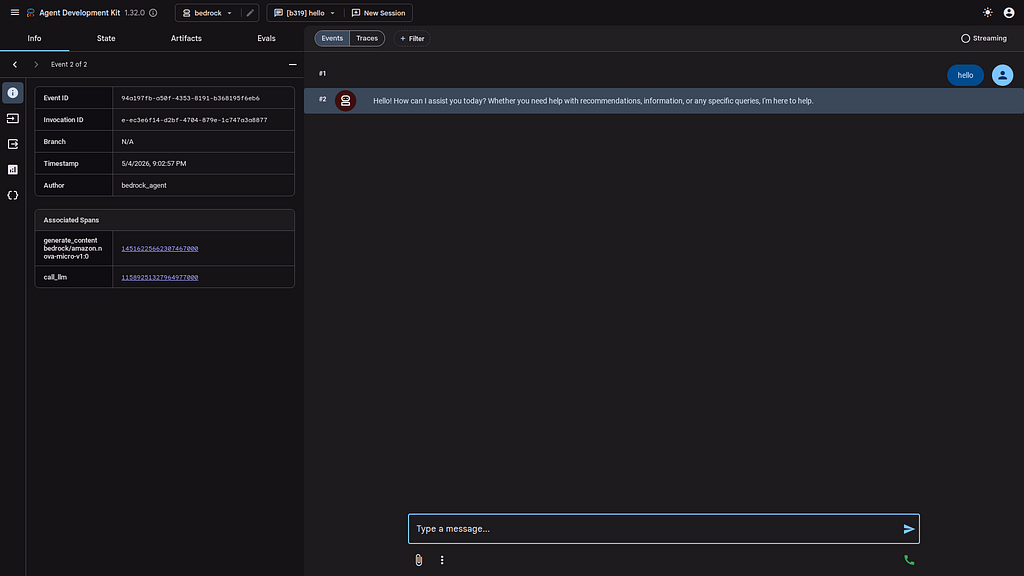
Special note for Google Cloud Shell Deployments- add a CORS **allow\_origins** configuration exemption to allow the ADK agent to run:
```shell
adk web --host 0.0.0.0 --allow_origins 'regex:.*'
```
#### Deep Dive with a Bedrock Model
Once the connection has been tested. You can drill into the bedrock model:
```console
[user]: what model are you
21:04:32 - LiteLLM:INFO: utils.py:4011 -
LiteLLM completion() model= amazon.nova-micro-v1:0; provider = bedrock
[bedrock_agent]: As an AI model, I am part of the Amazon Bedrock family of AI services. Specifically, I am based on advanced deep learning architectures designed for natural language understanding and generation. While I can't disclose the exact model name due to proprietary reasons, rest assured that I leverage cutting-edge technology to provide you with the best possible assistance and information.
If you need help with anything specific, feel free to ask, and I'll do my best to assist you!
[user]:
```
and deep model details:
```console
[user]: what is your knowledge cut-off date
21:05:28 - LiteLLM:INFO: utils.py:4011 -
LiteLLM completion() model= amazon.nova-micro-v1:0; provider = bedrock
[bedrock_agent]: My knowledge was last updated in October 2023. This means I can provide information and insights based on events, data, and developments up until that time. If you have any questions or need information within that timeframe, I'll do my best to assist you! If you have any more specific questions or need the latest updates, you might want to check the most recent sources or news.
[user]:
```
and Bedrock details:
```console
[user]: what other bedrock models are there
21:06:15 - LiteLLM:INFO: utils.py:4011 -
LiteLLM completion() model= amazon.nova-micro-v1:0; provider = bedrock
[bedrock_agent]: Amazon Bedrock is a platform that offers access to various foundation models from different vendors. These models can be used for a wide range of applications, including natural language processing, computer vision, and more. As of my last update in October 2023, specific details about all the models available through Amazon Bedrock could vary because the platform is continually evolving with new model integrations.
However, some common types of foundation models you might find on Amazon Bedrock include:
1. **Natural Language Processing (NLP) Models**: These are used for tasks like text generation, translation, summarization, and question-answering.
2. **Computer Vision Models** : These are used for image and video analysis, including object detection, image classification, and optical character recognition (OCR).
3. **General Purpose Foundation Models** : These are versatile models that can be fine-tuned for specific tasks across different domains.
For the most current and detailed information about the specific models available on Amazon Bedrock, I recommend visiting the [official Amazon Bedrock website](https://aws.amazon.com/bedrock/) or checking the AWS documentation and services catalog. These resources will provide the latest updates on available models, their capabilities, and how to integrate them into your applications.
[user]:
```
#### One Last Code Review with Gemini CLI
Gemini CLI was used to summarize the project:
```markdown
✦ I have completed the code review for agent.py. My analysis is based on the latest ADK 1.32.0 standards and LiteLLM best practices.
Code Review: agent.py
Summary
The current implementation is a clean and syntactically correct minimal scaffold for an ADK agent using Amazon Bedrock. It correctly leverages
the LiteLlm connector and defines a root_agent as required by the ADK runtime.
---
Detailed Feedback
1. Model Configuration & Fallbacks
* Positive: Using os.getenv for BEDROCK_MODEL is excellent for 12-factor app compliance.
* Positive: The fallback bedrock/amazon.nova-micro-v1:0 is a modern and efficient choice.
* Tip: Ensure AWS_REGION and credentials are set in the execution environment, as LiteLLM relies on these for Bedrock connectivity.
2. Agent Identity (name and description)
* Observation: The agent lacks a description field.
* Recommendation: While optional, a description is highly recommended for multi-agent systems. It allows the ADK runtime and other agents to
"discover" this agent's purpose.
* Action: Add description="A general-purpose assistant powered by Amazon Bedrock via LiteLLM.".
3. Instructions (instruction)
* Observation: The instruction "You are a helpful assistant powered by Amazon Bedrock." is very generic.
* Recommendation: A strong ADK instruction should define a persona, goals, and constraints.
* Risk: Hardcoding "Amazon Bedrock" in the instruction might lead to confusing output if the model is later changed via environment variables to
another provider (e.g., openai/gpt-4o).
* Action: Use a more descriptive or provider-agnostic instruction.
4. Tooling & Extensibility
* Observation: The agent currently has no tools and a placeholder comment # ... other agent parameters.
* Recommendation: To make the agent functional beyond simple chat, you should define and register tools (functions). Even if not immediately
needed, adding an empty tools=[] list makes the intended extension point clear.
5. Library Versions & Security
* Note: I verified your environment is running google-adk==1.32.0 and litellm==1.83.14. This is safe and avoids the recent LiteLLM security
advisory (v1.82.7/8).
```
#### Summary
The strategy for using the ADK with Amazon Bedrock LLMs was validated with a incremental step by step approach.
First- the basic environment tools were configured. Then the required Python libraries were installed. LiteLLM was used to proxy the Google ADK to a Model hosted on Amazon Bedrock. Finally, some tests were run from the CLI and the Web interface. Gemini CLI was used to validate the approach.
Comments
More Blog
View allkubernetesMinimalist EKS: The Easy Way
Amazon EKS manages the Kubernetes control plane, but you remain responsible for provisioning the...
J
Joaquin MenchacaaiNever forget to enter the Stern Grove lottery again!
Browser automation with Playwright, Python, GitHub Actions, and Entire to auto-enter San Francisco Stern Grove concert lotteries each week!
L
Lizzie SiegletypescriptA Free Screenshot Editor That Never Uploads Your Image
A free screenshot and image editor that runs entirely in your browser. Keeping every edit reversible and handling big phone photos, in plain TypeScript and Canvas2D.
M
Martin StarkshowdevI built a CLI to break my highlights out of Apple Books
A macOS CLI + MCP server that exports Apple Books highlights to Markdown and gives AI assistants direct access to your reading notes.
A
Andrey KorchakaiA Developer's Guide to Agent Hooks in Antigravity CLI
Motivation To be quite honest, "Hooks"—the shell commands we trigger at specific points...
T
TanaikeagentsTactical vs. Strategic Agentic AI Development — A Playbook for Developers
The Strategic Engineer: Why Writing Code Is No Longer Your Most Valuable Skill ...
A
Adewumi Saheed Adewale