
Back to Blog aws
aws kubernetes
 ai
ai typescript
 showdev
 ai
ai agents
Build Your Own AI Butler - A Scheduled Agent That Runs Itself!
Erik Hanchett May 5, 2026
0 views
I want an AI agent that works for me. I want it to search up the latest news, and I want it to...
I want an AI agent that works for me. I want it to search up the latest news, and I want it to deliver it to me in a daily message. I want to chat with it, and get advice. I want to expand its capabilities in the future. And most importantly I want to control it. Basically, I want Jarvis.
Yes Jarvis, the fictional AI character in the Marvel Cinematic Universe (MCU), serving as Tony Stark's butler. I've never had my own agentic butler, and now that I think about it who wouldn't? 😆 A few years ago I would have told you this would have never happened. But today with the rise of agents the future is here.
Well sort of... we are getting closer than ever though!
To take on this task one of the most obvious routes was to use something like OpenClaw. Except, OpenClaw is too new, and a little too much for what I needed, so like any good engineer I decided to roll my own. *[OpenClaw](https://openclaw.ai/) is an open-source, autonomous AI agent that runs locally on a your machine or VPS to automate tasks*.
Recently [Amazon Bedrock AgentCore](https://docs.aws.amazon.com/bedrock-agentcore/latest/devguide/harness.html?trk=1ad04439-1c50-4fdd-a845-d07d2655fe7a&sc_channel=el) released its managed harness in preview. You define the agent in a config file and a system prompt, and then deploy it. That was it! From my research it looked very straightforward to get up and running, and it could save me a lot of time in the long run. So I decided to take the journey to create my very own Jarvis.
> If you want the conceptual breakdown of what a harness actually is in more detail, [my friend Morgan's post on dev.to](https://dev.to/aws/what-is-an-agent-harness-a-hands-on-guide-with-agentcore-harness-1h33) covers that well. This post is the hands-on build.
After several hours of tinkering and research I created "The Pulse." It opens [Hacker News](https://news.ycombinator.com) in a real browser, grabs Reddit posts via RSS, saves everything to persistent storage, and every 6 hours writes a trending stories digest. It messages me every day, or I can message it anytime and ask what's happening in AI. It reads from the data it's been collecting all day.
If you're more like me and love videos, check out the full video below on how to get started. I'm also including the source code so you can try it yourself. Otherwise continue on and learn all about how to get started! Feel free to let me know how it goes.
{% embed https://youtu.be/sCRPT6dRE4k %}
**Full code:**
{% github aws-samples/sample-AgentCore-Managed-Harness-News %}
> AgentCore Harness is in preview. The CLI, pricing, and some APIs may change. Check the [AgentCore docs](https://docs.aws.amazon.com/bedrock-agentcore/latest/devguide/?trk=1ad04439-1c50-4fdd-a845-d07d2655fe7a&sc_channel=el) for the latest.
## Table of Contents
{% details Table of Contents %}
- [What We're Building](#what-were-building)
- [Why Not Just Use Lambda?](#why-not-just-use-lambda)
- [Prerequisites](#prerequisites)
- [Create the Harness Project](#create-the-harness-project)
- [Configure the Agent](#configure-the-agent)
- [Deploy](#deploy)
- [Test the Hourly Collection](#test-the-hourly-collection)
- [Test the Summary Digest](#test-the-summary-digest)
- [Ask It Questions](#ask-it-questions)
- [Pull Data Out Without Burning Tokens](#pull-data-out-without-burning-tokens)
- [Schedule It With EventBridge and Lambda](#schedule-it-with-eventbridge-and-lambda)
- [Troubleshooting](#troubleshooting)
- [Cost Estimate](#cost-estimate)
- [Cleanup](#cleanup)
- [What's Next](#whats-next)
{% enddetails %}
## What We're Building
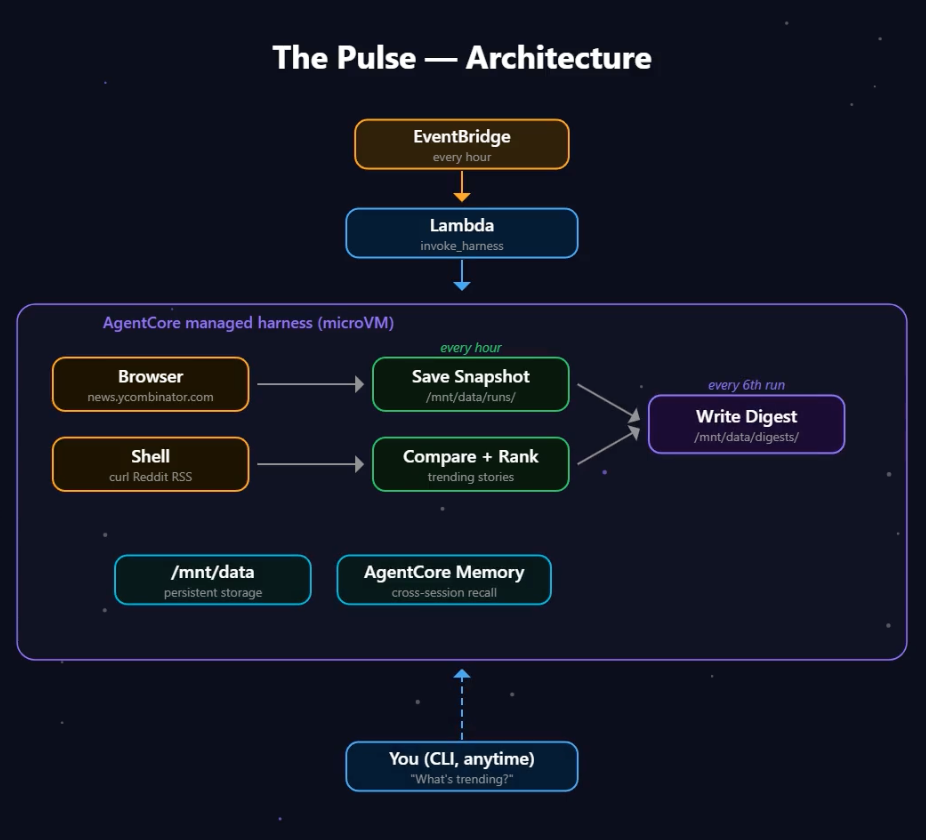
Don't worry if this diagram looks intimidating! The most complicated part is just getting the EventBridge connected with the correct IAM roles to the harness and dealing with the infrastructure code if you're new to that. Let's break down the flow here.
EventBridge fires every hour and triggers a Lambda. [EventBridge](https://docs.aws.amazon.com/eventbridge/latest/userguide/what-is-amazon-eventbridge.html?trk=1ad04439-1c50-4fdd-a845-d07d2655fe7a&sc_channel=el) is AWS's scheduler service, think of it like a cron job in the cloud. The [Lambda](https://docs.aws.amazon.com/lambda/latest/dg/welcome.html?trk=1ad04439-1c50-4fdd-a845-d07d2655fe7a&sc_channel=el) makes one API call to the harness. Inside the harness, the agent runs in its own microVM, which is basically a lightweight virtual machine that spins up just for your session with its own CPU, memory, and filesystem. The agent opens a browser, scrapes HN, fetches Reddit RSS, and saves a snapshot. Every 6th run it reads all the snapshots, finds trends, and writes a digest. And because the session ID stays the same across runs, all that data accumulates on `/mnt/data`. You can also just talk to it anytime through the CLI and ask what's trending.
## Why Not Just Use Lambda?
Before we get into the details, one question you may be thinking is couldn't we do all this with just a Lambda, some [Strands Agents](https://github.com/strands-agents/sdk-python) code, an LLM, and a dream? For a simple one-shot task, you are probably right. But this agent needs a few things Lambda can't give you, which makes this approach well worth it.
First, the agent opens a real browser to scrape Hacker News. Lambda can't spin up a managed browser session. You'd need [Fargate](https://docs.aws.amazon.com/AmazonECS/latest/developerguide/AWS_Fargate.html?trk=1ad04439-1c50-4fdd-a845-d07d2655fe7a&sc_channel=el) plus Playwright, and now you're managing containers. I love containers, but let's skip it for this scenario.
Second, it saves hourly snapshots to `/mnt/data/runs/` and reads them back 6 hours later. Lambda's `/tmp` gets wiped after every invocation. You'd need [S3](https://docs.aws.amazon.com/AmazonS3/latest/userguide/Welcome.html?trk=1ad04439-1c50-4fdd-a845-d07d2655fe7a&sc_channel=el) plus custom read/write logic for every file operation. That's a lot of work for what should be "save a file."
Third, the 6-hour summary run reads all the accumulated data, compares scores across snapshots, identifies trends, and writes a digest. That can take a while. Lambda maxes out at 15 minutes. The harness defaults to a 1-hour timeout per invocation (I set mine to 30 minutes since that's plenty), and the microVM itself can stay alive for up to 8 hours across multiple invocations.
And then there's memory. AgentCore Memory is a built-in service that stores facts, preferences, and conversation summaries across sessions. So "What did I ask about yesterday?" works because the memory carries context forward. In Lambda, you'd need [DynamoDB](https://docs.aws.amazon.com/amazondynamodb/latest/developerguide/Introduction.html?trk=1ad04439-1c50-4fdd-a845-d07d2655fe7a&sc_channel=el) plus a custom integration.
Could you build all of this with Lambda plus S3 plus Fargate plus DynamoDB plus Step Functions? Sure. That's five services instead of one. That's four too many for this tutorial.
## Prerequisites
- Node.js 20+
- AWS credentials configured in a preview region (`us-west-2`, `us-east-1`, `eu-central-1`, or `ap-southeast-2`)
- CDK bootstrapped in your account (`cdk bootstrap`). [CDK](https://docs.aws.amazon.com/cdk/v2/guide/home.html?trk=1ad04439-1c50-4fdd-a845-d07d2655fe7a&sc_channel=el) is the AWS Cloud Development Kit. It lets you define infrastructure in TypeScript instead of clicking through the console. If you haven't used it before, `npm install -g aws-cdk` and then `cdk bootstrap` in your account.
- The AgentCore CLI:
```bash
npm install -g @aws/agentcore@preview
```
- Bedrock model access for Claude Sonnet 4.6 in your region. As of late 2025, Bedrock gives you automatic access to all serverless models in your region without needing to enable them individually. If your organization uses IAM policies or SCPs to restrict model access, make sure Sonnet isn't blocked. You can verify by opening the [Bedrock console](https://us-west-2.console.aws.amazon.com/bedrock/home?region=us-west-2&trk=1ad04439-1c50-4fdd-a845-d07d2655fe7a&sc_channel=el) and trying the model in the playground.
## Create the Harness Project
This is where the fun begins. We'll create our very first managed harness.
```bash
agentcore create \
--name thepulse \
--model-provider bedrock \
--session-storage-mount-path /mnt/data
cd thepulse
```
That one command scaffolds the whole project. Harness config, memory, session storage, CDK app, IAM role. The `--session-storage-mount-path` flag wires up persistent storage so the platform creates a `/mnt/data` mount point for you. You don't have to worry about a Dockerfile, or container to manage.
Now add the browser tool. AgentCore Browser is a managed headless Chrome instance that the harness can spin up on demand. Your agent can navigate pages, click elements, extract content, basically anything you'd do with Playwright but without managing the browser infrastructure yourself.
```bash
agentcore add tool --harness thepulse --type agentcore_browser --name browser
```
Here's what you end up with:
```plaintext
thepulse/
├── agentcore/
│ ├── agentcore.json # Project-level resource config
│ ├── aws-targets.json # Deployment targets (account, region)
│ ├── .env.local # Local dev config (gitignored)
│ └── cdk/ # CDK TypeScript app
├── app/
│ └── thepulse/
│ ├── harness.json # Agent config
│ └── system-prompt.md # Agent instructions
```
## Configure the Agent
Our AgentCore CLI already set up the model, memory, and session storage. You just need to tweak the execution limits and write the system prompt.
Edit `app/thepulse/harness.json`:
```json
{
"name": "thepulse",
"model": {
"provider": "bedrock",
"modelId": "global.anthropic.claude-sonnet-4-6"
},
"tools": [
{
"type": "agentcore_browser",
"name": "browser"
}
],
"skills": [],
"memory": { "name": "thepulseMemory" },
"sessionStoragePath": "/mnt/data",
"maxIterations": 75,
"timeoutSeconds": 1800
}
```
A few things worth mentioning here.
I set `maxIterations` to 75 because browser interactions are chatty. That eats through iterations fast, and 75 gives room for the full HN browser scrape plus Reddit RSS plus file operations without the agent hitting the ceiling.
`timeoutSeconds` is 1800 (30 minutes). Browser sessions take time, and the summary run reads a lot of data. I didn't hit too many timeouts when testing, but this was a just-in-case update.
This next setting is really useful. The platform creates the `/mnt/data` mount point automatically when you set `sessionStoragePath`. This mount point will be shared per session, no matter if the session times out.
Now edit `app/thepulse/system-prompt.md`. The CLI created this file with a default prompt. Replace it:
```markdown
You are The Pulse, an AI research agent that monitors Hacker News
and Reddit for AI/ML stories.
You have two modes:
### HOURLY COLLECTION
When the prompt says "hourly run":
**Hacker News (browser):**
1. Use the browser tool to open https://news.ycombinator.com
2. Extract the top 30 stories: title, score, comment count, URL
3. Close the browser session when done
**Reddit (RSS — do NOT use the browser):**
Reddit blocks automated browser access (403). Use the RSS feed instead:
1. Shell: `curl -s -A 'ThePulse/1.0'
'https://www.reddit.com/r/MachineLearning/.rss'`
2. Parse the XML to extract post titles, URLs, authors, and dates
3. Note: RSS does not include upvote scores. That's expected.
4. Also try r/artificial: `curl -s -A 'ThePulse/1.0'
'https://www.reddit.com/r/artificial/.rss'`
**Save the snapshot:**
1. Combine HN and Reddit data into a single JSON file
2. Save to /mnt/data/runs/YYYY-MM-DD-HH.json
3. If a previous hour's snapshot exists (check /mnt/data/runs/),
compare and flag:
- Stories that appeared in both snapshots (persistent)
- HN stories with rising scores
### SUMMARY DIGEST
When the prompt says "generate summary":
1. Read all snapshots from /mnt/data/runs/ for the last 6 hours
2. Identify stories that appeared in multiple snapshots
(persistent presence = trending)
3. Identify stories with rising scores across snapshots
4. Deduplicate and rank by persistence, score growth, and
comment activity
5. Write a markdown digest to
/mnt/data/digests/YYYY-MM-DD-{morning|afternoon|evening|night}.md
6. Include the top 10 trending stories with: title, source
(HN/Reddit), peak score, trend direction, URL
### INTERACTIVE
When a user asks a question:
- Read from /mnt/data/runs/ and /mnt/data/digests/ to answer
- Use memory for conversational context
## Important
- /mnt/data is persistent session storage. Use the same session ID
across runs so data accumulates.
- Always create directories before writing:
`mkdir -p /mnt/data/runs /mnt/data/digests`
```
I put the collection to be hourly and the snapshots to run every six hours. Retrospectively, this is a lot of data, and I could certainly have expanded that. I'd say collecting twice a day and having a snapshot created once a day would be fine as well. Feel free to tweak this prompt to your liking.
One gotcha I'd like to pass on is that Reddit doesn't like agents scraping its data. The agent kept trying to open Reddit in the browser, getting 403'd, and burning 5-6 iterations before giving up. I sat there watching it retry over and over thinking "please just stop." The RSS feed at `reddit.com/r/MachineLearning/.rss` works every time. Putting it explicitly in the system prompt saves you from that pain.
## Deploy
```bash
agentcore deploy
```
One command. It provisions the harness, memory, IAM role, session storage, and the underlying microVM infrastructure. This takes about 3-5 minutes because it's also spinning up AgentCore Memory and running CDK for the IAM roles.
You can verify what got created:
```bash
agentcore status --json
```
## Test the Hourly Collection
To test this out you'll need a stable session ID so `/mnt/data` accumulates across runs, as I mentioned earlier. The session ID needs to be at least 33 characters (a UUID is 36, so that works). This is important because the same session ID means the same filesystem. That's how data builds up over time.
```bash
SESSION_ID="thepulse-$(uuidgen)"
echo $SESSION_ID # Save this. You'll reuse it for every run.
agentcore invoke --harness thepulse \
--session-id "$SESSION_ID" \
--actor-id scheduler \
"Hourly run. Collect AI/ML stories from Hacker News and Reddit. Save the snapshot."
```
The agent will open a managed Chrome browser, navigate to `news.ycombinator.com`, extract stories, fetch Reddit via RSS, and save everything to `/mnt/data/runs/`.
Verify it worked:
```bash
agentcore invoke --exec --harness thepulse \
--session-id "$SESSION_ID" \
"ls -la /mnt/data/runs/"
```
That `--exec` flag is one of my favorite things about the harness. It runs a shell command directly on the microVM. It's not connecting to any LLM so no tokens are used. You can use it to poke around the filesystem anytime without spending money.
## Test the Summary Digest
Run the collection a couple times (or wait a few hours), then:
```bash
agentcore invoke --harness thepulse \
--session-id "$SESSION_ID" \
--actor-id scheduler \
"Generate summary. Read all snapshots from the last 6 hours and write a trending stories digest."
```
The agent reads all the hourly snapshots, identifies stories that appeared multiple times (trending), flags rising scores, and writes a markdown digest.
## Ask It Questions
```bash
agentcore invoke --harness thepulse \
--session-id "$SESSION_ID" \
--actor-id demo-user \
"What's trending in AI right now?"
```
The agent reads from `/mnt/data/runs/` and `/mnt/data/digests/` to answer with real data. Not hallucinated summaries, actual scores and URLs from the snapshots it collected. I really liked this part. The agent isn't guessing. It's reading files it wrote earlier that day.
## Schedule It With EventBridge and Lambda
The `agentcore create` command already scaffolded a CDK app at `agentcore/cdk/`. We'll add a Lambda trigger and an EventBridge schedule to that existing project. EventBridge Scheduler is the AWS service that fires events on a cron schedule. We'll have it invoke a Lambda every hour, and that Lambda calls the harness. One `agentcore deploy` handles the harness, one `cdk deploy` handles the scheduler. I like keeping these separate because you iterate on the agent config way more often than the scheduling infrastructure.
### Set Up the Lambda
```bash
mkdir -p agentcore/cdk/lambda/pulse-trigger
cd agentcore/cdk/lambda/pulse-trigger
npm init -y
npm install @aws-sdk/client-bedrock-agentcore @aws-sdk/client-secrets-manager
npm install -D typescript @types/node esbuild
cd ../../../..
```
Create `agentcore/cdk/lambda/pulse-trigger/index.ts`:
```typescript
import {
BedrockAgentCoreClient,
InvokeHarnessCommand,
} from "@aws-sdk/client-bedrock-agentcore";
import {
SecretsManagerClient,
GetSecretValueCommand,
} from "@aws-sdk/client-secrets-manager";
interface TelegramSecret {
botToken: string;
defaultChatId: string;
}
const agentCore = new BedrockAgentCoreClient({ region: process.env.AWS_REGION });
const secrets = new SecretsManagerClient({ region: process.env.AWS_REGION });
// Cache the secret across warm invocations
let cachedSecret: { value: TelegramSecret; expiry: number } | null = null;
const SECRET_TTL_MS = 5 * 60 * 1000; // 5 minutes
async function getSecret(): Promise<TelegramSecret> {
if (cachedSecret && Date.now() < cachedSecret.expiry) {
return cachedSecret.value;
}
const secretArn = process.env.TELEGRAM_SECRET_ARN;
if (!secretArn) throw new Error("Missing TELEGRAM_SECRET_ARN env var");
const res = await secrets.send(
new GetSecretValueCommand({ SecretId: secretArn })
);
const value: TelegramSecret = JSON.parse(res.SecretString!);
cachedSecret = { value, expiry: Date.now() + SECRET_TTL_MS };
return value;
}
async function sendToTelegram(
botToken: string, chatId: string, text: string
) {
// Telegram's message limit is 4096 chars. Split if needed.
const chunks = text.match(/[\s\S]{1,4000}/g) || [];
for (const chunk of chunks) {
const res = await fetch(
`https://api.telegram.org/bot${botToken}/sendMessage`,
{
method: "POST",
headers: { "Content-Type": "application/json" },
body: JSON.stringify({
chat_id: chatId,
text: chunk,
parse_mode: "Markdown",
}),
}
);
if (!res.ok) {
console.error("Telegram send failed:", await res.text());
}
}
}
export const handler = async () => {
const hour = new Date().getUTCHours();
const sessionId = process.env.STABLE_SESSION_ID!;
const harnessArn = process.env.HARNESS_ARN!;
const isSummaryRun = hour % 6 === 0;
const prompt = isSummaryRun
? "Generate summary. Read all snapshots from the last 6 hours and write a trending stories digest."
: "Hourly run. Collect AI/ML stories from Hacker News and Reddit. Save the snapshot.";
const command = new InvokeHarnessCommand({
harnessArn,
runtimeSessionId: sessionId,
actorId: "scheduler",
messages: [{ role: "user", content: [{ text: prompt }] }],
});
const response = await agentCore.send(command);
// Collect the full response text from the stream
let responseText = "";
let chunkCount = 0;
if (response.stream) {
for await (const event of response.stream) {
chunkCount++;
if ("contentBlockDelta" in event) {
const delta = (event as any).contentBlockDelta?.delta;
if (delta && "text" in delta) {
responseText += delta.text;
process.stdout.write(delta.text);
}
}
}
}
console.log(
`\n[pulse-trigger] Stream complete — ${chunkCount} chunks`
);
// On summary runs, send the digest to Telegram
if (isSummaryRun && responseText) {
const { botToken, defaultChatId } = await getSecret();
await sendToTelegram(botToken, defaultChatId, responseText);
}
return {
statusCode: 200,
hour,
type: isSummaryRun ? "summary" : "collection",
digestSent: isSummaryRun,
};
};
```
Let's break down what's happening here.
The Lambda passes a stable session ID (from an environment variable) so every hourly run writes to the same `/mnt/data`. It collects the full response text from the stream and logs it to [CloudWatch](https://docs.aws.amazon.com/AmazonCloudWatch/latest/monitoring/WhatIsCloudWatch.html?trk=1ad04439-1c50-4fdd-a845-d07d2655fe7a&sc_channel=el). On summary runs, it sends the digest to Telegram using a bot token stored in [Secrets Manager](https://docs.aws.amazon.com/secretsmanager/latest/userguide/intro.html?trk=1ad04439-1c50-4fdd-a845-d07d2655fe7a&sc_channel=el). Secrets Manager is the AWS service for storing sensitive values like API keys and tokens. You don't want a bot token sitting in an environment variable where anyone with console access can see it. The `sendToTelegram` function handles Telegram's 4096 character limit by chunking the text. I found the CloudWatch logging really helpful for debugging early on when the agent would occasionally get stuck in a browser loop.
### Add the Scheduler Stack
Create `agentcore/cdk/lib/scheduler-stack.ts`. This is a CDK stack, which is basically a unit of deployment. Everything in this file gets deployed together as one [CloudFormation](https://docs.aws.amazon.com/AWSCloudFormation/latest/UserGuide/Welcome.html?trk=1ad04439-1c50-4fdd-a845-d07d2655fe7a&sc_channel=el) stack.
```typescript
import {
Stack, StackProps, Duration, TimeZone, CfnOutput,
} from "aws-cdk-lib";
import { NodejsFunction } from "aws-cdk-lib/aws-lambda-nodejs";
import { Runtime } from "aws-cdk-lib/aws-lambda";
import { Secret } from "aws-cdk-lib/aws-secretsmanager";
import * as iam from "aws-cdk-lib/aws-iam";
import * as scheduler from "aws-cdk-lib/aws-scheduler";
import * as targets from "aws-cdk-lib/aws-scheduler-targets";
import { Construct } from "constructs";
import * as path from "path";
export interface PulseSchedulerStackProps extends StackProps {
agentRuntimeArn: string;
harnessArn: string;
stableSessionId: string;
telegramSecretArn: string;
}
export class PulseSchedulerStack extends Stack {
constructor(
scope: Construct, id: string, props: PulseSchedulerStackProps
) {
super(scope, id, props);
const telegramSecret = Secret.fromSecretCompleteArn(
this, "TelegramSecret", props.telegramSecretArn
);
const triggerFn = new NodejsFunction(this, "PulseTrigger", {
runtime: Runtime.NODEJS_22_X,
entry: path.join(
__dirname, "../../lambda/pulse-trigger/index.ts"
),
handler: "handler",
timeout: Duration.minutes(15),
memorySize: 256,
environment: {
HARNESS_ARN: props.harnessArn,
STABLE_SESSION_ID: props.stableSessionId,
TELEGRAM_SECRET_ARN: props.telegramSecretArn,
},
bundling: {
externalModules: [],
},
});
triggerFn.addToRolePolicy(
new iam.PolicyStatement({
actions: [
"bedrock-agentcore:InvokeHarness",
"bedrock-agentcore:InvokeAgentRuntime",
],
resources: [
props.harnessArn,
props.agentRuntimeArn,
],
})
);
// Read access to the Telegram bot token secret
telegramSecret.grantRead(triggerFn);
new scheduler.Schedule(this, "HourlySchedule", {
schedule: scheduler.ScheduleExpression.cron({
minute: "0",
hour: "*",
timeZone: TimeZone.of("UTC"),
}),
target: new targets.LambdaInvoke(triggerFn, {}),
description: "The Pulse — hourly AI/ML news collection",
});
new CfnOutput(this, "TriggerFunctionName", {
value: triggerFn.functionName,
});
}
}
```
The `telegramSecret.grantRead(triggerFn)` line gives the Lambda permission to read the bot token from Secrets Manager. The bot token lives there instead of in environment variables so it doesn't show up in CloudFormation outputs or the Lambda console.
Wire it into `agentcore/cdk/bin/cdk.ts`:
```typescript
import { PulseSchedulerStack } from "../lib/scheduler-stack";
// ... existing AgentCore stack code ...
new PulseSchedulerStack(app, "ThePulseScheduler", {
harnessArn: "REPLACE_WITH_YOUR_HARNESS_ARN",
agentRuntimeArn: "REPLACE_WITH_YOUR_RUNTIME_ARN",
stableSessionId: "REPLACE_WITH_YOUR_SESSION_ID",
telegramSecretArn: "REPLACE_WITH_YOUR_SECRET_ARN",
env: {
account: targets[0].account,
region: targets[0].region,
},
});
```
I'm showing placeholders here to make it clear what goes where. You can get your harness ARN and runtime ARN with `agentcore status --json`, and use the same session ID you've been testing with. The Telegram secret ARN comes from Secrets Manager (store your bot token and chat ID as a JSON object with `botToken` and `defaultChatId` keys).
That said, you shouldn't hardcode ARNs and secrets into source files you commit to git. The [actual repo](https://github.com/aws-samples/sample-AgentCore-Managed-Harness-News) resolves the harness ARN and runtime ARN automatically from the deployed state file that `agentcore deploy` creates, and reads the Telegram secret ARN and session ID from environment variables. That way nothing sensitive ends up in version control. Check the `cdk.ts` in the repo for the full implementation.
### Deploy and Test
```bash
# Install esbuild in the CDK project (needed for NodejsFunction)
cd agentcore/cdk && npm install esbuild --save-dev && cd ../..
# Deploy the harness
agentcore deploy
# Deploy the scheduler stack
cd agentcore/cdk && npm run build && npx cdk deploy ThePulseScheduler && cd ../..
```
Test the Lambda directly:
```bash
aws lambda invoke \
--function-name $(aws cloudformation describe-stacks \
--stack-name ThePulseScheduler \
--query 'Stacks[0].Outputs[?OutputKey==`TriggerFunctionName`].OutputValue' \
--output text) \
--region us-west-2 \
--cli-read-timeout 900 \
/tmp/lambda-response.json
cat /tmp/lambda-response.json
```
The `--cli-read-timeout 900` is important. The harness invocation takes a few minutes (the agent is browsing HN, fetching RSS, saving data), and the AWS CLI's default timeout is 60 seconds. Without it, you'll get a `Read timeout` error even though the Lambda is still running fine. Don't make this mistake like I did.
You should see `{"statusCode":200,"hour":...,"type":"collection"}`.
## Troubleshooting
A few things I hit while building this. Hopefully they save you some time.
**`npm ci` fails during CDK synth.** If you use `nodeModules` in the bundling config instead of `externalModules: []`, CDK copies your `package-lock.json` into a temp directory and runs `npm ci`. If the lock file is even slightly out of sync with `package.json`, it fails. I went back and forth on this for a while before landing on the `externalModules: []` approach that bundles everything with esbuild and skips `npm ci` entirely.
**`AccessDeniedException` on `ConverseStream`.** This one got me. Bedrock now gives automatic access to all models in your region, so the old "Model Access" page is gone. But if your organization uses IAM (Identity and Access Management) policies or SCPs (Service Control Policies) to restrict which models can be invoked, you'll get this error. Check with your admin to make sure the model isn't blocked by a deny policy. I hit this when I tried to use Haiku for cheaper collection runs in an account that had an SCP limiting models to Sonnet only. The error message doesn't make it obvious that it's a permissions issue.
**Lambda times out but the agent is still running.** The Lambda timeout (15 min max) and the harness timeout (30 min) are separate. If the agent takes longer than the Lambda allows, the Lambda dies but the harness session keeps running in the background. Check CloudWatch logs for the Lambda, and use `agentcore logs --harness thepulse --since 1h` for the harness side.
**Reddit returns 403 in the browser.** Reddit blocks automated browser access. The system prompt tells the agent to use RSS instead, but if you're iterating on the prompt and forget to include that instruction, the agent will waste iterations trying to open Reddit in the browser. Ask me how I know.
## Cost Estimate
The main cost here is Bedrock model usage. Each hourly collection run uses around 10-15K tokens (browser interactions are chatty), and summary runs use more since they read all the accumulated data. Lambda and EventBridge are basically free at this scale.
You can cut costs by enabling a cheaper model like Haiku in the Bedrock console and passing a model override for collection runs. Keep Sonnet for the summary runs that need more reasoning. The harness supports per-invocation model overrides so you don't need to redeploy. You can also just reduce the number of times it collects data.
AgentCore Runtime and Browser have no separate charge during preview.
Check the [Bedrock pricing page](https://aws.amazon.com/bedrock/pricing/?trk=1ad04439-1c50-4fdd-a845-d07d2655fe7a&sc_channel=el) for current model token costs and the [AgentCore pricing page](https://aws.amazon.com/bedrock/agentcore/pricing/?trk=1ad04439-1c50-4fdd-a845-d07d2655fe7a&sc_channel=el) for runtime and browser session rates.
## Cleanup
Make sure you always clean up your stacks after trying out tutorials!
```bash
# Delete the scheduler stack
cd agentcore/cdk && npx cdk destroy ThePulseScheduler && cd ../..
# Delete the harness and all AgentCore resources
agentcore destroy
```
The `agentcore destroy` command removes the harness, memory, IAM role, and session storage. The CDK destroy removes the Lambda, EventBridge schedule, and any IAM roles CDK created.
## What's Next
This is a starting point. I have thoughts on a few directions I could take my very own Jarvis 😊.
Right now the Telegram integration is outbound only. I want to add two-way chat so I can message the bot and ask questions (without just using the command line). That means an [API Gateway](https://docs.aws.amazon.com/apigateway/latest/developerguide/welcome.html?trk=1ad04439-1c50-4fdd-a845-d07d2655fe7a&sc_channel=el) webhook and a second Lambda that invokes the harness in interactive mode. The agent reads from `/mnt/data` to answer with real data.
More sources would be easy to add. The system prompt is just markdown. Add instructions for other news sources that a browser can reach. The nice thing is it would just take a prompt update and a new run of `agentcore deploy`.
I also want to try switching models per run. Enable Haiku in the Bedrock console and pass `--model-id` on collection runs for cheaper hourly scrapes. Keep Sonnet for the summary runs that need more reasoning. The harness supports this per-invocation without a redeploy.
And eventually, a dashboard. Have the agent generate an HTML page from the accumulated data and sync it to S3. Use `--exec` to run `aws s3 sync` from the microVM.
After building this, I'm convinced the harness approach works really well for simpler use cases like my personal news Jarvis. If your agent needs persistent state, scheduled runs, and a browser, this is way less infrastructure than stitching it together yourself. If you just need a one-shot agent that answers a question, stick with Lambda. And of course if you need maximum flexibility, using AgentCore runtime is your best bet!
Let me know in the comments what you think! Thanks!
## Resources
- [AgentCore Harness docs](https://docs.aws.amazon.com/bedrock-agentcore/latest/devguide/harness.html?trk=1ad04439-1c50-4fdd-a845-d07d2655fe7a&sc_channel=el)
- [AgentCore Browser docs](https://docs.aws.amazon.com/bedrock-agentcore/latest/devguide/browser-tool.html?trk=1ad04439-1c50-4fdd-a845-d07d2655fe7a&sc_channel=el)
- [Connect to tools](https://docs.aws.amazon.com/bedrock-agentcore/latest/devguide/harness-tools.html?trk=1ad04439-1c50-4fdd-a845-d07d2655fe7a&sc_channel=el)
- [Persist memory and filesystem](https://docs.aws.amazon.com/bedrock-agentcore/latest/devguide/harness-memory.html?trk=1ad04439-1c50-4fdd-a845-d07d2655fe7a&sc_channel=el)
- [AgentCore CLI @preview](https://github.com/aws/agentcore-cli)
- [AgentCore pricing](https://aws.amazon.com/bedrock/agentcore/pricing/?trk=1ad04439-1c50-4fdd-a845-d07d2655fe7a&sc_channel=el)
Comments
More Blog
View allkubernetesMinimalist EKS: The Easy Way
Amazon EKS manages the Kubernetes control plane, but you remain responsible for provisioning the...
J
Joaquin MenchacaaiNever forget to enter the Stern Grove lottery again!
Browser automation with Playwright, Python, GitHub Actions, and Entire to auto-enter San Francisco Stern Grove concert lotteries each week!
L
Lizzie SiegletypescriptA Free Screenshot Editor That Never Uploads Your Image
A free screenshot and image editor that runs entirely in your browser. Keeping every edit reversible and handling big phone photos, in plain TypeScript and Canvas2D.
M
Martin StarkshowdevI built a CLI to break my highlights out of Apple Books
A macOS CLI + MCP server that exports Apple Books highlights to Markdown and gives AI assistants direct access to your reading notes.
A
Andrey KorchakaiA Developer's Guide to Agent Hooks in Antigravity CLI
Motivation To be quite honest, "Hooks"—the shell commands we trigger at specific points...
T
TanaikeagentsTactical vs. Strategic Agentic AI Development — A Playbook for Developers
The Strategic Engineer: Why Writing Code Is No Longer Your Most Valuable Skill ...
A
Adewumi Saheed Adewale