
Back to Blog linux
linux kubernetes
 ai
ai typescript
 showdev
 ai
ai agents
My fully offline AI-assisted Linux development machine
Deepu K Sasidharan May 11, 2026
0 views
My Arch Linux, Niri, and local AI coding setup on the ASUS ROG Flow Z13
---
title: "My fully offline AI-assisted Linux development machine"
description: "My Arch Linux, Niri, and local AI coding setup on the ASUS ROG Flow Z13"
published: true
tags:
- "linux"
- "archlinux"
- "development"
- "ai"
series: "GNU/Linux Environment for Developers"
canonical_url: "https://deepu.tech/my-fully-offline-ai-assisted-linux-development-machine"
date: "2026-05-07"
image: "https://deepu.tech/assets/images/linux-2026/main.png"
cover_image: "https://deepu.tech/assets/images/linux-2026/main.png"
devto_id: 3652261
devto_url: "https://dev.to/deepu105/my-fully-offline-ai-assisted-linux-development-machine-3lnl"
---
*Originally published at [deepu.tech](https://deepu.tech/my-fully-offline-ai-assisted-linux-development-machine/)*.
One of my most popular posts of all time was when I wrote about [my beautiful Linux development machine in 2019](https://deepu.tech/my-beautiful-linux-development-environment/). I followed that up in 2021 with [my sleek and modern Linux development machine](https://deepu.tech/my-beautiful-linux-development-environment-2021/). Since then, a lot has changed in my setup.
I moved from Fedora and KDE to a mostly vanilla [Arch Linux](https://archlinux.org/) setup. I moved from a traditional desktop environment to [niri](https://github.com/YaLTeR/niri), a scrolling Wayland compositor. And of course, like every developer out there, my workflow now has AI in it. But this time, I wanted something a bit different: AI-assisted development that can run fully offline on my own machine.
Yes, local AI coding on Linux. What is not to love here?
{% link https://dev.to/deepu105/introducing-llamastash-a-zero-overhead-terminal-native-llamacpp-launcher-4d2g %}
This is not a tutorial on how to reproduce every single bit of my setup. My full personal configuration is private because it has too much machine-specific and personal stuff. But I'm making a stripped-down public version with the bare minimum needed for Arch, niri, DMS, OpenCode, and llama.cpp at [deepu105/archdots](https://github.com/deepu105/archdots).
This post is more about the current shape of my Linux development machine and why I ended up with this stack.
This is my primary machine for all of the below.
- Rust, JavaScript, TypeScript, Java, Go, Python, Linux, and web development
- Running multiple web applications locally
- Running Docker containers and local Kubernetes clusters
- Kubernetes, Terraform, and cloud CLI work
- Writing, blogging, presentations, and demos
- Heavy browser usage
- E-mail, chat, and video conferencing
- Screen recording, screenshots, video editing, and light media work
- Running local LLMs for coding, refactoring, and code review
- Testing AI tools without sending every prompt to a cloud provider
## Machine configuration
The configuration of the machine is quite crucial for this setup. Running a browser, a few IDEs, Docker, terminals, and local LLMs is not exactly a light workload.
My current machine is an [ASUS ROG Flow Z13](https://rog.asus.com/laptops/rog-flow/rog-flow-z13-2025/) 2025 model. It is a weird little beast. It is technically a tablet, but it has enough CPU, GPU, and memory to behave like a mobile workstation.
Here is the current setup.
- **Model**: ASUS ROG Flow Z13 GZ302EA
- **Processor**: AMD Ryzen AI Max+ 395, 16 cores and 32 threads
- **Graphics**: AMD Radeon 8060S integrated GPU with 40 compute units
- **Memory**: 128GB unified memory. I have assigned 64GB to the GPU and 64GB to the CPU. This is configurable in the BIOS.
- **Storage**: 2TB NVMe SSD
- **Built-in display**: 13-inch, 2560x1600, 180Hz
- **External displays**: 34-inch 3440x1440 monitor and 27-inch 2560x1440 monitor
- **Camera**: Razer Kiyo Pro
- **Keyboard and mouse**: Keychron K2 and Logitech MX Vertical
The memory is the most interesting part here. For normal development work, 32GB is still fine and 64GB is great. But for local AI work, memory changes everything. A 27B quantized model, a large context window, Docker, Chrome, and an editor can happily eat memory like there is no tomorrow.
Having that much unified memory means the machine can run a useful local coding model without feeling like a science experiment. That is a big deal.
## Operating system
I praised Fedora in the previous posts, and I still think Fedora is one of the best Linux distributions for most developers. Updates are smooth, new packages land often, and it mostly stays out of the way.
But this time I went with vanilla [Arch Linux](https://archlinux.org/). So yes, I use Arch btw! 😉 I know, rolling release and all that. I have been using Linux long enough to know what I was signing up for.
The main reason was simple: I wanted the latest kernel, [Mesa](https://www.mesa3d.org/), [ROCm](https://rocm.docs.amd.com/)-adjacent bits, Wayland tools, and desktop packages without waiting for the next distro release. New hardware like the Flow Z13 usually benefits from being closer to the bleeding edge. Arch gives me that. Well, OK, I also fell in love with the sexy new compositors like niri and Hyprland, and Arch is a great way to run those without waiting for backports. I started with Hyprland, but I ended up liking niri better for my workflow, and Arch made it easy to switch and experiment.
My installation is still fairly boring, and I mean that as a compliment.
- [Btrfs](https://btrfs.readthedocs.io/) for root, home, cache, and log subvolumes
- [GRUB](https://www.gnu.org/software/grub/) for boot
- [paru](https://github.com/Morganamilo/paru) for pacman and AUR packages
- [Timeshift](https://github.com/linuxmint/timeshift) and `grub-btrfs` for snapshots
- [PipeWire](https://pipewire.org/) for audio
- [NetworkManager](https://networkmanager.dev/) for networking
- [Docker](https://www.docker.com/), [Distrobox](https://distrobox.it/), [Flatpak](https://flatpak.org/), and a bit of [Homebrew](https://brew.sh/) where it makes sense
I also use [Topgrade](https://github.com/topgrade-rs/topgrade) to keep the system updated. My private config even wires it into [DankMaterialShell](https://github.com/AvengeMedia/DankMaterialShell), so I can see available updates from the bar and trigger an update for everything on the system from pacman/AUR, brew, cargo, npm, VS Code plugins, Docker images, and so on in Kitty.
Again, quite simple, at least in my eyes.
## Desktop environment, or lack of one
This is probably the biggest change from my previous setup. I no longer run GNOME or KDE as my main desktop. I use [niri](https://github.com/YaLTeR/niri), which is a scrollable tiling Wayland compositor.
If you have not used niri, the workflow is quite different from a regular tiling window manager. Instead of forcing everything into a fixed grid, windows live in columns and you scroll horizontally across them. It sounds odd until it clicks. Once it clicks, it feels very natural on ultrawide monitors and laptop displays. I especially love the touchpad gestures for switching workspaces and moving windows around. It is a very fluid way to manage windows.
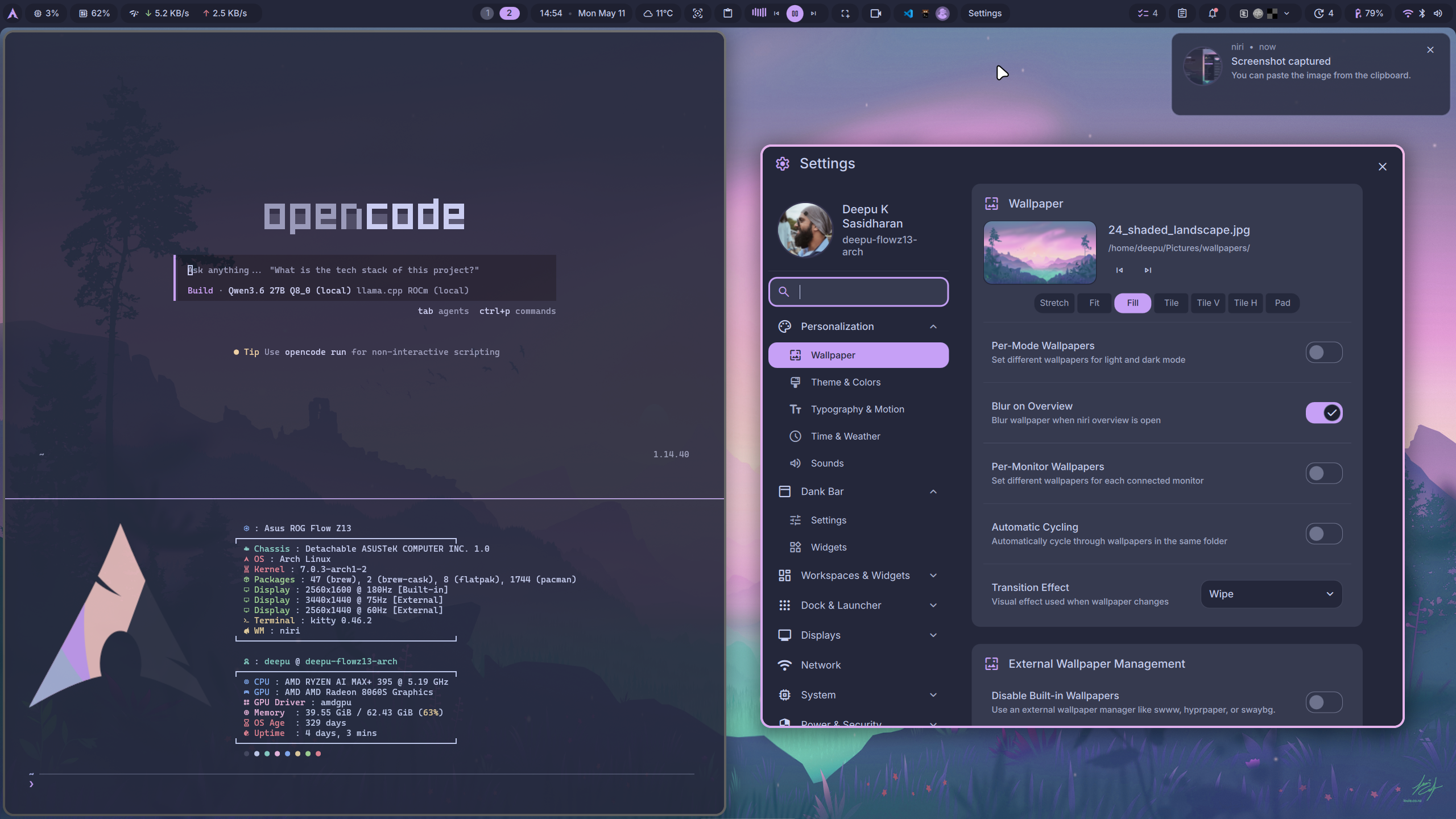
My current session looks like this.
- **Login manager**: [SDDM](https://github.com/sddm/sddm) on Wayland
- **Window manager**: niri 26.04 on Wayland
- **Shell**: [DankMaterialShell](https://github.com/AvengeMedia/DankMaterialShell), usually called DMS
- **Terminal**: [Kitty](https://sw.kovidgoyal.net/kitty/)
- **Theme**: [Catppuccin](https://catppuccin.com/) Macchiato everywhere. I just love this color theme.
- **Fonts**: Inter Variable and JetBrainsMono Nerd Font
## Niri and DMS
Niri gives me the compositor. DMS gives me the desktop shell pieces that I would otherwise have to stitch together myself.
DMS replaces a lot of the usual Wayland desktop plumbing:
- Top bar
- Application launcher, Control center, Media controls
- Clipboard manager, Notification center
- Process and system monitoring
- Power menu, Lock screen
- Screenshot and screen recording plugins
- Wallpaper and theme switching
This is the kind of stuff where I do not want to maintain five different tools and a bunch of scripts if one project does the job well enough. DMS is still young, but it is already quite useful, especially with niri. It's also quite extensible, and I have already started adding tools that I want. For example, a locally saved [TODO widget](https://github.com/deepu105/dms-dank-todo).
The Flow Z13 also needs some special handling. I have fixes for ASUS hotkeys, touchpad behavior, keyboard backlight, Thunderbolt rescans, and Wi-Fi quirks in my private config. The public archdots repo will only carry the reusable bits. This is Linux on new hardware, so of course there are quirks. What is a Linux experience without glitches, right?
## Development tools
My development tools are still mostly boring, in a good way. These are subjective choices, and they do not matter as long as you are comfortable with your tools.
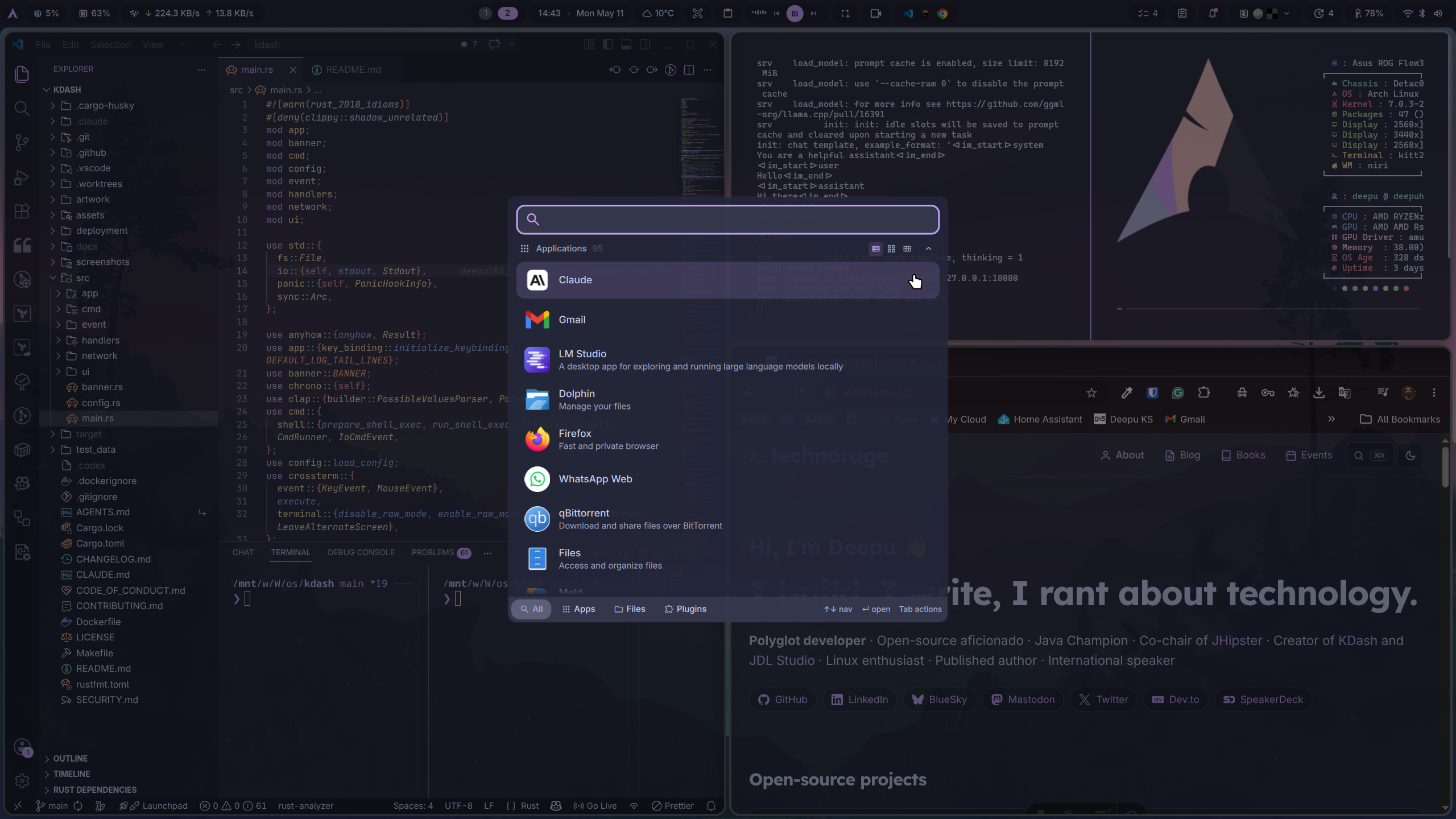
**Shell**: I use [Zsh](https://www.zsh.org/) with [zinit](https://github.com/zdharma-continuum/zinit), [Powerlevel10k](https://github.com/romkatv/powerlevel10k), [zoxide](https://github.com/ajeetdsouza/zoxide), and [fzf](https://github.com/junegunn/fzf). I still use a bunch of aliases for Git, Docker, package management, Jekyll, and local AI tools.
**Terminal**: I use [Kitty](https://sw.kovidgoyal.net/kitty/). I have tabs, splits, clipboard bindings, quick access terminal, and a few custom keybindings. It is fast, it works well on Wayland, and it does not get in my way.
**Editors**: I use [Neovim](https://neovim.io/) with [LazyVim](https://www.lazyvim.org/) as my default editor. I still use [Visual Studio Code](https://code.visualstudio.com/) depending on the project and what I am testing.
**Toolchains**: I use [SDKMAN!](https://sdkman.io/) for JDKs, [NVM](https://github.com/nvm-sh/nvm) for Node.js, [rustup](https://rustup.rs/) for Rust, [Bun](https://bun.sh/), Go, Python, Deno, and the usual Linux build tools.
**DevOps**: Docker, Docker Compose, kubectl, kdash, Terraform, Distrobox, and so on. Some come from pacman or AUR, some from Homebrew, and some from language-specific installers.
## Offline AI-assisted development
Now to the fun part.
I use cloud AI tools as well, and they are useful. But I also wanted a setup where I can code with an AI assistant without sending code, prompts, logs, or half-written ideas to a remote API. Not because every project is secret, but because local-first tooling is a good capability to have especially in a world that's heading towards techno oligarchy.
My current stack is:
- [OpenCode](https://opencode.ai/) as the coding agent
- A custom [llama.cpp](https://github.com/ggml-org/llama.cpp) build with HIP support. This is much more performant than Ollama or LM Studio.
- A local `llama-server` exposing an OpenAI-compatible API on `127.0.0.1:18080/v1`
- Qwen3.6 27B and Gemma 4 31B for local models, depending on the task. I use different quantization levels based on need, from 4-bit to 8-bit.
- [LM Studio](https://lmstudio.ai/) for managing models and for offline chat.
- ROCm/HIP acceleration on the Radeon 8060S
- [opencode-telegram-bot](https://github.com/grinev/opencode-telegram-bot) for managing OpenCode sessions remotely from Telegram
Here is my OpenCode provider config:
```json
{
"$schema": "https://opencode.ai/config.json",
"provider": {
"llama.cpp": {
"npm": "@ai-sdk/openai-compatible",
"name": "llama.cpp ROCm (local)",
"options": {
"baseURL": "http://127.0.0.1:18080/v1"
},
"models": {
"qwen3-6-27b-q8-0": {
"name": "Qwen3.6 27B Q8_0 (local ROCm)",
"limit": {
"context": 262144,
"output": 16384
}
},
"qwen3-6-27b-q6-k": ...,
"qwen3-6-27b-q4-k-m": ...,
"gemma-4-31b-it-q4-k-m": ...,
"gemma-4-31b-it-q8-0": ...
}
},
"openrouter": {
"models": {
"moonshotai/kimi-k2.6": {
"name": "Kimi K2.6 (OpenRouter backup)",
"limit": {
"context": 262144,
"output": 16384
}
},
"deepseek/deepseek-v4-pro": {
"name": "DeepSeek V4 Pro (OpenRouter backup)",
"limit": {
"context": 1048576,
"output": 384000
}
}
}
}
}
}
```
I start the local model server with an alias.
```bash
llamaServer
```
That points to a small script. It lets me pick a GGUF model, context size, and reasoning mode. It remembers the last choice, so most of the time I just start it and get going.
The default model and context right now are:
```text
Qwen3.6-27B-Q8_0.gguf - 256k context
```
Here is a quick `llama-bench` comparison of the local models on my machine. The numbers are tokens per second with ROCm, full GPU offload, flash attention, f16 KV cache, a 4096-token prompt, a 256-token generation, and 3 repetitions.
| Model | Quantization | Size | Prompt tokens/s | Generation tokens/s |
| -------------- | -----------: | --------: | --------------: | ------------------: |
| Qwen3.6 27B | Q4_K_M | 15.40 GiB | 260.06 | 10.41 |
| Qwen3.6 27B | Q6_K | 20.56 GiB | 279.37 | 8.70 |
| Qwen3.6 27B | Q8_0 | 26.62 GiB | 260.12 | 7.18 |
| Gemma 4 31B IT | Q4_K_M | 17.39 GiB | 209.57 | 9.12 |
| Gemma 4 31B IT | Q8_0 | 30.38 GiB | 202.31 | 6.19 |
The full context is 256k tokens. Here is a benchmark with full context for the Qwen variants.
| Model | Quantization | Size | Prompt+Generation tokens/s |
| ----------- | -----------: | --------: | -------------------------: |
| Qwen3.6 27B | Q4_K_M | 15.40 GiB | 67.15 |
| Qwen3.6 27B | Q6_K | 20.56 GiB | 65.77 |
| Qwen3.6 27B | Q8_0 | 26.62 GiB | 64.34 |
Running Qwen3.6 27B Q8_0 with 256k context in reasoning mode loads around 70% of the GPU memory in my setup and gives around 64 tokens/s for prompt+generation. That is quite good for a local model with that much context.
The llama.cpp build is also automated with a small script.
```bash
cmake -S /mnt/work/Workspace/llms/llama.cpp \
-B /mnt/work/Workspace/llms/llama.cpp/build-hip \
-G Ninja \
-DGGML_HIP=ON \
-DAMDGPU_TARGETS=gfx1151 \
-DCMAKE_BUILD_TYPE=Release
cmake --build /mnt/work/Workspace/llms/llama.cpp/build-hip \
--config Release \
-j "$(nproc)" \
--target llama-server llama-bench
```
The server runs like this under the hood.
```bash
ROCBLAS_USE_HIPBLASLT=1 llama-server \
--model "$model" \
--alias "$alias_name" \
--host 127.0.0.1 \
--port 18080 \
--ctx-size "$ctx" \
--n-gpu-layers 999 \
--flash-attn on \
--no-mmap \
--cache-type-k f16 \
--cache-type-v f16 \
--batch-size 4096 \
--ubatch-size 512 \
--reasoning "$reasoning"
```
Once the server is running, OpenCode talks to it like it would talk to any OpenAI-compatible provider. The difference is that the whole loop stays on my machine.
It's very elegant IMO!
I do not only use local models, though. For complex tasks, I also use frontier models through [OpenRouter](https://openrouter.ai/), mostly [Kimi K2.6](https://openrouter.ai/moonshotai/kimi-k2.6) and [DeepSeek V4](https://openrouter.ai/deepseek/deepseek-v4). Occasionally I use Copilot CLI and at work, I use Claude Code as well.
For the harness, I prefer OpenCode. I do not see any noticeable performance difference between Claude Code and OpenCode with Kimi or DeepSeek for the kind of coding tasks I do, which is mostly open source projects in Rust and TypeScript. That might vary for other people, of course, but for me OpenCode has been quite good and I especially prefer its UX over others. I'm trying [Pi](https://github.com/earendil-works/pi) on the side as well to see if I keep it in the mix.
## Why local AI coding matters to me
Local AI is not a replacement for everything. The best hosted models are still better for many tasks, especially when you need maximum reasoning quality or very fast responses. But local models have their own sweet spot.
For me, the advantages are clear.
- **Education/Fun**: Running a local model is a great way to learn about how these models work, what kind of hardware they need, and how to optimize them. It is a fun hobby in itself. This has already paid off in terms of understanding the AI landscape better and being able to troubleshoot issues that come up in my work.
- **Privacy**: I can use it on private code, half-baked ideas, local logs, and experiments without thinking about what leaves the machine.
- **Offline use**: It works without internet. That is great while travelling or when the network is flaky.
- **Cost control**: No token anxiety for long coding sessions and experiments. I can run it as long as I want without worrying about bills.
- **Hackability**: I can change model, context, cache type, build flags, server parameters, and client config whenever I want.
But there are tradeoffs.
- The model quality depends heavily on the model and quantization. Qwen3.6 27B, for example, has been good in most tasks I threw at it so far, but once context keeps growing the model compacts and starts hallucinating. So for long context tasks, I use Kimi or DeepSeek. I did some non-scientific benchmarks by giving Claude Opus 4.7, Qwen3.6 27B, and Kimi K2.6 the same set of prompts, and the difference in quality was noticeable but not too dramatic. The local model at times even did better than others, like catching stuff in review that Claude Opus missed.
- Large context is useful, but it is not free since it affects tokens/second. Qwen3.6 27B at 256k context is noticeably slow compared to a hosted frontier model. Like maybe twice or three times slower.
- ROCm on fresh AMD hardware can be a bit of a moving target but thanks to current models, a fix for any issue has been a prompt away.
- Some agent workflows are slower locally than with hosted models.
- You have to care about model storage, updates, server flags, GPU memory, and cooling.
So no, I do not think everyone should run a local coding model. But if you enjoy owning your stack and you have the hardware for it, it is a very satisfying setup.
## The AI workflow
My usual workflow is quite simple.
1. Start the local model server with `llamaServer`.
2. Pick the model and context preset if I want to change it.
3. Start `opencode` in the repository and pick a model if I want to change it.
4. Ask it to inspect the codebase before making changes.
5. Let it edit, test, and iterate, while I review the changes using the [opencode-telegram-bot](https://github.com/grinev/opencode-telegram-bot) remotely from Telegram.
For small tasks, I turn reasoning off because it makes tool-heavy work faster. For design questions, debugging, or code review, I turn reasoning on. The script makes that a prompt instead of forcing me to remember a long command.
This is the kind of boring automation I like. It removes friction without hiding what is actually happening.
## Productivity and media tools
Most of my productivity stack did not change much.
**Browser**: Google Chrome is still my primary browser. I also keep Firefox around.
**Password management**: I use Bitwarden and a YubiKey.
**Communication**: Zoom, Signal, Telegram, and the usual suspects.
**Screen capture**: DMS screenshot plugin, screen recorder plugin, and OBS Studio when I need more control.
**Images and video**: Gimp, Inkscape, Kdenlive, and a few Flatpak utilities like Upscayl and Buzz.
**File manager**: Dolphin, because KDE apps are still excellent even when KDE is not my main desktop.
## What is still not perfect
Of course, not everything is perfect. This is bleeding-edge Linux, on a new ASUS convertible, with a new AMD chip, a Wayland compositor, and a local AI stack. If everything worked perfectly on day one, I would be suspicious.
Some current rough edges are below.
- Suspend and wake-up glitches at times when I have my dock connected. Usually, the monitors refuse to wake up and I have to reboot or rescan Thunderbolt devices. I have a workaround for this, but it is still a bit annoying.
- Hibernate is not practical because of the large memory.
- Screen recording with OBS can be a bit tricky to set up and get right on Wayland, especially with niri. The built-in DMS screen recorder is good for quick captures but not for longer sessions or when I need more control. I'm still tweaking my OBS setup for this.
- The Flow Z13 has a cool transparent window on the back with RGB lights. It doesn't work under Linux. I'm planning to try and fix that with Qwen3.6 27B and OpenCode. It would be a complex hardware project that could test the model's ability.
- ROCm/HIP support on new integrated GPUs needs patience. I haven't had any issues lately, so maybe it has stabilized.
None of these are deal breakers for me. Most are either already fixed in my private config or on my TODO list.
## Conclusion
This is easily the most interesting Linux machine I have used so far. My 2019 setup was beautiful, my 2021 setup was sleek, and this one feels like a proper local-first AI development workstation.
Vanilla Arch gives me the latest bits. Niri gives me a workflow that fits both the tiny built-in screen and my ultrawide monitor. DMS gives me the desktop polish without a full desktop environment. And OpenCode plus llama.cpp gives me an AI coding assistant that can run without the cloud.
It is not the right setup for everyone. If you want a machine that never asks you to think about kernels, ROCm, compositor configs, or model files, this is probably not it. But for me, this is exactly the kind of developer machine that sparks joy.
The right tool for the right job.
If you like this article, please leave a like or a comment.
You can follow me on [Bluesky](https://bsky.app/profile/deepu105.bsky.social) and [LinkedIn](https://www.linkedin.com/in/deepu05/).
Comments
More Blog
View allkubernetesMinimalist EKS: The Easy Way
Amazon EKS manages the Kubernetes control plane, but you remain responsible for provisioning the...
J
Joaquin MenchacaaiNever forget to enter the Stern Grove lottery again!
Browser automation with Playwright, Python, GitHub Actions, and Entire to auto-enter San Francisco Stern Grove concert lotteries each week!
L
Lizzie SiegletypescriptA Free Screenshot Editor That Never Uploads Your Image
A free screenshot and image editor that runs entirely in your browser. Keeping every edit reversible and handling big phone photos, in plain TypeScript and Canvas2D.
M
Martin StarkshowdevI built a CLI to break my highlights out of Apple Books
A macOS CLI + MCP server that exports Apple Books highlights to Markdown and gives AI assistants direct access to your reading notes.
A
Andrey KorchakaiA Developer's Guide to Agent Hooks in Antigravity CLI
Motivation To be quite honest, "Hooks"—the shell commands we trigger at specific points...
T
TanaikeagentsTactical vs. Strategic Agentic AI Development — A Playbook for Developers
The Strategic Engineer: Why Writing Code Is No Longer Your Most Valuable Skill ...
A
Adewumi Saheed Adewale