
Back to Blog android
 kubernetes
 ai
ai typescript
 showdev
 ai
ai agents
Building a custom launcher for ChromeOS
Thomas Künneth May 14, 2026
0 views
In this article, I will share some of my experience of enhancing Be nice to be a launcher on...
In this article, I will share some of my experience of enhancing [Be nice](https://codeberg.org/tkuenneth/benice) to be a launcher on ChromeOS. Now, why would I want to do that anyway? I use my ChromeOS detachable more like an Android tablet than a traditional laptop; therefore, I find myself deeply missing the Android goodness that Google's desktop OS tends to strip away. Chief among these missing features is support for app widgets. *Be nice* has app widget support, so it would be great to run my app on ChromeOS. On a standard Android phone or tablet you can simply swap the home app in settings.
```kotlin
fun changeDefaultHomeApp() {
val intent = Intent(Settings.ACTION_HOME_SETTINGS).apply {
addFlags(Intent.FLAG_ACTIVITY_NEW_TASK)
}
if (context.packageManager.resolveActivity(
intent,
PackageManager.MATCH_DEFAULT_ONLY
) != null
) {
context.startActivity(intent)
}
}
```
Unfortunately, ChromeOS forces you to use its native environment.
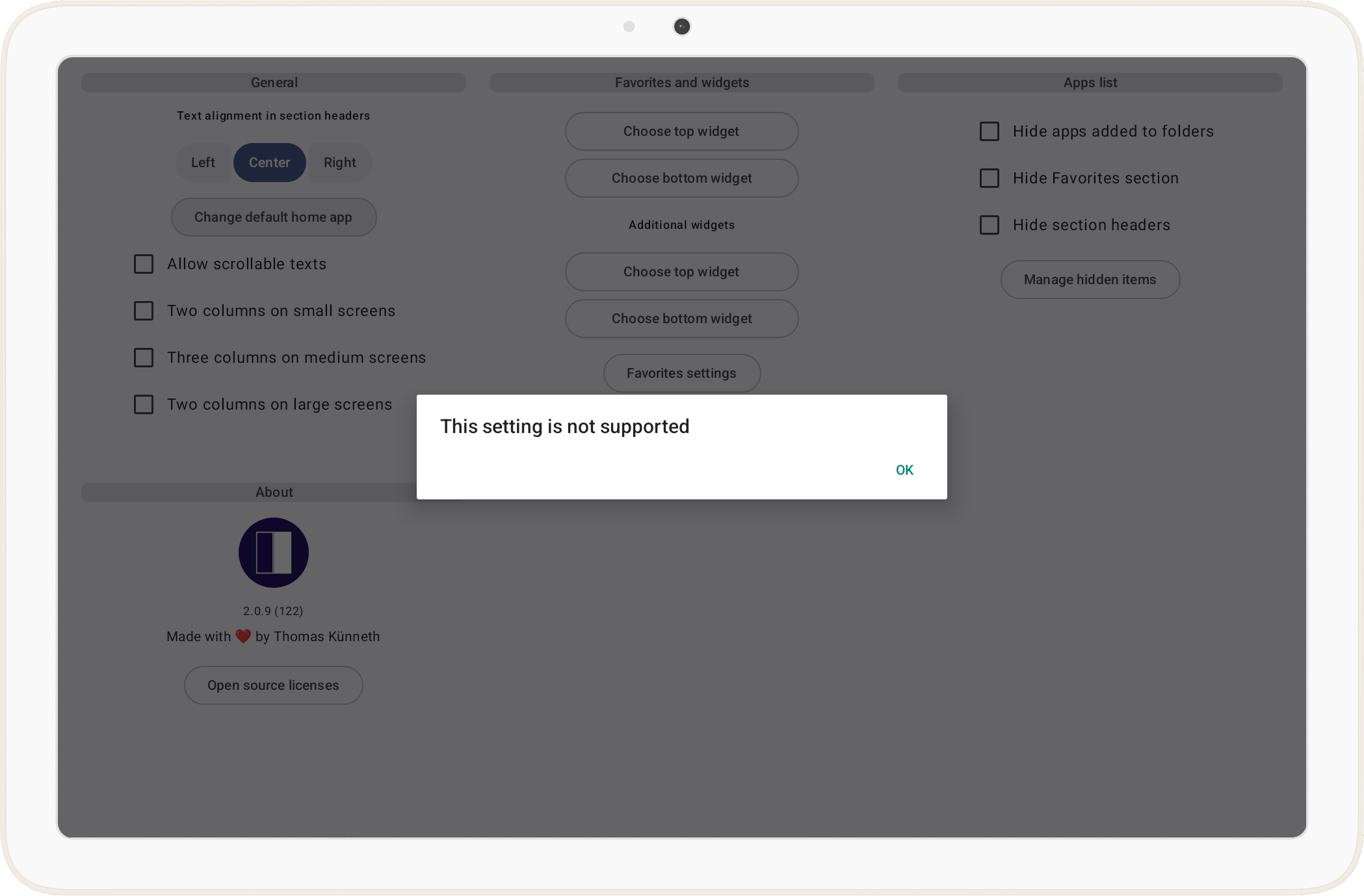
Consequently, the launcher will be treated just like any other Android app. What does this imply? While we can easily launch other apps, core launcher features like returning to the home screen via the system gesture or home button, acting as the dedicated home activity that fills the display with the normal Android home wallpaper visible behind transparent UI, and integration with the system-level overview or task switcher are not available. Instead, the launcher stays contained within its own window, meaning a swipe up or a press of the *Everything Button* will still take you back to the native ChromeOS shelf rather than your custom interface.
And there is another nasty issue. Before *Be nice* became a genuine launcher, its main goal was to run two apps side by side, utilizing the split-screen capabilities that are present in Android since 7.0 (Nougat). On ChromeOS, this behavior is consistently buggy. Specifically, when the launcher attempts to start another activity in the adjacent window for a side-by-side view, the originating app (*Be nice* itself) fails to redraw correctly and simply becomes a black, unresponsive rectangle. I have created an [issue tracker item](https://issuetracker.google.com/issues/332903525) for this, as the black screen glitch makes automated multitasking nearly impossible on ChromeOS. The issue is, at the time of writing this article, marked as *Assigned*, though there has been no significant movement toward a fix. It is disheartening to see such a fundamental multitasking feature remain broken while Google continues to market these devices as serious productivity tools.
Let's return to *Be nice*. When the app is the default launcher, tapping an item in its *Apps list* launches the desired app just like any launcher would; however, when *Be nice* is not the default home app, it intentionally opens the tapped app in split-screen. While the *default home app* behavior is what we want on ChromeOS, on that platform we just can't become the launcher. To cater for this, I changed *Be nice* to do this:
```kotlin
private fun detectIsHomeApp(): Boolean {
if (isRunningOnChromeOs()) {
return true
}
if (Build.VERSION.SDK_INT >= Build.VERSION_CODES.Q) {
val roleManager =
context.getSystemService(RoleManager::class.java)
return roleManager?.isRoleHeld(RoleManager.ROLE_HOME) == true
} else {
val intent = Intent(Intent.ACTION_MAIN).apply {
addCategory(Intent.CATEGORY_HOME)
}
val resolveInfo =
context.packageManager.resolveActivity(
intent,
PackageManager.MATCH_DEFAULT_ONLY
)
return resolveInfo?.activityInfo?.packageName == context.packageName
}
}
```
But what does `isRunningOnChromeOs()` do?
```kotlin
fun isRunningOnChromeOs(): Boolean {
val pm = context.packageManager
return pm.hasSystemFeature(SYSTEM_FEATURE_TYPE_CHROMEBOOK) ||
pm.hasSystemFeature(SYSTEM_FEATURE_ARC) ||
pm.hasSystemFeature(SYSTEM_FEATURE_ARC_DEVICE_MANAGEMENT)
}
```
Because ChromeOS will not let *Be nice* hold the real home role, `RoleManager` would always report that we are not the default launcher. The early `return true` in `detectIsHomeApp()` is therefore a deliberate in‑app policy switch: on ChromeOS we pretend we are the home app so the rest of the codebase can follow the same paths it uses when *Be nice* truly is the launcher on phones and tablets, without claiming any privilege the OS refuses to grant.
`isRunningOnChromeOs()` exists because a single `PackageManager` feature is not reliable across ARC/ARCVM builds: `android.hardware.type.chromebook` was absent on my device, so relying on it alone left detection false and the old UX in place. `org.chromium.arc` (and the related `org.chromium.arc.device_management` flag) matches what Android’s own docs and compatibility tooling use for the ChromeOS Android runtime; we still OR in the chromebook feature string when the system exposes it. Together, that trio is a pragmatic runtime probe; not a perfect definition of *ChromeOS everywhere*, but a stable way to branch behavior where the platform already diverges from stock Android.
### About wallpapers
On phones and tablets, *Be nice* is written like a classic launcher: the app theme turns on `android:windowShowWallpaper` and uses a transparent window background, and the main shell keeps the Material `Scaffold` surface transparent so the Android home wallpaper can show through wherever the UI does not paint an opaque layer. I do not sample the wallpaper with `WallpaperManager` and draw it myself; instead, I rely on the system to composite the wallpaper behind the window, which is simple and matches how many launchers behave.
```xml
<style name="Theme.BeNice" parent="Theme.AppCompat.DayNight.NoActionBar">
<item name="android:windowShowWallpaper">true</item>
<item name="android:windowBackground">@android:color/transparent</item>
</style>
```
The Compose tree leans into that model as well. For example, when *Be nice* believes it is acting as the default home app and the pager actually has transitions between widget-style home pages and other pages, the horizontal pager applies a fade on those transitions so the swipe does not feel like hard cuts over a solid sheet; visually that only works if there is something worth looking at behind the transparent regions.
```kotlin
val wallpaperFadeEdgeIndices = remember(pages) {
computeWallpaperFadeEdgeIndices(pages)
}
val useHomeWallpaperPagerFade = state.isHomeApp && wallpaperFadeEdgeIndices.isNotEmpty()
```
ChromeOS breaks the mental model. The wallpaper you care about on a Chromebook is usually the ChromeOS desktop behind all windows, while *Be nice* runs inside the Android (ARC) window. `windowShowWallpaper` still asks the Android side to show its wallpaper layer, but that layer is often weak, empty, or simply not the same thing as the ChromeOS background you identify as *my wallpaper*. Transparent UI that looks intentional on a Pixel can read as muddy, flat, or accidental in a resizable Android window.
```kotlin
Scaffold(
containerColor = if (defaultAppsManager.isRunningOnChromeOs()) {
MaterialTheme.colorScheme.background
} else {
ComposeColor.Transparent
},
// ...
```
Even after switching the main `Scaffold` to an opaque background on ChromeOS, the pager’s cross-fade still runs only when the app considers itself the home app and the page list includes at least one transition between a widget-style home page and a non-widget page (the same situation `useHomeWallpaperPagerFade` encodes), so the animation eases between pages over the opaque shell, not over the live wallpaper, without pretending ARC gives you a phone-quality backdrop.
So the pragmatic fix is boring but honest: on ChromeOS, stop pretending the ARC wallpaper layer is a beautiful backdrop. In the main activity I branch `Scaffold`’s `containerColor`: opaque theme background on ChromeOS, transparent on everything else. That trades the phone-launcher aesthetic on ChromeOS for a predictable in-window surface, which matches how the platform actually presents Android apps.
### Wrap-up
A pragmatic fix is also a boring one: a solid theme background is honest about ARC, but it is not necessarily nice. In a follow-up, I may explore what it would take to get an actually pleasant backdrop on ChromeOS, without lying to myself that `windowShowWallpaper` is doing the same job it does on a phone, whether that means sampling and drawing wallpaper myself, using a curated gradient or image asset, or finding a host-supported way to align with ChromeOS personalization. If you have solved this cleanly in a launcher-style app on ARC, I would love pointers.
Beyond wallpaper, the other open question is how to replace the system gestures you do not get on ChromeOS (home, recents, and that *snap back to launcher* feeling), without fighting the shell. I have started experimenting with notifications as a lightweight, always-reachable affordance: not as a fake home button, but as a predictable escape hatch back into *Be nice* when the OS route is wrong for how I actually use the device. I do not have a polished pattern yet. If you have tried notification-driven navigation (or a better substitute) for ARC-hosted *almost launchers*, kindly share what worked in the comments.
Comments
More Blog
View allkubernetesMinimalist EKS: The Easy Way
Amazon EKS manages the Kubernetes control plane, but you remain responsible for provisioning the...
J
Joaquin MenchacaaiNever forget to enter the Stern Grove lottery again!
Browser automation with Playwright, Python, GitHub Actions, and Entire to auto-enter San Francisco Stern Grove concert lotteries each week!
L
Lizzie SiegletypescriptA Free Screenshot Editor That Never Uploads Your Image
A free screenshot and image editor that runs entirely in your browser. Keeping every edit reversible and handling big phone photos, in plain TypeScript and Canvas2D.
M
Martin StarkshowdevI built a CLI to break my highlights out of Apple Books
A macOS CLI + MCP server that exports Apple Books highlights to Markdown and gives AI assistants direct access to your reading notes.
A
Andrey KorchakaiA Developer's Guide to Agent Hooks in Antigravity CLI
Motivation To be quite honest, "Hooks"—the shell commands we trigger at specific points...
T
TanaikeagentsTactical vs. Strategic Agentic AI Development — A Playbook for Developers
The Strategic Engineer: Why Writing Code Is No Longer Your Most Valuable Skill ...
A
Adewumi Saheed Adewale