
Back to Blog mcpserver
 kubernetes
 ai
ai typescript
 showdev
 ai
ai agents
Deploying a Rust MCP Server to Azure ACI
xbill May 15, 2026
0 views
The rmcp crate and standard Rust libraries are used to build a basic MCP Server in Rust. This MCP...
---
title: Deploying a Rust MCP Server to Azure ACI
published: true
series: Azure-Rust
date: 2026-05-15 13:02:34 UTC
tags: mcpserver,geminicli,iac,azure
canonical_url: https://xbill999.medium.com/deploying-a-rust-mcp-server-to-azure-aci-a2a81ee62455
---
The rmcp crate and standard Rust libraries are used to build a basic MCP Server in Rust. This MCP Server is then built and deployed to Azure ACI and validated locally with Gemini CLI.

#### Yet another MCP Demo?
All Hail Ferris- Lord Master of MCP!
#### Why not just use Python?
Python has traditionally been the main coding language for ML and AI tools. One of the strengths of the MCP protocol is that the actual implementation details are independent of the development language. The reality is that not every project is coded in Python- and MCP allows you to use the latest AI appt roaches with other coding languages.
#### What is this Tutorial Trying to Do?
Building on previous tutorials, the goal is to extend a Rust MCP server with basic support for deployment to Azure.
#### What is Rust?
Rust is a high performance, memory safe, compiled language:
[Rust](https://www.rust-lang.org/)
Rust provides memory safe operations beyond C/C++ and also can provide exceptional performance gains as it is compiled directly to native binaries.
#### So Why Am I reading this?
So what is different about this lab compared to all the others out there?
This is one of the first deep dives into deploying a Rust based MCP server hosted on Azure. The Azure ACI service was targeted for compatibility with Docker Images.
#### Rust Setup
Instructions to install Rust are available here:
[Getting started](https://www.rust-lang.org/learn/get-started)
For a Linux like environment the command looks like this:
```shell
curl — proto ‘=https’ — tlsv1.2 -sSf https://sh.rustup.rs | sh
```
Rust also depends on a working C compiler and OpenSSL setup. For a Debian 12 system — install the basic tools for development:
```shell
sudo apt install build-essential
sudo apt install libssl-dev
sudo apt install pkg-config
sudo apt-get install libudev-dev
sudo apt install make
sudo apt install git
```
#### Gemini CLI
If not pre-installed you can download the Gemini CLI to interact with the source files and provide real-time assistance:
```shell
npm install -g @google/gemini-cli
```
#### Testing the Gemini CLI Environment
Once you have all the tools and the correct Node.js version in place- you can test the startup of Gemini CLI. You will need to authenticate with a Key or your Google Account:
```plaintext
▝▜▄ Gemini CLI v0.33.1
▝▜▄
▗▟▀ Logged in with Google /auth
▝▀ Gemini Code Assist Standard /upgrade no sandbox (see /docs) /model Auto (Gemini 3) | 239.8 MB
```
#### Azure Container Instances
[Azure Container Instances](https://www.google.com/search?q=Azure+Container+Instances&sca_esv=9e0af5be28576de2&rlz=1CAIWTJ_enUS1110&sxsrf=ANbL-n7o0MyASoiBM0kA0-E5qMMzLudrbw%3A1775144526115&ei=To7OadXFBoOYptQP9JuB0A8&biw=1396&bih=632&ved=2ahUKEwiIvt3awM-TAxUolYkEHTTxLJIQgK4QegYIAQgAEAM&uact=5&oq=azure+aci&gs_lp=Egxnd3Mtd2l6LXNlcnAiCWF6dXJlIGFjaTIKECMYgAQYJxiKBTILEAAYgAQYkQIYigUyBRAAGIAEMgcQABiABBgKMgUQABiABDIFEAAYgAQyBRAAGIAEMgYQABgWGB4yBhAAGBYYHjIGEAAYFhgeSOwPUABY2gxwAHgBkAEAmAGVAaABqQmqAQMwLjm4AQPIAQD4AQGYAgmgAvYJwgIKEAAYgAQYQxiKBcICDhAAGIAEGLEDGIMBGIoFwgIREC4YgAQYsQMY0QMYgwEYxwHCAhAQABiABBixAxhDGIMBGIoFwgILEC4YgAQYxwEYrwHCAg0QABiABBixAxhDGIoFwgIIEAAYgAQYsQPCAgsQABiABBixAxiDAZgDAJIHAzAuOaAHsFWyBwMwLjm4B_YJwgcFMi04LjHIBzuACAA&sclient=gws-wiz-serp) (ACI) is a serverless, managed service that allows you to run Docker containers in the cloud without managing virtual machines. It is ideal for rapid deployment, bursting, and simple, isolated applications, offering per-second billing and quick startup times. ACI supports Linux and Windows containers, with options for volume mounting and GPU resources.
More details are available here:
[https://azure.microsoft.com/en-us/products/container-instances](https://azure.microsoft.com/en-us/products/container-instances)
#### Why would I want Gemini CLI with Azure? Isn’t that a Google Thing?
Yes- Gemini CLI leverages the Google Cloud console and Gemini models but it is also open source and platform agnostic. Many applications are already cross-cloud so this enables familiar tools to be run natively on Microsoft Azure.
#### Azure CLI
The Azure Command-Line Interface (CLI) is a cross-platform tool used to connect to Azure and execute administrative commands on your cloud resources. [[1](https://learn.microsoft.com/en-us/cli/azure/what-is-azure-cli?view=azure-cli-latest), [2](https://www.codemag.com/Article/2001021/Azure-CLI)]
It allows you to manage services like virtual machines, storage accounts, and networks through a terminal using either interactive prompts or automated scripts.
More information is here:
[What is the Azure CLI?](https://learn.microsoft.com/en-us/cli/azure/what-is-azure-cli?view=azure-cli-latest)
#### Setup the Basic Environment
At this point you should have a working Rust environment and a working Gemini CLI installation. All of the relevant code examples and documentation is available in GitHub.
The next step is to clone the GitHub repository to your local environment:
```shell
cd ~
git clone https://github.com/xbill9/gemini-cli-azure
```
Then run **init.sh** from the cloned directory.
The script will attempt to determine your shell environment and set the correct variables:
```shell
source init.sh
```
If your session times out or you need to re-authenticate- you can run the **set\_env.sh** script to reset your environment variables:
```shell
source set_env.sh
```
Variables like PROJECT\_ID need to be setup for use in the various build scripts- so the **set\_env** script can be used to reset the environment if you time-out.
Refresh the Azure credentials:
```console
xbill@penguin:~/gemini-cli-azure/mcp-aci-rust-azure$ az login
```
Finally install the packages and dependencies:
```shell
cd ~/gemini-cli-azure/mcp-aci-rust-azure
```
#### Build The Rust MCP Server
Some background information on building and configuring a Rust MCP server is here:
[Building a Secure HTTP Transport MCP Server with Rust, and Gemini CLI](https://xbill999.medium.com/building-a-secure-http-transport-mcp-server-with-rust-and-gemini-cli-b4e807e7aa1d)
The mcp-aci-rust-azure subdirectory has the complete Rust MCP server in one subdirectory.
#### Minimal System Information Tool Build
The first step is to build the basic tool directly with Rust. This allows the tool to be debugged and tested locally before adding the MCP layer.
First build the tool locally:
```console
xbill@penguin:~/gemini-cli-azure/mcp-aci-rust-azure$ make
Building the Rust project...
Compiling mcp-aci-rust-azure v1.0.0 (/home/xbill/gemini-cli-azure/mcp-aci-rust-azure)
Finished `dev` profile [unoptimized + debuginfo] target(s) in 8.58s
xbill@penguin:~/gemini-cli-azure/mcp-aci-rust-azure$
```
then lint check the code:
```console
xbill@penguin:~/gemini-cli-azure/mcp-aci-rust-azure$ make lint
Linting code...
Checking mcp-aci-rust-azure v1.0.0 (/home/xbill/gemini-cli-azure/mcp-aci-rust-azure)
Finished `dev` profile [unoptimized + debuginfo] target(s) in 1.89s
xbill@penguin:~/gemini-cli-azure/mcp-aci-rust-azure$
```
and run local tests:
```console
xbill@penguin:~/gemini-cli-azure/mcp-aci-rust-azure$ make test
Running tests...
Finished `test` profile [unoptimized + debuginfo] target(s) in 0.12s
Running unittests src/main.rs (target/debug/deps/mcp_aci_rust_azure-093b4404046a4149)
running 1 test
test tests::test_greeting ... ok
test result: ok. 1 passed; 0 failed; 0 ignored; 0 measured; 0 filtered out; finished in 0.00s
xbill@penguin:~/gemini-cli-azure/mcp-aci-rust-azure$
```
The last step is to build the production version:
```console
xbill@penguin:~/gemini-cli-azure/mcp-aci-rust-azure$ make release
Building Release...
Finished `release` profile [optimized] target(s) in 0.36s
xbill@penguin:~/gemini-cli-azure/mcp-aci-rust-azure$
```
The MCP server can be started locally:
```shell
make start
```
The MCP tool can then be tested locally:
```plaintext
🟢 local-rust - Ready (1 tool)
Tools:
- mcp_local-rust_greeting
> mcp_local-rust_greeting hello local
Executing Greeting Tool: Executing the greeting tool on the local Rust MCP server.
╭────────────────────────────────────────────────────────────────────────────────────────────────────────────────────────────────────────────╮
│ ✓ greeting (local-rust MCP Server) {"message":"hello local"} │
│ │
│ Hello World MCP! hello local │
╰────────────────────────────────────────────────────────────────────────────────────────────────────────────────────────────────────────────╯
Greeting Completed: Greeting successful. Standing by for next instruction.
✦ Hello World MCP! hello local
```
#### Deploy To ACI
A basic Dockerfile is used to build an image for deployment:
```console
xbill@penguin:~/gemini-cli-azure/mcp-aci-rust-azure$ make deploy
Building the Docker image...
[+] Building 2.2s (14/14) FINISHED docker:default
=> [internal] load build definition from Dockerfile 0.0s
=> => transferring dockerfile: 763B 0.0s 0.0s
```
Get the deployment status:
```console
xbill@penguin:~/gemini-cli-azure/mcp-aci-rust-azure$ make status
mcp-aci-rust-azure PID file exists but process is not running.
Checking Azure Container Instance status for mcp-container-penguin...
Name State FQDN IP
--------------------- ------- ----------------------------------------------- -------------
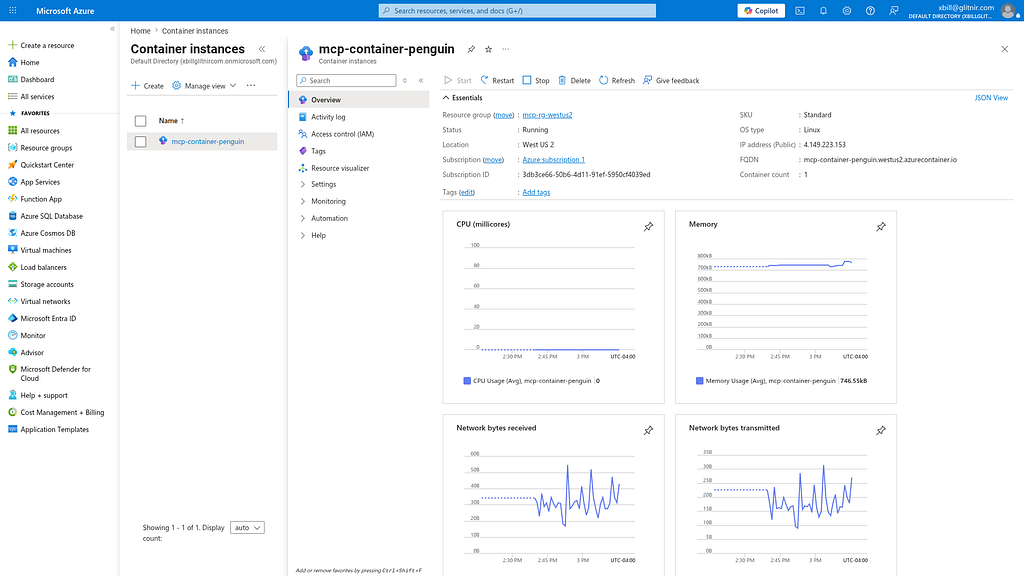
mcp-container-penguin Running mcp-container-penguin.westus2.azurecontainer.io 4.149.223.153
xbill@penguin:~/gemini-cli-azure/mcp-aci-rust-azure$
```
Get the Endpoint:
```console
xbill@penguin:~/gemini-cli-azure/mcp-aci-rust-azure$ make endpoint
mcp-container-penguin.westus2.azurecontainer.io
```
Check Gemini MCP settings:
```json
{
"mcpServers": {
"mcp-aci-rust-azure": {
"httpUrl": "http://mcp-container-penguin.westus2.azurecontainer.io:8080/mcp"
},
"local-rust": {
"httpUrl": "http://127.0.0.1:8080/mcp"
}
}
}
```
The service will be visible on the Azure console:
#### Final Test
Start up Gemini CLI and check the MCP server status:
```plaintext
🟢 mcp-aci-rust-azure - Ready (2 tools)
Tools:
- mcp_mcp-aci-rust-azure_greeting
> mcp_mcp-aci-rust-azure_greeting hello aci!
╭────────────────────────────────────────────────────────────────────────────────────────────────────────────────────────────────────────────╮
│ ✓ greeting (mcp-aci-rust-azure MCP Server) {"message":"hello aci!"} │
│ │
│ Hello World MCP! hello aci! │
╰────────────────────────────────────────────────────────────────────────────────────────────────────────────────────────────────────────────╯
✦ Hello World MCP! hello aci!
```
#### Summary
A complete HTTP transport MCP server was built using Rust. This application was tested locally with Gemini CLI. Then, the entire solution was deployed to Azure ACI. The remote MCP server was validated with Gemini CLI locally.
Comments
More Blog
View allkubernetesMinimalist EKS: The Easy Way
Amazon EKS manages the Kubernetes control plane, but you remain responsible for provisioning the...
J
Joaquin MenchacaaiNever forget to enter the Stern Grove lottery again!
Browser automation with Playwright, Python, GitHub Actions, and Entire to auto-enter San Francisco Stern Grove concert lotteries each week!
L
Lizzie SiegletypescriptA Free Screenshot Editor That Never Uploads Your Image
A free screenshot and image editor that runs entirely in your browser. Keeping every edit reversible and handling big phone photos, in plain TypeScript and Canvas2D.
M
Martin StarkshowdevI built a CLI to break my highlights out of Apple Books
A macOS CLI + MCP server that exports Apple Books highlights to Markdown and gives AI assistants direct access to your reading notes.
A
Andrey KorchakaiA Developer's Guide to Agent Hooks in Antigravity CLI
Motivation To be quite honest, "Hooks"—the shell commands we trigger at specific points...
T
TanaikeagentsTactical vs. Strategic Agentic AI Development — A Playbook for Developers
The Strategic Engineer: Why Writing Code Is No Longer Your Most Valuable Skill ...
A
Adewumi Saheed Adewale