
Back to Blog cloud
cloud kubernetes
 ai
ai typescript
 showdev
 ai
ai agents
The Ultimate Cloud Run Guide 2026
Sara Ford May 21, 2026
0 views
At Cloud Next '26, my teammate Wietse and I gave a talk called the Ultimate Guide to Cloud Run. We...
At Cloud Next '26, my teammate Wietse and I gave a talk called the Ultimate Guide to Cloud Run. We wanted to provide a comprehensive walkthrough of Cloud Run to experienced developers who know how to ship software, but might be new to Cloud Run.
This post recaps the Cloud Run fundamentals we went over in our talk. Each segment below has a link to the timestamp in the talk along with examples for you to try at home.
1. [Getting started - deploy a container](#1-getting-started-deploy-a-container)
2. [Autoscaling / audience participation demo](#2-autoscaling-audience-participation-demo)
3. [How gcloud Works Under the Hood](#3-how-gcloud-works-under-the-hood)
4. [Overview of Cloud Run resources](#4-overview-of-cloud-run-resources)
5. [Reliable Rollouts and Preview Links](#5-reliable-rollouts-and-preview-links)
6. [Structured Logging](#6-structured-logging)
7. [Troubleshooting: "container failed to start on port 8080"](#7-troubleshooting-container-failed-to-start-on-port-8080)
8. [Google Cloud Developer Knowledge MCP server](#8-google-cloud-developer-knowledge-mcp-server-in-public-preview)
9. [How to avoid hard-coded API Keys](#9-how-to-avoid-hardcoded-api-keys)
10. [Ephemeral Disks](#10-ephemeral-disks)
11. [Volume mounts](#11-volume-mounts)
12. [VPC Networking](#12-vpc-networking)
13. [Two Pricing Models](#13-two-pricing-models)
14. [Scale-to-zero GPUs](#14-scaletozero-gpus)
15. [Deploying an ADK agent](#15-deploying-an-adk-agent)
Prefer to watch the full talk instead? You can [watch it here](https://youtu.be/ZEuHBOhy_uY).
---
## 1. Getting started - deploy a container
####Where to watch:
- [Demo 1 (Nginx) at 1:04](https://youtu.be/ZEuHBOhy_uY?t=64)
####Code examples:
- [deploy the hello sample container](https://docs.cloud.google.com/run/docs/quickstarts/deploy-container?utm_campaign=CDR_0x2e662603_default_b516802488&utm_medium=external&utm_source=blog#deploy-the-sample-container)
- [deploy nginx](https://codelabs.developers.google.com/next26/ultimate-cloud-run-guide?utm_campaign=CDR_0x2e662603_default_b516802488&utm_medium=external&utm_source=blog#1)
####Recap:
- [Cloud Run](https://docs.cloud.google.com/run/docs/overview/what-is-cloud-run?utm_campaign=CDR_0x2e662603_default_b516802488&utm_medium=external&utm_source=blog) is Google Cloud's serverless engine. With Cloud Run you can run any container, on demand, without any infrastructure management. No VMs or clusters to manage.
####Hello Cloud Run!
Below is the sample hello container running on Cloud Run.
{% embed https://hello-540670744329.europe-west1.run.app/ %}
Don't have a container? It's all good! You can deploy from your source code. See section 3 - [How gcloud Works Under the Hood](#3-how-gcloud-works-under-the-hood)
---
## 2. Autoscaling / audience participation demo
####Where to watch:
- [Demo 2 watch at 6:10](https://youtu.be/ZEuHBOhy_uY?t=370) Each audience member who scans the QR code gets their own container
####Discussion:
- [Discussion from talk at 28:13](https://youtu.be/ZEuHBOhy_uY?t=1693)
####Docs:
- [Instance Autoscaling](https://docs.cloud.google.com/run/docs/about-instance-autoscaling?utm_campaign=CDR_0x2e662603_default_b516802488&utm_medium=external&utm_source=blog)
####Recap:
- **Minimum Instances:** You can configure minimum instances to keep containers pre-warmed, eliminating "cold start" latency.
- **Maximum Instances:** Set a hard limit on scaling to act as a budget safeguard and protect backend databases from being overwhelmed.
---
## 3. How gcloud Works Under the Hood
####Where to watch
- [Demo 3 at 9:54](https://youtu.be/ZEuHBOhy_uY?t=593)
####Code examples:
- [Quickstart: Build and deploy a Go web app to Cloud Run](https://cloud.google.com/run/docs/quickstarts/build-and-deploy/deploy-go-service?utm_campaign=CDR_0x2e662603_default_b516802488&utm_medium=external&utm_source=blog) (or one of the other buildpack-supported languages)
- [deploy from source example from talk](https://codelabs.developers.google.com/next26/ultimate-cloud-run-guide?utm_campaign=CDR_0x2e662603_default_b516802488&utm_medium=external&utm_source=blog#2)
**Recap:** When you type the simple command `gcloud run deploy` to deploy from source, gcloud performs the following steps for you:
1. **Upload:** Your local directory is safely uploaded to a secure Google Cloud Storage (GCS) bucket.
2. **Build:** Cloud Build takes over. If you have a Dockerfile, it runs a docker build. If not, it uses open-source **Buildpacks** to automatically detect your language and compile a container image.
3. **Store:** The completed container image is pushed to **Artifact Registry**.
4. **Create:** Cloud Run spins up a new **Revision** (a read-only, immutable copy of your container and its settings).
5. **Migrate:** Once the new revision passes its **startup probe** (confirming it is healthy), Cloud Run seamlessly migrates 100% of web traffic over to it.
But what about other resources besides services...
---
## 4. Overview of Cloud Run resources
####Where to watch
- [Discussion in talk at 3:38](https://youtu.be/ZEuHBOhy_uY?t=217)
####Code examples:
- [deploy a job](https://docs.cloud.google.com/run/docs/create-jobs?utm_campaign=CDR_0x2e662603_default_b511157057&utm_medium=external&utm_source=blog#job)
- [deploy a worker pool](https://docs.cloud.google.com/run/docs/deploy-worker-pools?utm_campaign=CDR_0x2e662603_default_b511157057&utm_medium=external&utm_source=blog#worker-pool)
- [deploy a function](https://docs.cloud.google.com/run/docs/quickstarts/functions/deploy-functions-console?utm_campaign=CDR_0x2e662603_default_b511157057&utm_medium=external&utm_source=blog)
####Recap:
- **Services:**
- _Purpose:_ Best for web applications, APIs, and microservices.
- _Features:_ Automatically scales instances up or down based on incoming traffic. Includes out-of-the-box HTTPS, traffic splitting, and support for WebSockets, gRPC, and HTTP/2.
- **Jobs:**
- _Purpose:_ Best for tasks that run to completion and do not require an active web endpoint.
- _Features:_ Runs for up to 7 days. Excellent for data processing, database migrations, or night-run scripts. You can parallelize a large job into multiple concurrent tasks.
- [more Jobs codelab examples](https://codelabs.developers.google.com/?text=cloud+run+jobs&utm_campaign=CDR_0x2e662603_default_b516802488&utm_medium=external&utm_source=blog)
- **Worker Pools:**
- _Purpose:_ Best for continuous background tasks.
- _Features:_ Always-on instances that actively pull for work (e.g., listening to a message queue). Scaling is handled manually.
- [more Worker Pools codelab examples](https://codelabs.developers.google.com/?text=cloud+run+worker+pools&utm_campaign=CDR_0x2e662603_default_b516802488&utm_medium=external&utm_source=blog)
- **Functions:**
- _Purpose:_ Best for single-purpose pieces of code (e.g., responding to a file upload event).
- _Features:_ Supports popular runtimes like Python, Node.js, Go, and Java. No Dockerfile is required; Google automatically builds the container for you from source.
- [more Functions codelab examples](https://codelabs.developers.google.com/?text=cloud+run+functions&utm_campaign=CDR_0x2e662603_default_b516802488&utm_medium=external&utm_source=blog)
---
## 5. Reliable Rollouts and Preview Links
####Where to watch
- [Demo 3 con't from talk: 10:10](https://youtu.be/ZEuHBOhy_uY?t=610)
- Demo 4 from talk [part 1 at 12:48](https://youtu.be/ZEuHBOhy_uY?t=767)
- Demo 4 from talk [part 2 at 16:25](https://youtu.be/ZEuHBOhy_uY?t=985)
####Code example:
- [gradual rollouts and preview links codelab](https://codelabs.developers.google.com/next26/ultimate-cloud-run-guide?utm_campaign=CDR_0x2e662603_default_b516802488&utm_medium=external&utm_source=blog#3)
**Recap:** Cloud Run versioning relies on **immutable** revisions:
- **Zero-Downtime Updates:** The new version scales up fully _before_ traffic begins migrating over.
- **Rollbacks:** If a bug gets into production, you can rollback traffic to any healthy, previous revision.
- **Preview Links (Traffic Tags):**
- Instead of auto-deploying to the public, you can pin production traffic to your stable revision
- Apply a "traffic tag" to your latest test revision
- This generates a private preview URL (e.g., `https://latest---[your-service].run.app`) where you can test changes.
---
## 6. Structured Logging
####Where to watch
- [Discussion in talk at 14:58](https://youtu.be/ZEuHBOhy_uY?t=897)
####Recap:
- **No logging libraries required:** To log, simply write standard text directly to `stdout` or `stderr`.
- **Use Structured Logging:** Write your logs in JSON format. This allows you to easily run queries in Cloud Logging for custom fields (such as `jsonPayload.user_id = "12345"`).
---
## 7. Troubleshooting container failed to start on port 8080
####Where to watch
- [Discussion in talk: 15:28](https://youtu.be/ZEuHBOhy_uY?t=927)
####Code example:
- Deploy hello container but set port to 8081 🙂
####Recap:
- **How to troubleshoot the _"The container failed to start on port 8080"_ error:**
- This means that Cloud Run couldn't start the container. This could be for many reasons.
- First scroll up in the logs to search for startup code crashes.
- Verify your code is actually listening on the port designated by the `PORT` environment variable.
- If your app loads large machine learning models, move database connections or loading actions out of the immediate container startup scope to prevent timeouts.
---
## 8. Google Cloud Developer Knowledge MCP server (in public preview)
####Where to watch
- [Discussion at 19:58](https://youtu.be/ZEuHBOhy_uY?t=1197)
####Example:
- [Codelab for Developer Knowledge MCP server](https://codelabs.developers.google.com/next26/ultimate-cloud-run-guide?utm_campaign=CDR_0x2e662603_default_b516802488&utm_medium=external&utm_source=blog#4)
####Recap:
- Great for keeping your agent up to date past its data training date.
**Looking for other MCP use cases?**
- use the [Cloud Run MCP server](https://docs.cloud.google.com/run/docs/use-cloud-run-mcp?utm_campaign=CDR_0x2e662603_default_b511157057&utm_medium=external&utm_source=blog) to deploy your apps
- host your [own MCP server](https://docs.cloud.google.com/run/docs/host-mcp-servers?utm_campaign=CDR_0x2e662603_default_b511157057&utm_medium=external&utm_source=blog) on Cloud Run
- [How to deploy a secure MCP server on Cloud Run | Google Codelabs](https://codelabs.developers.google.com/codelabs/cloud-run/how-to-deploy-a-secure-mcp-server-on-cloud-run?utm_campaign=CDR_0x2e662603_default_b511157057&utm_medium=external&utm_source=blog)
- [Build and deploy an ADK agent that uses an MCP server on Cloud Run | Google Codelabs](https://codelabs.developers.google.com/codelabs/cloud-run/use-mcp-server-on-cloud-run-with-an-adk-agent?utm_campaign=CDR_0x2e662603_default_b511157057&utm_medium=external&utm_source=blog)
---
## 9. How to avoid hard-coded API Keys
####Where to watch
- [Discussion in talk at 23:10](https://youtu.be/ZEuHBOhy_uY?t=1389)
- [Demo secret manager at 25:03](https://youtu.be/ZEuHBOhy_uY?t=1502)
####Code examples:
- [blog post on local development and ADC](https://cloud.google.com/blog/topics/developers-practitioners/how-to-develop-and-test-your-cloud-functions-locally?e=48754805&utm_campaign=CDR_0x2e662603_default_b511157057&utm_medium=external&utm_source=blog) (works the same for Cloud Run)
- [How to upload and serve images using Cloud Storage, Firestore and Cloud Run | Google Codelabs](https://codelabs.developers.google.com/codelabs/cloud-run/upload-serve-images-storage-firestore-fastapi?utm_campaign=CDR_0x2e662603_default_b511157057&utm_medium=external&utm_source=blog#0)
- [how to use secret manager](https://codelabs.developers.google.com/next26/ultimate-cloud-run-guide?utm_campaign=CDR_0x2e662603_default_b511157057&utm_medium=external&utm_source=blog#5)
####Recap:
- **Application Default Credentials (ADC):** Google client libraries automatically search for local credentials to handle authentication to Google's APIs for you.
- **Cloud Run Identity:** Assign a dedicated **Service Account** to your Cloud Run service. The client libraries will automatically request credentials from the metadata server to access APIs (like Firestore or Gemini).
- **Localhost Development:** Run `gcloud auth login application-default` on your machine. Local client libraries will securely use your personal developer identity (e.g. `gcloud auth list`) or use `--impersonate-service-account <service-account>`
- **Secret manager:** For when you absolutely need to save keys. Store database passwords or third-party API keys securely. You can mount them into Cloud Run directly as environment variables or volume mounts (or use the secret manager client library)
---
## 10. Ephemeral Disks
####Where to watch
- [Discussion in talk: 28:02](https://youtu.be/ZEuHBOhy_uY?t=1681)
####Code example:
- [Configure an ephemeral disk for Cloud Run services](https://docs.cloud.google.com/run/docs/configuring/services/ephemeral-disk?utm_campaign=CDR_0x2e662603_default_b516802488&utm_medium=external&utm_source=blog)
####Recap:
- **Ephemeral Disks:** Local, high-speed temporary storage. It lives and dies with the container instance and allows you to process large scratch files without consuming your system's active RAM memory.
---
## 11. Volume mounts
####Where to watch
- [Discussion in talk: 27:42](https://youtu.be/ZEuHBOhy_uY?t=1661)
####Code example:
- [Configure Cloud Storage volume mounts for Cloud Run services | Google Cloud Documentation](https://cloud.google.com/run/docs/configuring/services/cloud-storage-volume-mounts?utm_campaign=CDR_0x2e662603_default_b516802488&utm_medium=external&utm_source=blog)
####Recap:
- **Cloud Storage Volume Mounts:** Mount a Cloud Storage bucket or an NFS network file system directly as if it were a local directory.
---
## 12. VPC Networking
####Where to watch
- [Discussion & Demo in talk: 29:04](https://youtu.be/ZEuHBOhy_uY?t=1743)
####Code example:
- [VPC networking codelab](https://codelabs.developers.google.com/next26/ultimate-cloud-run-guide?hl=en&utm_campaign=CDR_0x2e662603_default_b516802488&utm_medium=external&utm_source=blog#6)
####Recap:
- **Direct VPC Egress:** Send outbound traffic directly into your internal Google Cloud VPC network. No Serverless VPC Access connector required.
- **Secure Private Backends:** You have two options:
- _Option 1 (IAM Authentication):_ Require authentication and grant the `run.invoker` role to your frontend's service account.
- _Option 2 (VPC Routing):_ Configure your backend to exclusively accept traffic originating from your VPC network.
---
## 13. Two Pricing Models
####Where to watch
- [Discussion in talk: 33:14](https://youtu.be/ZEuHBOhy_uY?t=1994)
####Recap:
Cloud Run offers two pricing models so you can optimize your spending.
1. **Request-based pricing** (default)
- Pay for container instance time (CPU and memory)
- No charge for idle instances (instances that are not handling requests)
- CPU is slowed down during idle
- There's a fee per request
- Minimum instances are charged a lot* less than the full rate when idle
2. **Instance-based pricing**
- Pay for container instance time (CPU and memory), **also when idle**
- Idle instances and minimum instances are charged at full rate
- Idle instances shut down after a maximum of 15 minutes
- No per-request fee
- Pay less* for instance time when compared with request-based pricing
\* _See [Cloud Run Pricing docs page](https://cloud.google.com/run/pricing?utm_campaign=CDR_0x2e662603_default_b516802488&utm_medium=external&utm_source=blog) for more details_
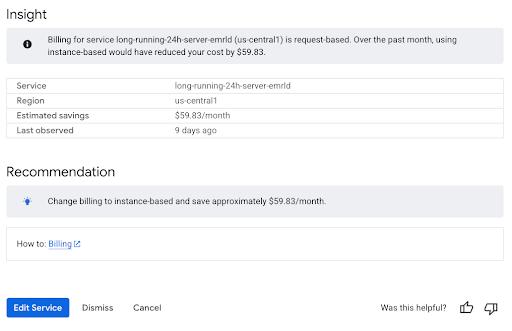
> **Note:** Cloud Run continuously analyzes your actual traffic patterns and will automatically recommend switching to Instance-based if it will save you money.
---
## 14. Scale-to-Zero GPUs
####Where to watch
- [Discussion in talk: 35:18](https://youtu.be/ZEuHBOhy_uY?t=2117)
####Code examples:
- [getting started GPUs](https://codelabs.developers.google.com/?text=cloud+run+gpu&utm_campaign=CDR_0x2e662603_default_b516802488&utm_medium=external&utm_source=blog)
####Recap:
- Cloud Run fully supports scale-to-zero GPUs.
- Access **NVIDIA L4** and the **NVIDIA RTX PRO 6000 Blackwell** chips
- Used for fine-tuning models via Cloud Run Jobs, or hosting lightweight open-source models like Google's Gemma.
---
## 15. Deploying an ADK agent
####Where to watch
- [Demo in talk: 35:32](https://youtu.be/ZEuHBOhy_uY?t=2132)
####Code examples:
- [ADK agent getting started](https://codelabs.developers.google.com/next26/ultimate-cloud-run-guide?hl=en&utm_campaign=CDR_0x2e662603_default_b516802488&utm_medium=external&utm_source=blog#7)
####Docs:
- [Gemini Enterprise Agent Platform - ADK](https://docs.cloud.google.com/gemini-enterprise-agent-platform/build/adk?utm_campaign=CDR_0x2e662603_default_b516802488&utm_medium=external&utm_source=blog)
Comments
More Blog
View allkubernetesMinimalist EKS: The Easy Way
Amazon EKS manages the Kubernetes control plane, but you remain responsible for provisioning the...
J
Joaquin MenchacaaiNever forget to enter the Stern Grove lottery again!
Browser automation with Playwright, Python, GitHub Actions, and Entire to auto-enter San Francisco Stern Grove concert lotteries each week!
L
Lizzie SiegletypescriptA Free Screenshot Editor That Never Uploads Your Image
A free screenshot and image editor that runs entirely in your browser. Keeping every edit reversible and handling big phone photos, in plain TypeScript and Canvas2D.
M
Martin StarkshowdevI built a CLI to break my highlights out of Apple Books
A macOS CLI + MCP server that exports Apple Books highlights to Markdown and gives AI assistants direct access to your reading notes.
A
Andrey KorchakaiA Developer's Guide to Agent Hooks in Antigravity CLI
Motivation To be quite honest, "Hooks"—the shell commands we trigger at specific points...
T
TanaikeagentsTactical vs. Strategic Agentic AI Development — A Playbook for Developers
The Strategic Engineer: Why Writing Code Is No Longer Your Most Valuable Skill ...
A
Adewumi Saheed Adewale