
Back to Blog azure
azure kubernetes
 ai
ai typescript
 showdev
 ai
ai agents
Create and configure virtual networks
Rahimah Sulayman May 25, 2026
0 views
Introduction Imagine migrating a critical enterprise web application to the cloud, only to...
## Introduction
Imagine migrating a critical enterprise web application to the cloud, only to face **network bottlenecks**, **unsegmented traffic**, or **exposure to the public internet**. Designing a resilient, production-ready cloud environment always begins at the foundational layer: _secure, scalable networking_.
In this article, I demonstrate how to architect a modern cloud infrastructure blueprint using a `Hub-and-Spoke` topology in Microsoft Azure. _This structural design isolates workloads, enforces security boundaries, and minimizes latency_.
As a cloud professional, my focus isn't just on clicking buttons in the portal,it is on delivering **architectural patterns that protect data, optimize costs, and align with the Azure Well-Architected Framework**.
**Scenario**
Your organization is migrating a web-based application to Azure. Your first task is to put in place the virtual networks and subnets. You also need to securely peer the virtual networks. You identify these requirements.
- Two virtual networks are required, **app-vnet** and **hub-vnet**. This simulates a hub and spoke network architecture.
- The app-vnet will host the application. This virtual network requires two subnets. The **frontend subnet** will host the web servers. The **backend subnet** will host the database servers.
- The hub-vnet only requires a subnet for the firewall.
- The two virtual networks must be able to communicate with each other securely and privately through **virtual network peering**.
- Both virtual networks should be in the same region.
## Skilling tasks
- Create a virtual network.
- Create a subnet.
- Configure vnet peering.
**Note:** To complete this lab you will need an Azure subscription with **Contributor** RBAC role assigned. In this lab, when you are asked to create a resource, for any properties that are not specified, use the default value.
## Create hub and spoke virtual networks and subnets
An `Azure virtual network` enables many types of Azure resources to securely communicate with each other, the internet, and on-premises networks. All Azure resources in a virtual network are deployed into `subnets` within the virtual network.
1.Sign in to the **Azure portal** - `https://portal.azure.com`.
2.Search for and select `Virtual Networks`.
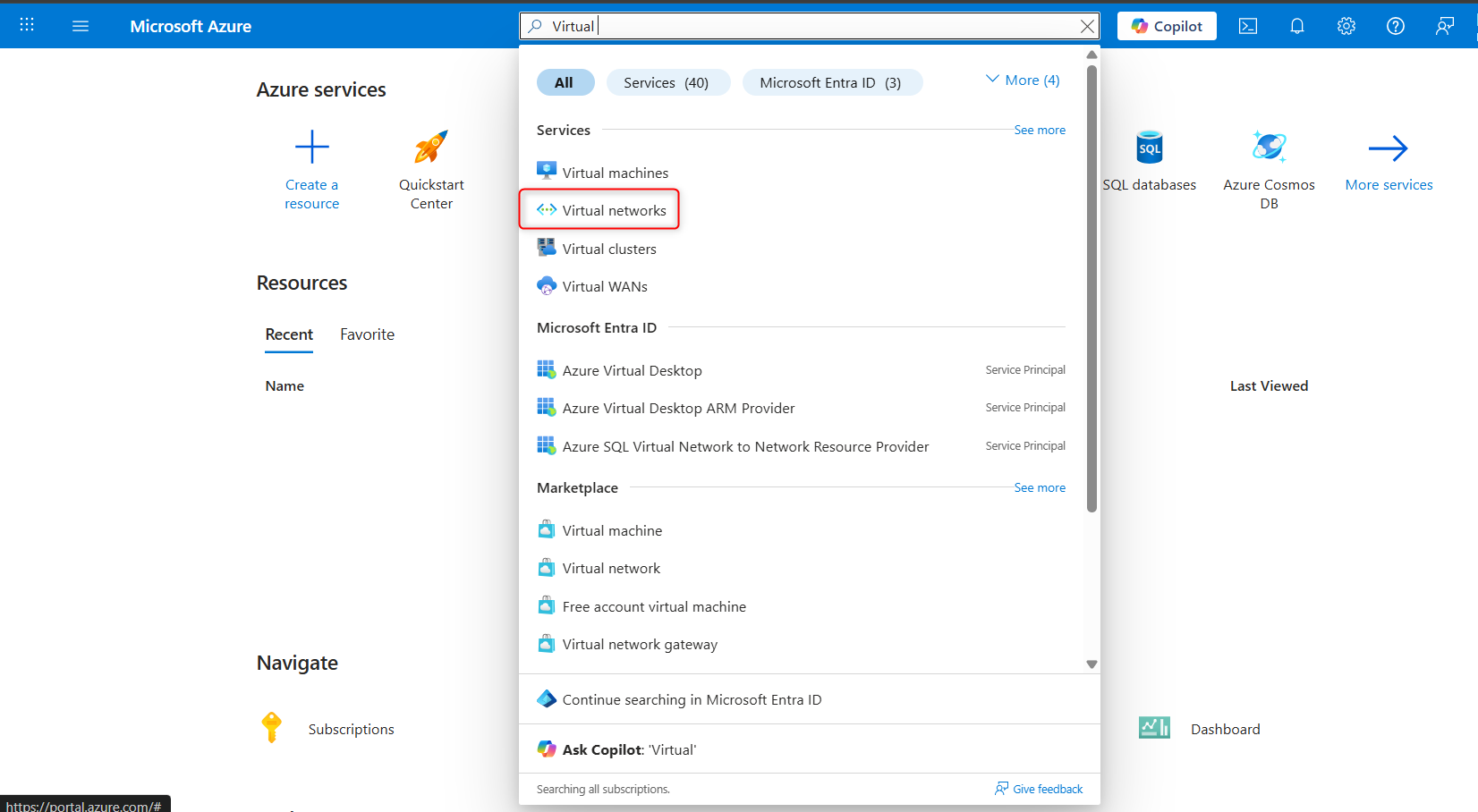
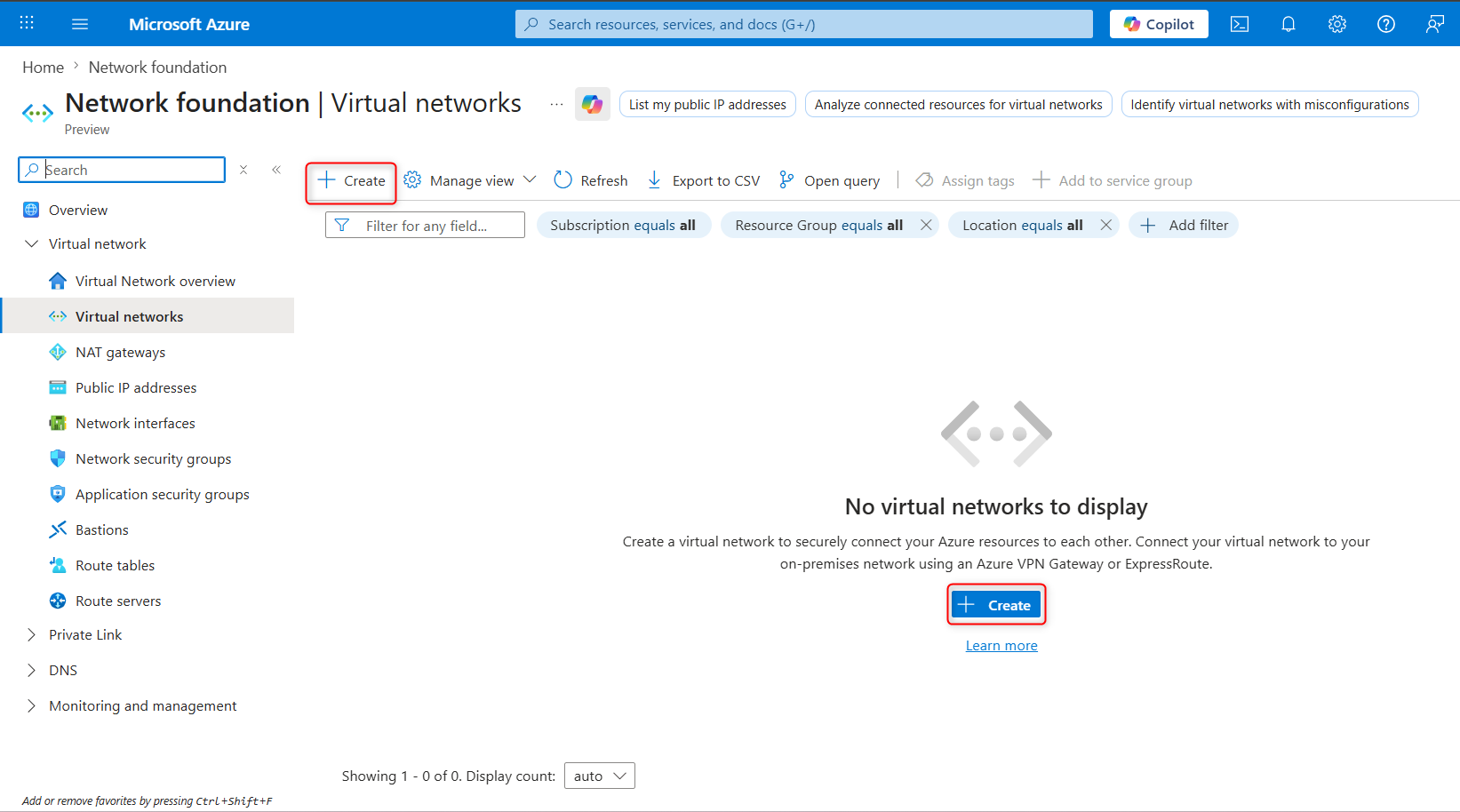
3.Select **+ Create** and complete the configuration of the **app-vnet**.
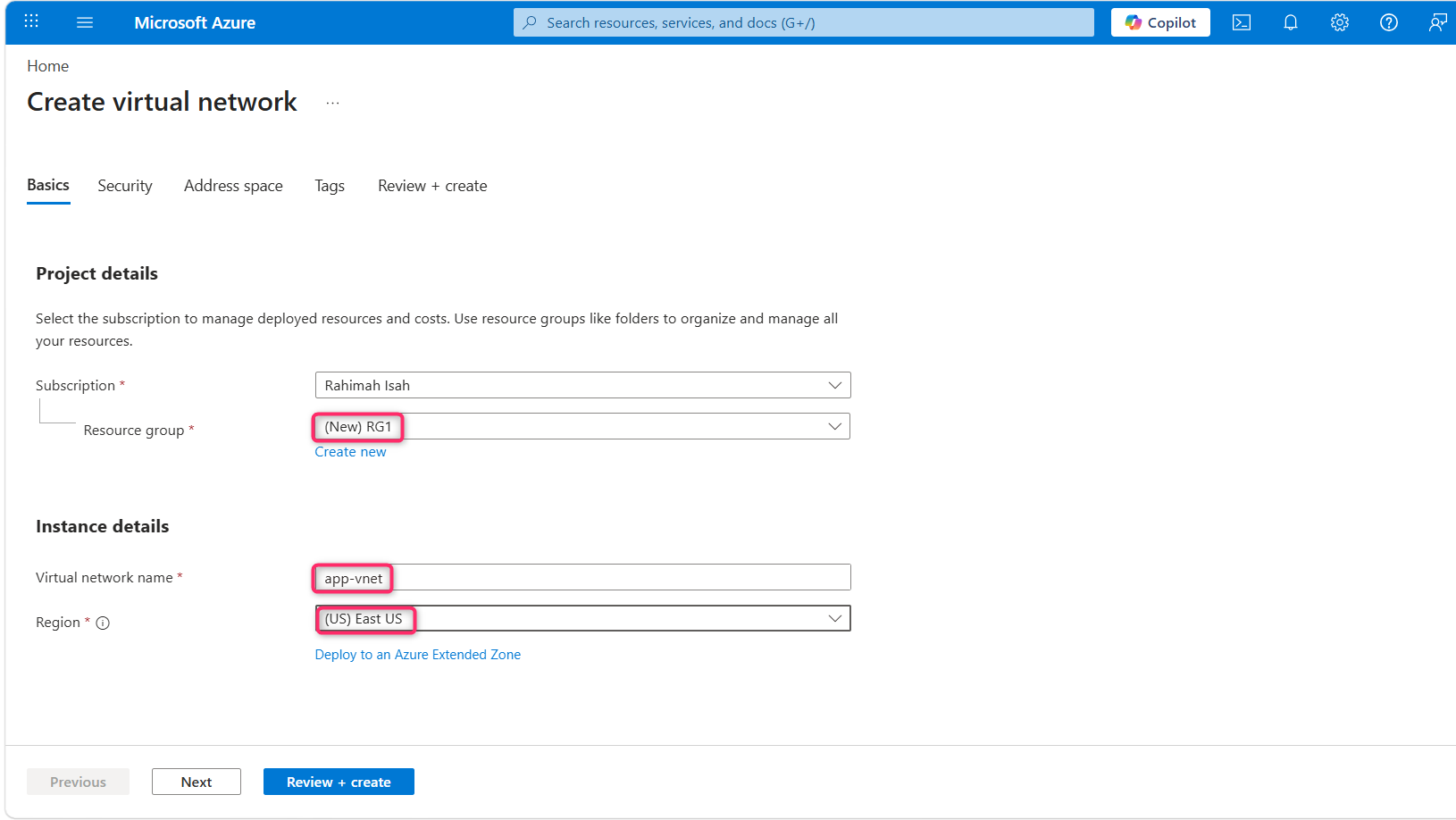
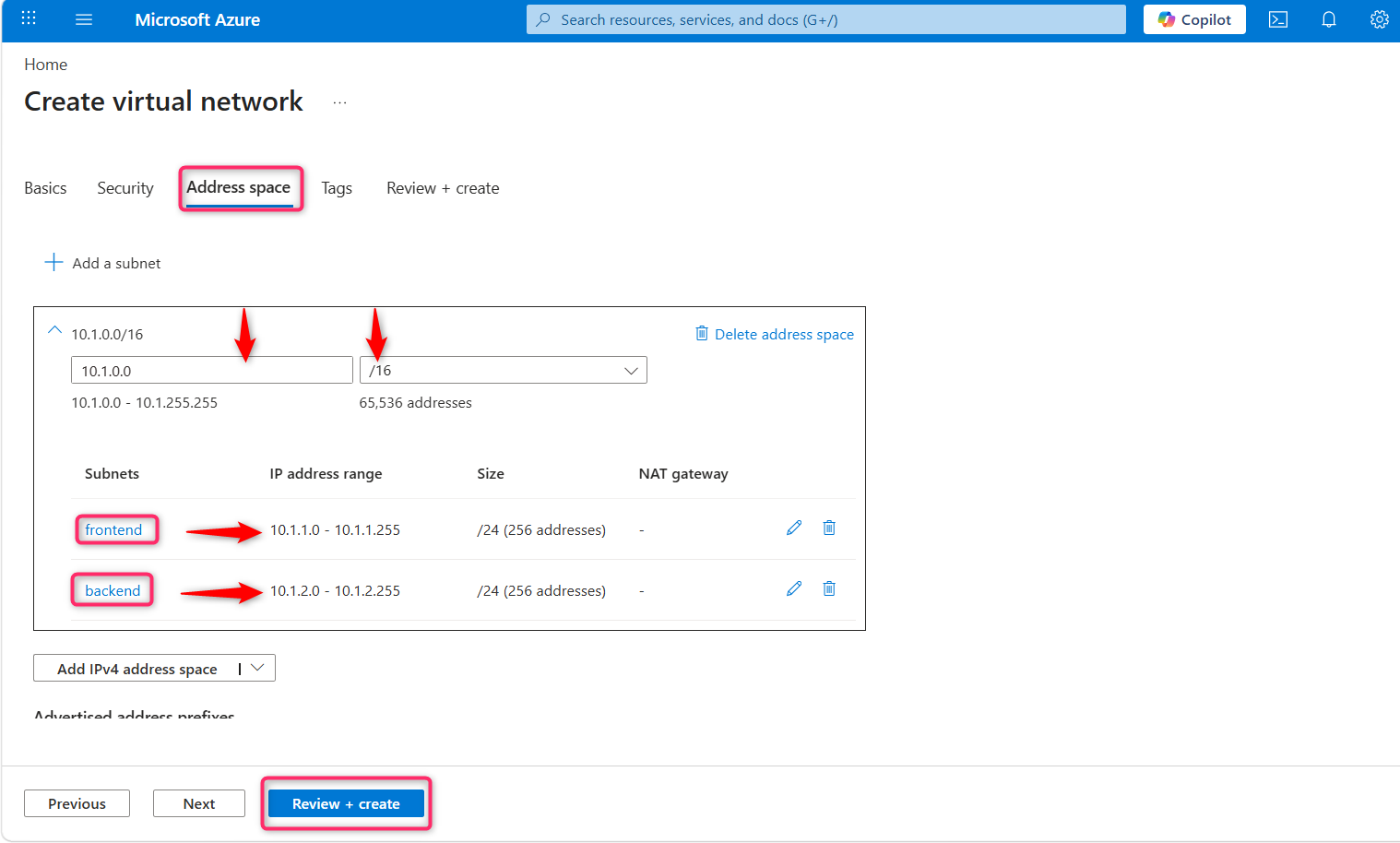
This virtual network requires two subnets, **frontend** and **backend**.
| **Property** | **Value** |
| :--- | :--- |
| Resource group | **RG1** |
| Virtual network name | `app-vnet` |
| Region | **East US** |
| IPv4 address space | **10.1.0.0/16** |
| Subnet name | `frontend` |
| Subnet address range | **10.1.0.0/24** |
| Subnet name | `backend` |
| Subnet address range | **10.1.1.0/24** |
**Note**:Leave all other settings as their defaults.
When finished select **Review + create** and then **Create**.
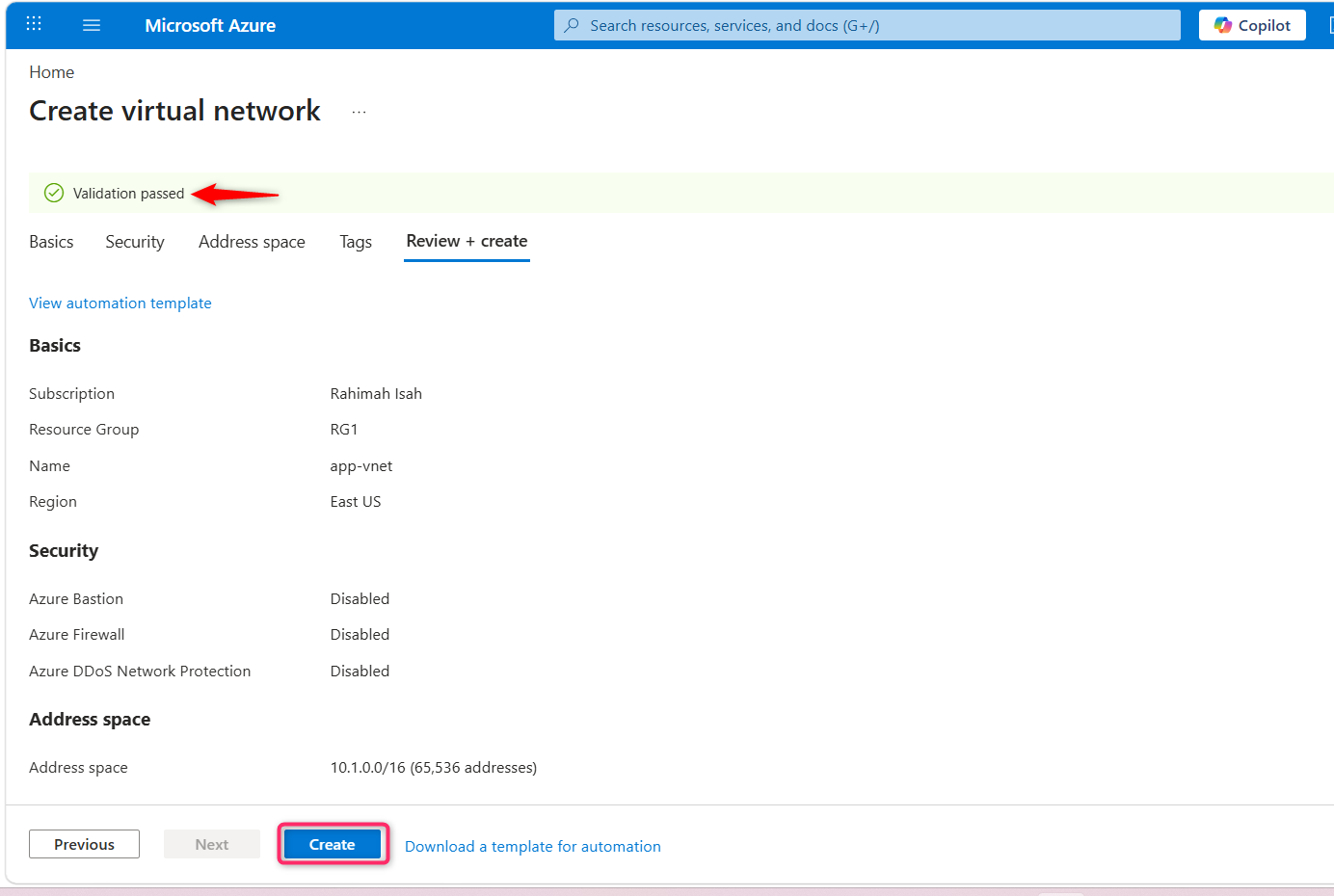
4.Create the **Hub-vnet** virtual network configuration. This virtual network has the firewall subnet.
| **Property** | **Value** |
| :--- | :--- |
| Resource group | **RG1** |
| Name | `hub-vnet` |
| Region | **East US** |
| IPv4 address space | **10.0.0.0/16** |
| Subnet name | **AzureFirewallSubnet** |
| Subnet address range | **10.0.0.0/26** |
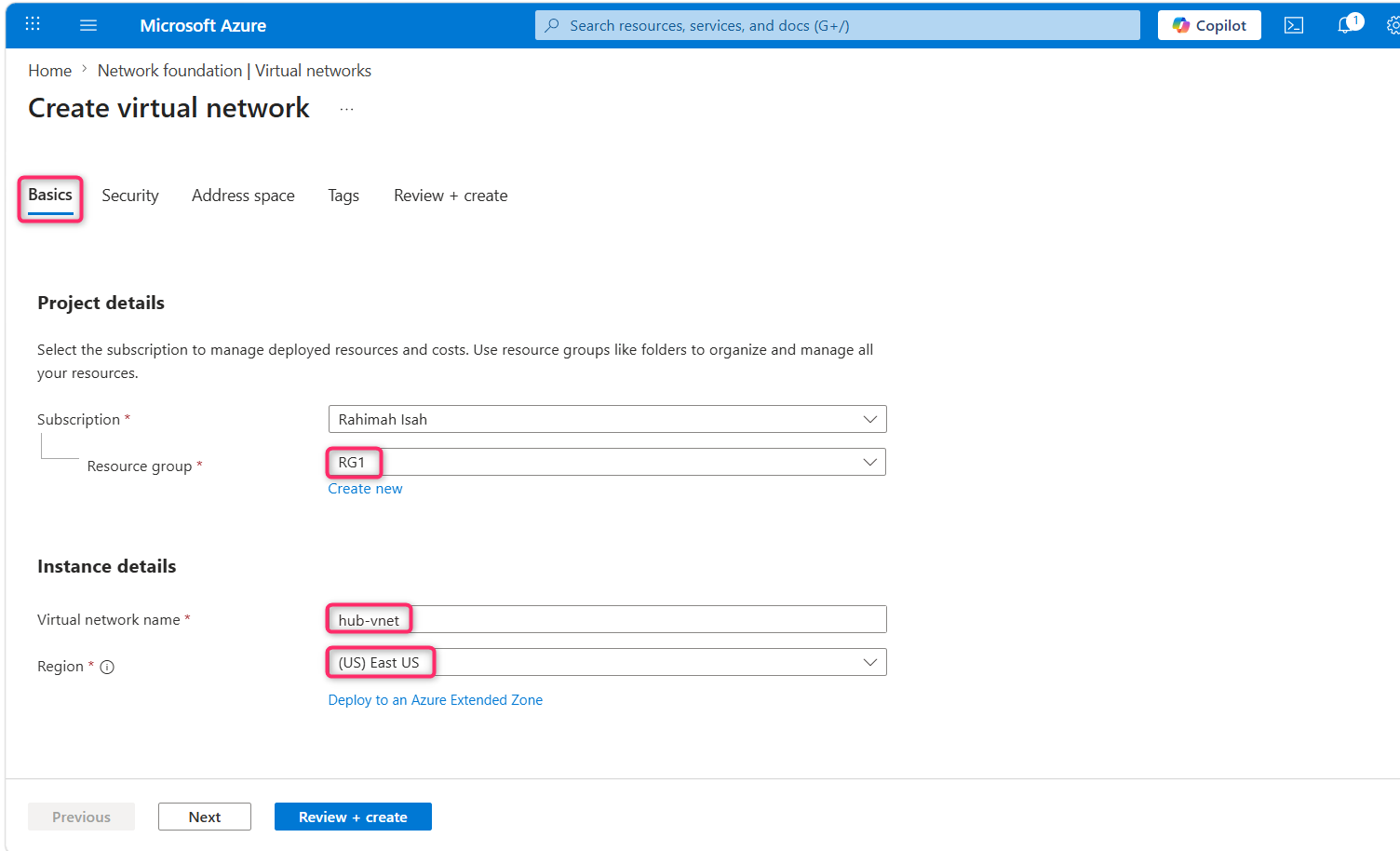
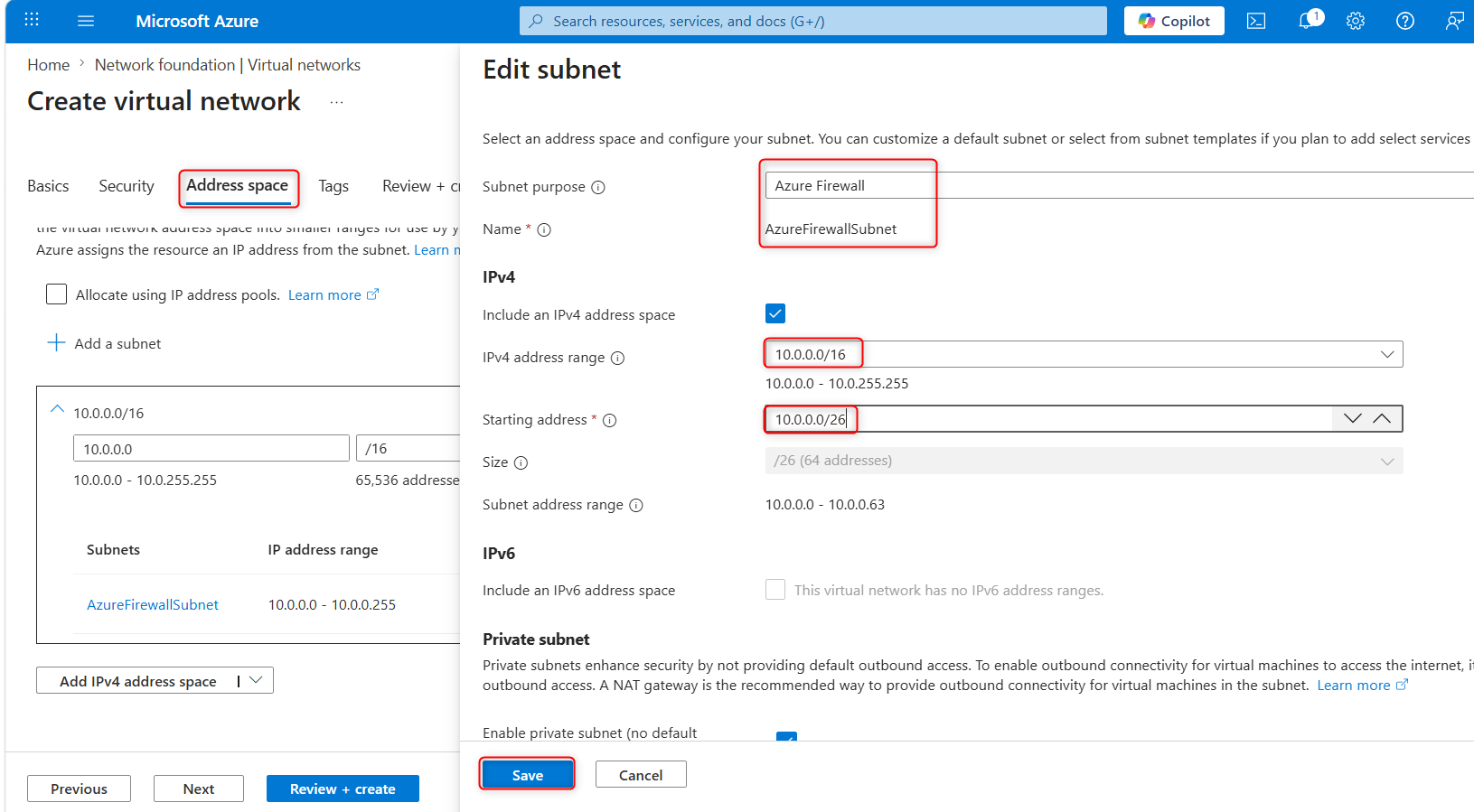
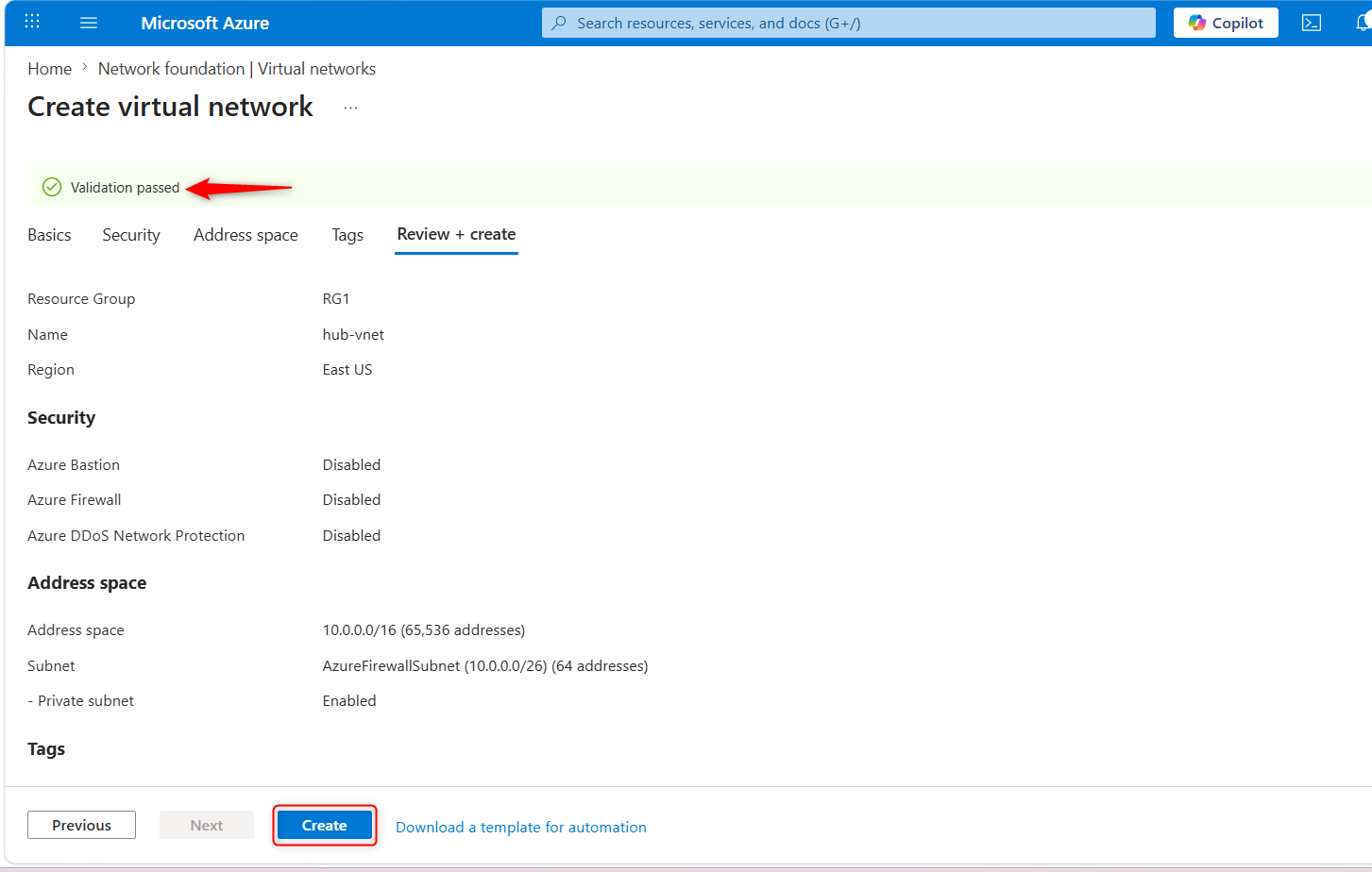
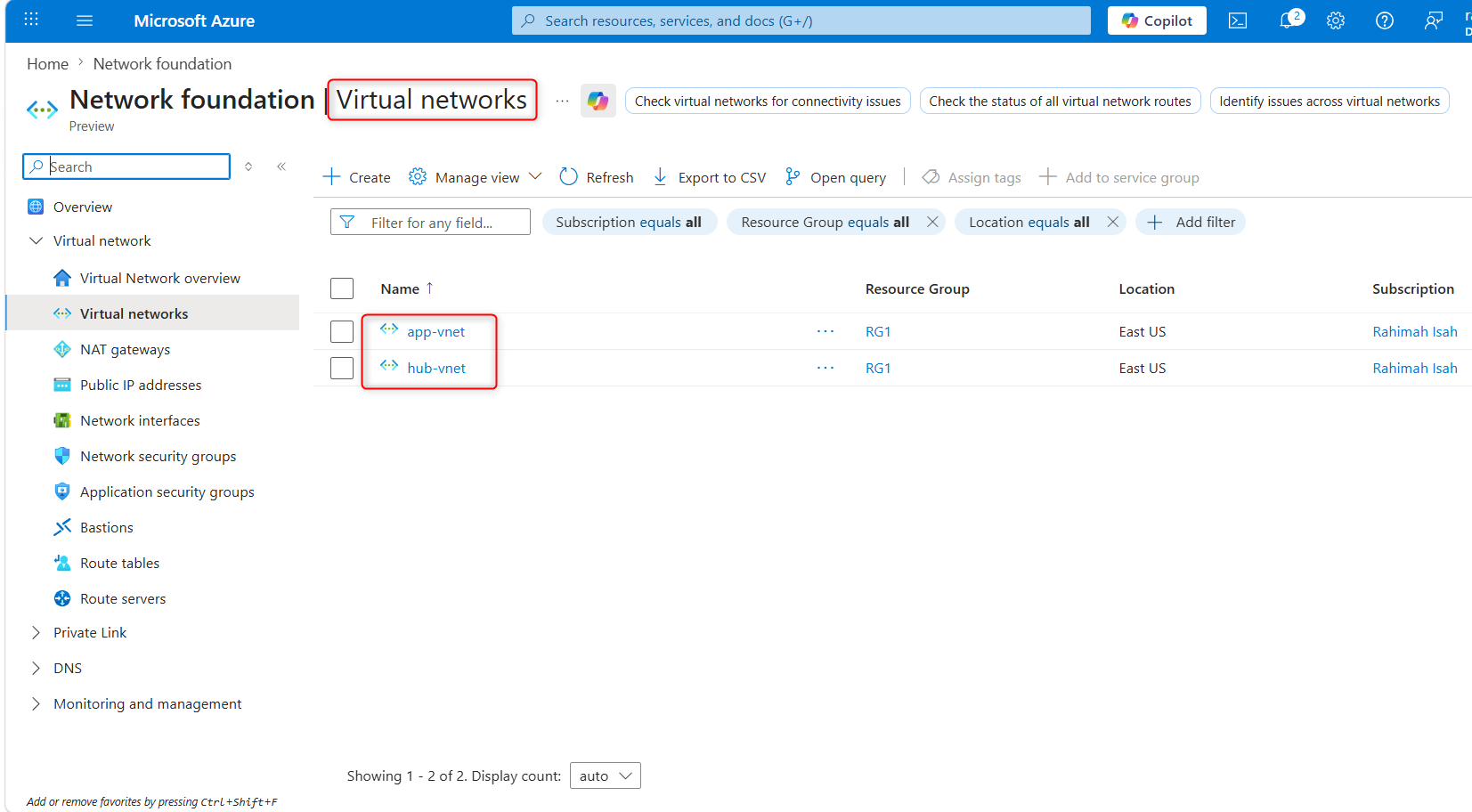
5.Once the deployments are complete, search for and select your ‘virtual networks`.
6.Verify your virtual networks and subnets were deployed.
## Configure a peer relationship between the virtual networks
`Virtual network peering` enables you to seamlessly connect two or more Virtual Networks in Azure.
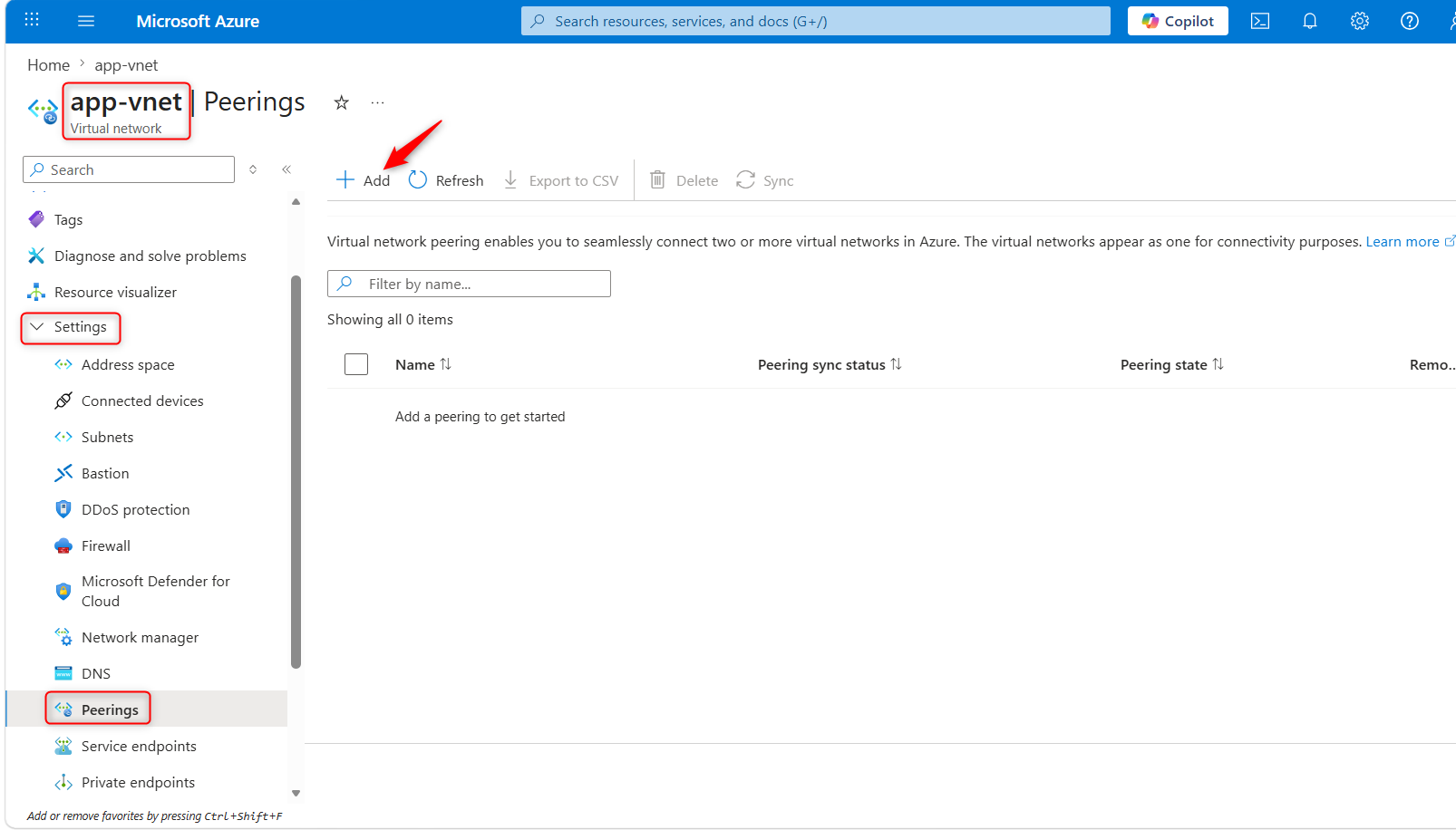
1.Search for and select the `app-vnet` virtual network.
2.In the **Settings** blade, select **Peerings**.
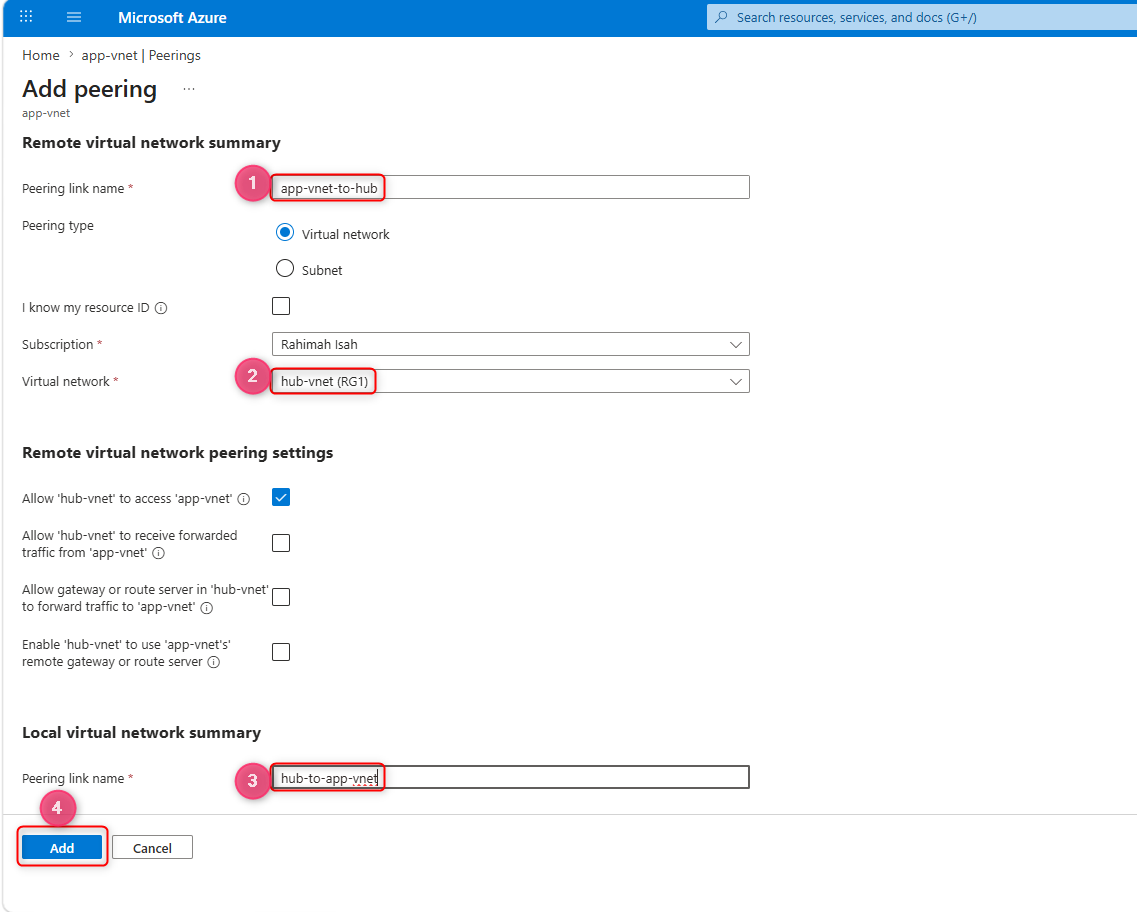
3.**+ Add** a peering between the two virtual networks.
| **Property** | **Value** |
| :--- | :--- |
| Remote peering link name | `app-vnet-to-hub` |
| Virtual network | `hub-vnet` |
| Local virtual network peering link name | `hub-to-app-vnet` |
**Note:** Leave all other settings as their defaults. Select **“Add”** to create the virtual network peering.
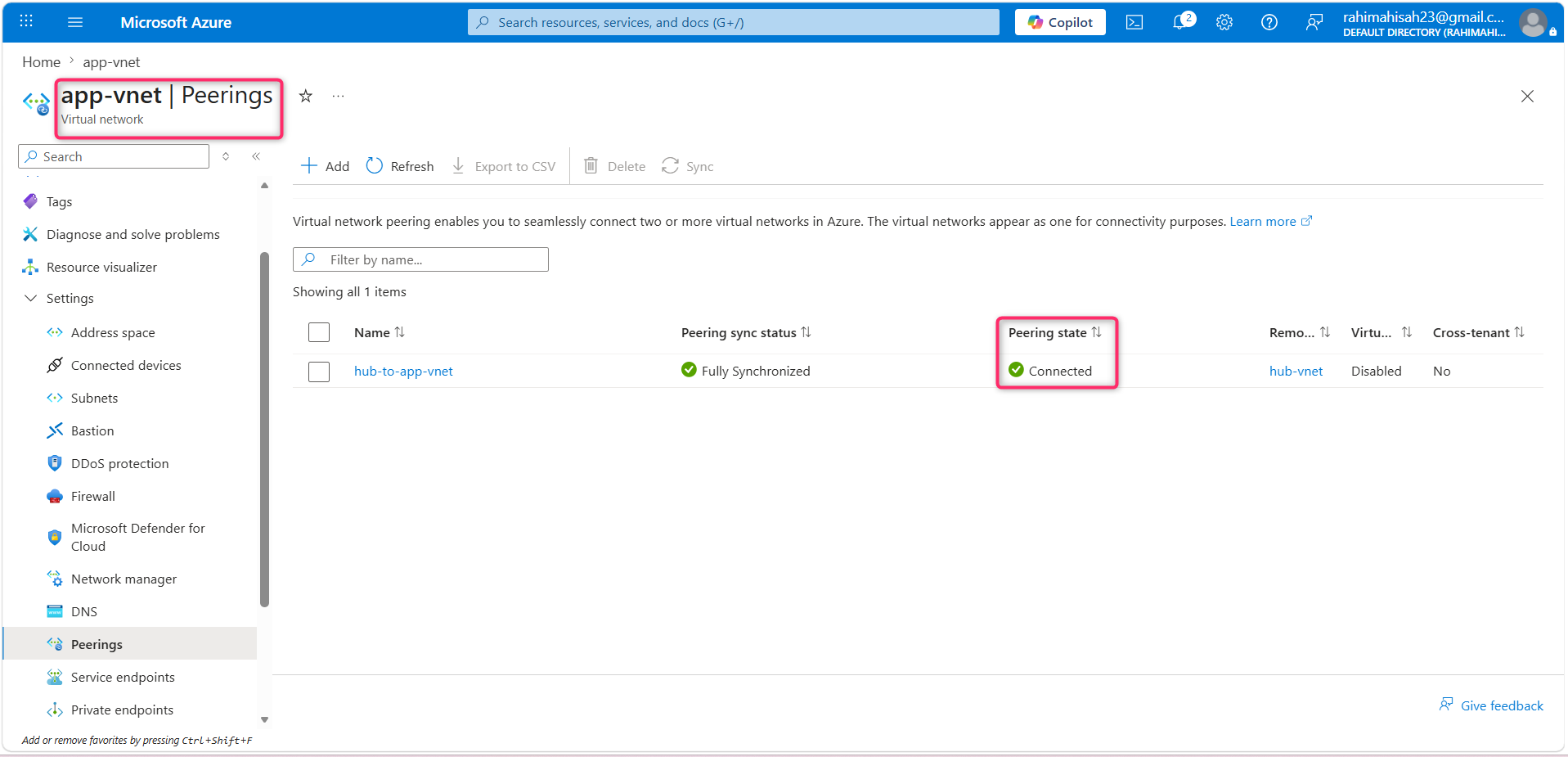
4.Once the deployment completes, verify the **Peering status** is **Connected**.
**Key takeaways**
Here are the main takeaways:
- Azure virtual networks (VNets) provide a secure and isolated network environment for your cloud resources. You can create multiple virtual networks per region per subscription.
- When designing virtual networks make sure the VNet address space (CIDR block) doesn’t overlap with your organization’s other network ranges.
- A subnet is a range of IP addresses in the VNet. You can segment VNets into different size subnets, creating as many subnets as you require for organization and security within the subscription limit. Each subnet must have a unique address range.
- Certain Azure services, such as Azure Firewall, require their own subnet.
- Virtual network peering enables you to seamlessly connect two Azure virtual networks. The virtual networks appear as one for connectivity purposes.
## Summary
This project isn't just about spinning up resources, it is a demonstration of **secure, production-grade cloud architecture**. By implementing this Hub-and-Spoke topology, I have successfully:
1.Enforced Strict Network Isolation: Segmented the application layer into dedicated frontend and backend subnets to implement a defense-in-depth security model.
2.Designed for Enterprise Scale: Established a central hub-vnet to allow seamless, future integration of centralized security appliances like Azure Firewall.
3.Optimized Performance & Security: Leveraged VNet Peering to ensure high-bandwidth, low-latency communication that remains entirely off the public internet.
_I designed this infrastructure with a **Zero-Trust mindset**, ensuring that every deployment is scalable, compliant, and structurally aligned with enterprise security standards_.
Comments
More Blog
View allkubernetesMinimalist EKS: The Easy Way
Amazon EKS manages the Kubernetes control plane, but you remain responsible for provisioning the...
J
Joaquin MenchacaaiNever forget to enter the Stern Grove lottery again!
Browser automation with Playwright, Python, GitHub Actions, and Entire to auto-enter San Francisco Stern Grove concert lotteries each week!
L
Lizzie SiegletypescriptA Free Screenshot Editor That Never Uploads Your Image
A free screenshot and image editor that runs entirely in your browser. Keeping every edit reversible and handling big phone photos, in plain TypeScript and Canvas2D.
M
Martin StarkshowdevI built a CLI to break my highlights out of Apple Books
A macOS CLI + MCP server that exports Apple Books highlights to Markdown and gives AI assistants direct access to your reading notes.
A
Andrey KorchakaiA Developer's Guide to Agent Hooks in Antigravity CLI
Motivation To be quite honest, "Hooks"—the shell commands we trigger at specific points...
T
TanaikeagentsTactical vs. Strategic Agentic AI Development — A Playbook for Developers
The Strategic Engineer: Why Writing Code Is No Longer Your Most Valuable Skill ...
A
Adewumi Saheed Adewale