
Back to Blog gpu
gpu kubernetes
 ai
ai typescript
 showdev
 ai
ai agents
G4 Fractional VMs are now available on Google Cloud!
Maciej Strzelczyk May 28, 2026
0 views
In 2025 Google Cloud added G4, powered by NVIDIA's RTX PRO 6000 Blackwell Server Edition GPUs to...
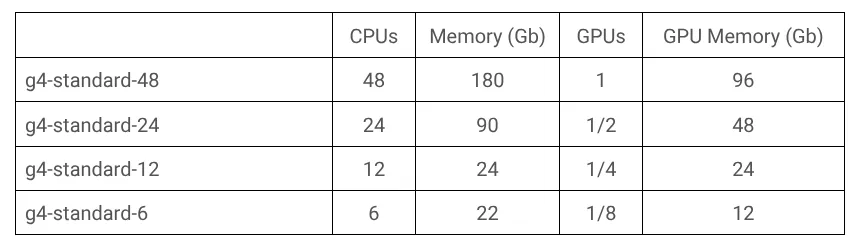
In 2025 Google Cloud [added G4](https://cloud.google.com/blog/products/compute/introducing-g4-vm-with-nvidia-rtx-pro-6000?utm_campaign=CDR_0x73f0e2c4_default_b491111818&utm_medium=external&utm_source=blog), powered by NVIDIA's RTX PRO 6000 Blackwell Server Edition GPUs to their offering, allowing them to offer hardware not only for AI applications, but also for other applications, such as rendering, simulations or gaming. A single G4 instance with one accelerator (*g4-standard-48*) comes equipped with 48 CPU cores, 180 gigabytes of RAM and 96 gigabytes of GPU memory. This is a lot of resources for a single cloud workstation, that only the most demanding workstreams would utilize. Most professionals who require a graphics accelerator to do their job, don't really need this much compute power for day to day tasks. It wasn't financially reasonable to pay for a G4 instance, when you weren't utilizing all the resources you paid for. If only there were smaller machine types… If only you could share that one very powerful GPU between multiple virtual machines…
## Introducing fractional VMs!
During Google Cloud Next 2026, Google announced GA for fractional G4 VMs and was the first provider to bring vGPU functionality to RTX PRO 6000 accelerators. vGPU stands for [virtual graphical processing unit](https://blogs.nvidia.com/blog/what-is-a-virtual-gpu/). Just like VMs (virtual machines) are a way to split one physical computer into smaller, independent systems, vGPU allows for a single physical accelerator to be split into 2, 4 or 8 virtual accelerators! The new fractional machine types (*g4-standard-24*, *g4-standard-12*, *g4-standard-6*) now allow you to perfectly match the compute capabilities to your needs!
## Who is it for?
The existence of those new machine types makes it much more cost-efficient to move many GPU-dependent tasks to the cloud. Replacing physical workstations in offices with cloud infrastructure is [not a new thing](https://dev.to/googlecloud/developing-in-the-google-cloud-57c6), but till now, Google Cloud didn't offer a good platform for those who needed workstations to process images, post-process videos, simulate physics or render 3D graphics. Those users now can get exactly the hardware they need, allowing their companies to move away from maintaining physical workstations and replacing them with virtual ones.
## How to get it?
The new machine types are available for new Compute Engine instances and GKE nodes. If you are creating a Compute Instance, remember to [install the correct drivers](https://docs.cloud.google.com/compute/docs/gpus/install-drivers-gpu#fractional-vms?utm_campaign=CDR_0x73f0e2c4_default_b491111818&utm_medium=external&utm_source=blog), so that you can utilize your virtual accelerator without any issues.
Creation of a fractional VM is no different from a regular VM. For example, to create a Compute Engine instance, you can use a `gcloud` command:
```shell
gcloud compute instances create $VM_NAME \
--machine-type=g4-standard-6 \
--zone=us-central1-b \
--boot-disk-size=$DISK_SIZE \
--maintenance-policy=TERMINATE \
--restart-on-failure
```
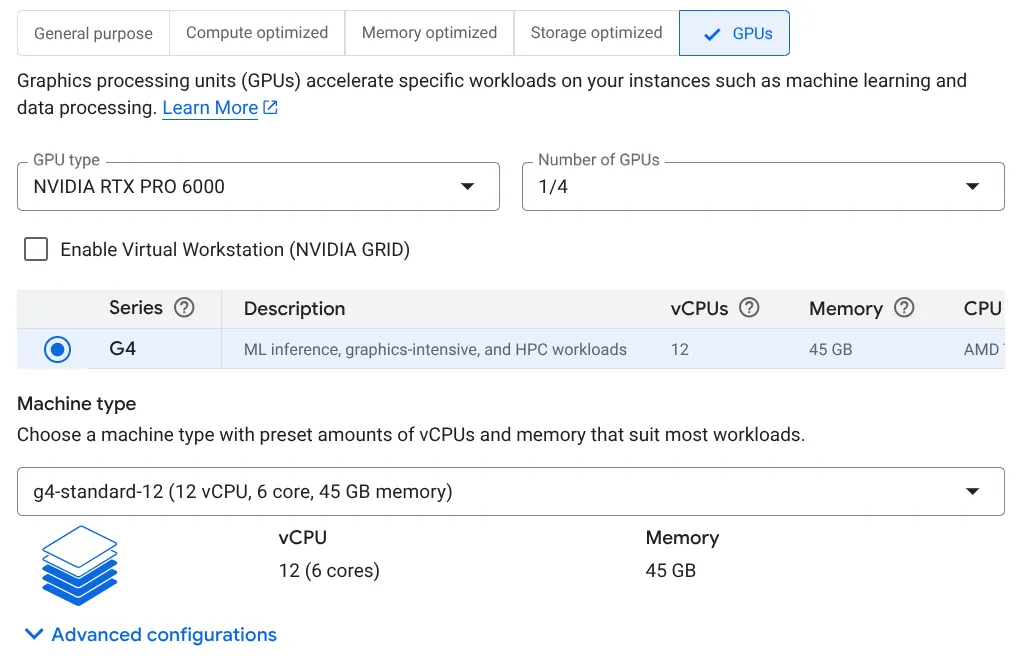
Or you can use Cloud Console:
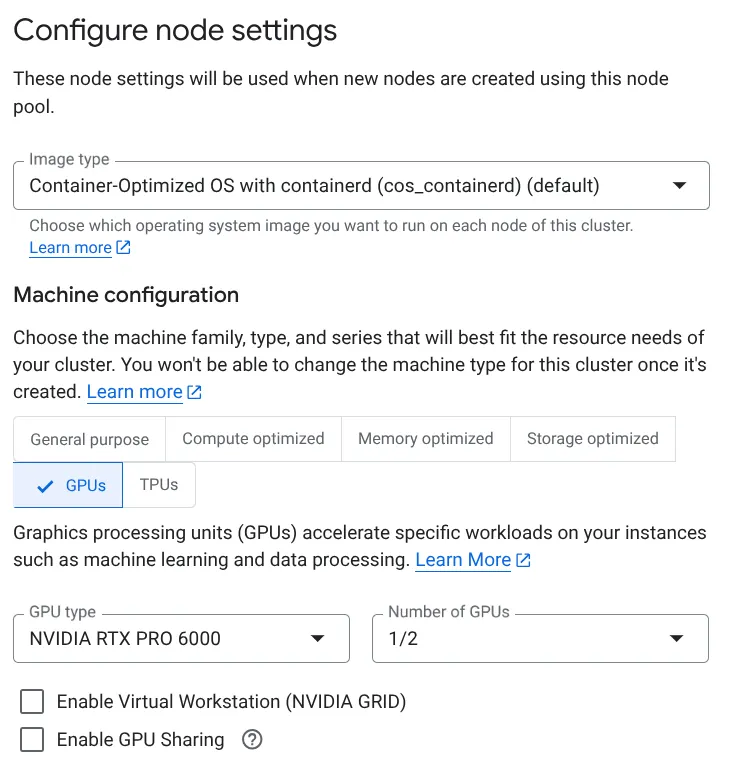
Similarly, for GKE you can specify the new machine types (*g4-standard-6*, *g4-standard-12* and *g4-standard-24*) to create a new Node Pool:
```shell
gcloud container node-pools create POOL_NAME \
--cluster CLUSTER_NAME \
--location=CONTROL_PLANE_LOCATION \
--machine-type=g4-standard-24
```
Or in Cloud Console:
The vGPU support is currently rolled out only to one zone: `us-central1-b`. However, it's only a matter of time before it's available in more regions. Keep an eye on the [documentation page](https://docs.cloud.google.com/compute/docs/regions-zones/gpu-regions-zones#view-using-table?utm_campaign=CDR_0x73f0e2c4_default_b491111818&utm_medium=external&utm_source=blog) to find which zones support which GPUs. To stay up to date, follow the [Google Cloud blog](https://cloud.google.com/blog/?utm_campaign=CDR_0x73f0e2c4_default_b491111818&utm_medium=external&utm_source=blog) and subscribe to [Google Cloud YouTube channel](https://www.youtube.com/@googlecloudtech) to not miss any updates!
Comments
More Blog
View allkubernetesMinimalist EKS: The Easy Way
Amazon EKS manages the Kubernetes control plane, but you remain responsible for provisioning the...
J
Joaquin MenchacaaiNever forget to enter the Stern Grove lottery again!
Browser automation with Playwright, Python, GitHub Actions, and Entire to auto-enter San Francisco Stern Grove concert lotteries each week!
L
Lizzie SiegletypescriptA Free Screenshot Editor That Never Uploads Your Image
A free screenshot and image editor that runs entirely in your browser. Keeping every edit reversible and handling big phone photos, in plain TypeScript and Canvas2D.
M
Martin StarkshowdevI built a CLI to break my highlights out of Apple Books
A macOS CLI + MCP server that exports Apple Books highlights to Markdown and gives AI assistants direct access to your reading notes.
A
Andrey KorchakaiA Developer's Guide to Agent Hooks in Antigravity CLI
Motivation To be quite honest, "Hooks"—the shell commands we trigger at specific points...
T
TanaikeagentsTactical vs. Strategic Agentic AI Development — A Playbook for Developers
The Strategic Engineer: Why Writing Code Is No Longer Your Most Valuable Skill ...
A
Adewumi Saheed Adewale