
Back to Blog mcpserver
 kubernetes
 ai
ai typescript
 showdev
 ai
ai agents
Local Mac Gemma 4 Deployment with MCP and Antigravity CLI
xbill June 1, 2026
0 views
This article provides a step by step deployment guide for Gemma 4 to a M3 Macbook Air. A suite of...
---
title: Local Mac Gemma 4 Deployment with MCP and Antigravity CLI
published: true
series: Gemma4
date: 2026-05-31 19:03:09 UTC
tags: mcpserver,llm
canonical_url: https://xbill999.medium.com/local-mac-gemma-4-deployment-with-mcp-and-antigravity-cli-d079396e06b8
---
This article provides a step by step deployment guide for Gemma 4 to a M3 Macbook Air. A suite of Python MCP tools is built to simplify management of the Ollama hosted Gemma 4 deployment with Antigravity CLI.
#### What is this project trying to Do?
This project is a DevOps/SRE assistant that uses a Gemma 4 model self-hosted locally. It provides tools to deploy the model, as well as for observability and performance testing.
This project is similar to a previous project that targeted TPU hosted Gemma4 instances on GCP:
[Self-hosted Gemma 4 on TPU with vLLM, MCP, ADK, and Gemini CLI](https://medium.com/google-cloud/self-hosted-gemma-4-on-tpu-with-mcp-adk-and-gemini-cli-7f646458a3c3)
#### Antigravity CLI
Antigravity CLI is the follow-on successor to Gemini CLI- the terminal driven, agent assisted coding tool.
Full details on installing Antigravity CLI are here:
[Getting Started with Antigravity CLI](https://medium.com/google-cloud/getting-started-with-antigravity-cli-26c5da90951f)
#### Testing the Antigravity CLI Environment
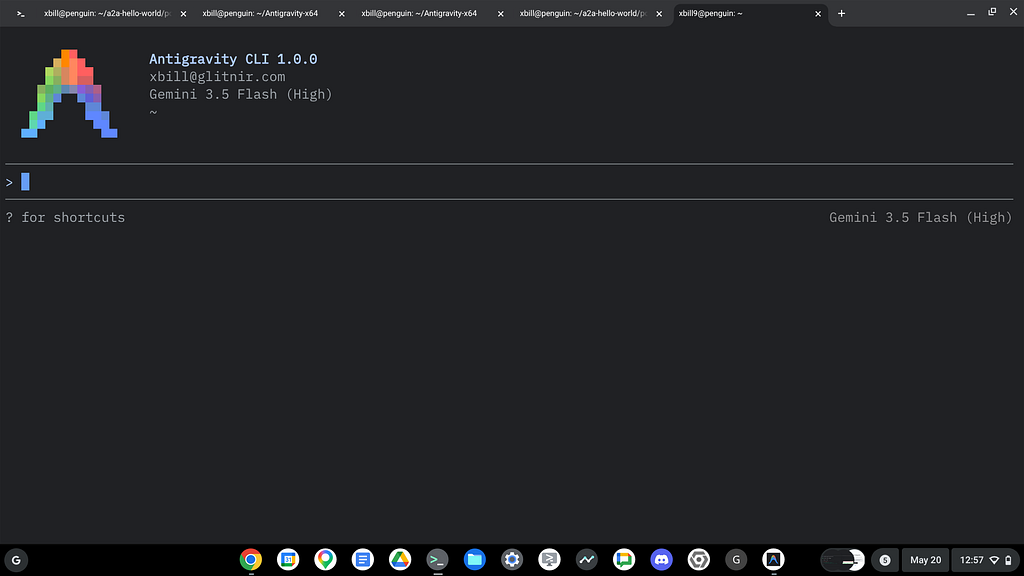
Once you have all the tools in place- you can test the startup of Antigravity CLI.
You will need to authenticate with a Google Cloud Project or your Google Account:
```plaintext
agy
```
This will start the interface:
#### Full Installation Instructions
The detailed installation instructions for Antigravity CLI are here:
[Getting Started with Antigravity CLI](https://medium.com/google-cloud/getting-started-with-antigravity-cli-26c5da90951f)
#### Python MCP Documentation
The official GitHub Repo provides samples and documentation for getting started:
[GitHub - modelcontextprotocol/python-sdk: The official Python SDK for Model Context Protocol servers and clients](https://github.com/modelcontextprotocol/python-sdk)
#### Where do I start?
The strategy for starting MCP development for model management is a incremental step by step approach.
First, the basic development environment is setup with the required system variables, and a working Antigravity CLI configuration.
Then, a minimal Python MCP Server is built with stdio transport. This server is validated with Antigravity CLI in the local environment.
This setup validates the connection from Antigravity CLI to the local server via MCP. The MCP client (Antigravity CLI) and the Python MCP server both run in the same local environment.
#### Setup the Basic Environment
At this point you should have a working Python environment and a working Antigravity CLI installation. The next step is to clone the GitHub samples repository with support scripts:
```shell
cd ~
git clone https://github.com/xbill9/gemma4-tips
```
Then run **init.sh** from the cloned directory.
The script will attempt to determine your shell environment and set the correct variables:
```shell
mac-2B-devops-agent
source init.sh
```
If your session times out or you need to re-authenticate- you can run the **set\_env.sh** script to reset your environment variables:
```shell
mac-2B-devops-agent
source set_env.sh
```
Variables like PROJECT\_ID need to be setup for use in the various build scripts- so the set\_env script can be used to reset the environment if you time-out.
#### Model Management Tool with MCP Stdio Transport
One of the key features that the standard MCP libraries provide is abstracting various transport methods.
The high level MCP tool implementation is the same no matter what low level transport channel/method that the MCP Client uses to connect to a MCP Server.
The simplest transport that the SDK supports is the stdio (stdio/stdout) transport — which connects a locally running process. Both the MCP client and MCP Server must be running in the same environment.
The connection over stdio will look similar to this:
```python
# Initialize FastMCP server
mcp = FastMCP("Self-Hosted vLLM DevOps Agent")
```
#### Running the Python Code
First- switch the directory with the Python version of the MCP sample code:
```shell
~/gemma4-tips/mac-2B-devops-agent
```
Run the release version on the local system:
```make
make install
Processing ./.
```
The project can also be linted:
```console
m3:mac-2B-devops-agent xbill$ make lint
ruff check .
All checks passed!
ruff format --check .
10 files already formatted
mypy .
Success: no issues found in 10 source files
m3:mac-2B-devops-agent xbill$
```
#### Antigravity CLI mcp\_config.json
A sample MCP server file is provided in the .agents directory:
```json
{
"mcpServers": {
"local-devops-agent": {
"command": "python3",
"args": [
"/Users/xbill/gemma4-tips/mac-2B-devops-agent/server.py"
],
"env": {
"GOOGLE_CLOUD_PROJECT": "aisprint-491218",
"MODEL_NAME": "google/gemma-4-E2B-it",
"LOCAL_VLLM_PORT": "8000",
}
}
}
}
```
#### Validation with Antigravity CLI
The final connection test uses Antigravity CLI as a MCP client with the Python code providing the MCP server:
```plaintext
m3:mac-2B-devops-agent xbill$ agy
Antigravity CLI 1.0.3
xbill9@gmail.com (Google AI Ultra)
Gemini 3.5 Flash (Low)
~/gemma4-tips/mac-2B-devops-agent
────────────────────────────────────────────────────────────────────────────────
>
────────────────────────────────────────────────────────────────────────────────
MCP Servers
Plugins (~/.gemini/antigravity-cli/plugins)
> ✓ local-devops-agent Tools: verify_model_health, save_hf_token,
manage_docker, get_system_status, get_endpoint, +9 more
```
#### Getting Started with Gemma 4 Locally
Ollama automatically leverages your M3 Mac’s unified memory and Metal GPU architecture out-of-the-box. It runs local open-weight models (like Qwen, Llama, and Gemma) at high speeds without the need for discrete VRAM limits. [[1](https://www.reddit.com/r/ollama/comments/1echlso/ollama_llamacpp_and_macbooks/), [2](https://medium.com/@michael.hannecke/running-llms-locally-on-apple-silicon-a-practical-guide-for-developers-980deed326d9), [3](https://www.sitepoint.com/mac-m3-max-vs-rtx-4090-local-llm-performance-showdown-2026/), [4](https://medium.com/@borislavbankov/the-engine-beneath-ollama-was-wrong-for-your-mac-that-just-changed-0ff28116ac7f), [5](https://www.spheron.network/blog/run-llms-locally-ollama/)]
How to Run Ollama with Metal:
1. Install Ollama
Download the macOS installer directly from [Ollama](https://ollama.com/) or open your Terminal and run: curl -fsSL https://ollama.com/install.sh | sh.
2. Pull a Model
Choose a model from the [Ollama Library](https://ollama.com/library) and pull it in your terminal:
ollama pull qwen3:8b
3. Run the Model
Initiate the prompt interface:
ollama run qwen3:8b [[1](https://www.youtube.com/watch?v=ucxtk-jUj6c), [2](https://medium.com/@dzbik.konrad/ollama-quick-start-for-macos-eb6de56e9cba), [3](https://www.mindstudio.ai/blog/run-open-weight-ai-models-locally-ollama-lm-studio), [4](https://docs.unstract.com/unstract/unstract_platform/adapters/llms/ollama_llm/), [5](https://www.reddit.com/r/ollama/comments/1srz7ci/ollama_in_m5_macbook_pro_issue_metal/)]
M3 Hardware Tips:
- Model Size: Your model size will depend heavily on your physical unified memory (RAM). For example, a 7B or 8B model will take \(\sim 4\) GB of RAM, while a 70B model requires \(\sim 40\) GB. [[1](https://www.sitepoint.com/local-llms-apple-silicon-mac-2026/), [2](https://www.sitepoint.com/mac-m3-max-vs-rtx-4090-local-llm-performance-showdown-2026/)]
- Unified Memory: Because your M3 CPU and GPU share the same memory pool, large models can be loaded entirely. Ensure you quit other memory-heavy applications to maximize your available token generation speeds. [[1](https://www.reddit.com/r/LocalLLaMA/comments/17sgwb8/m3_mac_performance_improvements/), [2](https://www.sitepoint.com/mac-m3-max-vs-rtx-4090-local-llm-performance-showdown-2026/), [3](https://www.reddit.com/r/ollama/comments/1pni9e4/can_i_try_ollama_with_a_macbook_air_m3/)]
- Avoid Docker: Do not run Ollama inside a Docker container on macOS, as GPU passthrough and Metal acceleration are not natively supported there.
#### Model Lifecycle Management via MCP
The MCP tools provide a complete suite of agent-oriented operations for managing vLLM deployment on Cloud Run or a TPU.
Overview of MCP tools :
```plaintext
> print out mcp tools
Here is the updated list of available MCP tools for the local Gemma 4 agent:
Tool Name | Description | Code Location
---------------------------|-----------------------------------------------------------------------|-----------------
analyze_local_logs | Analyzes the local container logs using Gemma 4 to find SRE/DevOps | server.py
| errors. |
get_active_models | Gets the currently loaded models in Ollama's memory. | server.py
get_docker_logs | Retrieves startup and execution logs from the Docker container. | server.py
get_endpoint | Checks endpoint connectivity and returns the service URL. | server.py
get_help | Provides help text and summarizes the configuration options. | server.py
get_model_show_details | Gets parameters, architecture, license, and config for a model. | server.py
get_system_details | Retrieves detailed information about the running local model, engine, | server.py
| and versions. |
get_system_status | Displays a dashboard of container and serving health status. | server.py
manage_docker | Starts, stops, restarts, or removes the container. | server.py
query_gemma4 | Standard prompt query interface for the local model. | server.py
query_gemma4_with_stats | Prompt interface returning performance metrics (latency, TTFT). | server.py
run_benchmark | Runs the benchmark suite or vLLM benchmarking script. | server.py
save_hf_token | Securely caches a Hugging Face API token. | server.py
verify_model_health | Runs a deep health check verifying latency and response correctness. | server.py
```
#### Checking System status
The status can be checked with an MCP tool:
```plaintext
> get_system_status
● local-devops-agent/get_system_status(Get system status) (ctrl+o to expand)
### 🌀 Local System Status
• vLLM Health: 🟢 Online (http://localhost:8000)
• Native Ollama Service Status: 🟢 Running (ollama daemon is active via
Homebrew launch agent)
Next Steps: You can now interact with the local model using the
query_gemma4 tool.
──────────────────────────
```
#### Deploy The Model Locally
Once the base environment has been checked- the Gemma model can be deployed:
```plaintext
> deploy gemma4
```
#### Cross Check The Deployed Model
Once the model starts locally- the MCP tool allows for model verification:
```plaintext
> model health check
• Status: ✅ Model health check PASSED.
• Model Response: "Hello! Yes, I am working and ready to assist you..."
• Inference Latency: 4.84 seconds.
The initial empty response was likely due to a transient cold-start or
model
loading delay (the model was active in CPU/GPU memory). The local
gemma4:e2b model is now fully healthy and ready for queries.
```
and model details:
```plaintext
> get_active_models
● local-devops-agent/get_active_models(Get active models) (ctrl+o to expand)
### 📊 Active Loaded Models:
NAME ID SIZE PROCESSOR CONTEXT
UNTIL
gemma4:e2b bcec27ff2bea 7.7 GB 76%/24% CPU/GPU 2048 4
minutes from now
```
and the endpoint:
```plaintext
> get_endpoint
● local-devops-agent/get_endpoint(Get endpoint) (ctrl+o to expand)
🟢 Local vLLM/Ollama is Online at: http://localhost:8000
```
and status:
```json
> get_system_details
● local-devops-agent/get_system_details(Get system details) (ctrl+o to expand)
### 🧩 Model Details (http://localhost:8000)
Model Information ( /v1/models ):
{
"object": "list",
"data": [
{
"id": "gemma4:e2b",
"object": "model",
"created": 1780234616,
"owned_by": "library"
},
{
"id": "gemma4:e4b",
"object": "model",
"created": 1780234234,
"owned_by": "library"
}
]
}
• Health Status: Healthy ✅
```
#### Review the Model
Check the model details:
```plaintext
> Here are the deep parameters and configurations for the loaded model
● local-devops-agent/get_model_show_details(Get model show ...) (ctrl+o to
expand)
Here are the deep parameters and configurations for the loaded model (
gemma4:e2b ):
### 🧩 Model Details for gemma4:e2b
• Architecture: gemma4
• Parameters: 5.1B
• Context Length: 131,072 (Configured to 1024 for run)
• Embedding Length: 1,536
• Quantization: Q4_K_M
• Capabilities: Completion, Vision, Audio, Tools, Thinking
• Parameters Config:
• temperature : 1
• top_k : 64
• top_p : 0.95
• License: Apache License 2.0
```
Once everything is online — you can send queries to the Model:
```plaintext
> query_gemma4_with_stats what is gemma?
● local-devops-agent/query_gemma4_with_stats(Query Gemma 4 ...) (ctrl+o to
expand)
### 📊 Inference Performance Stats
• Time to First Token (TTFT): 10.912s
• Total Generation Time: 28.396s
• Throughput: 14.93 tokens/s
• Total Tokens (approx.): 261
──────
### 💬 Model Response
"Gemma" primarily refers to a family of lightweight, open-weights large
language models (LLMs) developed by Google DeepMind.
Here is a breakdown of what that means:
1. Large Language Models (LLMs): Like other LLMs, Gemma models are trained
on massive amounts of text data, allowing them to understand, generate, and
process human language.
2. Open Weights: A key feature of the Gemma models is that they are
released with open weights. This means researchers, developers, and the
public have access to the model parameters, allowing them to inspect,
modify, fine-tune, and build upon the models for specific applications.
3. Lightweight and Efficient: The models are designed to be efficient,
meaning they offer strong performance while being relatively lightweight
compared to some of the largest models. This makes them accessible for
deployment on a wider range of hardware.
4. Family: The Gemma family includes various sizes (e.g., different
parameter counts) to suit different computational needs, ranging from
smaller, highly efficient models to more capable ones.
```
#### Benchmark the Local Model
The local model was benchmarked:
```plaintext
● Create(/Users/xbill/.gemini/an...benchmark_comparison.md) (ctrl+o to expand)
I have compiled a comparison report between the two benchmark results:
• 4B Agent File: benchmark_results.csv
• 2B Agent File: benchmark_results.csv
The full analysis is saved in the artifact: benchmark_comparison.md.
### Summary Comparison
Metric | Concurrency | 4B Model (m… | 2B Model (ma… | Speedup / Di…
--------------|-------------|--------------|---------------|---------------
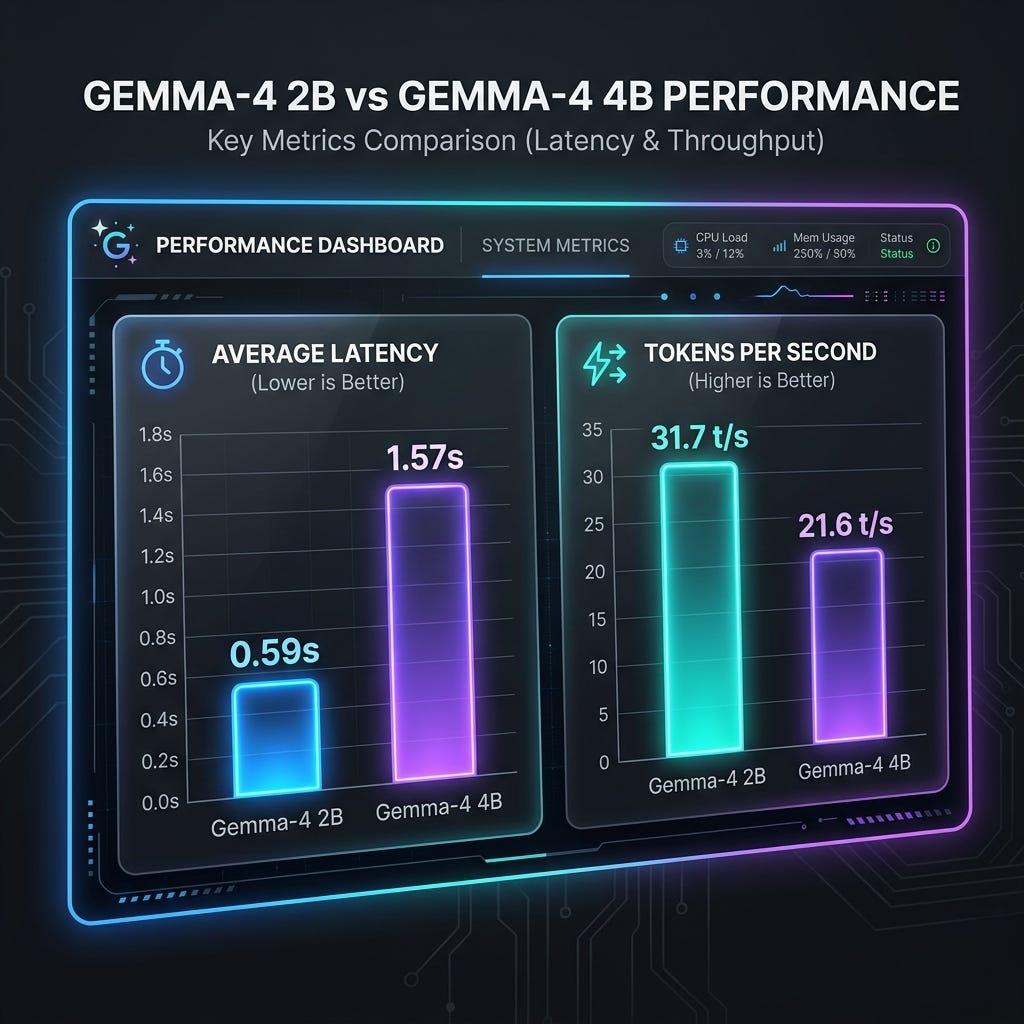
Avg Latency | 1 | 1.57s | 0.59s | 2.66x faster
(s) | | | | (2B)
| 2 | 2.68s | 0.79s | 3.39x faster
| | | | (2B)
P95 Latency | 1 | 1.57s | 0.61s | 2.57x faster
(s) | | | | (2B)
| 2 | 3.02s | 1.01s | 2.99x faster
| | | | (2B)
Req/sec | 1 | 0.64 | 1.70 | +166% (2B)
| 2 | 0.67 | 1.98 | +195% (2B)
Tokens/sec | 1 | 20.44 | 27.25 | +33.3% (2B)
| 2 | 21.57 | 31.70 | +47.0% (2B)
### Key Takeaways
1. Performance: The 2B model is significantly faster across the board,
processing requests with roughly 3x lower latency and achieving 47% more
tokens per second at concurrency 2.
2. Scalability: While the 4B model shows a sharp latency increase from
concurrency 1 to 2, the 2B model handles concurrency scaling up to 16 with
very little performance degradation (latency remaining under ~0.83s).
```
This is visualized:
#### Summary
The strategy for using MCP for local Gemma 4 deployment with Antigravity CLI was validated with a incremental step by step approach.
A minimal stdio transport MCP Server was started from Python source code and validated with Antigravity CLI running as a MCP client in the same local environment. This Python server provided all of the management tools to deploy and troubleshoot local Model deployments.
Comments
More Blog
View allkubernetesMinimalist EKS: The Easy Way
Amazon EKS manages the Kubernetes control plane, but you remain responsible for provisioning the...
J
Joaquin MenchacaaiNever forget to enter the Stern Grove lottery again!
Browser automation with Playwright, Python, GitHub Actions, and Entire to auto-enter San Francisco Stern Grove concert lotteries each week!
L
Lizzie SiegletypescriptA Free Screenshot Editor That Never Uploads Your Image
A free screenshot and image editor that runs entirely in your browser. Keeping every edit reversible and handling big phone photos, in plain TypeScript and Canvas2D.
M
Martin StarkshowdevI built a CLI to break my highlights out of Apple Books
A macOS CLI + MCP server that exports Apple Books highlights to Markdown and gives AI assistants direct access to your reading notes.
A
Andrey KorchakaiA Developer's Guide to Agent Hooks in Antigravity CLI
Motivation To be quite honest, "Hooks"—the shell commands we trigger at specific points...
T
TanaikeagentsTactical vs. Strategic Agentic AI Development — A Playbook for Developers
The Strategic Engineer: Why Writing Code Is No Longer Your Most Valuable Skill ...
A
Adewumi Saheed Adewale