
Back to Blog workspacestudio
 kubernetes
 ai
ai typescript
 showdev
 ai
ai agents
Automating Document Review with Google Workspace Studio and NotebookLM
Aryan Irani June 4, 2026
0 views
If you work in IT, Legal, or Procurement, you know the pain of the Vendor Security Review. A vendor...
If you work in IT, Legal, or Procurement, you know the pain of the Vendor Security Review. A vendor emails you a 50-page PDF outlining their privacy terms, and you have to manually cross-reference their document against your company’s internal Standard Operating Procedures (SOPs).
It is tedious, time-consuming, and highly prone to human error. What if they sneaked in a clause about 72-hour breach notifications when your policy strictly mandates 24 hours?
In this tutorial, we are going to fix that. We will build a fully automated workflow using **Google Workspace Studio** and **NotebookLM** that intercepts these documents, reads them, reasons against your internal rules, and instantly alerts you of any violations in Google Chat.
Check out the official update around the [NotebookLM and Google Workspace Studio Integration](https://workspaceupdates.googleblog.com/2026/05/notebooklm-in-workspace-studio.html).
### The Traditional Workflow:
1. Receive an email with a vendor PDF.
2. Download the PDF.
3. Open your 30-page internal compliance rulebook.
4. Spend 45 minutes using Ctrl+F and reading legalese to find discrepancies.
5. Write up a summary email of the risks and send it to the team.
### The New AI Workflow:
1. Receive an email with a vendor PDF.
2. Workspace Studio automatically saves the file, extracts the text, and asks NotebookLM to grade the vendor against your rulebook.
3. 10 seconds later, you receive a bulleted risk summary in Google Chat.
## Why Workspace Studio & NotebookLM?
This architecture is incredibly powerful because it separates the automation from the reasoning.
- **Workspace Studio** acts as the connective tissue (the hands). It handles the Gmail triggers, Drive storage, text extraction, and Chat messaging.
- **NotebookLM** acts as the grounded reasoning engine (the brain). By uploading your company SOPs directly into a Notebook, you ensure the AI's analysis is strictly grounded in your unique corporate rules, eliminating hallucinations.
## Beyond Vendor Compliance: Make it Your Own!
While we are building a **Vendor Compliance checker** today, you can tweak this exact architecture to automate dozens of other workflows simply by changing the source document in NotebookLM and adjusting the prompt:
**HR / Recruiting:** Upload your ideal Job Description to NotebookLM. Have Studio intercept emails with resumes, and output a candidate grading summary to Chat.
**Legal / Contract Review:** Upload your standard Master Services Agreement (MSA). Have Studio intercept third-party redlines and flag unapproved changes.
**Sales / RFP Responses:** Upload your product documentation. Have Studio intercept incoming RFPs and draft the initial technical responses.
## The Step-by-Step Build Guide
Let's build the workflow!
### Prerequisites: Setting up NotebookLM
Before building the automation, we need to create the "brain."
1. Head over to NotebookLM.
2. Create a new Notebook and name it "Compliance & SOPs".
3. Upload your company's baseline rulebooks (e.g., your Data Privacy Standards, ISO 27001 requirements, etc.).
> Pro Tip: You can manage up to 300 sources per notebook, with each source containing up to 500,000 words. You can dump all your governance documents here!
### Step 1: Configure the Starter (Gmail)
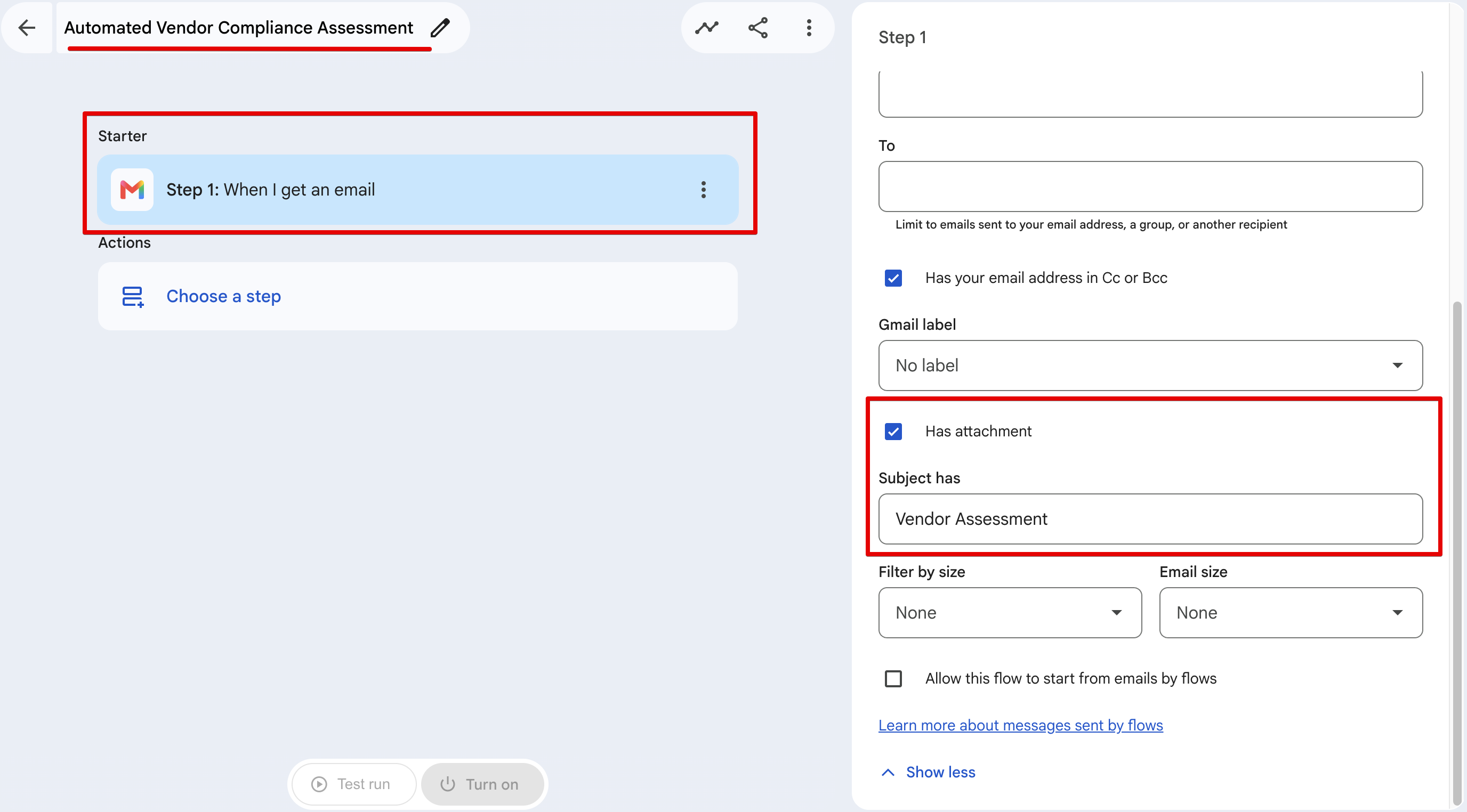
Open Google Workspace Studio and create a new flow. We need to trigger this automation whenever a new document arrives.
1. Click Choose a starter.
2. Select Gmail -> New Email.
3. Configure the trigger conditions to catch vendor emails:
- Subject includes: "Vendor Assessment"
- Has Attachment: Yes
### Step 2: Save to Drive
We need a place to securely store the raw PDF for record-keeping.
1. Click + Choose a step.
2. Select **Google Drive** -> **Save Attachment**.
3. **Destination Folder:** Select a specific, private folder in your Drive.
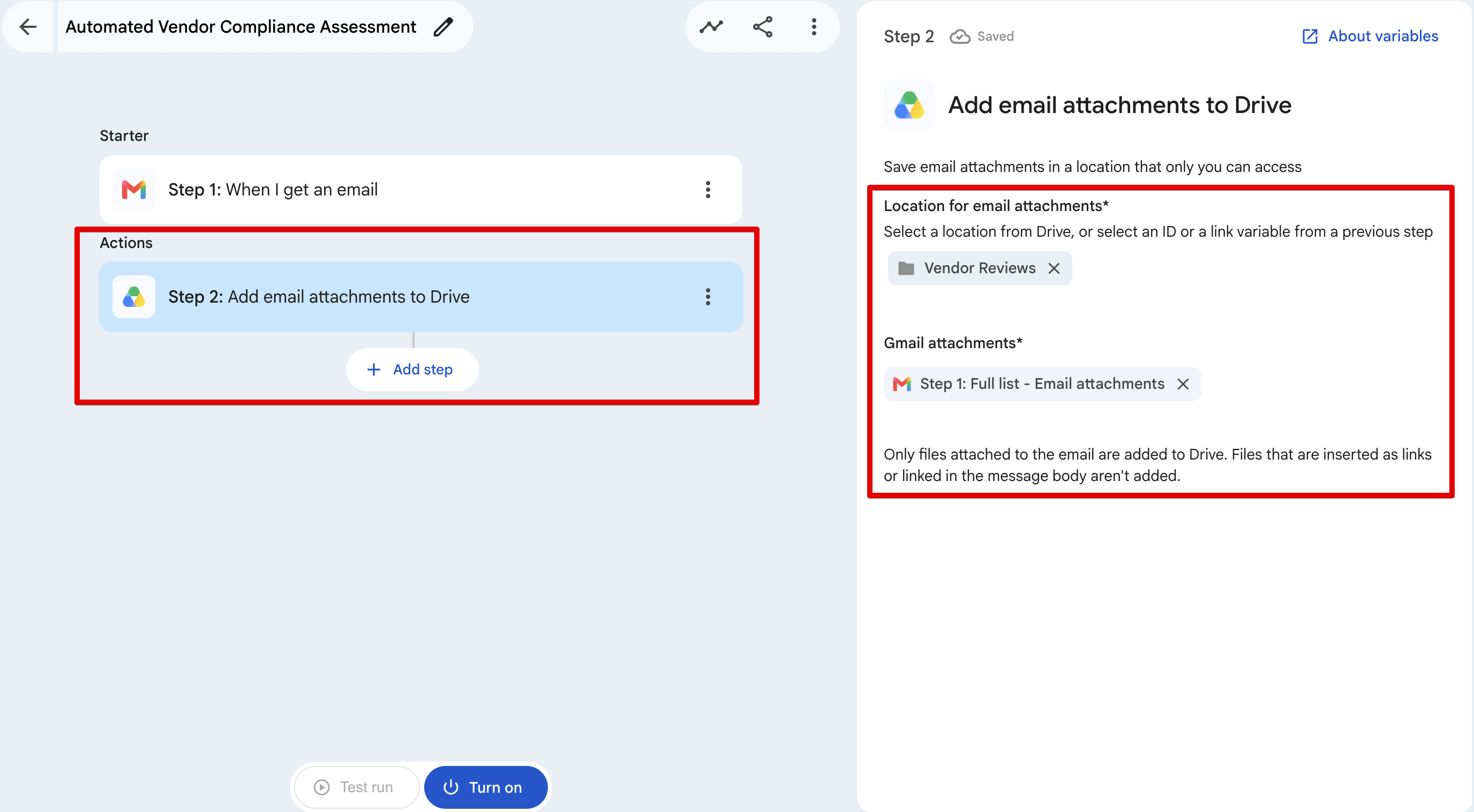
> Important Security Note: Ensure the destination folder is restricted to your team. Currently, this Studio step cannot save attachments directly to Shared Drives.
### Step 3: Extract Text (Gemini)
NotebookLM operates in a secure sandbox and cannot click external Drive links passed to it. We need to extract the raw text from the file first. Studio makes this easy with Gemini.
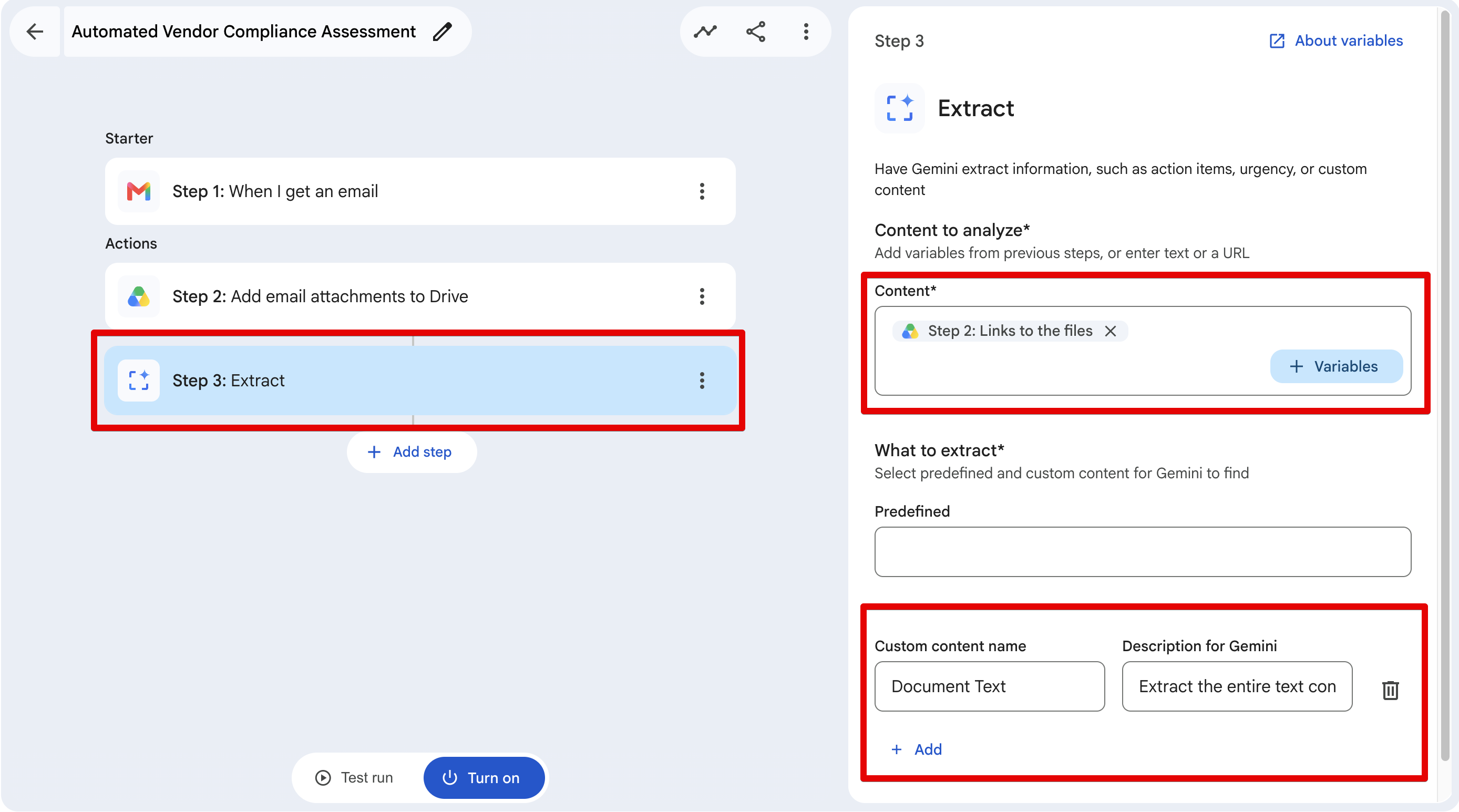
1. Click **+ Add step** and choose the **Extract** action (powered by Gemini).
2. Content to analyze: Click "Variables" and map the {{Saved File URL}} (from the Google Drive step). The Extract step natively supports reading URLs!
3. What to extract: Scroll down to the **Custom content name** section.
- **Custom content name:** Document Text
- **Description for Gemini:** Extract the entire text content of this document exactly as it is.
### Step 4: Ask NotebookLM
This is where the magic happens. We pass the extracted text to NotebookLM and ask it to find discrepancies against our SOP.
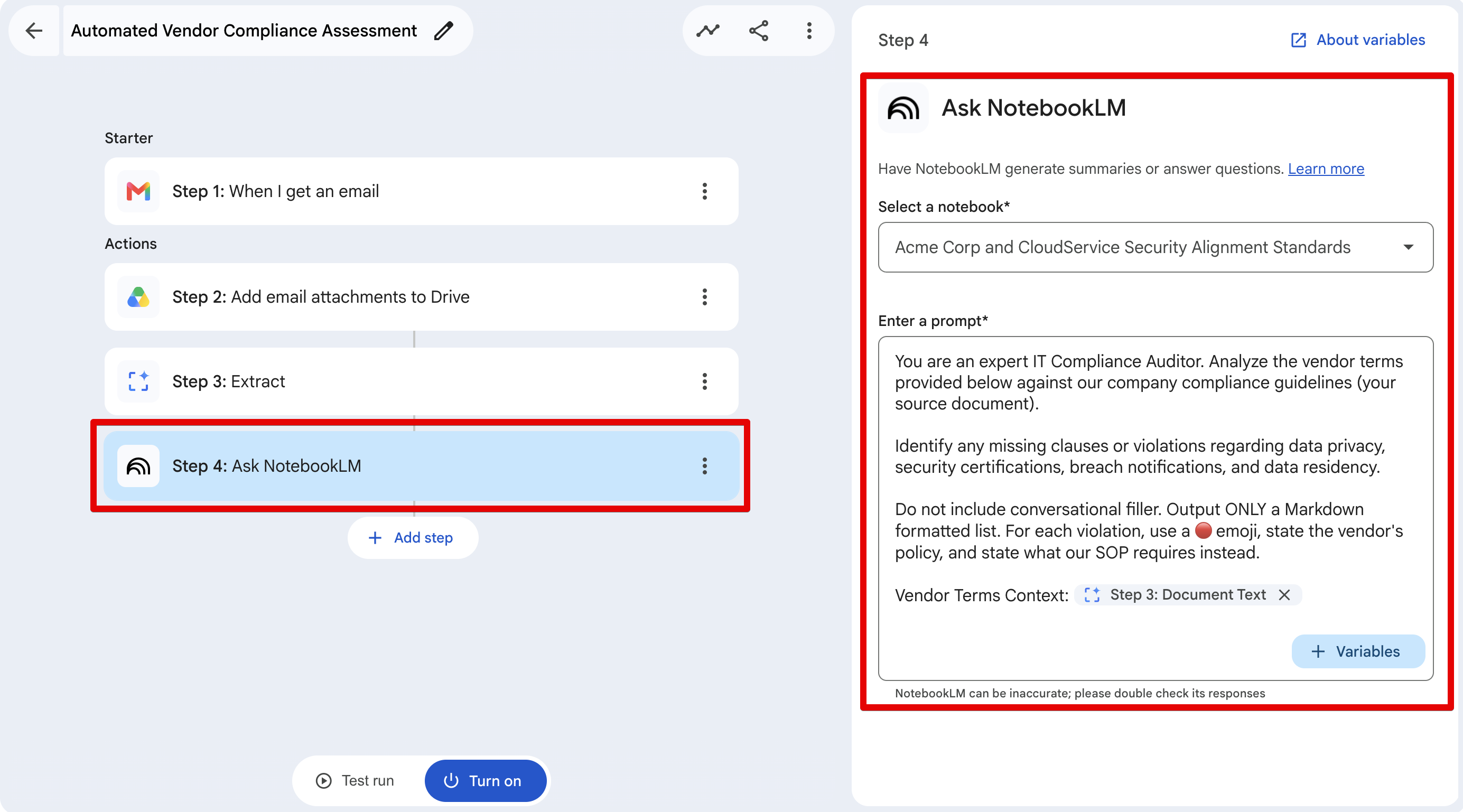
1. Click + Add step and choose **NotebookLM** -> **Ask NotebookLM**.
2. **Select a notebook:** Choose the Notebook you created earlier.
3. **Enter a prompt:** Construct your prompt like this:
> You are an expert IT Compliance Auditor. Analyze the vendor terms provided below against our company compliance guidelines (your source document).
> Identify any missing clauses or violations regarding data privacy, security certifications, breach notifications, and data residency.
> Do not include conversational filler. Output ONLY a Markdown formatted list. For each violation, use a 🔴 emoji, state the vendor's policy, and state what our SOP requires instead.
> Vendor Terms Context: {{Step3: Document Text}}
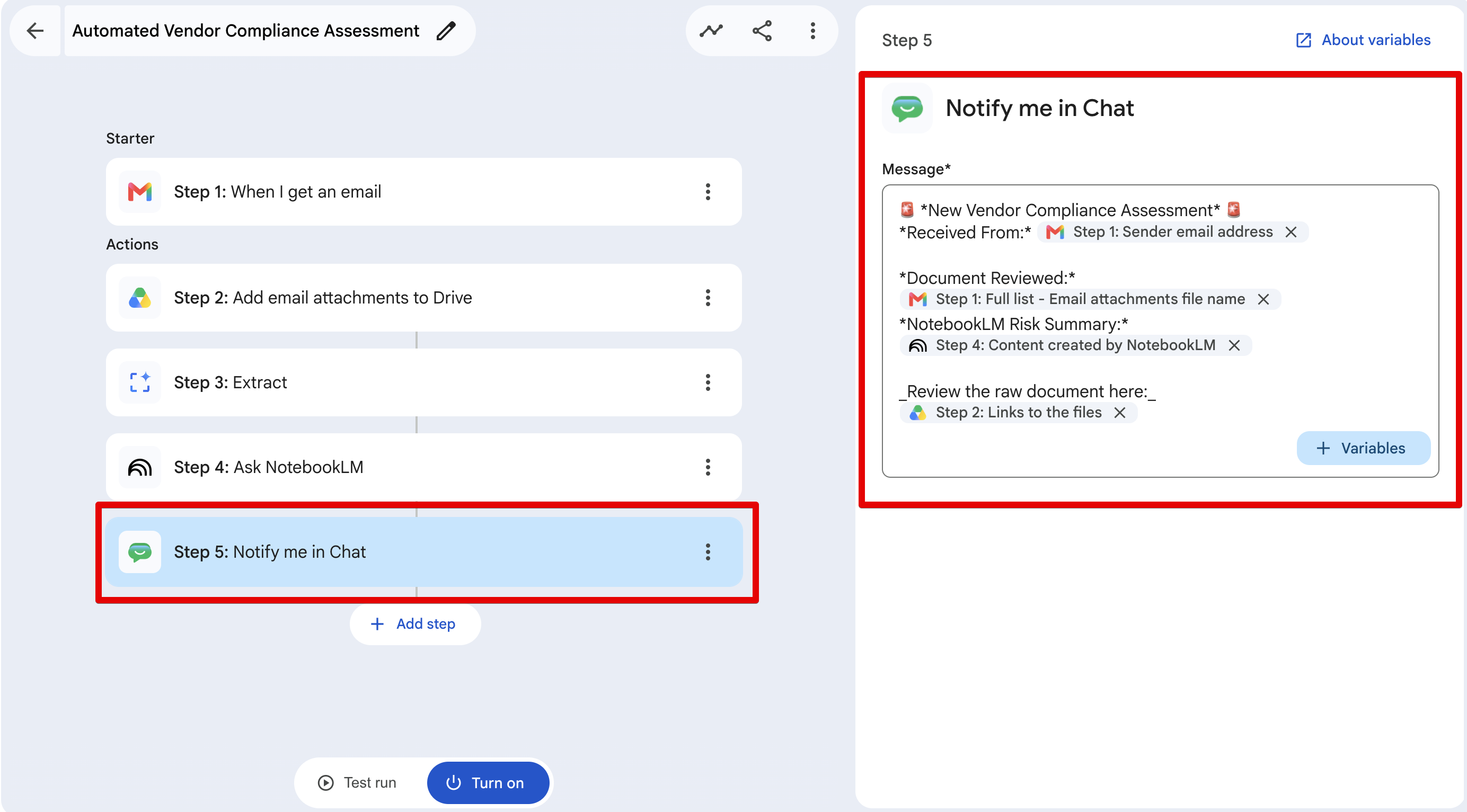
### Step 5: Send to Google Chat
Finally, we deliver this risk assessment directly to the team so they can review it without leaving their chat window.
1. Click + Add step and choose **Notify me in Chat**.
2. Message Payload: Format it nicely using markdown and variables:
> 🚨 *New Vendor Compliance Assessment* 🚨
> *Received From:* {{Step1: Sender email address}}
> *Document Reviewed:* {{Step1: Full list-Email Attachments file name}}
> *NotebookLM Risk Summary:*
> {{Step4: Content created by NotebookLM}}
> _Review the raw document here:_
> {{Step2: Links to the files}}
### Running a Test (The Moment of Truth)
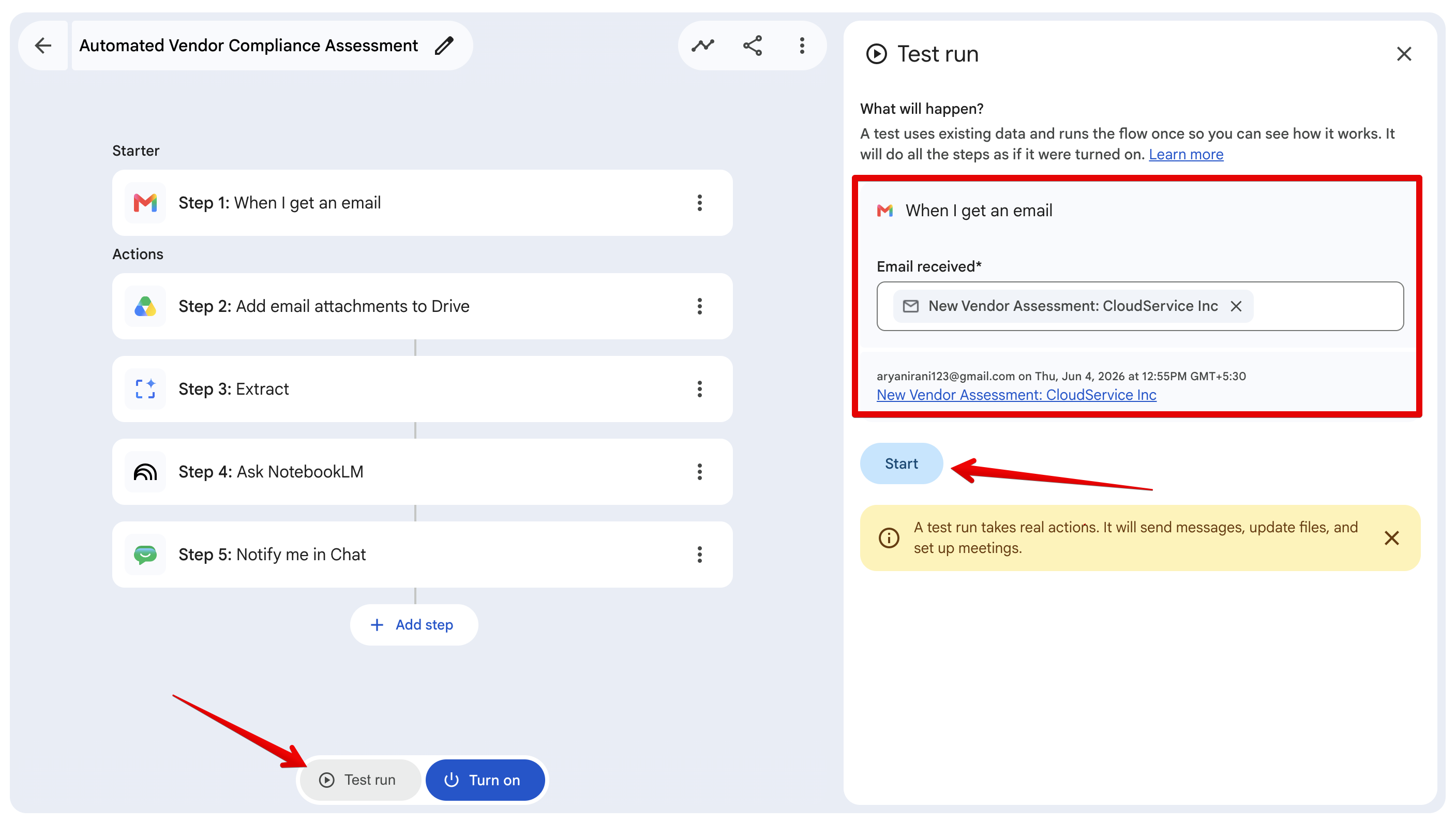
Before you fully turn the workflow on for your entire organization, Google Workspace Studio gives you a powerful way to test it using real data.
1. Send a Test Email: First, send yourself an email with a sample vendor PDF attached. Use the subject line we defined earlier (e.g., "New Vendor Assessment: CloudService Inc").
2. Open the Test Panel: At the bottom of your Studio canvas, click the Test run button.
3. Select Your Email: A side panel will appear. Studio will automatically scan your Gmail inbox and let you select the test email you just sent from a dropdown.
4. Hit Start: Click the blue Start button. Note: A test run takes real actions! It will actually save the file to Drive and post the message in Chat.
### The Result
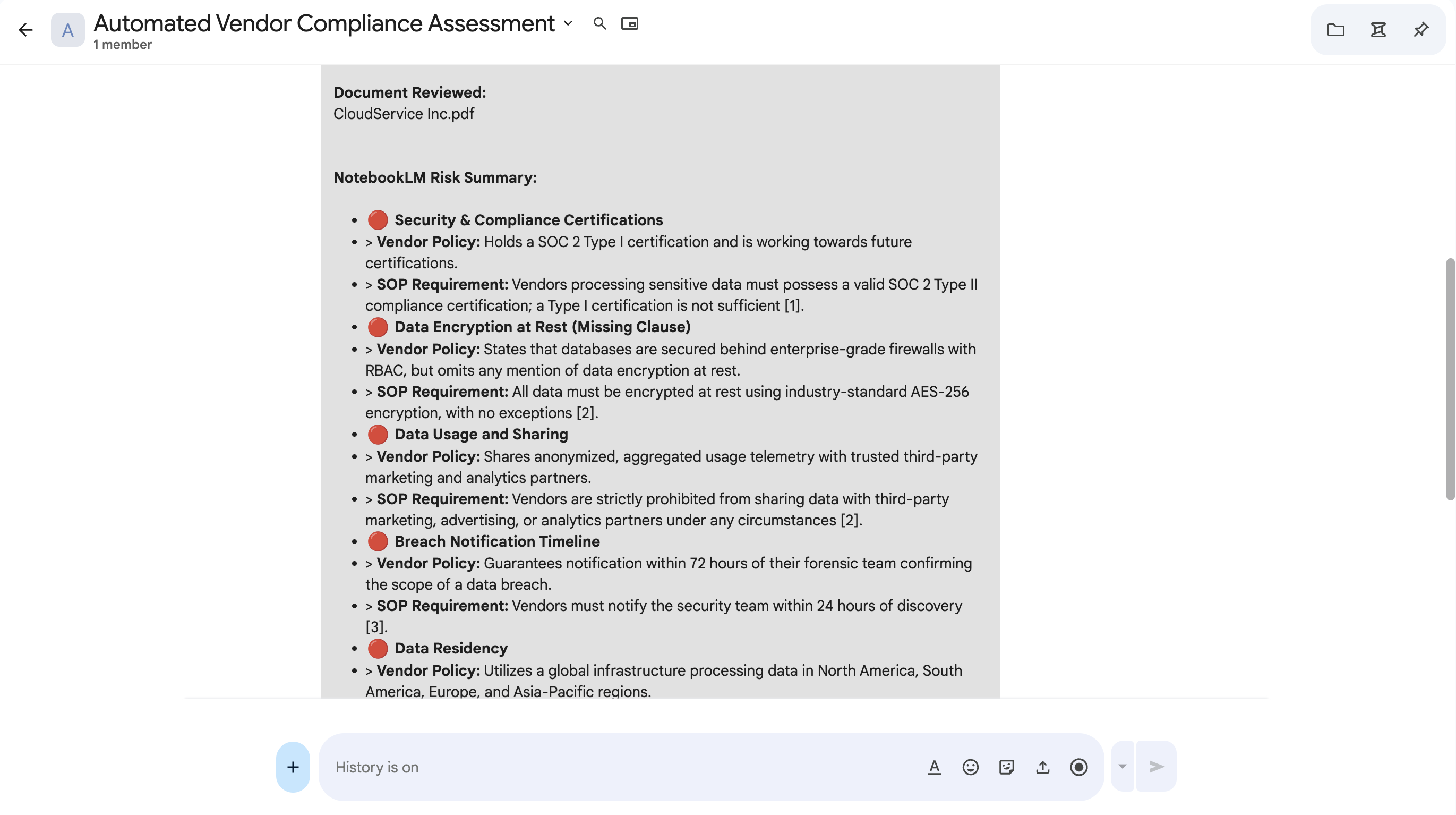
Within seconds, my Google Chat space lit up. Instead of having to read a 50-page vendor PDF manually, NotebookLM instantly output this incredibly detailed risk assessment:
## Conclusion
And just like that, we’ve bridged the gap between basic "if-this-then-that" automation and actual cognitive reasoning.
By combining the automation engine of **Google Workspace Studio** with the grounded, hallucination-free reasoning of **NotebookLM**, we didn't just automate a task—we automated a decision-making process. This architecture is highly scalable and can fundamentally change how enterprise teams handle documents, contracts, resumes, and RFPs.
What will you build? Once you have the foundation set up, the possibilities are endless. If you end up tweaking this workflow for your own HR, Legal, or Sales team, let me know in the comments below!
Comments
More Blog
View allkubernetesMinimalist EKS: The Easy Way
Amazon EKS manages the Kubernetes control plane, but you remain responsible for provisioning the...
J
Joaquin MenchacaaiNever forget to enter the Stern Grove lottery again!
Browser automation with Playwright, Python, GitHub Actions, and Entire to auto-enter San Francisco Stern Grove concert lotteries each week!
L
Lizzie SiegletypescriptA Free Screenshot Editor That Never Uploads Your Image
A free screenshot and image editor that runs entirely in your browser. Keeping every edit reversible and handling big phone photos, in plain TypeScript and Canvas2D.
M
Martin StarkshowdevI built a CLI to break my highlights out of Apple Books
A macOS CLI + MCP server that exports Apple Books highlights to Markdown and gives AI assistants direct access to your reading notes.
A
Andrey KorchakaiA Developer's Guide to Agent Hooks in Antigravity CLI
Motivation To be quite honest, "Hooks"—the shell commands we trigger at specific points...
T
TanaikeagentsTactical vs. Strategic Agentic AI Development — A Playbook for Developers
The Strategic Engineer: Why Writing Code Is No Longer Your Most Valuable Skill ...
A
Adewumi Saheed Adewale