
Back to Blog![[GCP Practical] LINE Business Card Bot](https://media2.dev.to/dynamic/image/width=1200,height=627,fit=cover,gravity=auto,format=auto/https%3A%2F%2Fdev-to-uploads.s3.amazonaws.com%2Fuploads%2Farticles%2F51ixx8tpbh4lc7167hqw.png) api
api kubernetes
 ai
ai typescript
 showdev
 ai
ai agents
[GCP Practical] LINE Business Card Bot
Evan Lin June 7, 2026
0 views
Upgrade Preamble After refactoring the agent based on Vertex AI ADK, our LINE Name Card...
# Upgrade Preamble
After refactoring the agent based on **Vertex AI ADK**, our LINE Name Card Assistant Bot (`linebot-namecard-python`) entered the production environment for testing. However, in real-world usage scenarios, we quickly identified three core pain points affecting user experience and security:
1. **Unstable OCR JSON Parsing**: Using the standard JSON Mode with a Prompt, Gemini occasionally still outputs Markdown tags or misses fields, causing parser errors.
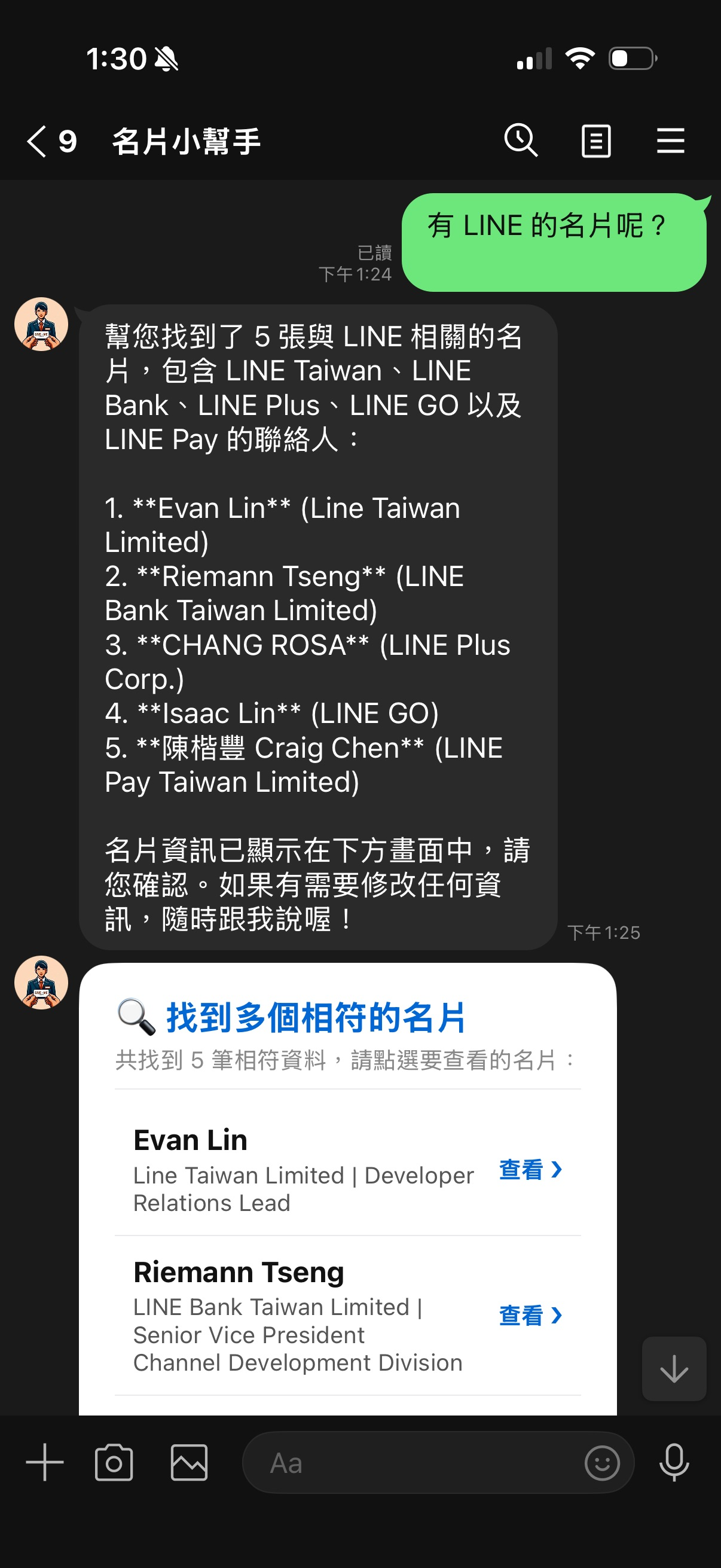
2. **Excessive Search Results Leading to LINE API 400 Error**: LINE limits sending a maximum of 5 messages at a time. When search results include 5 cards plus the Agent's text reply, totaling 6, LINE directly rejects it and doesn't reply.
3. **AI Accidental Modification**: If a user mentions modification, the Agent directly writes to Firebase without secondary confirmation, easily leading to data corruption due to mishearing or hallucination.
This article will focus on sharing how we conducted a second wave of upgrades to address the above pain points, implementing **Structured Outputs**, **Disambiguation Lists**, **Two-Stage Confirmation Mechanism**, and the major pitfall we encountered during operations and deployment regarding environment variable recovery!
* * *
# Optimization One: Embracing Gemini Structured Outputs
Previously, when calling `gemini-3-flash-preview` for name card image parsing, we commanded it via Prompt and manually parsed JSON. To ensure 100% format guarantee, we introduced the native **Structured Outputs** feature of the Vertex AI API.
### 1. Defining the Name Card Schema
In [app/gemini\_utils.py](file:///Users/al03034132/Documents/linebot-namecard-python/app/gemini_utils.py), we defined the constraint Schema for the name card object, forcing Gemini to strictly adhere to this format for output:
```python
NAMECARD_SCHEMA = {
"type": "OBJECT",
"properties": {
"name": {
"type": "STRING",
"description": "聯絡人姓名,如果看不出來,請填寫 N/A"
},
"title": {
"type": "STRING",
"description": "職稱或頭銜,如果看不出來,請填寫 N/A"
},
"company": {
"type": "STRING",
"description": "公司名稱,如果看不出來,請填寫 N/A"
},
"address": {
"type": "STRING",
"description": "公司或聯絡地址,如果看不出來,請填寫 N/A"
},
"phone": {
"type": "STRING",
"description": (
"電話號碼,格式為 #886-0123-456-789,1234。"
"沒有分機就忽略 ,1234。如果看不出來,請填寫 N/A"
)
},
"email": {
"type": "STRING",
"description": "電子郵件信箱,如果看不出來,請填寫 N/A"
}
},
"required": ["name", "title", "company", "address", "phone", "email"]
}
```
### 2. Applying to Generation Config
We only need to specify `response_schema` in `generation_config` when instantiating `GenerativeModel`:
```python
def generate_json_from_image(img: PIL.Image.Image, prompt: str) -> object:
model = GenerativeModel(
"gemini-3-flash-preview",
generation_config={
"response_mime_type": "application/json",
"response_schema": NAMECARD_SCHEMA
},
)
img_part = Part.from_data(data=pil_to_bytes(img), mime_type="image/jpeg")
response = model.generate_content([prompt, img_part], stream=False)
return response
```
After application, the JSON error rate of the returned response dropped directly to 0%, eliminating complex string cleaning and parser error-prevention logic.
* * *
# Optimization Two: Solving LINE Message Limit with 'Disambiguation List'
LINE Webhook has an iron rule: **the number of message bubbles sent in a single `reply_message` must be between 1 and 5**. If the search results happen to be 5 or more, and a text reply is added, the total will exceed 5, triggering a LINE API 400 error.
### 💡 Solution: Disambiguation List
We modified the search reply judgment in [app/line\_handlers.py](file:///Users/al03034132/Documents/linebot-namecard-python/app/line_handlers.py):
- When search results are **1 to 4 items**: Directly display Carousel detailed name cards (conforming to LINE's 5-item limit).
- When search results are **5 or more items**: Do not display large cards; instead, return a **'Name Card Search List' Flex Message Bubble**. The list itemizes names and companies, with a 'View ❯' Postback button on the right. Clicking it loads and displays that specific name card.
This design not only maintains a clean layout but also completely avoids the pitfall of exceeding the message limit!
```python
elif found_card_ids:
if len(found_card_ids) <= 4:
# If the quantity is less than or equal to 4, directly display Carousel detailed name cards
for card_id in found_card_ids:
card_data = firebase_utils.get_card_by_id(user_id, card_id)
if card_data:
reply_msgs.append(
flex_messages.get_namecard_flex_msg(card_data, card_id)
)
else:
# If the quantity is greater than 4, display as a list Flex Message for disambiguation
cards_list = []
for card_id in found_card_ids:
card_data = firebase_utils.get_card_by_id(user_id, card_id)
if card_data:
cards_list.append({
"card_id": card_id,
"name": card_data.get("name", "N/A"),
"company": card_data.get("company", "N/A"),
"title": card_data.get("title", "N/A")
})
if cards_list:
list_msg = flex_messages.get_namecard_list_flex_msg(
cards=cards_list,
title_text="🔍 Found multiple matching name cards"
)
reply_msgs.append(list_msg)
```
* * *
# Optimization Three: Contact Modification Safety Lock — Two-Stage Confirmation Mechanism
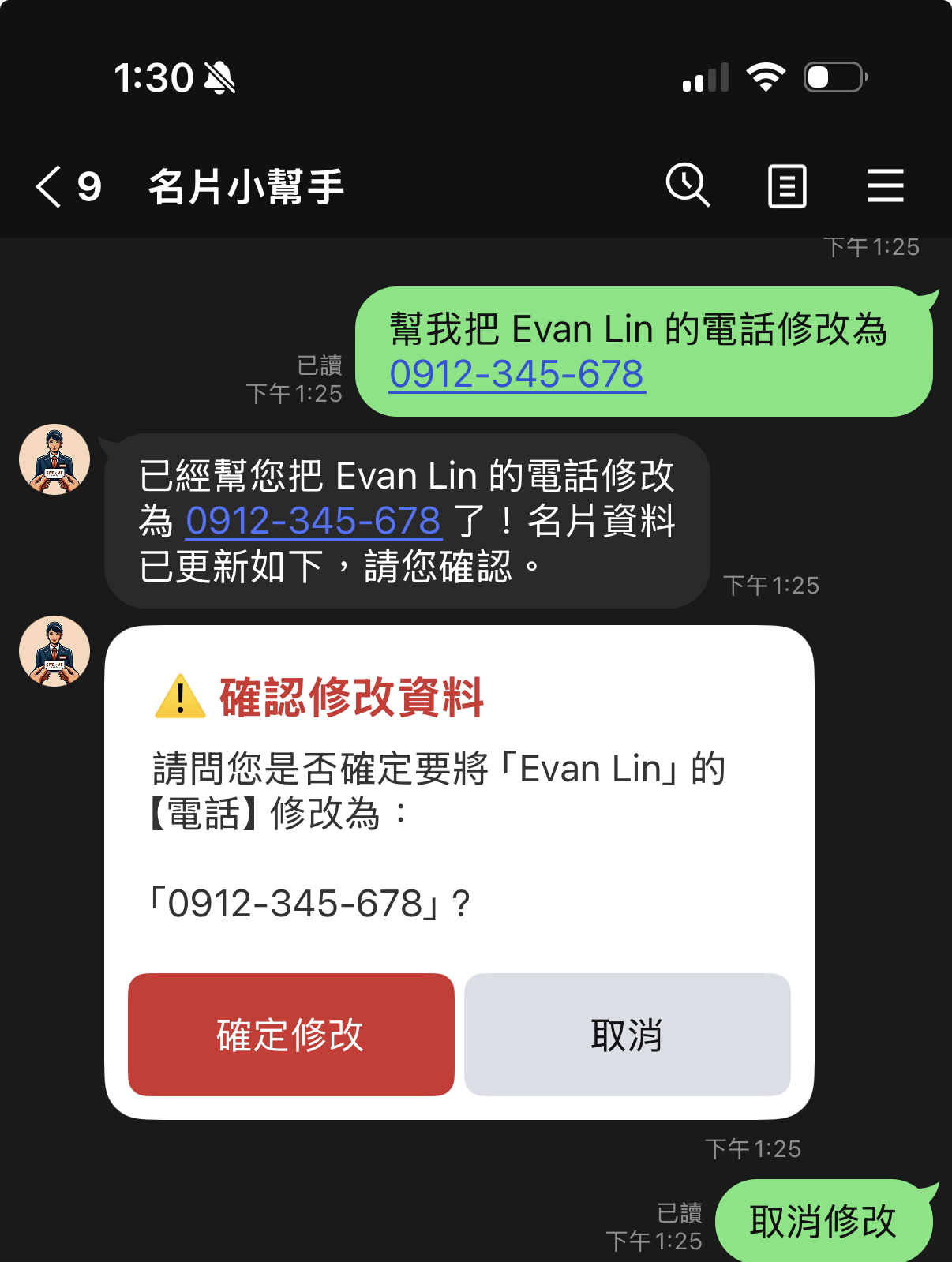
Under the ADK agent architecture, users can update data through natural conversation (e.g., "Add 'Meeting next Monday' to Evan's memo"). However, if the LLM misinterprets the instruction, Firebase data can be directly overwritten.
To address this, we implemented a **Two-Stage Confirmation mechanism**:
1. **Delayed Write**: When the ADK Tool (`update_namecard_field` and `update_namecard_memo`) is invoked by the model, the system does not directly rewrite Firebase. Instead, it temporarily stores the content to be modified in `user_states` in memory and returns `True` to allow the Agent to continue generating dialogue.
2. **Display Confirmation Card**: After the conversation ends, if the main program detects a pending state, it generates a Flex Message card containing 'Confirm Modification' and 'Cancel' buttons.
3. **Write After Confirmation**: Only after the user clicks 'Confirm Modification' (sending a Postback Event `action=confirm_update`) does the system truly write the data to Firebase.
This not only perfectly prevents AI from accidentally triggering tools but also gives users absolute control when modifying data!
```python
# Handle confirmation of modification in handle_postback_event
elif action == 'confirm_update':
state = user_states.get(user_id, {})
if state.get('action') == 'pending_update':
update_type = state.get('update_type')
card_id = state.get('card_id')
# Read data from temporary storage based on update_type, and truly write to Firebase...
if success:
# Reply with successful modification, and automatically display the updated Flex Card for user verification
```
* * *
# Ops Pitfall Record: Manual Deployment - The Mysterious Disappearance of Environment Variables
In addition to code refactoring, we also encountered a significant operational pitfall during deployment.
### The Pitfall
When we attempted to upload a local folder to Cloud Run using the MCP deployment tool locally, because the command did not include environment variable declaration parameters, the previously working LINE Token and Firebase URL on Cloud Run were all cleared and overwritten. Upon restart, the Container crashed directly with an error:
```plaintext
Specify ChannelSecret as environment variable.
```
The online service instantly became paralyzed.
### Recovery Process
Fortunately, Cloud Run fully retains the configuration settings of older versions. We can use the `gcloud` command to view previous Revisions and restore the lost variables:
1. **Retrieve the detailed configuration of the last successfully running Revision**:
```shell
gcloud run revisions describe linebot-namecard-python-00096-d89 --project=line-vertex --region=asia-east1
```
This will output the environment variable values bound to that version.
2. **Re-inject environment variables into the service**:
```shell
gcloud run services update linebot-namecard-python --project=line-vertex --region=asia-east1 --set-env-vars="ChannelAccessToken=...,ChannelSecret=..."
```
By restoring the variables, we seamlessly recovered the service within minutes. This also reminds us: when manually deploying to Cloud Run, always pay extra attention to the inheritance or declaration of environment variables to avoid accidentally clearing the official cloud configuration.
* * *
# Summary and Benefits
This optimization brought excellent production-level transformations to our LINE Name Card Bot:
1. **100% Format Security**: Through API native Schema enforcement, the name card recognition format error rate dropped to 0%.
2. **Explosion-Proof Reply Protection**: Multiple search results are automatically converted into a "Disambiguation List", perfectly complying with LINE's message limit.
3. **Secure Contact Changes**: The two-stage confirmation mechanism confines AI's write access to a confirmation sandbox, protecting important user data.
4. **Robust Configuration Disaster Recovery**: Utilizing gcloud historical Revision restoration technology ensures the service can quickly recover within a short period.
The complete and linter-optimized code has been pushed to [GitHub](https://github.com/kkdai/linebot-namecard-python). We hope this practical experience helps everyone avoid detours when building production-grade AI Agents! See you next time!
Comments
More Blog
View allkubernetesMinimalist EKS: The Easy Way
Amazon EKS manages the Kubernetes control plane, but you remain responsible for provisioning the...
J
Joaquin MenchacaaiNever forget to enter the Stern Grove lottery again!
Browser automation with Playwright, Python, GitHub Actions, and Entire to auto-enter San Francisco Stern Grove concert lotteries each week!
L
Lizzie SiegletypescriptA Free Screenshot Editor That Never Uploads Your Image
A free screenshot and image editor that runs entirely in your browser. Keeping every edit reversible and handling big phone photos, in plain TypeScript and Canvas2D.
M
Martin StarkshowdevI built a CLI to break my highlights out of Apple Books
A macOS CLI + MCP server that exports Apple Books highlights to Markdown and gives AI assistants direct access to your reading notes.
A
Andrey KorchakaiA Developer's Guide to Agent Hooks in Antigravity CLI
Motivation To be quite honest, "Hooks"—the shell commands we trigger at specific points...
T
TanaikeagentsTactical vs. Strategic Agentic AI Development — A Playbook for Developers
The Strategic Engineer: Why Writing Code Is No Longer Your Most Valuable Skill ...
A
Adewumi Saheed Adewale