
Back to Blog mcpserver
 kubernetes
 ai
ai typescript
 showdev
 ai
ai agents
Google Antigravity SDK: The developer guide
Karl Weinmeister June 10, 2026
0 views
The Google Antigravity SDK is a Python framework for building and running autonomous agents. It...
---
title: Google Antigravity SDK: The developer guide
published: true
date: 2026-06-09 15:01:34 UTC
tags: mcpserver,googlegemini,python,aiagent
canonical_url: https://www.linkedin.com/pulse/google-antigravity-sdk-developer-guide-karl-weinmeister-nymsc
cover_image: https://cdn-images-1.medium.com/max/1024/1*ew_HgMaHiNf6tcYBBnH-jQ.png
---
The [Google Antigravity SDK](https://antigravity.google/docs/sdk-overview?utm_campaign=CDR_0x2b6f3004_default_b521271009&utm_medium=external&utm_source=blog) is a Python framework for building and running autonomous agents. It decouples your agent’s logic from where it runs, letting you focus on what the agent does while the SDK manages execution and state.
The Python SDK interfaces with a bundled Go harness over WebSockets. The local Go harness runs the core agentic loop and manages sandboxed tool execution. Python acts as the control plane where you configure tools, safety policies, and lifecycle hooks.
This guide outlines the SDK’s architecture one layer at a time, referencing the official [source repository](https://github.com/google-antigravity/antigravity-sdk-python/tree/main/google/antigravity). Note that the SDK is currently pre-v1.0 and subject to change.
### Where Antigravity fits in Google’s AI stack
Google’s AI stack offers multiple levels of abstraction for building with Gemini. Choosing the right one depends on how much control you need over the execution loop.
- **The** [**Gemini API**](https://ai.google.dev/gemini-api/docs) is stateless. You make an API call and get a response. You manage the entire loop.
- The [**Agent Development Kit**](https://google.github.io/adk-docs/) sits one level up. With the ADK, you design the event loops, pick the foundation models, and control how agents route messages to each other.
- The [**Antigravity SDK**](https://antigravity.google/product/antigravity-sdk) is a pre-packaged runtime tightly integrated with [Gemini](https://ai.google.dev/?utm_campaign=CDR_0x2b6f3004_default_b521271009&utm_medium=external&utm_source=blog). You don’t build the agentic loop; you’re given one. Your role is to govern it.
### Getting started
Install the package with `pip install google-antigravity`, ensuring that `GEMINI_API_KEY` is set in your environment. Then you’re ready to build your first agent!
```python
import asyncio
from google.antigravity import Agent, LocalAgentConfig
# 1. Define a tool function with a descriptive docstring
async def get_weather(location: str) -> str:
"""Gets the current weather for a location."""
return f"The weather in {location} is sunny, 72°F."
async def main():
# 2. Register the tool in the agent configuration
config = LocalAgentConfig(
system_instructions="You are a helpful weather assistant.",
tools=[get_weather]
)
# 3. Initialize the agent and query it
async with Agent(config) as agent:
response = await agent.chat("How's the weather in San Diego?")
async for token in response:
print(token, end="", flush=True)
asyncio.run(main())
```
What’s happening here? The Agent context manager starts the Go harness, establishes a WebSocket connection, and registers the `get_weather` function as an available tool. The model automatically decides when to invoke it based on the user’s prompt. When the async with block exits, the harness shuts down and all connections are closed.
### The three-layer architecture
The SDK separates concerns into three layers, each with a distinct responsibility.
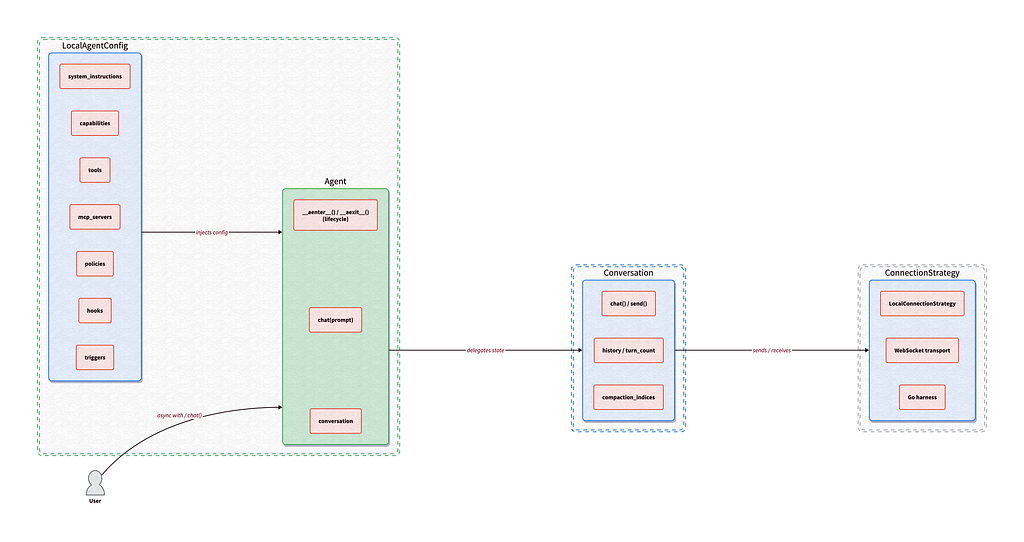
**Layer 1:** [**Agent**](https://github.com/google-antigravity/antigravity-sdk-python/blob/main/google/antigravity/agent.py) **and** [**LocalAgentConfig**](https://github.com/google-antigravity/antigravity-sdk-python/tree/main/google/antigravity/types.py). The high-level entry point. Manages configuration, session lifecycle, tool wiring, hooks, and triggers. This is where you spend most of your time.
**Layer 2:** [**Conversation**](https://github.com/google-antigravity/antigravity-sdk-python/tree/main/google/antigravity/conversation). The stateful session manager. Wraps the connection and handles message history accumulation, context window compaction, and token usage tracking (including Gemini’s “thinking tokens”).
**Layer 3:** [**Connection**](https://github.com/google-antigravity/antigravity-sdk-python/tree/main/google/antigravity/connections) **and** [**ConnectionStrategy**](https://github.com/google-antigravity/antigravity-sdk-python/tree/main/google/antigravity/connections). The transport abstraction. For local development, LocalConnection communicates via WebSockets with the Go harness. This layer is what makes it possible to eventually swap in remote backends without changing your application code.
Now let’s look at what you can build on top of those three layers.
### Tools and MCP
#### Built-in tools
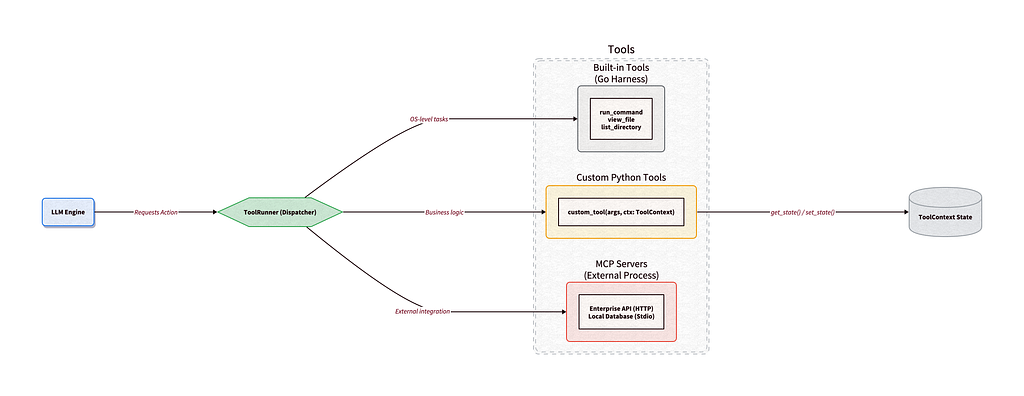
The Go harness ships with optimized native tools for standard OS interactions: `view_file`, `edit_file`, `create_file`, `list_directory`, `search_directory`, `run_command`, and `generate_image`. These run inside the harness process, not in Python, so they’re fast and sandboxed.
#### Custom Python tools
If you need the agent to call your business logic, you write a standard Python function. The SDK’s ToolRunner uses reflection to inspect type hints and parse docstrings, generating the Gemini FunctionDeclaration automatically.
```python
async def lookup_customer_tier(email: str) -> str:
"""Looks up a customer's subscription tier.
Args:
email: The customer's registered email address.
"""
tier = await db.query(email)
return f"The customer is on the {tier} plan."
config = LocalAgentConfig(tools=[lookup_customer_tier])
```
#### ToolContext for stateful tools
Sometimes a tool needs to remember things across invocations in the same conversation, like a pagination cursor or a running counter. Passing that state through the LLM wastes tokens and bloats the context window.
The SDK provides [ToolContext](https://github.com/google-antigravity/antigravity-sdk-python/blob/main/google/antigravity/tools/tool_context.py), a conversation-scoped key-value store. Add `ctx: ToolContext` to your function signature and the SDK injects it automatically. The model never sees the parameter.
```python
from google.antigravity.tools.tool_context import ToolContext
def process_logs(batch_size: int, ctx: ToolContext) -> str:
"""Processes the next batch of server logs."""
cursor = ctx.get_state("log_cursor", 0)
logs = fetch_logs(offset=cursor, limit=batch_size)
ctx.set_state("log_cursor", cursor + batch_size)
return logs
```
#### MCP integration
The SDK has native support for the [Model Context Protocol](https://modelcontextprotocol.io/) using both Stdio transport and Streamable HTTP. Point your agent at an MCP server and it for access to its exposed tools.
Because MCP tools are integrated at the ToolRunner level, they’re governed by the exact same safety policies as built-in and custom tools.
### Lifecycle hooks
The SDK treats agent lifecycles through composable middleware using [hooks](https://github.com/google-antigravity/antigravity-sdk-python/tree/main/google/antigravity/hooks).
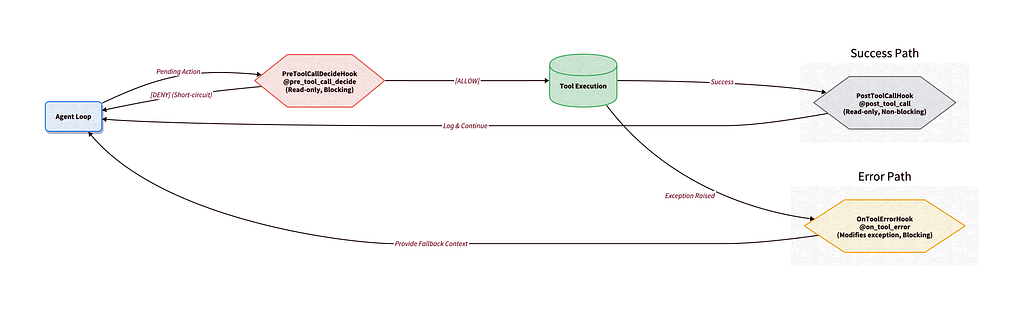
A common security flaw in custom agent frameworks is the [Time-Of-Check to Time-Of-Use](https://en.wikipedia.org/wiki/Time-of-check_to_time-of-use), or TOCTOU, vulnerability. A security hook approves a tool call’s arguments, then a subsequent middleware mutates those arguments before execution. Antigravity prevents this by categorizing hooks into three archetypes, enforced by the type system.
**Decide hooks** are read-only and blocking. They inspect incoming data (like a pending tool call) and return HookResult(allow=True/False). They can’t modify the payload. If any Decide hook denies, execution short-circuits. Example: [PreToolCallDecideHook](https://github.com/google-antigravity/antigravity-sdk-python/tree/main/google/antigravity/hooks).
**Inspect hooks** are read-only and non-blocking. They receive data after an event and run concurrently. They can’t block the main flow. Example: `PostToolCallHook` (writing tool outputs to external systems).
**Transform hooks** are modifying and blocking. They receive data, mutate it, and pass the transformed payload back. Example: `OnToolErrorHook`.
The `OnToolErrorHook` is particularly useful. When a tool throws an exception, instead of crashing the entire loop or dumping a raw Python traceback into the model’s context, you intercept the error and feed strategic recovery guidance:
```python
from typing import Optional
from google.antigravity.hooks import hooks
class FallbackHook(hooks.OnToolErrorHook):
"""Intercepts tool errors and returns recovery guidance."""
async def run(self, context: hooks.HookContext, data: Exception) -> Optional[str]:
if isinstance(data, ValueError):
return (
"[System: Invalid parameters. "
"Try 'search_directory' to find the correct ID.]"
)
return None
config = LocalAgentConfig(hooks=[FallbackHook()])
```
You can stack these hook types together to build a middleware pipeline. For example, you could include rate-limiting via Decide hooks, audit logging via Inspect hooks, and crash recovery via Transform hooks.
### Safety policies
Giving an autonomous agent access to your system requires guardrails. The SDK employs a declarative, priority-based [policy engine](https://github.com/google-antigravity/antigravity-sdk-python/tree/main/google/antigravity/hooks) that evaluates every single action at the runtime hook level.
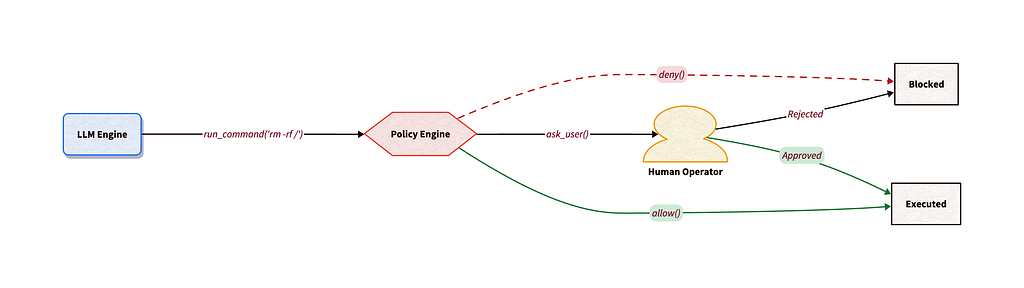
Out of the box, the SDK takes a strict security stance. If you spin up an agent with zero configuration, it defaults to `confirm_run_command()`: the agent can read and write files, but shell execution requires explicit approval.
Policies evaluate top-down using a priority model. You configure rules with `policy.allow()`, `policy.deny()`, and `policy.ask_user()`.
```python
from google.antigravity import Agent, LocalAgentConfig
from google.antigravity.hooks import policy
policies = [
# Block dangerous arguments instantly
policy.deny(
"run_command",
when=lambda args: "rm " in args.get("CommandLine", "")
),
# Ask the human for any other shell command
policy.ask_user("run_command", handler=my_cli_prompt_function),
# Allow safe tools silently
policy.allow("view_file"),
# Deny everything else
policy.deny("*")
]
config = LocalAgentConfig(policies=policies)
```
#### Human-in-the-loop
The `policy.ask_user()` builder pauses the execution loop, invokes your custom handler, and waits for approval before continuing.
#### Disabling vs. denying
There’s an important distinction between disabling vs denying tools. `CapabilitiesConfig.disabled_tools` physically removes a tool’s JSON Schema from the context window before sending the prompt to Gemini. The model doesn’t know the tool exists, and you save input tokens. `policy.deny()` keeps the tool visible but blocks it at runtime. The model attempts to use it, gets an error message, and learns why it was blocked. It costs tokens for the failed attempt, but enables dynamic, argument-based restrictions and lets the model adapt.
### Background triggers
True autonomous systems monitor their environment and alert you proactively. The SDK’s [triggers](https://github.com/google-antigravity/antigravity-sdk-python/tree/main/google/antigravity/triggers) are long-lived async tasks that run alongside the agent session, reacting to external events.
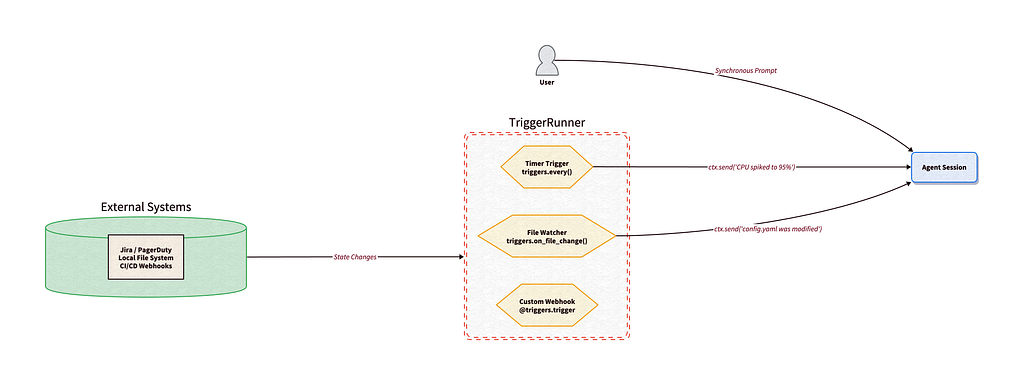
When you start an Agent context, the TriggerRunner spawns a separate asyncio task for each registered trigger. A crashing trigger won’t take down the agent. A busy agent won’t block the triggers.
Each trigger receives a TriggerContext. When it notices something in the outside world, it calls `ctx.send(“Message”)` to inject a notification into the agent’s conversation history. The agent reacts as if the user had typed it.
```python
from google.antigravity import Agent, LocalAgentConfig
from google.antigravity.triggers import every, TriggerContext
async def monitor_queue(ctx: TriggerContext):
tickets = await fetch_pagerduty_alerts()
if tickets:
await ctx.send(f"[System Alert]: {len(tickets)} new P0 alerts detected.")
config = LocalAgentConfig(triggers=[every(60, monitor_queue)])
```
The SDK also ships `triggers.on_file_change()` for OS-level file watching (great for local coding assistants) and `@triggers.trigger` for custom async listeners like GitHub webhook receivers.
### Streaming and thoughts
When an agent is executing a multi-step task, waiting for a final output can make the application feel frozen.
The SDK addresses this by streaming execution events in real time. Instead of blocking, `await agent.chat()` immediately returns a `ChatResponse` object. This object acts as a shared, memory-cached buffer.
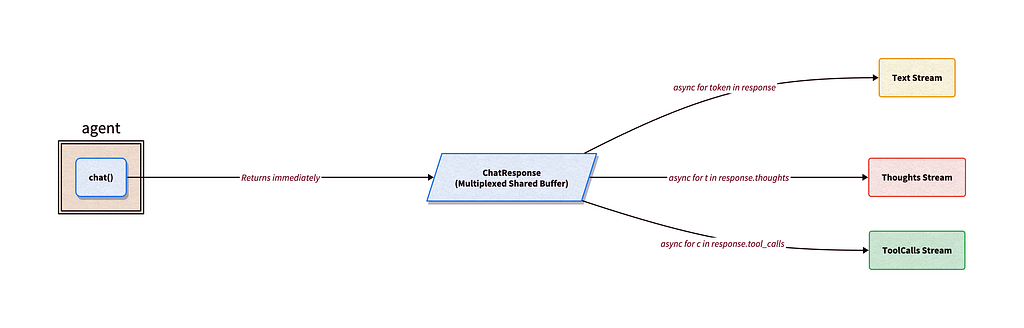
Unlike standard Python generators, which are exhausted once read, ChatResponse lets you attach multiple independent cursors to the same stream. This allows you to route different aspects of the same agent turn concurrently:
- **Main text stream** (e.g., rendering markdown chunks to your frontend UI)
- **Chain-of-thought stream** (e.g., logging the agent’s internal reasoning to a developer console)
- **Tool-call stream** (e.g., displaying a live status widget as the agent invokes tools)
```python
response = await agent.chat("Write a short story.")
# Stream raw text tokens
async for token in response:
print(token, end="", flush=True)
```
The response.thoughts stream exposes the model’s Chain-of-Thought reasoning in real-time. Token costs are tracked with `response.usage_metadata.thoughts_token_count`.
The `response.tool_calls` stream yields strongly-typed ToolCall objects as soon as the agent dispatches them, so your UI can render updates instantly.
### Subagents
One of the most common pitfalls in autonomous agents is context window bloat. The SDK solves this through hierarchical delegation.

Instead of doing all the work in a single thread, the main agent invokes the built-in `start_subagent` tool. This prompts the harness to spin up a fresh agent session with a clean context window to handle the subtask in isolation. The subagent works through the problem using its own tools and MCP servers, then shuts down. It returns only a synthesized summary of its findings, keeping the main agent’s context window clean and focused on high-level orchestration.
```python
from google.antigravity import Agent, LocalAgentConfig
config = LocalAgentConfig(
system_instructions="You are a lead developer. Delegate heavy research to subagents."
)
async with Agent(config) as agent:
prompt = (
"Use a subagent to research the /docs directory and "
"write a synthesized lesson plan based on what it finds."
)
response = await agent.chat(prompt)
print(await response.text())
```
To prevent privilege escalation, safety policies and hooks cascade hierarchically. If the main agent is restricted from running terminal commands, those same restrictions automatically apply to any subagents it spawns. You can also intercept and inspect subagent lifecycles using the same hook middleware (PreToolCallDecideHook and PostToolCallHook) that governs regular tool calls.
### What will you build?
Building an agent loop is relatively straightforward, but securing and monitoring it in production is where challenges typically begin. The Antigravity SDK bridges this gap by decoupling your agent’s logic from its execution environment.
To get started, review the [SDK overview docs](https://antigravity.google/docs/sdk-overview?utm_campaign=CDR_0x2b6f3004_default_b521271009&utm_medium=external&utm_source=blog) and clone the [source repository](https://github.com/google-antigravity/antigravity-sdk-python). Then try out one of the [examples](https://github.com/google-antigravity/antigravity-sdk-python/tree/main/examples).
Stay tuned for the next agent I’ll build with the Antigravity SDK! Share with me what you’re building on [X](https://x.com/kweinmeister), [LinkedIn](https://www.linkedin.com/in/karlweinmeister/), or [Bluesky](https://bsky.app/profile/kweinmeister.bsky.social).
Comments
More Blog
View allkubernetesMinimalist EKS: The Easy Way
Amazon EKS manages the Kubernetes control plane, but you remain responsible for provisioning the...
J
Joaquin MenchacaaiNever forget to enter the Stern Grove lottery again!
Browser automation with Playwright, Python, GitHub Actions, and Entire to auto-enter San Francisco Stern Grove concert lotteries each week!
L
Lizzie SiegletypescriptA Free Screenshot Editor That Never Uploads Your Image
A free screenshot and image editor that runs entirely in your browser. Keeping every edit reversible and handling big phone photos, in plain TypeScript and Canvas2D.
M
Martin StarkshowdevI built a CLI to break my highlights out of Apple Books
A macOS CLI + MCP server that exports Apple Books highlights to Markdown and gives AI assistants direct access to your reading notes.
A
Andrey KorchakaiA Developer's Guide to Agent Hooks in Antigravity CLI
Motivation To be quite honest, "Hooks"—the shell commands we trigger at specific points...
T
TanaikeagentsTactical vs. Strategic Agentic AI Development — A Playbook for Developers
The Strategic Engineer: Why Writing Code Is No Longer Your Most Valuable Skill ...
A
Adewumi Saheed Adewale