
Back to Blog angular
 kubernetes
 ai
ai typescript
 showdev
 ai
ai agents
Migrate to Firebase Server Prompt Template in Angular using Dependency Injection
Connie Leung June 15, 2026
0 views
Firebase released Server Prompt Templates to host prompt templates in its infrastructure. The...
Firebase released Server Prompt Templates to host prompt templates in its infrastructure. The template follows the DotPrompt format and syntax, so the content can have one or more of the following:
* Model name
* Model configuration
* Input validation and schema
* Output schema
* Tool user
* System instruction
* User prompt
Moreover, the team offers the `TemplateGenerativeModel` class, which allows engineers to call either the `generateContent` or `generateContentStream` method with a template ID and optional template variables to generate responses. This simplifies the process of constructing text and inline data parts programmatically, passing the parts array and the generation configuration to `GenerativeModel` to obtain the same results.
Server Prompt Templates resolve several key enterprise AI pain points.
| Pain Point | Description |
| --- | --- |
| Better Security | The prompt text is stored in the server side, so it cannot be exposed in the network call. Users cannot open the Network tab of the Chrome browser and inspect the prompt text in the payload. |
| Better Guardrail | Prompt texts are not revealed, so malicious users cannot modify the prompt easily to trigger prompt injection and other attacks to Gemini models |
| No Prompt Drift | Engineer A edits a prompt locally, forgets to commit, and deploys the code changes. Engineer B uses the old prompt for development, and there are two versions scattered around. Server prompt templates ensure engineers use the same version for development. When the prompt is updated on the server, it is propagated to all instances of the client application. |
| Testing in Console | Engineers can verify the prompts are working in the Firebase Console before writing a line of code. |
| Less Deployments | When prompts are updated in the server side, client applications receive the prompt updates without redeployment. |
I have listed the benefits of Firebase AI Logic Server Prompt Templates. Next, I will demonstrate how to migrate an existing prompt to use Server Prompt Templates in Angular using Dependency Injection.
**Note:** Currently, Firebase AI Logic Server Prompt Template is in Preview, please do not use it in production until it reaches General Availability (GA) status. However, it is an interesting technology to explore.
## 1. Prerequisites
* Angular 19
* TailwindCSS
* Node 22
* gemini-3.1-flash-image (also known as Nano Banana 2)
* Firebase AI Logic
* Firebase Cloud Functions
* Firebase Remote Config
* Firebase Local Emulator Suite
```bash
npm i -g firebase-tools
```
Install `firebase-tools` globally using npm.
```bash
firebase logout
```
```bash
firebase login
```
Log out of Firebase and re-login to perform proper Firebase authentication.
```bash
firebase init
```
Execute `firebase init` and follow the screens to set up Firebase Cloud Function, Firebase Local Emulator Suite and Firebase Remote Config.
If you have an existing project or multiple projects, you can specify the project ID on the command line.
```bash
firebase init --project <PROJECT_ID>
```
After completing the step-by-step, the Firebase tools will generate function and remote config templates, and configuration files such as `.firebaserc` and `firebase.json`.
The next section has the details of the implementation repository.
## 2. Source Code
The full source code for this project is available in the [NG Firebase AI Nano Banana](https://github.com/railsstudent/ng-firebase-ai-nano-banana), however, the following sections describe the code changes made to migrate to Firebase Server Prompt Templates.
## 3. Architecture
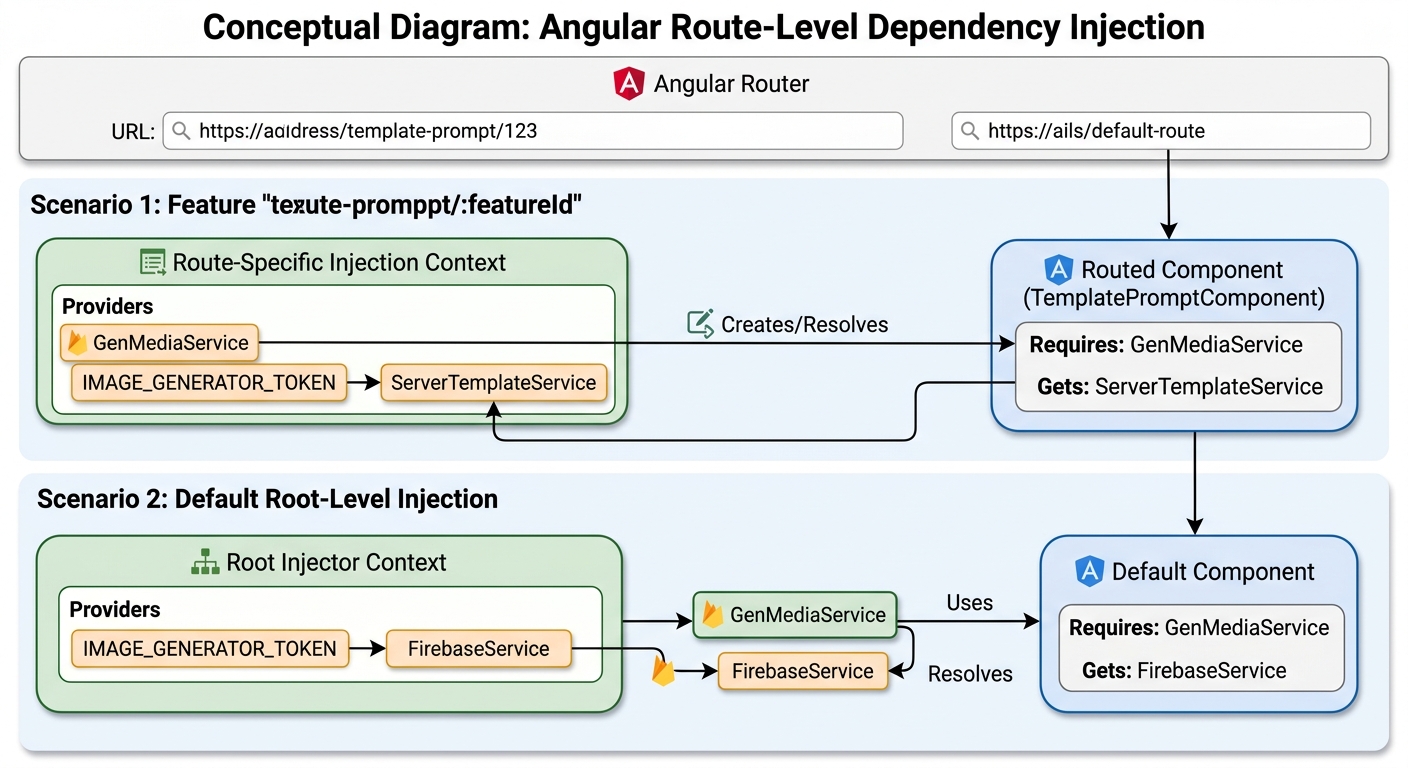
The application matches the URL paths and routes to different components. When the URL path matches `template-prompt/:featureId`, the route creates `GenMediaService` at the route level and injects `IMAGE_GENERATOR_TOKEN` using the route's injection context. The token is mapped to `ServerTemplateService`. On the other hand, other routes use the `GenMediaService` in the root injector and inject a global `IMAGE_GENERATOR_TOKEN` that maps to `FirebaseService`. The implementation will be shown later in the blog.
## 4. Server Prompt Template Creation
You can create a server prompt template in the Firebase Console. This guide assumes an existing Firebase project named `vertexai-firebase`. Click "AI Logic" from the left sidebar, and click the "Prompt templates (PREVIEW)" tab.
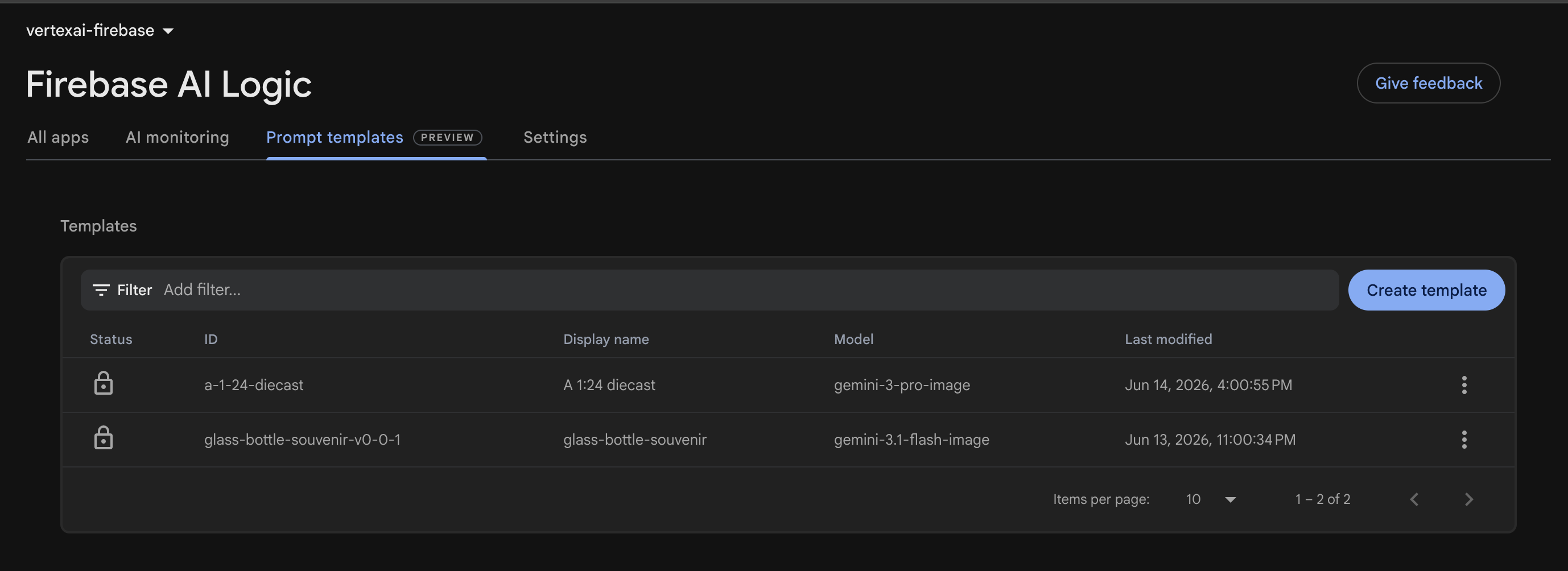
Users can click the `Create Template` button to create a new prompt on the server side.
A template is configured to generate a glass bottle image from inline image data. The unique template ID is `glass-bottle-souvenir-v0-0-1`, and the template name is `glass-bottle-souvenir`.
### 4.1. Model Configuration
```markdown
---
model: "gemini-3.1-flash-image"
config:
candidateCount: 1
safetySettings:
- category: HARM_CATEGORY_HARASSMENT
threshold: BLOCK_ONLY_HIGH
- category: HARM_CATEGORY_HATE_SPEECH
threshold: BLOCK_ONLY_HIGH
- category: HARM_CATEGORY_SEXUALLY_EXPLICIT
threshold: BLOCK_ONLY_HIGH
- category: HARM_CATEGORY_DANGEROUS_CONTENT
threshold: BLOCK_ONLY_HIGH
input:
schema:
inlineImages?(array, inline image data):
type: object
properties:
mimeType: string
data: string # inline data must be base64-encoded
aspectRatio?: string, the aspect ratio of the image
resolution?: string, the resolution of the image
---
```
The configuration specifies the model name, model configuration, and input schema and validations.
| Section | Configuration | Description |
| --- | --- | --- |
| model | gemini-3.1-flash-image | The Gemini model name of Nano Banana 2. |
| config | candidateCount: 1 | The model returns at most 1 image |
| safetySettings | BLOCK_ONLY_HIGH | Safety category of harassment, hate speech, sexually explicit content, and dangerous content |
| input | schema | Input schema and validation |
This prompt expects an array of `inlineImages` of type `object`. Each inline image contains a MIME type and inline data. Moreover, the prompt accepts an optional aspect ratio and resolution.
### 4.2. System Instructions
The prompt parts has `{{role "system"}}` syntax to specify the system instructions, and `{{role "user"}}` to specify the user prompt.
```markdown
{{role "user"}}
A 1/7 scale commercialized collectible ... with realistic lighting and shadows.
{{#if aspectRatio}}
Apply this aspect ratio to the image: {{aspectRatio}}.
{{/if}}
{{#if resolution}}
Apply this resolution to the image: {{resolution}}.
{{/if}}
{{#each inlineImages}}
{{media type="mimeType" data="data"}}
{{/each}}
```
The user prompt generates a souvenir glass bottle image from the uploaded inline image.
When the aspect ratio is provided, "Apply this aspect ratio to the image: {{aspectRatio}}." is appended to the prompt.
When the resolution is provided, "Apply this resolution to the image: {{resolution}}." is appended to the prompt.
The loop iterates the `inlineImages` list to specify the mime type and the inline data.
### 4.3. Testing the Prompt in Firebase Console
```markdown
// Prompt Input
{
"inline_images": [{
"mime_type": "image/png",
"contents": "iVBORw0KGgoAAAANSUhEUgAAARAAAABcCAYAAACm+q2AAAXGElEQVR4Ae1dC5QcVZm..."
}],
"aspectRatio": "4:1",
"resolution": "512"
}
```
The prompt input includes an image, aspect ratio, and resolution for testing before writing a line of code.
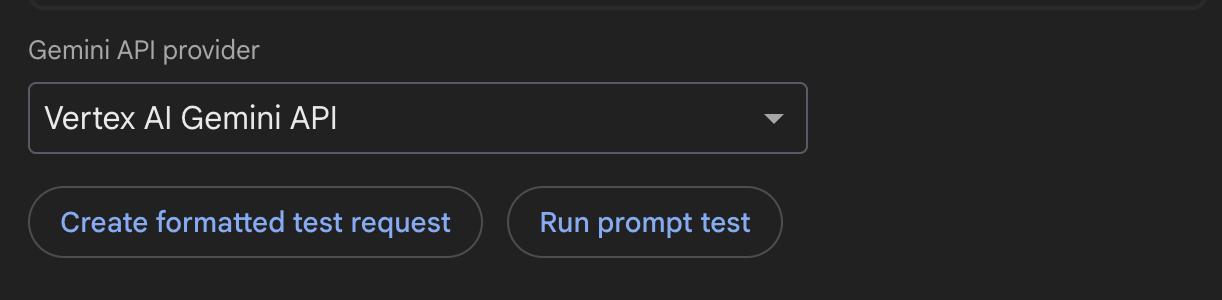
In the Firebase UI Console, choose the Gemini API provider from the dropdown list. The `Create formatted test request` button allows users to verify the request is correct before the actual execution. The `Run prompt text` button executes the request to generate a 512px and 4:1 image.
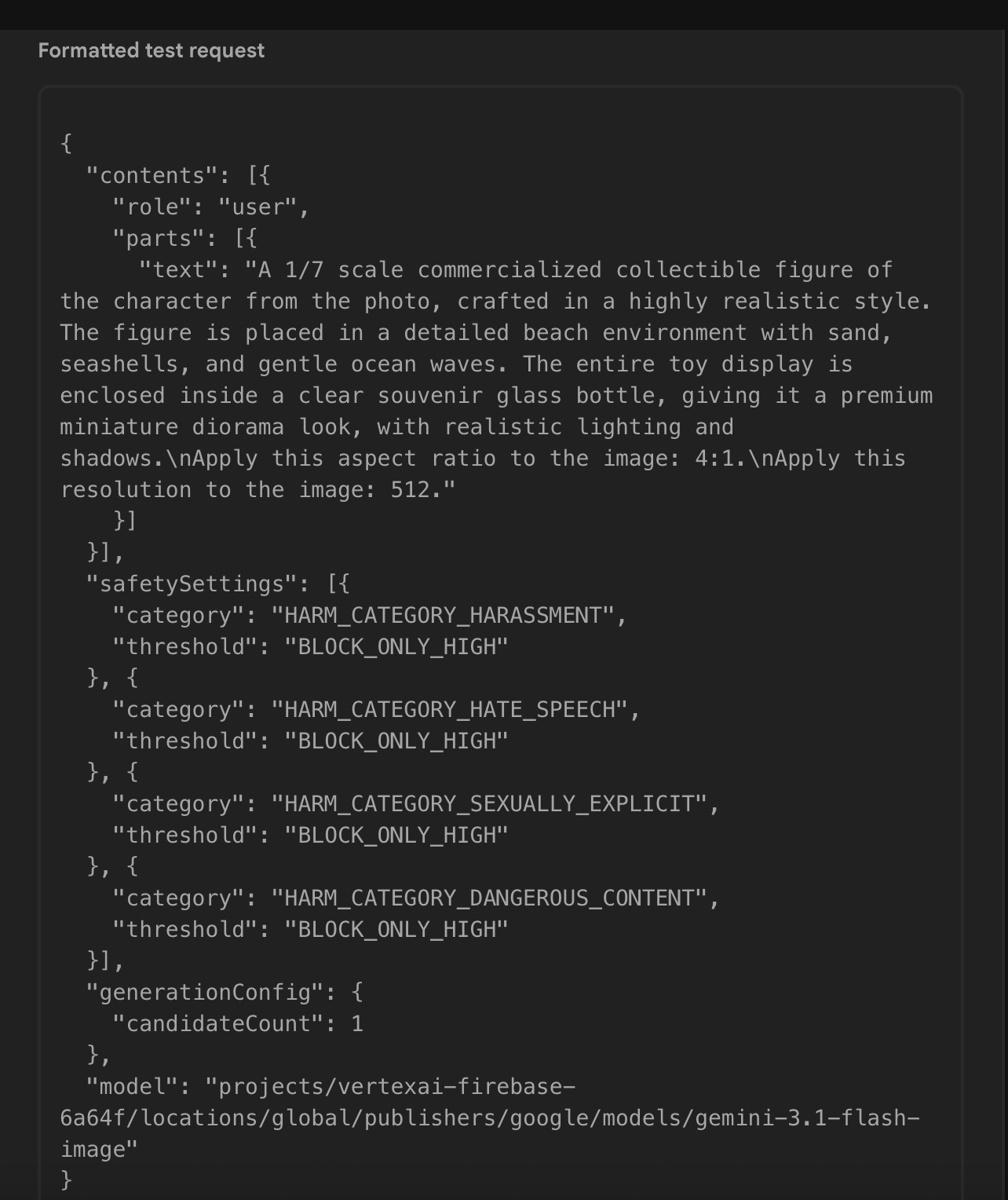
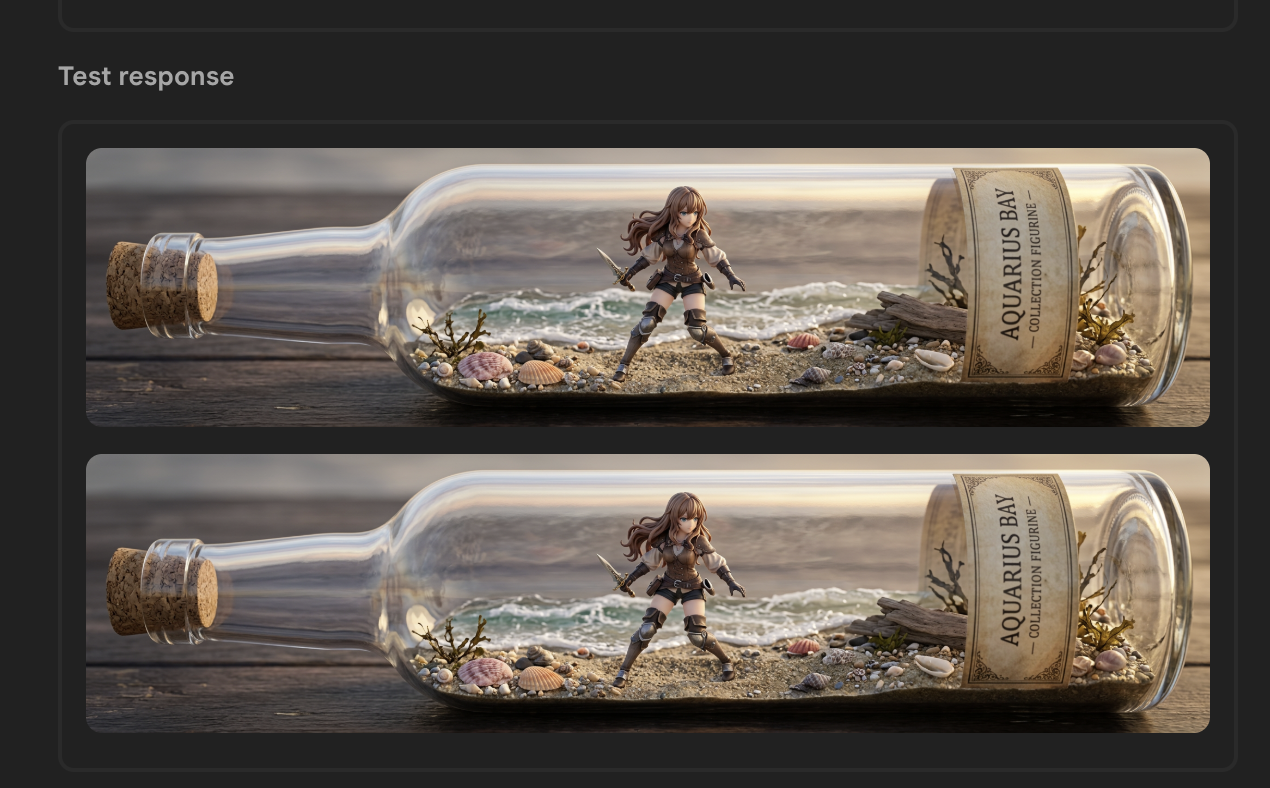
The test request generates a souvenir glass bottle with the expected aspect ratio.
Next, I will define two new injection tokens: the first one injects an image generator and the second one injects a `TemplateGenerativeModel`. I also create a new Server Prompt Template service to generate an image based on the template ID and template variables.
## 5. Server Prompt Template Service Implementation
### 5.1. Image Generator Interface
```typescript
export type BaseGenerateParam = {
aspectRatio?: string;
resolution?: string;
imageFiles: File[];
}
export type GenerateImageParam = BaseGenerateParam & {
prompt?: string;
templateId?: string;
}
```
The `GenerateImageParam` type provides aspect ratio, resolution, uploaded images, and template ID to the Gemini model to generate an image.
```typescript
export type ImageResponseWithoutId = {
data: string;
mimeType: string;
inlineData: string;
}
export type ImageResponse = ImageResponseWithoutId & {
id: number;
}
export type ImageTokenUsage = {
image: ImageResponse,
}
```
The `ImageTokenUsage` type stores inline image data, mime type, and a dummy image ID.
```typescript
import { GenerateImageParam } from '@/features/ai/types/generate-image-param.type';
import { ImageTokenUsage } from '@/features/ai/types/image-response.type';
export interface ImageGenerator {
generateImage(param: GenerateImageParam): Promise<ImageTokenUsage | undefined>;
}
```
`ImageGenerator` interface is a contract that must implement a `generateImage` method to accept a `GenerateImageParam` parameter and output a promise of `ImageTokenUsage` or undefined.
### 5.2. Injection Token for Image Generator
```typescript
import { FirebaseService } from '@/features/ai/services/firebase.service';
import { ImageGenerator } from '@/shared/ui/gen-media/interfaces/image-generator.interface';
import { InjectionToken, inject } from '@angular/core';
export const IMAGE_GENERATOR_TOKEN = new InjectionToken<ImageGenerator>('IMAGE_GENERATOR_TOKEN', {
providedIn: 'root',
factory: () => inject(FirebaseService)
});
```
The `IMAGE_GENERATOR_TOKEN` injection token uses the factory function to inject `FirebaseService` by default. It can be overridden to use the `ServerTemplateService` when the URL path is `template-prompt/:featureId`.
### 5.3. Injection Token for Server Template Model
```typescript
import { InjectionToken } from '@angular/core';
import { AI, TemplateGenerativeModel } from 'firebase/ai';
export const SERVER_TEMPLATE_MODEL = new InjectionToken<TemplateGenerativeModel>('SERVER_TEMPLATE_MODEL');
```
The `SERVER_TEMPLATE_MODEL` injection token injects an instance of `TemplateGenerativeModel`
Then, the `provideFirebase` function is updated to instantiate a `TemplateGenerativeModel` and provide it.
```typescript
export function provideFirebase() {
return makeEnvironmentProviders([
{
provide: VERTEX_AI_BACKEND,
useFactory: () => {
const configService = inject(ConfigService);
const vertexAILocation = getValue(configService.remoteConfig, 'vertexAILocation').asString();
const ai = getAI(configService.app, {
backend: new VertexAIBackend(vertexAILocation)
});
return ai;
}
},
{
provide: SERVER_TEMPLATE_MODEL,
useFactory: () => {
const ai = inject(VERTEX_AI_BACKEND);
return getTemplateGenerativeModel(ai);
}
}
]);
}
```
### 5.4. Server Prompt Template Service
```typescript
export async function makeTemplateVariables({ imageFiles, aspectRatio, resolution }: GenerateImageParam) {
const imageParts = await resolveImageParts(imageFiles);
const inlineImages = imageParts.map(part => part.inlineData);
return {
inlineImages,
aspectRatio,
resolution
}
}
```
The `makeTemplateVariables` function converts `Files[]` to an array of inline image data before returning an object of inline images, aspect ratio, and resolution.
```typescript
function processImageGeneratedContent(result: GenerateContentResult): ImageTokenUsage {
const response = result.response;
const inlineDataParts = response.inlineDataParts();
if (inlineDataParts?.length) {
const images = inlineDataParts.map(({inlineData}, index) => {
const { data, mimeType } = inlineData;
return {
id: index,
mimeType,
data,
inlineData: `data:${mimeType};base64,${data}`
};
});
if (images.length <= 0) {
throw new Error('Error in generating the image.');
}
return {
image: images[0],
};
}
throw new Error('Error in generating the image.');
}
export async function getTemplateBase64Images({ model, templateId, templateVariables }: TemplateImageOptions): Promise<ImageTokenUsage> {
const result = await model.generateContent(templateId, templateVariables);
return processImageGeneratedContent(result);
}
```
The `getTemplateBase64Images` function uses the `model` to generate an image, calls `processImageGeneratedContent` to post-process the result, and returns the ID, MIME type, inline data, and Base64-encoded string.
```typescript
import { SERVER_TEMPLATE_MODEL } from '@/features/ai/constants/firebase.constant';
import { GenerateImageParam } from '@/features/ai/types/generate-image-param.type';
import { ImageTokenUsage } from '@/features/ai/types/image-response.type';
import { getTemplateBase64Images } from '@/features/ai/utils/generate-image.util';
import { makeTemplateVariables } from '@/features/ai/utils/inline-image-data.util';
import { inject, Injectable } from '@angular/core';
@Injectable({
providedIn: 'root'
})
export class ServerTemplateService {
private readonly serverTemplateModel = inject(SERVER_TEMPLATE_MODEL);
async generateImage(genImageParameter: GenerateImageParam): Promise<ImageTokenUsage | undefined> {
const { templateId } = genImageParameter;
if (!templateId) {
return undefined;
}
const templateVariables = await makeTemplateVariables(genImageParameter);
return getTemplateBase64Images({
model: this.serverTemplateModel,
templateId,
templateVariables,
});
}
}
```
The `ServerTemplateService` fulfills the contract of `ImageGenerator` and implements `generateImage` to call `serverTemplateModel`.
## 6. Angular Route Definition
```typescript
import { ServerTemplateService } from '@/features/ai/services/server-template.service';
import { IMAGE_GENERATOR_TOKEN } from '@/shared/ui/gen-media/constants/image-generator.token';
import { GenMediaService } from '@/shared/ui/gen-media/services/gen-media.service';
import { Routes } from '@angular/router';
export const routes: Routes = [
{
path: 'predefined-prompt/:featureId',
loadComponent: () => import('./features/predefined-prompt-editor/predefined-prompt-editor.component'),
},
{
path: 'template-prompt/:featureId',
loadComponent: () => import('./features/predefined-prompt-editor/predefined-prompt-editor.component'),
providers: [
GenMediaService,
{ provide: IMAGE_GENERATOR_TOKEN, useExisting: ServerTemplateService }
],
},
... other routes ...
];
```
The `routes` array specifies a list of paths to route to different components to demonstrate use cases of image generation. The `PredefinedPromptEditorComponent` consists of an uploader that allows users to upload at least one image to prompt gemini-3.1-flash-image to generate a new image.
Use this component in two scenarios: programmatically passing the prompt text, or using Firebase Server Prompt Templates.
When the path is `predefined-prompt/:featureId`, the prompt text is submitted to gemini-3.1-flash-image directly. When the path is `template-prompt/:featureId`, the server prompt template is used.
In the former case, the component uses the `FirebaseService` that `IMAGE_GENERATOR_TOKEN` provides in its factory function. In the latter case, the route creates an instance of `GenMediaService` and does not use the global one. It also provides `ServerTemplateService` to `IMAGE_GENERATOR_TOKEN`.
```typescript
@Injectable({
providedIn: 'root'
})
export class GenMediaService {
private readonly imageGenerator = inject(IMAGE_GENERATOR_TOKEN);
... the rest of the service ...
}
```
When `GenMediaService` injects `IMAGE_GENERATOR_TOKEN`, `imageGenerator` is mapped to the `ServerTemplateService` instead of `FirebaseService`.
Next, update the navigation menu to use `/template-prompt/bottle` to call the new template.
## 7. Update the Navigation Menu
```json
"modeling": {
"figurine": {
"path": "/predefined-prompt/figurine",
"customPrompt": "... custom prompt ..."
},
"bottle": {
"path": "/template-prompt/bottle",
"templateConfigName": "glassBottleSouvenirTemplateId"
},
}
```
In the features JSON file, the path of `bottle` is updated to `/template-prompt/bottle`. Delete `customPrompt` and add `templateConfigName` to store the Firebase Remote Config name.

`glassBottleSouvenirTemplateId` references the template Id, `glass-bottle-souvenir-v0-0-1`, to load the template to generate the image.
When the Angular application makes the request to Firebase AI Logic, the network payload does not reveal the prompt text.
## 8. Verify the Network Request
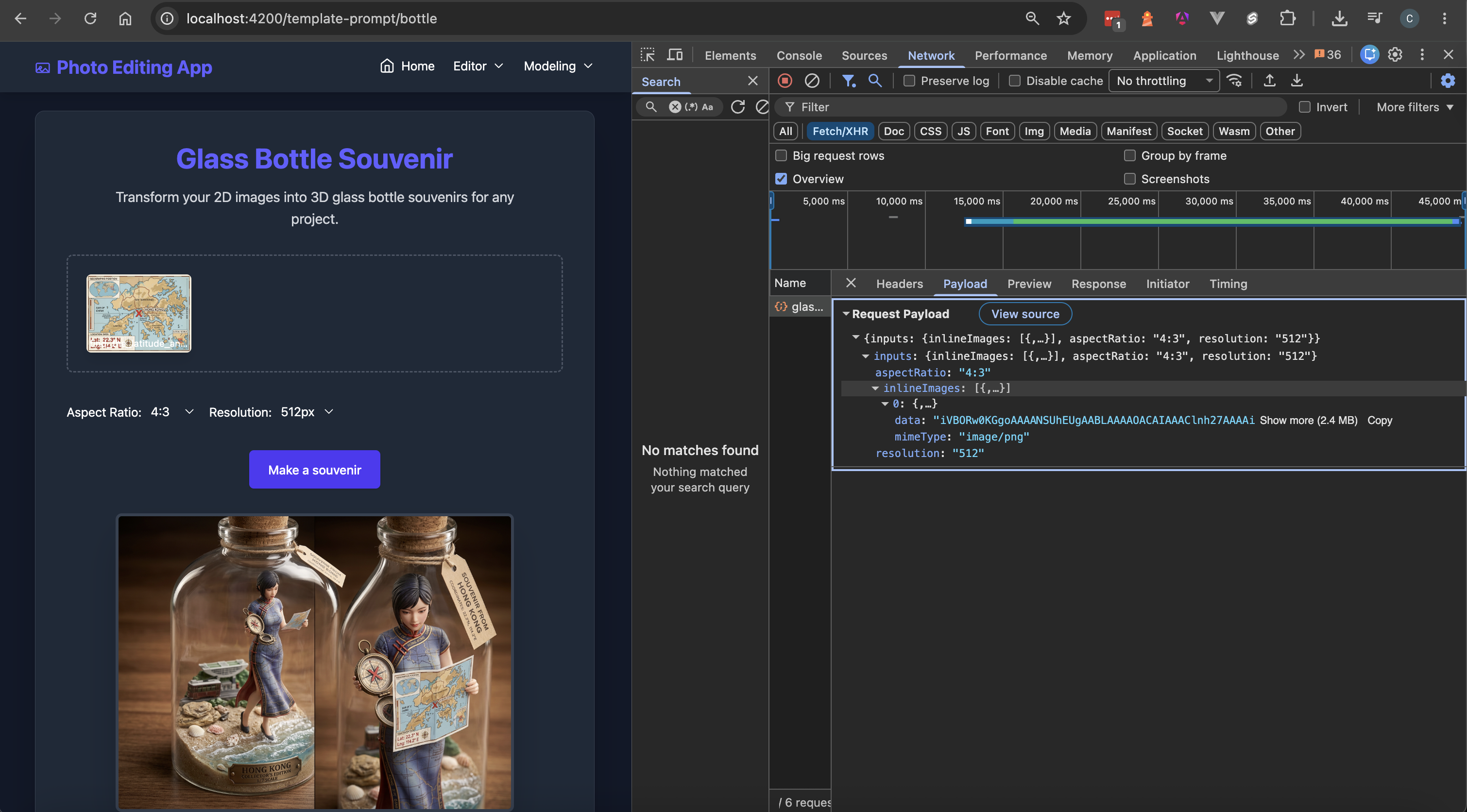
The network payload includes the aspect ratio, resolution, and inline image data. Firebase hides the prompt text, preventing it from being stored as a static value in the JSON file. If prompt text is sensitive data of an application, it is secured in the Firebase's infrastructure.
## 9. Conclusion
This concludes the journey of migrating the static prompt text to Firebase AI Logic Server Prompt Template.
After the migration, the Angular application does not require redeployment when the server prompt is modified. Users reload the page and they can use the latest prompt to generate images.
Engineers can build AI applications with Firebase AI Logic Server Prompt Templates to perform tasks beyond image generation, such as summarization, text generation, and tool use via Google Search and Google Maps.
## Resources
* [Generative AI with Angular & Firebase](https://github.com/railsstudent/ng-firebase-ai-nano-banana)
* [Firebase Server Prompt Templates](https://firebase.google.com/docs/ai-logic/server-prompt-templates/get-started?api=dev)
* [Best practices and considerations for templates](https://firebase.google.com/docs/ai-logic/server-prompt-templates/best-practices-and-considerations)
* [Angular Dependency Injection Essential](https://angular.dev/essentials/dependency-injection)
* [Angular Dependency Injection In-depth Guide](https://angular.dev/guide/di)
* [Angular Route Providers](https://angular.dev/guide/di/defining-dependency-providers#route-providers)
Comments
More Blog
View allkubernetesMinimalist EKS: The Easy Way
Amazon EKS manages the Kubernetes control plane, but you remain responsible for provisioning the...
J
Joaquin MenchacaaiNever forget to enter the Stern Grove lottery again!
Browser automation with Playwright, Python, GitHub Actions, and Entire to auto-enter San Francisco Stern Grove concert lotteries each week!
L
Lizzie SiegletypescriptA Free Screenshot Editor That Never Uploads Your Image
A free screenshot and image editor that runs entirely in your browser. Keeping every edit reversible and handling big phone photos, in plain TypeScript and Canvas2D.
M
Martin StarkshowdevI built a CLI to break my highlights out of Apple Books
A macOS CLI + MCP server that exports Apple Books highlights to Markdown and gives AI assistants direct access to your reading notes.
A
Andrey KorchakaiA Developer's Guide to Agent Hooks in Antigravity CLI
Motivation To be quite honest, "Hooks"—the shell commands we trigger at specific points...
T
TanaikeagentsTactical vs. Strategic Agentic AI Development — A Playbook for Developers
The Strategic Engineer: Why Writing Code Is No Longer Your Most Valuable Skill ...
A
Adewumi Saheed Adewale