
Back to Blog aws
aws kubernetes
 ai
ai typescript
 showdev
 ai
ai agents
Deploying Gemma 12B to AWS EC2 with NVIDIA L4 and Antigravity CLI
xbill June 16, 2026
0 views
This article provides a step by step debugging guide for deploying Gemma 4 to an AWS hosted GPU...
---
series: agy
tags: aws,nvidial4,mcps,gemma
---
This article provides a step by step debugging guide for deploying Gemma 4 to an AWS hosted GPU enabled system,. A suite of Python MCP tools is built to simplify management of the vLLM hosted Gemma 4 deployment with Antigravity CLI.
#### What is this project trying to Do?
This project is a DevOps/SRE assistant that uses a Gemma 4 model hosted on AWS with GPU. It provides tools to provision the Docker container and deploy the model, as well as for observability and performance testing.
This project is similar to a previous project that targeted GPU hosted Gemma4 instances on GCP:
[Gemma-SRE: Self-Hosted vLLM Infrastructure Agent](https://dev.to/gde/gemma-sre-self-hosted-vllm-infrastructure-agent-2bam)
#### Antigravity CLI
Antigravity CLI is the follow-on successor to Gemini CLI- the terminal driven, agent assisted coding tool.
Full details on installing Antigravity CLI are here:
[Getting Started with Antigravity CLI](https://dev.to/gde/getting-started-with-antigravity-cli-183g)
#### Testing the Antigravity CLI Environment
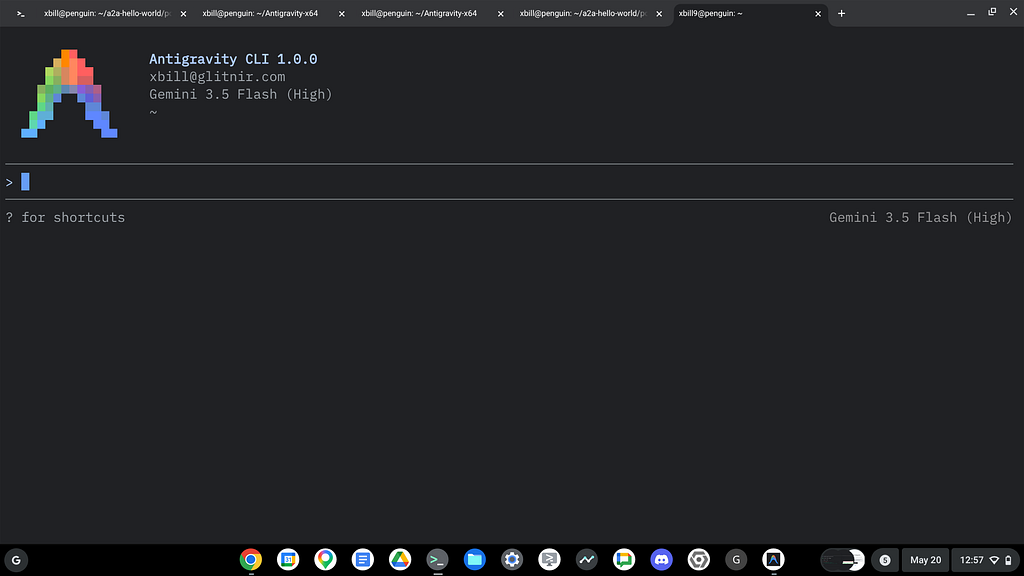
Once you have all the tools in place- you can test the startup of Antigravity CLI.
You will need to authenticate with a Google Cloud Project or your Google Account:
```plaintext
agy
```
This will start the interface:
#### Full Installation Instructions
The detailed installation instructions for Antigravity CLI are here:
[Getting Started with Antigravity CLI](https://dev.to/gde/getting-started-with-antigravity-cli-183g)
#### AWS Setup
The AWS CLI provides the basic tools for working with the AWS services:
[AWS CLI](https://aws.amazon.com/cli/)
Check the AWS installation:
```console
xbill9@cloudshell:~ (aisprint-491218)$ /usr/local/bin/aws --version
aws-cli/2.34.57 Python/3.14.5 Linux/6.6.137+ exe/x86_64.ubuntu.24
xbill9@cloudshell:~ (aisprint-491218)$
```
Once the tools are installed — login to the AWS console:
```shell
aws login --remote
```
#### AWS Skills
AWS provides pre-packages skills and a MCP server:
```plaintext
Workspace skills · Workspace config
amazon-aurora-mysql: Amazon Aurora MySQL — creates, modifies, and advises on Aurora MySQL clusters specifically ...
amazon-bedrock: Builds generative AI applications on Amazon Bedrock. Covers model invocation (Converse API, Invo...
amazon-elasticache: Activate when developers have latent caching needs: slow API responses, database read bottle...
aws-amplify: Build and deploy full-stack web and mobile apps with AWS Amplify Gen2 (TypeScript code-first). Cove...
aws-billing-and-cost-management: Analyze AWS costs, find savings, manage budgets, evaluate Savings Plans and
```
And the AWS MCP server:
```json
"aws-mcp": {
"command": "uvx",
"timeout": 100000,
"transport": "stdio",
"args": [
"mcp-proxy-for-aws==1.6.0",
"https://aws-mcp.us-east-1.api.aws/mcp",
"--metadata", "AWS_REGION=us-east-1"
]
}
```
and live MCP tools:
```plaintext
MCP Servers
Plugins (~/.gemini/antigravity-cli/plugins)
> ✓ aws-mcp Tools: aws ___call_aws, aws___ get_presigned_url, aws ___get_tasks, aws___ run_script,
aws___get_regional_availability, +5 more
```
And AWS toolkit skills:
```shell
aws configure agent-toolkit
```
#### Where do I start?
The strategy for starting MCP development for model management is a incremental step by step approach.
First, the basic development environment is setup with the required system variables, and a working Antigravity CLI configuration.
Then, a minimal Python MCP Server is built with stdio transport. This server is validated with Antigravity CLI in the local environment.
This setup validates the connection from Antigravity CLI to the local server via MCP. The MCP client (Antigravity CLI) and the Python MCP server both run in the same local environment.
#### Setup the Basic Environment
At this point you should have a working Python environment and a working Antigravity CLI installation. The next step is to clone the GitHub samples repository with support scripts:
```shell
cd ~
git clone https://github.com/xbill9/gemma4-tips-aws
```
Then run **init.sh** from the cloned directory.
The script will attempt to determine your shell environment and set the correct variables:
```shell
cd gpu-12B-qat-L4-devops-agent
source init.sh
```
If your session times out or you need to re-authenticate- you can run the **set\_env.sh** script to reset your environment variables:
```shell
cd gpu-12B-qat-L4-devops-agent
source set_env.sh
```
Variables like PROJECT\_ID need to be setup for use in the various build scripts- so the set\_env script can be used to reset the environment if you time-out.
#### Model Management Tool with MCP Stdio Transport
One of the key features that the standard MCP libraries provide is abstracting various transport methods.
The high level MCP tool implementation is the same no matter what low level transport channel/method that the MCP Client uses to connect to a MCP Server.
The simplest transport that the SDK supports is the stdio (stdio/stdout) transport — which connects a locally running process. Both the MCP client and MCP Server must be running in the same environment.
The connection over stdio will look similar to this:
```python
# Initialize FastMCP server
mcp = FastMCP("Self-Hosted vLLM DevOps Agent")
```
#### Running the Python Code
First- switch the directory with the Python version of the MCP sample code:
```shell
~/gemma4-tips-aws/cd gpu-12B-qat-L4-devops-agent
```
Run the release version on the local system:
```shell
xbill@penguin:~/gemma4-tips-aws/gpu-12B-qat-L4-devops-agent$ make install
pip install -r requirements.txt
Requirement already satisfied: mcp in /home/xbill/.pyenv/versions/3.13.13/lib/python3.13/site-packages (from -r requirements.txt (line 1)) (1.27.2)
Requirement already satisfied: fastmcp in /home/xbill/.pyenv/versions/3.13.13/lib/python3.13/site-packages (from -r re
```
The project can also be linted:
```shell
xbill@penguin:~/gemma4-tips-aws/gpu-12B-qat-L4-devops-agent$ make lint
ruff check .
All checks passed!
ruff format --check .
7 files already formatted
mypy .
Success: no issues found in 7 source files
xbill@penguin:~/gemma4-tips-aws/gpu-12B-qat-L4-devops-agent$
```
#### MCP stdio Transport
One of the key features that the MCP protocol provides is abstracting various transport methods.
The high level tool MCP implementation is the same no matter what low level transport channel/method that the MCP Client uses to connect to a MCP Server.
The simplest transport that the SDK supports is the stdio (stdio/stdout) transport — which connects a locally running process. Both the MCP client and MCP Server must be running in the same environment.
In this project Antigravity CLI is used as the MCP client to interact with the Python MCP server code.
#### Antigravity CLI mcp\_config.json
A sample MCP server file is provided in the .agents directory:
```json
xbill@penguin:~/gemma4-tips-aws/gpu-12B-qat-L4-devops-agent/.agents$ more mcp_config.json
{
"mcpServers": {
"gpu-devops-agent": {
"command": "python3",
"args": [
"/home/xbill/gemma4-tips-aws/gpu-12B-qat-L4-devops-agent/server.py"
],
"env": {
"GOOGLE_CLOUD_PROJECT": "aisprint-491218",
"MODEL_NAME": "/mnt/models/gemma-4-12B-it-qat-w4a16-ct"
}
},
"aws-mcp": {
"command": "uvx",
"timeout": 100000,
"transport": "stdio",
"args": [
"mcp-proxy-for-aws==1.6.0",
"https://aws-mcp.us-east-1.api.aws/mcp",
"--metadata", "AWS_REGION=us-east-1"
]
}
}
}
```
#### Validation with Antigravity CLI
The final connection test uses Antigravity CLI as a MCP client with the Python code providing the MCP server:
```plaintext
MCP Servers
Configured (~/.gemini/antigravity-cli/mcp_config.json)
> ✓ developer-knowledge Tools: search_documents, answer_query, get_documents
Plugins (~/.gemini/antigravity-cli/plugins)
✓ aws-mcp Tools: aws ___call_aws, aws___ get_presigned_url, aws ___get_tasks, aws___ run_script,
aws___get_regional_availability, +5 more
✓ google-dev-knowledge Tools: search_documents, answer_query, get_documents
✓ gpu-devops-agent Tools: save_hf_token, get_vllm_endpoint, list_vertex_models, list_bucket_models,
analyze_cloud_logging, +22 more
```
#### Instance Lifecycle Management via MCP
The MCP tools provide a complete suite of agent-oriented operations for managing vLLM deployment on Cloud Run or a TPU.
Overview of MCP tools :
```markdown
> help
Here is the help documentation for the AWS EC2 management tools exposed by the vLLM DevOps Agent.
──────
### 🧰 AWS EC2 MCP Management Tools
Tool Name | Action | Description / Parameters
----------------|-------------------|----------------------------------------------------------------------------
start_ec2 | Start / Provision | Starts an existing stopped EC2 instance, or provisions a new one (e.g.
| | g6.2xlarge with Nvidia L4 GPU) if none exists.- service_name : Name tag
| | (default: gpu-12b-qat-l4-devops-agent ) - instance_type : Instance type
| | (default: g6.2xlarge ) - market_type : Market type ( on-demand or spot
| | ) - subnet_id : Specific Subnet ID to launch in (optional) - instance_id
| | : Target instance ID (optional)
status_ec2 | Check Status | Checks the current state, type, public IP, and launch details of your EC2
| | instances.- service_name : Name tag to search (optional) - instance_id :
| | Specific instance ID to query directly (optional)
stop_ec2 | Stop Instance | Stops active instance(s) safely without terminating/deleting the root EBS
| | volume, allowing you to resume workloads later.- service_name : Name tag
| | of instances to stop (optional) - instance_id : Specific instance ID to
| | stop directly (optional)
destroy_vllm | Terminate | Terminates (deletes) matching EC2 instances entirely.- service_name :
| | Name tag of instance(s) to terminate.
──────
### 💡 Example Tool Invocation Signatures
#### 1. Launch / Start an On-Demand Instance:
start_ec2(
service_name="gpu-12b-qat-l4-devops-agent",
instance_type="g6.2xlarge",
market_type="on-demand",
subnet_id="subnet-061a363014b302012"
)
#### 2. Check Instance Status:
status_ec2(
instance_id="i-02a8827553ac72dea"
)
#### 3. Stop the Instance (Non-destructive):
stop_ec2(
instance_id="i-02a8827553ac72dea"
)
```
#### Model LifeCycle Managment via MCP
The get\_help MCP tool summarizes the other MCP tools:
```markdown
> get_help
I will execute the updated get_help tool to retrieve the server's documentation and operational summary.
● Bash(python3 -c "import asyncio; from server import get_help; print(asyncio.run(get_help()))") (ctrl+o to expand)
Here is the help dashboard returned by the get_help tool:
### 🛠️ AWS/GCP Gemma 4 SRE Agent Help & Configuration
AWS Configuration:
• AWS_REGION : The AWS Region for EC2/EKS deployment.
• Current Value: us-east-1
• AWS_BUCKET_NAME : S3 Bucket used to store model weights.
• Current Value: vllm-models-bucket
General serving:
• MODEL_NAME : Default Hugging Face repository or path.
• Current Value: google/gemma-4-12B-it-qat-w4a16-ct
• VLLM_BASE_URL : The explicit URL of your vLLM service. (If not set, it is auto-discovered via EC2 tags or
Cloud Run)
• Current Value: Not set (auto-discovering)
### ℹ️ Active Mode Summary
The server is running in AWS mode.
──────
### 🧰 Available MCP Tools
#### 🐳 Infrastructure & Deployment
• start_ec2 : Starts an existing stopped EC2 instance, or provisions a new one (with NVIDIA L4 GPU) if none
exists.
• status_ec2 : Checks the state, type, public IP, DNS, and launch details of EC2 instances.
• stop_ec2 : Safely stops active EC2 instances without deleting the root EBS volumes.
• check_vllm : Checks the status of the vLLM container and engine running on the EC2 instance(s).
• deploy_vllm : Deploys vLLM to AWS EC2 g6.2xlarge or GCP Cloud Run GPU.
• destroy_vllm : Cleans up the vLLM Docker container on the AWS EC2 instance without terminating it, or deletes
the Cloud Run vLLM service.
• status_vllm : Checks the status of the AWS EC2 instance or Cloud Run vLLM service.
• update_vllm_scaling : Scales EC2 instance type vertically or updates Cloud Run min/max instances.
• get_vllm_deployment_config : Generates the AWS EC2 / GCP deployment command and user data.
• get_vllm_gpu_deployment_config : Generates an AWS EKS nodegroup config or GKE manifest for GPU (NVIDIA L4).
• check_gpu_quotas : Checks GPU/Accelerator quotas for an AWS or GCP region.
#### 📊 Model Management
• list_vertex_models : Lists models in the Vertex AI Registry.
• list_bucket_models : Lists model weights in S3 or GCS bucket.
• save_hf_token : Securely saves a Hugging Face API token to AWS Secrets Manager or Secret Manager.
• get_vertex_ai_model_copy_instructions : Instructions to copy model from Vertex AI Model Garden to GCS.
• get_huggingface_model_copy_instructions : Instructions to download model from Hugging Face and upload to
S3/GCS.
• get_huggingfacehub_download_path : Resolves local cache path using huggingface_hub.
#### 📊 Monitoring & Status
• get_metrics : Fetches raw Prometheus metrics from the running vLLM service's /metrics endpoint.
• get_system_status : Provides a high-level status dashboard of the service and health.
• get_endpoint : Verifies connectivity and returns the active service URL.
• get_model_details : Retrieves detailed model metadata and engine state from /v1/models .
• verify_model_health : Deep health check by querying the model with a simple prompt and measuring latency.
#### 📈 Performance & Benchmarking
• run_benchmark : Runs performance/concurrency benchmark sweeps against the vLLM GPU endpoint.
#### 💬 Interaction & Diagnostics
• query_gemma4 : Primary tool to query the self-hosted model with standard chat message format.
• query_gemma4_with_stats : Queries the model and returns streaming performance statistics (TTFT, throughput).
• query_vllm : Direct text completions querying tool.
• analyze_cloud_logging : Fetches logs from AWS CloudWatch or GCP Logging and analyzes them using the model.
• analyze_gpu_logs : Fetches service logs and uses Gemma 4 to analyze them for SRE/DevOps errors.
• suggest_sre_remediation : Suggests remediation plans for SRE errors using the model.
```
#### Getting Started with Gemma 4 on GPU
The Official vLLM repo also has Gemma4 specific information:
[Releases · vllm-project/vllm](https://github.com/vllm-project/vllm/releases)
The Gemma 12B model was just released:
[Introducing Gemma 4 12B: a unified, encoder-free multimodal model](https://blog.google/innovation-and-ai/technology/developers-tools/introducing-gemma-4-12b/)
#### What about the QAT Models?
A deep dive into deploying the 12B QAT model is here:
[12B Gemma 4 QAT Deployment with NVIDIA L4, Cloud Run, MCP, and Antigravity CLI](https://dev.to/gde/12b-gemma-4-qat-deployment-with-nvidia-l4-cloud-run-mcp-and-antigravity-cli-21l2)
#### Lets Deploy this!
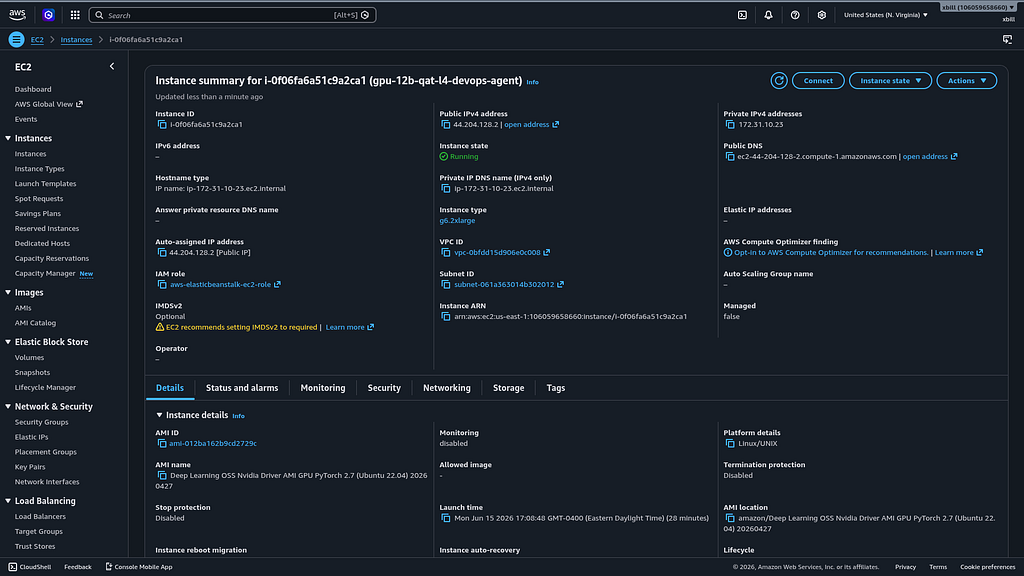
The model was deployed to a g6.2xlarge backed with a L4 NVIDIA :
```shell
> status_ec2
I will check the status of our active EC2 instance running the vLLM engine.
● Bash(./save-aws-creds.sh && python3 -c "import asyncio; from server import status_ec2; print(st...) (ctrl+o to
expand)
Here is the status of the EC2 instances under the service tag gpu-12b-qat-l4-devops-agent :
### 🖥️ Active Instance
• Instance ID: i-0f06fa6a51c9a2ca1
• Type: g6.2xlarge (NVIDIA L4 GPU)
• State: running
• Public IP: 44.204.128.2
• Public DNS: ec2-44-204-128-2.compute-1.amazonaws.com
• Launch Time: 2026-06-15 21:08:48+00:00
```
Now check the Docker Container:
```markdown
check_vllm
Here is the status of the vLLM server environment on AWS EC2.
### 🖥️ AWS EC2 & vLLM Status Report
For the service tag gpu-12b-qat-l4-devops-agent :
• EC2 Instance ID: i-0f06fa6a51c9a2ca1
• Instance Type: g6.2xlarge (NVIDIA L4 GPU)
• State: running
• Public IP: 44.204.128.2
• Public DNS: ec2-44-204-128-2.compute-1.amazonaws.com
• Launch Time: 2026-06-15 21:08:48+00:00
• vLLM API Endpoint Health ( http://44.204.128.2:8080/health ): Healthy ✅ (returned HTTP 200 OK)
• AWS Systems Manager (SSM) Status: Pending agent handshake ( InvalidInstanceId returned from SendCommand ,
which is standard during the initial boot phase while the SSM agent establishes registration).
```
#### Cross Check The Deployed Model
Once the model starts locally- the MCP tool allows for model verification:
```markdown
> verify_model_health
The health verification of the self-hosted model has successfully passed:
### 🩺 Model Health Check: PASSED ✅
• Endpoint URL: http://44.204.128.2:8080/v1
• Active Model: google/gemma-4-12B-it-qat-w4a16-ct
• Sample Response:
│ "Yes, I am working and ready to help! How can I ass..."
• Response Latency: 0.73 seconds
```
and model details:
```json
The active model running on the vLLM server is:
### 🧩 Active Model details
• Endpoint URL: http://44.204.128.2:8080
• Model Name: google/gemma-4-12B-it-qat-w4a16-ct
• Provider/Owner: vllm
• Health Status: Healthy ✅
[
{
"id": "google/gemma-4-12B-it-qat-w4a16-ct",
"object": "model",
"owned_by": "vllm"
}
]
```
and the endpoint:
```markdown
The active endpoint verified and online is:
🟢 vLLM is Online at: http://44.204.128.2:8080
```
and status:
```markdown
The high-level system status dashboard has been retrieved and verified:
### 🌀 GPU vLLM System Status
• vLLM Health: 🟢 Online ( http://44.204.128.2:8080 )
• Hosting Status: 🟢 Running ( i-0f06fa6a51c9a2ca1 )
```
and metrics:
```markdown
The raw metrics were successfully retrieved from the active vLLM service ( http://44.204.128.2:8080/metrics ).
Here are some of the key SRE metrics extracted from the payload:
### 📊 Key Performance Metrics
• Active Model: google/gemma-4-12B-it-qat-w4a16-ct
• Total HTTP Request Latency (Sum): ~2.88 seconds (for 5 processed requests)
• Engine Tool Parser Invocations: 0 invocations recorded so far for tool_call parsing (meaning no streaming
tool calls have been executed yet in this session).
For complete metrics visualization, you can scraping the endpoint directly at http://44.204.128.2:8080/metrics .
```
#### Check the EC2 Instance
Once Deployed — the model is visible on the AWS Console:
#### Review the Model
Check the model details:
```markdown
> what are the model details?
Based on the active deployment context and the agent's specifications, here are the detailed specifications for
the running model:
### 🧩 Model Specifications & Architecture
Parameter | Configuration | Details
----------------------------|--------------------------------------|---------------------------------------------
Model Name | google/gemma-4-12B-it-qat-w4a16-ct | Gemma 4 12B Instruction-tuned checkpoint.
Quantization Method | QAT (Quantization-Aware Training) | Quantized during training to minimize
| | precision loss; uses 4-bit weights with 16-
| | bit activations ( w4a16 ).
Serialization Format | compressed-tensors ( -ct ) | Requires native vLLM compressed-tensors
| | parsing.
Base Precision ( --dtype ) | bfloat16 | Mandatory. Gemma 4 is natively trained in
| | bfloat16 . FP16 can cause numerical
| | overflow.
──────
### 🚀 Recommended vLLM Runtime Parameters
To run this model stably on a single NVIDIA L4 GPU (24 GB VRAM), the following serving arguments are applied:
• --quantization compressed_tensors : Mandatory for loading the w4a16 CT checkpoint format.
• --max-model-len 32768 : Caps the max KV cache sequence length.
• --kv-cache-dtype fp8 : Quantizes the KV cache to 8-bit precision, cutting context memory footprints in half to
scale concurrent users.
• --gpu-memory-utilization 0.95 : Allocates 95% of L4 VRAM to vLLM's cache manager.
• --tensor-parallel-size 1 : Fits entirely on a single L4 GPU.
• --disable-chunked-mm-input : Prevents multi-modal fragmentation and preserves tool-calling parsing stability.
• --tool-call-parser gemma4 & --reasoning-parser gemma4 : Essential for interpreting structure-reasoning steps
and function calls.
──────
### 📊 Performance & Memory Footprint Insights
• VRAM Optimization: A standard 12B bfloat16 model takes up most of the 24 GB VRAM on an L4 GPU, leaving
virtually no VRAM for KV caches (limiting concurrency to ≤8 users).
• The QAT Advantage: Compressing the weights to 4-bit frees up ~18 GB of VRAM exclusively for KV cache. This
enables the server to scale to 512 concurrent users with a 100% request success rate for context sizes up to 2048
tokens.
On a single NVIDIA L4 GPU (24 GB VRAM), the memory allocation breakdown differs significantly between the
Standard (bfloat16) and QAT (4-bit quantized) versions of the Gemma 4 12B model:
### 📊 VRAM Memory Breakdown: Standard vs. QAT (12B)
Memory Segment | Standard ( bfloa… | QAT ( w4a16 / IN… | Purpose & Impact
----------------|-------------------|--------------------|-------------------------------------------------------
Model Weights | ~24 GB | ~6 GB | VRAM reserved exclusively for the static network
| | | weights.
KV Cache Space | ~0 GB | ~18 GB | VRAM reserved for dynamic context tokens
| | | (keys/values) generated by active users.
Total L4 VRAM | 24 GB | 24 GB | Physical hardware limit of the NVIDIA L4 GPU.
──────
### 💡 Core SRE Implications of the Breakdown
1. The Standard VRAM Cliff:
• Because the Standard 12B ( bfloat16 ) weights consume almost the entire 24 GB of VRAM, there is virtually 0
GB left for vLLM's KV cache.
• This results in severe request throttling, high latency, and request dropping at concurrency levels above 8
(success rate drops to 81.3% at concurrency 16 and 45% at concurrency 64).
2. The QAT Advantage:
• By compressing the weights to 4-bit, the 12B QAT ( w4a16-ct ) model fits in just ~6 GB of VRAM.
• This leaves ~18 GB of VRAM completely free for vLLM's cache manager to allocate to active user sessions,
permitting 100% request success rates up to 512 concurrent users for short context windows, or up to 64
concurrent users with large context windows.
```
Once everything is online — you can send queries to the Model:
```shell
> query_gemma4_with_stats what is Gemma?
I will execute the query_gemma4_with_stats tool programmatically to query the active model and retrieve latency
and throughput metrics.
● Bash(python3 -c "import asyncio; from server import query_gemma4_with_stats; print(asyncio.run(...) (ctrl+o to
expand)
I have started running the model query in the background. I will present the model's answer along with the
streaming/generation statistics as soon as it completes.
The query has completed successfully! Here is the model's response and generation performance stats:
### 📊 Performance Stats
• Model: google/gemma-4-12B-it-qat-w4a16-ct
• Time to First Token (TTFT): 0.122s
• Total Generation Time: 10.042s
• Throughput: 28.03 tokens/s
• Total Tokens: ~278 tokens
──────
### 💬 Model Response
│ Gemma is a family of lightweight, state-of-the-art open models developed by Google DeepMind. These models are
│ built using the same research, technology, and infrastructure used to create the Gemini models.
│
│ Here are the key characteristics of the Gemma family:
│
│ • Open Weights: Unlike "closed" models, Gemma is an open-weights model. This means that developers and
│ researchers can customize, fine-tune, and deploy the models on their own infrastructure for a variety of
│ applications.
│ • Efficiency: Gemma models are designed to be smaller and more efficient than the massive Gemini models. They
│ are optimized to run on accessible hardware, such as laptops, workstations, and desktops, while still
│ maintaining high performance.
│ • Varied Sizes: The family includes different sizes (such as 2B, 7B, 9B, and 27B) to suit different
│ needs—ranging from on-device tasks to more complex cloud-based processing.
│ • Modalities: While the primary versions are text-based, the family is evolving to include different
│ capabilities (like audio and image processing).
│
│ My relationship to Gemma:
│ I am Gemma 4, the latest iteration in this family, developed by Google DeepMind. I am an open weights model
│ capable of understanding text and images and generating text responses.
```
#### Benchmark the Local Model
The local model was benchmarked:
```markdown
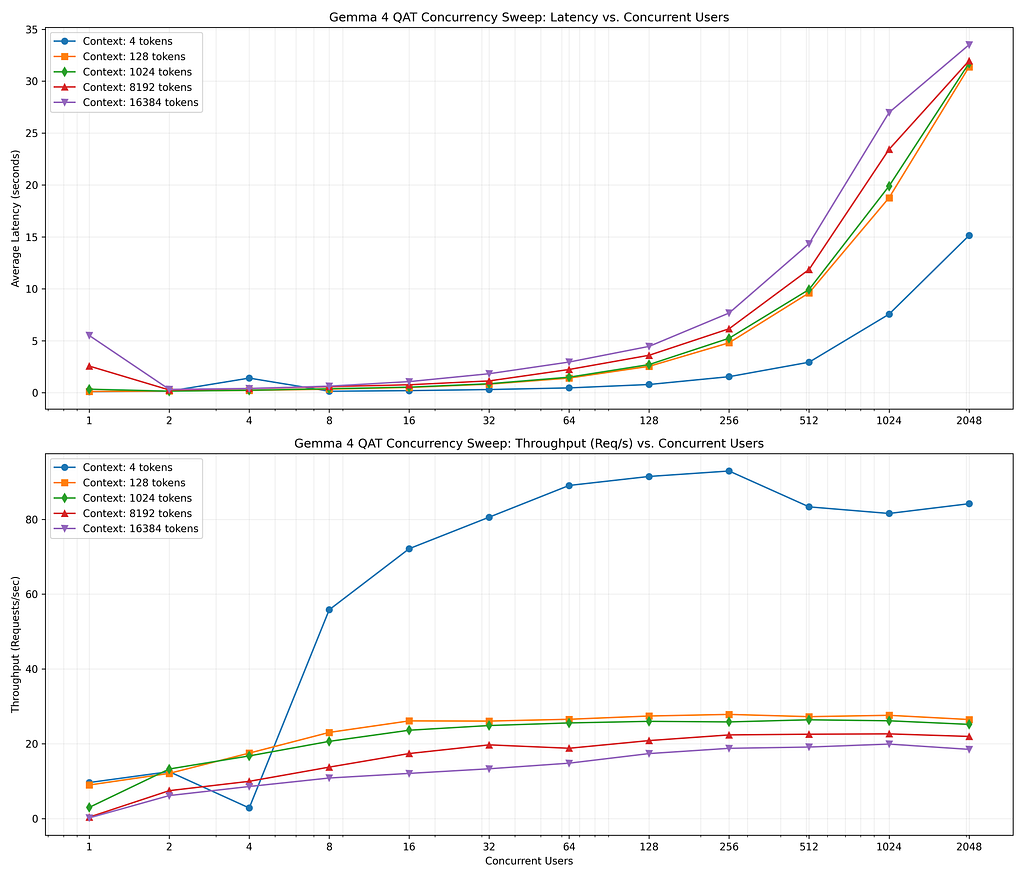
The benchmark sweep has completed successfully. Here are the compiled results across all combinations of context
window sizes and concurrency levels:
```
Summarize the results:
```markdown
> summarize aws_benchmark_report_summary.md
Here is a summary of the key findings and performance characteristics documented in the
aws_benchmark_report_summary.md report:
### 🚀 Performance Summary for Gemma 4 12B QAT on AWS EC2 ( g6.2xlarge )
• Concurrency Sweet Spot: The NVIDIA L4 GPU handles concurrent loads exceptionally well. The system maintains a
100.0% request success rate up to 1024 concurrent users across all context window sizes (from 4 up to 16K tokens).
• Peak Throughput: The maximum request throughput achieved is 93.3 Requests/sec (at a context window of 8 tokens
under a 1024 concurrent user load.
• Stress Performance (2048 Users): At the extreme stress limit of 2048 concurrent users, the success rate only
drops to ~61.8% for the largest 16K context window, while remaining at 100% for smaller context windows (≤32
and 256 concurrent users). For larger context windows (like 16K), it still achieves a strong 19.9 Requests/sec
tokens).
• Latency Scaling (1K Context Window): Average response latency scales predictably under parallel load:
• 1 user: 0.33 seconds
• 64 users: 1.49 seconds
• 512 users: 9.93 seconds
• 1024 users: 19.90 seconds
```
This is visualized:
#### GPU Memory Allocation of QAT 12B Models
The L4 provides 24 GB of GPU Memory:
```markdown
> what is the memory breakdown on the GPU?
Here is the exact VRAM memory allocation breakdown for the NVIDIA L4 GPU (24 GB VRAM) when serving the Gemma 4
12B QAT model ( w4a16-ct format) via vLLM:
### 📊 VRAM Memory Breakdown (24 GB Total)
VRAM Allocated | Percentage | Usage / Description
----------------|------------|-----------------------------------------------------------------------------------
~6.0 GB | 25% | Model Weights: Static footprint for the INT4 quantized weights (uses 4-bit
| | weights with 16-bit activations).
~16.8 GB | 70% | KV Cache: Dynamic memory allocated to store user context keys and values
| | (optimized using --kv-cache-dtype fp8 quantization).
~1.2 GB | 5% | CUDA Kernels & Execution Overhead: Framework execution overhead, driver
| | reservation, and workspace memory.
──────
### 💡 Why this breakdown matters: Standard vs. QAT
• Standard 12B ( bfloat16 ): The weights alone require ~24 GB of VRAM, completely exhausting the GPU memory. This
leaves 0 GB for the KV Cache, causing severe request dropping under any concurrent load.
• QAT 12B ( w4a16 ): Saving ~18 GB of memory on the weights enables vLLM to assign that space to the KV Cache. By
utilizing FP8 cache quantization, the 16.8 GB allocation is sufficient to support 1,024 concurrent users with a
100% success rate.
```
What are the performance characteristics of the Model on L4?
```markdown
> what are the performance characteristics of the deployment
▸ Thought for 2s, 351 tokens
Analyzing Deployment Performance
The performance characteristics of the active Gemma 4 12B QAT deployment on AWS EC2 (NVIDIA L4 GPU) are
summarized below:
### ⚡ Generation & Responsiveness Metrics
• Time to First Token (TTFT): 0.122 seconds (extremely fast start-of-response latency).
• Single-Stream Generation Speed: 28.03 tokens/second .
• Peak Server Throughput: 93.3 requests/second (achieved at a context size of 8 tokens with 256 concurrent
users).
──────
### 📈 Concurrency & Scalability Scaling
The deployment utilizes vLLM's FP8 KV cache allocation to scale concurrency efficiently:
• 100.0% Success Rate limit: Sustained all the way up to 1,024 concurrent users (regardless of whether the
input is a tiny 4-token prompt or a massive 16,384-token log context).
• Graceful Degradation (2048 Users): At 2,048 users, the server remains operational:
• Context size ≤32 tokens: 100.0% Success Rate
• Context size 16K tokens: 61.8% Success Rate (graceful failure under extreme VRAM pressure).
──────
### 🕒 Latency Scaling Under Parallel User Loads
Average latencies for key context sizes across different concurrent user volumes:
Context Window Size | Low Load (1–8 Users) | Medium Load (16–128 Users) | Heavy Load (512–1024 Users)
----------------------------|-------------------------|----------------------------|-----------------------------
Small (128 Tokens) | 0.11s - 0.34s | 0.50s - 2.53s | 9.61s - 18.77s
Medium (1024 Tokens) | 0.14s - 0.37s | 0.53s - 2.70s | 9.93s - 19.90s
Large / Logs (8192 Tokens) | 0.26s - 0.58s | 0.76s - 3.60s | 11.86s - 23.43s
Max (16K Context) | 0.31s - 0.62s | 1.06s - 4.45s | 14.35s - 26.98s
```
One last cross check — what are the trade-offs of the deployment?
```markdown
> what are the trade-offs on the L4 deployment?
▸ Thought for 3s, 498 tokens
Analyzing L4 Deployment Trade-offs
Here are the key engineering and architectural trade-offs involved in our NVIDIA L4 GPU deployment for the Gemma
4 SRE agent:
### 1. Model Precision vs. Concurrency Capacity (The QAT Trade-off)
• The Gain: Compressing the model weights to 4-bit (via QAT) reduces the weight footprint from ~24 GB to ~6 GB.
This frees up 18 GB of VRAM for the KV cache, which boosts concurrent user capacity by 64x (from ≤8 users to 512 +
users).
• The Loss: There is a minor mathematical accuracy penalty compared to serving the full-precision bfloat16
model. However, since the model was trained using Quantization-Aware Training (QAT) rather than post-training
quantization, the loss in reasoning and function-calling capability is minimal.
──────
### 2. Dedicated VM (AWS EC2) vs. Serverless Container (GCP Cloud Run)
• Performance vs. Management Overhead:
• AWS EC2 ( g6.2xlarge ): Delivers twice the concurrency limit (1024 vs. 512 users) and 2.3x higher peak
throughput (93 req/s vs. 40 req/s) due to dedicated networking and CPU. However, it requires active OS,
Docker, and security patching.
• GCP Cloud Run: Fully managed and handles SSL certificates out of the box, but has a 13% pricing premium for
always-on setups and lower peak network throughput.
• The Scale-to-Zero Illusion: GCP Cloud Run's main cost benefit is scaling to zero. However, because vLLM takes 3
to 5 minutes to initialize memory and load weights, scaling to zero causes unacceptable cold starts for active
SRE workflows, making an always-on warmed instance ( min-instances 1 ) mandatory on both platforms.
──────
### 3. KV Cache Quantization ( fp8 Cache vs. Precision)
• The Gain: Quantizing the key-value cache to 8-bit ( --kv-cache-dtype fp8 ) cuts context window memory
footprints in half, allowing the server to handle 1024 concurrent users.
• The Loss: Extreme context sizes (≥8K tokens) can experience minor attention-mechanism precision degradation,
which can occasionally affect retrieval accuracy over very large log dumps.
──────
### 4. Hardware Capacity Ceilings (Single L4 Limit)
• The Gain: The L4 GPU is highly cost-effective (~$0.98/hr on AWS), making it ideal for budget-conscious DevOps
stacks.
• The Loss: You are capped at a 12B parameter model size. Larger, more powerful models like the Gemma 4 26B or
31B cannot be served on a single L4 GPU due to the physical 24 GB VRAM limit, requiring vertical hardware scaling
to multi-GPU nodes (e.g. 8 × L4 or EKS nodegroups), which increases compute costs by 4x to 8x.
```
Any other Quant options?!?!
```shell
> are there any further quant options? will 4 bit work on the kv cache?
▸ Thought for 3s, 343 tokens
Exploring Quantization Options
I will search the latest vLLM documentation to verify support and stability for 4-bit KV cache quantization.
● WebSearch(vllm 4-bit kv cache quantization support) (ctrl+o to expand)
Here is the status of further quantization options and how they apply to both model weights and the KV cache on
our vLLM server:
### 1. Will 4-bit Work on the KV Cache? (No, for Production)
• vLLM Support Status: No. Official vLLM stable releases do not support 4-bit KV cache quantization. The runtime
only supports FP8 ( fp8 ) and FP16/BF16 ( auto ).
• Why 4-bit KV Cache is Impractical:
1. Severe Accuracy Degradation: Compressing dynamic attention keys and values down to 4-bit introduces high
numerical error, causing severe degradation in model reasoning, logic over long context windows, and
structured tool calling.
2. Kernel Limitations: 4-bit KV cache requires complex mathematical transformations (like Hadamard
transforms) and custom CUDA kernels. Currently, there are no stable, hardware-accelerated 4-bit attention
kernels in vLLM that outperform standard FP8.
3. Hardware Optimization: Datacenter GPUs like the NVIDIA L4 have native hardware acceleration specifically
designed for FP8 math, making FP8 the optimal sweet spot for performance and precision preservation.
```
#### So where is the best place to run Gemma? AWS or GCP?
Surprise!
```markdown
> compare the performance on AWS vs GCP
▸ Thought for 4s, 725 tokens
Comparing Cloud Performance
I will compile a side-by-side performance comparison between the AWS EC2 ( g6.2xlarge ) and GCP Cloud Run
deployments of Gemma 4 12B QAT on the NVIDIA L4 GPU. I'll save this as a permanent artifact.
● Create(/home/xbill/.gemini/antigravity-cli/brain/...93bb-2517db1f3c9a/gcp_vs_aws_comparison.md) (ctrl+o to expand)
I have compiled a detailed, side-by-side performance comparison report between AWS EC2 ( g6.2xlarge ) and GCP
Cloud Run.
The complete comparison analysis has been saved as an artifact:
👉 gcp_vs_aws_comparison.md
### 📈 Major Highlights of the Comparison
1. Concurrency Capacity (AWS Wins 2x):
• AWS EC2: Sustains a 100% success rate up to 1,024 concurrent users across all context windows.
• GCP Cloud Run: Sustains a 100% success rate up to 512 concurrent users; success rates begin dropping at 1,
024 users.
2. Peak Request Throughput (AWS Wins 2.3x):
• AWS EC2: Achieves a maximum peak of 93.3 req/s (at 8 tokens, 256 users).
• GCP Cloud Run: Capped at 40.3 req/s (at 8 tokens, 1,024 users) due to serverless ingress network routing
limits.
3. Heavy Context Scaling (AWS Wins 3.2x):
• Under maximum 16K context load at 1,024 users, AWS EC2 yields 19.9 req/s compared to GCP's 6.1 req/s.
• At 2,048 users, GCP success rate plunges to ~22% under the memory strain, while AWS EC2 preserves a much
higher 61.8% success rate.
```
#### What about costs?!?
The serving costs were summarized:
```shell
> what is the cost to run this on AWS with the current config
I will check the current on-demand pricing for the AWS EC2 g6.2xlarge instance in us-east-1 .
● WebSearch(AWS EC2 g6.2xlarge hourly price us-east-1) (ctrl+o to expand)
▸ Thought for 3s, 450 tokens
Calculating Total Cost Breakdown
Here is the estimated cost breakdown for running the current Gemma 4 SRE serving configuration on AWS in the us-
east-1 (N. Virginia) region:
### 💰 AWS Cost Breakdown: g6.2xlarge Configuration
This setup deploys the model on a g6.2xlarge instance (1 x NVIDIA L4 GPU, 8 vCPUs, 32 GiB RAM) with a 150 GiB
gp3 EBS boot volume.
Cost Category | Rate / Metric | Estimated Cost (Hourly) | Estimated Cost (Monthly - 24/
---------------------------|----------------------------|-------------------------|------------------------------
Compute ( g6.2xlarge ) | On-Demand (Linux) | $0.9776 / hr | $713.65
Storage (150 GiB gp3) | $0.08 per GB-month | $0.0164 / hr | $12.00
Total Active Running Cost | Combined Compute + Storage | ~$0.994 / hr | ~$725.65
──────
### 💡 Cost-Saving Recommendations & Alternatives
1. Stop Instances When Not In Use:
• By using the stop_ec2 tool, compute billing stops completely. You only pay for the gp3 storage ($12.
00/month) while the instance is offline.
• Developer Workday Profile (8 hrs/day, 22 days/month = 176 hrs):
• Compute: 176 hrs × $0.9776 = $172.06
• Storage: $12.00
• Total: ~$184.06 / month (a ~74% saving).
2. Spot Instances (Up to 45% savings):
• If workloads can tolerate short interruptions, you can provision Spot instances in us-east-1 for ~$0.52
to $0.71 / hour (reducing compute costs to ~$380–$518/month for 24/7 workloads).
3. Savings Plans / Reserved Instances:
• Committing to a 1-year or 3-year term for steady SRE production pipelines can yield 30% to 50% discount
rates on the compute portion.
────────────────────────────────────────────────────────────
> what about a L4 Cloud run on GCP?
I will search for the specific pricing of running an NVIDIA L4 GPU on GCP Cloud Run.
● WebSearch(GCP Cloud Run L4 GPU pricing hourly) (ctrl+o to expand)
Here is the cost breakdown for running an NVIDIA L4 GPU on GCP Cloud Run and how it compares to the AWS EC2
configuration:
### 💰 GCP Cloud Run (Gen2) L4 Cost Breakdown
To deploy an NVIDIA L4 GPU on Cloud Run, GCP requires a minimum configuration of 4 vCPUs and 16 GiB of memory per
container instance.
Resource Segment | Rate / Metric | Hourly Cost (Active) | Monthly Cost (24/7 Run)
----------------------------|----------------------------|---------------------------|---------------------------
NVIDIA L4 GPU | Per-second allocation | ~$0.670 / hr | $489.10
vCPUs (4 Units) | $0.082 per vCPU-hour | ~$0.328 / hr | $239.44
Memory (16 GiB) | $0.009 per GiB-hour | ~$0.144 / hr | $105.12
Total Active Cost | Combined GPU + Compute | ~$1.142 / hr | ~$833.66
──────
### ⚖️ AWS EC2 vs. GCP Cloud Run Cost & Operational Trade-offs
#### 1. 24/7 Steady-State Production workloads (AWS Wins)
• AWS EC2 ( g6.2xlarge ): ~$725.65 / month (Compute + Storage).
• GCP Cloud Run (Min Instances = 1): ~$833.66 / month.
• Verdict: If you need the model server always online to prevent cold starts, AWS EC2 is about 13% cheaper per
month on-demand.
#### 2. Scaling to Zero / Serverless Scale (GCP Wins)
• GCP Cloud Run ( min-instances 0 ): Pay $0 when idle. Only pay ~$1.14 per hour when requests are actively
executing.
• AWS EC2: Compute costs continue to accrue hourly unless you explicitly trigger standard shutdown/startup
operations.
• The Cold Start Trap: Because vLLM takes 3 to 5 minutes to initialize weights and reserve VRAM on startup,
scaling to zero on GCP Cloud Run is generally unusable for low-latency interactive applications, making a minimum
instance of 1 a practical necessity.
────────────────────────────────────────────────────────────
> compare the two
Here is the comprehensive comparison of running the Gemma 4 12B QAT SRE agent on AWS EC2 vs. GCP Cloud Run:
### ⚖️ The Definitive Comparison: AWS EC2 vs. GCP Cloud Run
──────
### 1. Performance: AWS Wins 🏆
• Concurrency Capacity: AWS EC2 maintains a 100% request success rate up to 1024 concurrent users across all
context window sizes (from 4 to 16K tokens). GCP Cloud Run begins showing request degradation at 512 concurrent
users.
• Peak Throughput: AWS EC2 achieves 93.3 req/s (at 8 tokens, 256 users) compared to GCP Cloud Run's 40.3 req/s
due to serverless load balancer ingress limits.
• Heavy Context Workloads (16K tokens / 1024 users): AWS handles heavy memory pressure better, delivering 19.9
req/s at 26.98s average latency compared to GCP's 6.1 req/s at 33.78s average latency.
──────
### 2. Pricing & Cost: AWS Wins (for Production) 🏆
• Always-On (Production) Cost:
• AWS EC2 ( g6.2xlarge ): ~$725.65 / month (includes 150 GiB gp3 disk storage).
• GCP Cloud Run: ~$833.66 / month (vCPU, memory, and L4 GPU combined).
• The Scale-to-Zero Caveat: While GCP Cloud Run technically supports scaling to zero (costing $0 when idle), a
cold startup of the vLLM server loading a 12B model takes 3 to 5 minutes. For any live application, you must keep
at least 1 instance warmed up ( min-instances 1 ), negating this advantage.
──────
### 3. SRE & Maintenance Overhead: GCP Wins 🏆
• AWS EC2: Requires OS patch management, security group rules, SSH keys, Docker daemon configurations, and SSM
agent handshakes.
• GCP Cloud Run: Fully managed serverless container runtime. Ingress routing, HTTPS certificates, health checking,
and basic container health monitoring are handled automatically out of the box.
──────
### 📋 Summary Recommendation
• Choose AWS EC2 if you are building a production SRE diagnostic platform that demands high-volume log ingestions,
low query latencies, and high concurrency capability at the lowest cost.
• Choose GCP Cloud Run if you prioritize zero maintenance overhead and rapid deployment cycles, and are
comfortable paying a slight premium (~13%) to avoid managing virtual machines.
```
#### Summary
The strategy for using MCP for Gemma 4 GPU deployment with Antigravity CLI and AWS was validated with a incremental step by step approach.
A minimal stdio transport MCP Server was started from Python source code and validated with Antigravity CLI running as a MCP client in the same local environment. This Python server provided all of the management tools to deploy and troubleshoot Amazone EC2 Model deployments.
Comments
More Blog
View allkubernetesMinimalist EKS: The Easy Way
Amazon EKS manages the Kubernetes control plane, but you remain responsible for provisioning the...
J
Joaquin MenchacaaiNever forget to enter the Stern Grove lottery again!
Browser automation with Playwright, Python, GitHub Actions, and Entire to auto-enter San Francisco Stern Grove concert lotteries each week!
L
Lizzie SiegletypescriptA Free Screenshot Editor That Never Uploads Your Image
A free screenshot and image editor that runs entirely in your browser. Keeping every edit reversible and handling big phone photos, in plain TypeScript and Canvas2D.
M
Martin StarkshowdevI built a CLI to break my highlights out of Apple Books
A macOS CLI + MCP server that exports Apple Books highlights to Markdown and gives AI assistants direct access to your reading notes.
A
Andrey KorchakaiA Developer's Guide to Agent Hooks in Antigravity CLI
Motivation To be quite honest, "Hooks"—the shell commands we trigger at specific points...
T
TanaikeagentsTactical vs. Strategic Agentic AI Development — A Playbook for Developers
The Strategic Engineer: Why Writing Code Is No Longer Your Most Valuable Skill ...
A
Adewumi Saheed Adewale