
Back to Blog qat
qat kubernetes
 ai
ai typescript
 showdev
 ai
ai agents
Deploying Gemma 12B to Azure with GPU
xbill June 17, 2026
0 views
This article provides a step by step debugging guide for deploying Gemma 4 to an Azure hosted GPU...
---
title: Deploying Gemma 12B to Azure with GPU
published: true
series: Azure
date: 2026-06-17 01:15:19 UTC
tags: qat,gemma4,mcps,nvidiagpu
canonical_url: https://xbill999.medium.com/deploying-gemma-12b-to-azure-with-gpu-41cf65d7ec91
---
This article provides a step by step debugging guide for deploying Gemma 4 to an Azure hosted GPU enabled system,. A suite of Python MCP tools is built to simplify management of the vLLM hosted Gemma 4 deployment with Antigravity CLI.

#### What is this project trying to Do?
This project is a DevOps/SRE assistant that uses a Gemma 4 model hosted on Azure with GPU. It provides tools to provision the Docker container and deploy the model, as well as for observability and performance testing.
This project is similar to a previous project that targeted GPU hosted Gemma4 instances on GCP:
[Gemma-SRE: Self-Hosted vLLM Infrastructure Agent](https://dev.to/gde/gemma-sre-self-hosted-vllm-infrastructure-agent-2bam)
#### Antigravity CLI
Antigravity CLI is the follow-on successor to Gemini CLI- the terminal driven, agent assisted coding tool.
Full details on installing Antigravity CLI are here:
[Getting Started with Antigravity CLI](https://dev.to/gde/getting-started-with-antigravity-cli-183g)
#### Testing the Antigravity CLI Environment
Once you have all the tools in place- you can test the startup of Antigravity CLI.
You will need to authenticate with a Google Cloud Project or your Google Account:
```plaintext
agy
```
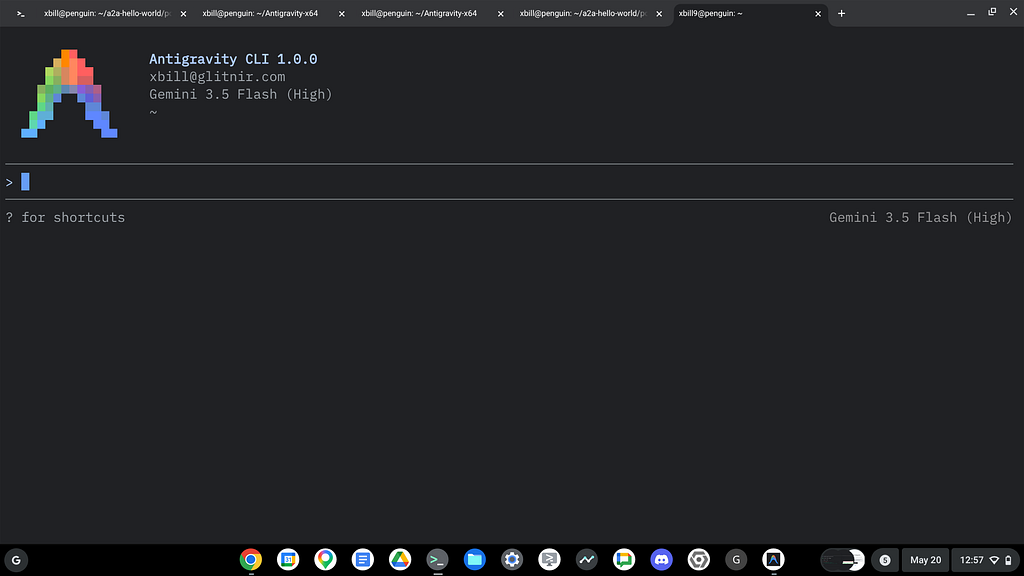
This will start the interface:
#### Full Installation Instructions
The detailed installation instructions for Antigravity CLI are here:
[Getting Started with Antigravity CLI](https://dev.to/gde/getting-started-with-antigravity-cli-183g)
#### Azure CLI
The Azure Command-Line Interface (CLI) is a cross-platform tool used to connect to Azure and execute administrative commands on Azure resources. It allows you to manage services like virtual machines, databases, and networking through a terminal using interactive prompts or scripts. [[1](https://learn.microsoft.com/en-us/cli/azure/what-is-azure-cli?view=azure-cli-latest), [2](https://learn.microsoft.com/en-us/cli/azure/?view=azure-cli-latest), [3](https://sumble.com/tech/azure-cli)]
More details are available here:
[What is the Azure Developer CLI?](https://learn.microsoft.com/en-us/azure/developer/azure-developer-cli/overview?tabs=linux)
#### Where do I start?
The strategy for starting MCP development for model management is a incremental step by step approach.
First, the basic development environment is setup with the required system variables, and a working Antigravity CLI configuration.
Then, a minimal Python MCP Server is built with stdio transport. This server is validated with Antigravity CLI in the local environment.
This setup validates the connection from Antigravity CLI to the local server via MCP. The MCP client (Antigravity CLI) and the Python MCP server both run in the same local environment.
#### Setup the Basic Environment
At this point you should have a working Python environment and a working Antigravity CLI installation. The next step is to clone the GitHub samples repository with support scripts:
```shell
cd ~
git clone https://github.com/xbill9/gemma4-tips-azure
```
Then run **init.sh** from the cloned directory.
The script will attempt to determine your shell environment and set the correct variables:
```shell
cd gpu-12B-qat-L4-devops-agent
source init.sh
```
If your session times out or you need to re-authenticate- you can run the **set\_env.sh** script to reset your environment variables:
```shell
cd gpu-12B-qat-L4-devops-agent
source set_env.sh
```
Variables like PROJECT\_ID need to be setup for use in the various build scripts- so the set\_env script can be used to reset the environment if you time-out.
#### Model Management Tool with MCP Stdio Transport
One of the key features that the standard MCP libraries provide is abstracting various transport methods.
The high level MCP tool implementation is the same no matter what low level transport channel/method that the MCP Client uses to connect to a MCP Server.
The simplest transport that the SDK supports is the stdio (stdio/stdout) transport — which connects a locally running process. Both the MCP client and MCP Server must be running in the same environment.
The connection over stdio will look similar to this:
```python
# Initialize FastMCP server
mcp = FastMCP("Self-Hosted vLLM DevOps Agent")
```
#### Running the Python Code
First- switch the directory with the Python version of the MCP sample code:
```shell
~/gemma4-tips-azure/cd gpu-12B-qat-L4-devops-agent
```
Run the release version on the local system:
```console
xbill@penguin:~/gemma4-tips-azure/gpu-12B-qat-L4-devops-agent$ make install
pip install -r requirements.txt
Requirement already satisfied: mcp in /home/xbill/.pyenv/versions/3.13.13/lib/python3.13/site-packages (from -r requirements.txt (line 1)) (1.27.2)
Requirement already satisfied: fastmcp in /home/xbill/.pyenv/versions/3.13.13/lib/python3.13/site-packages (from -r re
```
The project can also be linted:
```console
xbill@penguin:~/gemma4-tips-azure/gpu-12B-qat-L4-devops-agent$ make lint
ruff check .
All checks passed!
ruff format --check .
7 files already formatted
mypy .
Success: no issues found in 7 source files
xbill@penguin:~/gemma4-tips-azure/gpu-12B-qat-L4-devops-agent$
```
#### MCP stdio Transport
One of the key features that the MCP protocol provides is abstracting various transport methods.
The high level tool MCP implementation is the same no matter what low level transport channel/method that the MCP Client uses to connect to a MCP Server.
The simplest transport that the SDK supports is the stdio (stdio/stdout) transport — which connects a locally running process. Both the MCP client and MCP Server must be running in the same environment.
In this project Antigravity CLI is used as the MCP client to interact with the Python MCP server code.
#### Antigravity CLI mcp\_config.json
A sample MCP server file is provided in the .agents directory:
```json
{
"mcpServers": {
"gpu-devops-agent": {
"command": "python3",
"args": [
"/home/xbill/gemma4-tips-azure/gpu-12B-qat-L4-devops-agent/server.py"
],
"env": {
"GOOGLE_CLOUD_PROJECT": "aisprint-491218",
"MODEL_NAME": "/mnt/models/gemma-4-12B-it-qat-w4a16-ct"
}
}
}
}
```
#### Validation with Antigravity CLI
The final connection test uses Antigravity CLI as a MCP client with the Python code providing the MCP server:
```plaintext
MCP Servers
Plugins (~/.gemini/antigravity-cli/plugins)
> ✓ google-dev-knowledge Tools: search_documents, answer_query, get_documents
✓ gpu-devops-agent Tools: save_hf_token, get_vllm_endpoint, list_vertex_models, list_bucket_models,
analyze_cloud_logging, +25 more
```
#### Getting Started with Gemma 4 on GPU
The Official vLLM repo also has Gemma4 specific information:
[Releases · vllm-project/vllm](https://github.com/vllm-project/vllm/releases)
The Gemma 12B model was just released:
[Introducing Gemma 4 12B: a unified, encoder-free multimodal model](https://blog.google/innovation-and-ai/technology/developers-tools/introducing-gemma-4-12b/)
#### What about the QAT Models?
A deep dive into deploying the 12B QAT model is here:
[12B Gemma 4 QAT Deployment with NVIDIA L4, Cloud Run, MCP, and Antigravity CLI](https://dev.to/gde/12b-gemma-4-qat-deployment-with-nvidia-l4-cloud-run-mcp-and-antigravity-cli-21l2)
#### Lets Deploy this!
The model was deployed to Standard\_NV36ads\_A10\_v5 backed with a NVIDIA GPU:
```plaintext
> status_azure_vm
● Bash(az vm show -g gpu-12b-qat-l4-devops-agent-rg5 -n gpu-12b-qat-l4-devops-agent-vm5 -d --query "{Name:name,
Sta...)
● Read(/home/xbill/.gemini/antigravity-cli/brain/e...c73cc4/.system_generated/tasks/task-679.log) (ctrl+o to expand)
The VM gpu-12b-qat-l4-devops-agent-vm5 is currently running:
• VM Name: gpu-12b-qat-l4-devops-agent-vm5
• Size: Standard_NV36ads_A10_v5
• State: VM running
• Public IP: 13.72.84.53
```
Now check the Docker Container:
```plaintext
> check_vllm
• Container Status: Up 11 minutes
• Health Endpoint Check: 200 OK (HTTP response code 200 from /health )
```
#### Cross Check The Deployed Model
Once the model starts locally- the MCP tool allows for model verification:
```plaintext
> verify_model_health
The deep model health check verified that the model is fully responsive:
• Target URL: http://13.72.84.53:8080/v1
• Active Model ID: google/gemma-4-12B-it-qat-w4a16-ct
• Health Query Output:
│ Hello there! How can I help you?
```
and model details:
```markdown
Here are the details for the running model:
### 🧩 Model Details ( http://13.72.84.53:8080 )
Model Information ( /v1/models ):
[
{
"id": "google/gemma-4-12B-it-qat-w4a16-ct",
"object": "model",
"owned_by": "vllm"
}
]
Health Status ( /health ):
• Status: Healthy ✅
```
and the endpoint:
```plaintext
The current active vLLM service endpoint status:
🟢 vLLM is Online at: [http://13.72.84.53:8080](http://13.72.84.53:8080)
```
and status:
```plaintext
Here is the current system/model status:
### 🌀 GPU vLLM System Status
• vLLM Health: 🟢 Online ( http://13.72.84.53:8080 )
• Hosting Status: Running on Azure VM (GCP service checks skipped or not found)
👉 Next Step: You can use query_gemma4 to interact with the model.
```
and metrics:
```plaintext
Here are the key vLLM serving and cache metrics from the running instance:
### 📊 Active vLLM Cache & Request Metrics
• Running Requests ( vllm:num_requests_running ): 0.0 (no active inference requests)
• Waiting Requests ( vllm:num_requests_waiting ): 0.0 (empty wait queue)
• KV-Cache Usage ( vllm:kv_cache_usage_perc ): 0.0% (0.0 usage factor)
• Prefix Cache Queries (Tokens) ( vllm:prefix_cache_queries_total ): 23.0 tokens cached and queried via prompt
prefixes.
```
#### Check the Azure Instance
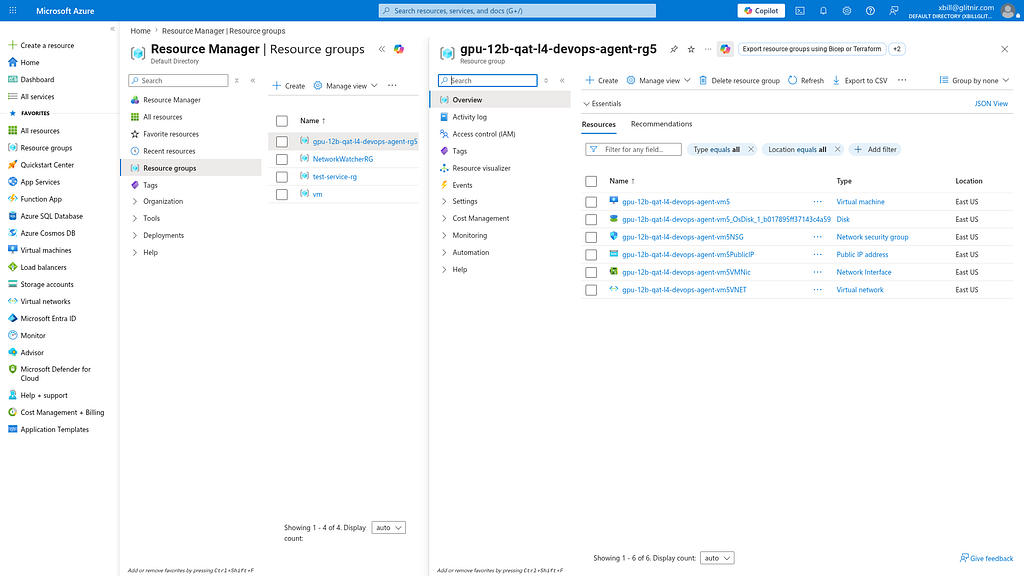
Once Deployed — the model is visible on the Azure Console:
#### Review the Model
Check the model details:
```markdown
> what are the model details?
The running model is Gemma 4 12B IT (QAT compressed-tensors). Here are the configuration and serving details:
### 🧩 Model Configuration
• Model ID: google/gemma-4-12B-it-qat-w4a16-ct
• Quantization: Quantization-Aware Training (QAT)
• Method: 4-bit weights with 16-bit activations ( w4a16 ).
• Serialization: Natively serialized in the compressed-tensors ( -ct ) format for optimized serving.
• Context Limit: 32,768 tokens ( --max-model-len 32768 ).
### ⚙️ Serving Architecture
• Inference Engine: vLLM ( vllm/vllm-openai:nightly container)
• Serving Host: Azure VM size Standard_NV36ads_A10_v5 (equipped with a virtualized NVIDIA A10-24Q GPU).
• Operating System: Ubuntu 22.04 LTS (Gen2).
• VRAM Footprint: ~84% allocation on the virtualized 24 GB partition.
```
Once everything is online — you can send queries to the Model:
```markdown
> query_gemma4_with_stats what is Gemma?
Here are the response and performance statistics from the running model:
### 📊 Performance Stats
• Model: google/gemma-4-12B-it-qat-w4a16-ct
• Time to First Token (TTFT): 0.113s
• Total Generation Time: 13.815s
• Tokens per Second: 47.80 tokens/s
• Total Tokens (approx.): 655
### 💬 Model Response
Gemma is a family of lightweight, state-of-the-art open models developed by Google DeepMind.
To understand what Gemma is, it helps to look at its relationship to Google's larger AI models and its specific
characteristics:
#### 1. The "Open" vs. "Closed" Distinction
• Gemini: This is Google's flagship, highly capable, proprietary model (accessible via API or Google products).
It is a "closed" model because the internal weights and architecture aren't available for public download.
• Gemma: This is the "Open Model" version. Google took the same research, technology, and infrastructure used to
create Gemini and distilled it into smaller, more efficient models that developers and researchers can download,
customize, and run on their own hardware.
#### 2. Key Characteristics
• Performance: Despite being smaller, Gemma models are designed to punch above their weight. They are optimized
to achieve high performance on tasks like reasoning, coding, and mathematics relative to their size.
• Size Variants: Gemma comes in different sizes (e.g., 2B, 7B, 9B, 27B, etc., referencing billions of
parameters). Smaller models (like 2B) can run on a laptop, while larger models (like 27B) require more powerful
GPUs.
• Responsible AI: Gemma was built using "Responsible AI" techniques, meaning it underwent rigorous safety tuning
to reduce bias and the generation of harmful content.
#### 3. Why do people use Gemma?
• Accessibility: You can run it on a personal computer or a workstation without needing a massive data center.
• Customization (Fine-tuning): Because the weights are open, developers can "fine-tune" the model on specific
datasets.
• Privacy: Since you run it on your own local hardware, you can process sensitive data without sending it to a
cloud provider.
• Ecosystem: It integrates seamlessly with popular frameworks like Hugging Face, Keras, PyTorch, and JAX.
#### 4. Summary Comparison
Feature | Gemini | Gemma
------------------------------------|-----------------------------------|---------------------------------------
Access | Closed (API / Web) | Open (Downloadable weights)
Size | Massive (huge compute required) | Small to Medium (laptop/GPU friendly)
Use Case | General purpose, high-end apps | Research, local apps, fine-tuning
Developer | Google DeepMind | Google DeepMind
In short: If Gemini is the heavy-duty industrial machine, Gemma is the high-performance power tool that anyone
can own and customize.
```
#### Benchmark the Local Model
The local model was benchmarked. Summarize the results:
```markdown
> summarize the benchmark
Here is a summary of the 2D grid concurrency benchmark results for Gemma 4 12B QAT ( google/gemma-4-12B-it-qat-
w4a16-ct ) running on an Azure VM ( Standard_NV36ads_A10_v5 with 1 x NVIDIA A10 GPU):
### 📊 Key Performance Metrics
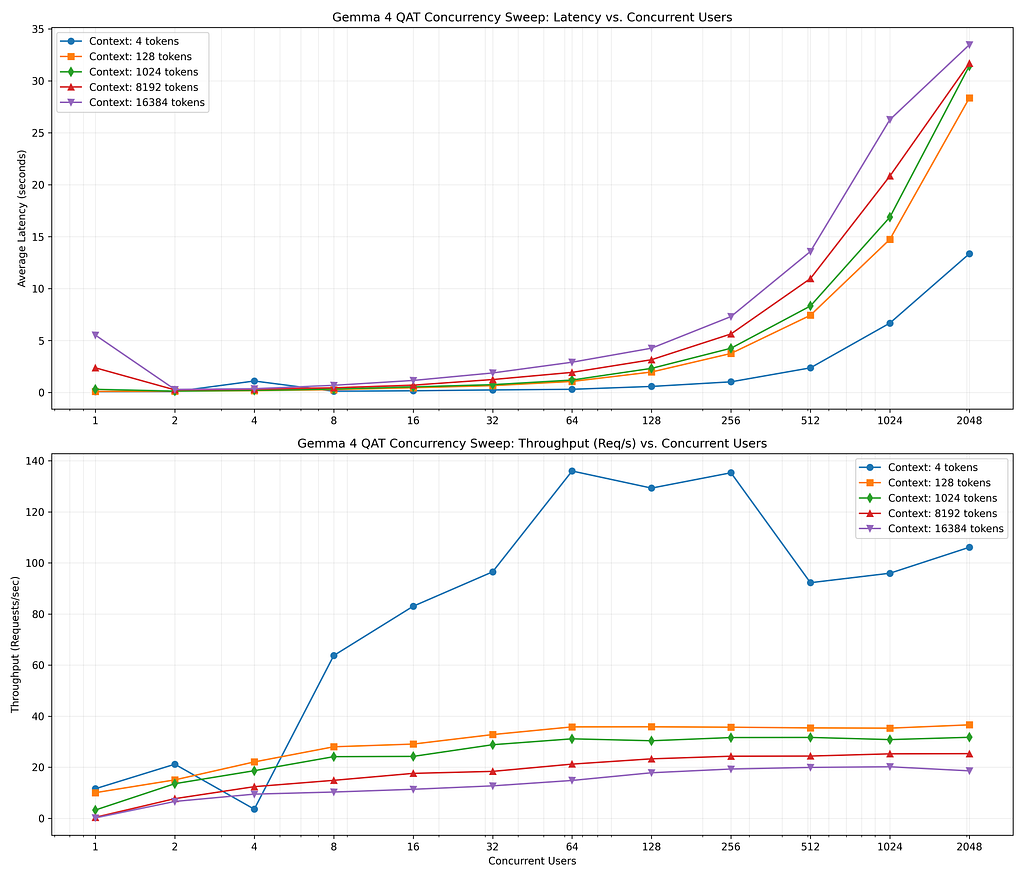
• Peak Throughput: 136.0 Requests/second (achieved at context size 4 with 64 concurrent users).
• Stability Limit: 100% request success rate was maintained up to 1024 concurrent users across all context
windows (from 4 tokens to 16,384 tokens).
• Stress Load Behavior: At 2048 concurrent users, success rates remained at 100% for smaller context sizes (up
to 256 tokens) and degraded gracefully to 62.0% at the maximum 16K context window under VRAM pressure.
### 🕒 Latency & Scaling
• Short Context (<= 128 tokens): Extremely fast response times (average latency < 1.0s up to 128 concurrent
users, scaling to 13.35s under massive 2048 user load).
• Medium Context (1024 tokens): Remains highly responsive with average latency of 2.32s at concurrency 128,
and 16.88s at concurrency 1024.
• Large Context (16384 tokens): Prefill latency scales linearly with concurrency (e.g., 4.26s average latency
at 128 users, 13.57s at 512 users, and 26.27s at 1024 users).
### 💡 DevOps & SRE Conclusion
Serving the 12B QAT model weights (4-bit weight / 16-bit activation) using vLLM on a single NVIDIA A10 GPU is
highly robust. The INT4 quantized weight footprint frees up significant VRAM for the KV cache, permitting
excellent concurrency scaling and stability up to 1024 concurrent users even with high context lengths, making
it ideal for high-throughput SRE log analysis workflows.
```
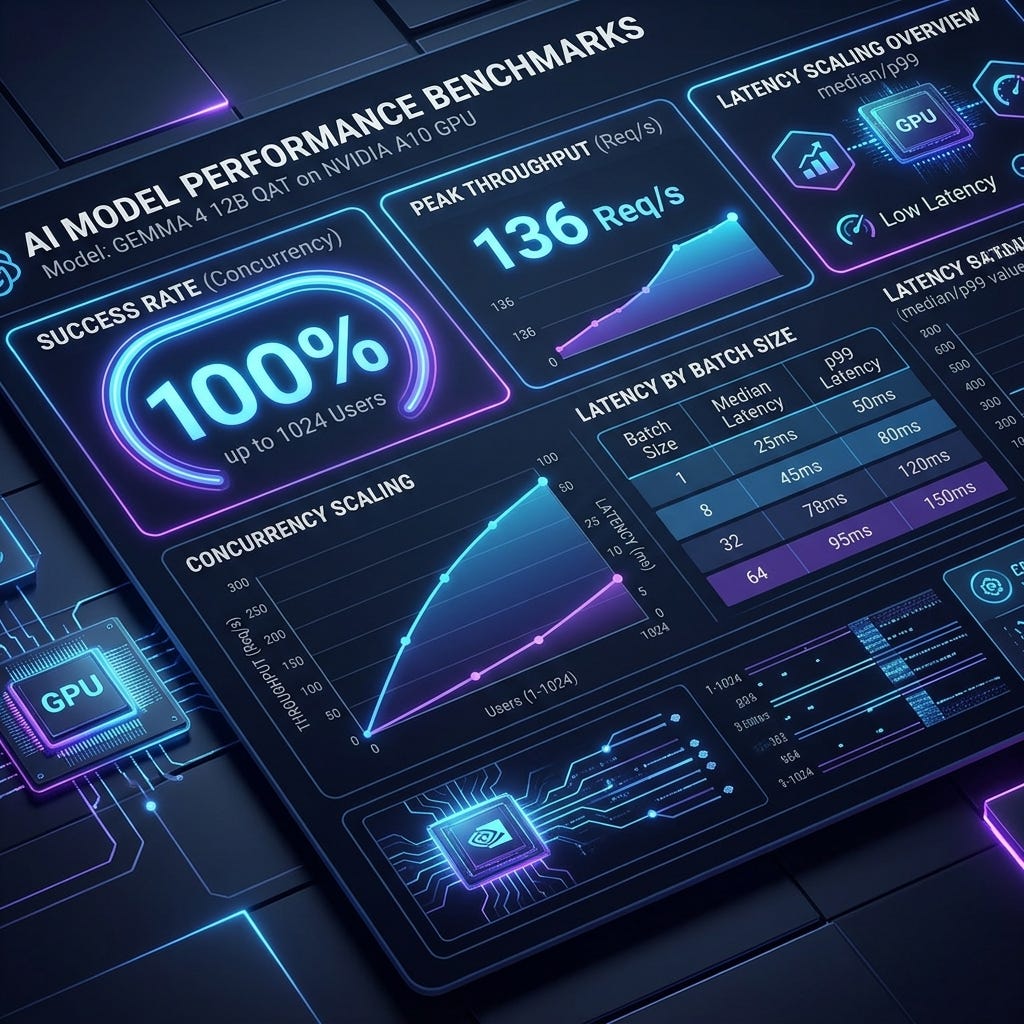
This is visualized:
#### GPU Memory Allocation of QAT 12B Models
The GPU provides 28 GB of GPU Memory:
```plaintext
> what is the memory breakdown on the GPU?
The current GPU memory breakdown on the virtualized NVIDIA A10 GPU on the remote VM:
### 📊 nvidia-smi Process & VRAM Usage
• Total VRAM Capacity: 24,512 MiB (24 GB)
• Allocated/Used VRAM: 21,240 MiB (~86.6% utilization)
• Free VRAM: 3,272 MiB (~13.4% free)
#### Active GPU Processes:
GPU | Process ID | Type | Process Name | GPU Memory Usage
----------------------|----------------------|----------------------|---------------------|---------------------
0 | 26419 | C (Compute) | VLLM::EngineCore | 21,237 MiB
Note: The remaining ~3 MiB is system hypervisor/driver overhead.
```
What are the performance characteristics of the Model?
```markdown
> what are the performance characteristics of the deployment
The performance characteristics of the Gemma 4 12B QAT ( google/gemma-4-12B-it-qat-w4a16-ct ) deployment on the
Azure VM NV36ads A10 v5 are summarized below:
### ⚙️ 1. Resource & Serving Settings
• Quantization Advantage: The model uses 4-bit weights with 16-bit activations ( w4a16 ). This compresses the
model footprint significantly, leaving ~18 GB of VRAM free for the KV cache pool on the 24 GB A10 GPU.
• VRAM Allocation Tuning: To accommodate the ~2.35 GB Azure virtualization/hypervisor overhead, the server is
tuned to --gpu-memory-utilization 0.85 (using 21.2 GB total), preventing out-of-memory crashes on startup.
• KV-Cache Format: Uses bfloat16 KV cache (Ampere GPUs do not support native FP8 Triton kernels, which are
reserved for Ada/Hopper architectures).
──────
### 🚀 2. Throughput & Concurrency
• Peak Throughput: 136.0 requests/second (at 64 concurrent users, short context).
• Concurrency Ceiling:
• 100% Success Rate is maintained up to 1024 concurrent users across all context window sizes (4 to 16,384
tokens).
• 2048 concurrent users degrades gracefully to 62% success rate for the maximum 16K context window due to
prefill queue saturation.
──────
### 🕒 3. Latency Characteristics
• Zero-Load TTFT: 0.113s (Time to First Token).
• Latency Scaling (under concurrent load):
• 128 Users: Average latency is 0.58s (4 tokens) / 2.32s (1K tokens) / 4.26s (16K tokens).
• 1024 Users: Average latency is 6.68s (4 tokens) / 16.88s (1K tokens) / 26.27s (16K tokens).
• 2048 Users: Average latency is 13.35s (4 tokens) / 31.44s (1K tokens) / 33.47s (16K tokens).
```
One last cross check — what are the trade-offs of the deployment?
```markdown
> what are the trade-offs on the deployment?
The performance characteristics of the Gemma 4 12B QAT ( google/gemma-4-12B-it-qat-w4a16-ct ) deployment on the
Azure VM NV36ads A10 v5 are summarized below:
### ⚙️ 1. Resource & Serving Settings
• Quantization Advantage: The model uses 4-bit weights with 16-bit activations ( w4a16 ). This compresses the
model footprint significantly, leaving ~18 GB of VRAM free for the KV cache pool on the 24 GB A10 GPU.
• VRAM Allocation Tuning: To accommodate the ~2.35 GB Azure virtualization/hypervisor overhead, the server is
tuned to --gpu-memory-utilization 0.85 (using 21.2 GB total), preventing out-of-memory crashes on startup.
• KV-Cache Format: Uses bfloat16 KV cache (Ampere GPUs do not support native FP8 Triton kernels, which are
reserved for Ada/Hopper architectures).
──────
### 🚀 2. Throughput & Concurrency
• Peak Throughput: 136.0 requests/second (at 64 concurrent users, short context).
• Concurrency Ceiling:
• 100% Success Rate is maintained up to 1024 concurrent users across all context window sizes (4 to 16,384
tokens).
• 2048 concurrent users degrades gracefully to 62% success rate for the maximum 16K context window due to
prefill queue saturation.
──────
### 🕒 3. Latency Characteristics
• Zero-Load TTFT: 0.113s (Time to First Token).
• Latency Scaling (under concurrent load):
• 128 Users: Average latency is 0.58s (4 tokens) / 2.32s (1K tokens) / 4.26s (16K tokens).
• 1024 Users: Average latency is 6.68s (4 tokens) / 16.88s (1K tokens) / 26.27s (16K tokens).
• 2048 Users: Average latency is 13.35s (4 tokens) / 31.44s (1K tokens) / 33.47s (16K tokens).
> what are the trade-offs on the deployment?
────────────────────────────────────────────────────────────
▸ Thought Process
Analyzing Deployment Trade-offs
The deployment of Gemma 4 12B QAT on the Azure VM Standard_NV36ads_A10_v5 involves several key trade-offs across
hardware, software, and serving configurations:
### 1. Model Precision: QAT w4a16 vs. Standard bfloat16
• Trade-off: Quality vs. Concurrency Capacity
• Details:
• The standard bfloat16 12B model leaves 0 GB of free VRAM for the KV cache on a 24 GB GPU, restricting
concurrency to < 8 concurrent users.
• The QAT w4a16 format frees up ~18 GB of VRAM for the KV cache pool, permitting stable serving for up to
1024 concurrent users (~64x capacity increase).
• Loss: A negligible degradation in model accuracy/reasoning capability, which QAT minimizes compared to
standard post-training quantization (PTQ).
### 2. Operating System: Ubuntu 22.04 LTS vs. Azure Linux 4.0
• Trade-off: Ecosystem Compatibility vs. Minimal Footprint
• Details:
• Azure Linux 4.0 is highly optimized for lightweight VM instances but lacks mature repository support (
tdnf ) for the NVIDIA driver stack, causing installation/compilation failures.
• Standardizing on Ubuntu 22.04 LTS increases the OS image footprint slightly but guarantees out-of-the-box
support for the official NvidiaGpuDriverLinux extensions, ensuring driver stability and container toolkit
binding.
### 3. Memory Allocation: --gpu-memory-utilization 0.85 vs. 0.95
• Trade-off: Startup Stability vs. KV Cache Overhead
• Details:
• Virtualized GPU partitions ( NVIDIA A10-24Q ) on Azure consume ~2.35 GB of VRAM for the driver/hypervisor
stack immediately upon VM boot.
• Setting vLLM's utilization to the default 0.95 causes the server to crash during initialization with an
Out-of-Memory error. Lowering the limit to 0.85 leaves sufficient headroom for the hypervisor to run but
slightly reduces the total number of concurrent tokens that can be stored in the KV cache.
### 4. KV-Cache Type: bfloat16 vs. fp8
• Trade-off: Hardware Compatibility vs. Context Window Scaling
• Details:
• FP8 KV caching cuts cache memory requirements in half but requires SM89+ compute capabilities (e.g. NVIDIA
L4 or Hopper architectures).
• The A10 GPU is based on the Ampere architecture (SM86), which lacks native hardware support for Triton FP8
attention kernels. We must use bfloat16 KV cache, which consumes double the memory per token but
guarantees stable and correct execution.
```
#### So where is the best place to run Gemma? AWS or GCP? Azure?
Survey says…
```markdown
> compare aws vs gcp vs azure performance
● Read(/home/xbill/gemma4-tips-azure/gpu-12B-qat-L4-devops-agent/benchmark_report_summary_gcp.md) (ctrl+o to expand)
Here is the performance comparison of serving Gemma 4 12B QAT across AWS, GCP, and Azure.
All three deployments utilize 24 GB VRAM GPUs (NVIDIA L4 on AWS/GCP, NVIDIA A10 on Azure) and run the model in
the w4a16-ct format:
Metric | AWS EC2 ( g6.2xlarge … | GCP Cloud Run Gen2 (NV… | Azure VM ( NV36ads_A10_…
---------------------------------|-------------------------|-------------------------|--------------------------
Peak Throughput | ~93.3 Req/s | ~40.3 Req/s | 136.0 Req/s 🏆
100% Success Rate Limit | Up to 1024 users | Up to 512 users | Up to 1024 users 🏆
Success @ 2048 Users (16K) | ~61.8% | ~22.0% | 62.0% 🏆
1K Context Latency @ 1024 Users | ~19.90s | ~23.22s | 16.88s 🏆
Infrastructure Type | Dedicated VM | Serverless Container | Dedicated VM
──────
### 💡 Infrastructure & Performance Insights
#### 1. Azure Dedicated VM vs. GCP Cloud Run (Serverless)
• The Serverless Concurrency Penalty: GCP Cloud Run enforces CPU throttling limits and container sandbox
virtualization overhead, which limits peak throughput to 40.3 Req/s and causes earlier success rate degradation
(at 1024 users).
• Dedicated Compute Power: Both AWS and Azure dedicated VMs bypass container sandbox virtualization. Azure
achieves the lowest latency (16.88s for 1K context at 1024 concurrency) and the highest peak throughput (136.0
Req/s).
#### 2. GPU Capabilities (NVIDIA A10 vs. NVIDIA L4)
• Memory Bandwidth: The NVIDIA A10 GPU on Azure has a larger memory bus width (384-bit GDDR6 with 600 GB/s
bandwidth) compared to the NVIDIA L4 (192-bit GDDR6 with 300 GB/s bandwidth).
• Impact: The higher memory bandwidth of the A10 significantly accelerates input prefill token processing under
high concurrent load, explaining the higher throughput and lower latencies on Azure compared to AWS and GCP.
```
#### What about costs?!?
The serving costs were summarized:
```markdown
> what is the cost to run this on Azure
● WebSearch(Standard_NV36ads_A10_v5 azure price) (ctrl+o to expand)
Here is the cost breakdown to run the Standard_NV36ads_A10_v5 (NVIDIA A10 GPU) serving stack on Azure (using
typical pricing in US Eastern regions):
### 💵 Hourly and Monthly Run Costs
Purchase Model | Hourly Cost | Monthly Cost (24/7 Run) | SRE Savings
----------------------------|---------------------------|---------------------------|---------------------------
On-Demand | ~$3.20 / hour | ~$2,304 / month | Baseline price
Spot Instance | ~$0.59 / hour | ~$424 / month | ~81% savings 🏆
──────
### 💡 Cost Optimization Tips
1. Leverage Spot Instances (Highly Recommended): Since this is a self-hosted SRE diagnostic stack rather than a
production-critical user-facing app, using Azure Spot VMs saves 80%+ of compute costs.
2. Auto-Stop Policy: The MCP server exposes the stop_azure_vm tool. Setting up a cron schedule or SRE trigger
to automatically invoke stop_azure_vm during off-hours (deallocating the VM) ensures you only pay for active
execution hours.
3. Fractional GPU Partitioning: The Azure NVads A10 v5 series supports fractional GPU partitioning (e.g.
Standard_NV6ads_A10_v5 provides 1/6th of an A10 GPU with 4GB VRAM). However, for a 12B QAT model, you need the
full GPU frame buffer ( Standard_NV36ads_A10_v5 ), so partition scaling down is not recommended for this
specific model size.
────────────────────────────────────────────────────────────
> compare vs aws and gcp
● WebSearch(g6.2xlarge aws price hourly)
● WebSearch(gcp cloud run gpu pricing hourly l4) (ctrl+o to expand)
Here is the cost comparison between AWS, GCP, and Azure for running the Gemma 4 serving stack:
### 💰 Cost Comparison Table
Platform & Setup | Hourly Cost (Ac… | Idle Cost | Estimated Monthl… | Cost Key Characteristic
--------------------------|------------------|------------------|-------------------|---------------------------
GCP Cloud Run | ~$0.75 / hr | $0.00 / hr | Variable (Usage- | Pay-per-second & Scale-
(Serverless L4) | | (Idle) | based) | to-zero 🏆
AWS EC2 ( g6.2xlarge VM | ~$0.98 / hr | ~$0.98 / hr | ~$705 / mo | Best balance for
L4) | | | | dedicated VM compute
Azure VM ( | ~$3.20 / hr | ~$3.20 / hr | ~$2,304 / mo | Performance leader, but
NV36ads_A10_v5 VM A10) | | | | instance is oversized
──────
### 🔍 Deep Dive & Recommendations
#### 1. GCP Cloud Run (Serverless) — Best for Low/Intermittent Usage
• The Scale-to-Zero Advantage: If your SRE diagnostic tools only run occasionally (e.g., triggered on-call or
during morning log reviews), Cloud Run scales down to 0 instances when idle, billing you $0.00.
• Trade-off: Cold starts (takes ~1 minute to spin up from zero to load model weights) and lower peak concurrency
limits.
#### 2. AWS EC2 ( g6.2xlarge ) — Best Value for Dedicated Running
• Right-sized VM: AWS pairs the single L4 GPU with a reasonably sized host (8 vCPUs, 32GB RAM), keeping the on-
demand price under $1.00/hour.
• Spot Option: Spot pricing brings the cost down to ~$0.30/hour (~$216/month).
#### 3. Azure VM ( NV36ads_A10_v5 ) — Best for High-Concurrences (Enterprise)
• Oversized Host: To get a single A10 GPU on Azure, the NVads series bundles it with a massive host (36 vCPUs
and 440 GiB RAM), which drives the on-demand price up to $3.20/hour.
• Spot Recommendation: If you deploy on Azure, Spot Instances are mandatory to keep the cost viable at ~$0.
59/hour (~$424/month), while delivering the highest throughput (136 Req/s) and memory bandwidth of all three
platforms.
```
#### Summary
The strategy for using MCP for Gemma 4 GPU deployment with Antigravity CLI and Azure was validated with an incremental step by step approach.
A minimal stdio transport MCP Server was started from Python source code and validated with Antigravity CLI running as a MCP client in the same local environment. This Python server provided all of the management tools to deploy and troubleshoot Azure Model deployments.
Comments
More Blog
View allkubernetesMinimalist EKS: The Easy Way
Amazon EKS manages the Kubernetes control plane, but you remain responsible for provisioning the...
J
Joaquin MenchacaaiNever forget to enter the Stern Grove lottery again!
Browser automation with Playwright, Python, GitHub Actions, and Entire to auto-enter San Francisco Stern Grove concert lotteries each week!
L
Lizzie SiegletypescriptA Free Screenshot Editor That Never Uploads Your Image
A free screenshot and image editor that runs entirely in your browser. Keeping every edit reversible and handling big phone photos, in plain TypeScript and Canvas2D.
M
Martin StarkshowdevI built a CLI to break my highlights out of Apple Books
A macOS CLI + MCP server that exports Apple Books highlights to Markdown and gives AI assistants direct access to your reading notes.
A
Andrey KorchakaiA Developer's Guide to Agent Hooks in Antigravity CLI
Motivation To be quite honest, "Hooks"—the shell commands we trigger at specific points...
T
TanaikeagentsTactical vs. Strategic Agentic AI Development — A Playbook for Developers
The Strategic Engineer: Why Writing Code Is No Longer Your Most Valuable Skill ...
A
Adewumi Saheed Adewale