
Back to Blog javascript
 kubernetes
 ai
ai typescript
 showdev
 ai
ai agents
I stopped generating color scales and started shaping them
Gil Barbara June 23, 2026
0 views
Generating a color scale is a solved problem. Hand most tools a color and you get back eleven valid,...
Generating a color scale is a solved problem. Hand most tools a color and you get back eleven valid, perceptually even steps. The trouble is they tend to come out a little lifeless: chalky tints, every step interchangeable, technically correct and slightly generic.
The scale you actually want has *intent*: clean highlights, shadows with depth, contrast spent where your UI needs it. The gap between the two isn't more math — it's a few controls, and a way to see what they're doing.
I maintain a small color library, [colorizr](https://github.com/gilbarbara/colorizr), and its `scale()` does the generating part: one color in, a full scale out:
```ts
import { scale } from 'colorizr';
scale('#ff38af');
// { 50: '#ffeff7', 100: '#ffe2f1', …, 500: '#ff3fb4', …, 950: '#31001c' }
```
Even, valid, fine. The interesting part is everything *after* the default — the controls that let you shape it.
## The catch: you'd be shaping blind
Here's why this takes more than an API. Most of these controls are gamut-relative: they work against the maximum chroma a color can physically exhibit, and that ceiling shifts with hue and lightness at every step. There's no fixed range to picture the way there is in HSL — set `chromaCurve: { low: 0.6, high: 0.4 }` and you'd have no real idea what you just did.
So the app isn't a product wrapped around the library, it's a **visualizer** for it. The scale on screen, every control on a slider, and a chart for the parts you can't see.
## Chroma curve — shaped against the ceiling
```ts
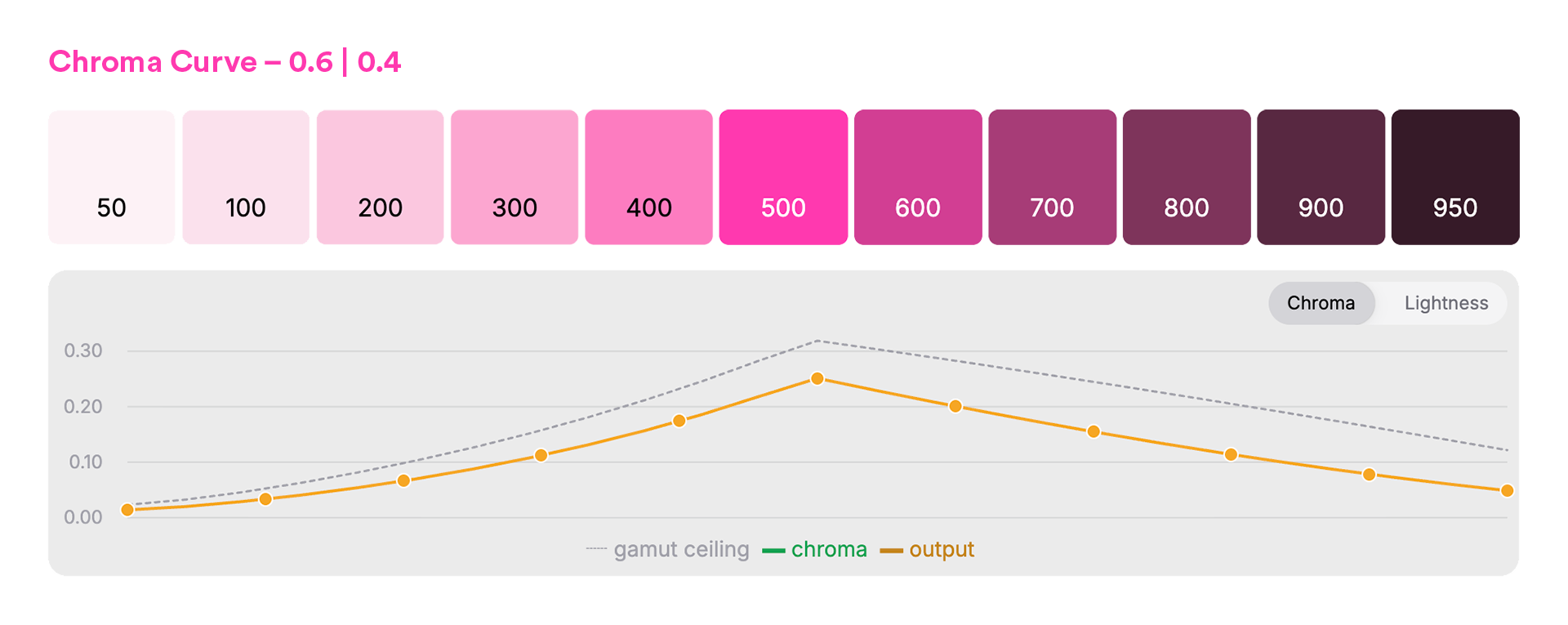
scale('#ff38af', { chromaCurve: { low: 0.6, high: 0.4 } });
```
The dotted line is the gamut ceiling; the solid line is what the scale uses. You shape chroma as a *fraction of the ceiling*, so the tints stay clean and nothing clips — per step, per hue. Hold chroma flat instead, and those pale steps go chalky. That's the whole difference between a washed-out light end and a clean one, and it's not a number you'd ever land on by eye.
## Hue shift — depth across the range
```ts
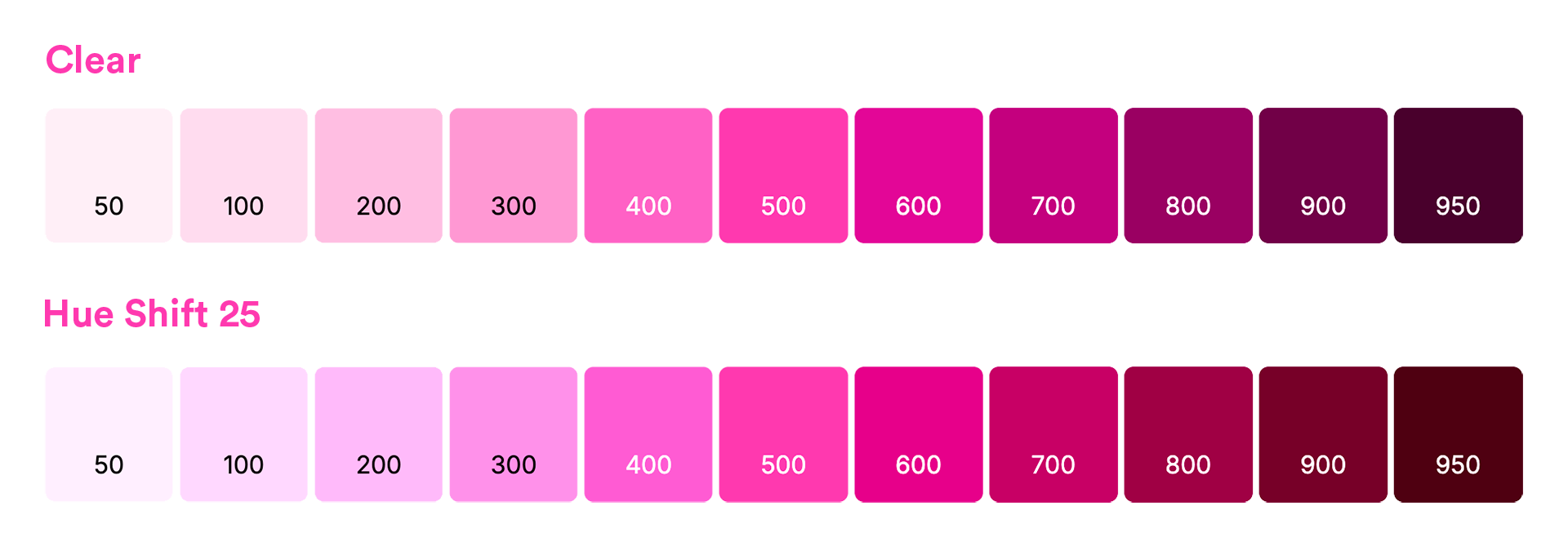
scale('#ff38af', { hueShift: 25 });
```
Pinning one hue across the whole scale is part of what reads synthetic. Rotate it a few degrees toward the ends — warm the shadows, cool the tints — and the scale gains the sense of light moving through it that hand-mixed palettes have. The middle stays locked to your base; the visualizer shows you how far is too far before your pink drifts into orange.
There's more in the same spirit: a **lightness curve** to decide where the contrast lives, a **min/max lightness range** to set the endpoints, and they all work the same way: a slider and a chart, so the choice is something you see, not something you guess.
## The payoff
That's the whole loop: shape the scale against the charts until it has the character you want, then take it to code. The visualizer hands you the result, export-ready — CSS variables, Tailwind, SCSS — and if you'd rather skip the UI, the same controls are available in colorizr for your build.
Same base color across all images above. The numbers won't tell you which scale you want; shaping it where you can see it will.
- **[colorizr](https://github.com/gilbarbara/colorizr)** - the engine. `npm i colorizr`, generate and shape scales in code, export-ready.
- **[the visualizer](https://lab.colormeup.co/custom-color-scales)** - shape against the gamut ceiling, watch the curves, copy the result out.
Comments
More Blog
View allkubernetesMinimalist EKS: The Easy Way
Amazon EKS manages the Kubernetes control plane, but you remain responsible for provisioning the...
J
Joaquin MenchacaaiNever forget to enter the Stern Grove lottery again!
Browser automation with Playwright, Python, GitHub Actions, and Entire to auto-enter San Francisco Stern Grove concert lotteries each week!
L
Lizzie SiegletypescriptA Free Screenshot Editor That Never Uploads Your Image
A free screenshot and image editor that runs entirely in your browser. Keeping every edit reversible and handling big phone photos, in plain TypeScript and Canvas2D.
M
Martin StarkshowdevI built a CLI to break my highlights out of Apple Books
A macOS CLI + MCP server that exports Apple Books highlights to Markdown and gives AI assistants direct access to your reading notes.
A
Andrey KorchakaiA Developer's Guide to Agent Hooks in Antigravity CLI
Motivation To be quite honest, "Hooks"—the shell commands we trigger at specific points...
T
TanaikeagentsTactical vs. Strategic Agentic AI Development — A Playbook for Developers
The Strategic Engineer: Why Writing Code Is No Longer Your Most Valuable Skill ...
A
Adewumi Saheed Adewale