
Back to Blog webdev
 cursor
 ai
ai amazonbedrock
 ai
ai ai
ai mcp
mcp
Cursor AI: 5 Advanced Features You're Not Using
Vishwas December 18, 2024
0 views
If you've been using Cursor AI code editor, you're probably already blown away by tab completion,...
If you've been using Cursor AI code editor, you're probably already blown away by tab completion, code generation, chat, and the composer. These features alone can make you feel like you've got superpowers.
But here's the thing, there's more. A lot more. Cursor has some seriously cool advanced features that most people aren't using yet. In this post, I'm going to show you five of them.
If you're new to Cursor, check out my posts on Cursor AI for developers and Cursor vs. GitHub Copilot to get up to speed.
The Cursor agent
<video src="https://cdn.builder.io/o/assets%2FYJIGb4i01jvw0SRdL5Bt%2F0dc168adfc8d40699d1478a4fb250e95%2Fcompressed?apiKey=YJIGb4i01jvw0SRdL5Bt&token=0dc168adfc8d40699d1478a4fb250e95&alt=media&optimized=true" width="320" height="240" controls></video>
First up is the Cursor Agent. It's like having a super-smart coding assistant that you can summon with ⌘. (Command + period). Here's what it can do:
- Pull in context automatically (try
@Recommended) - Run terminal commands.
- Create and modify files.
- Do semantic code search.
- Handle file operations.
Right now, it only works with Claude models, and each tool operation counts as a separate request in your quota.
Cursor rules
Next up is the .cursorrules file. It's a way to give Cursor project-specific instructions. Here's what you need to know:
- Put it in your project's root directory.
- It provides instructions for Cursor Chat and
Ctrl/⌘ Kcommands. - It's like the "Rules for AI" in Cursor's settings, but just for your project.
Here’s a sample .cursorrules file you could define in a Next.js project:
You are an expert in TypeScript, Node.js, Next.js App Router, React, Shadcn UI, Radix UI and Tailwind CSS.

Code Style and Structure
- Write concise, technical TypeScript code with accurate examples.
- Use functional and declarative programming patterns; avoid classes.
- Prefer iteration and modularization over code duplication.
- Use descriptive variable names with auxiliary verbs (e.g., isLoading, hasError).
- Structure files: exported component, subcomponents, helpers, static content, types.

Naming Conventions
- Use lowercase with dashes for directories (e.g., components/auth-wizard).
- Favor named exports for components.

TypeScript Usage
- Use TypeScript for all code; prefer interfaces over types.
- Avoid enums; use maps instead.
- Use functional components with TypeScript interfaces.

Syntax and Formatting
- Use the "function" keyword for pure functions.
- Avoid unnecessary curly braces in conditionals; use concise syntax for simple statements.
- Use declarative JSX.

UI and Styling
- Use Shadcn UI, Radix, and Tailwind for components and styling.
- Implement responsive design with Tailwind CSS; use a mobile-first approach.

Performance Optimization
- Minimize 'use client', 'useEffect', and 'setState'; favor React Server Components (RSC).
- Wrap client components in Suspense with fallback.
- Use dynamic loading for non-critical components.
- Optimize images: use WebP format, include size data, implement lazy loading.

Key Conventions
- Use 'nuqs' for URL search parameter state management.
- Optimize Web Vitals (LCP, CLS, FID).
- Limit 'use client':
  - Favor server components and Next.js SSR.
  - Use only for Web API access in small components.
  - Avoid for data fetching or state management.

Follow Next.js docs for Data Fetching, Rendering, and Routing.
This is super useful when you want to give Cursor some context about your project's specific requirements or conventions. It's worth noting that while .cursorrules is cool, Cursor also has Notepads, which can do even more. Speaking of which...
Notepads
<video src="https://cdn.builder.io/o/assets%2FYJIGb4i01jvw0SRdL5Bt%2Fb0224f79169a4b6c818115a515837439%2Fcompressed?apiKey=YJIGb4i01jvw0SRdL5Bt&token=b0224f79169a4b6c818115a515837439&alt=media&optimized=true" width="320" height="240" controls></video>
Notepads in Cursor are like supercharged sticky notes for your code. They bridge the gap between composers and chat interactions.
Here's what makes them special:
- You can share them between different parts of your dev environment
- Reference them using the
@syntax - Attach files to them
- Use them as dynamic templates for various scenarios
To create a Notepad in Cursor, click the "+" in the Notepads section, give it a meaningful name, and add any necessary content, context, or files. Reference Notepads in composers or chats using the @ symbol.
Notepads are great for documenting project architecture decisions, development guidelines, reusable code templates, team-specific rules and frequently referenced materials.
When you're creating a Notepad, try to use clear headings, markdown for readability, and include examples or file attachments as needed.
Notepads are still in beta, but they're already a super flexible way to enhance your workflow.
Bug finder
<video src="https://cdn.builder.io/o/assets%2FYJIGb4i01jvw0SRdL5Bt%2F7857571c386f4870ba400c809fd41a57%2Fcompressed?apiKey=YJIGb4i01jvw0SRdL5Bt&token=7857571c386f4870ba400c809fd41a57&alt=media&optimized=true" width="320" height="240" controls></video>
<br>Cursor's got this neat new bug finder feature. It's pretty cool, even if it comes with a slightly aggressive warning message and a pay-per-click pricing model (yeah, you might shell out a buck or more just to use it).
Here's how it works: it scans through all your code and recent changes. If you're on a feature branch, it'll compare that to main, looking for potential bugs.
For each bug it finds, you get a confidence rating and a quick overview. Then it's just a click to fix it in the editor. Cursor fills in all the details in the prompt and generates updates, just like you're used to.
It's not perfect, but it's a pretty handy tool to have in your back pocket.
@web symbol
<video src="https://cdn.builder.io/o/assets%2FYJIGb4i01jvw0SRdL5Bt%2F7bda0c44fa364e9b8b5e04989670bb11%2Fcompressed?apiKey=YJIGb4i01jvw0SRdL5Bt&token=7bda0c44fa364e9b8b5e04989670bb11&alt=media&optimized=true" width="320" height="240" controls></video>
With @Web, Cursor constructs a search query based on the query and the context you’ve provided, and searches the web to find relevant information as additional context. This is particularly useful for finding the most up-to-date information.
The @Web symbol is like having a research assistant built into Cursor. Here's how it works:
- You give it a query and some context.
- Cursor turns that into a web search.
- It searches the internet for relevant info.
- The search results get added to your query's context.
This is super useful when you're working with new tech or anything where you need the latest info.
Bonus: AI commit messages
<video src="https://cdn.builder.io/o/assets%2FYJIGb4i01jvw0SRdL5Bt%2F975c252d1ed14ba282d189e562582c5d%2Fcompressed?apiKey=YJIGb4i01jvw0SRdL5Bt&token=975c252d1ed14ba282d189e562582c5d&alt=media&optimized=true" width="320" height="240" controls></video>
Here's a little bonus feature: AI-generated commit messages. It might not sound like much, but it saves me a couple of minutes every day and reduces the mental load of coming up with good commit messages.
Now, Cursor does have this habit of being a bit...wordy with its commit messages. But hey, you can tweak that behavior by adding some instructions in a .cursorrules file.
Convert Figma designs to code in Cursor
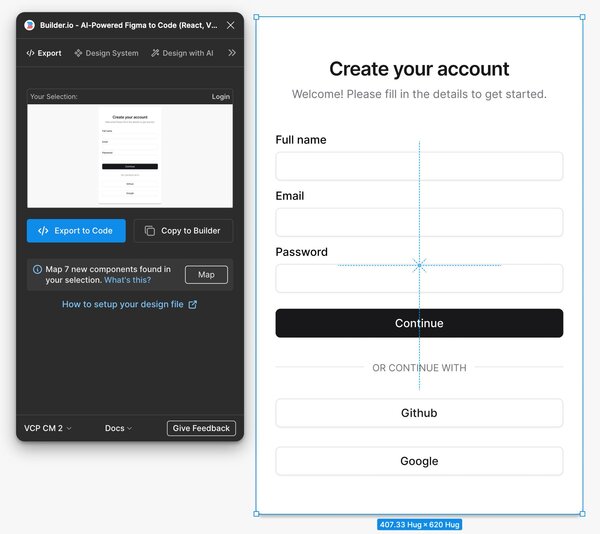
Let's talk about turning Figma designs into code using Builder.io's Visual Copilot plugin. It's a game-changer when you're working in Cursor.
Here's what you can do:
- Export your Figma design using the Visual Copilot plugin.
- Copy the generated command from Builder.io.
- Paste that command right into Cursor's terminal and generate the code
From there, you can tell Cursor to add interactivity, animations, event handlers and more. It'll generate all the code you need.
The result? You get a pixel-perfect UI that uses your components as expected. It's pretty slick. This whole process — from design to functional code — is way faster than doing it manually.
The best part? This workflow fits right into Cursor's other AI features. You can use the agent to add logic, make your updates and auto-generate a commit message.
Cursor AI FAQ
Here are some commonly asked questions about Cursor AI:
Does Cursor work with all programming languages?
Pretty much. It's great with the usual suspects like Python, JavaScript, and Java, but it'll work with most languages VS Code supports.
Do I need an OpenAI API key to use Cursor?
Nope. Cursor works straight out of the box. No extra setup needed.
Can Cursor handle both easy and hard coding tasks?
Absolutely! It'll help with simple functionality, but it can also tackle bigger jobs like refactoring huge codebases or writing entire functions.
Is Cursor good for beginners?
Definitely. If you're just starting out, its AI assistance can help explain concepts, suggest best practices, and help you learn as you go.
How does Cursor deal with existing code?
Pretty well, actually. It can understand and work with code you've already written. It can help you manipulate code, refactor, and even explain complex sections of your codebase
Can Cursor make a whole app from scratch?
It's not magic — it can't conjure up a full app out of thin air. But it can speed things up a lot. With the right prompts, you can go from a simple idea to basic working app pretty quick.
Will Cursor mess with my existing workflow?
Cursor is designed to seamlessly fit into your development process. It's built on top of VS Code, so if you're used to that, you'll be fine.
Can Cursor help with unit testing?
Yes, Cursor can assist in writing and improving unit tests. It can suggest test cases, help with test setup, and even identify areas of your code that might need better test coverage.
What are the pricing options for Cursor?
Cursor offers a free Hobby tier with limited features, a Pro tier at $20/month with expanded capabilities, and a Business tier at $40 per user/month for advanced features and team management.
Comments
More Blog
View allcursorCursor Automations in 2026: wire event-triggered coding agents to Slack, CI, and timers
Cursor Automations in 2026: wire event-triggered coding agents to Slack, CI, and...
M
Manu ShuklaaiIndex Everything, or Read Everything? The Dilemma of Feeding Specs to AI in Multi-Repo Development
The specs exist. The AI just can't see them. I've always been the type who builds hobby...
S
Shunya ShidaamazonbedrockConnect Claude Code, Cursor and Codex to Amazon Bedrock's new console (2026)
Connect Claude Code, Cursor and Codex to Amazon Bedrock's new console (2026) Summary. On 5...
M
Manu ShuklaaiSpotting AI UI is too easy
There is a weird uncanny valley with LLM-generated UI right now. The code functions perfectly, but if...
H
Harish .saiSeven ranking frameworks, one search page, zero translation tables
I went down a rabbit hole this morning reading the late-2025 Juejin AI roundups side by side, and the...
N
ninghonggangmcpZendesk MCP: Let Claude Handle Your Support Tickets
Install guide and config at curatedmcp.com Zendesk MCP: Let Claude Handle Your Support...
C
curatedmcpReady-made automations for this
Workflows from the Neura Market marketplace related to this Cursor resource
- Build Advanced AI Agents with Multi-Step Reasoning Using GPT-4n8n · $9.99 · Related topic
- Enhance AI Responses with Advanced Multi-Query RAG Using Supabase and GPT-5n8n · $14.99 · Related topic
- Advanced Anomaly Detection for Crop Analysis Using Vector Databasesn8n · $4.07 · Related topic
- Advanced Retry and Delay Logicn8n · $4.99 · Related topic