
Back to Blog llm
llm cursor
 ai
ai amazonbedrock
 ai
ai ai
ai mcp
mcp
Building Websites with Cursor and AWS.
balaji thadagam kandavel January 5, 2025
0 views
In this fast-moving world, where everything seems to move very fast, website creation and deployment...
In this fast-moving world, where everything seems to move very fast, website creation and deployment may seem frighteningly daunting. Most conventional means involve a hell of a lot of coding and similarly overwhelming infrastructure management. But large language models, combined with innovative tools like Cursor, are changing the way applications are developed.
Cursor is going to be a game-changing IDE in the creation and deployment of applications at speeds not fathomable by man. It makes use of a tight integration with LLMs such as Gemini that will have your ideas directly translated into functional code, automating most of the big, annoying steps in web development.
This article will walk you through a simplified build-and-deploy process of a simple website using Cursor and AWS while looking at human-oriented approaches for website development with an LLM as collaborator. We are going to see how Gemini creates a starting scaffold, perform some infrastructure creations on AWS using AWS CDK, and finish uploading our website onto Amazon S3.
How Cursor Works with LLMs
At its core, Cursor is an intelligent bridge between your creative vision and the code that delivers that vision. The simplified breakdown goes this way:
Natural Language Input: You provide Cursor with your desired website functionality or features in the form of plain, human-understandable language. An example could be,
_ "Create a simple landing page with a hero section, an about us section, and a contact form."_
LLM-Powered Code Generation: The magic of Cursor brings together the power of LLMs, such as Gemini, to translate your natural language instructions into real code. Think HTML, CSS, JavaScript, and any backend code that may be required.
Automation of Deployment: Cursor provides the deployment of the generated code on the cloud provider chosen by you- AWS. It manages the complexities in infrastructure provisioning for a smooth and seamless deployment.
Creating Your Template:
Define Your Website's Core Elements: First of all, outline the very important parts that must be present on your website. Consider these: Structure of the homepage: hero banner, about us, services, contact. Type of content: blog posts, product pages, landing pages. Design considerations: color scheme, typography, general aesthetics. Create the Template Using Gemini: With the use of Gemini, create a basic HTML, CSS, and JavaScript template that suits your desired structure and design. For this, one can give various prompts to drive the generation using Gemini. For example:
"I want to make a website for my portfolio/profile. I have cursor/AI assistant. Get me a template to ask AI to do this in aws with automation of deployment.”
This above prompt will instruct LLM(ChatGPT, Gemini etc..) to produce a template which must include considerations for SEO, JSON-LD, and other relevant aspects. Refine and Customize: Review the generated template and make any necessary adjustments. This might involve fine-tuning the styling, adding specific features, or integrating third-party libraries.
Example Template that got created:
`Subject: Create Website for My Personal Portfolio
Dear Cursor,
I would like to create a website for my personal portfolio/profile. Please help me with the following:
- Website Structure & Content:
Homepage: Introduce myself with a brief bio and professional summary. Showcase a curated selection of my best projects (with images/videos and brief descriptions). Include a "Contact" section with an email form and links to my social media profiles. About Me: Expand on my professional background, education, and skills. Include a personal touch to make it more engaging (e.g., hobbies, interests). Projects: Detailed descriptions of each project, including: Project name, date, and role. Technologies used. Project goals and challenges. Links to live projects or case studies. Contact: Contact form (name, email, message). Links to social media profiles (LinkedIn, GitHub, Twitter, etc.). Blog (optional): Share insights, thoughts, and experiences related to my field. 2. Technical Implementation:
Choose a suitable platform: Static site generators: (e.g., Jekyll, Hugo, Gatsby) for performance and flexibility. Design and Development: Design: Create a clean and professional design using CSS and a CSS framework (e.g., Bootstrap, Tailwind CSS). Development: Implement the website using HTML, CSS, and JavaScript. Hosting: Choose a reliable web hosting provider (e.g., Netlify, Vercel, GitHub Pages).
- Other Considerations:
Mobile responsiveness: Ensure the website looks great on all devices (desktops, tablets, and smartphones). Accessibility: Make the website accessible to users with disabilities (e.g., screen reader compatibility). Performance optimization: Minimize page load times by optimizing images and using a Content Delivery Network (CDN). Security: Implement basic security measures to protect my website from threats. Also create a new CDK project. Please provide me with:
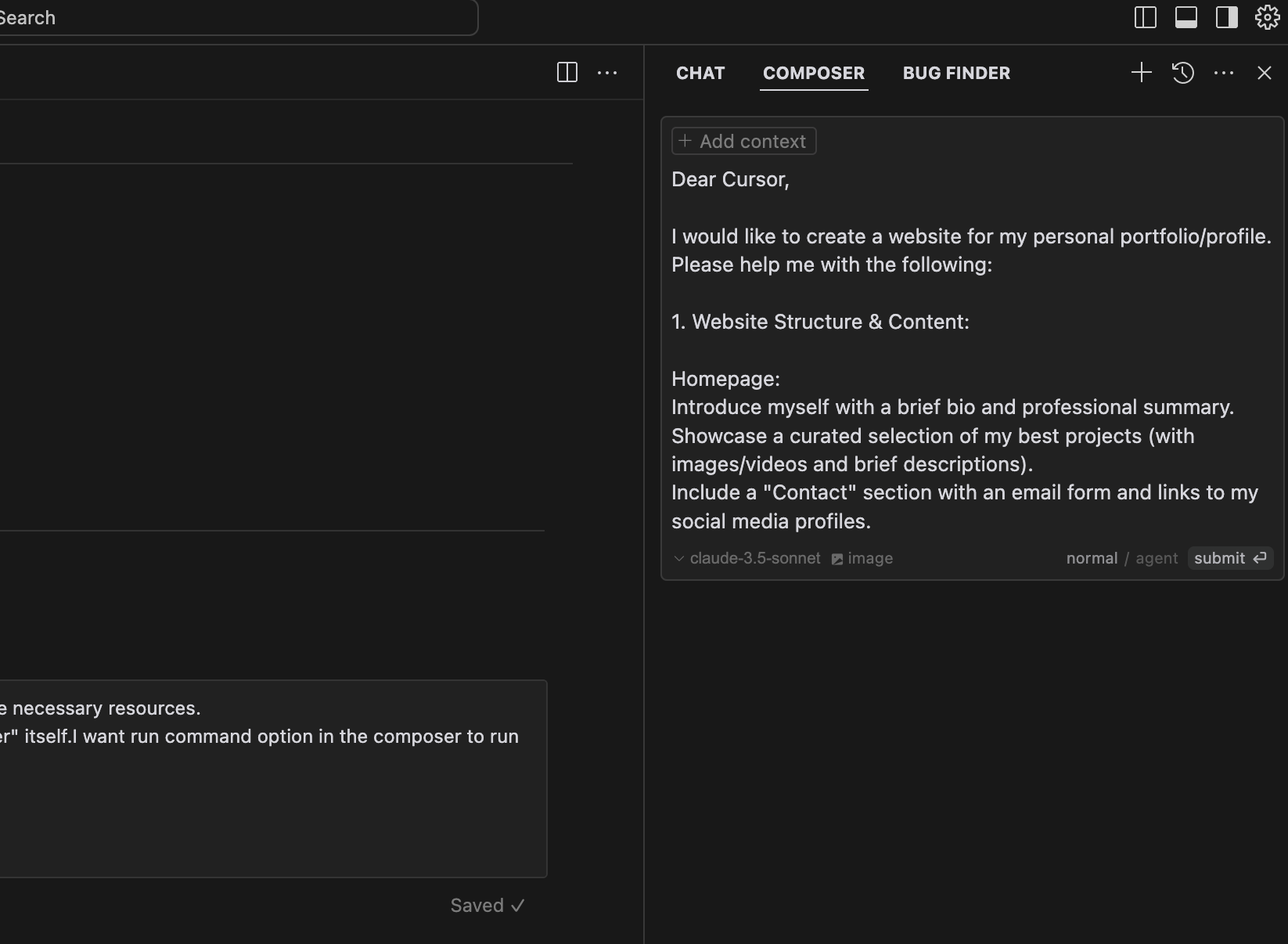
A step-by-step guide or a project plan to help me organize the website creation process. Recommendations for tools and resources that can assist me with website development, SEO, and JSON-LD implementation. Thank you for your assistance. `
Developing with AI assistant is about providing right instructions.
Download cursor and if you are a developer pro version will help you a lot.
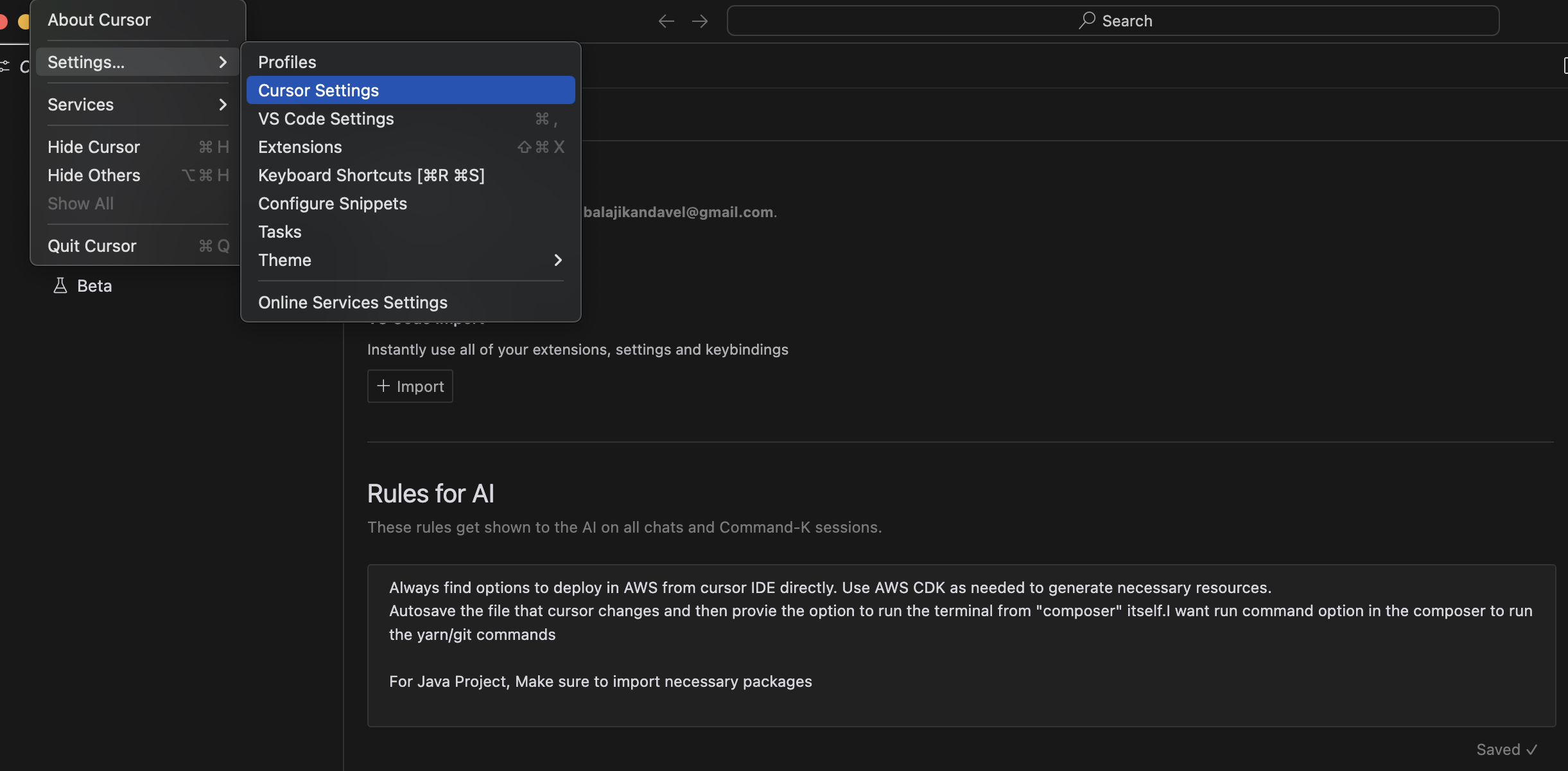
Set Development Guidelines: You can add custom instructions for Cursor's AI in the Cursor Settings > General > Rules for AI. These will help inform its behavior across features like Chat and ⌘ K, including but not limited to coding style preferences, indentation, naming conventions, preferred libraries or frameworks, security best practices, and considerations about accessibility. Context with the Necessary Files: After having the code being generated for the first time, relevant files can then be uploaded into the Cursor project to provide context. Given this, the AI context is much enhanced and can be able to let out much more accurate and relevant code suggestions.
Provide the whole template in the cursor composer.
Continue to chat with composer and ask it to run the app locally, to deploy to AWS.
To further refine the code generation process and build in alignment with your project, you can use Cursor settings to:
Accuracy of Template Generation: The quality of the generated template depends a lot on how clear and specific your prompts are to Gemini. Experiment with different prompts, refine them iteratively to get the desired output. Infrastructure Complexity: If your website requires more complex infrastructure, such as databases or serverless functions, the CDK code may also be more complex. Consider breaking down the infrastructure into smaller, independent modules. Debugging and Troubleshooting: Even with Cursor simplifying a lot of the development, chances are that something might go wrong during the deployment or at runtime. Utilize AWS CloudWatch logs along with debugging tools to identify and fix problems. Conclusion
This tutorial will give you the foundation to do it yourself to build websites that might just change everything for modern web development.
Comments
More Blog
View allcursorCursor Automations in 2026: wire event-triggered coding agents to Slack, CI, and timers
Cursor Automations in 2026: wire event-triggered coding agents to Slack, CI, and...
M
Manu ShuklaaiIndex Everything, or Read Everything? The Dilemma of Feeding Specs to AI in Multi-Repo Development
The specs exist. The AI just can't see them. I've always been the type who builds hobby...
S
Shunya ShidaamazonbedrockConnect Claude Code, Cursor and Codex to Amazon Bedrock's new console (2026)
Connect Claude Code, Cursor and Codex to Amazon Bedrock's new console (2026) Summary. On 5...
M
Manu ShuklaaiSpotting AI UI is too easy
There is a weird uncanny valley with LLM-generated UI right now. The code functions perfectly, but if...
H
Harish .saiSeven ranking frameworks, one search page, zero translation tables
I went down a rabbit hole this morning reading the late-2025 Juejin AI roundups side by side, and the...
N
ninghonggangmcpZendesk MCP: Let Claude Handle Your Support Tickets
Install guide and config at curatedmcp.com Zendesk MCP: Let Claude Handle Your Support...
C
curatedmcpReady-made automations for this
Workflows from the Neura Market marketplace related to this Cursor resource
- Automate Website Creation and Deployment with AI and Netlifyn8n · $14.99 · Related topic
- Automate MVP Creation and Deployment with AI, GitHub, and Verceln8n · $19.99 · Related topic
- Automate Your Website Building with N8N: Unsubscribe Workflowmake · $6.62 · Related topic
- Building a RAG Chatbot for Movie Recommendations with Qdrant and OpenAIn8n · $14.99 · Related topic