
Back to Blog vscode
 cursor
 ai
ai amazonbedrock
 ai
ai ai
ai mcp
mcp
ThoughtTap: I Built a VS Code Extension That Stops Me From Writing Terrible AI Prompts (and it's kinda working)
Nauman Tanwir September 29, 2025
0 views
Launching on Cursor & Windsurf next week, Product Hunt in 2-3 weeks — would love your feedback...
Launching on Cursor & Windsurf next week, Product Hunt in 2-3 weeks — would love your feedback before then!
TL;DR
- 🧠 What: VS Code extension that makes AI prompts context-aware
- 🎯 Why: Stop wasting time explaining your tech stack to AI tools
- ⚡ How: Analyzes your project automatically, optimizes prompts locally
- 💰 Cost: Free tier forever, $6.99/month for Pro features
- 🚀 Status: Live on VS Code, launching on Cursor/Windsurf next week, Product Hunt in 2-3 weeks
- 🙏 Need: Your feedback before official launches
Try it:
- VS Code: VS Code Marketplace
- Cursor/Windsurf: Coming next week via OpenVSX Registry
- Check out the website for more information - ThoughtTap
The Problem That Wouldn't Leave Me Alone
You know that moment when you copy-paste code into ChatGPT with "fix this bug" and get back a generic solution that completely ignores your TypeScript/React/AWS stack? Yeah, me too. Every. Single. Day.
I'd spend 10 minutes explaining context:
- "Actually, I'm using React 18 with TypeScript"
- "This is a microservices architecture"
- "We're deploying to AWS Lambda"
- "We use Prisma for database queries."
Then, finally, get a useful response. Rinse and repeat 20 times a day.
There had to be a better way.
The "Aha!" Moment
The problem wasn't the AI — it was the context gap. AI tools don't know:
- What language/framework are you using
- Your project architecture
- Your deployment environment
- Your testing setup
They're flying blind because we give them nothing to work with.
Enter ThoughtTap
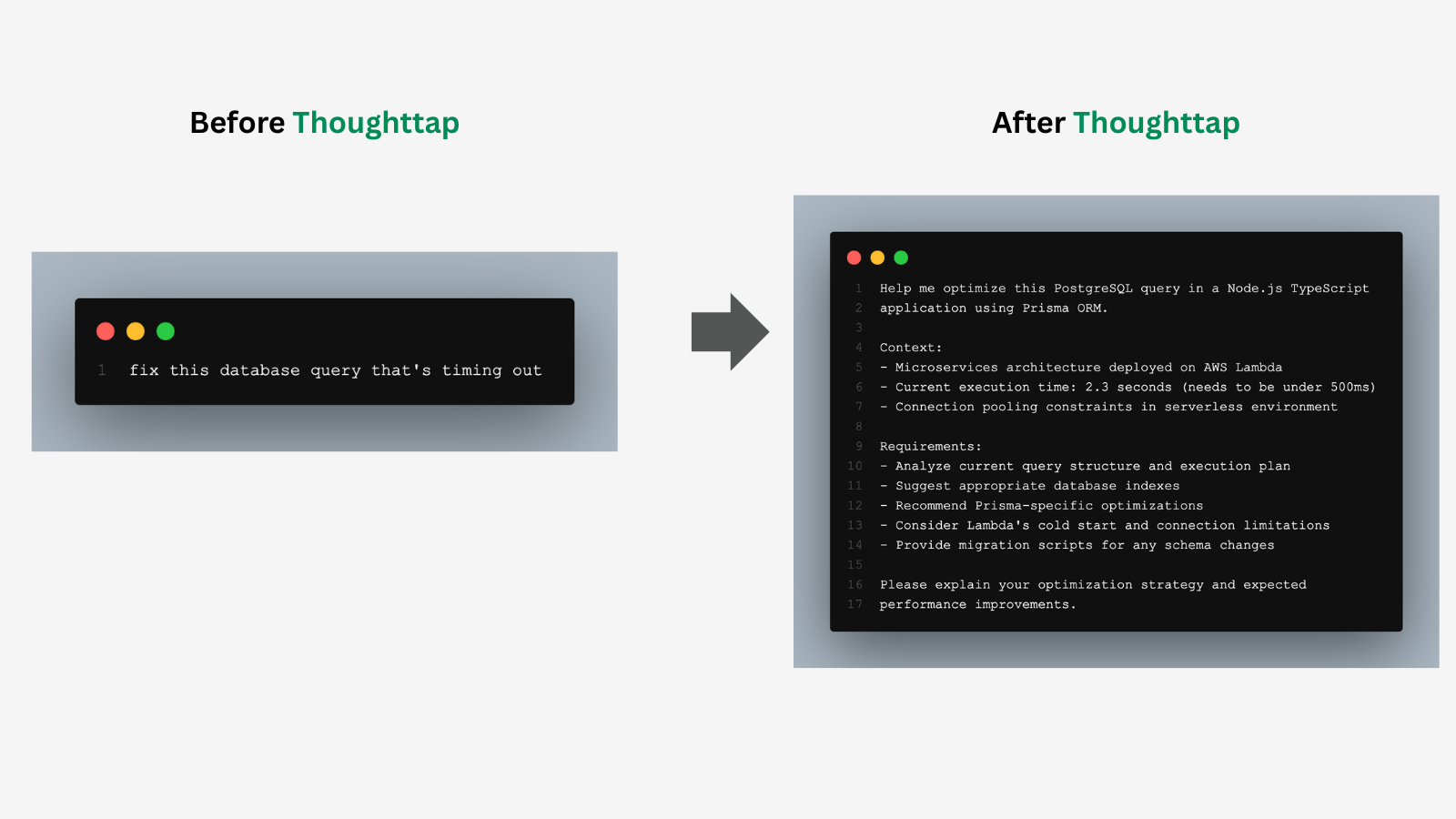
I built a VS Code extension that automatically analyzes your project and transforms basic prompts into context-aware requests.
Before:
Help me optimize this database query
After ThoughtTap:
Help me optimize this PostgreSQL query in a Node.js TypeScript

application using Prisma ORM. The query runs in a microservices architecture deployed on AWS Lambda with connection pooling

constraints. The current query execution time is 2.3s and needs to be

under 500ms. Consider database indexes, query structure, and Prisma-

specific optimizations.
The AI now has everything it needs to give me a useful answer on the first try.
How It Works (The Technical Bits)
ThoughtTap hooks into VS Code's extension API and analyzes:
- Language Detection: File extensions + syntax patterns
- Framework Recognition: Parses
package.json,requirements.txt,pom.xml - Project Structure: Workspace layout, dependencies, architecture patterns
- Code Context: Selected code blocks for specific optimization
All processing happens locally in VS Code — your code never leaves your machine.
interface ProjectContext {
  language: string;                    // 'typescript'
  frameworks: string[];                // ['React', 'Next.js']
  projectType: 'web' | 'backend' | ...; // 'web'
  dependencies: string[];              // ['prisma', 'aws-sdk']
  currentFile?: FileContext;
}
The optimization engine uses:
- Rule-based processing (<100ms) for grammar, structure, clarity
- Template matching for common patterns (debugging, code review, architecture)
- AI provider integration (Pro) for advanced optimization
Real-World Impact
Here's what early testers are reporting (mostly VS Code users, gathering Cursor/Windsurf feedback next week):
- ⏱️ Time saved: 10-15 minutes per complex AI interaction
- 🎯 First-response quality: 3-4x improvement in useful answers
- 🔄 Back-and-forth reduction: From 5+ clarifications to 1-2
- 💰 API cost savings: Fewer tokens wasted on bad prompts
Why I'm Building This Publicly
I'm taking the bootstrap approach — no VC funding, 100% user-focused. This means:
- You shape the product through feedback
- Your needs drive the roadmap
- Privacy-first — local processing, your AI keys
- Fair pricing — $6.99/month Pro (30% less than competitors)
Multi-Editor From Day One
I'm launching on VS Code first, then expanding to Cursor and Windsurf next week via the OpenVSX Registry. Why? Because developers are moving to these AI-powered editors, ThoughtTap should work wherever you code.
If you're using Cursor or Windsurf, your feedback is especially valuable — let me know what works differently in your editor!
Free vs Pro: What You Get
Free Tier (Always Free)
- ✅ Core optimization engine
- ✅ 10 developer templates
- ✅ Context analysis (language, frameworks)
- ✅ Up to 5 custom rules
- ✅ Right-click optimization
Pro Tier ($6.99/month)
- ✨ Advanced DevOps & architecture rules
- ✨ Cloud deployment optimization (AWS/Azure/GCP)
- ✨ 25+ specialized templates
- ✨ AI provider integration (OpenAI/Anthropic/Google)
- ✨ Up to 20 custom rules
- ✨ Settings sync + 90-day history
The Bigger Vision
ThoughtTap starts with developers because that's where the pain is sharpest. But the vision extends beyond code.
Our Strategic Roadmap (see full roadmap on GitHub):
Phase 1 (Months 1-12): "Tap into AI-enhanced development intelligence"
Focus on VS Code, Cursor, and Windsurf with deep developer workflow integration
Phase 2 (Year 2+): Web app + Chrome extension for universal use
Imagine the same context-aware optimization for:
- Business prompts (reports, analysis, strategy)
- Creative work (writing, design briefs)
- Academic research (citations, analysis)
But first, I need to nail the developer experience. That's where you come in.
I Need Your Feedback
Before the Product Hunt launch next week, I'm looking for:
Technical Feedback:
- Does the context analysis catch your project setup correctly?
- Are the optimization rules actually useful?
- What frameworks/languages should I prioritize?
- Performance issues? (It should be <100ms for most operations)
UX Feedback:
- Is the workflow intuitive?
- What's confusing or unclear?
- What features are you missing?
- Where does it feel clunky?
Strategic Feedback:
- Would you actually pay $6.99/month for the Pro features?
- What would make this a "must-have" tool?
- What's missing that would prevent you from using it daily?
Try It Now (Pre-Launch Access)
VS Code Users
ThoughtTap is live on the VS Code Marketplace:
- Open VS Code
- Search "ThoughtTap" in Extensions
- Install
- Select any text → Right-click → "ThoughtTap: Optimize"
Or use the keyboard shortcut: Ctrl+Shift+O (Cmd+Shift+O on Mac)
Installation: VS Code Marketplace
Cursor & Windsurf Users
Coming Next Week! ThoughtTap will be available on:
- OpenVSX Registry (for both Cursor and Windsurf)
- Cursor Marketplace (OpenVSX-powered)
- Windsurf Marketplace (marketplace.windsurf.com)
I'm publishing to OpenVSX next week to reach Cursor and Windsurf users. If you're using these editors, drop a comment and I'll notify you when it's live!
The Ask
If you try ThoughtTap:
- ⭐ Drop a comment with your honest feedback (brutal honesty welcome!)
- 🐛 Report bugs via GitHub Issues
- 💡 Share ideas for features you'd actually use (GitHub Issues or contact page)
- 🚀 Spread the word if you find it useful
Stay connected:
- 🐛 Report Bugs: GitHub Issues
- 💬 Get in Touch: thoughttap.com/contact
- 🗺️ View Roadmap: GitHub Roadmap
- ⭐ Star on GitHub: github.com/ntanwir10/ThoughtTap
What's Next
This Week:
- Polish based on your feedback
- Fix any critical bugs
- Add most-requested features
Next Week:
- Publish to OpenVSX Registry
- Launch on Cursor & Windsurf marketplaces
- Support multi-editor user base
Weeks 2-3:
- Product Hunt launch
- Official marketing push
- Community building campaign
Month 2-3:
- Advanced AI provider integrations
- Custom template builder
- Team collaboration features
A Note on Sustainability
I'm building ThoughtTap as a sustainable business, not a VC-funded rocket ship. This means:
- No pressure to pivot away from what users need
- Long-term thinking over quick exits
- Fair pricing that reflects actual value
- User privacy over data monetization
If this resonates with you, give ThoughtTap a shot and let me know what you think.
Discussion
I'm curious about your experiences:
- What's your biggest frustration with AI coding assistants?
- How much time do you spend clarifying context to AI tools daily?
- Would you trust a VS Code extension with your project analysis?
- What would make you choose ThoughtTap over just learning better prompting?
- Are you using Cursor or Windsurf? What features would you need most?
Let's discuss in the comments! 👇
Comments
More Blog
View allcursorCursor Automations in 2026: wire event-triggered coding agents to Slack, CI, and timers
Cursor Automations in 2026: wire event-triggered coding agents to Slack, CI, and...
M
Manu ShuklaaiIndex Everything, or Read Everything? The Dilemma of Feeding Specs to AI in Multi-Repo Development
The specs exist. The AI just can't see them. I've always been the type who builds hobby...
S
Shunya ShidaamazonbedrockConnect Claude Code, Cursor and Codex to Amazon Bedrock's new console (2026)
Connect Claude Code, Cursor and Codex to Amazon Bedrock's new console (2026) Summary. On 5...
M
Manu ShuklaaiSpotting AI UI is too easy
There is a weird uncanny valley with LLM-generated UI right now. The code functions perfectly, but if...
H
Harish .saiSeven ranking frameworks, one search page, zero translation tables
I went down a rabbit hole this morning reading the late-2025 Juejin AI roundups side by side, and the...
N
ninghonggangmcpZendesk MCP: Let Claude Handle Your Support Tickets
Install guide and config at curatedmcp.com Zendesk MCP: Let Claude Handle Your Support...
C
curatedmcpReady-made automations for this
Workflows from the Neura Market marketplace related to this Cursor resource
- Extract Text from Images & PDFs via Telegram with Mistral OCR to Markdownn8n · $24.99 · Related topic
- Microsoft Outlook AI Email Assistant with Contact Support from Monday and Airtablen8n · $14.99 · Related topic
- Cold Email Icebreakers from Local Business Search with GP-4 and Dumpling AIn8n · $9.99 · Related topic
- Create Unique Jira Tickets from Splunk Alertsn8n · $9.99 · Related topic