
Back to Blog claudecode
 cursor
 ai
ai amazonbedrock
 ai
ai ai
ai mcp
mcp
I built a CLI that writes AI rules once for Claude Code, Cursor, and Codex
JSK9999 February 25, 2026
0 views
Every AI coding tool has its own rule format. Claude Code uses .claude/rules/*.md. Cursor uses...
Every AI coding tool has its own rule format.
Claude Code uses .claude/rules/*.md.
Cursor uses .cursor/rules/*.mdc.
Codex uses .codex/AGENTS.md.
If you use more than one tool, you end up copy-pasting rules between formats, and they inevitably drift apart. On top of that, every prompt loads ALL your rules — even when most of them are irrelevant — wasting tokens and degrading response quality.
I built ai-nexus to fix both problems.
What is ai-nexus?

ai-nexus is a CLI tool that lets you write AI coding rules once in plain Markdown and deploy them across Claude Code, Cursor, and Codex automatically.
- Claude Code →
.claude/rules/with semantic routing (only relevant rules loaded per prompt) - Cursor →
.cursor/rules/*.mdcwith auto-converted frontmatter - Codex →
.codex/AGENTS.mdaggregated from all your rules
One source of truth. Every tool stays in sync.
Quick start
The interactive wizard asks which tools you use, which rule categories you want, and sets everything up — hooks, settings, symlinks, format conversion. Done in 30 seconds.
npx ai-nexus install
Or quick install with defaults:
npx ai-nexus install -q
Or use your team's rules:
npx ai-nexus install --rules github.com/your-org/team-rules
Key features
Semantic Router — load only what you need
Most setups load every rule file on every prompt. If you have 30+ rules, that's a lot of wasted context.
ai-nexus includes a Semantic Router that runs as a Claude Code hook on each prompt. It analyzes your prompt and picks only the 2-3 rules you actually need.
- With AI routing (recommended): GPT-4o-mini or Claude Haiku selects rules. Cost: ~$0.50/month.
- Without AI (free fallback): Keyword matching activates rules based on words in your prompt.
Result: better AI responses + lower token costs.
Example output:
$ npx ai-nexus test "write a react component with hooks"
Selected rules (3):
- rules/essential.md
- rules/react.md
- skills/react.md
Write once, deploy everywhere
Write a single .md rule file with a description in the frontmatter. ai-nexus
automatically converts it to:
.mdcformat for Cursor (with description and alwaysApply frontmatter)- Aggregated
AGENTS.mdfor Codex - Semantic-routed
.mdfor Claude Code
No more copy-pasting between formats.
Team rules via Git
Share rules across your entire team with a Git repository:
npx ai-nexus install --rules github.com/acme/team-rules
When rules are updated:
npx ai-nexus update
Updates are non-destructive — your local customizations are never overwritten. Only new files from the source are added.
Community marketplace
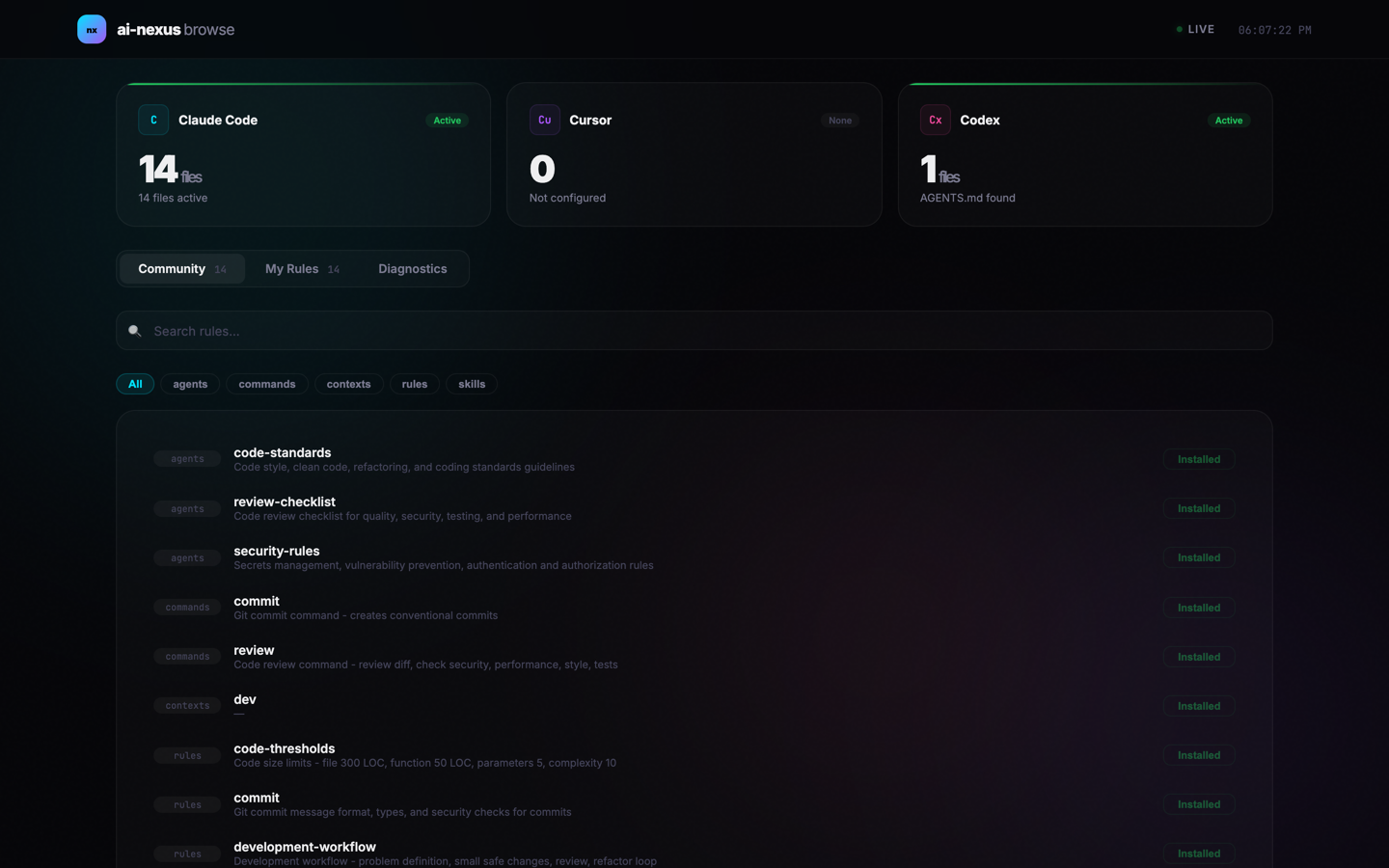
Browse, search, install, and remove community-contributed rules — from your browser or CLI:
npx ai-nexus browse
Search and download from the CLI:
npx ai-nexus search react
npx ai-nexus get react.md
Anyone can contribute rules via PR. They become available immediately after merge — no npm publish needed.
How each tool integration works
Claude Code — Semantic Router
A hook runs on every prompt. It moves relevant rules into .claude/rules/
(active) and parks the rest in rules-inactive/. Only active rules are loaded
into context.
Cursor — Rule Converter
ai-nexus converts your .md rules to Cursor's .mdc format, automatically
adding frontmatter. After that, Cursor's own built-in semantic search handles the
filtering.
Codex — Aggregated Rules
All individual rule files are merged into a single AGENTS.md file, loaded at
session start.
All commands
- install — Interactive setup wizard
- install -q — Quick install with defaults
- init — Install in current project
- update — Sync latest rules (respects local changes)
- list — Show installed rules
- test — Preview which rules would load
- search — Search community registry
- get — Download a community rule
- add — Add rules from a Git repo
- remove — Remove a rule source
- browse — Open marketplace in browser
- doctor — Diagnose installation issues
- uninstall — Remove ai-nexus
Links
If you use multiple AI coding tools and are tired of managing rules separately, give it a try:
npx ai-nexus install
Feedback, issues, and rule contributions are all welcome!
What about you? How do you manage your AI coding rules across different tools? Do you copy-paste between formats, or have you found a better workflow? I'd love to hear what's working (or not working) for you.
Comments
More Blog
View allcursorCursor Automations in 2026: wire event-triggered coding agents to Slack, CI, and timers
Cursor Automations in 2026: wire event-triggered coding agents to Slack, CI, and...
M
Manu ShuklaaiIndex Everything, or Read Everything? The Dilemma of Feeding Specs to AI in Multi-Repo Development
The specs exist. The AI just can't see them. I've always been the type who builds hobby...
S
Shunya ShidaamazonbedrockConnect Claude Code, Cursor and Codex to Amazon Bedrock's new console (2026)
Connect Claude Code, Cursor and Codex to Amazon Bedrock's new console (2026) Summary. On 5...
M
Manu ShuklaaiSpotting AI UI is too easy
There is a weird uncanny valley with LLM-generated UI right now. The code functions perfectly, but if...
H
Harish .saiSeven ranking frameworks, one search page, zero translation tables
I went down a rabbit hole this morning reading the late-2025 Juejin AI roundups side by side, and the...
N
ninghonggangmcpZendesk MCP: Let Claude Handle Your Support Tickets
Install guide and config at curatedmcp.com Zendesk MCP: Let Claude Handle Your Support...
C
curatedmcpReady-made automations for this
Workflows from the Neura Market marketplace related to this Cursor resource
- Full Blog Content Automation with GPT-4, Claude & Ghost CMS Publishern8n · $24.99 · Related topic
- Deploy Code to GitHub with Natural Language via Slack & Claude 3.5n8n · $14.99 · Related topic
- AI Blog Post Journalist: Perplexity for Research, Anthropic Claude for Blogn8n · $9.99 · Related topic
- Daily Calendar Digest: Format Google Calendar Events with Claude 3.5 Sonnet for Telegramn8n · $9.99 · Related topic