
Back to Blog react
react
 cursor
 ai
ai amazonbedrock
 ai
ai ai
ai mcp
mcp
Skills Are Overhyped. I Converted Vercel's Into Cursor Rules and Got Real Performance Wins
Alonso March 3, 2026
0 views
Skills are having a moment. Vercel launched skills.sh, a curated directory where teams can publish...
Skills are having a moment. Vercel launched skills.sh, a curated directory where teams can publish reusable skill packages for AI coding agents. The idea is compelling: instead of re-explaining your stack to the AI every time, you install a skill and it knows the context.
Vercel published two skills of their own that caught my attention:
react-best-practicesperformance patterns and rendering optimizationscomposition-patternscomponent architecture, compound components, context usage
I read through both. The content is solid. But then I asked myself: do I actually need skills for this, or are Cursor rules a better fit?
Skills vs. Rules: Why I Chose Rules
When I read through the Vercel skill packages, I noticed something: the content isn't really capabilities, it's conventions, rules about when to use useMemo, how to avoid async waterfalls, why you should prefer useRef over useState for non-rendered values. That's not what skills were designed for. That's what rules are.
Here's why rules win for this use case:
1. Universal coverage. A rule activates based on context, Cursor reads the description and decides relevance. A skill requires either explicit invocation or the model detecting it as pertinent, and that's a meaningful difference when you're in the middle of writing a component and the agent needs to know your patterns right now, without you thinking to mention it.
2. Less friction. Rules are part of the context from the start of every interaction. Skills depend on the model remembering to consult them, or you remembering to invoke them. In practice, that means skills get skipped.
3. More robust. If a skill isn't recognized as relevant, it simply doesn't activate. Rules degrade more gracefully: even if a rule isn't perfectly matched, its content is still present in the context window.
4. Predictable behavior. The guidance a rule provides is constant and auditable, you can read it, version it, and review it in a PR. Skills introduce variability depending on how the model interprets the skill's own internal instructions on any given day.
5. Operational simplicity. A folder of .mdc files is easier to maintain than a skill library with its own packaging, versioning, and activation logic. There's nothing to install, no server to run, no registry to depend on.
There's also a practical constraint specific to these Vercel packages: they're written for a Next.js and SWR stack. If you're on plain React (Vite, CRA, or any non-Next setup), a significant chunk of the content either doesn't apply or actively points you toward patterns that don't fit your project.
The Transformation: Stripping Next.js, Keeping React
I went through both skill packages and split the content into six focused rule files, removing everything Next.js or SWR-specific:
.cursor/rules/
├── react-composition-patterns.mdc       # Compound components, context, state management
├── react-performance-critical.mdc       # Async waterfalls, Promise.all, bundle size, lazy loading
├── react-rerender-optimization.mdc      # memo, useMemo, useState, useRef, derived state
├── react-rendering-performance.mdc      # Animations, SVG, CSS content-visibility, conditionals
├── react-javascript-performance.mdc     # Loops, caching, Set/Map, array methods
└── react-advanced-patterns.mdc          # Refs, useEffectEvent, initialization
Each file uses .mdc frontmatter so Cursor can decide when to activate it:
---
description: React re-render optimization. Use when component renders excessively,
  props cause unnecessary updates, or memoization strategies are needed.
globs: "*.tsx,*.jsx"
alwaysApply: false
---
With alwaysApply: false, Cursor reads the description and activates the rule when the context is relevant, so you're not paying the context window cost on every single message. You can also invoke them manually:
@react-rerender-optimization Why is this component rendering 40 times on a single keystroke?
The full rule set is available here: github.com/alonsarias/agent-rules
Applying the Rules: The Audit + Plan Workflow
Having the rules is one thing. Using them to systematically improve an existing codebase is another. Here's the workflow I used with Cursor Agent in Plan Mode.
Step 1: Audit the codebase against one rule
I ran this prompt for each rule file, one at a time:
Read @react-rerender-optimization.mdc to understand the project's coding rules
and conventions. Then scan the src directory to identify all places where code
violates or fails to follow these rules.

For each violation found:
* Cite the specific file path and the relevant code.
* Reference which rule from the .mdc is being violated.
* Group violations by rule so the plan is easy to follow.

The goal is to produce a plan that, once confirmed, will implement the minimal
set of changes needed to bring all code in src into full compliance.
Prioritize violations by impact: correctness issues first, then
structural/architectural rules, then style/convention rules.
The agent comes back with a structured plan: file by file, violation by violation, with the specific rule cited for each one.
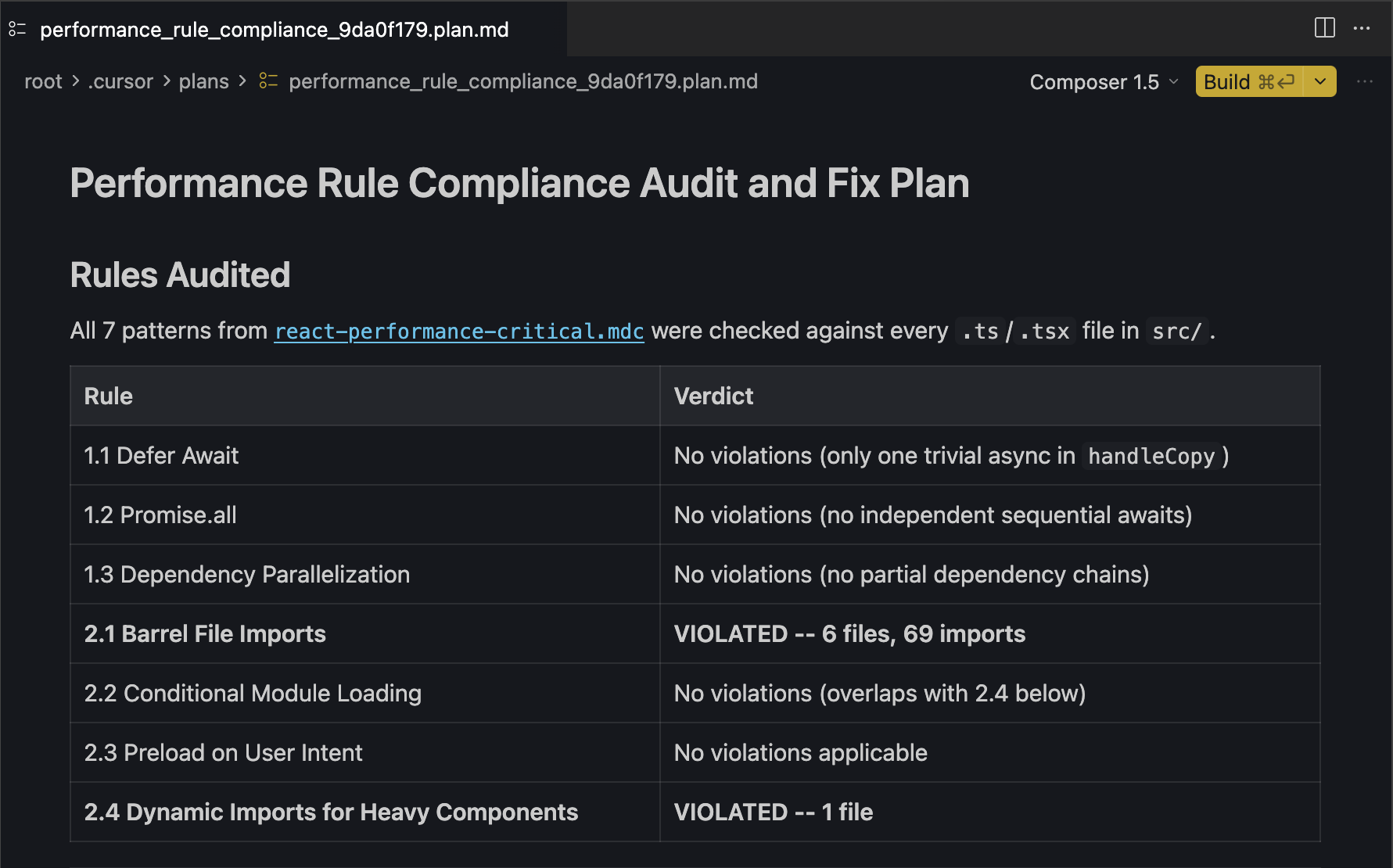
Step 2: Split the plan into executable chunks
A plan covering 40+ violations across 20 files is too risky to execute as a single unit. One wrong change can cascade. I followed up with:
This plan is too large to execute as a single unit. Split it into smaller,
self-contained plans that can each be reviewed and executed independently.

Each sub-plan should:
* Be a logical, cohesive chunk of work (grouped by rule, by module, or by
  type of change, use your judgment).
* Be ordered so that earlier plans don't depend on later ones (but later
  plans may build on earlier ones).
* Keep the same structure: cite specific files, reference the rule being
  addressed, and describe the exact changes.
You end up with 4–8 smaller plans that each touch a specific concern.
Step 3: Execute, build, and iterate
For each sub-plan:
- Review it manually, you should understand every change before approving
- Let the agent implement it
- Run the build (
npm run buildor equivalent) - Fix any breakage before moving to the next sub-plan
Then repeat the entire process for the next rule file. The order matters: start with react-performance-critical.mdc (structural issues, async waterfalls) before tackling react-rerender-optimization.mdc (micro-optimizations). Fixing the architecture first means the re-render fixes land on stable ground.
The Result
After completing the full cycle for all six rules, I ran a Lighthouse audit. Here's what changed:
| Metric | Before | After |
|---|---|---|
| Performance score | 26 | 60 |
| First Contentful Paint | 6.7 s | 2.3 s |
| Total Blocking Time | 1,320 ms | 90 ms |
| Speed Index | 8.7 s | 2.7 s |
| Largest Contentful Paint | 13.0 s | 8.6 s |
| Cumulative Layout Shift | 0 | 0 |
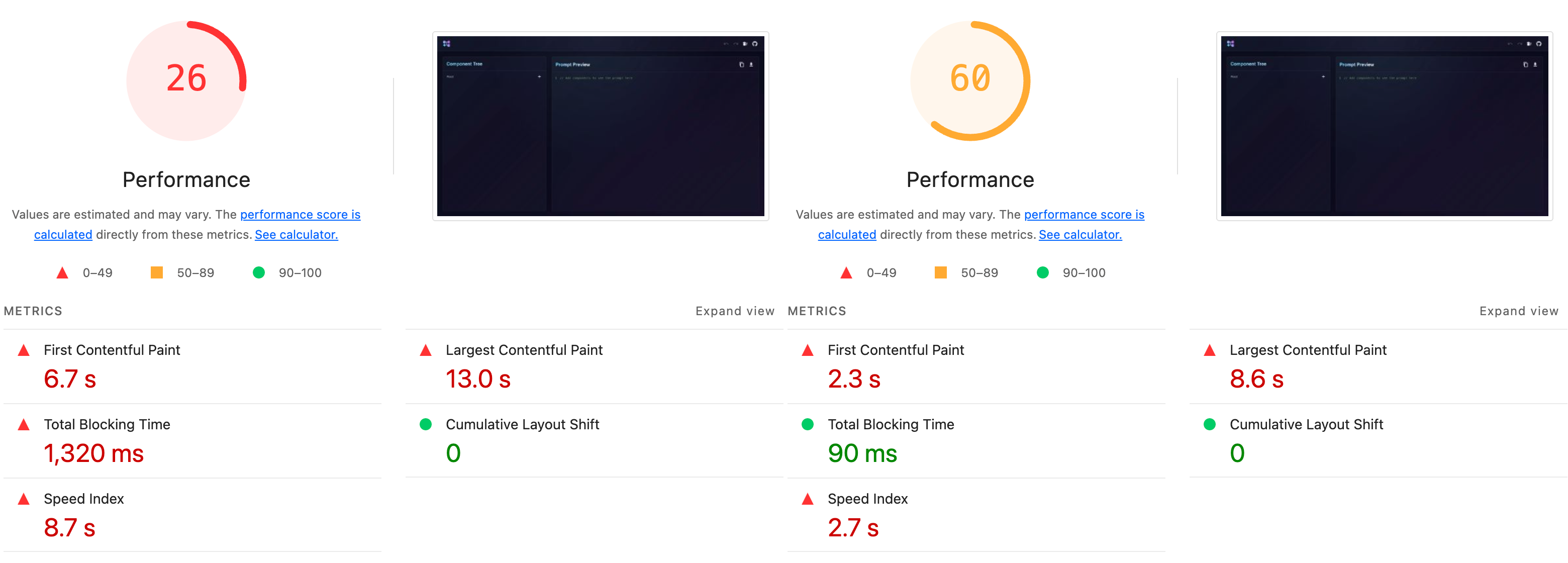
The TBT drop, from 1,320ms to 90ms, is the most telling number. That's the metric most directly tied to interactivity and how "frozen" a page feels to users. The bulk of it came from the react-performance-critical pass: the codebase had multiple places where async operations ran sequentially instead of in parallel, and several heavy components loading eagerly on the initial render.
The FCP improvement (6.7s → 2.3s) came largely from lazy loading and bundle splitting. The Speed Index followed from both.
LCP is still high at 8.6s, there's more work to do, likely at the data-fetching layer - but the improvement from 13.0s is real. The refactor covered the React side of the equation, and the remaining gains would require looking at the API response times and server-side rendering decisions.
The specific numbers will vary by project, but the categories of improvement are predictable, they map directly to what each rule targets.
What to Take Away
You don't need to adopt this whole workflow at once. Here are three things you can do today:
1. Copy the rules into your project
git clone https://github.com/alonsarias/agent-rules.git
cp agent-rules/.cursor/rules/react-*.mdc /your-project/.cursor/rules/
2. Start with one rule, one audit
Pick react-rerender-optimization.mdc, it tends to surface the most violations in mature React codebases. Run the audit prompt. Review the plan before executing anything.
3. Make it a recurring practice After any significant feature work, run an audit pass against the relevant rules. Catching regressions before they accumulate is cheaper than doing a large refactor later.
The skills directory is genuinely useful, it's a good source of curated, community-maintained knowledge. But for coding conventions that should apply across every PR, every feature, and every AI-assisted edit, rules that live in your repo and activate automatically are just more practical.
If you try this on your own project, I'd be curious what violations came up most often.
Rules repo: github.com/alonsarias/agent-rules
Original Vercel skills: github.com/vercel-labs/agent-skills
Comments
More Blog
View allcursorCursor Automations in 2026: wire event-triggered coding agents to Slack, CI, and timers
Cursor Automations in 2026: wire event-triggered coding agents to Slack, CI, and...
M
Manu ShuklaaiIndex Everything, or Read Everything? The Dilemma of Feeding Specs to AI in Multi-Repo Development
The specs exist. The AI just can't see them. I've always been the type who builds hobby...
S
Shunya ShidaamazonbedrockConnect Claude Code, Cursor and Codex to Amazon Bedrock's new console (2026)
Connect Claude Code, Cursor and Codex to Amazon Bedrock's new console (2026) Summary. On 5...
M
Manu ShuklaaiSpotting AI UI is too easy
There is a weird uncanny valley with LLM-generated UI right now. The code functions perfectly, but if...
H
Harish .saiSeven ranking frameworks, one search page, zero translation tables
I went down a rabbit hole this morning reading the late-2025 Juejin AI roundups side by side, and the...
N
ninghonggangmcpZendesk MCP: Let Claude Handle Your Support Tickets
Install guide and config at curatedmcp.com Zendesk MCP: Let Claude Handle Your Support...
C
curatedmcpReady-made automations for this
Workflows from the Neura Market marketplace related to this Cursor resource
- SmartLead to HubSpot Performance Analyticsn8n · $14.99 · Related topic
- Send search term performance stats from Google Ads in an emailmake · $4.99 · Related topic
- Automate Restaurant Daily Performance Reports with AI Insightsn8n · $24.99 · Related topic
- Automate Scheduled Multi-Photo Facebook Posts Using Cloudinary and Local Directoryn8n · $24.99 · Related topic