
Back to Blog mcp
mcp claudecode
 ai
ai aicoding
 microsoft
 ai
ai aitools
I Built a Production MCP Server Kit - Here's What I Learned
Tyson Cung March 10, 2026
0 views
Every MCP starter on GitHub is a hello-world. I needed production features. I spent the last few...
Every MCP starter on GitHub is a hello-world. I needed production features.
I spent the last few months building MCP servers for real projects - integrating with Cursor, Claude Desktop, VS Code - and every time I started from an open-source template, I'd spend days bolting on the same stuff: auth, rate limiting, deployment configs, actual useful tools.
So I built the starter kit I wished existed. Here's what went into it and the decisions I made along the way.
---
## The Problem Nobody Talks About
MCP (Model Context Protocol) is everywhere right now. Cursor uses it. Claude Desktop uses it. VS Code Copilot is adopting it. It's becoming *the* standard way AI agents talk to external tools.
But go look at the starter templates on GitHub. They all look like this:
```typescript
server.tool("hello", "Says hello", {}, () => ({
content: [{ type: "text", text: "Hello, world!" }],
}));
```
Cool. Now what?
You need auth because you're exposing this over the network. You need rate limiting because AI clients will hammer your server in a loop. You need actual tools that do real things - query databases, call APIs, read files. You need deployment configs because "just run it locally" doesn't work for teams.
Every single time, you copy a template and spend 2-3 days adding the stuff that should've been there from the start.
I got tired of that loop.
## What I Built
The **MCP Server Starter Kit** is a production-ready TypeScript template with everything you need to ship a real MCP server. Not a toy. Not a demo. A starting point for actual projects.
Here's what's in the box:
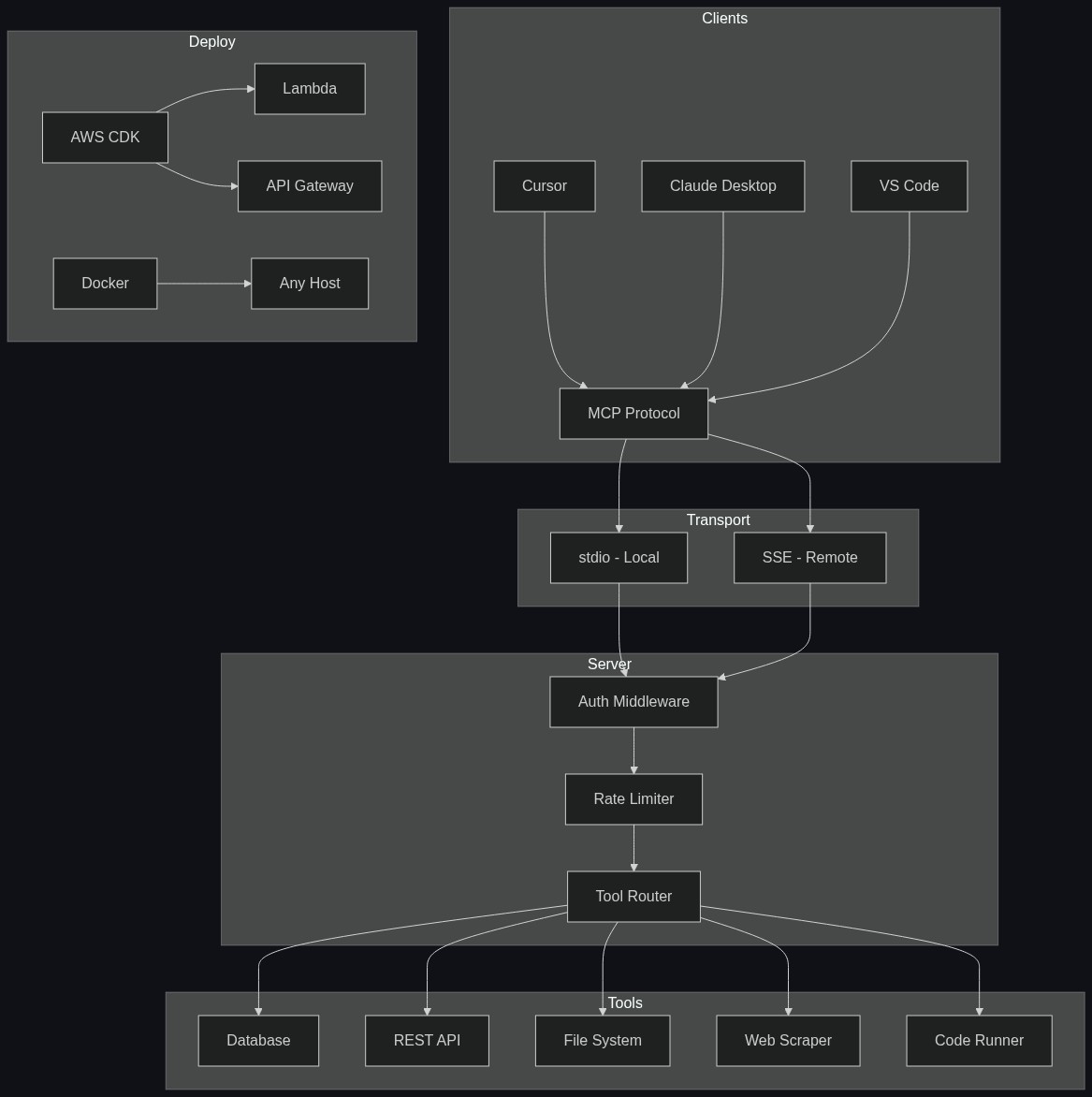
- **5 production tools** - Database queries, REST API integration, file system operations, web scraper, and a sandboxed code runner
- **Auth middleware** - API key and JWT validation, pluggable for your own auth provider
- **Rate limiting** - Per-client rate limiting so runaway AI agents don't melt your server
- **Dual transport** - stdio for local development, SSE for remote/team usage
- **AWS CDK deployment** - One-command deploy to Lambda + API Gateway
- **Docker support** - Containerized for any environment
- **Full test suite** - Unit and integration tests out of the box
The architecture looks like this:
## Key Decisions and What I Learned
### Dual transport is not optional
When you're developing locally, stdio is great. Your MCP client (Cursor, Claude Desktop) spawns the server as a child process. No network, no config, fast.
But the moment you want to share that server with your team - or deploy it for a hosted AI product - you need SSE (Server-Sent Events). That means HTTP, which means auth, which means everything changes.
Most starters only support stdio. I built both from day one, and the abstraction layer between them turned out to be one of the most important parts of the architecture.
### Auth is non-negotiable for remote servers
The second you expose an MCP server over the network, you need auth. Full stop. An unauthenticated MCP server is an open door to your database, your file system, whatever tools you've wired up.
I implemented a middleware pattern that supports both API keys (simple, good for server-to-server) and JWT (good for user-scoped access):
```typescript
import { z } from "zod";
const authConfig = z.object({
type: z.enum(["api-key", "jwt"]),
apiKeys: z.array(z.string()).optional(),
jwtSecret: z.string().optional(),
jwtIssuer: z.string().optional(),
});
export function createAuthMiddleware(config: z.infer<typeof authConfig>) {
return async (req: IncomingMessage): Promise<AuthResult> => {
const token = req.headers.authorization?.replace("Bearer ", "");
if (!token) {
return { authenticated: false, error: "Missing authorization header" };
}
if (config.type === "api-key") {
const valid = config.apiKeys?.includes(token) ?? false;
return valid
? { authenticated: true, clientId: token.slice(0, 8) }
: { authenticated: false, error: "Invalid API key" };
}
// JWT validation
const payload = await verifyJwt(token, config.jwtSecret!, config.jwtIssuer);
return {
authenticated: true,
clientId: payload.sub,
scopes: payload.scopes,
};
};
}
```
The key insight: your auth middleware should return a `clientId` that flows through to rate limiting and logging. You want to know *which* client is doing what.
### Rate limiting saves you from AI clients
Here's something nobody warns you about: AI agents in a loop will call your tools hundreds of times per minute. If one of those tools hits your database or an external API, you're in trouble fast.
Per-client rate limiting with a sliding window was the right call. I started with a simple token bucket, but moved to sliding window for smoother behavior:
```typescript
export function createRateLimiter(opts: {
windowMs: number;
maxRequests: number;
}) {
const clients = new Map<string, number[]>();
return (clientId: string): boolean => {
const now = Date.now();
const timestamps = clients.get(clientId) ?? [];
const windowStart = now - opts.windowMs;
// Remove expired timestamps
const valid = timestamps.filter((t) => t > windowStart);
valid.push(now);
clients.set(clientId, valid);
return valid.length <= opts.maxRequests;
};
}
```
Simple, effective, and it's saved me from some truly aggressive Cursor sessions.
### CDK over Serverless Framework
I went with AWS CDK instead of Serverless Framework for the deployment stack. The main reason: CDK gives you actual TypeScript code for your infrastructure, not YAML. When your MCP server is already TypeScript, keeping infra in the same language means one less context switch.
The CDK stack deploys to Lambda + API Gateway with SSE support. It's not trivial - Lambda's response streaming for SSE took some work - but the result is a serverless MCP server that scales to zero and handles bursts without you thinking about it.
### Zod schemas are self-documenting tools
Every tool in the kit uses Zod for input validation. This isn't just about type safety - MCP clients use these schemas to understand what your tools expect. Better schemas = better AI tool usage.
```typescript
server.tool(
"query-database",
"Execute a read-only SQL query against the configured database",
{
query: z.string().describe("SQL SELECT query to execute"),
params: z
.array(z.union([z.string(), z.number(), z.boolean()]))
.optional()
.describe("Parameterized query values to prevent SQL injection"),
limit: z
.number()
.max(1000)
.default(100)
.describe("Maximum rows to return"),
},
async ({ query, params, limit }) => {
// Validate read-only
if (!isReadOnly(query)) {
return toolError("Only SELECT queries are allowed");
}
const results = await db.query(query, params, limit);
return toolResult(JSON.stringify(results, null, 2));
}
);
```
Notice the `.describe()` calls - those become part of the tool's schema that AI clients read. The more descriptive you are, the better the AI uses your tools.
## Free vs Pro
I split this into two tiers because I think the ecosystem needs both.
**[Free version](https://github.com/tysoncung/mcp-server-starter)** - open source on GitHub. It's a clean minimal starter with stdio transport and a single example tool. Good for learning MCP, building simple local tools, or just understanding the protocol. Star it, fork it, ship something.
**[Pro version](https://tysoncung.gumroad.com/l/mcp-starter-pro)** ($49) - everything described in this article. The 5 production tools, auth middleware, rate limiting, dual transport, AWS CDK deployment, Docker, full test suite. This is what you grab when you have a real project and don't want to spend days on boilerplate.
The way I see it: the free version gets you started, the pro version gets you shipped.
## Watch the Walkthrough
{% youtube _dB7caHjwXk %}
## Get Started
**⭐ Free Starter** - [github.com/tysoncung/mcp-server-starter](https://github.com/tysoncung/mcp-server-starter)
**🚀 Pro Kit ($49)** - [tysoncung.gumroad.com/l/mcp-starter-pro](https://tysoncung.gumroad.com/l/mcp-starter-pro)
Adding it to Cursor takes about 30 seconds:
```json
// .cursor/mcp.json
{
"mcpServers": {
"my-server": {
"command": "npx",
"args": ["tsx", "src/index.ts"],
"env": {
"DATABASE_URL": "postgresql://localhost:5432/mydb",
"MCP_API_KEY": "your-api-key"
}
}
}
}
```
If you're building on AWS or shipping AI-powered products, you might also want to check out my other kits:
- **[AI Platform AWS](https://tysoncung.gumroad.com/)** - Full AI SaaS platform on AWS
- **[Serverless NestJS Starter Kit](https://tysoncung.gumroad.com/)** - Production NestJS on Lambda
---
MCP is still early, but it's moving fast. The gap between "cool demo" and "production server" is where most people get stuck. Hopefully this kit closes that gap.
If you build something with it, I'd love to hear about it. Drop a comment or find me on [GitHub](https://github.com/tysoncung).
Comments
More Blog
View allclaudecodeCursor vs Claude Code in 2026: Which AI Coding Tool Actually Makes You Faster?
I've spent the last three months shipping production code with both Cursor and Claude Code. Not toy...
A
Atlas WhoffaiThe 5 MCPs that actually changed how I use Cursor and Claude Code
I've been testing MCPs heavily in Cursor and Claude Code. Here are the 5 that actually changed how I...
V
vdalhambraaicodingAI-Powered Development 2026: Beyond Basic Code Generation
AI-Powered Development 2026: Beyond Basic Code Generation How AI assistants have evolved...
L
lufumeiyingmicrosoftCursor AI vs GitHub Copilot: Developer Comparison 2025
Cursor AI vs GitHub Copilot: Developer Comparison 2025 The AI-Powered Code Completion...
I
IcaraxaiHow to Build 3D & AR Apps with AI — Cursor, Windsurf, Claude Code
AI coding assistants are great at generating UI code. But ask them to build a 3D scene or an AR...
T
Thomas GorisseaitoolsAI Coding Market Share 2026: Who's Winning?
Claude Code holds 54% of the AI coding market. Cursor hit $2B ARR. Copilot leads enterprise. Here's what the 2026 numbers actually mean.
J
Jangwook Kim