
Back to Blog ai
ai claudecode
 ai
ai aicoding
 microsoft
 ai
ai aitools
🚀 Stop Burning Money on AI Tools - Use Cursor Like a Pro
Dineshraj Anandan March 18, 2026
0 views
You wouldn't leave your car engine running while you grab groceries. So why are you burning...
> *You wouldn't leave your car engine running while you grab groceries. So why are you burning thousands of tokens on a chat that's asking an AI to "look at your entire repo"?*
AI coding tools like **Cursor**, **Claude Code**, and **GitHub Copilot** are genuinely life-changing for developers. But here's the uncomfortable truth nobody tells you when you sign up:
**Most developers use them inefficiently, and pay for it.**
This guide is your no-nonsense, zero-fluff walkthrough to using AI coding tools smarter. Whether you're a solo dev, an engineering lead watching the cloud bill creep up, or just someone who's tired of slow, confused AI responses. This one's for you.
* * *
## 🧠 First, Understand What You're Actually Paying For
LLMs charge by **tokens**. Think of a token as roughly a word, or sometimes just a syllable.
Every time you hit send, you're paying for:
| Type | What's Included |
| --- | --- |
| **Input tokens** | Your prompt + chat history + attached files + context |
| **Output tokens** | Code generated + explanations + suggestions |
**Total Cost = Input Tokens + Output Tokens**
Sounds simple. Here's where it gets sneaky.
* * *
## 🔁 The Dirty Secret: LLMs Have No Memory
LLMs are **stateless**. They remember nothing.
So every single message you send? The tool secretly resends your *entire* conversation from the beginning. Every. Single. Time.
```plaintext
You → "Fix this function" ← 200 tokens
You → "Make it async" ← 400 tokens (history resent)
You → "Add error handling" ← 800 tokens (history resent again)
...
You → Message #10 ← Several thousand tokens 💸
```
This is called **token compounding**, and it's silently draining your usage quota. A casual 20-message debug session can cost 10x more than it should.
* * *
## 💀 What Happens When Context Gets Too Full?
In Cursor, you'll see a little indicator:
```plaintext
38.2% context used
```
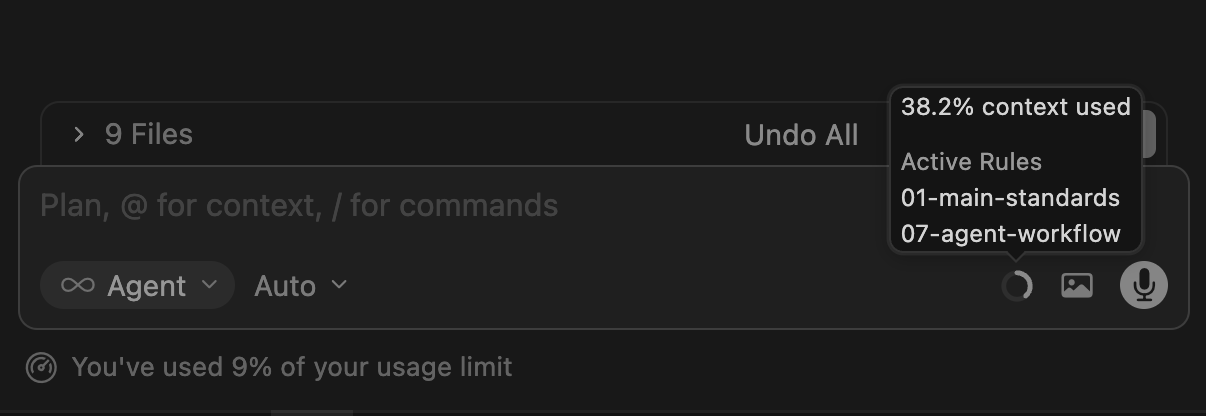
Think of this as a whiteboard. The AI can only see what's on the board. When it fills up:
* 🧠 Important details get erased
* 🐌 Responses get slower
* 🤷 Accuracy tanks and the AI starts guessing
Here's a simple rule of thumb:
| Context Level | What to Do |
| --- | --- |
| < 40% | You're golden ✅ |
| 40–70% | Keep an eye on it 👀 |
| 70–90% | Start a new chat soon |
| \> 90% | You're basically yelling into the void |
* * *
## 💡 The Fix: Treat AI Chats Like Sticky Notes, Not Journals
Here's the mental model shift that changes everything:
> **Treat each chat like a temporary sticky note. Not a long-running conversation.**
Write what you need, get the answer, move on.
### ❌ The Way Most People Work
```plaintext
One giant chat → entire day of development
```
Debugging a login bug → then asking about SQL → then generating a React component → then refactoring a service layer → all in the same chat.
That's not a conversation. That's a novelette. And you're paying per word.
### ✅ The Right Way
```plaintext
Chat 1 → Fix login API bug (done, close it)
Chat 2 → Optimize SQL query (done, close it)
Chat 3 → Generate React component (done, close it)
Chat 4 → Refactor caching layer (done, close it)
```
Smaller context = faster responses + lower cost + more accurate outputs. It's a triple win.
* * *
## 🗜️ When a Chat Gets Long But Useful, Summarize It
Sometimes you've been deep in a debugging rabbit hole and the context is gold but getting huge. Don't just abandon it.
**Ask the AI to summarize before you start fresh:**
```plaintext
Summarize this conversation in bullet points so I can paste it into a new chat.
```
You'll get something like:
```plaintext
- Project: .NET Web API
- Problem: Cosmos DB queries hitting cache too frequently
- Goal: Reduce redundant reads with smarter TTL
- Relevant files: CacheService.cs, CosmosRepository.cs
```
Then:
1. Open a **new chat**
2. Paste the summary
3. Continue exactly where you left off with a fraction of the token cost
In Claude Code, you can also use `/compact` to auto-summarize. In Cursor, just ask manually.
* * *
## 🎯 Use the Right Model for the Job
This one feels obvious, but almost nobody does it consistently.
Not every task needs the most powerful (and most expensive) model in the lineup.
| Use Powerful Model For 🔥 | Use Lighter Model For ⚡ |
| --- | --- |
| Complex algorithms & logic | Simple implementations |
| Deep debugging & root-cause fixes | Coding from a clear plan |
| System design & architecture | Writing documentation |
| Performance optimization | Syntax fixes & formatting |
| Large refactors / code rewrites | Small edits & boilerplate |
| Ambiguous / open-ended problems | Repetitive or well-defined tasks |
Here's a rough sense of the cost difference at scale:
| Model | Input (per 1M tokens) | Output (per 1M tokens) |
| --- | --- | --- |
| Claude Opus | ~$5 | ~$25 |
| Claude Sonnet | ~$3 | ~$15 |
| Gemini Flash | ~$0.5 | ~$3 |
Ref: [https://cursor.com/docs/models-and-pricing#model-pricing](https://cursor.com/docs/models-and-pricing#model-pricing)
Using Opus to rename a variable is like hiring a principal engineer to fix a typo. Use Sonnet. Save Opus for the hard stuff.
In Claude Code, switch models with:
```plaintext
/mod sonnet
```
* * *
## 📎 Attach Only What's Relevant
This one stings because it feels helpful to give the AI *everything*.
```plaintext
@entire-project ← please don't
```
Every file you attach is more input tokens. More cost. More noise for the AI to wade through.
Instead:
```plaintext
@AuthController.cs
@TokenService.cs
```
Give it the files it actually needs. Your wallet (and your response quality) will thank you.
* * *
## ✂️ Break Big Tasks Into Small Steps
Instead of:
```plaintext
Build the entire authentication system with JWT, refresh tokens,
middleware, and role-based access control.
```
Try:
```plaintext
Step 1 → Create the login API endpoint
Step 2 → Add JWT token generation
Step 3 → Implement refresh token logic
Step 4 → Add role-based middleware
```
Each step = a focused, cheap, accurate response. All in one go = an expensive, possibly hallucinated mess.
* * *
## 📊 Monitor Your Usage Dashboard
Cursor has a billing dashboard at:
```plaintext
https://cursor.com/dashboard → Usage
```
Check it regularly. You'll see two buckets:

**Included Usage** - What your plan covers:
| Plan | Included |
| --- | --- |
| Pro | ~$20 |
| Pro+ | ~$70 |
| Ultra | ~$400 |
**On-Demand Usage** - What you pay extra when you go over. Sneaks up fast if you're not watching.
Set a reminder to check it. It takes 30 seconds and can save you from a surprise bill.
* * *
## ✅ Your Pre-Prompt Checklist
Before you hit send on your next prompt, run through this:
* Is this a **new task**? → Open a new chat
* Is context **above 70%**? → Summarize and restart
* Am I attaching **only relevant files**? → Remove the rest
* Is the **right model** selected for this task?
* Is my prompt **specific and focused**?
* Have I broken this into **smaller steps** if it's complex?
* * *
## 🧵 The TL;DR (For the Skimmers)
1. **Start a new chat per task**, token compounding is real and it's expensive
2. **Summarize long chats** before switching topics, not after
3. **Use Sonnet for everyday tasks**, Opus only when you really need it
4. **Attach fewer files** , precision beats coverage
5. **Break big prompts into steps**, better results, lower cost
6. **Check your dashboard regularly**, no one likes surprise bills
* * *
> **The core principle:** AI chats are temporary working memory ,not a permanent journal. Keep them short, focused, and task-specific. You'll get better answers, faster responses, and a much friendlier bill at the end of the month.
* * *
*Found this useful? Share it with your team, especially that one colleague who's been running a 200-message conversation for three days straight.* 👀
Comments
More Blog
View allclaudecodeCursor vs Claude Code in 2026: Which AI Coding Tool Actually Makes You Faster?
I've spent the last three months shipping production code with both Cursor and Claude Code. Not toy...
A
Atlas WhoffaiThe 5 MCPs that actually changed how I use Cursor and Claude Code
I've been testing MCPs heavily in Cursor and Claude Code. Here are the 5 that actually changed how I...
V
vdalhambraaicodingAI-Powered Development 2026: Beyond Basic Code Generation
AI-Powered Development 2026: Beyond Basic Code Generation How AI assistants have evolved...
L
lufumeiyingmicrosoftCursor AI vs GitHub Copilot: Developer Comparison 2025
Cursor AI vs GitHub Copilot: Developer Comparison 2025 The AI-Powered Code Completion...
I
IcaraxaiHow to Build 3D & AR Apps with AI — Cursor, Windsurf, Claude Code
AI coding assistants are great at generating UI code. But ask them to build a 3D scene or an AR...
T
Thomas GorisseaitoolsAI Coding Market Share 2026: Who's Winning?
Claude Code holds 54% of the AI coding market. Cursor hit $2B ARR. Copilot leads enterprise. Here's what the 2026 numbers actually mean.
J
Jangwook Kim