
Back to Blog githubcopilot
 cursor
 ai
ai amazonbedrock
 ai
ai ai
ai mcp
mcp
Anthropic Cybersecurity Skills — Full Tutorial
TechLatest June 11, 2026
0 views
Give any AI agent the structured decision-making of a senior security analyst — not generic web...
title: Anthropic Cybersecurity Skills — Full Tutorial published: true date: 2026-06-11 09:51:34 UTC tags: githubcopilot,cursor,cybersecurity,aisecurity canonical_url:
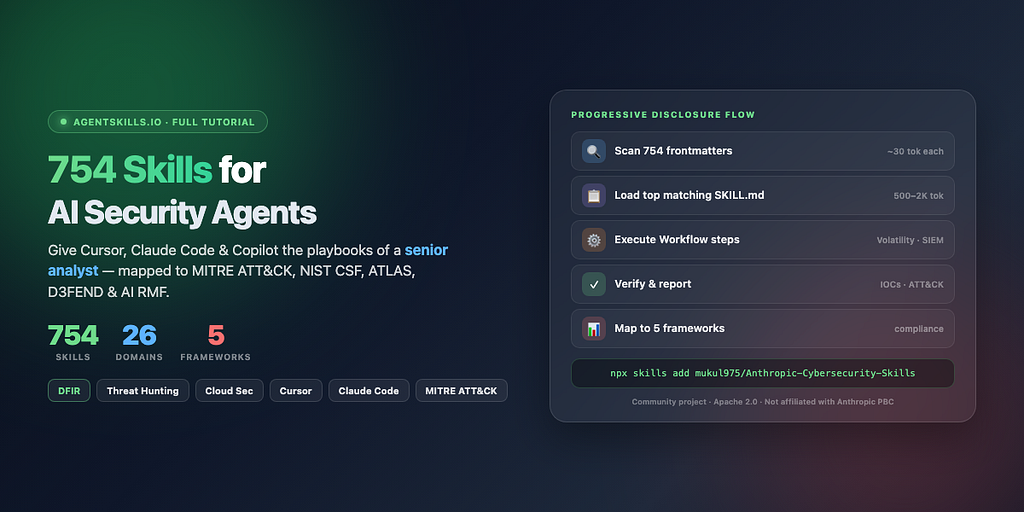
Give any AI agent the structured decision-making of a senior security analyst — not generic web search, but step-by-step playbooks mapped to MITRE ATT&CK, NIST CSF 2.0, MITRE ATLAS, D3FEND, and NIST AI RMF.
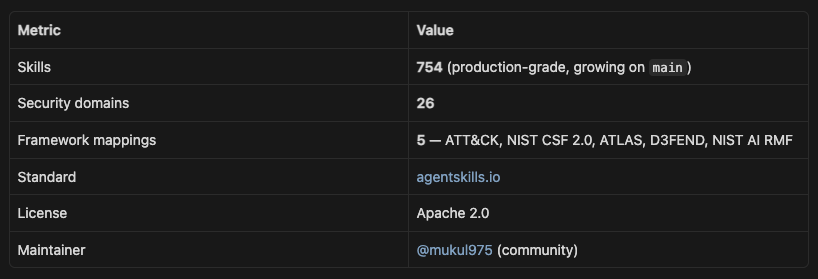
Based on mukul975/Anthropic-Cybersecurity-Skills (754 skills · 26 domains · Apache 2.0).
Community project — not affiliated with Anthropic PBC.
What you’ll learn
- What the library is and why it exists
- How the agentskills.io standard enables progressive disclosure
- All five framework mappings and how to use them in compliance workflows
- Install on Claude Code, Cursor, Copilot, Codex CLI, Gemini CLI, Hermes , and MCP agents
- Skill anatomy — frontmatter, Workflow, Verification, references, scripts
- End-to-end examples: memory forensics, threat hunting, cloud IR
- All 26 security domains and when to activate each
- Contributing, responsible use, citation, and troubleshooting
Table of contents
- Part 1 — The problem this solves
- Part 2 — Library at a glance
- Part 3 — Architecture and progressive disclosure
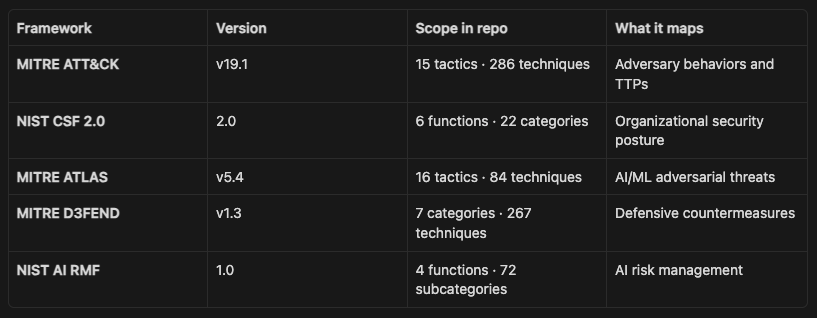
- Part 4 — Five frameworks, one skill library
- Part 5 — Quick start installation
- Part 6 — Claude Code setup
- Part 7 — Cursor setup
- Part 8 — GitHub Copilot and Codex CLI
- Part 9 — Gemini CLI and other platforms
- Part 10 — Hermes Agent integration
- Part 11 — Skill anatomy deep dive
- Part 12 — How agents discover and execute skills
- Part 13 — Walkthrough: credential theft in a memory dump
- Part 14 — Walkthrough: hypothesis-driven threat hunting
- Part 15 — Walkthrough: multi-cloud breach scoping
- Part 16 — All 26 security domains
- Part 17 — MITRE ATT&CK v19.1 coverage
- Part 18 — Compliance and risk frameworks in practice
- Part 19 — Casky Playground and GARS-2026
- Part 20 — Contributing your own skill
- Part 21 — Security, ethics, and authorized use
- Part 22 — Troubleshooting
- Part 23 — Citation and license
TL;DR
- 754 production-grade cybersecurity skills for AI agents — structured playbooks, not random scripts or payload dumps
- Community project (mukul975/Anthropic-Cybersecurity-Skills) — not affiliated with Anthropic PBC · Apache 2.0
- 26 security domains — cloud, DFIR, threat hunting, web app, OT/ICS, red team, and more
- 5 framework mappings per skill — MITRE ATT&CK v19.1 · NIST CSF 2.0 · MITRE ATLAS · D3FEND · NIST AI RMF
- Built on agentskills.io — YAML frontmatter for discovery + Markdown workflows for execution
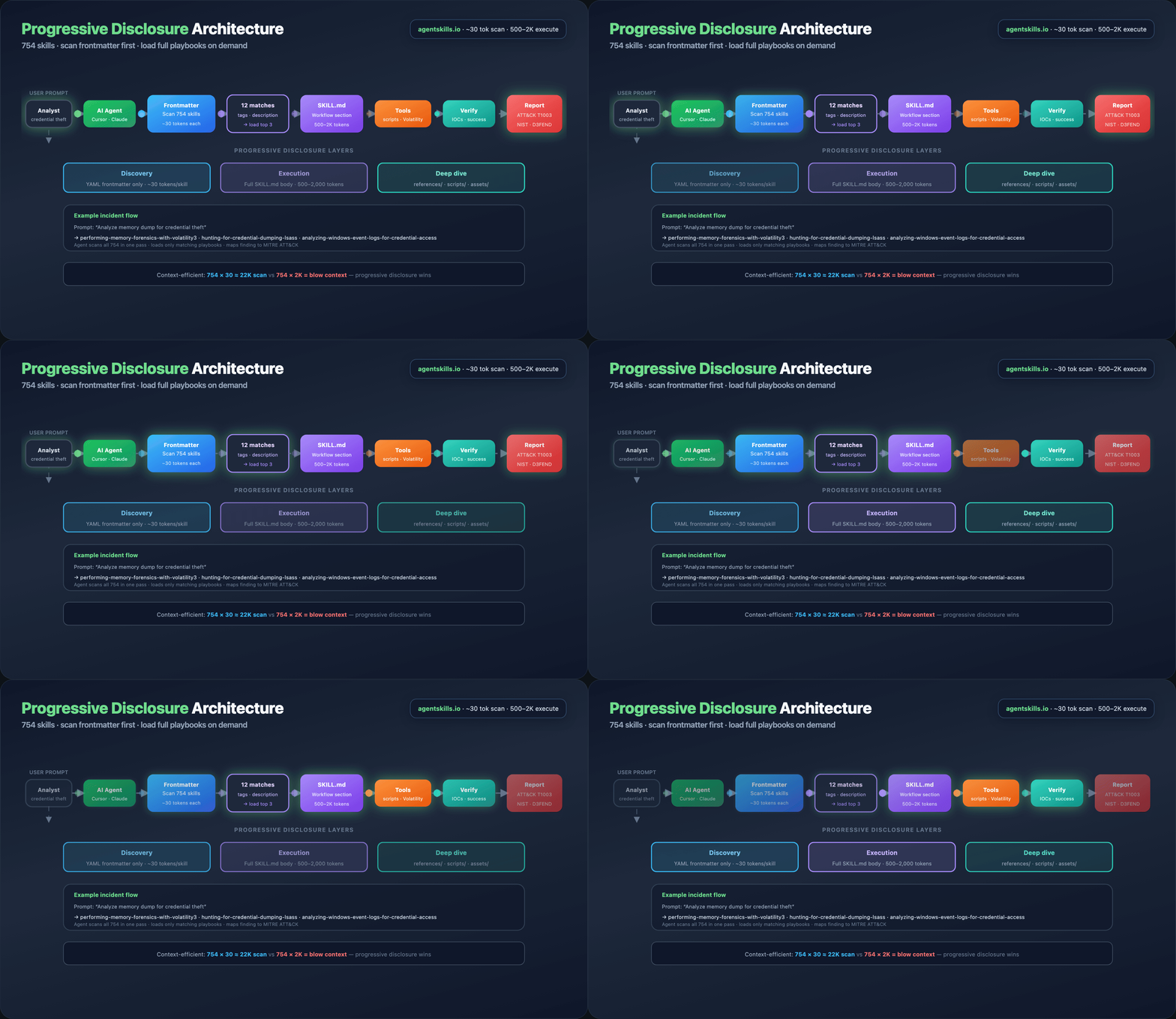
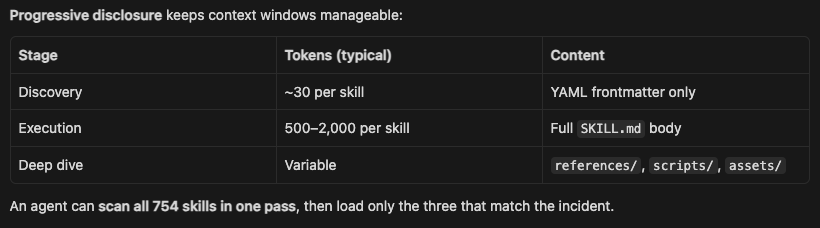
- Progressive disclosure — scan all 754 skills at ~30 tokens each, load only matching playbooks at ~500–2K tokens
- One-line install: npx skills add mukul975/Anthropic-Cybersecurity-Skills
- Works with Cursor, Claude Code, Copilot, Codex CLI, Gemini CLI, Hermes, and MCP agents
- Tutorial includes animated GIFs — install steps, architecture, skill anatomy, DFIR walkthrough, domain + ATT&CK tables
- Runnable scripts — inspect real SKILL.md files and walk through a credential-dump IR scenario
- Closes the gap between “LLM that searches the web” and “agent that follows a senior analyst playbook.”
Note
BlackArch Linux
We also provide a ready-to-deploy BlackArch Linux VM that can be launched instantly on AWS , GCP , or Azure . No installation, setup, or dependency management required — just spin it up and start using a full arsenal of penetration testing and security auditing tools in minutes.
Kali GUI Linux
Our Kali GUI Linux VM comes fully pre-configured with a graphical interface, making it easy for both beginners and professionals to get started. Deploy directly on AWS , GCP , or Azure with zero setup — no installation hassles, just immediate access to a complete offensive security toolkit.
Browser-Based Kali Linux
We offer a browser-based Kali Linux environment that runs entirely in the cloud. Simply deploy and access it from your browser — no downloads, no local setup, no compatibility issues. Deploy directly on AWS , GCP , or Azure with zero setup — no installation hassles, just immediate access to a complete offensive security toolkit. Perfect for quick testing, learning, and remote security operations from anywhere.
ParrotOS Linux
Our ParrotOS Linux VM is optimized for security, privacy, and development workflows. Available for instant deployment on AWS , GCP , and Azure , it eliminates the need for manual installation — giving you a secure, ready-to-use environment in just a few clicks.
Part 1 — The problem this solves
The cybersecurity workforce gap hit 4.8 million unfilled roles globally in 2024 (ISC2). AI agents can help close that gap — but only if they have structured domain knowledge to work from.
Today’s agents can write code and search the web. They typically cannot :
- Pick the right Volatility3 plugin for a suspicious memory dump
- Know which Sigma rules catch Kerberoasting
- Scope a cloud breach across AWS, Azure, and GCP with consistent playbooks
- Map findings to ATT&CK techniques without hallucinating IDs
Existing security repos give you wordlists, payloads, or exploit code. None give an AI agent the decision workflow a senior analyst follows: prerequisites, step order, verification, and framework mapping.
Anthropic Cybersecurity Skills fills that gap: 754 skills, each a practitioner playbook in agentskills.io format — YAML frontmatter for discovery, Markdown body for execution, optional references/scripts/assets for depth.
Part 2 — Library at a glance
What it is not
- Not an Anthropic official product
- Not a script dump or payload collection
- Not a replacement for authorization, legal scope, or human judgment
What it is
- An AI-native knowledge base built for agent toolchains
- Validated ATT&CK v19.1 mappings via mitreattack-python — zero revoked IDs
- The only open-source skills library with unified five-framework coverage per skill
Part 3 — Architecture and progressive disclosure
Part 4 — Five frameworks, one skill library
No other open-source skills library maps every skill to all five frameworks. One skill, five compliance checkboxes.
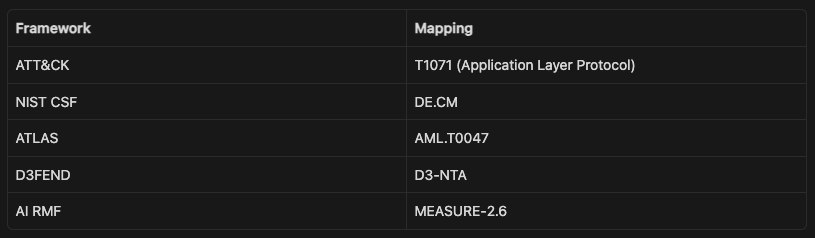
Example — one skill, five mappings
Skill: analyzing-network-traffic-of-malware
Part 5 — Quick start installation
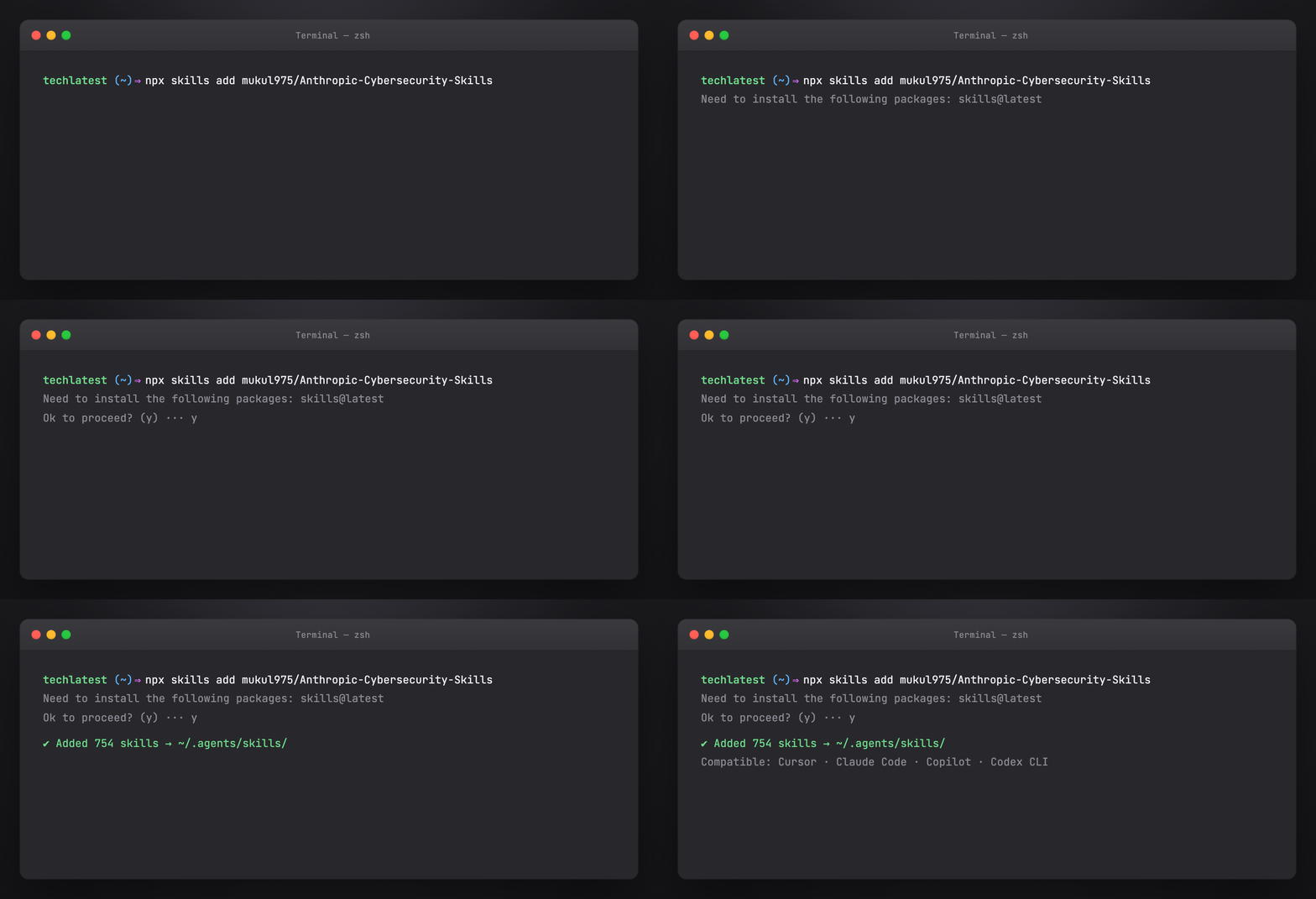
Option A — npx (recommended)
Works with any agentskills.io-compatible platform:
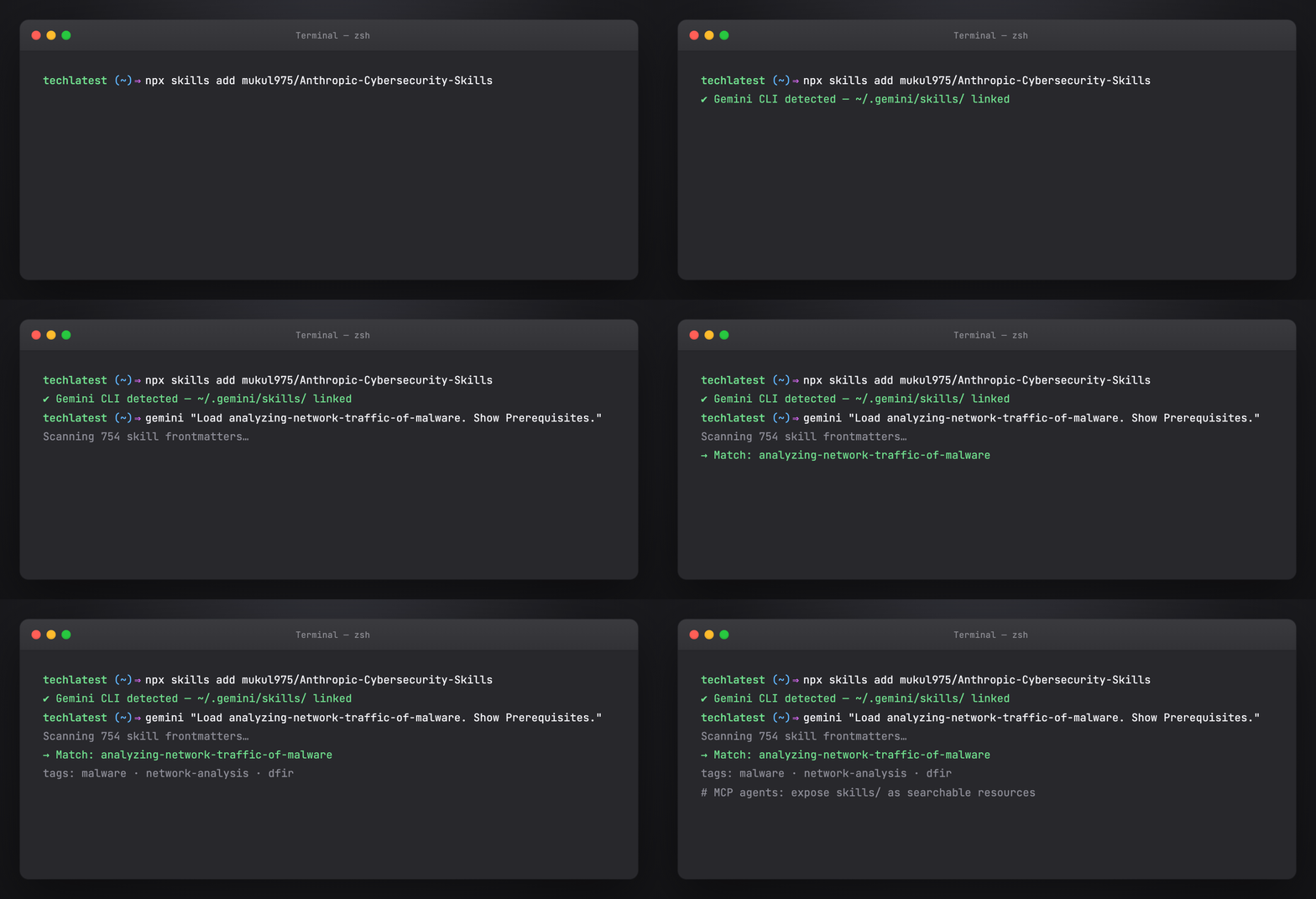
npx skills add mukul975/Anthropic-Cybersecurity-Skills
The installer registers skills in your agent’s configured skills directory.
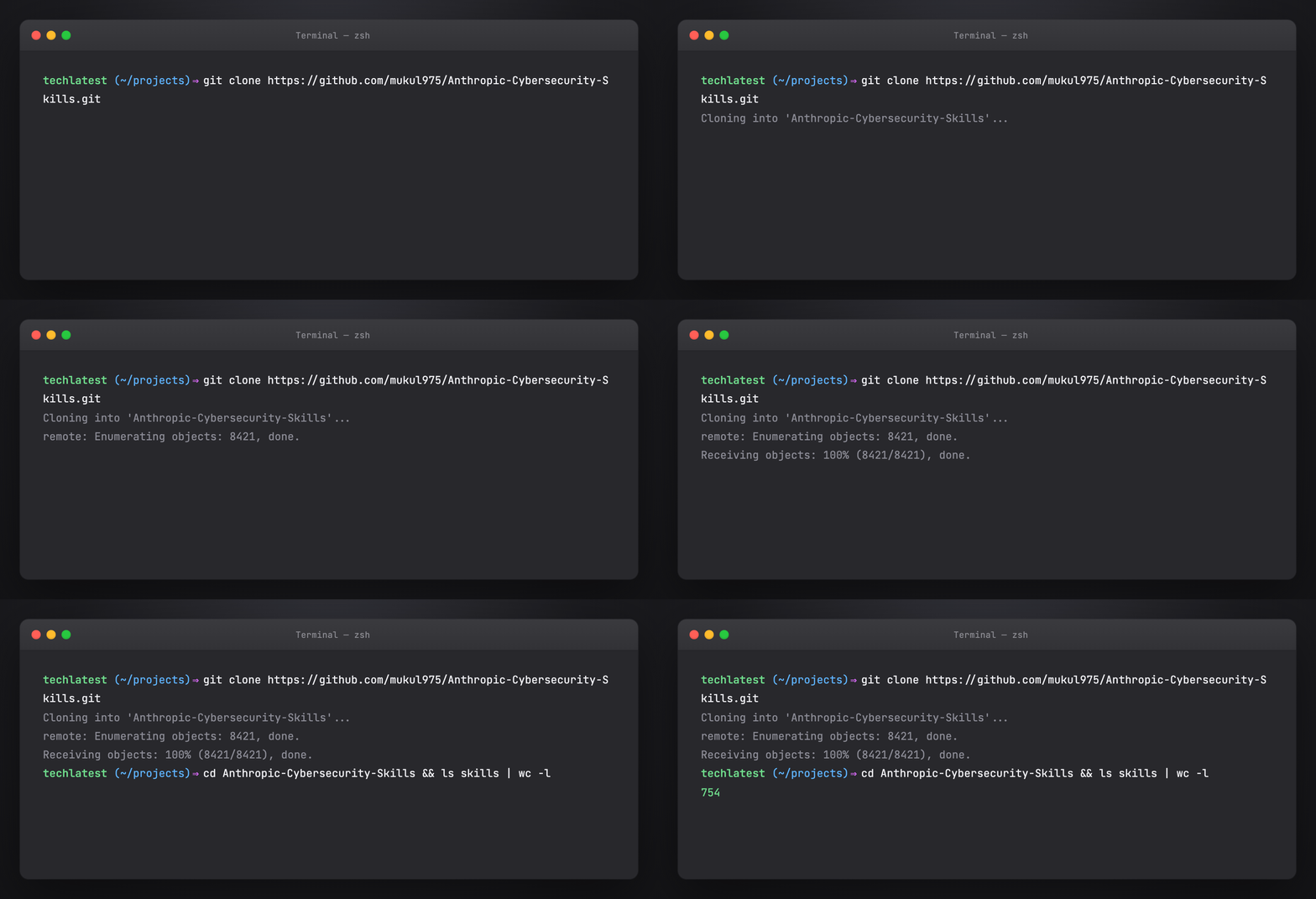
Option B — Git clone
git clone https://github.com/mukul975/Anthropic-Cybersecurity-Skills.git
cd Anthropic-Cybersecurity-Skills
Inspect skills/ — each subdirectory is one skill with SKILL.md at the root.
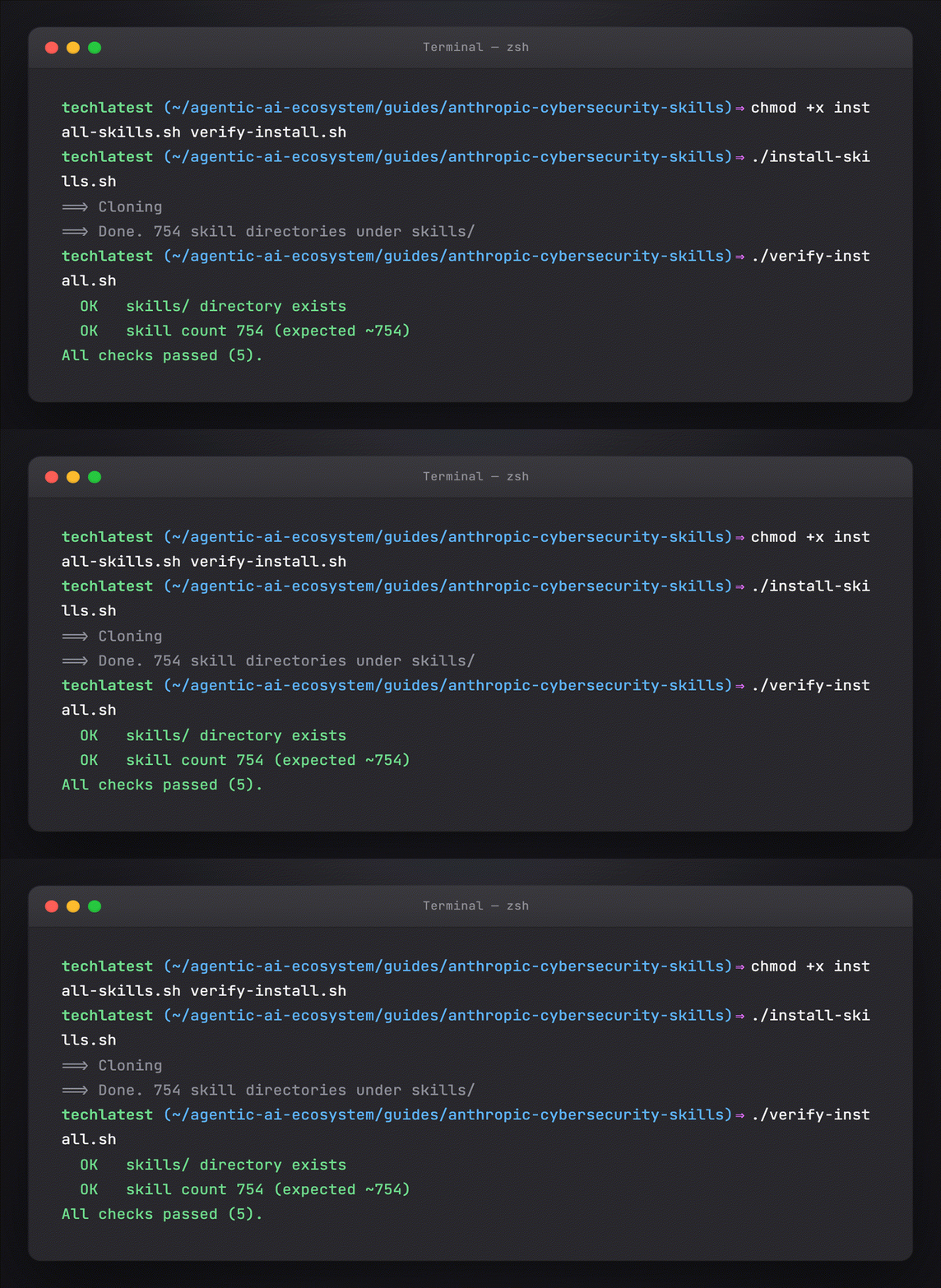
Option C — This guide’s helper script
cd guides/anthropic-cybersecurity-skills
chmod +x install-skills.sh verify-install.sh
./install-skills.sh
./verify-install.sh
Default clone path: ~/.cybersec-skills/Anthropic-Cybersecurity-Skills. Override:
export CYBERSEC_SKILLS_DIR=/opt/security-skills/Anthropic-Cybersecurity-Skills
./install-skills.sh
Part 6 — Claude Code setup
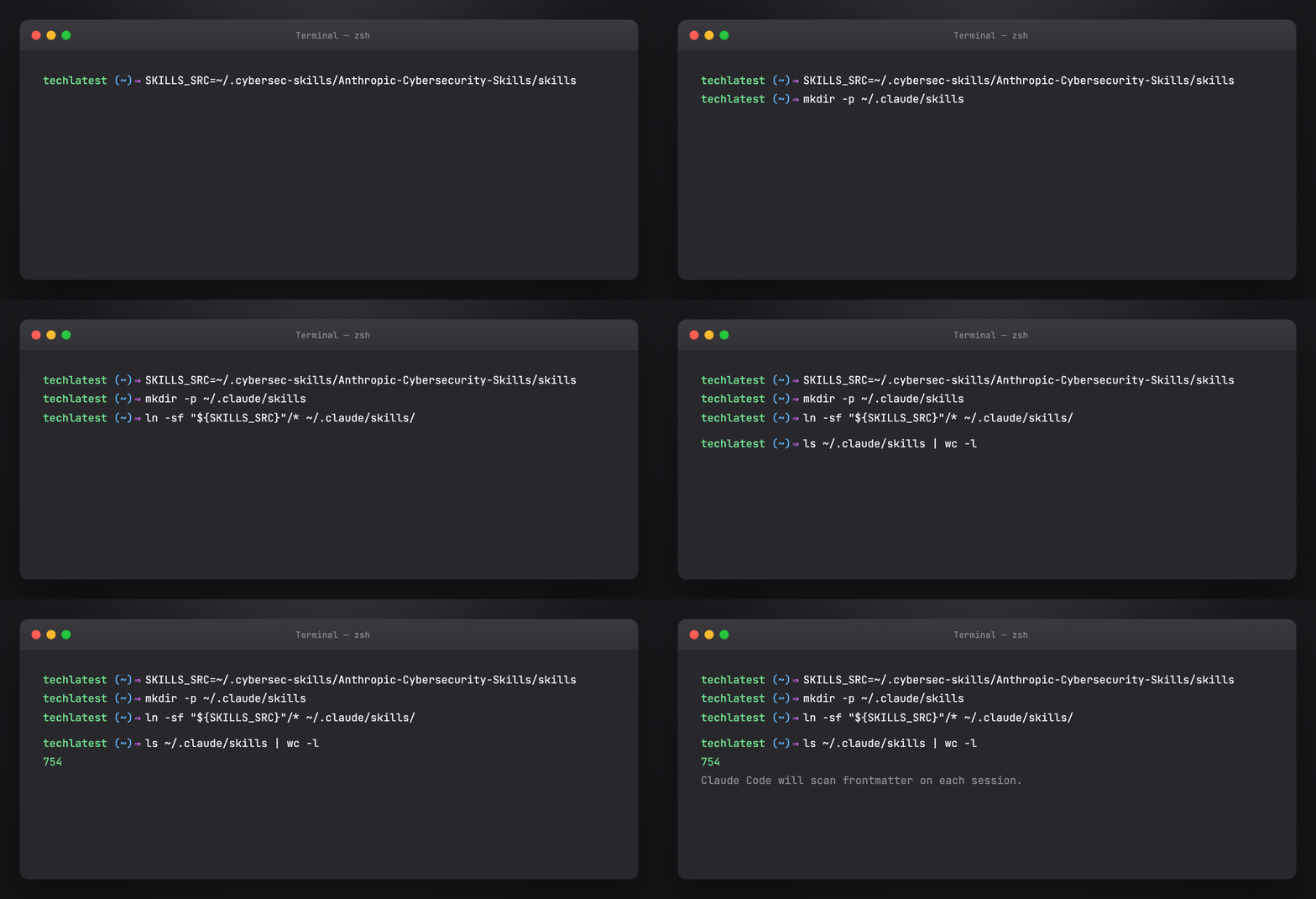
Claude Code — symlink skills to ~/.claude/skills/
Claude Code loads skills from .claude/skills/ (project) or ~/.claude/skills/ (global).
Global install (all projects)
SKILLS_SRC=~/.cybersec-skills/Anthropic-Cybersecurity-Skills/skills
mkdir -p ~/.claude/skills

# Symlink entire library (754 skills — high discovery surface)
ln -sf "${SKILLS_SRC}"/* ~/.claude/skills/

# Or copy a subset — e.g. DFIR only
cp -r "${SKILLS_SRC}"/performing-memory-forensics-with-volatility3 ~/.claude/skills/
cp -r "${SKILLS_SRC}"/hunting-for-credential-dumping-lsass ~/.claude/skills/
Project-scoped (one engagement)
mkdir -p .claude/skills
ln -sf ~/.cybersec-skills/Anthropic-Cybersecurity-Skills/skills/* .claude/skills/
Verify in Claude Code
Start a session and ask:
Use the performing-memory-forensics-with-volatility3 skill. List prerequisites and the first three Workflow steps only.
Claude should read SKILL.md and cite structured sections — not invent generic Volatility commands.
See also: Claude Code .claude/ tutorial.
Part 7 — Cursor setup
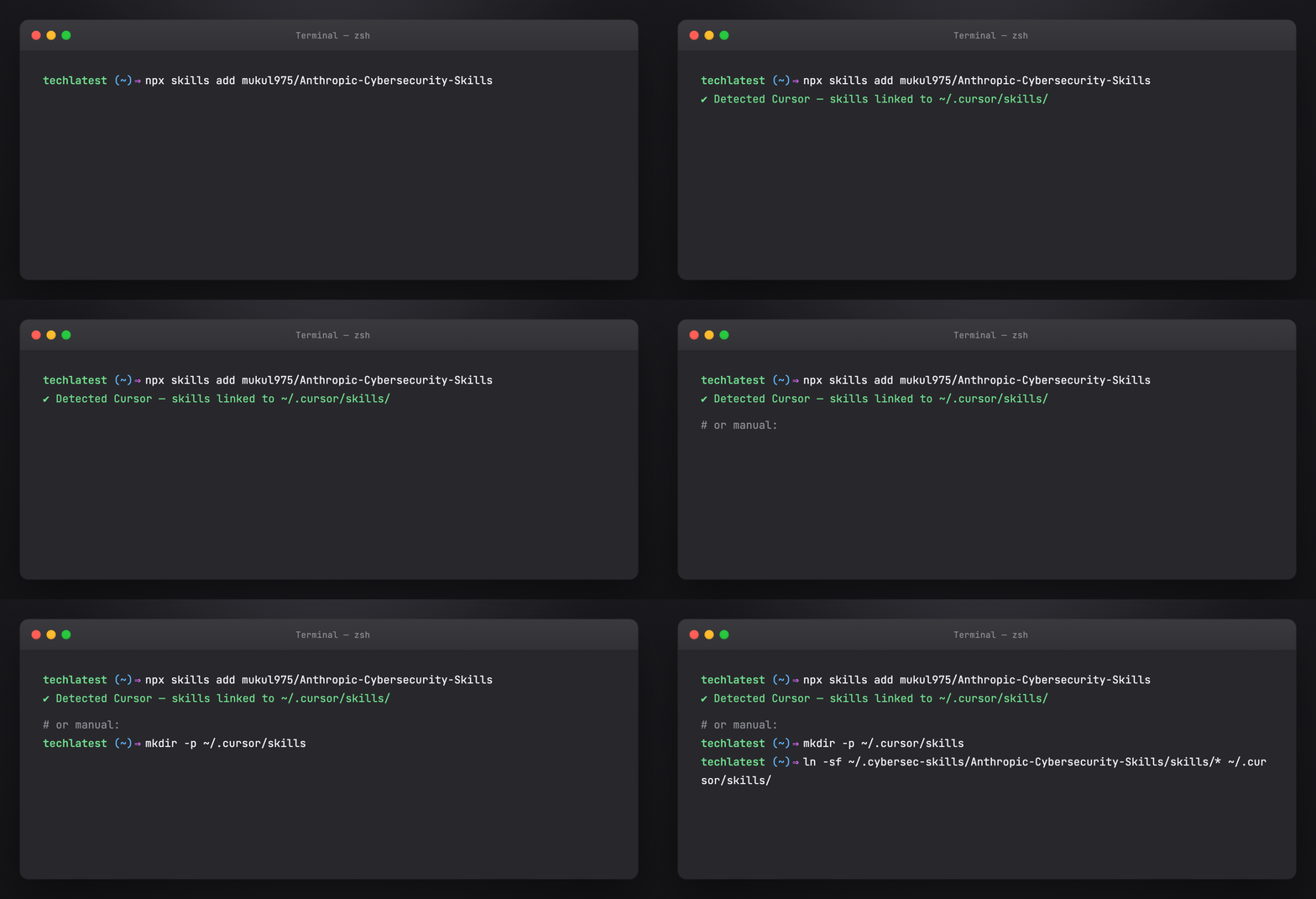
Cursor — npx or manual symlink to ~/.cursor/skills/
Cursor discovers skills listed in agent configuration and from ~/.cursor/skills/ (user skills).
Install via npx
npx skills add mukul975/Anthropic-Cybersecurity-Skills
Follow Cursor-specific prompts if the installer detects your environment.
Manual symlink
mkdir -p ~/.cursor/skills
ln -sf ~/.cybersec-skills/Anthropic-Cybersecurity-Skills/skills/* ~/.cursor/skills/
Project rules (optional)
Add to .cursor/rules/ or project instructions:
For security investigations, prefer skills from Anthropic Cybersecurity Skills.
Scan skill frontmatter by tags (dfir, threat-hunting, cloud-security) before loading full SKILL.md.
Always complete the Verification section before closing an investigation step.
Verify in Cursor
Open Agent mode and prompt:
I have a Windows memory dump. Which cybersecurity skills apply? Load the best match and show Prerequisites.
Part 8 — GitHub Copilot and Codex CLI
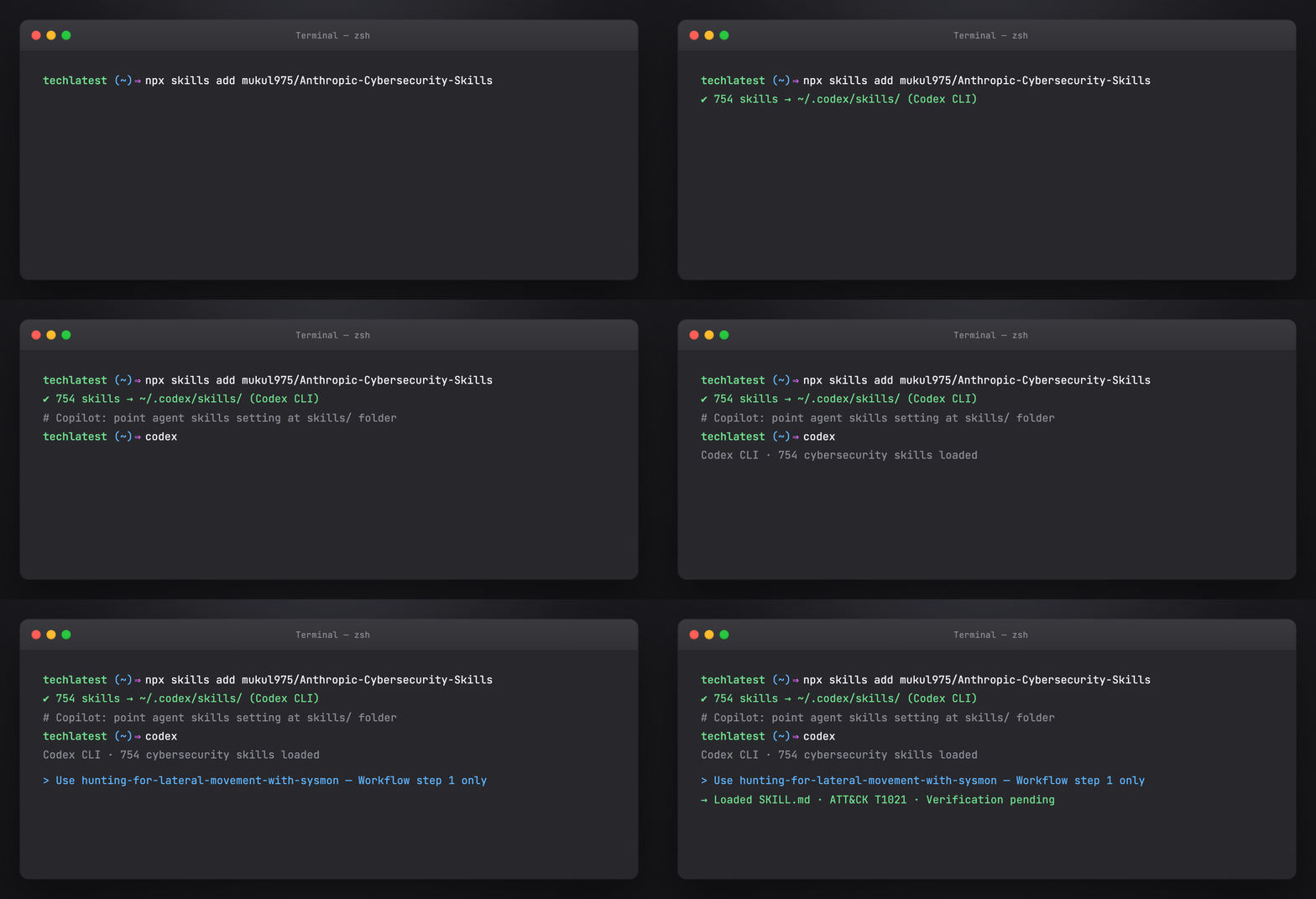
Copilot + Codex CLI — install skills and invoke by name
Both support agentskills.io when configured with a skills path.
Copilot (VS Code / JetBrains)
- Clone or npx skills add the repo
- Point Copilot’s agent skills setting at skills/
- In agent chat: reference skill name in kebab-case (e.g. hunting-for-lateral-movement-with-sysmon)
OpenAI Codex CLI
npx skills add mukul975/Anthropic-Cybersecurity-Skills
codex # or your configured entrypoint
Codex reads frontmatter for routing; load full skills for multi-step IR workflows.
Part 9 — Gemini CLI and other platforms
Gemini CLI — npx install and skill invocation
Compatible without custom forks:
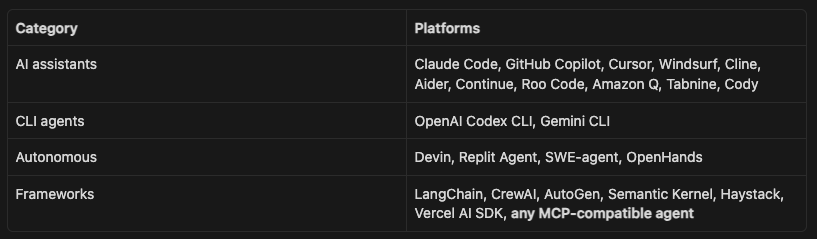
Gemini CLI: install skills via npx skills add, then invoke by skill name in prompts.
LangChain / CrewAI: mount skills/<name>/SKILL.md as tool description or system prompt segment; use frontmatter tags for retrieval routing.
MCP agents: expose skill search as an MCP resource listing frontmatter; fetch full SKILL.md on match.
Part 10 — Hermes Agent integration
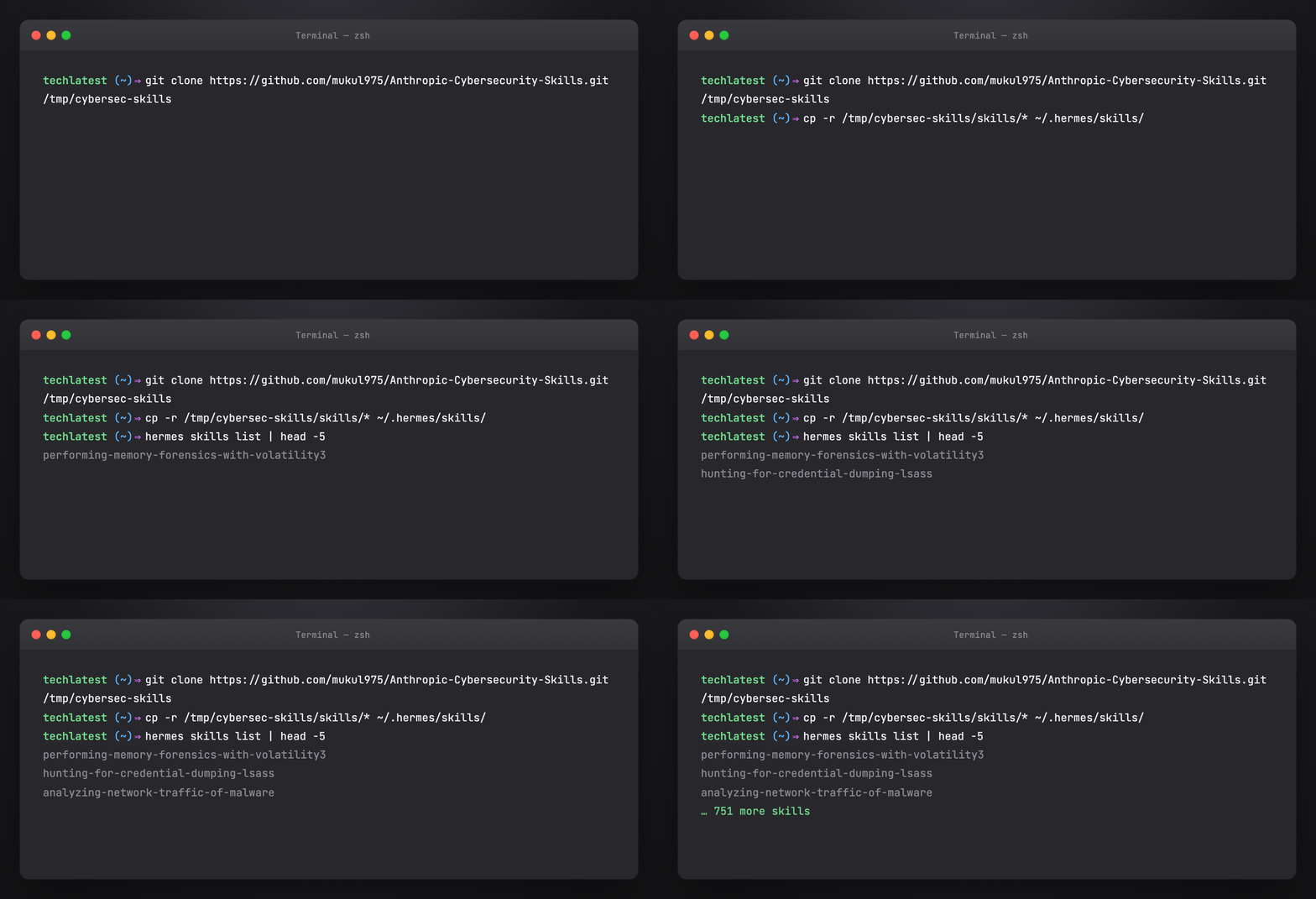
Hermes — copy skills into ~/.hermes/skills/
Hermes uses ~/.hermes/skills/ (same agentskills.io layout).
git clone https://github.com/mukul975/Anthropic-Cybersecurity-Skills.git /tmp/cybersec-skills
cp -r /tmp/cybersec-skills/skills/* ~/.hermes/skills/
hermes skills list | head
For SOC automation, combine with Hermes cron/Curator so frequently used skills stay prioritized. See Awesome Hermes Agent tutorial.
Example Hermes prompt:
Run a hypothesis-driven hunt for Kerberoasting using the threat hunting skills. Map hits to ATT&CK T1558.003.
Part 11 — Skill anatomy deep dive
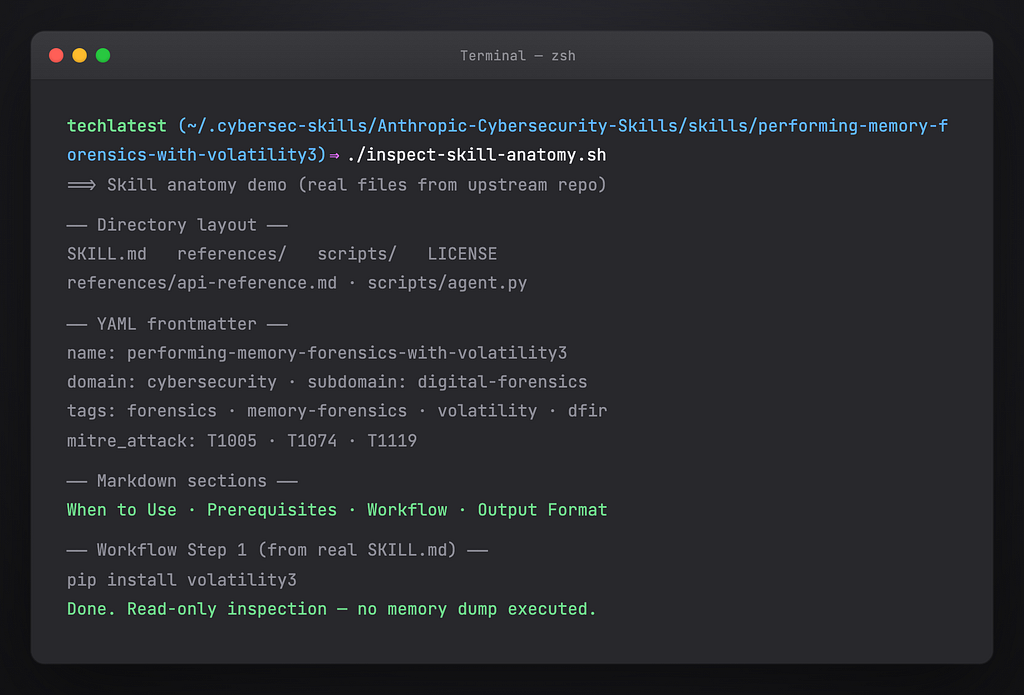
Every skill follows a consistent directory structure:
skills/performing-memory-forensics-with-volatility3/
├── SKILL.md ← Definition (YAML + Markdown)
├── references/
│ ├── standards.md ← Framework mappings
│ └── workflows.md ← Deep technical reference
├── scripts/
│ └── process.py ← Helper scripts
└── assets/
    └── template.md ← Report templates
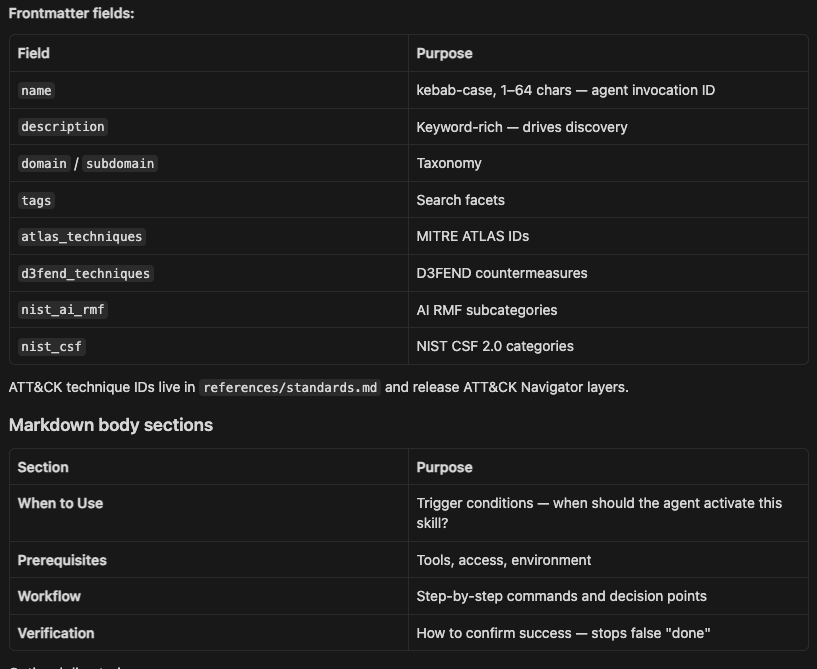
YAML frontmatter (real example)
---
name: performing-memory-forensics-with-volatility3
description: >-
  Analyze memory dumps to extract running processes, network connections,
  injected code, and malware artifacts using the Volatility3 framework.
domain: cybersecurity
subdomain: digital-forensics
tags: [forensics, memory-analysis, volatility3, incident-response, dfir]
atlas_techniques: [AML.T0047]
d3fend_techniques: [D3-MA, D3-PSMD]
nist_ai_rmf: [MEASURE-2.6]
nist_csf: [DE.CM-01, RS.AN-03]
version: "1.2"
author: mukul975
license: Apache-2.0
---
Part 12 — How agents discover and execute skills
User prompt: “Analyze this memory dump for signs of credential theft.”
Agent internal process:
- Scan 754 frontmatter (~30 tokens each)
- → Match tags: forensics, credential-access, memory-analysis
→ 12 candidate skills - Load top 3:
- performing-memory-forensics-with-volatility3
- hunting-for-credential-dumping-lsass
- analyzing-windows-event-logs-for-credential-access
- Execute Workflow — Volatility3 plugins, LSASS access patterns, event log correlation
- Verification — confirm IOCs, map to ATT&CK T1003 (Credential Dumping)
Without skills, the agent guesses commands and skips steps. With skills, it follows the same playbook a senior DFIR analyst would use.
Tips for better agent behavior
- Ask the agent to name the skill before executing
- Require Verification section output in every response
- For red team skills, state authorized scope in the prompt
- Use subset installs (10–20 skills) if the agent overloads context
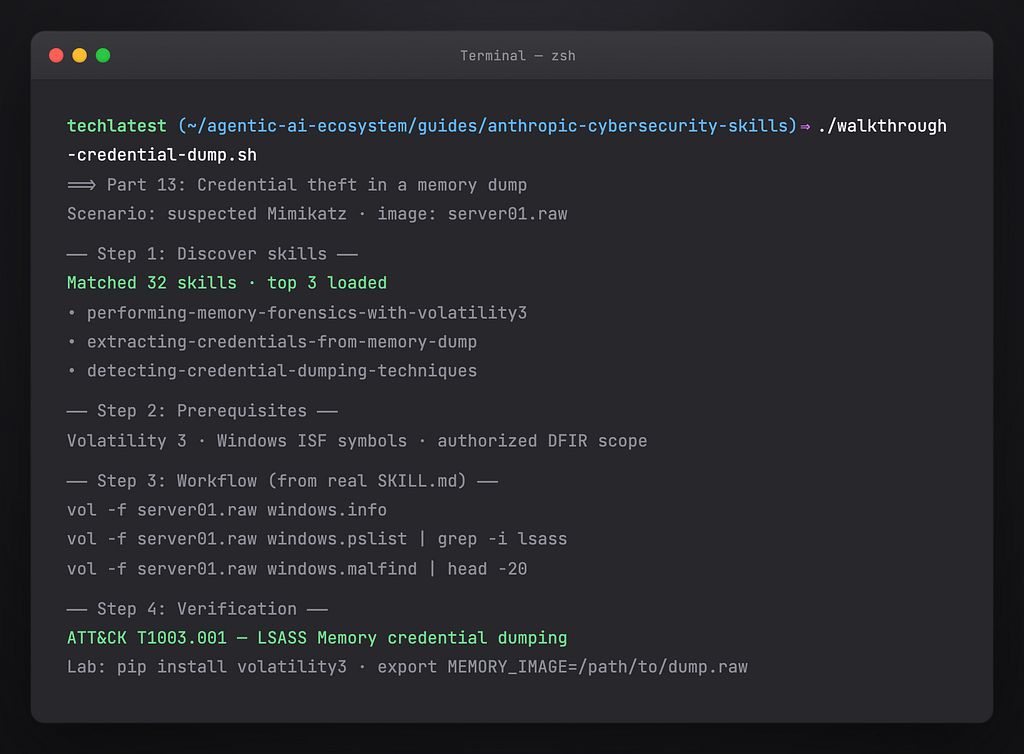
Part 13 — Walkthrough: credential theft in a memory dump
Scenario: IR ticket — suspected Mimikatz on a Windows server. You have a .raw memory image.
Step 1 — Activate the right skills
Prompt:
Authorized DFIR on image server01.raw. Find skills for memory forensics and credential dumping. List prerequisites.
Expected skills: memory forensics + LSASS hunting + Windows event logs.
Step 2 — Prerequisites check
Agent should verify from SKILL.md:
- Volatility3 installed (vol -h)
- Symbol tables / Windows profile for OS build
- Sufficient disk space for plugin output
- Chain of custody documented
Step 3 — Workflow execution
Typical workflow order (from skills):
- windows.info / windows.pslist — baseline processes
- windows.malfind / windows.vadwalk — injection indicators
- LSASS-focused plugins and handle analysis
- Correlate with Security Event ID 4656/4663 if disk logs are available
Step 4 — Verification
- Named process accessing lsass.exe with suspicious privileges
- In-memory strings or injection matching known dump tools
- Timeline aligns with alert timestamp
- ATT&CK: T1003.001 OS Credential Dumping: LSASS Memory
Step 5 — Report
Use skill assets/template.md if present; include framework mappings from references/standards.md.
Part 14 — Walkthrough: hypothesis-driven threat hunting
Scenario: Hunt for Kerberoasting in Enterprise SIEM.
Hypothesis
Service accounts may be targeted via Kerberoasting (T1558.003) in the last 30 days.
Skill selection
Tags: threat-hunting, kerberos, sigma, splunk or sentinel.
Agent loads hunting skill → Workflow:
- Deploy/validate Sigma rule for Kerberoasting
- Query rare RC4/HMAC service ticket requests
- Enrich service accounts — SPN exposure, password age
- Escalate confirmed anomalies to IR queue
Verification
- Non-noise hits with service account + weak crypto ticket
- ATT&CK technique documented
- Hunt notebook updated for repeatability
Part 15 — Walkthrough: multi-cloud breach scoping
Scenario: Credentials leaked; unknown activity in AWS, Azure, and GCP.
Skills to combine
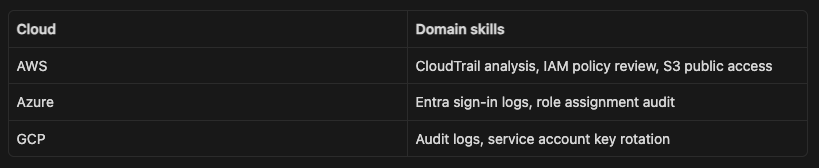
Agent workflow:
- Contain — disable keys, force password reset (Incident Response skills)
- Discover — each provider’s log skill in parallel
- Collect — unified timeline (Digital Forensics)
- Map — ATT&CK cloud techniques (T1078, T1530, etc.)
- Report — NIST CSF RS.AN / RS.MI categories
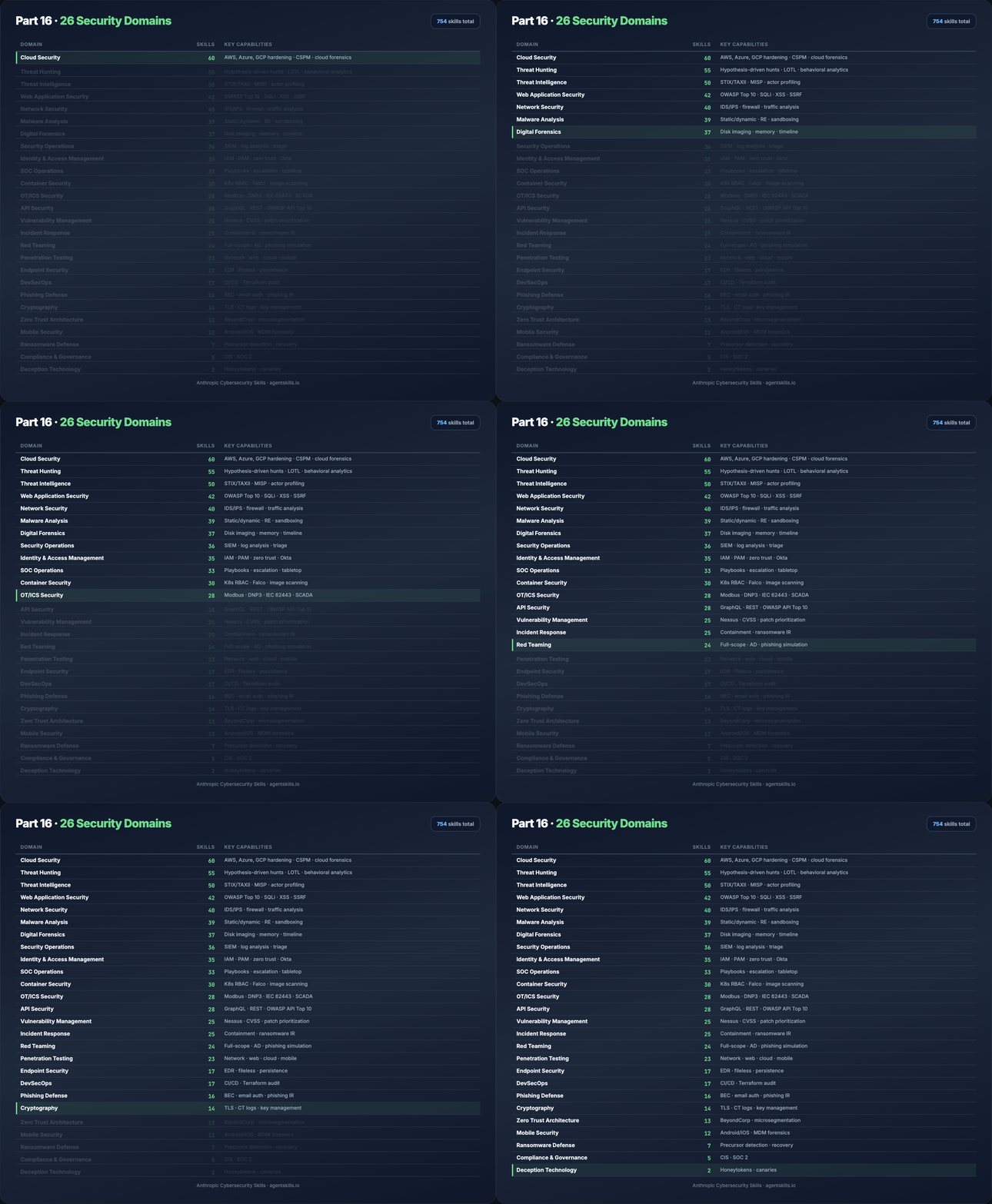
Part 16 — All 26 security domains
Part 17 — MITRE ATT&CK v19.1 coverage
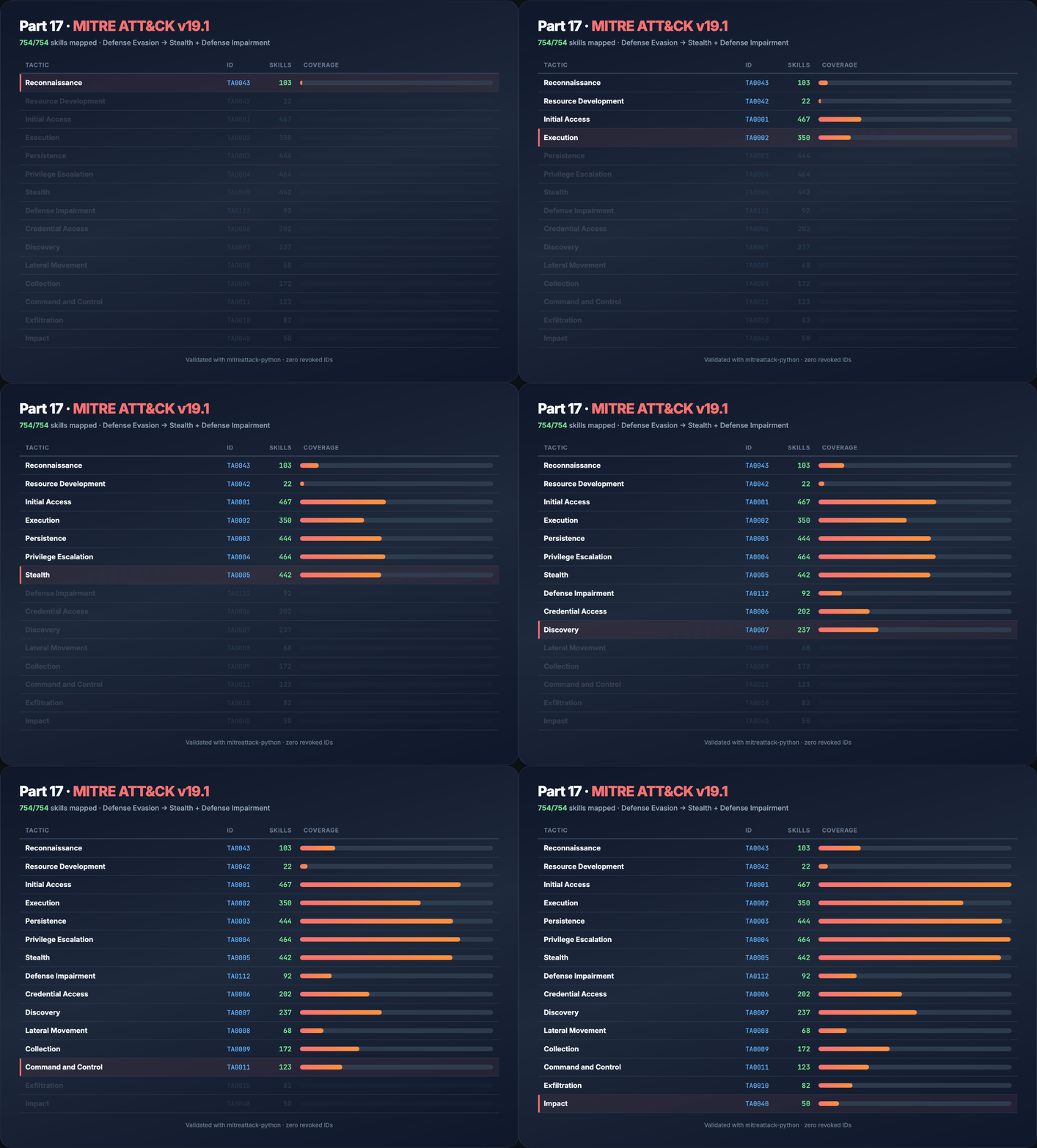
754/754 skills mapped. Validated with official mitreattack-python — no revoked or deprecated IDs.
v19.1 change: Defense Evasion split into Stealth (TA0005) and Defense Impairment (TA0112).
Part 18 — Compliance and risk frameworks in practice
NIST CSF 2.0
Map skill outputs to Govern, Identify, Protect, Detect, Respond, Recover for audit trails. Example: memory forensics → Detect (DE.CM), Respond (RS.AN).
MITRE ATLAS
Use when the incident involves ML models — poisoning, evasion, model theft. Frontmatter field: atlas_techniques.
MITRE D3FEND
Pair offensive findings with defensive countermeasures — e.g. D3-NTA for network traffic analysis skills.
NIST AI RMF
For AI governance — document which agent skills were used, human-in-the-loop checkpoints, and measurement (MEASURE-* subcategories).
See Framework mappings for crosswalk tables and reporting templates.
Part 19 — Casky Playground and GARS-2026
Casky.ai Playground
Hands-on exercises without local install:
→ Launch Playground on Casky.ai
- Live cybersecurity skill exercises
- Real-time agent execution
- Interactive ATT&CK-mapped workflows
GARS-2026 Survey
Global Agentic AI Readiness Survey (SRH Berlin) — measures readiness for MCP, tool calling, and governance.
- ~10 minutes, anonymous
- Results published open access (CC-BY 4.0)
- Link in upstream README
Part 20 — Contributing your own skill
- Fork Anthropic-Cybersecurity-Skills
- Copy the skill template from CONTRIBUTING.md
- Add skills/your-skill-name/SKILL.md with full frontmatter + four body sections
- Add references/standards.md with ATT&CK + framework IDs
- PR title: Add skill: your-skill-name
- Review within ~48 hours for technical accuracy and agentskills.io compliance
Improve existing skills: framework mappings, fixed commands, new scripts/templates.
Report issues: inaccurate procedures or broken scripts → GitHub Issues.
Project follows Contributor Covenant.
Part 21 — Security, ethics, and authorized use
These skills describe ** offensive and defensive techniques**. Use only:
- On systems you own or have written authorization to test
- Within bug bounty/pentest/red team scope
- With human oversight for destructive or exfiltration steps
AI agents can execute commands quickly — mis-scoped prompts cause real damage. Always:
- State authorization in the prompt
- Use read-only modes where available
- Keep humans in the loop for containment and legal notification
Upstream Security Policy: responsible disclosure, 48-hour acknowledgment.
Part 22 — Troubleshooting
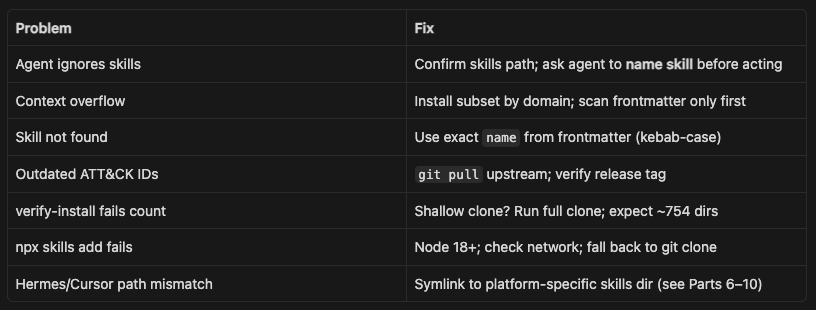
Run ./verify-install.sh after every pull.
Part 23 — Citation and license
@software{anthropic_cybersecurity_skills,
  author = {Jangra, Mahipal},
  title = {Anthropic Cybersecurity Skills},
  year = {2026},
  url = {https://github.com/mukul975/Anthropic-Cybersecurity-Skills},
  license = {Apache-2.0},
  note = {754 structured cybersecurity skills for AI agents,
                  mapped to MITRE ATT\&CK, NIST CSF 2.0, MITRE ATLAS,
                  MITRE D3FEND, and NIST AI RMF}
}
License
Apache License 2.0 — use, modify, and distribute in personal and commercial projects.
Conclusion
The cybersecurity skills gap is not going to close with generic chatbots alone. Analysts do not win investigations because an LLM can search the web — they win because they know which playbook to run, in what order, and how to verify the result before closing the ticket.
Anthropic Cybersecurity Skills (community-built, Apache 2.0) gives AI agents that same structure: 754 skills across 26 domains, each mapped to MITRE ATT&CK, NIST CSF, ATLAS, D3FEND, and NIST AI RMF. The agentskills.io format makes it practical — scan lightweight frontmatter first, load full workflows only when the incident demands it.
You do not need a custom fork or a new agent runtime. One install command works across Cursor, Claude Code, Copilot, Codex CLI, Gemini CLI, and Hermes. Point your agent at the library, name the skill in your prompt, and require the Verification step before it reports done.
Start here:
npx skills add mukul975/Anthropic-Cybersecurity-Skills
Then walk through the tutorial: inspect a real SKILL.md, run the credential-dump walkthrough, and pick skills by domain or ATT&CK tactic. Use them only on authorized systems — these are practitioner playbooks, not toys.
If this helps your SOC or red-team workflow, star the upstream repo and consider contributing a skill in an underrepresented domain like Deception Technology or Compliance & Governance. The library grows on community PRs — and the agents using it get sharper with every one.
Thank you so much for reading
Like | Follow | Subscribe to the newsletter.
Catch us on
Website: https://www.techlatest.net/
Newsletter: https://substack.com/@parvezmohammed
Twitter: https://twitter.com/TechlatestNet
LinkedIn: https://www.linkedin.com/in/techlatest-net/
YouTube:https://www.youtube.com/@techlatest_net/
Blogs: https://medium.com/@techlatest.net
Reddit Community: https://www.reddit.com/user/techlatest_net/
Comments
More Blog
View allcursorCursor Automations in 2026: wire event-triggered coding agents to Slack, CI, and timers
Cursor Automations in 2026: wire event-triggered coding agents to Slack, CI, and...
M
Manu ShuklaaiIndex Everything, or Read Everything? The Dilemma of Feeding Specs to AI in Multi-Repo Development
The specs exist. The AI just can't see them. I've always been the type who builds hobby...
S
Shunya ShidaamazonbedrockConnect Claude Code, Cursor and Codex to Amazon Bedrock's new console (2026)
Connect Claude Code, Cursor and Codex to Amazon Bedrock's new console (2026) Summary. On 5...
M
Manu ShuklaaiSpotting AI UI is too easy
There is a weird uncanny valley with LLM-generated UI right now. The code functions perfectly, but if...
H
Harish .saiSeven ranking frameworks, one search page, zero translation tables
I went down a rabbit hole this morning reading the late-2025 Juejin AI roundups side by side, and the...
N
ninghonggangmcpZendesk MCP: Let Claude Handle Your Support Tickets
Install guide and config at curatedmcp.com Zendesk MCP: Let Claude Handle Your Support...
C
curatedmcpReady-made automations for this
Workflows from the Neura Market marketplace related to this Cursor resource
- AI Blog Post Journalist: Perplexity for Research, Anthropic Claude for Blogn8n · $9.99 · Related topic
- Learn n8n Keyboard Shortcuts with an Interactive Hands-On Tutorial Workflown8n · $24.99 · Related topic
- Learn API Fundamentals with an Interactive Hands-On Tutorial Workflown8n · $24.99 · Related topic
- Automating WhatsApp Replies Using GoHighLevel with Redis and Anthropicn8n · $24.99 · Related topic