
Back to Blog mcp
mcp csharp
 ai
ai ai
ai ai
ai ai
ai cursor
ServBay 1.30.0 Update: Dual-Platform MCP Server Integration — Turn AI Coding Assistants into Your Local DevOps
ServBay June 18, 2026
0 views
Hello everyone! ServBay 1.30.0 (ServBay for Windows 1.20.0) is finally here. AI-assisted programming...
Hello everyone! ServBay 1.30.0 (ServBay for Windows 1.20.0) is finally here.
AI-assisted programming is profoundly reshaping our daily development workflows, with AI assistants growing increasingly capable of understanding code. However, managing the local development environment—such as starting or stopping services, switching language versions, troubleshooting port conflicts, or inspecting logs—still requires us to constantly jump between our editor, terminal, and management tools.
In version 1.30.0, we are introducing the ServBay MCP (Model Context Protocol) Server. By leveraging the MCP protocol, we feed the capabilities of your entire local environment directly to your AI programming assistants. Now, you can let your AI assistant handle local DevOps tasks directly, allowing you to focus on writing code efficiently.
### Core Feature Upgrades: Broader Coverage, More Precise Control
#### ServBay MCP Server: A Cross-Language, Multi-Service Full-Stack Local Companion
Most existing MCP solutions on the market are limited to a single language ecosystem. Thanks to ServBay's rich built-in software stack, our MCP Server provides you with a much broader dimension of environment control:
**Full-Stack Support, Expanding Beyond a Single Ecosystem:** Seamlessly covers 50+ local services, including Python, Node.js, and various mainstream database systems.
**Trigger Multiple Local Tools with Simple Prompts:** Claude Code, Cursor, and Codex connect directly with ServBay. You can issue natural language commands to let them handle tasks directly, including:
- **Service Management:** Start, stop, or install local services with a single command;
- **Site Configuration:** Create new sites, bind local domains, and automatically configure SSL certificates;
- **Daily Troubleshooting:** Query port occupancy and directly read local service logs;
- **Version Switching:** Swap between different languages and versions in seconds;
- **Data Operations:** Directly create and query local databases.
#### Windows & macOS Dual-Platform Support: Filling the Ecosystem Gap
We understand the unique pain points of developers across different operating systems. The newly released MCP Server natively supports both macOS and Windows. Especially for Windows developers, we are committed to providing a local AI development foundation that is as smooth and efficient as its macOS counterpart, filling a long-standing gap in this tool space.
#### One-Click Configuration Writing & Entirely Local Data Execution
- **One-Click Configuration:** No need to manually figure out complex integration flows. Within ServBay's "Settings" page, you can write local MCP service configurations directly to Claude Code, Cursor, or Codex with a single click—getting you up and running instantly.
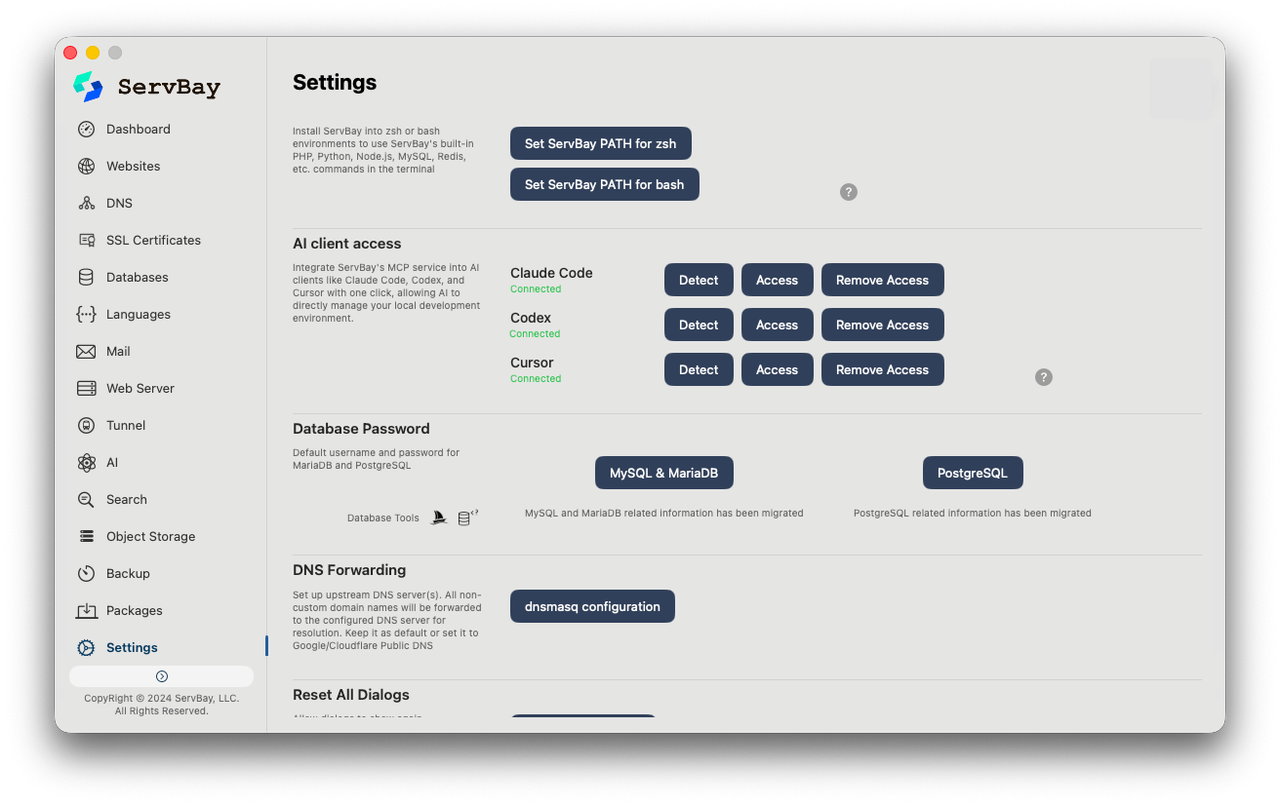
- **Local Keys & Data:** This service runs entirely locally. Your API keys, sensitive database information, and local environment data are never uploaded to any third-party cloud, safely protecting your code and environment while taking advantage of AI productivity.
### How to Update
You can check for updates and upgrade to version 1.30.0 via the "Settings" -> "Updates" section in the ServBay app, or go directly to the official ServBay website to download the latest installer.
👉 https://www.servbay.com/download
### Feedback & Support
As an all-in-one AI-ready infrastructure, the ServBay team will continuously optimize the interfaces exposed by the MCP Server and improve invocation stability. If you encounter any issues during configuration or usage, or if you have new ideas for AI-collaborative development, feel free to share your feedback with us through our official channels.
Unlock a new AI-driven local full-stack development experience together with ServBay!
Comments
More Blog
View allcsharpThis week in Cursor + .NET — 7 rules (week ending June 21, 2026)
A weekly digest from the Agentic Architect persistence kit: 7 senior C#/.NET rules for engineers keeping Cursor honest across sessions.
A
Agentic ArchitectaiHow Graphify Stopped My Team from Burning Thousands of Tokens Per Query
We were feeding Cursor 12 files per question. Graphify turned our React Native codebase into a knowledge graph — now it reads a scoped subgraph instead.
V
Vikrant NegiaiThe Twenty-Dollar Anchor: What the AI Tool Pricing Guides Are Actually Telling Us
I went down a rabbit hole this morning reading the late-2025 Juejin AI tool pricing guides back to...
N
ninghonggangaiWhy the December 2025 AI IDE Rankings Are Scoring the Wrong Category
I spent the morning reading two December 2025 Juejin AI IDE ranking posts back to back, and the thing...
N
ninghonggangaiSpaceX is buying Cursor for $60B — the AI coding-tool race just got weird
SpaceX is reportedly buying Cursor parent Anysphere for $60B. For builders, the big questions are model neutrality, compute, pricing, and trust.
D
Damien GallaghercursorThis Week in AI: Claude Goes Dark, SpaceX Buys Cursor for $60B
Claude Fable 5 went dark by government order, SpaceX bought Cursor for $60B, OpenAI's real losses leaked, and GitHub nearly broke under AI agents.
Z
ZyVOP