
Back to Blog aws
aws
 gemma
gemma community
 ai
ai ai
ai githubactions
 ai
ai
I Built a Conflict-Resilient JSON Editor to Solve Collaborative Nightmares, and here is the Tech Stack
Emily Chen January 16, 2026
0 views
If your JSON configuration is stored within the codebase, even a one-character change can trigger a...
If your JSON configuration is stored within the codebase, even a one-character change can trigger a release cycle. Many teams work around this by syncing configs to object storage(AWS S3) via CI/CD. The app logic ships on its own cadence, while configs publish independently. It reduces deploy friction, but often at the cost of double work (touching code and a pipeline) and silent overwrites when multiple people edit the same file.
This article outlines a more direct path: a JSON editor that writes to object storage, while optionally mirroring changes back to your codebase (via modal MRs) to keep repo and storage in sync.
We'll cover:
- Architecture pattern: browsing prefixes, create, view, or edit in an editor component, presigned url uploads to object storage.
- Migration strategy: how to keep CI/CD intact by opening MRs that mirror storage edits to your repository until the legacy watch-and-sync job can be retired.
- Concurrency model: why object storage feels like last-write-wins, and how optimistic locking prevents accidental clobbers.
- DX & UX details: human-readable diffs, clear conflict dialogs that make config changes feel like normal software changes.
If you're tired of redeploying to change a comma or maintaining two parallel workflows for one edit. This is a practical blueprint to simplify the pipeline without sacrificing safety.
This series will be separated into 2 articles, please stay tuned…🚎
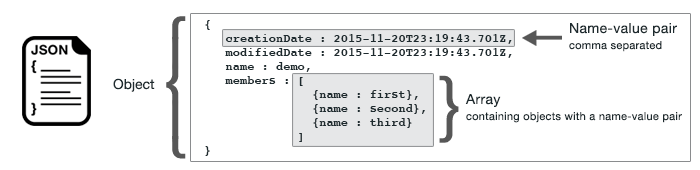
In case some ask what JSON format is, a definition from the web, FYI - JSON (JavaScript Object Notation) is a lightweight, human-readable text format for storing and exchanging data. It is widely used in web applications, particularly for transferring data between a server and client, due to its simplicity and language-independent nature.
Background: JSON as Decoupled Static Content
In many systems that manage large amounts of relatively static content, such as blogs, event descriptions, or config-driven pages, text data is often stored as JSON and hosted in external storage like Amazon S3. This approach decouples content from the application codebase, allowing content updates without triggering a full rebuild or redeployment.
However, once content is decoupled from the codebase, keeping JSON data synchronized with application logic becomes a non-trivial problem, especially in teams with frequent content updates. A common workaround is to maintain a separate branch dedicated to static JSON updates. When a change is committed to this branch, the CI/CD pipeline automatically syncs the JSON files to S3.
But this method exposes some potential problems: 1. Duplicate Merge Request for the same text change For a single text update, two merge requests are often required: one for the main code branch and another for the JSON-sync branch. If a single word is updated ten times a day, this results in twenty merge requests. Over the course of a year, this can easily grow into thousands of redundant MRs, effectively doubling the operational overhead for a single logical change.
2. Missed deployments caused by size-based sync heuristics
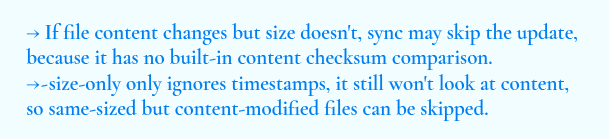
A content update that does not affect file size may be misclassified as "no change" and silently skipped during deployment aws s3 sync ./json s3://bucket - size-only. In practice, even a one-word text edit can fail to propagate if the sync logic does not inspect file content directly. Some teams attempt to mitigate this by adding client-side guards or commit-time checks, but these workarounds often expose a deeper limitation of the approach. Content synchronization driven by heuristics is inherently fragile and difficult to reason about at scale.
aws s3 sync determines whether to upload files by checking:
3. Increase the time for updating the S3 text through the pipeline In traditional workflows, static content updates are often gated by CI/CD pipelines, meaning changes are only propagated to S3 after the pipeline completes. This introduces avoidable delays for simple text updates. An editor-based approach enables direct updates to S3, allowing content changes to take effect almost instantly without passing through the pipeline.
JSON Editor: Architecture & Workflow
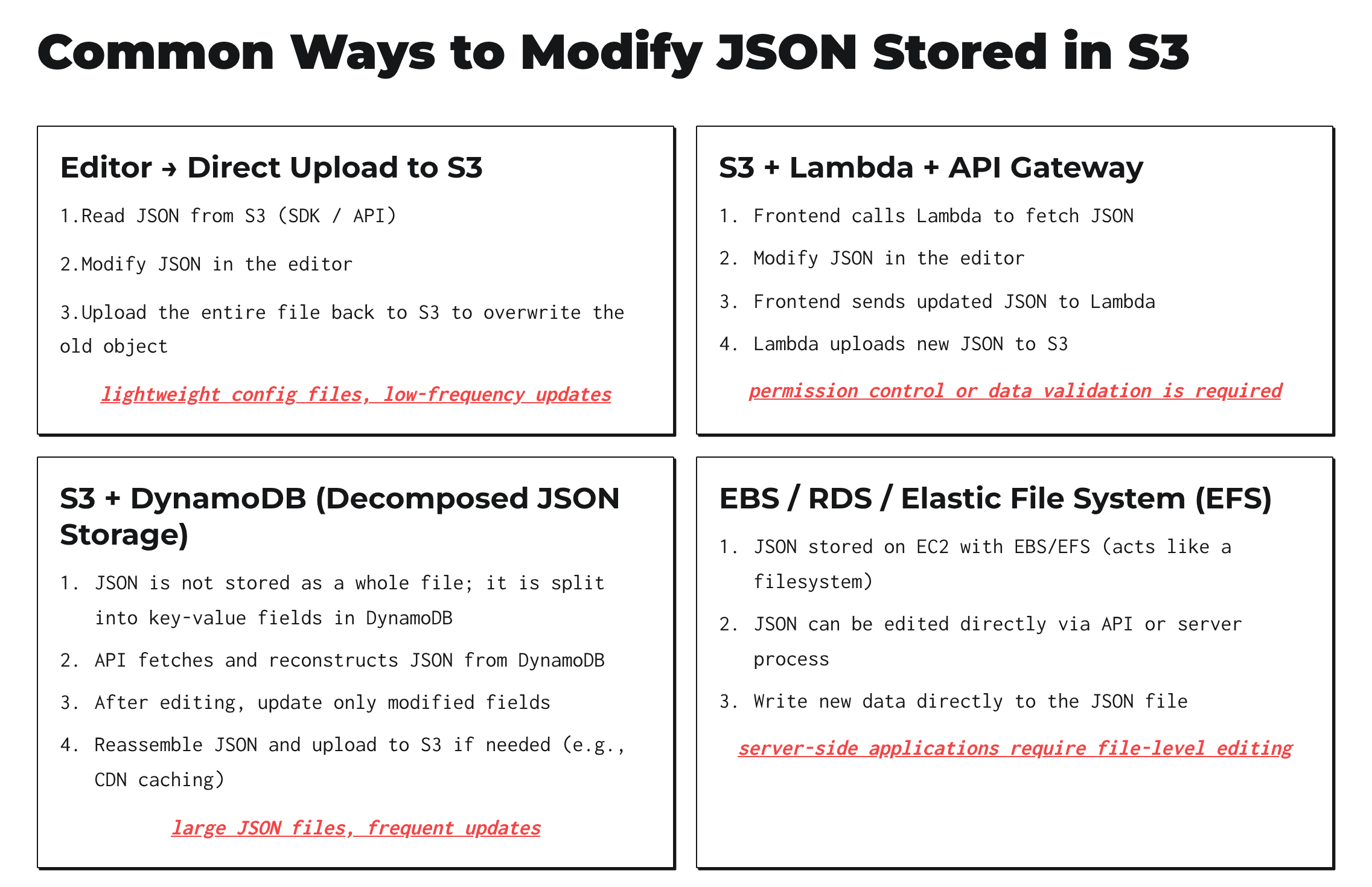 Why not modify directly on S3? Since Amazon S3 is a key-based object storage service, not a traditional file system or block storage volume. One way to modify is to use an editor and upload to S3 as this article uses; Other methods include S3 + Lambda + API Gateway, S3 + DynamoDB, EBS / RDS / Elastic File System (EFS), which we will not cover the specifics in this post.
What it looks like in Prototype. Suppose that S3 stores the latest version of config and serves as a single source of truth. We can create a config editor that allows developers to perform CRUD directly on S3 data.
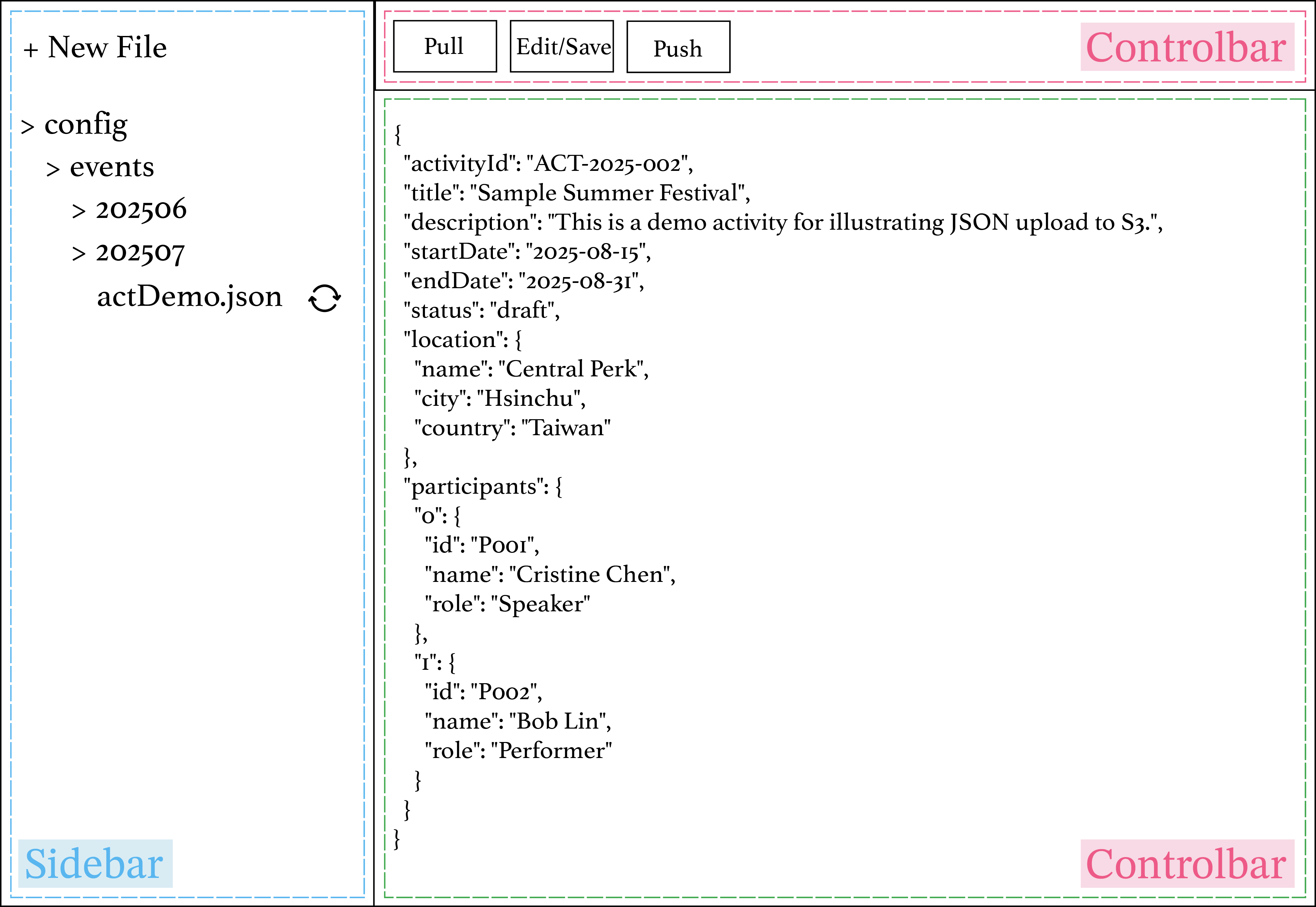
The UI is intentionally simple:
• Sidebar - browses prefixes/folders and files from object storage (e.g., S3).
• Main panel - JSON viewer/editor (CodeMirror).
• ControlBar - Edit/Save, Push to S3, and Create MR/PR.
How data flows.
Browse- The sidebar lists keys via the S3 SDK (e.g., ListObjectsV2), grouped by common prefixes.Load- Selecting a file issues a GetObject and renders the JSON in CodeMirror (view mode).Edit- Toggling Edit enables in-place editing with schema-aware hints if available.Save/Push- Clicking Push to S3 uploads the current buffer (e.g., with PutObject from a presigned URL).Mirror to codebase- Create MR takes the same change set, using gitlab api, we create a new branch, commit the file, and open a merge request so your repository and storage stay in sync while you migrate away from legacy watch-and-sync jobs.
*Note: we use S3 SDK command for CRUD operations.
DX & UX details
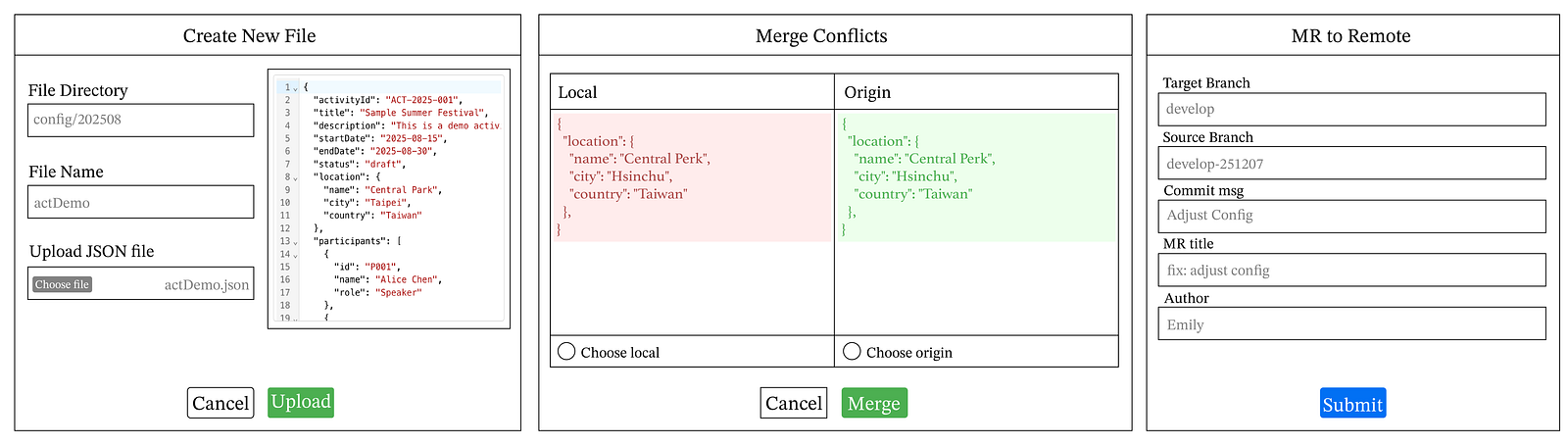
1) Create a new file. A New file action opens a modal: choose a target prefix (defaults to the selected folder), provide a filename, upload/paste JSON, and the editor writes it to storage and refreshes the tree.
Create flow Browse folder → Create new file → fill in file info → drag/choose file from local folders → preview file → upload file → reload page → show file in S3.
2) Edit the file. Editing a file follows a simple load–edit–push workflow:
Edit flow Browse file → Load → Edit → Push to S3 → (Optionally) Open MR to mirror back to codebase. Conflict handling.
Because object storage behaves like last-write-wins, the editor uses optimistic concurrency: • On load, it snapshots the object version using Etag. • On push, it compares against the latest and performs a 3-way merge (local/origin/remote) with jsondiffpatch. Details will be discussed in the following articles. • Non-overlapping edits auto-merge. Overlaps surface a Monaco-based conflict dialog (red and green diffs) where users accept or reject per hunk.
3)MR to remote. Git Integration (Optional but Recommended) • Highlight the gap between local Git config files and live S3 changes. • Select target Git branch. • Commit S3-edited config as a new branch. • Create an MR to ensure S3 and Git remain in sync.
MR flow → Select target Git branch → Create new feature branch → Commit S3-edited config → Open Merge Request → Reviewer approves & merges → Git branch updates → S3 + Git states remain consistent
The JavaScript Trap: Why my JSON properties kept jumping around
While building a configuration management interface, I encountered a fascinating edge case regarding how JavaScript handles JSON property ordering. JSON format
The editor displays the code in JSON format using CodeMirror UI. To show the JSON by line breaks but not inline, the intuitive way is to use json.parse and json.stringify to format. However, this will result in some problems. JavaScript engines (like V8 in Chrome/Node) store and enumerate object properties. JavaScript objects have a specific property order rule:
- Integer-like keys (e.g., "1", "2", "100") are sorted in ascending numeric order.
- String keys (non-integers) appear in insertion order.
- Symbol keys follow after all string keys, in insertion order.
For example:
const obj = { "3": "a", "1": "b", "2": "c", "x": "z" };
console.log(JSON.stringify(obj));
// Output: {"1":"b","2":"c","3":"a","x":"z"}
The "1", "2", "3" keys are treated as integer-like, so they get reordered numerically. "x" is just a normal string, so it keeps insertion order. Why? Once you've gone through JSON.parse, you lose all formatting info (spaces, indentation, comments, even key order rules are applied). That's why JSON.stringify often looks reordered or reformatted.
Therefore, we use jsonc-parser that works at the text editing level, not at the object level. It tokenizes the JSON and builds a tree model of positions. Instead of regenerating the whole string, it calculates the minimal text edits required to change a value or insert/delete a key. You can tell jsonc-parser whether to respect existing line breaks and indentation or to prettify. This way, we are able to display JSON by line break and still preserve the order.
import { format, applyEdits } from 'jsonc-parser'
export function prettifyJson(src, tabSize = 2) {
  try {
    const edits = format(src, undefined, { insertSpaces: true, tabSize, eol: '\n' })
    return applyEdits(src, edits)
  } catch {
    return src
  }
}
Types of JSON format When it comes to syncing local and remote JSON versions, things become increasingly arduous. Imagine local and remote versions all modify different parts of the file. One with a word change, another with an object change. When one is about to sync and merge the other, how do we make sure which order and data type is correct to merge? Thus, a structural solution should be developed in advance, so as to face different data scenarios and sorting principles.
*Note: remote means places that common parties save files, it can be any storage destination, like S3, database, etc.
For example, most of the data type in JSON can be separated into 3 formats: scalar(number, string), object and array. In JSON file, we can predefine the key of the data, and the order to follow when merge conflict occurs. When it comes to auto-merging an object that both parties modified, if A add an { id: 1, name: apple}, and B delete an { id: 3, name: banana } in the same array prod_detail, then the principle to merge will follow the rule that is defined in the schema.
export const defaultSchema = {
  participants: { type: 'object', order: 'remote' },
  prod_details: { type: 'array',
    strategy: { kind: 'id', idKey: 'id', order: 'local', insertRule: 'preserve-local' },
},
  ...
  // fallback
  '**': { type: 'scalar' },
}
Therefore, when a merge conflict occurs, the function should first detect which kind of data type causes the collision, and follow each rule of the data type merging principle correspondingly.
Cache Control This editor manages JSON files that are frequently updated but also heavily read as static resources. Initially, updates were successfully uploaded to S3, yet I continued to receive stale data due to missing cache control settings. The root cause was that the API generating presigned URLs did not define Cache-Control, so cached responses could persist for an entire day. This made recent edits invisible until the cache expired.
To fix this, I explicitly set Cache-Control: max-age=180 when generating the presigned URL and passed the same header to the frontend during the PUT request. This ensures the cache policy is written to the S3 object at upload time.
How to try it locally
If you're curious about how the editor works, you can do this by adding your AWS credentials either through a .env file or via the standard AWS credentials file on your machine.
For example, you can configure your credentials in ~/.aws/credentials. The AWS SDK will automatically read the default profile when using fromIni from @aws-sdk/credential-providers. You can also define multiple accounts by adding additional profiles, like this:
[default]
aws_access_key_id = AKxxx
aws_secret_access_key = sexxx
[personal]
aws_access_key_id = AKxxx
aws_secret_access_key = sexxx
To use the editor with S3, you'll also need to create your own S3 bucket in your AWS account. Once the bucket is created, update the project configuration so that the fetch/upload API points to your bucket name and path. The editor will then read and write JSON files from that bucket instead of any pre-existing data.
That is, make sure to change the S3 bucket name and the first-level prefix where you stored those JSON files. For instance, if your bucket name is "editor-bucket" and you have files stored in the "config" folder under this bucket, then make sure you change the bucket name in the list-all api file and the prefix state in the Sidebar component:
api/json/list-all.js
const S3_BUCKET_NAME = "editor-bucket"; // <- change this
export default async function handler(req, res) {
  ...
do {
    const output = await s3.send(
      new ListObjectsV2Command({
        Bucket: S3_BUCKET_NAME,
        Prefix: key,
        ContinuationToken,
      })
    );
    ...
  } while (ContinuationToken);
  res.status(200).json({ keys: allKeys });
}
container/jsonEditor/components/SideBar/index.jsx
const Sidebar = ({ onFileSelect }) => {
  const [prefix, setPrefix] = useState("config/"); // <- change this
  const { folders, files } = useTree(prefix);
return (
    <SidebarContainer>
      ...
    </SidebarContainer>
  );
};
export default Sidebar;
Security note: Forking this repository does not grant access to any existing S3 data. The editor only reads/writes to the S3 bucket configured by the user and authenticated with the user's own AWS credentials. No credentials are included in this repo.
Config management is often an afterthought until duplicate jobs found in git workflow. By treating JSON as structured text and enforcing optimistic concurrency via S3 ETags, we can bridge the gap between developer velocity and system safety.
In the next post, we'll take a closer look at how Optimistic Locking and version control with S3 ETags work in practice.
Github repo: https://github.com/yenjungchen80108/dynamic-editor-demo#
Comments
More Blog
View allgemmaFive Gemma-4 models, one accelerator: what porting E2B 31B to AWS Inferentia2 taught me
I ported the whole Gemma-4 family — E2B, E4B, 12B, 31B, and the 26B-A4B MoE — to run on...
X
xbillcommunityHey DEV, I'm Tobore. Let's actually connect.
Hey DEV, I'm Tobore. Let's actually connect. I've been on here for a while now, mostly writing and...
L
Laurina AyarahaiI burned through thousands of AI tokens. Then a friend did it for free
(yep, kinda clickbait, just for the funsies 😊) At the beginning of the year, I relaunched my...
P
Paulo HenriqueaiClaude might be saturating your machine
My laptop was sitting idle with the fan at full tilt. Nothing was running that I knew of. The culprit...
S
Sidhant PandagithubactionsAutomated GitHub Code Reviews Using Google Gemini
I Built a Thing! TL;DR — Google Gemini-based Pull Request reviews and Issue Triaging for...
D
Darren "Dazbo" LesteraiWhat is an "agentic harness," actually?
I've been hearing the word "harness" thrown around a lot lately. I assumed it just meant "the IDE" or...
T
Tilde A. ThuriumReady-made automations for this
Workflows from the Neura Market marketplace related to this DeepSeek resource
- Automated Water Consumption Tracker - Stored in Sheet and Notify in Slackn8n · $14.99 · Related topic
- Nano Banana AI Image Editor via Telegramn8n · $9.99 · Related topic
- AI-Powered OAuth2 Configuration Discovery with Confidence Scoringn8n · $9.99 · Related topic
- Create Resilient AI Workflows with Automatic Model Failover in n8nn8n · $9.99 · Related topic