
Back to Blog coding
 gemma
gemma community
 ai
ai ai
ai githubactions
 ai
ai
Antigravity the Ralph Wiggum style
Remigiusz Samborski February 2, 2026
0 views
The Ralph Wiggum trend has been surfacing across social platforms lately. If you're tracking...
The Ralph Wiggum trend has been surfacing across social platforms lately. If you're tracking current tech developments, it’s hard to miss. Named after a persistent and slightly confused second-grader, the Wiggum Loop agentic development boils down to: Don't stop until the job is done.
In traditional AI coding, the agent performs a task, stops, and waits for you to approve its next step or request changes. In a Wiggum Loop, you give the agent a mission and success criteria (like passing tests), and it keeps looping, fixing its own bugs and refactoring - until it hits the green light.
The recent excitement around the Wiggum Loop agentic development highlights a powerful shift: achieving autonomous, self-correcting development. I've been leveraging a similar approach effectively with Antigravity for some time already. In this post, I’ll share my strategy, enabling you to implement true unsupervised development yourself.
Going "Full Wiggum"
To achieve true unsupervised development, we need to move away from the review-driven defaults and let the agent take the wheel. Antigravity is uniquely built for this because it's an agent-first environment capable of acting in both the terminal and the browser.
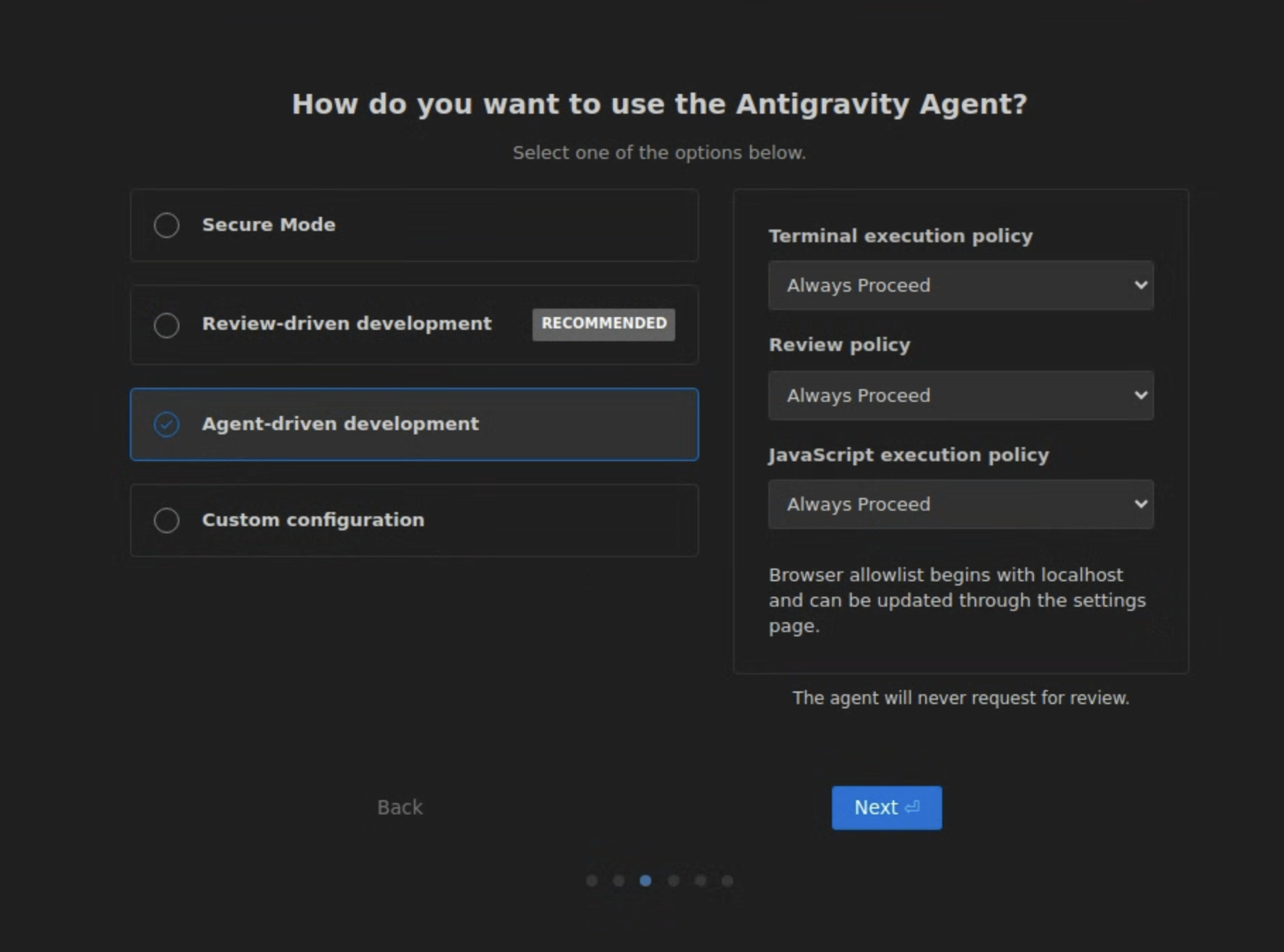
To mirror the “Bash loop" persistence of the Ralph Wiggum plugin, configure your Antigravity settings as follows:
- Mode: Select Agent-driven development. This shifts the agent from a "wait for instructions" assistant to a "goal-oriented" architect.
- Terminal execution policy: Set to Always Proceed. This allows the agent to run
npm test,uv run pytests, and other commands without constantly pausing for approval. - Review policy: Set to Always Proceed. This tells the agent that its implementation plans are pre-approved.
- JavaScript execution policy: Set to Always Proceed. This is essential for agents that need to run scripts or interact with browser environments to verify their work.
WARNING: THE SANDBOX IS NOT OPTIONAL. Running an agent in "Always Proceed" mode is like giving Bart Simpson a slingshot in front of a mirror store. Only do this in a sandbox environment.
Here is a great article from my colleague which shows a step-by-step guide to setting such an environment up and running on Cloud Workstation.
Example
To see this in practice, I ran the following prompt against Antigravity:
Build a REST API for todos in NodeJS.

When complete:
- All CRUD endpoints are working
- Input validation is in place
- Tests are passing (coverage > 80%)
- README with API docs exists
The screencast below shows how Antigravity handled the task without my interruptions (I spent this time on other tasks rather than handholding the agent):
{% embed https://www.youtube.com/watch?v=HLLCn4KsNcc %}
How does this work?
Antigravity isn't just looping in a vacuum. Because it has native hooks into Gemini 3 Pro, it utilizes a massive context window that remembers exactly why a previous command failed.
It kicks things off by drafting up an implementation plan and a task list. In the video, you can watch it tick through these items in real time. It doesn't just plan, though - it actually touches the terminal to initialize the npm project and run tests.
The loop only closes once every requirement is met and the test suite hits green. It then provides a handy walkthrough so you can easily understand the architecture it just spun up.
This approach turns development from writing code into verifying outcomes.
From vibe-coding to vibe-building
The Ralph Wiggum trend isn't about cutting corners; it's about embracing sheer, stubborn persistence through automation. By letting Antigravity operate autonomously, you transition from a coder to an architect and team lead. You define the standards and environment, while agents manage the iterative grind of writing, testing, and debugging cycles that typically consume a developer's valuable time.
Are you brave enough to let the agent "Always Proceed"? Visit Antigravity’s download page to start experimenting yourself.
Other resources
- Billy’s Ralph Wiggum loop with Gemini CLI
- Daniel’s Antigravity on Cloud Workstation tutorial
- Romin’s getting started with Google Antigravity tutorial
Let’s Connect!
I’d love to hear how you’re using Antigravity for your agentic workflows. Are you building Wiggum loops or keeping a tighter leash on your agents?
Comments
More Blog
View allgemmaFive Gemma-4 models, one accelerator: what porting E2B 31B to AWS Inferentia2 taught me
I ported the whole Gemma-4 family — E2B, E4B, 12B, 31B, and the 26B-A4B MoE — to run on...
X
xbillcommunityHey DEV, I'm Tobore. Let's actually connect.
Hey DEV, I'm Tobore. Let's actually connect. I've been on here for a while now, mostly writing and...
L
Laurina AyarahaiI burned through thousands of AI tokens. Then a friend did it for free
(yep, kinda clickbait, just for the funsies 😊) At the beginning of the year, I relaunched my...
P
Paulo HenriqueaiClaude might be saturating your machine
My laptop was sitting idle with the fan at full tilt. Nothing was running that I knew of. The culprit...
S
Sidhant PandagithubactionsAutomated GitHub Code Reviews Using Google Gemini
I Built a Thing! TL;DR — Google Gemini-based Pull Request reviews and Issue Triaging for...
D
Darren "Dazbo" LesteraiWhat is an "agentic harness," actually?
I've been hearing the word "harness" thrown around a lot lately. I assumed it just meant "the IDE" or...
T
Tilde A. ThuriumReady-made automations for this
Workflows from the Neura Market marketplace related to this DeepSeek resource
- Generate Platform-Optimized Social Media Content Across 6 Platforms with GP-40n8n · $24.99 · Related topic
- Generate Social Media Content Across Platforms with GP-4 and Auto-Schedulern8n · $9.99 · Related topic
- Automate Video Scheduling Across Social Media Platforms with Postizn8n · $14.99 · Related topic
- Automate Video Publishing Across Multiple Social Platforms from Google Sheetsn8n · $14.99 · Related topic