
Back to Blog gemini
 gemma
gemma community
 ai
ai ai
ai githubactions
 ai
ai
Beyond Chatbots: Building Task-Driven Agentic Interfaces in Google Workspace with A2UI and Gemini
Tanaike February 3, 2026
0 views
Abstract This article explores A2UI (Agent-to-User Interface) using Google Apps Script...

Abstract
This article explores A2UI (Agent-to-User Interface) using Google Apps Script and Gemini. By generating dynamic HTML via structured JSON, Gemini transforms Workspace into an "Agent Hub." This recursive UI loop enables complex workflows where the AI builds the specific functional tools required to execute tasks directly.
Introduction: The Evolution of AI Interaction
The Official A2UI framework by Google marks a significant paradigm shift in how we interact with artificial intelligence. Short for Agent-to-User Interface, A2UI represents the evolution of Large Language Models (LLMs) from passive chatbots into active agents capable of designing their own functional interfaces. Building upon my previous research, A2UI for Google Apps Script and Bringing A2UI to Google Workspace with Gemini, I have refined this integration to support sophisticated, stateful workflows.
To appreciate the impact of A2UI, we must recognize the limitations of "Chat-centric" AI. In traditional chat interfaces, users must manually bridge the gap between an AI's advice and their actual files—a process often involving tedious context switching. By implementing A2UI within Google Apps Script (GAS), we leverage a unique "Home-Field Advantage." Because GAS is native to the Google ecosystem, it possesses high-affinity access to the Drive API and Spreadsheet services, allowing the AI to act directly on your data.
Core Architecture: The Generative UI Loop
In this system, Gemini functions as both the Agent and the UI Architect. When a user submits a natural language prompt, the Agent evaluates the intent and generates a specific HTML interface—such as a file selector, a metadata card, or a live text editor.
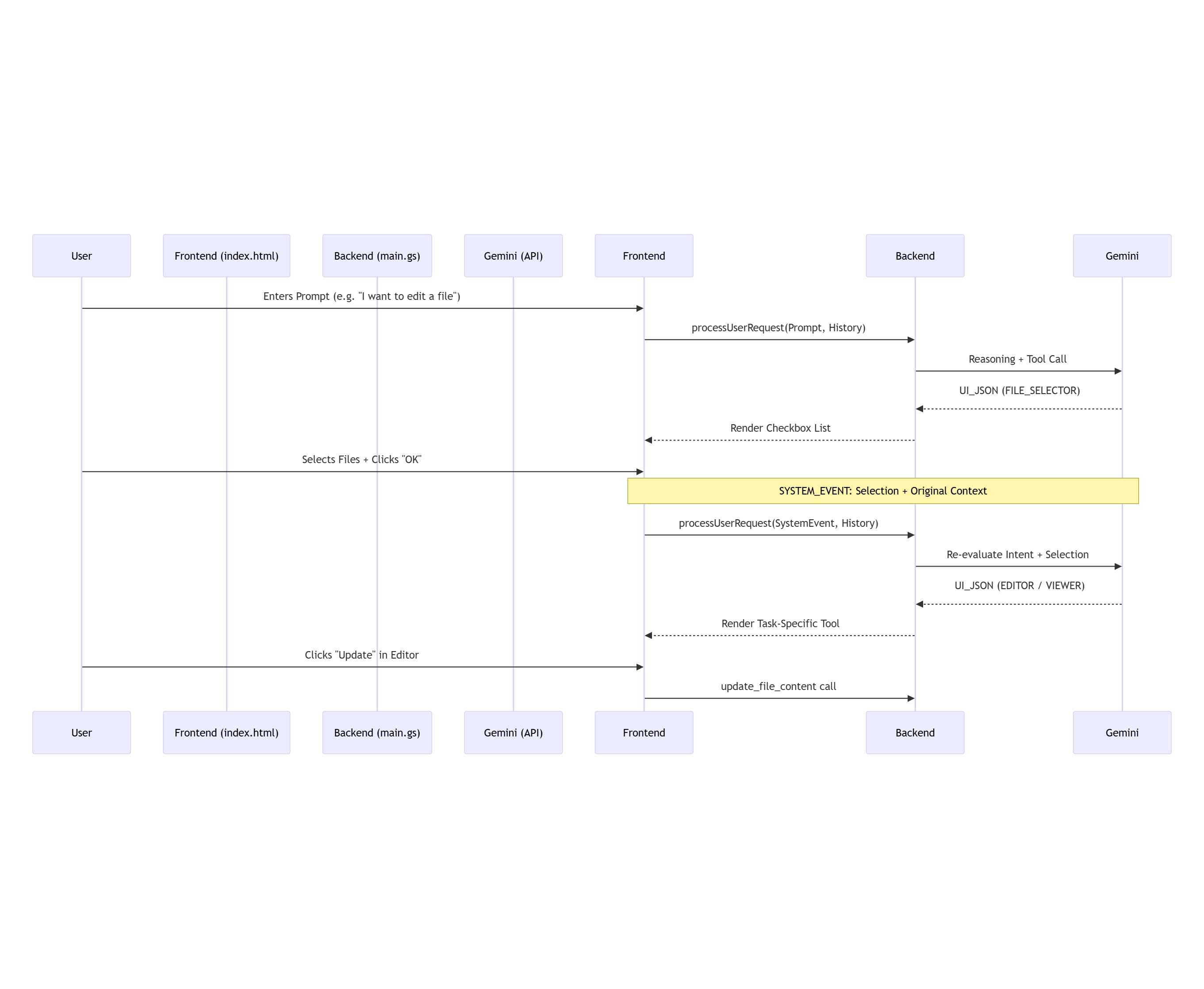
Crucially, this implementation utilizes Recursive UI Logic. When a user interacts with a generated component (e.g., clicking an "OK" button), that action is transmitted back to the Agent as a "System Event." This event contains the conversation history and the new data context. This allows the Agent to "see" the current state of the task and generate the next logical interface, creating a seamless, multi-step agentic workflow.
Workflow Visualization
This diagram illustrates how the system maintains state and generates interfaces recursively using "System Events."
Repository
The full source code and sample implementation can be found here: https://github.com/tanaikech/A2UI-for-Google-Apps-Script
Application Setup Guide
To deploy this application in your own environment, please follow these steps:
1. Obtain an API Key You will need a valid Gemini API Key to communicate with the LLM. Get one here.
2. Copy the Sample Script You can copy the Google Spreadsheet containing the pre-configured Google Apps Script using the link below: https://docs.google.com/spreadsheets/d/1UB5j-ySSBBsGJjSaKWpBPRYkokl7UtgYhDxqmYW00Vc/copy
3. Configure the Script
- Open the script editor (Extensions > Apps Script).
- Locate the
main.gsfile. - Set your API key in the
GEMINI_API_KEYvariable. - Save the project.
Alternatively, visit the GitHub Repository to manually copy the source codes.
Demonstration: Productivity Meets Magic
The following video showcases how A2UI transforms a Google Sheet into an agentic command center. The system doesn't just talk; it guides the user through three distinct patterns of interaction.
{% youtube 6oIJGyn-9TU %}
Operational Patterns: Productivity in Action
The system transforms a standard Google Sheet into an agentic command center. It facilitates three distinct patterns of interaction:
Pattern 1: Intelligent Viewing
Sample prompt: Please list the files in the folder named 'sample'. I would like to select a file and view its content.
The user requests to see files in a specific folder. Gemini understands the intent, calls the Drive API to list the files, and generates a File Selector UI. Once the user selects files, the Agent fetches the content and renders it in a clean Content Viewer layout designed specifically for reading.
Pattern 2: Contextual Metadata Analysis
Sample prompt: Show me the files in the 'sample' folder. I need to select a file to check its metadata.
If a user asks for technical details, the UI adapts. The Agent generates a Metadata Viewer, displaying properties like File IDs, sizes, and creation dates. This showcases the agent hub's ability to pivot between task types by generating appropriate interfaces on the fly.
Pattern 3: Multi-Step "Verify and Edit"
Sample prompt: I want to edit a file in the 'sample' folder. Please let me select a file and check its content first. If it's the right one, I will edit and update it.
This demonstrates the power of stateful A2UI:
- Selection Preview: The Agent provides a preview with radio buttons for content confirmation.
- Dynamic Editor: Gemini generates an Editor UI containing the file’s text.
- Real-Time Execution: The script executes modifications directly to Google Drive upon clicking "Update," completing the cycle from prompt to action.
Note: In this specific sample, only text files on Google Drive are eligible for editing.
Important Note
This project serves as a foundational methodology for building Agentic UIs. When implementing this in a production environment, ensure the scripts are modified to meet your specific security requirements and workflow constraints.
Summary
- A2UI (Agent-to-User Interface) represents a paradigm shift where the Agent builds the functional UI components required for a task rather than just providing text.
- The recursive task execution model uses "System Events" to track progress, allowing the interface to evolve dynamically based on real-time user actions.
- Native Workspace integration via Google Apps Script provides secure, high-speed access to Drive and Sheets data without the need for external server management.
- Zero-Tab efficiency is achieved by consolidating file discovery, analysis, and editing within a single, dynamic dialog box inside a spreadsheet.
- This task-driven architecture proves the future of productivity lies in AI agents acting as architects, creating custom tools precisely when they are needed.
Comments
More Blog
View allgemmaFive Gemma-4 models, one accelerator: what porting E2B 31B to AWS Inferentia2 taught me
I ported the whole Gemma-4 family — E2B, E4B, 12B, 31B, and the 26B-A4B MoE — to run on...
X
xbillcommunityHey DEV, I'm Tobore. Let's actually connect.
Hey DEV, I'm Tobore. Let's actually connect. I've been on here for a while now, mostly writing and...
L
Laurina AyarahaiI burned through thousands of AI tokens. Then a friend did it for free
(yep, kinda clickbait, just for the funsies 😊) At the beginning of the year, I relaunched my...
P
Paulo HenriqueaiClaude might be saturating your machine
My laptop was sitting idle with the fan at full tilt. Nothing was running that I knew of. The culprit...
S
Sidhant PandagithubactionsAutomated GitHub Code Reviews Using Google Gemini
I Built a Thing! TL;DR — Google Gemini-based Pull Request reviews and Issue Triaging for...
D
Darren "Dazbo" LesteraiWhat is an "agentic harness," actually?
I've been hearing the word "harness" thrown around a lot lately. I assumed it just meant "the IDE" or...
T
Tilde A. ThuriumReady-made automations for this
Workflows from the Neura Market marketplace related to this DeepSeek resource
- Automate Google Workspace with AI-Driven Modular Agentsn8n · $24.99 · Related topic
- Automate CV Screening and Analysis with Telegram, Google Gemini AI, and Google Workspacen8n · $14.99 · Related topic
- Automate Invoice Management with Smart Reminders Using GPT-4, Stripe, and Google Workspacen8n · $14.99 · Related topic
- Generate AI Prompts with Custom Web Interface Using n8n and Google Geminin8n · $14.99 · Related topic