
Back to Blog antigravity
 gemma
gemma community
 ai
ai ai
ai githubactions
 ai
ai
How I Turned an Ugly Spreadsheet into an AI Assisted App with Antigravity
Shir Meir Lador February 18, 2026
0 views
I have a confession to make. Up until now, I wasn’t that much into “vibe coding.” I used AI all the...
I have a confession to make.
Up until now, I wasn’t that much into “vibe coding.” I used AI all the time for Python coding, but I never really built a whole app from scratch in a language I knew nothing about.
That changed today. I encountered a really annoying problem: I had to review a massive amount of talk submissions for a conference. We’re talking about a massive spreadsheet. Staring at those tiny cells was literally making my eyes hurt.
My initial thought was, “Hey, let’s create a really sharp UI for the submission review.” But then I thought, why stop there? Why not let AI provide me valuable inputs from social media to help me with the review itself?
So, I decided to build TalkScout. And since I wanted to test drive Google Antigravity (Google’s new AI-powered coding agent), I figured this was the perfect opportunity.
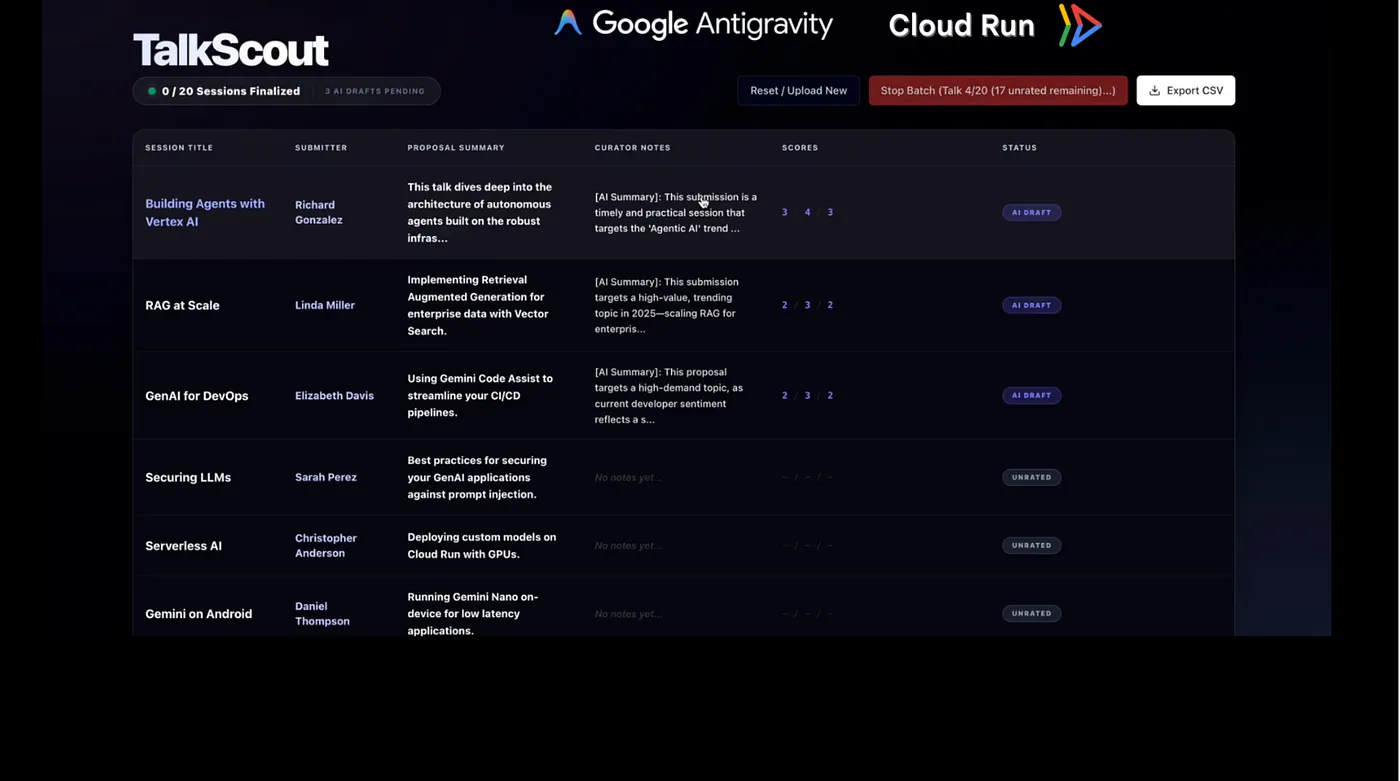
Here is how I went from a painful CSV to a fully deployed Cloud Run app-without writing a single line of React code myself.
Step 1: The “Meta-Prompt” (Asking Gemini to Talk to Antigravity)
I didn’t start by coding; I started by chatting. I used meta-prompting to get started.
So, what is meta-prompting, you may ask? It’s actually when you go to Gemini 3 and ask it to write the prompt for the coding agent.
I explained my problem to Gemini 3 in simple words. Gemini 3 acted as my architect. It turned my “brain dump” requirements into a technical spec, defining the component structure and data model. I didn’t have to guess the right words, I just pasted that polished spec into Antigravity.
Step 2: Ditching the Spreadsheet for a Dashboard
With that prompt, Antigravity built the app of my dreams. It allowed me to:
- Upload the CSV with all the conference talks.
- Get a dashboard showing the status of each talk.
- See a beautiful, high-contrast UI to review abstracts and demo plans without squinting at cells.
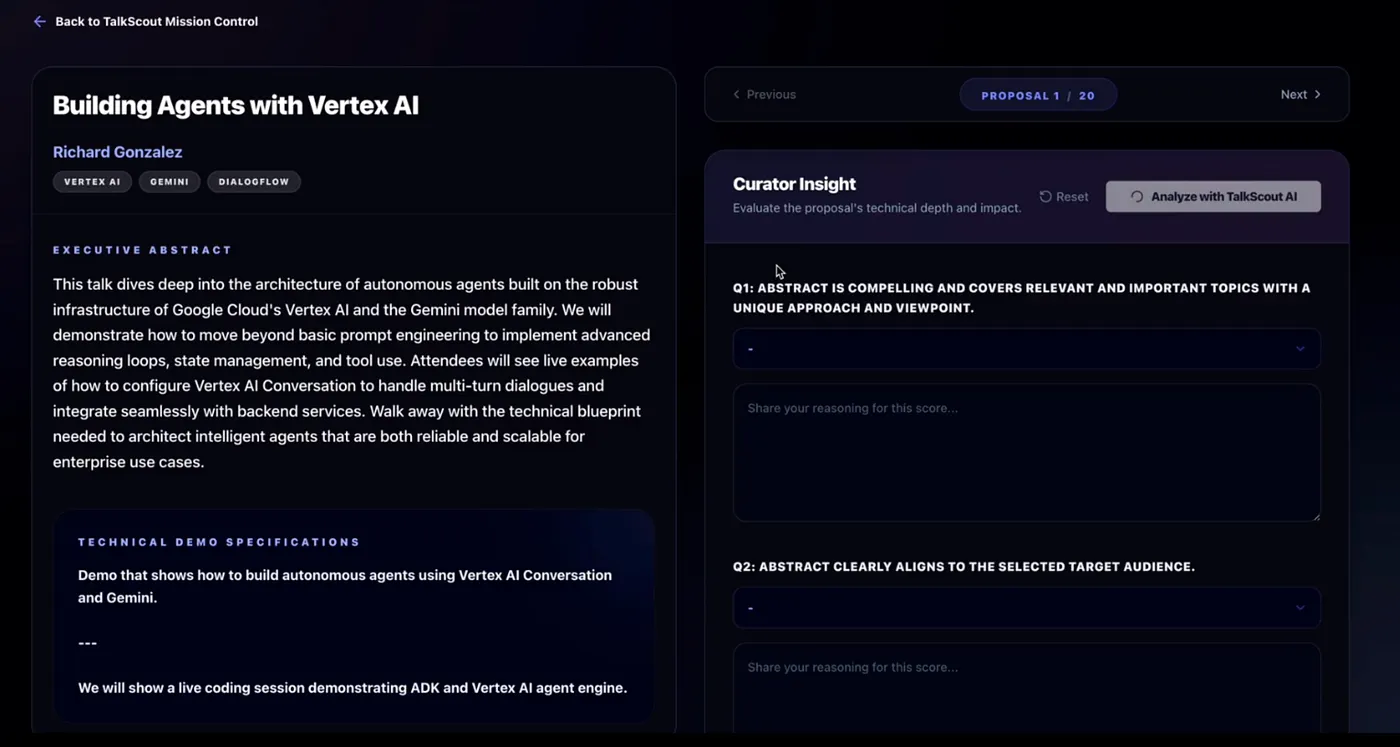
The “Vibe” Fix: It wasn’t all smooth sailing — I actually hit a nasty React hydration error. This can take hours to debug, especially if you’re not a frontend developer… But I simply provided the error message to Antigravity and the coding agent pinpointed the mismatch in the DOM and fixed it in minutes.
Step 3: Integrating Grounded Intelligence
I didn’t just want a UI; I wanted to overcome my own bias. How do I know if a niche topic is actually hot?
I added a button to get an AI Assessment. But I didn’t want hallucinations. I used Google Search Grounding so the AI could search through Reddit, X (Twitter), and LinkedIn for real-world developer signals. That provided me inputs based on the current developer audience mindshare.
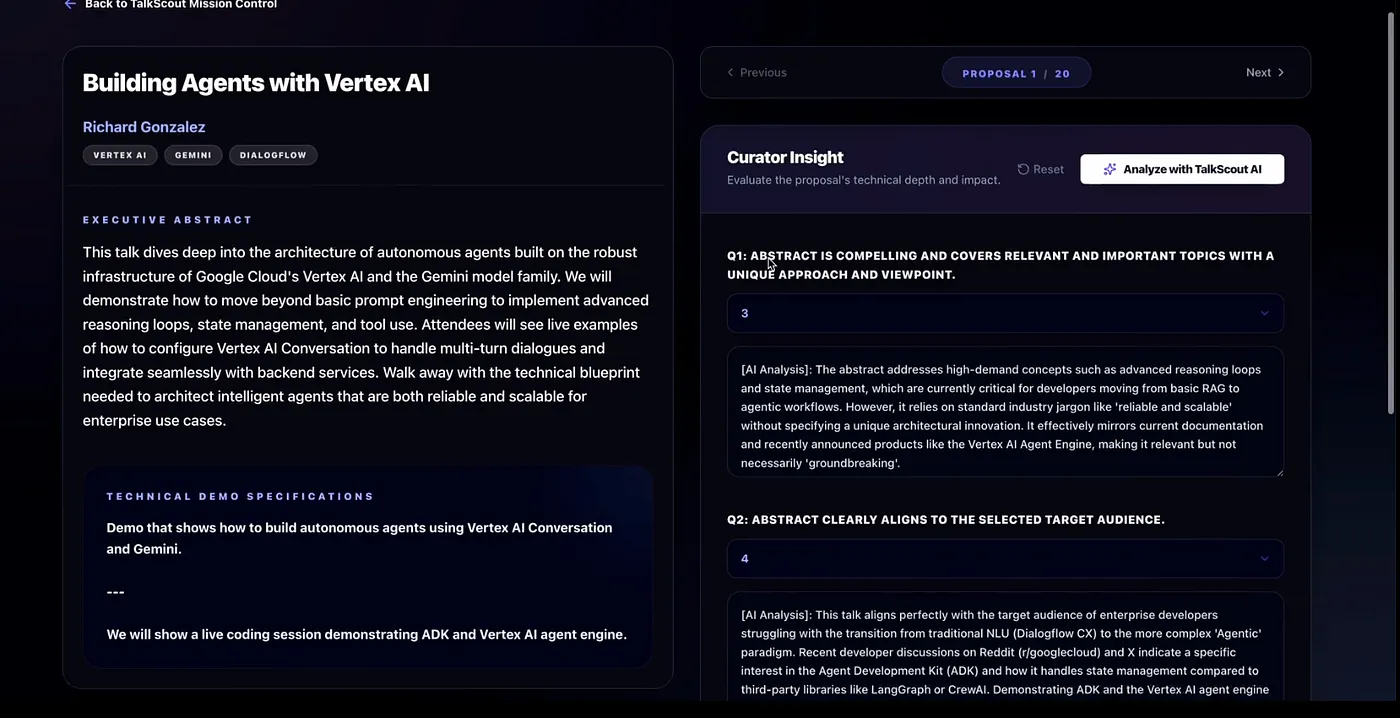
Step 4: Calibrating the “Strict” Reviewer
Initially, the AI was way too nice. It was giving high scores to anything with trendy keywords.
I used what’s called few-shot prompting to calibrate it. I gave examples of my scores vs. its scores and introduced what I call the “Marketing Fluff Penalty”.
- If a submission reads like a documentation/marketing page? Points docked.
- If the submission was way too short? We capped the score at a hard 2.
- If it includes war stories and actual learnings — increase rating. After a few examples, it became more calibrated to my taste.
Step 5: The Pivot to Batch Mode
I realized it was taking me too long to ask the AI to evaluate each talk individually while I reviewed it.
So, I asked Antigravity to refactor the backend for Batch Mode. Now, TalkScout processes the entire submission pool in the background. By the time I grab a coffee, the “AI Draft” column is full of insights, allowing me to focus only on the final decisions.
Step 6: Sharing the Goodness (Deploy to Cloud Run)
TalkScout was working great for me, but I thought, “It would be great to share this with the other reviewers.”
This is where Antigravity really showed off. I simply asked it to deploy the app. It automatically recognized my Google Cloud Project ID, handled the containerization, generated the exact deployment commands, and deployed it to Cloud Run.
One simple ask, and minutes later, I had a URL to share with the team.
It Was Pretty Fun!
It was pretty fun to actually solve a real problem I had using Antigravity and vibe coding. I built a tool that handles ingestion, provides a distraction-free rating interface, and provides valuable inputs for my reviews.
I would love to hear from you all - have you recently solved a problem using vibe coding?
If you haven’t already - try playing around with Antigravity and easily deploy your apps to Cloud Run.
Comments
More Blog
View allgemmaFive Gemma-4 models, one accelerator: what porting E2B 31B to AWS Inferentia2 taught me
I ported the whole Gemma-4 family — E2B, E4B, 12B, 31B, and the 26B-A4B MoE — to run on...
X
xbillcommunityHey DEV, I'm Tobore. Let's actually connect.
Hey DEV, I'm Tobore. Let's actually connect. I've been on here for a while now, mostly writing and...
L
Laurina AyarahaiI burned through thousands of AI tokens. Then a friend did it for free
(yep, kinda clickbait, just for the funsies 😊) At the beginning of the year, I relaunched my...
P
Paulo HenriqueaiClaude might be saturating your machine
My laptop was sitting idle with the fan at full tilt. Nothing was running that I knew of. The culprit...
S
Sidhant PandagithubactionsAutomated GitHub Code Reviews Using Google Gemini
I Built a Thing! TL;DR — Google Gemini-based Pull Request reviews and Issue Triaging for...
D
Darren "Dazbo" LesteraiWhat is an "agentic harness," actually?
I've been hearing the word "harness" thrown around a lot lately. I assumed it just meant "the IDE" or...
T
Tilde A. ThuriumReady-made automations for this
Workflows from the Neura Market marketplace related to this DeepSeek resource
- Add a new row into a Google Sheets spreadsheet from a modified deal in Bitrix24make · $4.99 · Uses make
- Scan your books with Android barcodes and save them in a Google Sheet spreadsheetmake · $3.99 · Uses make
- Send Paystack invoices from new Google Sheets spreadsheet rowsmake · $4.99 · Uses make
- Send Infobip SMSes from new rows in a Google Sheets spreadsheetmake · $3.99 · Uses make