
Back to Blog openclaw
 gemma
gemma community
 ai
ai ai
ai githubactions
 ai
ai
One OpenClaw Gateway Multiple Isolated AI Assistants (One Telegram Bot Per Worker)
Nino February 22, 2026
0 views
tldr; Give every team member their own private AI employee on a single machine. Full...
tldr;
Give every team member their own private AI employee on a single machine. Full isolation, zero extra servers, Telegram-only setup in minutes.
Abstract
Tired of spinning up separate servers or cloud instances for every AI assistant in your company?
OpenClaw lets you run dozens of completely separate, fully isolated agents on one single machine — and Telegram makes the UX feel magical.
Each worker gets their own dedicated bot (@AliceSalesClawBot, @BobSupportClawBot, etc.). They chat privately with “their” AI, have their own memory, files, tools, and personality — and they never see anyone else’s stuff.
Here’s exactly how I set it up.
Why this works so well
- One Gateway process handles everything
- Each agent gets its own workspace folder (
~/.openclaw/agents/alice-sales/) - Separate
SOUL.md,AGENTS.md, history, allowed tools, LLM keys, everything - Telegram routing is dead simple and rock-solid
From the worker’s perspective it’s just “my personal AI in Telegram”. They have no idea it’s all running on the same Mac Mini / VPS.
Step 1: Create one agent per worker
openclaw agents add alice-sales
openclaw agents add bob-support
openclaw agents add carol-finance
# ... one for every person
Step 2: Create a Telegram bot for each agent
Talk to @BotFather /newbot → give it a clean name Copy the token
Do this once per worker.
Step 3: Configure everything in one file
Run openclaw configure or edit ~/.openclaw/openclaw.json directly. Here’s a ready-to-paste example for a 3-person team:
{
  "agents": {
    "list": [
      { "id": "alice-sales", "workspace": "~/.openclaw/agents/alice-sales" },
      { "id": "bob-support", "workspace": "~/.openclaw/agents/bob-support" },
      { "id": "carol-finance", "workspace": "~/.openclaw/agents/carol-finance" }
    ]
  },
  "bindings": [
    { "agentId": "alice-sales", "match": { "channel": "telegram", "accountId": "alice" } },
    { "agentId": "bob-support", "match": { "channel": "telegram", "accountId": "bob" } },
    { "agentId": "carol-finance", "match": { "channel": "telegram", "accountId": "carol" } }
  ],
  "channels": {
    "telegram": {
      "enabled": true,
      "accounts": {
        "alice": {
          "botToken": "7123456789:AAFxxxxxxxxxxxxxxxxxxxxxxxxxxxxx",
          "dmPolicy": "pairing"
        },
        "bob": {
          "botToken": "7987654321:AAFyyyyyyyyyyyyyyyyyyyyyyyyyyyyy",
          "dmPolicy": "pairing"
        },
        "carol": {
          "botToken": "7843210987:AAFzzzzzzzzzzzzzzzzzzzzzzzzzzzzz",
          "dmPolicy": "pairing"
        }
      }
    }
  }
}
Security tip (do this immediately):
After the worker sends their first message, change dmPolicy to "allowlist" and add their Telegram numeric ID:
"allowFrom": ["tg:1234567890"]
(Get the ID by having them message @userinfobot)
Step 4: Restart & test
openclaw gateway restart
openclaw agents list --bindings
Send each worker their bot link. Done.
What you get automatically
- Full isolation (memory, files, tools, history)
- Different models or permissions per person (Claude for leadership, cheaper model for interns)
- Agents can still talk to each other internally when needed
- Works on anything: old Mac Mini, cheap VPS, even a Raspberry Pi with some tweaks
Official docs I used
Security hardening
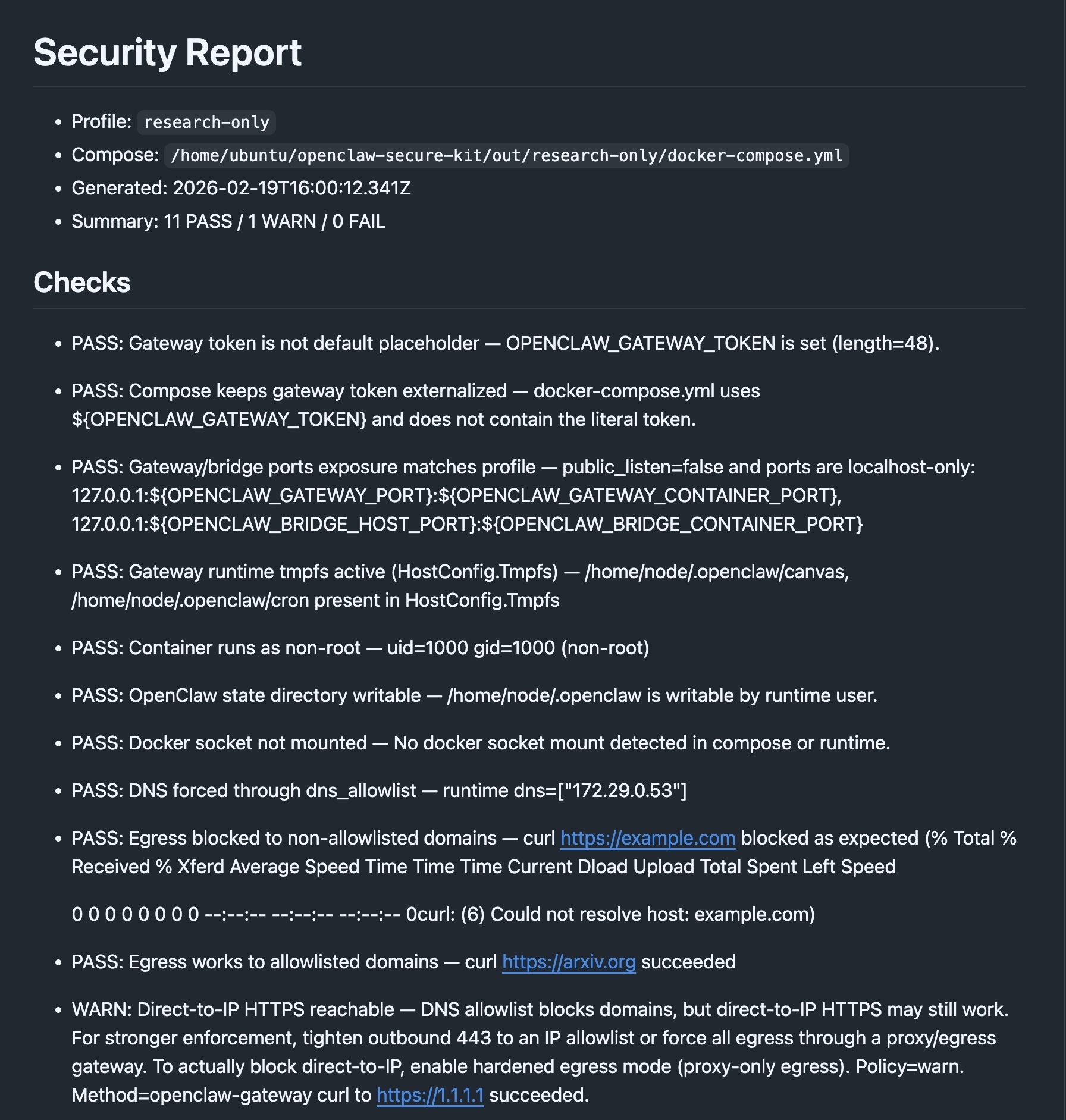
If you want tighter control over your Openclaw, consider installing via my open source Openclaw hardening kit: https://github.com/NinoSkopac/openclaw-secure-kit
It is a turnkey solution - secure-by-default OpenClaw, with a verifiable security report.
Comments
More Blog
View allgemmaFive Gemma-4 models, one accelerator: what porting E2B 31B to AWS Inferentia2 taught me
I ported the whole Gemma-4 family — E2B, E4B, 12B, 31B, and the 26B-A4B MoE — to run on...
X
xbillcommunityHey DEV, I'm Tobore. Let's actually connect.
Hey DEV, I'm Tobore. Let's actually connect. I've been on here for a while now, mostly writing and...
L
Laurina AyarahaiI burned through thousands of AI tokens. Then a friend did it for free
(yep, kinda clickbait, just for the funsies 😊) At the beginning of the year, I relaunched my...
P
Paulo HenriqueaiClaude might be saturating your machine
My laptop was sitting idle with the fan at full tilt. Nothing was running that I knew of. The culprit...
S
Sidhant PandagithubactionsAutomated GitHub Code Reviews Using Google Gemini
I Built a Thing! TL;DR — Google Gemini-based Pull Request reviews and Issue Triaging for...
D
Darren "Dazbo" LesteraiWhat is an "agentic harness," actually?
I've been hearing the word "harness" thrown around a lot lately. I assumed it just meant "the IDE" or...
T
Tilde A. ThuriumReady-made automations for this
Workflows from the Neura Market marketplace related to this DeepSeek resource
- Process Multiple Media Files in Telegram with Gemini AI & PostgreSQL Databasen8n · $24.99 · Related topic
- Manage Personal Data with Multiple GP-40 AI Agents: Gmail, Tasks & Finance on Telegramn8n · $24.99 · Related topic
- Generate Multiple Language Blog Posts with OpenAI, Supporting Yoast & Polylangn8n · $14.99 · Related topic
- Merge Binary Objects from Multiple Items into a Single Itemn8n · $4.99 · Related topic